Quick answer: An AI receptionist is software that answers your business line in 2–3 rings, understands what the caller wants in natural language, and either handles the call end-to-end (hours, pricing, scheduling), captures a message with verified contact details, or routes urgent calls to your phone. NextPhone is one — a flat-rate AI receptionist with 1,446,980+ business calls answered; this guide covers how the whole category works. Modern systems are built on a voice pipeline — speech-to-text, an LLM holding call context, function calls into your calendar or CRM, and text-to-speech — that runs in roughly the same time a human takes to start a sentence.
A production demo of what an AI receptionist actually sounds like — greeting, intake, capture. This is the bar to measure every option below against.
You're installing a water heater. Phone rings. You're elbow-deep in pipes, can't answer. Customer hangs up, calls next plumber. $800 service call lost.
This happens dozens of times per month for most small businesses. Industry research shows 74.1% of calls to home services businesses go completely unanswered.
NextPhone's AI receptionist solves this. It picks up in under 5 seconds, 24/7—answering routine questions from your knowledge base, booking appointments directly into your calendar, and transferring emergencies to your phone the moment urgency signals appear. One flat monthly fee, unlimited calls.
This guide covers what AI receptionists are, how they work technically, what they cost, and how to choose the right one. The data comes from our production database of 1,446,980+ calls across 17+ industries—not marketing copy.
What Is an AI Receptionist?
The Simple Definition
An AI virtual receptionist is software that uses artificial intelligence to answer phone calls, understand what callers want, and take action—all without a human on the other end.
It lives on your business phone line, answers in 2-3 rings, and uses natural language processing to understand conversational speech. When someone calls asking about your hours, pricing, or availability, the AI responds just like a receptionist would.
The difference? It never sleeps, never calls in sick, and costs a fraction of a human salary.
According to market research, the AI agents market is growing from $5.4 billion in 2024 to a projected $50.31 billion by 2030—an 832% increase. The virtual receptionist market specifically is projected to grow from $3.85 billion to $9 billion by 2033. That explosive growth reflects how quickly businesses are adopting this technology.
How It's Different from Traditional Receptionists
A traditional receptionist works 9 AM to 5 PM, Monday through Friday. That's 40 hours per week. The other 128 hours? Your calls go to voicemail.
An AI receptionist works 24/7/365:
- No lunch breaks
- No sick days
- No vacation time
- No holiday coverage issues
- No "sorry, we're closed" message
One HVAC contractor we work with would have captured 23 emergency calls that came in after hours. At $1,200 per emergency job, that's $27,600 in revenue he missed—just from after-hours emergencies.
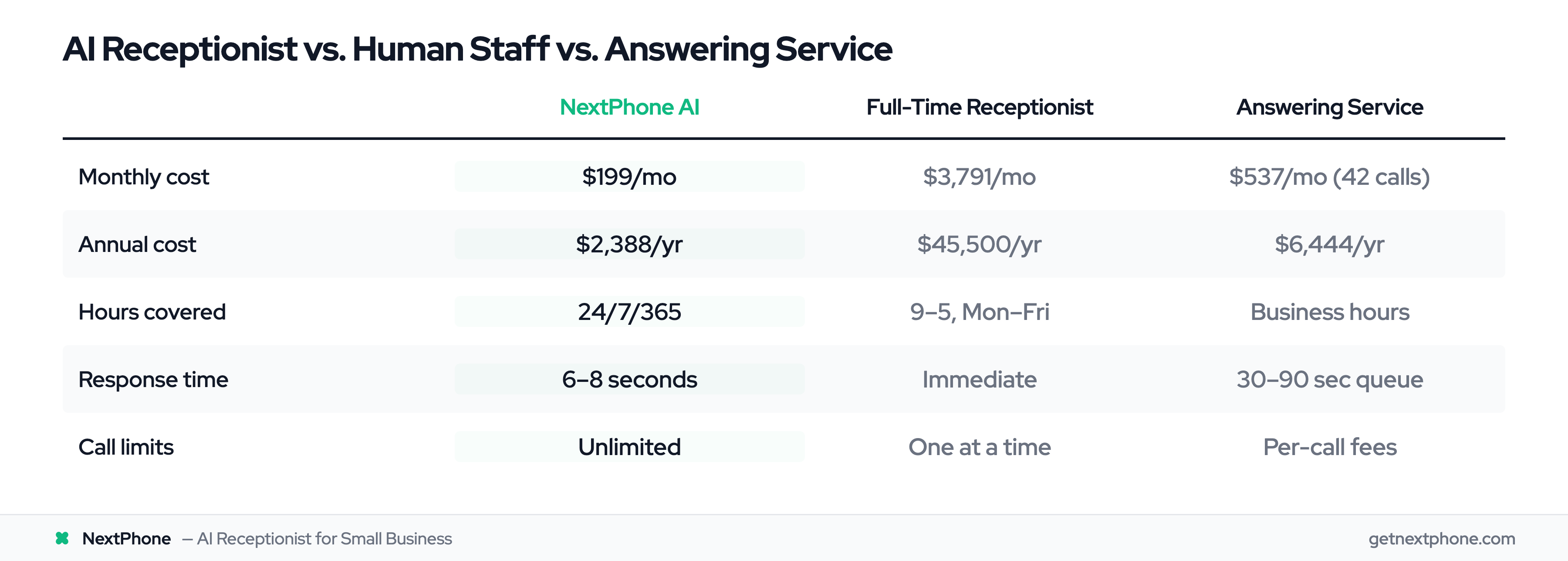
The cost difference is staggering. According to the Bureau of Labor Statistics, the average receptionist salary is $35,000 per year. Add benefits and taxes (roughly 30%), and you're at $45,500 annually. An AI receptionist? $199/month with NextPhone, or $2,388 per year. That's a $43,112 annual savings.
How It's Different from Answering Services
Traditional live answering services have humans answering calls, but you're sharing them with dozens of other businesses. When a customer calls, they wait 30-90 seconds in a queue before reaching someone.
AI receptionists answer in 6-8 seconds—no queue, no waiting.
Live answering services also charge per minute or per call. At around 40 calls per month, you'd pay $300-500/month with most services. At 87 calls per month, the kind of volume roofing contractors see, you're at $700+/month.
AI receptionists handle unlimited calls for a flat monthly fee.
The bigger difference: AI receptionists integrate with your calendar and CRM. They don't just take messages—they book appointments directly, update your schedule, and log every interaction automatically.
Common Use Cases
AI receptionists excel in specific scenarios:
After-hours coverage: You're not answering at 9 PM, but customers are calling. AI handles routine questions and routes emergencies to your on-call number.
Overflow during busy times: Storm season brings 5X normal call volume for roofers. AI scales instantly without hiring temporary staff.
Initial call screening: AI answers every call, handles the simple ones, and only routes complex or urgent calls to you.
Appointment scheduling: Customer wants Thursday 2-4 PM? AI checks your calendar, books 2:30, sends confirmation. Done in 60 seconds.
Lead capture: Even if AI can't answer the question, it captures perfect contact details and notes for callback. No more "I think that guy said his name was Mike or Matt something."
Shows AI, Human Receptionist, Answering Service side-by-side comparing availability, speed, and cost
How AI Receptionists Actually Work (Under the Hood)
I'm Yanis, founder of NextPhone. We've spent two years building voice infrastructure that answers real customer calls, so let me skip the marketing version and explain what's actually running on the wire when your phone rings.
The voice pipeline, end to end
When a call comes in, four things happen in roughly the time it takes a person to start a sentence:
- Phone rings → carrier (Twilio, in our case) bridges the audio stream to a voice agent runtime (we use Vapi as the orchestration layer). 1–2 rings.
- Speech-to-text (STT) → caller audio is streamed into a real-time transcription model. It returns partial transcripts as the caller is still talking, so the system doesn't wait for silence to start thinking. Per-turn latency: ~200–400ms.
- LLM with call state → the partial transcript plus the call's running context (caller history, intent so far, what slots are filled) goes to an LLM via a system prompt tuned for receptionist behavior. The model returns either a spoken response or a function call (
bookAppointment,transferCall,captureMessage,lookupKnowledgeBase). Per-turn latency: ~400–800ms depending on model. - Text-to-speech (TTS) → the response text streams into a neural TTS engine that returns audio in chunks the caller hears in 150–300ms.
End-to-end, the caller stops talking and hears the AI start responding in roughly 800ms to 1.5s. That's the bar. Anything slower and the conversation feels off — the silence that's fine in a Zoom call reads as broken on a phone line, where people expect a response in well under a second.
Why prompt engineering for a receptionist is its own discipline
A general-purpose chatbot is forgiving — the user can re-read your last answer, scroll up, try again. A receptionist gets one shot at every turn, on a synchronous voice channel, with a caller who's already mid-task (cooking dinner, driving, on a job site). That changes the prompt design in concrete ways:
- State has to live in the prompt, not in the model's head. Every turn, the system replays who the caller is, what they've said so far, what slots are filled (name, phone, reason, urgency), and which actions are still pending. The LLM is stateless; the conversation isn't.
- Output length is a latency tax. A 300-token response sounds smart on screen but takes 4–5 seconds for TTS to speak out loud. Receptionist prompts force terse responses — usually 1–2 sentences, often a single clarifying question — because every extra token is wall-clock time the caller is waiting.
- Tool-calls are the actual product. "Answering the call" is mostly the system deciding which function to invoke on each turn — book the slot, transfer the call, send a callback SMS, capture the message — and only filling in conversational glue around it. The prompt is structured around when to use each tool, not around what to "say."
- Industry context is grafted in per business. Generic "AI receptionist" prompts fail on contractors because "no heat" is an emergency for an HVAC tech but routine for a roofer. The system layers a business-specific block on top of the generic receptionist scaffolding — services, pricing, service area, emergency keywords, transfer rules — that gets compiled in at call time.
The reason most older "phone tree" experiences felt awful isn't that the AI was bad. It's that the architecture was stateless ("press 1 for hours") and the latency budget was wrong (every transition took 3–5 seconds of dead air). Modern stacks fixed both at the same time.
What the caller experiences
From the caller's side, the whole loop collapses into:
- Phone rings → AI system answers in 2-3 rings
- AI greets caller → "Thanks for calling [Your Business]. How can I help you today?"
- Customer speaks → AI listens to the entire request
- Speech recognition → Converts voice to text in real-time
- AI analyzes → Understands what the caller wants
- AI responds → Either answers the question or takes appropriate action
The whole process feels like talking to a competent receptionist, not a robot. Below is a real production call captured from one of our customer lines — lead qualification end to end. Listen to the cadence, the slot-filling, and the lack of dead air; that's the four-stage pipeline above doing its job.
The AI captures contact info, urgency, and scope before the caller has a chance to hang up.
Natural Language Processing (NLP)
NLP is how AI understands meaning, not just keywords.
A customer says: "I need someone out here ASAP, my basement's flooding."
The AI doesn't just hear "basement" and "flooding." It understands:
- This is an emergency (ASAP, flooding)
- Customer needs immediate service
- Route to human immediately, don't try to book appointment
Modern NLP achieves 85-95% accuracy for routine business inquiries. It handles conversational speech, not just rigid commands.
Another example: "Do you guys work on Saturdays?" AI understands "guys" means your business, "work" means availability, "Saturdays" means specific day. It responds with your Saturday hours.
Speech Recognition
AI converts spoken words to text in real-time with 85-95% accuracy. It handles:
- Different accents and speech patterns
- Background noise (kids screaming, traffic, job site sounds)
- Fast talkers and slow talkers
- People who ramble or get off-topic
The technology has improved dramatically. Five years ago, speech recognition struggled with anything outside perfect audio. Today's systems work with real-world calls.
Intent Detection and Routing
This is where AI decides what to do with the call.
Simple question? Answer directly from knowledge base.
- "What are your hours?" → AI responds with hours
- "Do you service [neighborhood]?" → AI checks service area, responds yes/no
Appointment request? Book in calendar.
- "I need someone Thursday afternoon" → AI checks availability, books time slot
Complex question? Take detailed message.
- "I need a quote for a 3,000 sq ft roof replacement" → AI captures details, you call back
Emergency? Route to you immediately.
- "My AC went out, it's 95 degrees and I have a newborn" → AI transfers within seconds
Urgent calls rank among the top reasons people call. AI receptionists detect this and route appropriately rather than trying to handle situations beyond their capability.
Integration with Your Systems
AI receptionists connect to:
Your phone system: Works with any VoIP provider or traditional phone line. Either forward calls to the AI number or port your existing number.
Your calendar: Syncs with Google Calendar, Outlook, or Apple Calendar. When AI books an appointment, it appears on your schedule instantly.
Your CRM (optional): Logs calls, adds contacts, tracks interactions. If you use a CRM, AI can update it automatically.
The setup is simpler than you'd think. Most businesses are fully integrated within 1-2 hours.
Continuous Learning
AI receptionists get smarter over time.
Week 1: 80-85% accuracy as it learns your terminology Week 4: 90-95% accuracy after handling dozens of your specific calls
It learns:
- How your customers phrase questions
- Your industry-specific terms
- Common scenarios unique to your business
- Which calls should route vs. which AI should handle
One electrical contractor's AI learned that when customers say "I smell something burning," that's always an emergency requiring immediate routing—even though the word "emergency" was never said.
Call comes in → AI answers → Speech to text → NLP analyzes → Intent detected → Action (Answer / Take message / Route to human)
The Problem AI Receptionists Solve (Real Data)
Most Small Business Calls Go Unanswered
We've answered 1,446,980+ customer calls for businesses across 17+ industries. What was happening before those calls got answered is shocking.
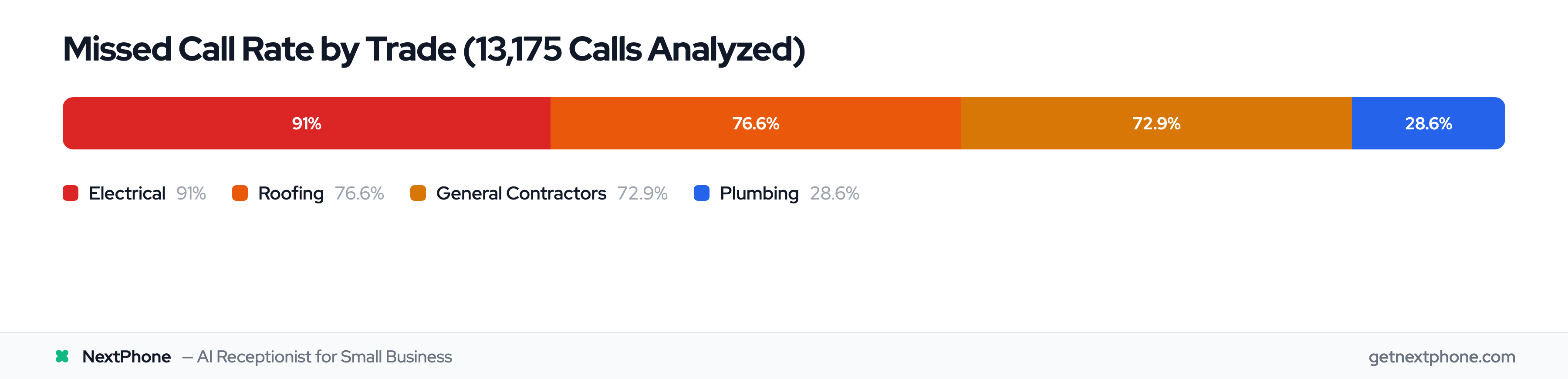
Industry research shows 74.1% of calls to home services businesses go completely unanswered.
Not "went to voicemail and customer left message." Unanswered—customer hung up, called someone else, you never knew they called.
And the rate varies sharply by trade:
- Electrical: the worst of the trades, with the vast majority of calls never picked up
- Roofing: most inbound calls missed
- General contractors: most inbound calls missed
- Plumbing: the best performer of the group, and still missing roughly one in four
Even the best-performing industry was leaving significant revenue on the table.
Why Businesses Miss Calls
You're not ignoring customers intentionally. You physically can't answer because:
You're on a job site. Hands are full, you're on a ladder, you're with a customer. Can't stop what you're doing to answer every call.
You're with another customer. Answering your phone while installing someone's HVAC system is unprofessional. Current customer deserves your attention.
It's after hours. Calls come in at 7 PM, on weekends, during holidays. You're not working 24/7.
You're understaffed. Most small businesses don't have dedicated phone coverage. The owner answers when possible, spouse helps sometimes, everyone's juggling multiple roles.
One roofer we work with was missing more than three out of every four calls that came in. When he finally saw the numbers, he said: "I didn't know I was missing that many calls. I thought it was just a few here and there."
The Revenue Impact of Missed Calls
Let's do the math on what those missed calls cost.
Average small business: 42 calls per month, 31 missed (74.1% industry rate).
Conservative calculation:
- 31 missed calls/month
- 20% would have hired you (industry-standard close rate)
- = 6.2 lost jobs per month
- × $3,500 average project value
- = $21,700 lost per month
- = $260,400 lost per year
That's not even accounting for referrals, repeat business, or relationship value. That's just the immediate revenue from jobs you could have booked.
For high-volume businesses, the numbers are worse. A roofing contractor taking 87 calls a month and missing three out of four of them is losing an estimated $666,000 in potential revenue annually.
After-Hours Calls Are Especially Critical
A receptionist that only works business hours is the wrong tool for a quarter of your calls. Voicemail isn't the alternative; AI is.
A production after-hours call — the AI greets, gathers urgency and contact details, and promises a callback. Voicemail loses it; an AI receptionist captures it.
Many of these come after hours when you're not working:
- 9 PM: "My AC went out, house is 88 degrees"
- Saturday 6 AM: "Pipe burst in bathroom"
- Sunday afternoon: "Breaker won't reset, no power in kitchen"
These aren't calls that can wait until Monday 9 AM. By then, the customer has called 4 other contractors and hired whoever answered first.
Emergency calls also command premium pricing. The same HVAC contractor missed 23 after-hours emergencies. At $1,200 per emergency job (industry average), that's $27,600 in lost revenue—just from emergencies that happened outside business hours.
Missed-call rates by trade: roofing, electrical, general contracting, plumbing
How AI Receptionists Handle Multi-Turn Conversations
Most "AI receptionist" marketing acts like every call is a single question with a single answer. The data says otherwise.
The average conversation in our 1,446,980-call dataset runs 7.1 exchanges between caller and AI. The caller speaks 3.2 times per call, with an average length of 135 words. And 47% of calls go past 7 exchanges.
Booking calls are the heaviest: 15 turns on average. That's a full back-and-forth—greeting, intent, disambiguation ("which service?"), slot checking, contact capture, confirmation, re-confirmation. Nothing about it is simple.
Stateful vs Stateless Call Handling
Most legacy phone systems are stateless. You hit an IVR tree: "Press 1 for hours, press 2 for..." The first time a caller says "well, actually, I'm looking at booking but first I had a pricing question" the system breaks. It has no memory of what the caller said three turns ago.
A stateful AI receptionist holds the whole call in working memory: the caller's name, the reason, the urgency level, the preferred time slot, whether identity has been verified, whether the caller has been on the line before. Each turn updates the state. The next response factors in everything that came before.
Here's what that looks like in practice—a lightly edited sample from an evening call:
- Caller: "Hi, I have a question about my last bill."
- AI: "Happy to help. Can I get your name and the phone number on the account?"
- Caller: "Yeah, Maria Reyes, 555-0142. Actually, you know what, can I also book something for next week while I'm on?"
- AI: "Of course—I can help with both. Let me note the billing question first, then we'll get the appointment on the calendar. What day works?"
- Caller: "Tuesday afternoon if you have anything. Oh—do you speak Spanish? My husband handles these calls normally."
- AI: (switches to Spanish) "Sí, claro. ¿Preferirías que sigamos en español?"
Three intents, one language switch, six turns, and the AI is still tracking all of it. That's what multi-turn means.
Why This Matters
If half your call volume is multi-turn, the question isn't whether your AI can read a script. It's whether it can hold context while the caller changes their mind. A virtual receptionist service that can't do that is going to frustrate more callers than it helps.
Benefits of AI Receptionists (With Data)
24/7 Availability (Never Miss After-Hours)
AI receptionists work every hour of every day:
- Weekends and holidays
- Middle of the night
- Early mornings
- Late evenings
No overtime pay. No asking staff to be on-call. No rotating coverage schedules.
Remember that urgent calls rank among the top reasons people call? Many of them come in outside normal business hours. AI ensures these get handled—either answered if routine, or routed to your on-call number if it's a true emergency.
One HVAC contractor captured 23 after-hours emergency calls he was previously missing. At $1,200 per emergency job, that's $27,600 annually—just from being available when customers need help most.
Instant Response Times
How fast does your business respond to calls?
- Voicemail: Rings 20-25 seconds, sends to voicemail, customer waits hours or days for callback (if they leave message)
- Traditional answering service: 30-90 seconds in queue before reaching someone
- AI receptionist: 6-8 seconds total
According to Salesforce research, 82% of service professionals report increased customer demands, and customers expect faster service than ever.
For simple questions ("What are your hours?" "Do you work Saturdays?"), AI gives instant answers. Customer gets what they need in 30 seconds. No callback, no waiting, no frustration.
For emergencies—a recurring reason people call—speed literally matters. A burst pipe or AC failure can't wait 4 hours for you to check voicemail. AI routes immediately.
Cost Savings vs. Hiring
Full-time receptionist:
- Salary: $35,000/year (Bureau of Labor Statistics)
- Benefits/taxes: ~30% = $10,500 Total: $45,500/year ($3,791/month)
- Works: 9 AM - 5 PM, Monday-Friday (40 hours/week)
Part-time receptionist:
- $15/hour × 20 hours/week Total: $1,300/month
- Still only covers peak hours, misses evenings/weekends
AI receptionist:
- NextPhone: $199/month ($2,388/year)
- Works: 24/7/365 (168 hours/week)
Savings: $43,112 annually vs. full-time receptionist, $13,212 vs. part-time.
Industry research shows businesses using AI receptionists report 40-60% overhead savings compared to traditional staffing.
Perfect Lead Capture
Humans forget details, mishear names, lose Post-it notes.
AI captures every detail perfectly:
- Names (confirmed spelling)
- Phone numbers (read back for verification)
- Email addresses
- Problem descriptions (verbatim transcription)
- Preferred callback times
- Specific service requests
That's hundreds of potential jobs per year. If you miss the contact info or misunderstand the request, those callbacks never happen.
AI logs everything automatically. You get full transcripts, contact details, and call summaries for every interaction.
Appointment Booking Automation
Customer: "I need someone Thursday between 2-4 PM."
Without AI: "Let me check and call you back." You check calendar later, call back, play phone tag for 3 days, maybe book appointment.
With AI: AI checks calendar in real-time, books 2:30 PM, sends confirmation to customer and adds to your calendar. Done in 60 seconds.
Booking or rescheduling an appointment is the single most common reason people call. For a business getting 42 calls/month, that's a steady stream of appointments booked automatically instead of requiring callback phone tag.
Spam Call Filtering
20.3% of engaged calls in our updated dataset are spam and robocalls.
Across 1,446,980 total calls, that's 26,320 spam interruptions filtered automatically in 2025. Just interruptions pulling you away from real work.
AI recognizes spam patterns and blocks them automatically:
- Robocalls
- Telemarketing
- "We've been trying to reach you about your car's extended warranty"
- Survey calls
- Scam calls
You never hear about these. AI filters them, logs them as spam, you stay focused on actual work.
26,320 prevented interruptions is hundreds of hours of your time saved annually—time you'd have spent picking up, realizing it's spam, hanging up, and getting back to work.
Rows: Availability (24/7 vs 9-5), Response time (8 sec vs 30-90 sec), Annual cost ($2,388 vs $35,000), Lead capture (Perfect vs Variable), Appointment booking (Automatic vs Manual), Spam filtering (Automatic vs None)
What AI Receptionists Can Handle
AI receptionists excel at specific tasks. Here's what they handle perfectly:
Answering Common Questions
Repetitive questions from your knowledge base:
- "What are your hours?"
- "What areas do you service?"
- "How much does [standard service] cost?"
- "Are you available this week?"
- "Do you offer [specific service]?"
A steady share of every month's calls asks these same repetitive questions. That's hours of your time answering identical queries.
AI answers in 10 seconds from your knowledge base. Customer satisfied, you never interrupted.
Appointment Scheduling
Direct calendar integration means AI can:
- Check your availability in real-time
- Book open time slots
- Send confirmations via SMS/email
- Add appointments to your calendar automatically
- Reschedule if customer calls back
Booking or rescheduling is the single most common reason people call. For 42 calls/month, that's several appointments booked automatically without phone tag.
Message Taking and Lead Capture
For anything AI can't handle directly, it takes perfect messages:
- Full transcription of customer's request
- Verified contact information
- Specific details about their situation
- Preferred callback time
- Urgency level
No more "Some guy called about a roof, I think his name was Mike, didn't get his number."
Every detail captured accurately and sent to you via email/SMS immediately.
Emergency Detection and Routing
AI recognizes emergency keywords and phrases:
- "Flooding," "burst pipe," "water everywhere"
- "No heat," "no AC," "freezing"
- "Sparks," "burning smell," "smoke"
- "ASAP," "urgent," "emergency," "right now"
When detected, AI routes the call to you within seconds. No attempt to schedule for next week, no message taking—immediate transfer to your phone.
Emergencies are a recurring reason people call. For 42 calls/month, that's a couple every month that need immediate human response, not AI handling.
Spam Call Filtering
Recognizes and blocks:
- Robocall patterns
- Known spam numbers
- Telemarketing scripts
- Survey calls
- Scam attempts
Spam is filtered out before it ever rings you, which means hundreds of interruptions prevented annually. You only see and hear real customer calls.
Icons showing: FAQs/Hours, Calendar/Scheduling, Message taking, Emergency routing, Spam filtering