Introduction
You're crawling through an attic running electrical wire when your phone buzzes with three voicemail notifications. By the time you finish the job, clean up, and find a quiet spot to listen, two hours have passed. You press play on the first message: "This is Linda, I need someone to come out today for an emergency..." and you realize you just lost a job to whoever answered their phone.
A large share of voicemails contain explicit callback requests. Messages flagged with urgency language — "ASAP," "emergency," "today," or "immediately" — consistently rank among the most time-sensitive in real call data. These aren't messages that can wait until you have time to sit down and listen.
Here's the problem with voicemail: you have to stop what you're doing, find somewhere quiet, play the message, and often replay it to catch the callback number correctly. If you're on a job site with equipment running, good luck hearing anything clearly.
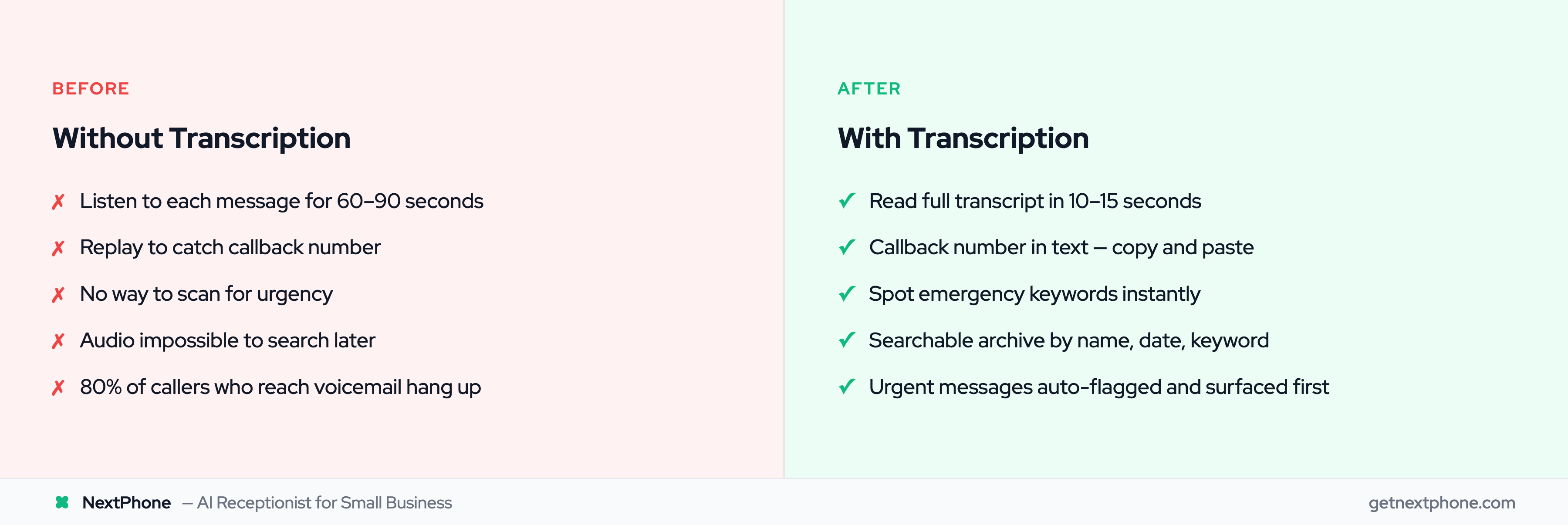
Voicemail transcription changes this equation. Instead of listening, you read. Instead of replaying to catch a phone number, you copy and paste it. Instead of guessing whether a message is urgent, you scan for keywords in seconds.
This guide covers exactly how voicemail transcription works, what accuracy levels you can realistically expect, and whether transcription alone is enough - or if there's a better approach to capturing every customer opportunity. For a deeper dive into how dedicated services handle this, see our voicemail transcription service comparison.
What Is Voicemail Transcription?
The Simple Definition
Voicemail transcription is technology that converts audio voice messages into written text. When someone leaves you a voicemail, the audio gets processed through speech recognition software, and you receive a text version of what they said - delivered via email, SMS, or your phone app.
Instead of pressing play and listening for 90 seconds, you read the message in 10 seconds. Instead of scrambling for a pen to write down a phone number, you have it right there in text, ready to copy.
How Voicemail Transcription Differs from Visual Voicemail
Visual voicemail and voicemail transcription are related but different. Visual voicemail shows you a list of your messages with caller information, allowing you to select which ones to play in any order - rather than listening to them sequentially like old-school voicemail.
Voicemail transcription goes further by actually showing you the words. You see the content of the message, not just who called and when. Most modern visual voicemail systems include transcription, but the features aren't the same thing.
Why Businesses Need Voicemail Transcription
The business case is straightforward: time savings and information capture.
According to an eVoice survey, 67% of people don't listen to voicemails from business contacts. Research shows voicemails have an average 4.8% response rate. When you're the one receiving voicemails from customers, this stat works in reverse - you need to listen to every message because each one could be a job. But listening takes time you don't have.
Even more concerning: 82% of respondents said they don't listen to voicemails from unknown numbers. Gong's research on voicemail effectiveness confirms this pattern. This means when your customers call someone for the first time (like a new prospect calling your business), the odds of them listening to any voicemail you leave are slim. But more importantly, this highlights how voicemail behavior has changed - and why quick access to message content matters more than ever.
How Voicemail Transcription Works
Automatic Speech Recognition (ASR) Technology
At the core of voicemail transcription is Automatic Speech Recognition, or ASR. This technology uses artificial intelligence to analyze audio and convert speech patterns into text.
Modern ASR doesn't just match keywords - it understands context. When a caller says "call me back at five five five, one two three four," the system recognizes this as a phone number and formats it correctly as "555-1234." When someone says "I need this done ASAP," the system captures both the request and the urgency.
The voice and speech recognition market was valued at $14.42 billion in 2021 and continues growing at over 15% annually. This investment has driven major accuracy improvements over the past decade. Modern speech recognition achieves over 90% accuracy under optimal conditions. Google's ASR achieved 95% accuracy for English speech in controlled conditions. Real-world voicemail, with its lower audio quality and background noise, typically sees 80-90% accuracy - still remarkably useful for business purposes.
The Transcription Process Step-by-Step
When someone leaves you a voicemail, here's what happens:
Step 1: The voicemail system records the audio message
Step 2: The recording gets sent to a transcription engine (either cloud-based or integrated into your phone system) — the same technology behind dedicated call transcription software
Step 3: ASR software analyzes the audio, breaking it into phonetic segments and matching them against language models
Step 4: The system generates a text output, applying context to improve accuracy (recognizing phone numbers, names, common business terms)
Step 5: The transcript gets delivered to you - via email, SMS, app notification, or dashboard
Most of this happens within seconds to two minutes. By the time you see the voicemail notification, the transcript is often already waiting for you. Note: State laws vary on recording phone calls - voicemail is generally one-party consent since the caller is leaving a message voluntarily.
Factors That Affect Transcription Quality
Not all voicemails transcribe equally well. Several factors impact accuracy:
Audio quality: Cell phone voicemails recorded in poor signal areas sound worse than landline messages. Lower audio quality means lower transcription accuracy.
Background noise: A customer calling from a construction site or busy street introduces competing sounds that confuse the ASR system.
Speaker clarity: Fast talkers, mumblers, and people who trail off mid-sentence are harder to transcribe accurately.
Accents and speech patterns: Modern ASR handles common accents well, but strong regional dialects or non-native speakers may reduce accuracy.
Technical terminology: Industry-specific jargon that isn't in the ASR's training data may be transcribed phonetically rather than correctly.
The good news: voicemail-specific transcription systems are optimized for these challenges. They're tuned for phone audio quality rather than expecting studio-grade recordings. Phone call recording laws vary by state, but voicemail transcription is generally permitted since callers voluntarily leave messages.
Benefits of Voicemail Transcription for Business
Save Time: Read vs. Listen
The math is simple. The average voicemail is 30-60 seconds of audio. Listening to it takes 30-60 seconds minimum - often longer if you need to replay it to catch details. Reading that same content as text takes 10-15 seconds.
If you receive 10 voicemails a day, that's the difference between 10-15 minutes of listening and 2-3 minutes of reading. Over a week, you're saving nearly an hour. Over a month, you're saving a full workday worth of time.
But the real savings come from prioritization. When you can scan five voicemail transcripts in under a minute, you immediately know which one is the emergency that needs a callback now, which ones can wait until lunch, and which one is spam you can delete.
Never Miss a Callback Number
A large share of voicemails explicitly request callbacks. These are messages where the customer is specifically asking you to call them back - and they're leaving a phone number for you to use.
Here's the problem with audio voicemails: you hear the number once, maybe twice if you replay it. If you mishear a digit, you're calling the wrong person. If you're driving and can't write it down immediately, you might forget it entirely.
With transcription, the callback number is right there in text. Copy it directly into your dialer. No mishearing. No scrambling for a pen. No "wait, was that 4567 or 4576?"
Specialized transcription systems achieve up to 99% accuracy for phone numbers specifically, even when overall accuracy is around 80-85%. That's because callback numbers are the most critical information in a voicemail, so the systems are optimized to get them right. Industry statistics on automated transcription show continued accuracy improvements across all transcription use cases.
Spot Urgent Messages Instantly
NextPhone call data consistently shows urgency language — "urgent," "ASAP," "emergency," "today," "immediately," "right now" — marks the most time-sensitive messages in any batch. A meaningful share are true emergencies requiring an immediate response.
With audio voicemails, you have to listen to each message to know if it's urgent. With transcription, you scan for keywords. If you see "emergency" or "urgent" in the text, you know to prioritize that message over others.
Real example from customer service data: "Needs emergency AC repair, no cooling in 95 degree weather." When you see that in a transcript, you know it can't wait. When it's buried as the third of five voicemails you need to listen to, precious time passes before you even know there's an emergency.
Create a Searchable Message Archive
Audio voicemails are essentially unsearchable. If you need to find a message from a customer who called three weeks ago, you're either scrolling through dates trying to remember when they called, or you're out of luck entirely.
Transcribed voicemails are fully searchable. Need to find every message that mentioned "roof leak"? Search for it. Looking for that customer named Martinez? Search by name. Want to review all callback requests from last month? Search for "call back" or filter by that category.
This searchability becomes increasingly valuable as your message volume grows. Instead of your voicemails being a transient to-do list that disappears once addressed, they become a searchable archive of customer communications.
Share Messages with Your Team
Audio voicemails are awkward to share. You can forward them as audio files, but then someone else has to take time to listen. With transcribed voicemails, you forward the text. Your office manager can see exactly what the customer asked. Your technician can read the problem description before arriving at the job. Your billing department can handle the payment question without you playing intermediary.
This is especially valuable for businesses with multiple people handling customer communications. Instead of one person being the bottleneck who listens to all voicemails and relays information, the transcripts can be distributed and acted on in parallel.
Accessibility for All Situations
There are plenty of situations where you can't listen to audio:
- In a loud environment (job site, restaurant, airport)
- In a meeting or with a client
- When you forgot your headphones and don't want to play a voicemail on speaker
- While driving (reading a quick glance is safer than a 60-second audio)
Transcription gives you access to your voicemails' content regardless of your environment. A quick glance at text works anywhere. A 60-second audio message doesn't.
See how NextPhone captures calls before they become voicemails
How Accurate Is Voicemail Transcription?
Accuracy Rates: What to Expect
Let's set realistic expectations. Voicemail transcription accuracy varies based on several factors, but here's what modern systems typically achieve:
Overall accuracy: 80-95% for general voicemail content. This means you'll understand the message clearly, even if a few words are wrong or marked as [inaudible].
Phone numbers: Up to 99% accuracy. Transcription systems are specifically optimized to capture callback numbers correctly because they're the most critical information.
Names: More variable, typically 70-85%. Unusual names or names that sound like common words may be transcribed incorrectly.
Technical terms: Depends on the system's training. Common business terminology is usually accurate, but industry-specific jargon may be hit or miss.
Nexiwave, a dedicated voicemail transcription provider, reports 80%+ overall accuracy and nearly 99% accuracy for callback numbers specifically. 60% of UCaaS platforms will integrate AI transcription by 2025. These numbers align with what most quality business transcription systems achieve.
Phone Numbers and Names: The Critical Details
Callback numbers are where transcription accuracy matters most. If someone says "Call me at 555-123-4567," you need that number to be right.
Modern transcription systems achieve this through several techniques:
- Pattern recognition that identifies phone number formats
- Verification algorithms that ensure the right number of digits
- Context analysis that distinguishes phone numbers from other number sequences
Names are trickier. If a customer says "This is John Smith," that's easy. If they say "This is Jaylen Czarnecki," the system may struggle. Best practice: when a name looks unusual in a transcript, verify it against the audio.
Factors That Reduce Accuracy
Several factors can push accuracy below those typical ranges:
Poor cell signal: If the caller had one bar of service, the audio quality suffers, and accuracy drops accordingly.
Heavy background noise: Traffic, construction, restaurant chatter, or machinery competing with the caller's voice creates confusion for ASR systems.
Strong accents: While modern systems handle common accents well, very strong regional accents or non-native speakers may see reduced accuracy.
Fast or unclear speech: Mumblers, fast talkers, and people who trail off mid-sentence are harder to transcribe accurately.
Technical terminology: Industry jargon that the ASR wasn't trained on may be transcribed phonetically.
Automated vs. Human Transcription Accuracy
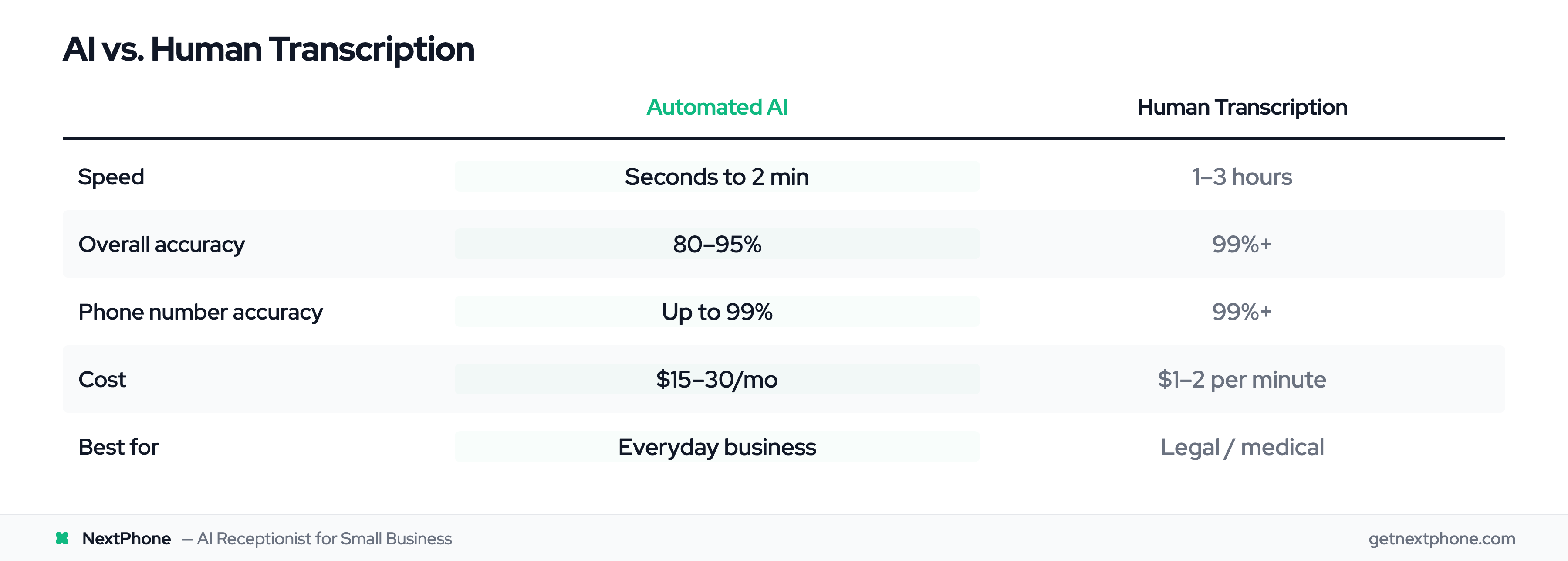
You have two main options for transcription: automated AI or human transcriptionists.
Automated (AI) transcription:
- Speed: Seconds to minutes
- Accuracy: 80-95%
- Cost: Usually included with phone service or $15-30/month
- Best for: Everyday business voicemails where speed matters
Human transcription:
- Speed: 1-3 hours, sometimes 24 hours
- Accuracy: 99%+
- Cost: $1-2 per minute of audio
- Best for: Legal, medical, or sensitive content where errors have consequences
For most businesses, automated AI transcription is the right choice. The speed advantage is significant - you get the transcript immediately, not hours later. The accuracy is high enough for practical use, and the cost is dramatically lower.
Human transcription makes sense when you're dealing with legal matters, medical records, or other content where a single error could cause problems. For standard business voicemails asking about appointments, quotes, and services, AI transcription handles the job well. The AI transcription market is growing from $4.5B in 2024 to $19.2B by 2034 as accuracy improves and adoption accelerates.