The $109 Billion Problem Law Firms Can't Ignore
Your phone rings at 2 PM. You're in a client meeting. A potential client needs representation for a personal injury case. The call goes to voicemail. They call the next attorney on Google. You just lost a $5,000 retainer.
This happens more often than you think. According to a national study, law firms miss approximately 35% of incoming calls during normal business hours. Across the U.S. legal industry, that's nearly 195 million unanswered calls every year, costing firms an estimated $109 billion annually.
Here's the worst part: 34% of those callers never try again after one unanswered call. They move on to the next lawyer.
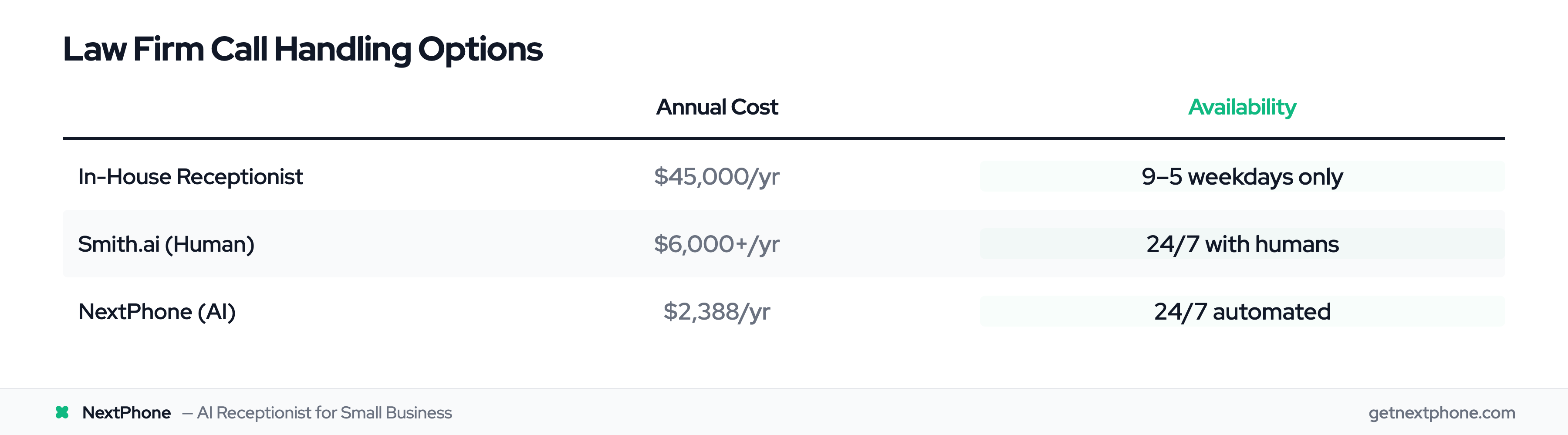
For solo attorneys and small law firms, hiring a full-time receptionist at $45,000 per year doesn't make financial sense. But missing calls means missing cases. The average law firm spends $649 to generate a single lead, making every missed call painful. Clio's legal marketing statistics show how critical lead conversion has become for firm profitability.
This post shows you how connecting an AI receptionist to MyCase practice management software solves this problem once and for all.
Why Small Law Firms Miss Critical Client Calls
Why Law Firms Can't Answer Every Call
Solo attorneys and small law firms wear multiple hats. You're in court depositions, client meetings, working on briefs, and handling everything in between. There's no dedicated person sitting at a desk waiting for the phone to ring.
Common scenarios where calls get missed:
- You're in court or depositions (phone must be off)
- You're meeting with a current client (can't interrupt)
- You're deep in legal research or document review
- After-hours calls (evenings, weekends when people research lawyers)
- You're driving between the courthouse and your office
Hiring a $45,000/year receptionist for 30-50 calls per month doesn't add up financially. Traditional answering services sound generic and miss important context about your practice. Voicemail feels unprofessional and gets ignored.
The Real Cost of Missed Opportunities
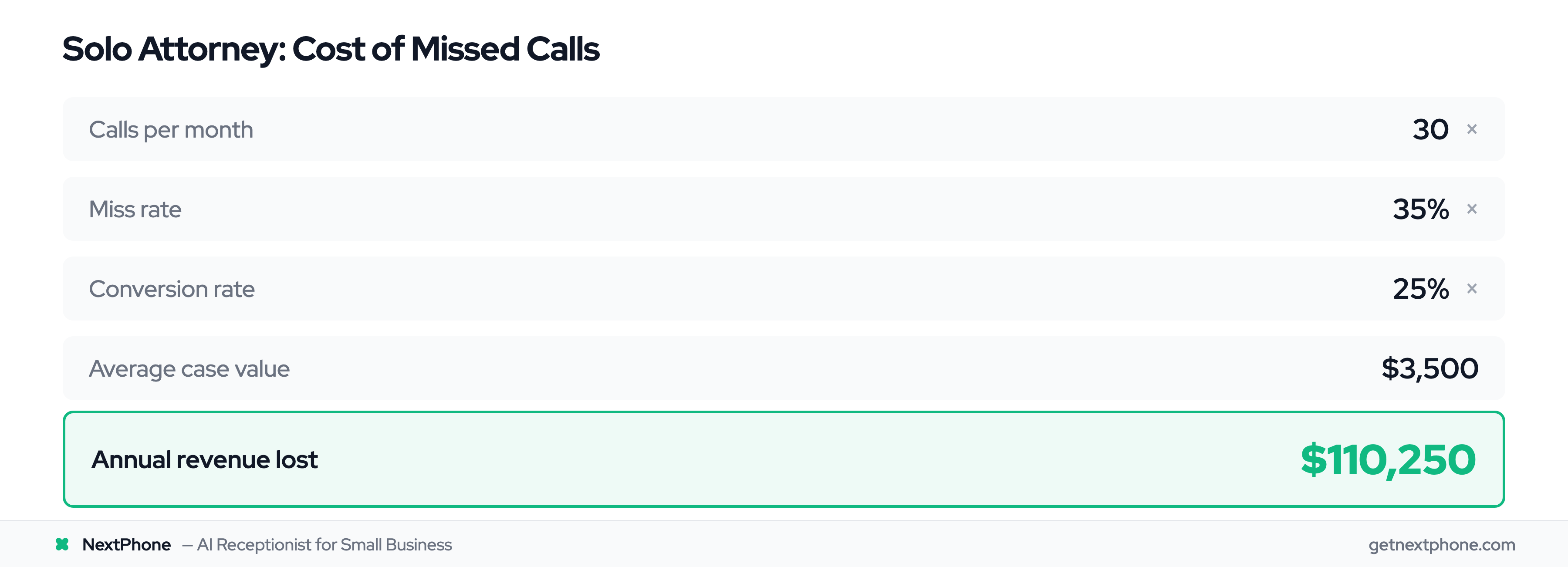
Let's do the math for a typical solo attorney:
You receive about 30 calls per month. At a 35% miss rate, that's 10.5 missed calls monthly. Legal calls have higher intent than most industries. These are people actively seeking representation. Let's assume a conservative 25% conversion rate and an average case value of $3,500 (typical for family law or smaller personal injury cases).
The calculation: 10.5 missed calls × 25% conversion × $3,500 = $9,188 per month in lost revenue
That's $110,250 per year you're leaving on the table.
Compare that to the $649 the average law firm spends to generate a single lead through marketing. You're paying to get these calls, then not answering them.
Client Expectations Have Changed
Today's legal consumers expect immediate responses. According to the American Bar Association, 64% of prospective clients received no follow-up at all, whether by phone or email. That's a massive failure in client service.
Legal industry analysis shows that law firms responding within the first five minutes of an inquiry experience a 400% higher conversion rate compared to those taking an hour or more. Five minutes versus an hour is the difference between winning and losing the case.
People research lawyers at night after work. They call on weekends when they have time to deal with legal matters. If you're not available, they'll call the next name on the list.
What Is MyCase? (And Why Small Firms Choose It Over Clio)
MyCase Overview
MyCase is a cloud-based legal practice management platform designed specifically for solo attorneys and small law firms. 70% of lawyers prefer working from home with cloud practice management, driving adoption in the $348B legal services industry. Unlike complex enterprise solutions, MyCase focuses on simplicity and affordability.
Core features include:
- Case management (all case details and documents in one place)
- Client communication (messaging, client portal, updates)
- Billing and payments (time tracking, invoicing, online payments)
- Built-in CRM for lead and client management
- Calendaring and task management
- Document management and e-signatures
According to software reviews, MyCase is rated 4.6 out of 5 for ease of use and starts at $49 per user per month (billed annually). 18,000+ law firms trust MyCase, significantly more affordable than many competitors.
MyCase vs Clio: The Small Firm Difference
Many solo attorneys and small firms choose MyCase specifically because it's simpler than Clio. Here's the difference:
Clio: Feature-rich platform with 250+ integrations. Complex setup, steeper learning curve, higher price point starting around $49+ per month. Built for growing firms that need extensive customization.
MyCase: All-in-one solution that puts everything in one dashboard. Fewer integrations needed because more functionality is built in. Simpler interface, easier onboarding, starts at $39-49 per month. Perfect for solos and small firms who want practice management without the complexity.
Comparison analysis shows that MyCase focuses on delivering a complete solution for small law firms without requiring a tech stack of third-party tools.
But here's what MyCase can't do: Answer your phone.
AI Receptionist for Law Firms: 24/7 Client Intake Without Hiring Staff
How AI Receptionists Work
An AI receptionist answers every call in under 5 seconds. No rings, no hold music, no voicemail. Just an instant, professional greeting.
The AI is trained on your law firm's specifics: your practice areas, pricing structure, availability, and booking process. When someone calls, the AI conducts a natural conversation (not robotic IVR menus) and collects key information:
- Caller name, phone number, and email
- Type of legal matter (family law, personal injury, criminal defense, etc.)
- Urgency level (is this time-sensitive?)
- Basic case details
- Preferred callback time
The AI is available 24/7: evenings, weekends, holidays. Whenever potential clients call, someone (something) answers.
Legal-Specific Capabilities
Modern AI receptionists understand legal terminology. They know the difference between a personal injury case and a family law matter. They can ask intake questions like:
- "What type of legal matter are you calling about?"
- "Have you consulted with another attorney about this?"
- "When did this incident occur?"
- "Are there any upcoming court dates or deadlines?"
The AI qualifies leads and can explain basic fee structures if you configure it that way. If you connect a calendar, it can book the consultation on the call as well. After the call, it sends confirmation via SMS and email so the caller knows you received their information.
Emergency Call Handling
Legal matters often have urgency. A client facing court tomorrow. Statute of limitations deadlines. Someone who's been detained. A restraining order situation.
AI receptionists can detect urgency keywords ("court tomorrow," "statute of limitations," "detained," "restraining order") and immediately transfer those calls to your cell phone. Legal emergencies get through to you instantly. Non-urgent calls get handled by the AI, which collects full intake details and schedules a callback.
No legal emergency goes to voicemail.
Connecting AI Receptionist to MyCase: Seamless Data Flow
NextPhone's MyCase integration answers and qualifies every caller 24/7, captures the full intake, and hands your team qualified leads with complete case details. No voicemail to transcribe.
A direct integration, not a workaround
This is a direct connection to MyCase, not a Zapier bridge or a copy-paste export. NextPhone talks to MyCase itself, so there is no middleman subscription to maintain and nothing to re-key.
In 2023, MyCase released a public API that lets approved tools write directly into your MyCase account. It is available on MyCase's Advanced tier, so your firm needs to be on Advanced for the integration to work. MyCase support issues your firm its own credentials on request.
You do not configure any of it. You send us the credentials, approve the connection once from your MyCase admin account, and we handle the rest. Setup is done for you, the same as the rest of your onboarding.
The Integration Workflow (Step-by-Step)
Here's exactly how the MyCase + AI receptionist integration works:
- Call comes in. NextPhone AI answers in under 5 seconds with your firm's custom greeting
- AI conducts intake. Asks for name, contact info, case type, and the details of what happened
- AI decides if it's a lead. Spam, robocalls, wrong numbers and hang-ups are filtered out, so only real potential clients reach your pipeline
- The lead is created in MyCase. The moment the call ends, a new lead appears in your Leads pipeline with the caller and their case details attached
- It lands in Online leads. New leads arrive in the same queue as your website form leads, waiting for approval
- You hit Approve. One click moves the lead into your working pipeline, exactly like the web leads you already review
- You get notified instantly. Email with caller information, transcript link, recording link, and a tap-to-call button
That Approve step is MyCase's own quality gate for anything created outside the platform, and it applies to your website forms too. It gives you a quick look at each lead before it enters your pipeline.
What Data Gets Sent
Each lead arrives with:
- Caller name and phone number
- Email address, when the caller gives one
- The AI's summary of the call
- Every intake answer your firm asked for, written into the lead details
- A link to the call recording
- A referral source of "NextPhone AI", so you can see at a glance which leads came from calls
Real-world example: A personal injury caller phones your firm at 8 PM on a Saturday. The AI conducts a complete intake, asks about the accident, injuries, and other party information. Seconds after the call ends, the lead is sitting in MyCase with the whole story attached. Monday morning, you approve it and call them back with everything already in front of you. No information lost. No voicemail to transcribe.