
The phone rings at 9:47 PM. A homeowner's basement is flooding. Water is creeping toward the electrical panel, and panic is setting in. They grab their phone and search for "emergency plumber near me." Your business pops up. They call.
And nobody answers.
Your voicemail plays its friendly message while gallons of water pour across their floor. They hang up before the beep—because who leaves voicemails anymore?—and call the next plumber on the list.
That's a $1,200 emergency job that just became your competitor's revenue. And it happens more often than you think.
Most businesses operate about 8 hours a day, leaving 16 hours where phones ring, voicemails fill up, and customers move on. Research from Invoca shows that 27% of calls to service businesses go completely unanswered. For small and mid-size businesses, that number climbs to 62%.
Here's what makes those numbers devastating: 85% of people whose calls go unanswered won't call back. They're gone. They found someone else. Your missed call became someone else's new customer.
An after hours answering service isn't a luxury anymore — it's the difference between capturing business and watching it walk away. This guide breaks down everything you need to know about keeping your phones covered when you're not there to answer them. If you're primarily looking for pricing, see our dedicated after-hours answering service cost breakdown.
What is an After Hours Answering Service?
An after hours answering service handles your business calls outside standard operating hours—evenings, weekends, holidays, and any time you're not available to pick up the phone yourself.
Rather than routing callers to voicemail (which most people ignore), an answering service provides actual interaction. Someone—or something—answers the phone, engages with the caller, gathers information, and takes appropriate action.
The after-hours answering service market continues to grow as businesses recognize the revenue impact of missed calls. The market offers several types of after-hours coverage:
Traditional live operator services employ human agents who answer calls on behalf of multiple businesses. They follow scripts, take messages, and can patch urgent calls through to you.
Automated phone systems (IVR) use menu trees—"Press 1 for sales, Press 2 for support"—to route callers. They're cheap but frustrating, and most people mash the zero button hoping to reach a human.
AI-powered virtual receptionists use conversational artificial intelligence to interact naturally with callers. They can answer questions, book appointments, qualify leads, and detect emergencies—all without the per-minute costs of human operators.
Hybrid solutions combine AI handling for routine calls with human escalation for complex situations.
The core functions remain consistent across types: message taking, call routing, emergency dispatch, and often appointment scheduling. The key difference from voicemail? Actual engagement. Someone (or something sophisticated enough to feel like someone) is there to help.
The Revenue Cost of Missed After-Hours Calls
Understanding the real cost of missed calls changes how you think about after-hours coverage. It's not about convenience — it's about revenue and customer relationships.
The Calls You're Missing Right Now
The average small-to-mid-size business misses about 62% of incoming calls. Large businesses fare better but still miss around 22%. That's not during after-hours only — that's across the entire business day.
When you factor in evenings, weekends, and holidays? The opportunity loss compounds dramatically.
But here's what the raw numbers don't tell you: after-hours callers often represent your highest-intent customers. Someone calling at 10 PM isn't browsing. They have an immediate need.
NextPhone's analysis of call data reveals that 6.2% of all calls are genuine emergencies requiring immediate response. Another 15.9% contain urgency language—phrases that signal the caller needs help now, not tomorrow.
These aren't "I'll think about it" inquiries. These are "I need this fixed tonight" decisions. And if you're not answering, someone else will.
What Happens When No One Answers
The statistics here should make every business owner uncomfortable:
- 85% of callers who don't reach someone won't call back. Not tomorrow. Not ever.
- 85% of customers whose calls go unanswered won't call back, according to CallRail research.
- 76% of customers will stop doing business with a company after just one bad experience—and not reaching anyone counts as a bad experience.
Think about what this means in practice. A potential customer with a flooded basement calls four plumbers at 11 PM. Three go to voicemail. One answers. Who do you think gets the job?
The caller isn't waiting until morning to sort through voicemails. They're calling the next number on their list until someone picks up. Your missed call becomes your competitor's new customer in under sixty seconds.
The Hidden Revenue in After-Hours Calls
Emergency work commands premium pricing. That's not news to anyone in home services. What might surprise you is just how significant that premium becomes.
Emergency plumbing rates typically run $150-$400 per hour, compared to $45-$200 during regular hours. Emergency flat rates range from $250-$600 per visit. In one documented example, a 10 PM service call cost $475 for work that would have been $150 during business hours—more than three times the regular rate.
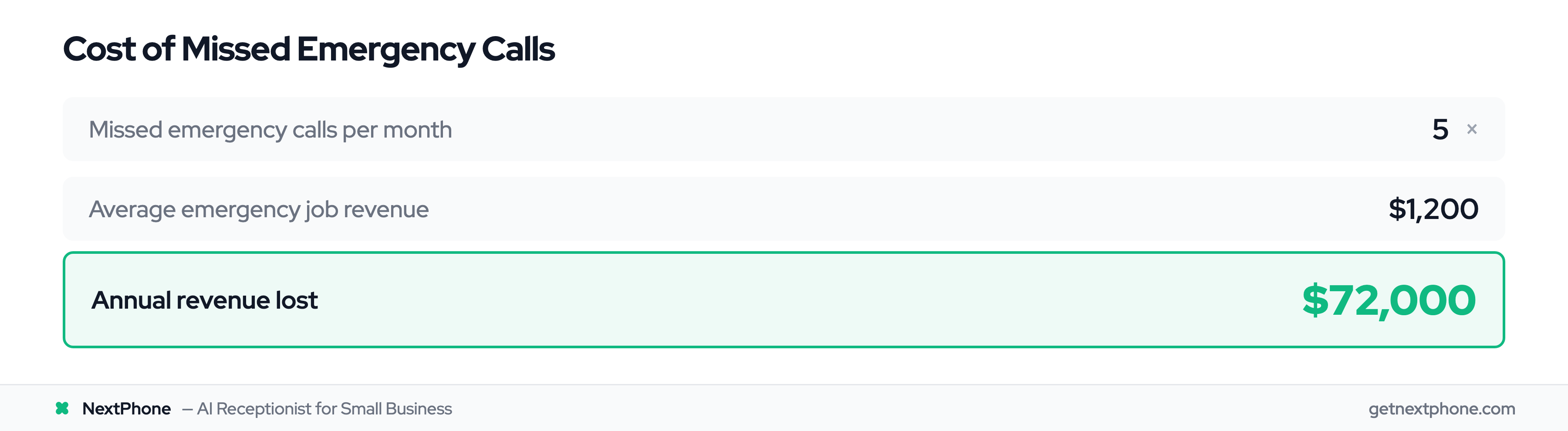
NextPhone's data shows that emergency jobs average $1,200 per call when you factor in after-hours premiums. Five missed emergency calls per month equals $6,000+ in lost revenue. That's $72,000 per year walking out the door because nobody answered the phone.
And these aren't theoretical customers who might have hired you. These are people who called, ready to pay premium rates for immediate help. They just needed someone to answer.
Live Operators vs AI vs IVR: After-Hours Options Compared
Not all answering services work the same way. Understanding your options helps you match the right solution to your business needs and budget.
Traditional Live Operator Services
These services employ human agents who answer calls on behalf of your business. They work from call centers, handling calls for multiple companies simultaneously.
The upside: Human operators can handle complex conversations, show empathy during stressful situations, and make judgment calls that automated systems might miss. For industries requiring nuanced communication—legal, healthcare, certain B2B services—the human touch matters.
The downside: Cost. Traditional answering services typically charge $1-3 per minute of talk time, plus monthly base fees. A busy month can easily run $500-800 or more. Quality also varies by operator—you might get great service one call and mediocre service the next, depending on who picks up.
Automated Phone Systems (IVR)
Interactive Voice Response systems use menu trees to route callers: "Press 1 for hours and location. Press 2 for appointments. Press 3 for emergencies."
The upside: Low cost and simple implementation. Good for basic routing needs.
The downside: People hate them. Nobody calls a business hoping to navigate a phone tree. The "Press 0 repeatedly until a human answers" phenomenon exists because these systems frustrate callers. High abandonment rates often negate the cost savings.
AI-Powered Virtual Receptionists
Modern AI solutions use natural language processing to have actual conversations with callers. They don't just route—they engage, answer questions, gather information, and take action.
The upside: Consistent 24/7 coverage without per-minute costs. No wait times. Natural conversation rather than menu navigation. These systems can book appointments, qualify leads, answer FAQs, and detect emergencies—all while maintaining a professional, branded experience.
They also improve over time, learning from interactions to provide better service. And because AI doesn't get tired, sick, or distracted, you get the same quality at 3 AM that you get at 3 PM.
The downside: For extremely complex or emotionally charged situations, some callers still prefer human interaction. Though AI capabilities continue to advance rapidly.
Hybrid Solutions
Some businesses combine AI front-line handling with human escalation for complex situations. AI handles the 80% of calls that follow predictable patterns, while humans step in for edge cases.
This approach balances cost efficiency with service quality, though it adds complexity to your answering setup.
What Your After-Hours Service Should Handle
An effective after-hours system does more than take messages. Here's what to expect from a comprehensive solution.
Message Taking and Delivery
Basic, but critical. Your service should capture complete caller information—name, contact details, reason for calling, and any relevant specifics about their situation.
The delivery method matters too. Messages sitting in an email inbox until morning don't help with urgent situations. Look for services offering text notifications, app alerts, and priority flagging for time-sensitive calls.
The difference between "you got a message" and "you got actionable information delivered instantly" can mean thousands in captured revenue.
Emergency Detection and Dispatch
For service businesses, this capability is non-negotiable.
Remember: 6.2% of calls are genuine emergencies, and 15.9% contain urgency language. Your after-hours service needs to distinguish between "I'd like to schedule an appointment next week" and "Water is pouring through my ceiling right now."
Effective emergency detection and routing identifies key phrases and caller tone, then immediately escalates according to your protocols. That might mean texting your on-call technician, patching the call through directly, or triggering a call tree until someone responds.
With emergency jobs averaging $1,200, missing even one per month far exceeds the cost of any answering service. Your emergency handling protocol might be the single most valuable thing your after-hours coverage provides.
Appointment Scheduling
Callers increasingly expect to accomplish something during the call—not just leave information and wait for a callback. Real-time appointment scheduling gives customers immediate resolution while reducing your team's morning workload. For businesses that take purchases over the phone, a dedicated order taking service goes further—processing the full transaction during the call so the customer hangs up with a confirmed order.
Look for services that integrate with your existing calendar system, confirm appointments with customers, and provide you with complete details before the scheduled time.
Lead Qualification
A message that says "John called about his bathroom" gives you almost nothing. A message that says "John needs a water heater replacement in his 2,400 sq ft home, has a $3,000 budget, and wants the work done this week" gives you a qualified lead ready for follow-up.
Good after-hours services gather the information your sales process needs: project details, timeline, budget range, service area confirmation. Your morning becomes converting warm leads rather than making discovery calls. AI can recover 78% of after-hours leads that traditional systems miss-use-in-2025-and-what-theyre-adding).
Basic Customer Service
Not every after-hours call is a lead or emergency. Some people just want to know your hours, your service area, or whether you work on their type of equipment.
AI-powered services excel here, providing instant answers to common questions without requiring callbacks. This builds trust—even if someone isn't hiring you tonight, they remember that you were helpful when they called.
Industries That Need After-Hours Coverage Most
Some businesses can get away with 9-to-5 availability. Others can't afford to miss after-hours calls. Here's where 24/7 coverage provides the biggest impact.
Home Services (Plumbing, HVAC, Electrical)
Emergencies don't follow business hours. Pipes burst at midnight. Furnaces die on the coldest night of the year. Circuits trip during holiday gatherings.
Homeowners facing these situations aren't comparison shopping—they're calling until someone answers. The first company to pick up typically wins the job at premium emergency rates.
Beyond the immediate revenue, these crisis-response moments build fierce customer loyalty. The plumber who showed up at 2 AM when the basement was flooding becomes the only plumber that homeowner ever calls again.
Healthcare and Medical Practices
Patient concerns arise around the clock. While true medical emergencies go to the ER, many situations fall between "can wait until Monday" and "call 911."
Healthcare practices need compliant after-hours solutions that can triage urgency, handle prescription refill requests, manage appointment scheduling, and provide appropriate guidance without practicing medicine over the phone. After-hours nurse triage services achieve ED avoidance rates up to 90%, with 80% of calls resolved without local admin involvement.
Legal Services
Legal emergencies often occur outside business hours. Criminal arrests happen at night. Car accidents happen on weekends. Domestic situations escalate when courts are closed.
For attorneys, the first-to-respond often wins the client. High-value cases frequently originate from after-hours calls when people are desperate for guidance. AI lead qualification can dramatically improve after-hours capture rates.
Property Management
Tenant emergencies don't wait for the leasing office to open. Burst pipes, lockouts, security concerns, HVAC failures in extreme weather—all demand immediate response. 39% of property managers spend 20+ hours per month on maintenance requests, and 61% of landlords say maintenance is the worst aspect of the job.
Property managers who answer after-hours calls maintain better tenant relationships and prevent minor issues from becoming major property damage. Over 75% of US property managers handle maintenance and repairs, with 17 million infrastructure workers expected to retire in the next 10 years.
Choosing the Right After Hours Answering Service
The market offers dozens of options. Here's how to evaluate them without getting locked into a bad fit.
Questions to Ask Before Signing Up
Before committing, get clear answers on:
- What are the actual costs? Per-minute charges? Monthly base fees? Overage rates?
- Is there a contract, or can you cancel anytime?
- How quickly are calls answered? What's the average wait time?
- How will operators or AI be trained about your specific business?
- What are the emergency escalation protocols?
- What integrations are available (CRM, calendar, notification systems)?
- Is there a mobile app for managing calls and messages?
- Can you customize scripts and responses to match your brand?
Red Flags to Watch For
Walk away from services that:
- Require long-term contracts with hefty early termination fees
- Have vague pricing with "fees may vary" language
- Show poor reviews mentioning inconsistent quality
- Offer no trial period or satisfaction guarantee
- Limit customization options
- Use outdated technology
- Lack clear emergency handling procedures
Cost Comparison: Your Options
Here's a realistic look at what different solutions cost:
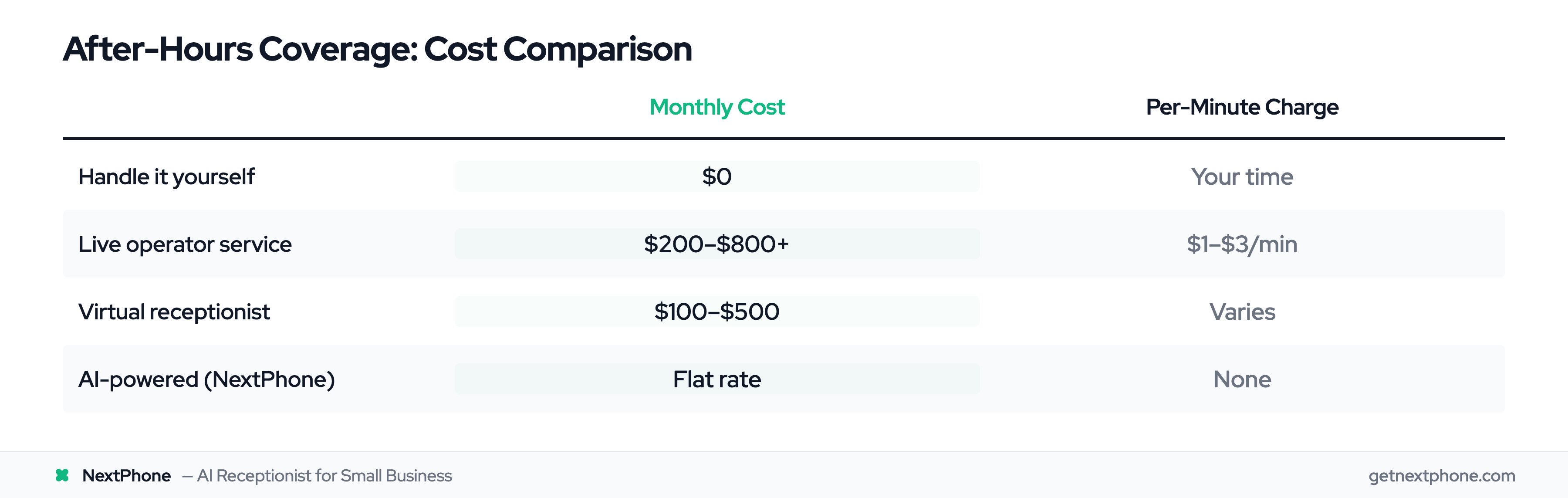
Handling it yourself (forwarding to your personal phone): $0 monthly, but you sacrifice personal time and still miss calls during sleep, dinner, or anything requiring focus.
Traditional live operator service: $200-800+ per month depending on call volume, with per-minute charges of $1-3 adding up quickly.
Virtual receptionist services: $100-500 per month, with various feature tiers.
AI-powered solutions: Often most cost-effective for true 24/7 coverage, with predictable monthly pricing regardless of call volume. See our flat-rate vs. per-minute pricing comparison for the full breakdown.
The real calculation isn't monthly cost — it's ROI. At $1,200 average revenue per emergency call, capturing just one additional emergency call per month pays for virtually any answering service on the market. Everything beyond that is profit you would have otherwise lost.
How NextPhone Handles After-Hours Calls
When evaluating after-hours solutions, the goal is finding coverage that never misses a call without breaking the bank or compromising quality.
NextPhone's AI-powered system provides true 24/7 coverage — not "staffed hours" that still leave gaps, but continuous availability that answers every call, every time. (See our AI receptionist features for the full list.)
The emergency detection capability matters most for service businesses. NextPhone's AI analyzes calls in real-time, identifying the 6.2% that represent genuine emergencies and the 15.9% containing urgency language that signals time-sensitive needs. When emergencies arise, immediate notifications reach your on-call team through text, call, or app alert—whatever gets attention fastest.
For non-emergency calls, the AI engages naturally with callers. No phone trees. No "please hold." Just conversation that gathers the information you need: customer details, project scope, timeline, and any specifics relevant to your business. Appointments can be booked in real-time based on your actual availability.
The cost model differs fundamentally from traditional services. No per-minute charges that spike during busy periods. Predictable monthly pricing that makes budgeting straightforward. For the full after-hours answering service cost comparison, including hidden fees and ROI math, see our pricing guide. And because AI doesn't require breaks, sick days, or shift changes, you get the same consistent service at midnight that you get at noon.
The peace of mind factor shouldn't be underestimated. Your phone is covered while you sleep, while you're with family, while you're actually living your life. Every call answered. Every emergency captured. Every opportunity preserved.
Setting Up Your After-Hours System for Success
The right technology only works if you configure it correctly. Here's how to set yourself up for success. (For step-by-step instructions on after-hours phone system configuration, we have a dedicated guide.)
Define Your Emergency Protocols
Before anything else, clarify what constitutes an emergency for your business. For a plumber, a burst pipe is an emergency; a slow drain isn't. For an HVAC company, no heat in winter qualifies; a mildly noisy furnace doesn't.
Document these distinctions clearly. Then establish:
- Who gets notified for emergencies (primary on-call, backup contacts)
- How they get notified (text, call, both)
- Expected response time for acknowledging the alert
- Escalation path if the first contact doesn't respond within X minutes
Create Custom Scripts and Responses
Your after-hours service represents your business. The greeting, the questions asked, the information provided—all should reflect your brand voice.
Anticipate the most common after-hours inquiries and prepare clear responses. Test your scripts with actual calls, then refine based on what works.
Train Your Team on the Handoff
The best after-hours coverage loses value if morning follow-up falls apart. Establish a routine:
- First thing: review overnight messages and prioritize callbacks
- High-urgency leads get called immediately
- All leads get same-day follow-up
- Feedback to the system: what worked, what information was missing, what could improve
Frequently Asked Questions
How much does an after hours answering service cost?
Costs range significantly based on service type. Traditional live operators typically charge $1-3 per minute plus monthly base fees ($200-800+). Virtual receptionist services run $100-500 monthly. AI-powered solutions often offer flat monthly rates regardless of call volume. When evaluating cost, factor in the $1,200+ average value of emergency calls you might otherwise miss—one captured emergency typically covers months of service.
What's the difference between an answering service and voicemail?
Voicemail is passive: the caller talks to a machine, and maybe you get the message eventually. Answering services actively engage with callers, gathering information, answering questions, and taking appropriate action. Since 80% of callers won't leave voicemails, an answering service captures business that voicemail simply misses.
Can an after hours service actually schedule appointments?
Yes, services with calendar integration can book appointments in real-time based on your actual availability. The customer gets confirmation before hanging up, and you get complete appointment details. This immediate resolution improves customer satisfaction while reducing your team's follow-up workload.
How do I handle true emergencies through an answering service?
Proper emergency handling requires clear protocols. Define what qualifies as an emergency, establish who gets notified, and set up escalation paths if the primary contact doesn't respond. Good services can text or call your on-call team immediately, patch calls through directly, or trigger notification trees until someone acknowledges the emergency.
Will callers know they're not speaking directly with my business?
Professional services answer in your business name using customized scripts that match your brand voice. AI-powered solutions maintain natural, conversational interactions that feel professional. Most callers can't distinguish a well-configured answering service from an in-house receptionist—they just appreciate that someone answered.
What industries benefit most from after-hours answering?
Home services (plumbing, HVAC, electrical) see enormous ROI from after-hours coverage due to emergency call value. Healthcare practices need 24/7 patient communication. Legal services capture high-value cases that originate after hours. Property management requires constant availability for tenant emergencies—the PM market is projected to grow from $81.52B in 2025 to $98.88B by 2029. Generally, any industry where problems don't wait for business hours benefits from after-hours coverage. The property management industry alone generates $136.9B in revenue, growing at 2.3% CAGR.
How do I choose between AI and traditional live operators?
AI excels at consistent 24/7 coverage, handling high volume without per-minute costs, and maintaining identical quality regardless of time or call volume. Traditional operators may be preferred for extremely complex situations requiring human judgment or for businesses where callers specifically expect human interaction. Many businesses find AI meets all their needs at significantly lower cost. See our full AI receptionist vs answering service comparison for a detailed breakdown.
Conclusion
Your business operates 8 hours a day. Opportunities arrive 24 hours a day. The gap between those numbers represents revenue you're either capturing or watching walk away.
The math on after-hours coverage is straightforward: the cost of missing calls far exceeds the cost of answering them. With 85% of unanswered callers never calling back, every missed call effectively becomes a customer for your competition.
Modern solutions have made 24/7 coverage accessible for businesses of every size. You don't need a massive budget or a fully staffed call center. You need a system that answers every call, identifies emergencies, and captures the information that keeps your business growing.
The phone is ringing. Someone has an emergency. They're ready to pay premium rates for immediate help.
The only question is: who's answering?