
Quick answer: Google Local Services Ads (LSAs) put your business at the very top of Google search results and charge you per lead instead of per click. The setup guide is everywhere. What almost nobody explains is that Google ranks you on how fast and how consistently you answer the phone, so a paid lead that hits voicemail does double damage: you lose the customer AND you lower your ad placement for months. This guide covers everything: 2026 costs, the new Google Verified badge, the responsiveness factor, and the operational fix that keeps every paid lead from going to your competitor.
Program details verified against Google's support documentation.
A lawyer is in a deposition. It's 2 PM on a Tuesday. Someone just had a car accident and they're searching for a personal injury attorney on their phone. They tap the call button on the first Google Verified listing. The call goes to voicemail. They call the next one.
The first firm just paid Google for that lead the moment the call connected. And they'll never talk to that client.
This happens dozens of times a day for businesses running LSAs without handling the phone side. The ads themselves work. The call-handling does not. This guide covers both.
What Local Services Ads actually are
Local Services Ads appear above the regular text ads, above the map pack, and above everything else on the results page for queries like "personal injury lawyer near me," "HVAC repair [city]," or "plumber open now." They show your business name, star rating, review count, phone number, and a trust badge.
Two things make LSAs fundamentally different from standard Google Ads.
Pay-per-lead, not pay-per-click. With regular search ads, you pay every time someone clicks, even if they were just curious, clicked the wrong result, or bounced immediately. LSAs only charge you when a potential customer contacts your business through the ad. A single click on a competitive legal keyword can run $25 to $200 on traditional search ads. LSAs shift the risk toward Google: if nobody contacts you, you pay nothing.
Verification is required before you run. Google vets you through background checks, license verification, and insurance confirmation. That process earns you the trust badge that shows beside your listing. What that badge is called changed significantly in 2025.
The Google Verified badge: what changed in October 2025
If you've read any LSA setup guide written before late 2025, it probably mentions three different badge types: Google Guaranteed (for trades like HVAC, plumbers, electricians), Google Screened (for professional services like lawyers and financial advisors), and License Verified by Google (a third tier for some categories). Three programs, three names, one confused consumer.
In 2025, Google consolidated all of them into a single blue Google Verified badge. Starting October 20, 2025, every verified LSA advertiser shows the same badge, regardless of category (Search Engine Journal reporting). The rollout was automatic for advertisers who had already completed verification.
Two things are worth knowing about what changed:
The money-back guarantee that used to accompany Google Guaranteed (where Google would refund a customer for work done by a Guaranteed contractor) was retired in the transition. After November 2025, that guarantee no longer applies. For most professional service businesses this is cosmetic; the guarantee was always limited to specific trade categories and never applied to legal or financial services. But any consultant still selling you on "Google Guaranteed protection" is working from an outdated slide deck.
The verification steps behind the badge haven't changed in any meaningful way. You still confirm your bar license, contractor's license, or professional certifications, plus business insurance and identity. The label the public sees changed. The vetting process did not.
When you're evaluating any guide or agency's LSA advice, the badge language is a quick freshness test: if they're still calling it Google Screened or Google Guaranteed as if it's the current program, check how current the rest of their information is.
How LSA costs actually work
LSA pricing is not a flat rate. Google sets lead prices dynamically based on your service category, your market, and how competitive demand is in your area at any given time. They publish a rough cost-per-lead calculator that gives ballpark ranges, but the number you actually pay per lead depends on live auction conditions.
That said, there are consistent patterns across categories. Legal leads are among the most expensive in the program: personal injury leads commonly run $195 to $250 each in 2026. (Our post on LSAs specifically for law firms has a detailed breakdown with conversion math.) Home services leads are significantly cheaper: trades like HVAC, plumbing, and electrical tend to run in the mid-double digits per lead, though competitive urban markets push that higher.
The cost-per-lead number Google shows is the input cost. Your real cost per signed job, booked appointment, or closed deal is what actually matters, and that calculation introduces a variable that most LSA guides skip entirely: your answer rate.
If you're paying $200 per legal lead and you answer 60% of the calls that come in, your true cost per answered lead is $333. If you answer 90%, it's $222. That gap is significant at scale, and it doesn't count the second-order effect, which is what answering rate does to your ad placement.
The responsiveness ranking factor (the part that changes everything)
Google ranks LSA advertisers partly on responsiveness. This is not a rumor or a consultant's interpretation. Google's own support documentation confirms that how often and how quickly you answer leads directly influences where your ad appears in results (Google's Local Services responsiveness help page).
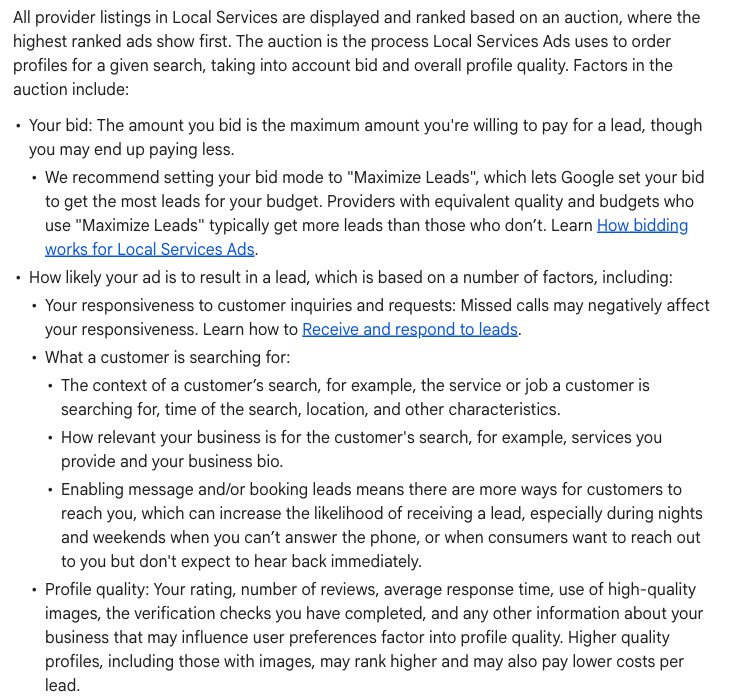
Google says it plainly in its own ranking documentation: "Missed calls may negatively affect your responsiveness." Captured from Google's Local Services Help, August 2026.
The mechanism works over a rolling window. Google tracks whether you answer, how fast you answer, and how you mark leads afterward. Businesses with high responsiveness get better placement and more lead volume. Businesses that miss calls get lower placement, which means fewer leads shown per dollar of budget, which means higher effective cost per lead even at the same nominal price.
There's a compounding effect that makes this worse than it sounds. Most businesses that miss LSA calls are missing them for predictable reasons: after hours, on weekends, or when the owner is on a job and can't pick up. That pattern means they're missing the high-intent calls that come in outside business hours (the ones from people with real urgency), and they're doing it consistently, which trains Google's algorithm over the ~90-day rolling window to deprioritize their listing.
The business that picks up at 10 PM when someone's roof is leaking, or at 8 AM Saturday when a pipe burst, and does it every time, gets ranked above the business that only answers during business hours, even if the after-hours business has more reviews or a larger budget.
This is why the phone-handling side of LSAs matters as much as the bidding and verification side. The ad placement algorithm is partly a proxy for operational reliability.
Automated lead credits: what replaced the dispute window
Before mid-2024, if you received an LSA lead that didn't qualify (a spam call, a call outside your service area, a job type you don't do), you could submit a manual dispute to Google to request a credit. This required submitting the dispute within a specific window and hoping a human reviewer agreed with your assessment. The process was inconsistent and time-consuming.
In mid-2024, Google replaced the manual dispute process with automated machine-reviewed credits. Now Google's systems automatically review leads and issue credits for invalid ones within approximately 72 hours, without you having to dispute anything. Leads that are genuinely outside your service area, from spam numbers, or otherwise not qualifying typically get credited automatically.
What this means in practice: every call now needs a recording and transcript. With automated review, Google's systems are evaluating whether a lead was legitimate. If you have a dispute with how a lead was credited (or wasn't credited), the call recording is your documentation. Without it, you have no recourse.
An AI receptionist solves this automatically. Every call gets recorded and transcribed regardless, so you have a complete log of every LSA lead, what was discussed, and how the conversation ended. For a business running meaningful LSA spend, this is no longer optional.
Setting up LSAs: the essentials
Setup is the part agencies write about at length. We'll cover the key steps and let you go deep on the official documentation.
1. Check eligibility. LSAs are available for specific service categories. The program covers legal, financial advisory, home services trades, real estate, health and wellness services, and others. Not every business type qualifies.
2. Complete verification. Depending on your category, this means submitting your license, insurance, and identity documents. Google Verified (legal, financial) requires professional license verification and background checks. This takes days to weeks, not hours.
3. Set your service area and job types. LSAs show your ad to searchers in your defined area. Setting this tightly (actual counties or cities you serve, not "everywhere") avoids paying for leads you can't take.
4. Configure your profile. Hours, services, photos, and response preferences all affect both consumer perception and how leads reach you.
5. Set your weekly budget. LSAs run on a weekly budget cap, not a daily one. Google's budget suggestions are starting points, not recommendations.
6. Configure the phone number. This step is where most businesses leave money on the table.
The number policy: how LSA call routing actually works
Here's something every LSA guide buries: the phone number that appears in your Local Services Ad is Google's forwarding number, not your direct business number. Google routes the call from that forwarding number to whatever destination you configure in your LSA profile.
That destination is completely up to you. Most businesses set it to their main office line or the owner's cell. The problem with both of these: the main office line often goes to voicemail after hours, and the owner's cell goes to voicemail whenever they're on a job or in a meeting.
The practical fix is to point that forwarding destination at a number that actually answers. Integrating an AI receptionist with Google LSAs means the call from Google's forwarding number routes to an AI that answers in under 5 seconds, runs your intake workflow, and either resolves the call or transfers to a human when needed.
You're not replacing Google's tracking. You're not displaying a different number publicly. You're configuring where Google's forwarding number sends the call, which is exactly what the system is designed to support. CallRail documents this approach for their users (CallRail + LSA setup guide); the mechanics are the same whether the destination is a call-tracking number or an AI receptionist line.
For law firms: where LSAs have the highest upside (and the highest risk)
Legal is the category where LSA economics are most consequential. The leads are the most expensive, the cases are the highest value, and the missed-call penalty is the most severe.
A personal injury firm running LSAs might pay $200 to $250 per lead. A personal injury case that converts can be worth tens of thousands or more on contingency. The math for answering every call is obvious when you write it out: if you miss half your leads at $200 each, you're burning $100 in real ad spend per missed lead, plus the lost case value.
The urgency pattern in legal is also different from home services. A person who was just injured, arrested, or served with divorce papers is not browsing. They're in a high-emotional-state decision with time pressure. If you don't pick up, they call the next firm immediately. Unlike a plumbing inquiry where someone might leave a voicemail and wait, legal callers rarely leave a message and call back. They move on.
After-hours and weekend coverage is where most law firms leak legal intake the most. Personal injury firms advertise 24/7 urgency. Criminal defense firms get calls at 2 AM when someone's been arrested. Estate planning inquiries often come in evenings when people finally have time to think about hard conversations. If your LSA is running but your office is closed, every one of those calls needs to be handled.
Our guide to Google LSAs specifically for law firms covers the legal-specific setup considerations, Clio integration, and the intake workflow for different practice areas. For a full picture of how NextPhone handles law firm intake, including practice-area routing, consultation booking, and 24/7 coverage, see AI answering service for law firms.
A sample legal intake call (car accident): the AI confirms the state, the other driver's insurer and the injury, then flags it urgent and texts a link for a same-day callback. This is the call that goes to voicemail without 24/7 coverage.