You're on a roof installing a new HVAC system. It's 95 degrees, and you're three hours into the job. Your phone rings from the truck below. By the time you climb down, wipe your hands, and grab it, they've hung up. No voicemail. No callback number. They've already called the next contractor on Google.
That's a $3,500 job that just drove past your truck.
Industry research on home services contractors found that 74.1% of customer calls go completely unanswered. That's three out of every four potential customers calling someone else. For the typical contractor receiving 42 calls per month, that's 31 missed opportunities, translating to $260,400 per year in lost revenue.
The solution is putting an AI receptionist on the phone so that every call turns into a request in Jobber, ready to quote, while you're still working.
The Hidden Cost of Missed Calls for Contractors
The Reality: 74.1% of Contractor Calls Go Unanswered
Industry research on calls to home services contractors is brutal: 74.1% of calls go completely unanswered. These aren't spam calls. These are real customers with real projects reaching out for quotes, scheduling service, or requesting emergency help.
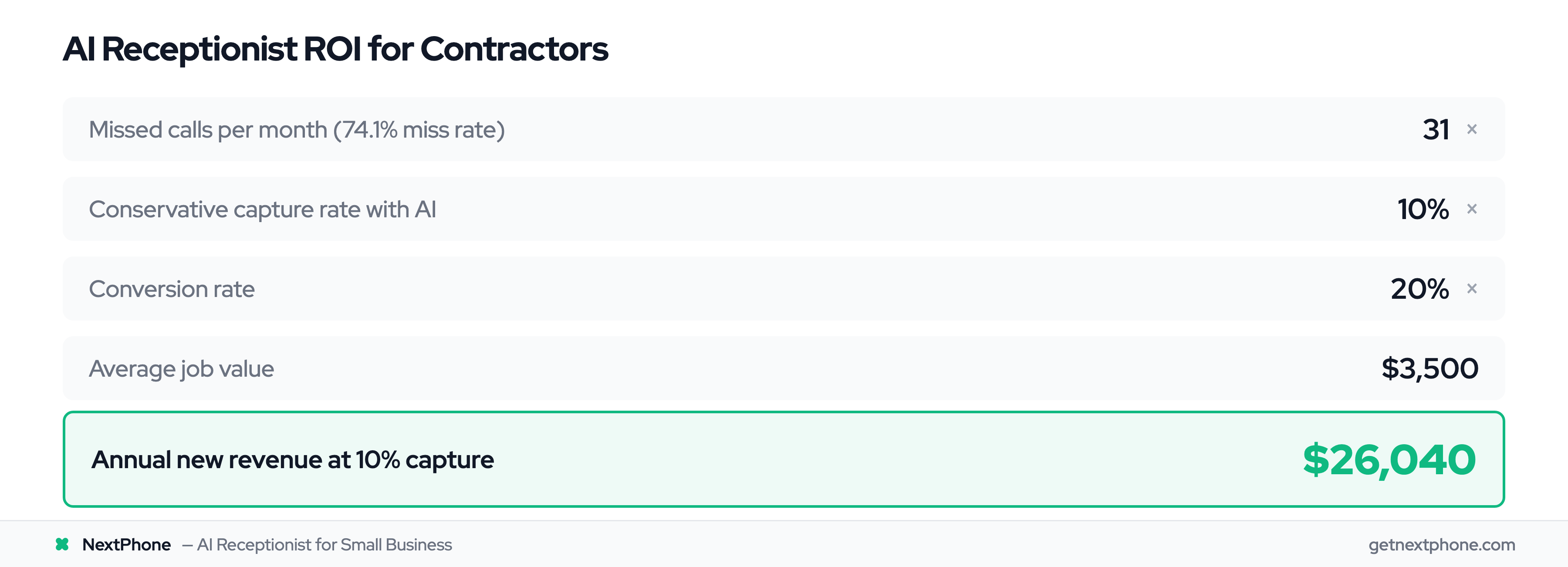
The average contractor receives about 42 calls per month. When 74.1% go unanswered, that's 31 missed calls every single month. At a conservative 20% conversion rate and $3,500 average job value, that's $21,700 per month in lost revenue, or $260,400 per year.
Research shows 62% of home service companies say finding clients is their biggest challenge, often not realizing the calls are coming in but going unanswered.
Why Contractors Miss Calls (On the Job, Hands Full)
Here's the reality of field work. Industry statistics show 60% of home service businesses say labor shortages affect their ability to complete jobs, and that's before considering the phone answering problem.
- You're under a house fixing a leaking pipe, hands covered in mud and water
- You're in an attic running electrical wire in 110-degree heat
- You're on a ladder installing an AC condenser three stories up
- You're operating loud equipment that drowns out your ringtone
- You're with a customer explaining an estimate and can't break away
Safety regulations prevent answering in some situations. Common courtesy prevents it in others. And sometimes you simply can't hear or reach your phone.
Your phone is usually in the truck. Or your pocket. Or buried in your tool bag. And by the time you can get to it, they're gone.
The Revenue Impact: $260K Per Year
Let's break down the math for a typical contractor:
- 42 calls per month (industry average for small contractors)
- 31 missed calls (74.1% miss rate)
- 20% conversion rate (conservative estimate)
- $3,500 average job value
Calculation: 31 missed calls × 0.20 conversion × $3,500 = $21,700 per month = $260,400 per year
But it gets worse for emergency calls. Urgent calls, using language like "emergency," "urgent," or "ASAP," rank among the top reasons people call. These calls are worth more, averaging $4,200 instead of the typical $3,500.
For a contractor getting 42 calls per month, that's several urgent calls monthly. Missing just one emergency call per week costs you $16,800 per month, or $201,600 per year.
Then there are callback requests. Approximately one in four callers explicitly asks for a callback. Without a systematic tracking system, most of these callback requests fall through the cracks. You meant to call them back, but you got busy. The sticky note got lost. You forgot. Home services industry trends for 2025 show this problem is industry-wide.
What Is Jobber Integration?
Jobber as Your Command Center
If you're running a contracting business, Jobber is likely your command center. Over 200,000 home service professionals use platforms like Housecall Pro for similar workflow management. It's where you manage clients, create quotes, schedule jobs, track time, send invoices, and collect payments. Everything flows through Jobber.
But Jobber alone can't answer your phone.
What "Integration" Actually Means
Integration means connecting third-party tools to Jobber so data flows automatically between systems. Instead of manually entering information in multiple places, the systems talk to each other. Platforms like ServiceM8 manage $22B+ in jobs worldwide. The industry has embraced integrated workflows.
Common Jobber integrations include:
- Accounting: QuickBooks Online, Xero (sync invoices and payments)
- Payment processing: Stripe (collect payments online)
- Scheduling: Calendly (book appointments)
- Phone answering: AI receptionists or live answering services
The field service management market is projected to grow from $5.1B in 2025 to $9.17B by 2030. Integration is the future.
According to Jobber's API documentation, the platform uses GraphQL to allow developers to access and modify account data in real time. This means when a phone integration is set up correctly, information can flow from a call into Jobber within seconds.
Why Phone Integration Is Critical
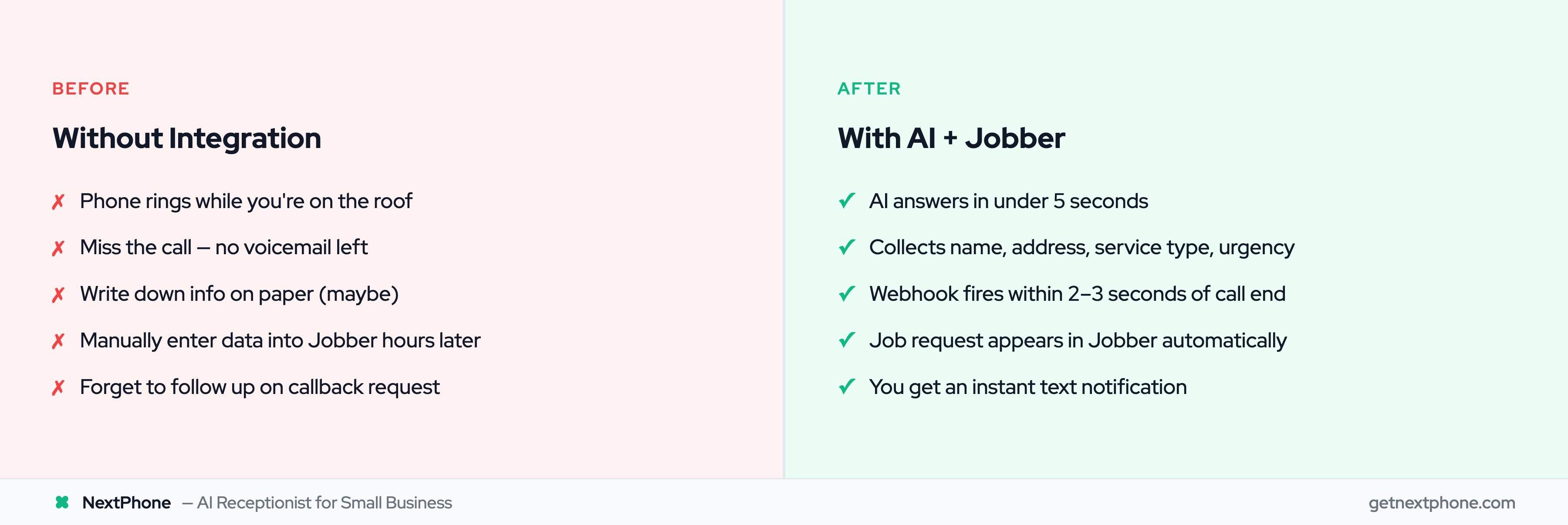
Without integration, here's what happens when a customer calls:
- Phone rings
- You (hopefully) answer
- You write down their info on paper, in your phone notes, or try to remember it
- Later (maybe hours, maybe days), you manually enter the information into Jobber
- You create the client record
- You create the request
- You set a reminder to follow up
With phone integration, here's what happens:
- Phone rings
- AI receptionist answers in under 5 seconds
- AI asks questions, collects all relevant information
- Call ends
- The caller is matched to their Jobber client record, or added as a new one
- A request appears in your Requests list with the summary and their answers attached
- You get a notification with all the details
One path takes 15-30 minutes of admin work. The other takes 2 seconds and happens while you're still on the roof.
Phone Answering Options for Jobber Users
Live Answering Services (PATLive, AnswerForce)
Traditional live answering services have been around for decades. Companies like PATLive and AnswerForce employ real humans who answer your calls, take messages, and can integrate with Jobber to create client records.
Pros of live answering:
- Real human interaction
- Can handle complex or unusual questions
- Personal touch some customers prefer
Cons of live answering:
- Expensive: $500-800 per month for basic coverage
- Slower: 30+ second wait times are common
- Limited hours: Many services don't offer true 24/7 coverage
- Inconsistent: Quality varies by operator
- Per-call fees: Overage charges during busy season
PATLive, for example, charges $549 per month for 200 calls. If you're a busy HVAC contractor during summer or a roofer after a storm, you'll blow through 200 calls quickly.
AI Receptionists (NextPhone, Jobber's Built-in AI)
AI receptionists use voice AI technology to answer calls, understand what customers need, collect information, and route calls appropriately.
Pros of AI answering:
- Fast: Answers in under 5 seconds, no hold time
- 24/7: True round-the-clock coverage, including holidays
- Consistent: Same quality every call, never has a bad day
- Affordable: $199/month for unlimited calls (NextPhone pricing)
- Scalable: Handles one call or 100 simultaneous calls without degradation
Cons of AI answering:
- May struggle with very unusual or complex questions
- Some customers prefer human interaction (though most can't tell the difference)
Jobber recently launched its own AI receptionist feature, which is built into the platform. However, it's limited to the Jobber ecosystem and doesn't offer the same level of customization or advanced routing that standalone AI receptionists provide.
AI with Smart Forwarding: Best of Both Worlds
The most effective approach: AI resolves 90-95% of calls autonomously. Smart forwarding routes the rest to your phone:
- "What are your hours?"
- "Do you service my area?"
- "How much for an AC tune-up?"
- "Can I schedule an appointment?"
For complex questions or customer preference, the AI can transfer to you immediately or take a detailed message for callback.
Emergency calls get routed to your phone right away, while routine calls are handled completely by AI.
How AI Receptionist + Jobber Integration Works
What Actually Lands in Jobber
You don't need to understand any plumbing to use this, and you don't have to build anything. Here is what shows up on your side.
The caller becomes a client. If they have called you before, they are matched to the client record you already have, by phone number, so you don't end up with the same person twice. If they are new, they are added with their name, their number, and the email address they gave on the call.
The call becomes a request. It lands in your Requests list, the same place a request from your website would, titled with who called and what it was about. From there it is an ordinary Jobber request: quote it, book an assessment, or turn it into a job.
The details ride along. The summary, every answer the receptionist collected, and a link to the recording sit on the request, so nobody has to listen back to find out where the house is.
One thing worth being straight about: Jobber does not let outside software read your team's live availability, so no AI receptionist can genuinely offer a caller a real Jobber slot and book it. Anyone telling you otherwise is selling you something that doesn't exist. What you get is the lead captured properly and waiting for you, which is the part that was actually costing you money.
Step-by-Step: What Happens During a Call
Let's walk through a real example. A customer calls your business number at 8 PM on a Tuesday:
1. Call comes in Customer dials your business number. Your phone might be on silent because you're having dinner with family.
2. AI answers immediately Within 2-3 seconds, the AI receptionist answers: "Thanks for calling [Your Business Name]. How can I help you today?"
3. Customer explains their need Customer: "My AC stopped working and it's 90 degrees in my house. Can someone come out tomorrow?"
4. AI collects information AI: "I can definitely help with that. Let me get some information. What's your address?" Customer provides address. AI: "And what's the best phone number to reach you?" Customer provides phone number. AI: "Just to confirm, you need AC repair service as soon as possible, correct?" Customer: "Yes, it's pretty urgent."
5. AI creates summary and routes appropriately The AI recognizes urgency keywords ("stopped working," "urgent") and marks this as a priority call.
6. The call ends Within a couple of seconds, everything the receptionist collected is on its way to Jobber.
7. Jobber has the work waiting In your account:
- John Smith is matched to his existing client record, or added as a new client
- A request opens on him, titled for the call and what it was about
- The summary, his address, the service he needed and how urgent it was land on the request as fields
- A note carries the full write-up and a link to the recording
8. You get notified You receive a text message: "New urgent AC repair request from John Smith, (555) 123-4567, 123 Main St. Check Jobber for details."
You're still at dinner, but you can quickly text back or schedule the job for first thing tomorrow morning, all from your phone, without any manual data entry.
What Data Syncs to Jobber
The integration can sync any information the AI collects:
Standard fields:
- Client name
- Phone number
- Email address
- Service address
- Service type requested
Custom fields you define:
- Equipment details (HVAC system type, age)
- Problem description
- Budget range
- Preferred appointment time
- How they heard about you (marketing attribution)
- Urgency level
All of this appears in Jobber automatically, linked to the call recording so you can listen if needed.