
Your phone rings. It's a potential customer calling about a roofing project. You answer, spend 20 minutes explaining your services, only to learn they're "just getting ballpark pricing" with no budget and a timeline of "maybe next year."
Meanwhile, you missed three other calls. One was an emergency leak with an insurance claim—a qualified lead worth $4,200 who called your competitor instead. Phone calls generate 10-15x more revenue than web leads, making every missed call costly.
Generic qualification questions don't work for specialized businesses. A roofing contractor needs to know "repair or full replacement?" immediately, not the standard "What's your budget?" A legal firm needs "What type of case?" not "Tell me about your needs."
Here's how to train your AI receptionist to ask YOUR specific qualification questions, identify hot leads automatically, and push everything to your CRM without manual data entry. See how AI lead qualification works in practice.
What is Lead Qualification (and Why It Matters for Small Businesses)
The Lead Qualification Problem
Lead qualification is the process of determining which prospects are likely to become paying customers. For small businesses, it's critical—you can't talk to everyone who calls, and you definitely can't waste time on tire-kickers when qualified buyers are waiting.
The problem? Most qualification systems use generic scripts that frustrate real customers or miss the nuances that matter for your specific industry.
Why Generic Scripts Fail
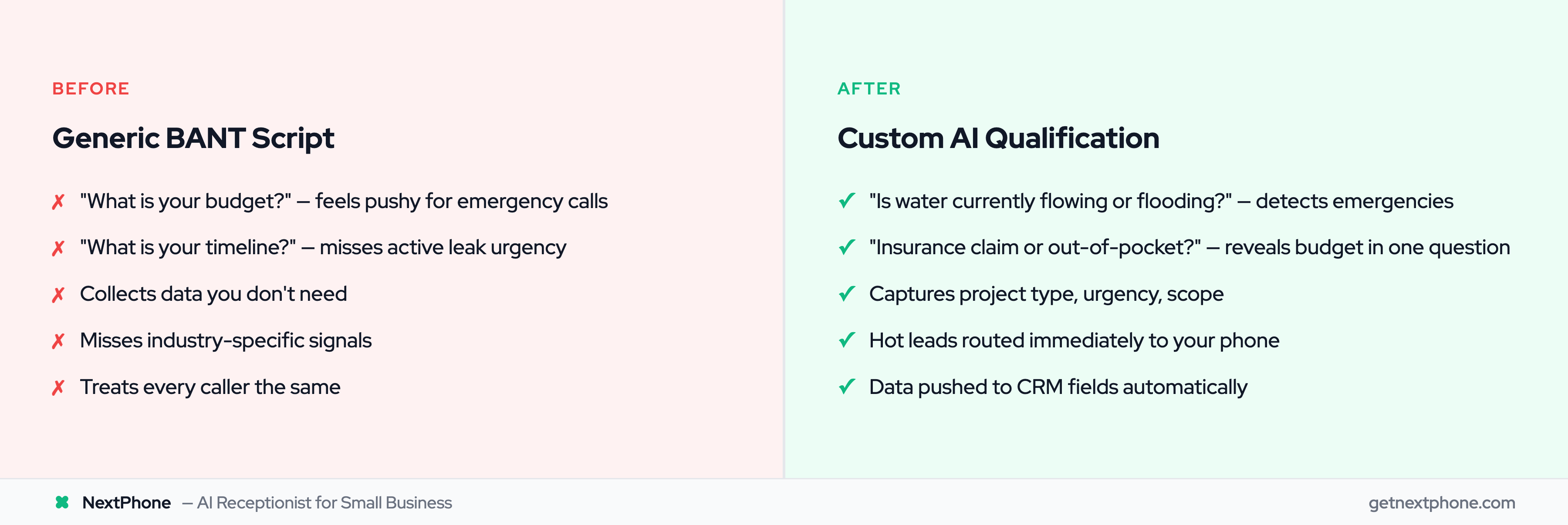
Generic qualification sounds robotic. "What is your budget?" feels pushy for a homeowner calling about emergency AC repair. "What is your timeline?" doesn't capture whether someone has an active pipe leak or is just "thinking about it for spring."
More importantly, generic scripts collect data you don't need while missing information you do need.
A contractor doesn't care about a lead's job title. They need to know: repair or replacement? Insurance claim or out-of-pocket? Emergency or can it wait?
A real estate agent doesn't need to know company size. They need: pre-approved for mortgage? Timeline to buy? Working with another agent? Real estate lead generation statistics show these qualifying questions directly impact conversion rates.
The Cost of Poor Qualification
Companies who focus on the right leads see 9%-20% increases in marketing conversions and 13%-31% decreases in churn rates. Poor qualification means you waste time on unqualified leads while missing hot prospects.
The math is brutal. In our analysis of 130,175 calls from 45 home services businesses over 7 months, 74.1% of calls went completely unanswered. For a business receiving 42 calls per month, if just 20% of those calls would qualify and convert at an average $3,500 project value, that's $21,700 per month in potential revenue—$260,400 per year.
You can't qualify leads you don't answer. And when you do answer, you need to ask the right questions.
Traditional Lead Qualification: The BANT Framework
What is BANT?
BANT is a lead qualification framework developed by IBM in the 1950s. It stands for:
- Budget: Can they afford your service?
- Authority: Are they the decision-maker?
- Need: Do they have a problem you can solve?
- Timeline: When do they need it?
BANT works for many businesses. It's simple, systematic, and covers the basics. But it was designed for enterprise sales in 1950, not small business phone calls in 2026.
BANT for Small Businesses
The modern BANT framework has evolved. Average buying committees now consist of 10-11 stakeholders, and sales cycles have stretched by over 20%. The "Authority" question alone has become more complex.
But for small businesses—contractors, solo lawyers, real estate agents—BANT needs serious customization to be useful.
A roofing contractor's "Budget" question isn't "Do you have $10,000?" It's "Is this an insurance claim or out-of-pocket?" The answer tells you everything about budget, timeline, and urgency in one question.
When BANT Isn't Enough
As sales qualification experts note: "BANT should be customized based on your industry, buyer sophistication, and deal complexity. Good qualification is both art and science."
One-size-fits-all BANT fails for specialized industries. You need custom questions that sound natural, collect relevant data, and help you identify serious buyers versus information gatherers.
Why Custom Qualification Questions Beat Generic Scripts
The Generic Script Problem
Generic qualification scripts feel robotic because they are robotic. When your AI asks "What is your budget range for this project?" to someone calling about a burst pipe flooding their basement, you've already lost them.
Real customers want relevant questions that show you understand their situation. Custom questions sound natural because they're specific to what you actually need to know.
Industry-Specific Qualification Needs
Every industry has unique qualification criteria. A plumbing contractor asking "Is water currently shut off?" learns more than "What's your timeline?" A legal firm asking "What type of case?" immediately knows which attorney to route the call to.
In our analysis of 2,487 calls, 25.4% of callers explicitly requested callbacks. But not all callbacks are equal. A callback request for "emergency electrical work" is a hot lead. A callback request for "thinking about solar panels someday" is cold.
Custom questions help you identify the difference.
Collecting Data That Actually Matters
When you define your Ideal Customer Profile before creating qualification questions, as lead generation best practices recommend, you collect data you'll actually use. Freddy AI scores leads using 30,000+ machine learning models, demonstrating the sophistication possible with AI qualification.
A real estate agent needs:
- "Are you pre-approved for a mortgage?"
- "What's your target neighborhood?"
- "Timeline to purchase?"
- "Must-haves versus nice-to-haves?"
These aren't in BANT. But they're what qualifies a real estate lead.
A legal firm needs:
- "What type of legal matter?" (personal injury, family law, criminal, estate planning)
- "When did the incident occur?"
- "Do you currently have legal representation?"
- "Urgency level?"
Again, not standard BANT questions. But they're what determines if someone is a qualified legal lead.
A plumbing contractor needs:
- "Is this an emergency or can it wait?"
- "What type of issue?" (leak, clog, installation, water heater failure)
- "Is water currently shut off?"
- "Residential or commercial property?"
These questions identify hot leads (emergency + water flowing + residential) versus cold leads (thinking about replacing water heater next year).
How AI Receptionists Collect Custom Qualification Data
Arbitrary Data Collection: Collect ANY Information
Here's what most people don't know about modern AI receptionists: they can collect any custom field you define. A voice AI receptionist gathers this information through natural conversation, not robotic scripts.
Not just name and phone number. Not just yes/no questions. ANY information.
The AI receptionist can collect data in real-time during natural conversation:
- Name, phone, email
- New versus existing customer
- Willingness to pay and budget ranges
- Call intent (quote, emergency, question, scheduling)
- Job title and company name
- Project details and scope
- Timeline preferences
- Any business-specific field you create
This is called arbitrary data collection. You define the parameters, the AI asks the questions naturally, and the data gets structured and stored automatically.
Real-Time Data Capture During Calls
Unlike some AI receptionists limited to three yes/no questions, advanced systems collect data throughout the entire call in natural conversation.
Here's how it works in practice:
Caller: "I need someone to remodel my kitchen."
AI: "I can help with that. What's the scope of your project?"
Caller: "New cabinets, countertops, maybe flooring if the price is right."
AI: "Got it. What's your timeline for this project?"
Caller: "Hoping to start in the next 2-3 months."
AI: "Perfect. Do you have a budget range in mind?"
Caller: "We're thinking around $25,000 to $30,000."
Behind the scenes, the AI has structured this data:
- project_type: "kitchen remodel"
- scope: "cabinets, countertops, potentially flooring"
- timeline: "2-3 months"
- budget_range: "$25,000-$30,000"
- budget_flexibility: "price dependent for flooring"
All collected naturally, no interrogation, no robotic checklist reading.
Natural Conversation, Not Interrogation
The key difference between custom AI qualification and generic scripts is conversational flow. The AI doesn't read a checklist. It asks relevant follow-up questions based on what the caller says.
If someone mentions "emergency," the AI immediately asks emergency-related questions. If someone says "just getting quotes," the AI adjusts to collect contact info and timeline without pushing budget questions that feel pushy.
This is why AI-driven budget assessments can increase lead qualification accuracy by up to 60%—the AI adapts to each caller instead of forcing everyone through the same rigid script.
Beyond Yes/No Questions
Advanced AI receptionists aren't limited to multiple choice. They extract information from freeform responses.
When a caller says "We're thinking somewhere between five and seven thousand," the AI extracts:
- budget_range: "$5,000-$7,000"
- budget_confidence: "estimate"
When a caller says "The AC died this morning and it's 95 degrees in here," the AI extracts:
- urgency: "emergency"
- timeline: "immediate"
- problem_type: "AC failure"
- temperature_context: "95 degrees"
This contextual understanding beats yes/no questions every time.
Custom Lead Qualification Questions by Industry
Home Services (Roofing, Plumbing, Electrical, HVAC)
In our analysis of calls from roofing contractors, emergency leak calls generate approximately $4,200 in revenue—20% higher than routine work averaging $3,500. Identifying emergencies during qualification isn't just helpful, it's profitable.
Roofing Contractor Custom Questions:
- "Is this for a repair or full replacement?"
- "Are you experiencing an active leak right now?"
- "Is this an insurance claim?"
- "What's the age of your current roof?"
- Hot lead criteria: Active leak + insurance claim + homeowner = route immediately to owner's phone
Plumbing Contractor Custom Questions:
- "Is this an emergency? Is water currently flowing or flooding?"
- "Have you shut off the water supply?"
- "What type of issue?" (leak, clog, water heater, sewer line)
- "Residential or commercial property?"
- Hot lead criteria: Emergency + water not shut off + willing to pay emergency rates = immediate response
Electrical Contractor Custom Questions:
- "Is this an emergency? Do you currently have power?"
- "Residential or commercial property?"
- "Do you need a permit?" (indicates new construction or major renovation)
- "Timeline for the work?"
- Hot lead criteria: No power + residential + immediate need = hot lead
HVAC Contractor Custom Questions:
- "Is this an emergency or routine maintenance?"
- "Is your system currently working?"
- "Age of your system?"
- "Any warranty coverage?"
- Hot lead criteria: System failure + extreme weather + homeowner = high priority
Real Estate
Real Estate Agent Custom Questions:
- "Are you pre-approved for a mortgage?"
- "What's your target price range?"
- "Timeline to purchase?"
- "Are you currently working with another agent?"
- Hot lead criteria: Pre-approved + ready in 30-60 days + not working with agent = qualified buyer
Legal Services
Legal Firm Custom Questions:
- "What type of legal matter?" (personal injury, family law, criminal defense, estate planning)
- "When did the incident or issue occur?"
- "Do you currently have legal representation?"
- "How urgent is this matter?"
- Hot lead criteria: Recent incident + no current lawyer + urgent timeline = priority consultation
These industry-specific questions collect relevant information that generic BANT frameworks miss entirely. AI can increase lead conversions by up to 30%.
