
Why AI Receptionist Training Matters More Than the Technology
Your phone rings. A customer asks about emergency AC repair pricing. Your AI receptionist gives them your standard service menu. The customer hangs up, calls your competitor. You just lost a $4,200 emergency job.
Not because the AI failed. Because you never trained it on emergency protocols.
Here's the truth most vendors won't tell you: 67% of small businesses abandon their AI tools within 90 days. Stanford's AI Index reports that 70-85% of AI projects fail, with 42% abandoned before deployment—not because the technology doesn't work—but because they expected a "5-minute setup" and got frustrated when their voice AI receptionist couldn't answer basic questions.
The businesses that succeed? They invest 4-8 hours in proper training upfront. They prepare the right documents. They build comprehensive FAQs. They review and optimize weekly.
This guide shows you exactly what to prepare, how to structure it, and how to continuously improve your AI receptionist so it captures leads instead of losing them.
What "Training" Actually Means for AI Receptionists
Let's clear up the biggest misconception first.
It's Not Machine Learning—It's Knowledge Management
Your AI receptionist doesn't "learn" from calls automatically like a human employee would. When a customer asks a question, the AI doesn't remember it for next time.
Instead, training means providing structured information your AI can reference during calls. Think of it like organizing a knowledge base, not teaching a human.
You're essentially creating a comprehensive Q&A system. When someone calls asking "Do you service Boulder?", your AI searches its knowledge base for service area information and responds.
Quality matters more than quantity. MIT Technology Review research shows that 30 well-documented FAQs outperform 100 poorly written ones. Your AI needs clear, concise, accurate information—not mountains of unorganized text.
The Real Cost of Poor Training

When you don't properly train your AI receptionist, you don't just get frustrated customers. You lose money.
Our analysis of 130,175 calls from 45 home services businesses over 7 months revealed exactly where poor training costs you:
Missed Emergency Revenue: 15.9% of calls contain urgency language like "emergency," "urgent," or "ASAP." These emergency calls average $4,200 in revenue—significantly higher than routine work. If your AI doesn't recognize emergency keywords and escalate properly, you're losing your most valuable jobs.
Failed Callbacks: 25.4% of callers explicitly request callbacks. Without a clear callback collection protocol, 80% of those callbacks never happen. For a typical contractor, that's $113,400 in lost revenue per year.
Wrong Information: AI that doesn't know your pricing, service areas, or availability gives incorrect answers. Customers calling competitors who actually answer their questions correctly.
According to Gartner research, 85% of AI customer service failures stem from inadequate training data—not technology limitations. The platform works fine. The problem is you haven't told it what it needs to know.
The Complete AI Receptionist Training Framework
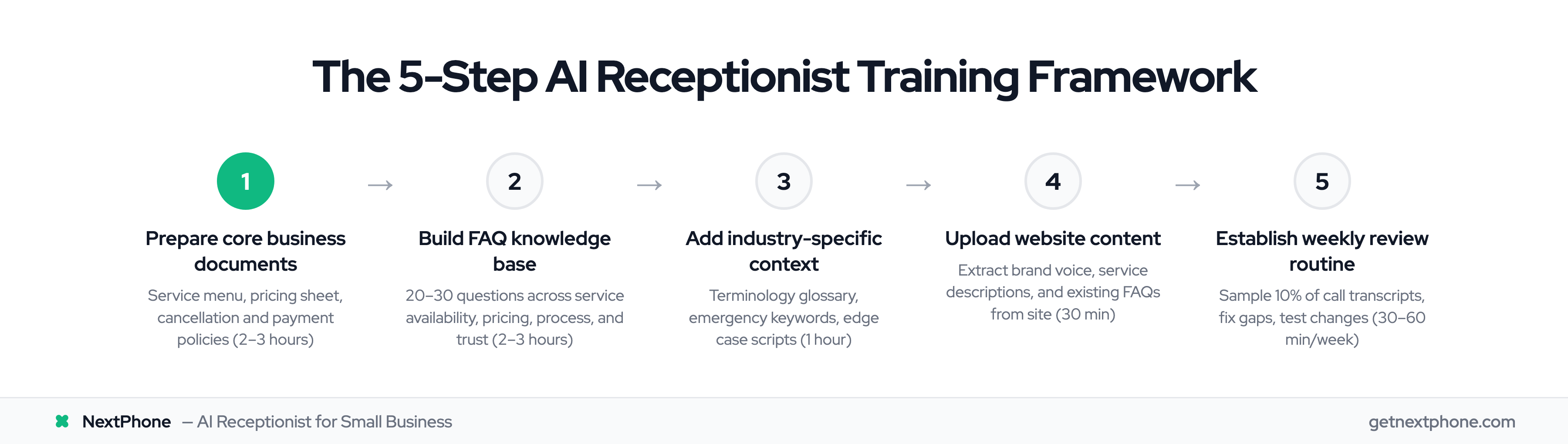
Here's your roadmap. Five steps, 4-8 hours total initially, then 30-60 minutes weekly for optimization.
Don't skip steps. Each one prevents specific failure modes that cost you leads.
You can tackle this over several sessions—it doesn't need to happen all at once. But do complete all five steps before relying on your AI for real customer calls.
The 5 Steps:
- Prepare Core Documents (Service menu, pricing, policies)
- Build FAQ Knowledge Base (20-30 common questions)
- Document Industry Context (Terminology, emergency protocols)
- Upload Website Content (Brand voice, additional context)
- Establish Review Routine (Weekly call log analysis)
Let's dive into each step with specific examples you can follow.
Step 1: Prepare Your Core Business Documents
Start here. Your AI needs to know the basics: what you offer, what it costs, and what your policies are.
Our call data shows that 14.6% of calls are quote or estimate requests that specifically need this information. That's roughly 6 out of every 40 calls—enough to matter significantly.
Time required: 2-3 hours
Service Menu with Descriptions
Create a list of every service you offer with a brief description. Don't assume the AI knows what "tankless water heater installation" means or when someone might need it.
Checklist:
- List all services you offer
- Include brief description of each (1-2 sentences)
- Note any service limitations or requirements
- Specify service area coverage by zip codes or cities
Example for Plumber:
Emergency Plumbing Repairs: 24/7 response for burst pipes, gas leaks, severe blockages. We arrive within 2 hours and provide upfront pricing before starting work. Service areas: Denver metro, Boulder, Aurora.
Water Heater Installation: Traditional tank and tankless models. We handle permits, removal of old unit, and installation. Typical completion time: 4-6 hours same-day or next-day.
Drain Cleaning: Professional-grade equipment for kitchen sinks, bathroom drains, main sewer lines. Most jobs completed in under 2 hours. Starting at $150.
Pricing Sheet
Yes, you need to give your AI pricing information. Callers want to know "ballpark, how much?" before scheduling.
You don't need exact quotes for every scenario. Ranges work fine. Starting prices work. The goal is giving callers enough information to decide whether to move forward.
Checklist:
- Starting prices or price ranges for common services
- Minimum service call fees
- Emergency vs standard pricing (if different)
- Factors that affect final price
Example:
Diagnostic visit: $89 (waived if we complete the repair)
Emergency service: Standard rate plus $150 after-hours fee
Drain cleaning: $150-$300 depending on severity and location
Water heater replacement: $1,200-$2,800 depending on tank vs tankless and capacity
Factors affecting price: accessibility of pipes, extent of damage, parts needed, time of service (emergency vs scheduled)
Policy Documents
Your AI needs to know your business rules so it can answer policy questions accurately.
Checklist:
- Cancellation policy (notice required, fees)
- Rescheduling policy (how much notice, limits)
- Refund or satisfaction guarantee policy
- Payment methods accepted (credit cards, checks, financing)
- Service area boundaries (zip codes, cities, maximum distance)
Example:
Cancellation: Cancel or reschedule up to 2 hours before appointment with no fee. Cancellations within 2 hours incur $50 fee.
Payment: We accept all major credit cards, checks, and cash. Payment due upon completion. We offer financing through GreenSky for jobs over $1,000.
Service Area: We serve Denver metro, Boulder, Aurora, and surrounding areas within 25 miles of downtown Denver.
With these core documents ready, your AI can handle basic service inquiries and pricing questions. Next, let's build the FAQ knowledge base that handles 80% of incoming calls.
Step 2: Create Your FAQ Knowledge Base (20-30 Questions)
This is where you capture the questions customers actually ask.
Why 20-30? It's the sweet spot. Too few and your AI can't handle common inquiries. Too many and you'll spend weeks writing FAQs for questions no one asks.
Our analysis shows this range handles about 80% of typical customer inquiries for home services businesses.
Time required: 2-3 hours
How to Identify Your Top Questions
Don't guess what customers might ask. Look at what they actually ask.
Sources for finding your questions:
- Review your voicemails from the past month
- Ask your team: "What do customers always ask?"
- Check your website contact form submissions
- Look at your email inbox for common inquiries
- Ask yourself: "What did I spend time explaining this week?"
FAQ Categories to Cover
Structure your FAQs across these five categories:
-
Category 1: Service Availability (5-7 questions)
-
Do you service [city/area]?
-
What are your hours?
-
Do you offer emergency or after-hours service?
-
How quickly can you come out?
-
Are you available on weekends?
-
Category 2: Pricing & Payment (5-7 questions)
-
How much does [common service] cost?
-
Do you offer free estimates?
-
What payment methods do you accept?
-
Do you offer financing?
-
What's your minimum service charge?
-
Category 3: Service Process (5-7 questions)
-
How do I schedule an appointment?
-
What happens during a service call?
-
Do I need to be home during the appointment?
-
How long will the service take?
-
What should I do to prepare for your arrival?
-
Category 4: Qualifications & Trust (3-5 questions)
-
Are you licensed and insured?
-
Do you guarantee your work?
-
How long have you been in business?
-
Do you have references or reviews?
Category 5: Common Technical Questions (3-5 questions)
These are industry-specific. For a plumber:
- Do you work on tankless water heaters?
- Can you camera inspect sewer lines?
- Do you handle gas line work?
For an electrician:
- Can you install EV charging stations?
- Do you work on commercial properties?
- Can you upgrade my electrical panel?
How to Structure Answers
Keep answers concise. Front-load the direct answer. Add context if needed.
Best practice format:
- Direct answer first (yes/no or the specific info)
- Brief context or details (1-2 sentences)
- Next step if relevant (how to schedule, what to expect)
Good Example:
Q: Do you offer emergency plumbing service?
A: Yes, we provide 24/7 emergency plumbing service for urgent issues like burst pipes, gas leaks, and severe blockages. We typically arrive within 2 hours. Emergency service includes our standard rate plus a $150 after-hours fee. You can reach our emergency line anytime at [phone number].
Bad Example:
Q: Do you offer emergency plumbing service?
A: Our company has been serving the Denver area since 1995 and we pride ourselves on customer service. We understand that plumbing emergencies can happen at any time, which is why we've invested in emergency response capabilities. Yes, we offer emergency service.
See the difference? The bad example buries the answer. The good example leads with it.
NextPhone's AI can handle all these FAQ types out of the box —