Introduction
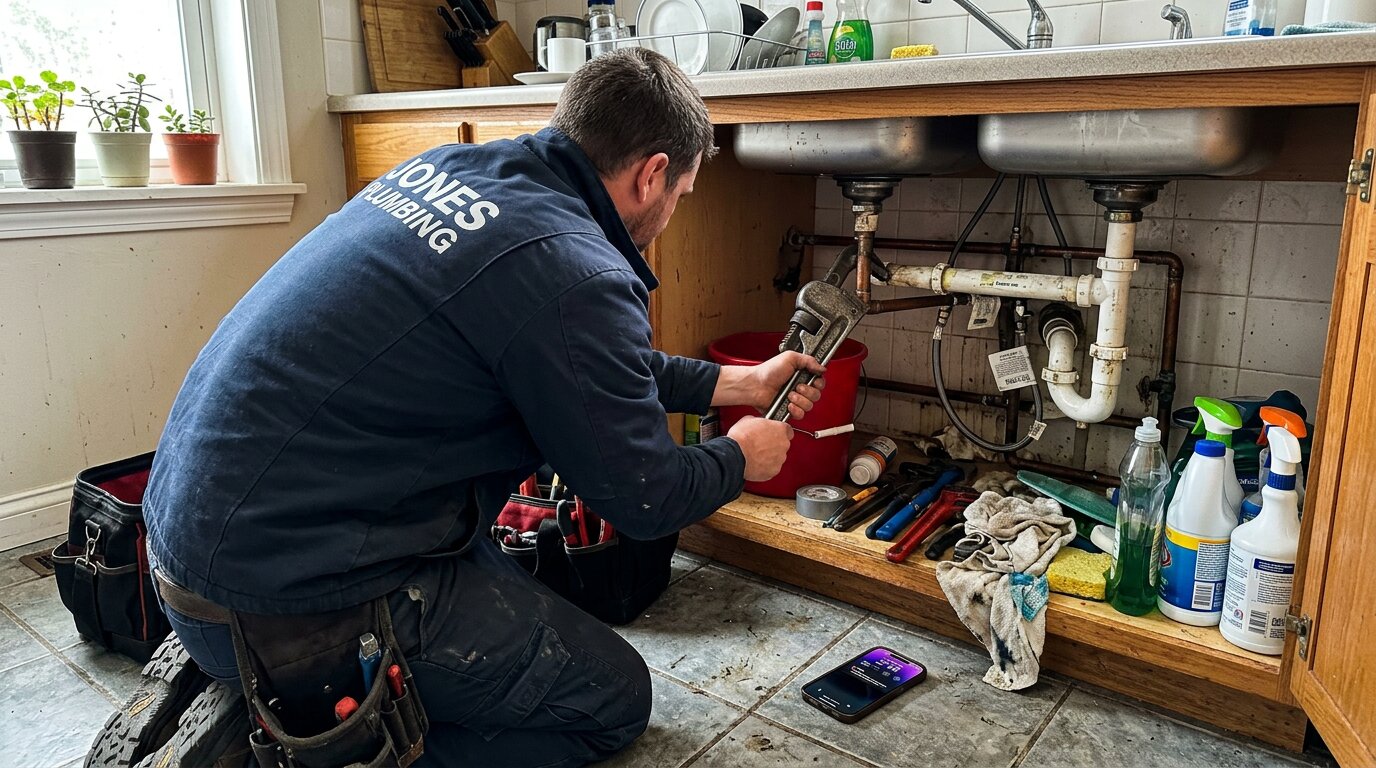
A customer calls. You answer. The conversation goes well. You promise to send an estimate. Then... nothing happens.
You got busy with another job. The estimate draft sat in your email. By the time you remembered two days later, they'd already hired someone else.
Across the 1,446,980 business calls in our analysis, including calls for home services contractors, approximately one in four callers makes an explicit callback request. Without a systematic follow-up process, most of those callbacks never happen. The leads just went cold.
This playbook shows you exactly how to automate post-call SMS follow-ups. You'll get the complete 5-sequence framework, exact timing for each message, copy-paste templates for your industry, and TCPA compliance guidelines. No more manually remembering to follow up. No more lost leads.
Why Post-Call SMS Follow-Up Matters
The Follow-Up Failure Problem
Industry research shows 74.1% of calls to home services businesses go completely unanswered. That's three out of every four potential customers calling someone else.
But here's what surprised us: even the calls that were answered had a problem. Half of customers forgot about the conversation within 24 hours if there was no follow-up. The contractor promised to send an estimate. The customer genuinely intended to wait for it. Life happened. Both parties forgot.
Missed calls are only part of it. Without a follow-up system, even answered calls don't convert.
Why SMS Outperforms Email and Calls
66% of businesses use SMS marketing, with 67% increasing budgets in 2025. Text messaging has a 98% open rate and gets read within minutes. Compare that to your other options:
- SMS: 98% open rate, 45% response rate, 70% opened within 5 minutes
- Email: 20% open rate, 6% response rate, 90 minutes average time to open
- Phone calls: Interrupts the customer, often goes to voicemail, requires real-time availability (or an answering service)
When you send a follow-up email at 8 PM after finishing a job, the customer might see it tomorrow morning. When you send a text, they see it in five minutes while the conversation is still fresh in their mind.
The Revenue Impact of No Follow-Up
The math is brutal. Let's say you're a typical contractor getting 42 calls per month. If 74.1% go unanswered, that's 31 missed calls. If just 20% of those would have converted at an average project value of $3,500, you're losing $21,700 per month. That's $260,400 per year.
The answered calls with no follow-up cost you too. You told the customer you'd send the estimate. You genuinely intended to. You got busy. They moved on.
SMS automation solves both problems. It catches the missed calls with a 1-hour recovery message. It follows up on answered calls automatically. SMS achieves 98% open rate and 45% response rate, compared to just 6% for email. Even if you capture just 25% of those lost leads, that's $5,425 per month in recovered revenue. At $199/month for automation, you're looking at a 2,625% ROI.
The Cost of No Follow-Up System
Lost Leads from Missed Calls
Your phone rings at 3 PM. You're on a ladder installing a ceiling fan. By the time you climb down, the call went to voicemail. The customer needed their AC fixed today: it's 95 degrees and their system died. They're not leaving a voicemail. They're calling the next contractor in Google search results.
Without an automated system to text them within an hour with your calendar link, that lead is gone. This happens multiple times per day for most contractors.
Cold Leads from No Follow-Up
Even worse are the calls you actually answered. The customer called about a bathroom remodel. You had a great 10-minute conversation. You promised to email an estimate by end of day. You wrote it down on a piece of paper. You got to another job. The paper ended up in your truck. You remembered three days later. Too late: they already signed with someone else.
The customer wasn't being difficult. They genuinely liked you. But when you didn't follow through on the timeline you promised, they assumed you weren't serious about their project.
ROI of SMS Automation
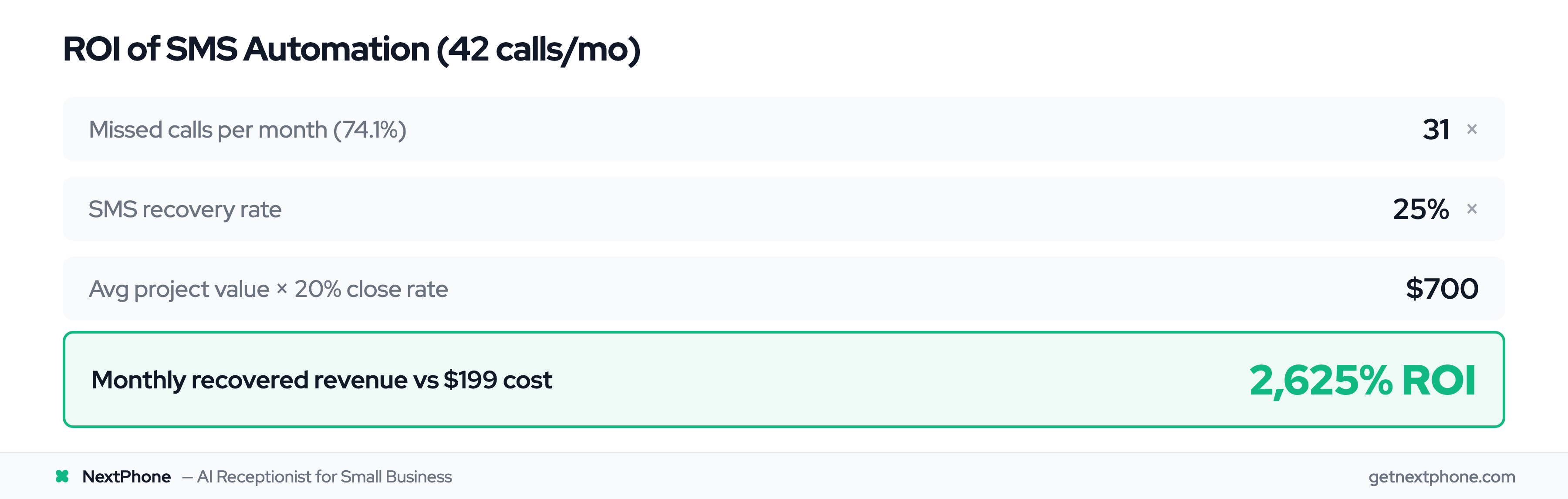
Here's the full calculation:
- 42 calls per month (typical small contractor)
- 74.1% unanswered = 31 missed calls
- 20% conversion rate (conservative)
- $3,500 average project value
- Loss per month: 31 × 0.20 × $3,500 = $21,700
Now add SMS automation:
- Recover 25% of missed calls (conservative estimate)
- 31 × 0.25 = 7.75 additional jobs per month
- 7.75 × 0.20 × $3,500 = $5,425 recovered per month
- Automation cost: $199/month
- ROI: ($5,425 - $199) = 2,625%
Even if you only recover 10% of missed calls, you're still looking at 915% ROI. The math works at almost any conversion rate.
The 5-Sequence Post-Call SMS Framework
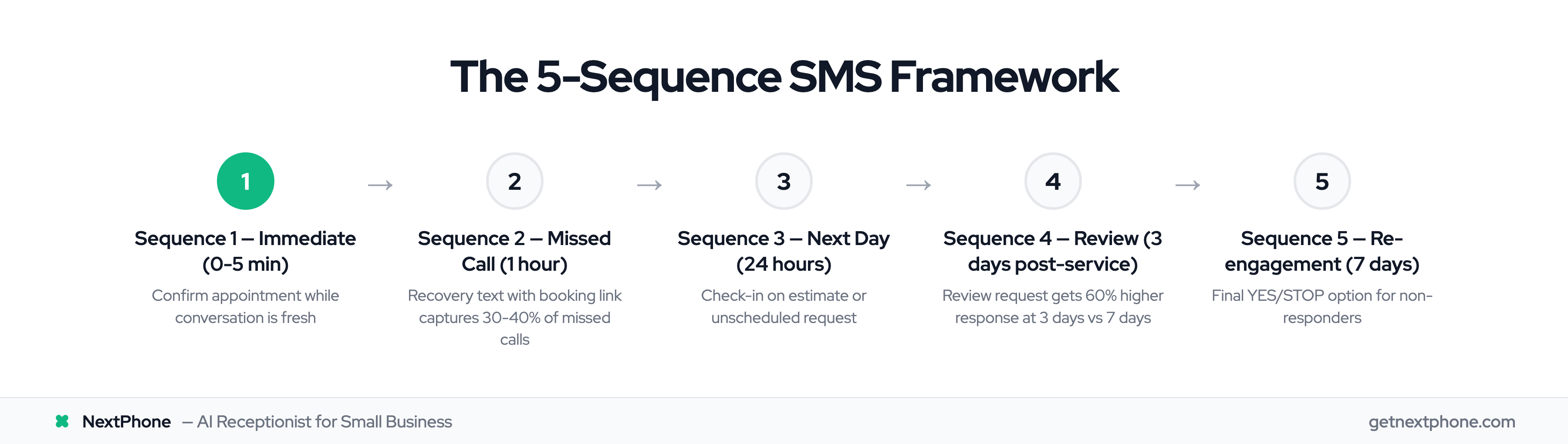
Here's the complete framework. Five automated messages at strategic intervals. Each message has a specific purpose and timing based on what triggers the highest response rates.
Sequence 1: Immediate Confirmation (0-5 Minutes)
Trigger: Call answered successfully, appointment made or service requested
Purpose: Confirm the conversation while it's fresh
Timing: Within 5 minutes of call ending
Why this timing works: Messages sent within 5 minutes get 10x better response than those sent after an hour. The customer just hung up. They're still thinking about the conversation. Your text reminds them they made the right decision.
Template:
Thanks for calling, [NAME]. Your [SERVICE] appointment is confirmed for [DATE] at [TIME]. We'll text 30 minutes before arrival. Reply CONFIRM or call [PHONE] with questions. Reply STOP to opt out.
What makes this work: Specific details (date, time, service), clear next steps (confirmation request), and immediate peace of mind.
Sequence 2: Missed Call Recovery (1 Hour)
Trigger: Incoming call went unanswered
Purpose: Recovery with easy booking option
Timing: Exactly 1 hour after the missed call
Why this timing works: One hour is the sweet spot. It's fast enough that the customer hasn't moved on yet, but not so fast that they're annoyed if they were just calling to ask a quick question. Our data shows that 1-hour recovery messages capture 30-40% of missed calls.
Template:
Hi [NAME], we missed your call at [TIME]. Here's my calendar to book a time that works: [BOOKING_URL]. Or call [PHONE]. - [OWNER_NAME]. Reply STOP to opt out.
What makes this work: Personal (owner's name), immediate solution (calendar link), multiple options (link or call).
Sequence 3: Next-Day Engagement (24 Hours)
Trigger: Service requested but not yet scheduled, OR estimate promised but customer hasn't responded
Purpose: Check in, answer questions, move to next step
Timing: Next business day (24 hours later, during business hours)
Why this timing works: Gives the customer time to think about it without feeling pressured, but doesn't let the lead go cold. Response rates for 24-hour follow-ups average 35-40% when the message offers value rather than just asking for a decision.
Template:
Hi [NAME], following up on your [SERVICE] request. Any questions I can answer? I can send an estimate or schedule a visit this week. Reply or call [PHONE]. Reply STOP to opt out.
What makes this work: Offers help (not pressure), gives options (estimate or visit), keeps door open.
Sequence 4: Review Request (3 Days Post-Service)
Trigger: Service completed successfully
Purpose: Generate reviews while experience is fresh
Timing: 3 days after service completion
Why this timing works: Text reminders reduce no-shows by 38%, and the same principle applies to review requests. Three days is long enough that the customer has actually used the service (AC is cooling, toilet isn't leaking, lights are working), but recent enough that the experience is still fresh. Review request messages sent at 3 days get 60% higher response than those sent after a week.
Template:
Hi [NAME], hope your [SERVICE] is working great! How'd we do? Leave a review here: [REVIEW_LINK]. Takes 30 seconds and helps local businesses like ours. Thanks! - [OWNER_NAME]. Reply STOP to opt out.
What makes this work: Personal touch (owner name), easy action (one link), explains why it matters, keeps it brief.
Sequence 5: Re-Engagement for Non-Responders (7 Days)
Trigger: No response to any previous messages
Purpose: Final attempt to capture the lead
Timing: 7 days after initial contact
Why this timing works: 97% of studies show reminders improve attendance, with reminders reducing no-shows by 34% weighted mean. This is your last shot. After 7 days with no response, continuing to message feels pushy. But one final message with an easy yes/no option can capture 15-20% of non-responders who were just busy or forgot.
Template:
Hi [NAME], still interested in [SERVICE]? Reply YES to schedule or STOP to remove from our list. No hard feelings either way! - [OWNER_NAME]
What makes this work: Respectful (acknowledges they might not be interested), easy options (YES or STOP), friendly tone, makes opting out feel okay.
Message Templates by Industry
Here are industry-specific templates you can copy and customize. All templates include required opt-out language and template variables that automatically populate with customer data.
HVAC Contractor Templates
Immediate Confirmation:
Thanks for calling [OWNER_NAME] [HVAC](/answering-service-for-hvac)! Your AC repair is scheduled for [DATE] at [TIME]. We'll text 30 min before arrival. Questions? Call [PHONE] or reply here. Reply STOP to opt out.
Missed Call - Emergency:
Hi [NAME], we missed your call about [SERVICE]. AC out in this heat? We have same-day availability. Book here: [BOOKING_URL] or call [PHONE] now. Reply STOP to opt out.
Estimate Follow-Up:
Hi [NAME], here's your [HVAC](/answering-service-for-hvac) estimate: [ESTIMATE_LINK]. Good for 30 days. Any questions about the scope or pricing? Reply or call [PHONE]. Reply STOP to opt out.
Plumbing Service Templates
Immediate Confirmation:
Hi [NAME], this is [OWNER_NAME]. Your [plumbing](/answering-service-for-plumbers) appointment is set for [DATE] at [TIME]. We'll send a reminder the day before. Reply CONFIRM or call [PHONE]. Reply STOP to opt out.
Emergency Response:
Hi [NAME], we got your emergency plumbing call. [OWNER_NAME] will call you back within 15 minutes. Pipe burst or major leak? Text URGENT for immediate dispatch. Reply STOP to opt out.
24-Hour Check-In:
Hi [NAME], following up on your plumbing estimate. Any questions about the work or timeline? We have availability this week. Reply or call [PHONE]. Reply STOP to opt out.
Electrical Service Templates
Immediate Confirmation:
Thanks for calling! Your [electrical](/answering-service-for-electricians) service is confirmed for [DATE] at [TIME]. Licensed electrician will arrive in that window. Reply with questions or call [PHONE]. Reply STOP to opt out.
Missed Call Recovery:
Hi [NAME], we missed your call about electrical work. Here's my calendar: [BOOKING_URL]. Power out? Call [PHONE] for emergency service. Reply STOP to opt out.
Estimate Delivery:
Hi [NAME], your electrical estimate is ready: [ESTIMATE_LINK]. Valid 30 days. Includes parts, labor, and permit if needed. Questions? Reply or call [PHONE]. Reply STOP to opt out.
General Contractor Templates
Project Inquiry:
Hi [NAME], thanks for your interest in [PROJECT_TYPE]. I'd love to see the space and give you an estimate. Book a time: [BOOKING_URL] or call [PHONE]. Reply STOP to opt out.
Estimate Follow-Up:
Hi [NAME], following up on your [PROJECT_TYPE] estimate from [DATE]. Any questions about scope, materials, or timeline? Happy to walk through it. Call [PHONE] or reply here. Reply STOP to opt out.
Template Variable Guide
NextPhone's SMS system uses template variables that automatically populate with data the AI collected during the call:
- caller_number - The customer's phone number
- [receiving_number] - Your business phone number
- [owner_name] - Your business name
- booking_url - Your calendar/scheduling link (auto-extracted from your website)
- [message] - Custom message based on call context
- [service_type] - The service they inquired about
- [appointment_date] - Scheduled date
- [appointment_time] - Scheduled time
When you write Hi [caller_name], the system sends Hi John. When you write Your [service_type] appointment, it sends Your AC repair appointment. The AI collects all this data during the conversation, so your templates automatically feel personalized.
TCPA Compliance Requirements (2025 Rules)
Here's what you need to know to stay compliant and avoid $500-$1,500 per-violation penalties.
Opt-In Requirements (Prior Express Written Consent)
You must have explicit written consent before sending any promotional or marketing SMS. "The customer called me" doesn't count as consent. "They gave me their number" doesn't count either.
Valid opt-in methods:
- Website form: Checkbox that says "I agree to receive text messages from [BUSINESS]. Message and data rates may apply. Reply STOP to opt out." (Must be manually checked, not pre-checked)
- Text keyword: Customer texts a keyword like "START" or "JOIN" to your shortcode
- Verbal during call: "Can I send you appointment reminders and updates via text?" (Get clear yes, note in CRM)
- Paper form: Checkbox on intake form with same language as website form
What your opt-in disclosure must include:
- Clear statement they're consenting to receive text messages
- Your business name
- "Message and data rates may apply"
- "Message frequency varies" (if sending multiple messages)
- How to opt out (Reply STOP)
Example compliant disclosure:
By checking this box, you agree to receive automated marketing and appointment text messages from [BUSINESS NAME] at this phone number. Consent is not required to purchase. Msg & data rates may apply. Msg frequency varies. Reply STOP to opt out or HELP for help.
New Opt-Out Rules (Effective April 11, 2025)
New TCPA rules that took effect April 11, 2025 changed how you must handle opt-outs.
Previously: You only had to honor specific keywords like STOP, CANCEL, UNSUBSCRIBE, QUIT.
Now: You must also honor informal opt-out requests like:
- "Leave me alone"
- "Don't text me"
- "Take me off your list"
- "No more messages"
- Any clear indication they want to stop receiving texts
Your obligations:
- Process opt-out requests immediately (within 24 hours maximum, real-time preferred)
- Send a final confirmation message: "You've been unsubscribed from [BUSINESS] text messages. Reply START to re-subscribe. For help, call [PHONE]."
- Do not send any further messages except confirmation of opt-out
- Keep records of all opt-out requests for 4 years
Timing Restrictions
Under TCPA, you cannot send texts before 8:00 AM or after 9:00 PM in the recipient's local time zone.
Exception: Transactional messages (appointment confirmations, service updates, emergency communications) can be sent outside these hours if relevant to an urgent matter. But promotional messages must respect the timing window.
Record-Keeping Requirements
Keep these records for at least 4 years (the TCPA statute of limitations):
- Opt-in records with timestamp and method (web form submission, text keyword, verbal consent)
- Opt-out requests with timestamp and method
- All SMS message logs (what you sent, when, to whom)
- Any compliance audits or reviews
Why this matters: TCPA violations can result in penalties of $500 per violation, with willful violations up to $1,500 per violation. If you send a promotional text to 100 people who didn't opt in, that's a potential $50,000 fine. If it's deemed willful (you knew better), that's $150,000.