
Your Phone Rings. A Customer Wants to Book, and Pay Now.
A homeowner calls your contracting business at 7 PM. Their AC died in 95-degree heat. They need emergency service tonight and want to pay a deposit right now to secure the slot.
Stripe processed $1.4T in total payment volume in 2024 (38% YoY growth), with half of Fortune 100 companies using the platform. Can you take their payment over the phone?
If the answer is "no" or "I'll call you back during business hours," you just lost a $4,200 emergency job.
Industry research shows 74.1% of calls to home services contractors go completely unanswered. For a contractor receiving 42 calls per month, missing opportunities to collect even modest $50 deposits on just 20% of calls means $3,744 in lost security per year.
Square serves 4.1M+ active businesses with 22% digital payments market share; 1 in 3 US small businesses use the platform.
The numbers get worse. Studies show that 30-40% of customers prefer to pay bills outside standard business hours. If you can't accept payments when they're ready to pay, they'll call someone who can.
According to a recent study, 73% of companies plan to adopt payment automation within the next two years. The businesses winning capture payments the moment customers are ready.
This guide shows you six payment collection workflows that work over the phone, how to stay PCI compliant with Stripe integration, and how AI assistants automate the entire process without call centers or IVR keypads.
6 Payment Collection Workflows That Work Over the Phone
Phone payment collection isn't one-size-fits-all. Different businesses need different workflows depending on their industry, service type, and customer expectations.
Here are six proven workflows with real conversation examples showing exactly what to say and how the technology works behind the scenes.
Appointment Deposit Collection ($50 to Hold Your Slot)
This is the most common workflow for appointment-based businesses. The deposit holds the time slot and reduces no-shows.
When to use this: Salons, contractors providing estimates, consultants offering initial sessions, medical appointments
Typical amounts: $25-$100 for salons, $50-$500 for contractors, depending on service value
Industry data shows that more than 33% of people have no-showed for at least one salon appointment in the past. A salon with an average service cost of $30 that experiences just two no-shows per week loses $2,880 per year in potential income.
Example conversation:
"I can book your bathroom remodel estimate for Tuesday at 2 PM. We require a $50 deposit to hold the slot, which will be credited toward your final invoice if you proceed with the project. May I collect your payment information?"
Customer provides card details.
"Perfect. I've charged your card $50 and sent a confirmation email to your inbox. You'll receive a text reminder the day before your appointment. See you Tuesday at 2 PM."
Behind the scenes: The AI system sends the card details to Stripe's API via a Custom HTTP webhook. Stripe creates a PaymentIntent, processes the $50 charge immediately, and returns a payment confirmation plus receipt URL. The AI then triggers an email and SMS with the booking details and receipt.
Businesses using this workflow see dramatic results. According to GlossGenius, businesses using deposits see a 32% increase in successful appointments on average, translating to nearly $1,000 of additional monthly revenue.
Credit Card on File (Store Without Charging)
This workflow stores payment information for future use without processing an immediate charge. It's perfect for recurring clients or subscription-style services.
When to use this: Monthly service contracts, subscription boxes, recurring appointments, retainer-based consulting
Important requirement: You must get explicit customer consent before storing their card. Stripe's guidance is clear: "Customers must opt into credit card on file transactions. As a merchant, you can't make the decision to keep customer information on file without notifying and gaining consent from customers."
Example conversation:
"For your monthly lawn service subscription, I'd like to keep a credit card on file. This won't be charged today; we'll bill you automatically after each monthly service. Is that okay with you?"
Customer agrees.
"Great. What's your card number?"
Customer provides details.
"I've securely saved that card ending in 4242 on your account. You'll receive an email receipt after each monthly service, and you can update or remove this card anytime by calling us or logging into your account."
Behind the scenes: Instead of creating a PaymentIntent (which charges immediately), the system uses Stripe's SetupIntent. This validates the card and creates a token for future use without processing a payment. The token is stored in your system, but the actual card number never touches your servers. That's the beauty of tokenization. Stripe processes 500M+ API requests daily with 99.999% uptime.
Instant Booking Confirmation with Payment
Some businesses need full payment at booking, not just a deposit. This workflow processes the complete charge and sends immediate confirmation.
When to use this: Event venue bookings, workshop registrations, single-session consultations, equipment rentals
Example conversation:
"Your business coaching session is scheduled for next Thursday at 2 PM. The fee is $350, which I can charge to your card today. You'll receive a receipt via email for your records. What card would you like to use?"
Customer provides card information.
"Perfect. I've charged your card $350 and sent a confirmation email with your session details and Zoom link. You'll also receive a calendar invitation. Looking forward to speaking with you next Thursday."
Behind the scenes: Stripe processes the full $350 immediately via PaymentIntent. The system automatically generates a receipt, sends it via email, and can trigger calendar invitations or access credentials for virtual meetings. The entire workflow (from call to confirmation to calendar invite) happens in under 60 seconds.
Payment Plan Setup Over Phone
This is one of the most valuable workflows for high-ticket services. You can set up installment payments during the initial call.
When to use this: Large contractor projects, multi-session programs, wedding photography packages, dental work. Firms using payment plans collect 49% more revenue per lawyer. QuickBooks offers 800+ app integrations for seamless payment tracking.
Example conversation:
"Your kitchen remodel total is $24,000. We can structure this as $6,000 today as a deposit, then four monthly payments of $4,500. I'll charge your card $6,000 now and set up automatic billing on the 15th of each month for the next four months. Does that work for you?"
Customer agrees.
"Great. What card would you like to use?"
Customer provides details.
"Perfect. I've charged your card $6,000 today and scheduled four payments of $4,500 starting on August 15th. You'll receive an email confirmation with the complete payment schedule and a receipt for today's charge. You'll also get reminder emails three days before each scheduled payment."
Behind the scenes: The system processes the initial $6,000 via PaymentIntent immediately, then creates a Stripe Subscription or uses scheduled PaymentIntents for the four remaining charges. Each payment is automatically processed on the scheduled date, and the customer receives email confirmations for each transaction.
73% of US eCommerce startups use Stripe at launch, and 45% of US eCommerce uses Stripe as their primary processor. This workflow transforms large projects from "I need to think about it" into "Yes, I can do $6,000 today."
Emergency Job Deposits (Urgent Service + Payment)
Across the calls we answer, urgent calls using words like "emergency," "urgent," or "ASAP" rank among the top reasons people call. These calls are gold: emergency jobs average $4,200 in revenue, significantly higher than routine work.
When to use this: Emergency plumbing, HVAC failures, electrical problems, urgent pest control
Example conversation:
"I understand your basement is flooding from a burst pipe. I can have our emergency plumber there within 45 minutes. Emergency calls require a $150 deposit to dispatch the technician. May I collect that now so we can get someone to you immediately?"
Customer urgently agrees.
"What's your card number?"
Customer provides information quickly.
"Got it. I've charged your card $150 and dispatched Mike to your location. He'll call you from his cell when he's 10 minutes away. Your confirmation number is E-7834. Is this the best number to reach you?"
Behind the scenes: Speed matters here. The system processes the $150 deposit via Stripe in under 5 seconds while simultaneously notifying the on-call technician via SMS or app notification. The customer receives immediate confirmation, and the technician gets the job details with the customer's contact information and the confirmation that payment is secured.
Stripe's Radar blocked $2.3B in fraud in 2025. Missing one emergency call per week means $16,800 per month in lost revenue. This workflow captures those high-value jobs 24/7.
Refund & Cancellation Processing
The final workflow handles the opposite scenario: when customers need to cancel and request refunds.
When to use this: Cancellations within your refund policy window, no-shows (keep deposit), service failures requiring refunds
Example conversation (advance cancellation):
"You're calling to cancel Tuesday's appointment. Our policy allows full refunds for cancellations 24 hours or more in advance. I've processed your $50 deposit refund. It will appear in your account within 5-7 business days. Would you like to reschedule for a different time instead?"
Example conversation (no-show):
"I see you missed your scheduled appointment yesterday and didn't call to cancel. According to our policy, which was shared when you booked, deposits are non-refundable for no-shows. However, I can apply that $50 toward a future appointment if you'd like to reschedule."
Behind the scenes: The system checks the cancellation timestamp against your refund policy (e.g., "24+ hours = full refund, <24 hours = 50% refund, no-show = no refund"). If a refund is warranted, it's processed automatically through Stripe. Refunds take 5-10 days because each refund passes through at least three parties: your payment gateway, the acquiring bank, and the customer's issuing bank.
Clear policies prevent disputes. Your policy might be:
- Salons: Cancel 24+ hours in advance = full refund, cancel <24 hours = 50% refund, no-show = no refund
- Contractors: Cancel 48+ hours in advance = full refund minus $25 processing fee, cancel <48 hours = 50% refund, no-show = deposit forfeited
The key is communicating this clearly when collecting the deposit and documenting the customer's agreement.
PCI Compliance Made Simple: What You Can (and Can't) Do
Here's what scares most small business owners away from phone payments: PCI compliance. The acronyms, the technical jargon, the fear of massive fines.
Let's cut through that and focus on what actually matters.
The Golden Rules of Phone Payments
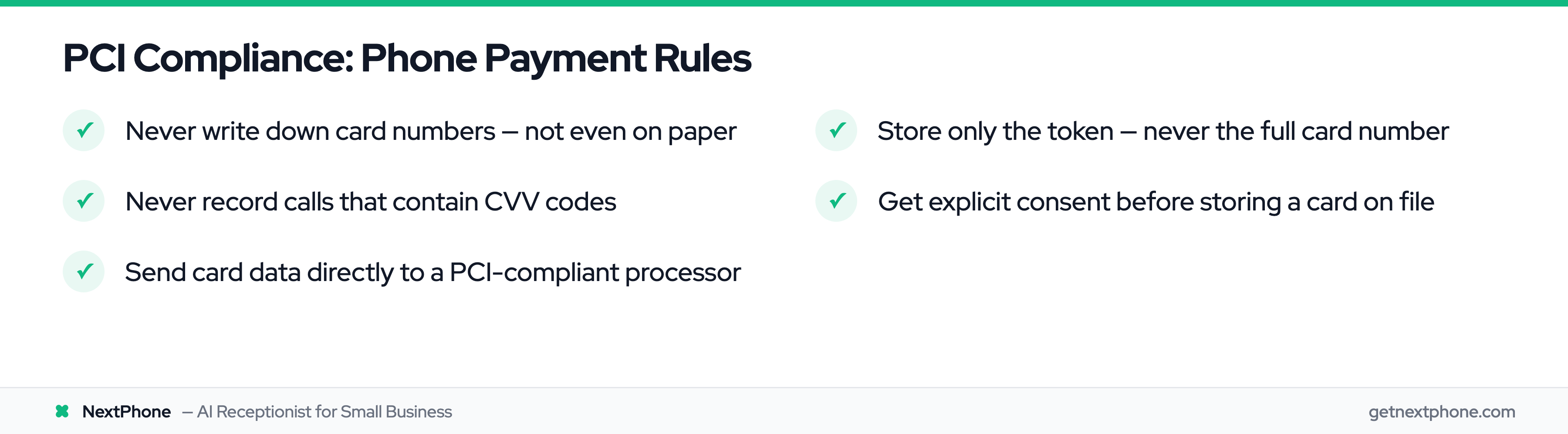
According to PCI compliance regulations, staff can take card details over the phone but must never write them down or store them anywhere once the payment is processed.
Here are the four rules you actually need to follow:
Rule 1: Never write down card numbers on paper. Not on a sticky note, not in a notebook, not on the back of a business card. The moment you write it down, you've created a data security vulnerability. Even if you lock that paper in a safe, it's still a PCI violation.
Rule 2: Never record calls containing CVV codes. You might record calls for quality assurance, but the instant a customer speaks their three-digit CVV code, you're recording sensitive authentication data, which is explicitly prohibited by PCI standards. The recording itself becomes a form of data storage that's not allowed.
Rule 3: Enter card data directly into a PCI-compliant system. Whether that's Stripe, a virtual terminal, or an AI system integrated with a payment processor, the card information should go straight from the customer's mouth to a secure, tokenized system. No intermediate stops.
Rule 4: Delete card data immediately after tokenization. Once Stripe (or your payment processor) returns a token, the original card number should be gone. The token is what you store: a random string like "tok_1234abcd" that's useless to anyone who steals it.
What Gets Tokenized vs What You Can Store
Tokenization is the process that replaces sensitive payment information (like credit card numbers) with a unique, random set of characters called a token. This helps keep payment data safe during transactions because the real card data isn't used or stored.
If someone steals a token, they can't use it to make fraudulent purchases. The token only works within your payment system and can't be reversed back into the original card number.
You CAN store (encrypted or tokenized):
- Cardholder name
- Last 4 digits of card number
- Expiration date
- Billing ZIP code
- Payment token from Stripe
You CAN'T store (even if encrypted):
- Full card number (PAN - Primary Account Number)
- CVV/CVC security code
- PIN numbers or PIN blocks
- Full magnetic stripe data
The good news? When you use Stripe integration with an AI phone system like NextPhone, tokenization happens automatically. The AI collects the card information verbally, sends it to Stripe's API, and receives back a token, all in under 2 seconds. The full card number never touches your servers.
Why You Can't Record Calls with Payment Info
Many businesses record calls for quality assurance or training. That's fine, until someone says their CVV code.
The problem? Recording a CVV code means you're storing sensitive authentication data, which violates PCI DSS standards. Even if the recording is encrypted and stored in Fort Knox, it's still non-compliant.
Your options:
Option 1: Pause recording during payment collection. Most call recording systems allow you to stop recording temporarily. The AI can announce: "For security, I'm pausing the recording while I collect your payment information." Then resume after the payment is processed.
Option 2: Use IVR keypad entry instead of spoken input. The customer types their card number using their phone keypad instead of speaking it aloud. This keeps payment data out of voice recordings entirely.
Option 3: Use an AI system that never records payment portions of calls. Modern systems like NextPhone can be configured to handle payment collection in a PCI-compliant manner without creating recordings of sensitive data.
The expensive mistake is assuming "we don't get hacked" means you're compliant. PCI compliance means following the standards even if you never experience a security incident. The consequences of non-compliance can include fines, losing your ability to accept credit cards, and liability if customer data is compromised.
Stripe Integration: From Card Number to Secure Token
Now let's talk about how this actually works technically, without requiring you to hire a developer.
How Stripe Tokenization Works
Here's the simple version:
- Customer provides their card number over the phone
- Your system (AI assistant or virtual terminal) sends it to Stripe's API
- Stripe validates the card and returns a token (a random string like "tok_abc123xyz")
- Your system stores the token, not the card number
- When you need to charge the card later, you send the token to Stripe
- Stripe processes the payment using the real card number (which they store securely)
The customer's actual card number never touches your servers. It goes straight from the conversation to Stripe's PCI-compliant vault.
Think of the token as a claim ticket. When you valet park your car, they give you a ticket with a number. That ticket is useless to a car thief: it only works when you present it to the valet service that has your actual car. Stripe tokens work the same way. The token only works within your Stripe account and can't be used anywhere else.
SetupIntent vs PaymentIntent (When to Use Each)
Stripe offers two primary objects for collecting payment information, and choosing the right one matters:
PaymentIntent: Use this when you want to charge the card immediately.
- Collecting an appointment deposit right now
- Processing full payment for a service
- Taking the first payment in a payment plan
SetupIntent: Use this when you want to store the card for future use without charging it yet.
- Keeping a card on file for monthly billing
- Storing backup payment methods
- Pre-authorizing a card without capturing funds
Example: A salon collecting a $50 deposit for an appointment uses PaymentIntent (charge now). That same salon storing a card for a monthly membership uses SetupIntent (charge later).
Both create tokens. Both are PCI compliant. The difference is timing: do you charge now or later?
Integrating Stripe with Your Phone System (HTTP Webhooks)
This is where most small businesses think "I need a developer." You don't.
Traditional approach: Human agent answers call, writes down card info (PCI violation), manually enters it into a virtual terminal after the call ends.
Modern approach: AI system collects card information during the call and immediately sends it to Stripe via an HTTP webhook. The customer receives confirmation before hanging up.
Here's how Custom HTTP webhooks work with a system like NextPhone:
Step 1: Configure a webhook in your AI phone system settings.
- Endpoint URL:
https://api.stripe.com/v1/payment_intents - Method:
POST - Authentication: Your Stripe secret API key (kept secure)
Step 2: Define the data the AI should collect during the call.
- Card number
- Expiration date
- CVV code
- Billing ZIP code
- Cardholder name
- Amount to charge
Step 3: Map that data to Stripe's API format using template variables.
When the customer provides their information, the AI automatically sends this request to Stripe:
POST https://api.stripe.com/v1/payment_intents
Authorization: Bearer sk_live_...
Content-Type: application/x-www-form-urlencoded

amount=5000
currency=usd
payment_method_data[type]=card
payment_method_data[card][number]=4242424242424242
payment_method_data[card][exp_month]=12
payment_method_data[card][exp_year]=2025
payment_method_data[card][cvc]=123
payment_method_data[billing_details][name]=John Smith
payment_method_data[billing_details][postal_code]=90210
confirm=true
Step 4: Stripe responds with the payment result.
If successful: The AI receives a payment confirmation, receipt URL, and payment ID. It can then say: "Your $50 deposit is confirmed. I'm texting you a receipt now."
If failed: The AI receives an error code (like "insufficient_funds" or "card_declined") and can respond appropriately: "I'm sorry, that card was declined. Would you like to try a different card?"
The entire process (from customer speaking their card number to receiving confirmation) takes under 10 seconds.
No developer required. Just configure the webhook once, and the AI handles every payment collection call the same way.
Industry-Specific Payment Workflows
Different industries have different norms for deposits, payment timing, and refund policies. Here's how four common industries use phone payment collection.
Contractors: Project Deposits ($500-$2,000 Upfront)
Contractor deposits serve two purposes: purchasing materials and securing the client's commitment to the project.
Typical deposit amounts: According to industry standards, deposits typically range from 10% on larger jobs to 33% or more on smaller projects. For a $16,000 bathroom remodel, a 50% deposit ($8,000) might be reasonable. For a $100,000 full-home renovation, a 10-20% deposit ($10,000-$20,000) is more typical.
State regulations matter: Updated 2025 contractor deposit laws introduce tighter limits on upfront payments, varying by state and project type from 10% to 30%.
- California: Maximum 10% of total project cost or $1,000, whichever is less (for projects over $500)
- Florida: Maximum 10% or $1,000, whichever is less
- Virginia: Maximum 33%
- Texas: No statutory limit, but 50%+ is considered excessive
Example conversation:
"Your kitchen remodel estimate is $28,000. California law limits deposits to 10% of the project total, which would be $2,800. I can collect that today to reserve your spot on our schedule and order your custom cabinets. What card would you like to use?"
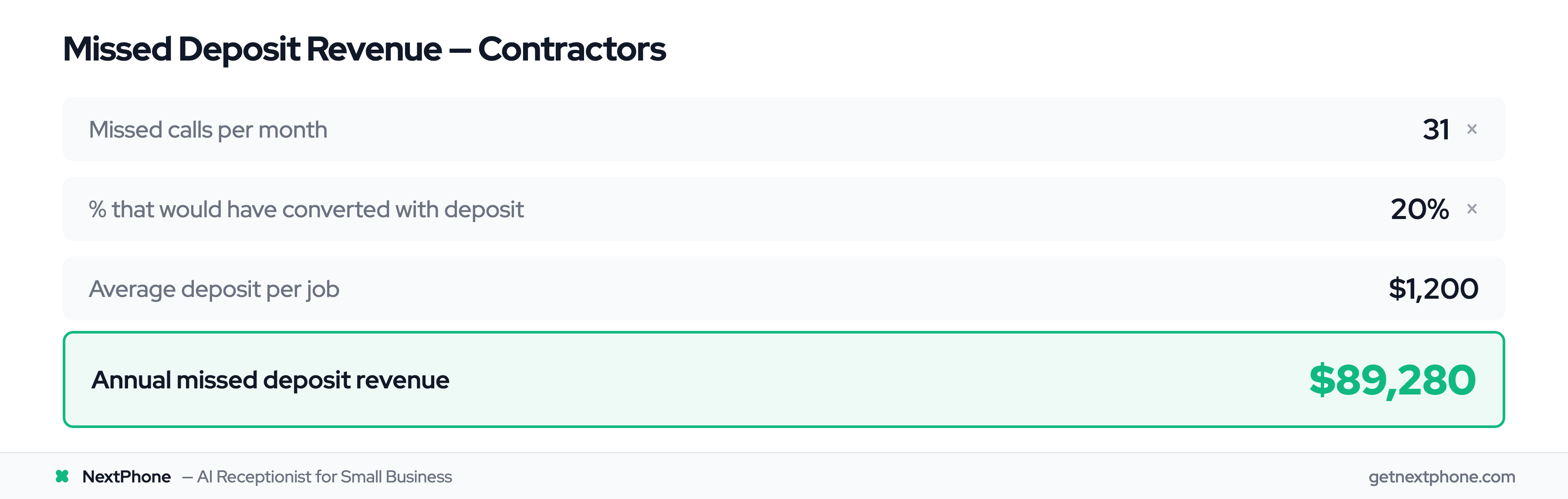
ROI calculation: For contractors averaging 42 calls per month, if 74.1% go unanswered (31 missed calls), and just 20% of those would have converted with a collected deposit, that's 6.2 lost jobs per month. At an average $1,200 deposit per job, that's $7,440 per month in lost security, or $89,280 per year.
Even capturing half of those deposits would mean an additional $44,640 in secured projects annually.
Salons & Spas: Appointment Deposits ($25-$100 to Prevent No-Shows)
The no-show problem costs salons real money. Industry data shows that more than 33% of people have no-showed for at least one salon appointment in the past. A salon with average services at $30 that experiences two no-shows per week loses $2,880 per year.
Typical deposit amounts: $25-$100, or 50% of the service cost. A $200 color service might require a $100 deposit. A $40 haircut might require $25.
The ROI is dramatic: Businesses using deposits see a 32% increase in successful appointments on average, translating to nearly $1,000 of additional monthly revenue.
Example conversation:
"I've booked your haircut and balayage for Saturday at 10 AM with Jessica. The total service is $180, and we require a $90 deposit to hold the appointment. This will be applied to your total, so you'll pay the remaining $90 at checkout. May I collect your card information?"
Policy clarity matters: Make it clear whether the deposit is refundable. Example policy: "Deposits are fully refundable for cancellations 24+ hours in advance. Cancellations with less than 24 hours notice forfeit the deposit."
ROI calculation:
- Current state: 2 no-shows/week × $30 average = $60/week lost = $3,120/year
- With deposits: 32% reduction in no-shows = save $998/year
- Plus: Deposit fees collected from remaining no-shows = additional $500-1,000/year
- Total benefit: $1,500-2,000/year from a simple policy change
Consultants: Session Fees ($150-$500 per Session)
Consultants often charge full session fees upfront rather than deposits. The customer is buying your time, and that time is booked exclusively for them.
Typical fees: $150-$500 for individual sessions, $1,500-$5,000 for multi-session packages
Payment plan options for packages: "I offer a 6-session coaching package for $3,000. You can pay in full today, or we can do three monthly payments of $1,050. What works better for you?"
Example conversation:
"Your 90-minute business strategy session is scheduled for next Thursday at 2 PM via Zoom. The fee is $450, which I can charge to your card today. You'll receive a receipt via email for your business records, along with a calendar invitation and the Zoom link. What card would you like to use?"
Why charge upfront: It reduces no-shows to nearly zero. When someone has paid $450 for your time, they show up. When it's "pay after the session," last-minute cancellations are common.
Refund policy example: "Sessions are fully refundable if canceled 48+ hours in advance. Cancellations with less than 48 hours notice forfeit the session fee, though we can apply it to a future session within 90 days."
Event Planners: Venue Deposits ($500-$5,000 to Secure Date)
Event venues and planners deal with high-value bookings months in advance. Deposits secure the date and demonstrate serious intent.
Typical deposits: $500-$5,000 depending on venue and event size. A backyard wedding venue might require $1,000. A luxury ballroom might require $5,000. Smaller event spaces might ask for 25-50% of the total package cost.
Refundability varies: Many venue deposits are non-refundable once the date is secured, though some offer partial refunds with sufficient advance notice.
Example conversation:
"The Oak Ballroom is available for your October wedding. Our venue fee is $12,000, and we require a $3,000 deposit to hold the date. This deposit is non-refundable but will be credited toward your total package cost. I can collect that today to reserve October 14th exclusively for your event. What card would you like to use?"
Payment plans for large events: "Your total event package is $18,000. We can structure this as $3,000 today to hold the date, $7,500 at 60 days before the event, and the final $7,500 at 30 days before. Does that work for your budget?"
Why non-refundable deposits make sense: When you block off October 14th for this wedding, you're turning away other potential bookings for that date. If the customer cancels two months later, you've lost the opportunity to book someone else. The non-refundable deposit compensates for that risk.