Make.com AI Receptionist Automation: Visual Workflow Builder & Multi-App Integration

16 min read
Yanis Mellata
AI Technology

Your phone rings at 9 PM. A customer needs emergency AC repair—their system died in 95-degree heat. You're at dinner with your family. The call goes to voicemail. They call the next contractor. You just lost a $4,200 job.

This happens more than you think. In our analysis of 13,175 customer service calls from 45 home services contractors over 7 months, 74.1% of calls went completely unanswered. That's $260,400 per year in lost revenue for a typical contractor.

But what if every call was answered instantly, every lead was logged automatically, and emergency calls were routed straight to your phone while routine inquiries went to your CRM? That's where Make.com integration with an AI receptionist changes everything.

What is Make.com? Visual Automation for Business Workflows

Make.com is a visual automation platform that connects over 2,000+ apps without writing a single line of code. Unlike traditional automation tools that show you a linear list of steps, Make lets you see your entire workflow as a visual flowchart.

The Power of Seeing Your Automation

Here's what makes Make.com different: when you build an automation (called a "scenario"), you see exactly where data comes from, how it transforms, and where it goes. Your workflow appears as connected modules on a canvas, with lines showing data flow between them.

Think of it like a GPS map versus turn-by-turn directions. Zapier tells you "turn left, then turn right." Make.com shows you the entire route at once, with all the alternative paths visible.

This visual approach makes troubleshooting intuitive. When something breaks, you can trace the exact point where data stopped flowing. Companies using Make.com have reported saving 10,000 hours in back-office work because problems are easier to spot and fix.

Who Make.com is Built For

Make.com targets small businesses, agencies, and power users who need more than basic automation. If you're connecting an AI receptionist to your CRM, triggering different actions based on call urgency, or running parallel workflows, Make.com gives you the flexibility you need.

The platform is no-code but powerful enough for complex logic. You don't need to be a programmer, but you do need to think through your business process: "When this happens, do that—but if this other thing happens, do something different."

How Make.com Works: Scenarios, Modules, and Multi-Step Logic

Let's break down how you actually build workflows in Make.com.

Scenarios: Your Automated Workflows

A scenario is Make.com's term for an automated workflow. Each scenario contains a trigger (what starts it) and one or more actions (what happens next). You can have unlimited scenarios on paid plans, and each runs independently.

For example: "When AI answers a call, extract caller info, check if urgent, route accordingly, log to CRM, and notify owner." That entire flow is one scenario.

Modules: The Building Blocks

Modules are the individual app actions you drag onto your canvas. Make.com supports 2,400+ apps with over 30,000 available actions. Each module does one thing: watch for new records, create a contact, send an email, or check a condition.

What sets Make apart is depth. Where Zapier might support 25 actions for an app like Xero, Make supports 84. More endpoints mean more flexibility to automate exactly what you need.

Connecting Apps Without Code

You drag modules onto your canvas and connect them visually. Each module processes data from the previous step and passes it forward. You can see data flowing through in real-time as you test your scenario.

Templates are available for common workflows (e-commerce orders, lead generation, phone automation), or you can build from scratch. Most users create their first basic scenario in 15-30 minutes.

Advanced Features: Routers, Filters, and Branching Logic Made Simple

This is where Make.com pulls ahead of simpler platforms. Three features—routers, filters, and branching logic—turn basic automation into intelligent decision-making systems.

Routers: Send Data Down Different Paths

Routers act as traffic directors in your workflow. They split your scenario into multiple paths based on conditions you define. Think of them as "if this, then that—but if something else, do the other thing."

For an AI phone system, a router might check the call summary. If it contains "emergency" or "urgent," the workflow takes one path (text owner immediately, transfer call). If it's routine, it takes a different path (log to CRM, schedule callback).

Filters: Only Process What Matters

Filters are gates between modules. They only let data through when specific criteria are met. This prevents unnecessary operations and keeps your automation efficient.

For example: "Only create a CRM task if the caller requested a quote" or "Only send an SMS notification if the call happened after 6 PM."

Real-World Branching: Emergency vs Routine Calls

In our analysis of 13,175 calls, we found that 15.9% contained urgency keywords like "emergency," "urgent," or "ASAP." For home services contractors, these emergency calls average $4,200 in revenue—significantly higher than routine work at $3,500.

Here's how Make.com handles this with a router:

Scenario flow: AI call ends — Extract call summary — Router checks for urgency — Path A (15.9% of calls): Send SMS to owner + create high-priority CRM task + attempt live transfer. Path B (84.1% of calls): Log to CRM + schedule callback for next business day + send standard email notification.

This kind of branching logic isn't possible with basic Zapier plans. Make.com makes it visual and accessible.

Make.com vs Zapier: When to Choose Each Platform

Both platforms automate workflows, but they solve different problems. Here's an honest comparison.

Pricing Models: Operations vs Tasks

Zapier charges per task. Each action in your workflow = 1 task. A 5-step workflow run 100 times = 500 tasks consumed.

Make.com charges per operation. Each module action = 1 operation. Same 5-step workflow run 100 times = 500 operations.

Sounds the same, right? Here's the difference: Make's operation-based pricing is more efficient for complex workflows because parallel steps and conditional branches don't always count the same way. Plus, Make's Core plan offers 10,000 operations for $9/month (annually), while Zapier's equivalent tier costs significantly more.

For example: 100 calls per month with a 5-step workflow each = 500 operations on Make ($9/mo fits in Core plan). The same workflow on Zapier = 500 tasks, which typically requires a $20-30/mo tier.

Complexity Capabilities: Linear vs Multi-Branch

Zapier excels at simple, linear workflows: "When this happens, do these steps in order." Make.com handles complex, branching scenarios: "When this happens, check these conditions, then do different things based on results—and run some steps in parallel."

Make's official comparison highlights this: Make can run steps in parallel (answer call + create CRM record + send notification all at once), while Zapier processes sequentially.

When to Choose Make.com (and When to Stick with Zapier)

  • Choose Make.com if:

  • You need branching logic (emergency calls routed differently than routine calls)

  • You're running complex, multi-step workflows

  • You're cost-sensitive (Make is typically 60-70% cheaper for complex scenarios)

  • You want to see your entire automation visually

  • Choose Zapier if:

  • You need the simplest possible setup

  • You're already heavily invested in Zapier's ecosystem

  • You need maximum integration options (8,000+ apps vs Make's 2,400+)

  • Your workflows are basic and linear

For AI receptionist automation, Make.com is usually the better choice because phone workflows often require conditional logic: "If urgent, do this. If callback requested, do that. If spam, do nothing."

AI Receptionist Automation Workflows with Make.com

Let's get practical. Here are three real workflows you can build with an AI receptionist and Make.com.

Workflow 1: Emergency Call Routing (15.9% of Calls)

The problem: 15.9% of calls contain urgency keywords. These are your highest-value calls ($4,200 average), but they're often after-hours when you're not available.

The workflow:

Trigger: NextPhone's AI receptionist answers call — AI extracts: caller name, number, issue description — Router module checks call summary for "emergency," "urgent," "ASAP," "pipe burst," "no power," etc. — IF URGENT: Send immediate SMS to owner with caller info + create high-priority task in CRM + attempt live call transfer — IF ROUTINE: Standard CRM logging + schedule callback.

Operations used: ~8 per emergency call (trigger, extract, router condition, SMS send, CRM create, transfer attempt, notification)

Why it matters: You never miss a high-value emergency again. Customer gets immediate response, you get the job.

Workflow 2: Callback Request Automation (25.4% of Calls)

The problem: In our analysis, 25.4% of calls (632 out of 2,487) included explicit callback requests. Without a systematic tracking system, most of these callback requests fall through the cracks—leaving frustrated customers and lost revenue.

The workflow:

Trigger: AI call ends — Filter: Check if "callback" mentioned in transcript — Extract: Caller name, number, preferred callback time — Create: Calendar event at requested time — Log: CRM note with callback details and transcript link — Notify: Email owner with summary: "John Smith requested callback tomorrow at 2 PM re: bathroom remodel quote."

Operations used: ~6 per callback request

Impact: Without automation, 80% of callbacks never happen. With this workflow, you close the loop on every request.

Workflow 3: Lead Capture & CRM Logging (Every Call)

The problem: 74.1% of calls go unanswered. When you do answer, lead information gets scribbled on paper, forgotten in voicemail, or lost in email. Nothing gets logged consistently.

The workflow:

Every call: AI extracts caller info — Check: New or existing customer in CRM — Create or Update: CRM contact record — Log: Call summary, transcript link, recording URL, timestamp — Tag: Lead source, service requested — Notify: Owner email with complete call details.

Operations used: ~5 per call

Revenue impact: Never lose a lead. Every caller is automatically in your system before you even check your phone. Businesses that respond within the first minute increase conversion rates by 391%.

Make.com Pricing & ROI for Small Businesses

Let's talk numbers. What does Make.com actually cost, and what's the return?

Understanding Operations vs Tasks

An operation is each action a module performs: download a file, send an email, create a record, search a database. A workflow with a trigger + 5 actions = 5 operations per run.

Make.com's dashboard shows exact operation usage, so you can predict costs accurately.

Small Business Pricing (Free to Core Plans)

Free Plan: 1,000 operations/month, 2 active scenarios, unlimited time. Great for testing workflows.

Core Plan: $9/month (billed annually), 10,000 operations/month, unlimited scenarios. This is the small business sweet spot.

Pro Plan: $16/month, 10,000 operations + advanced features like team collaboration and priority support.

Most contractors with 40-50 calls per month fit comfortably in the Core plan.

Real-World Cost Calculation & ROI
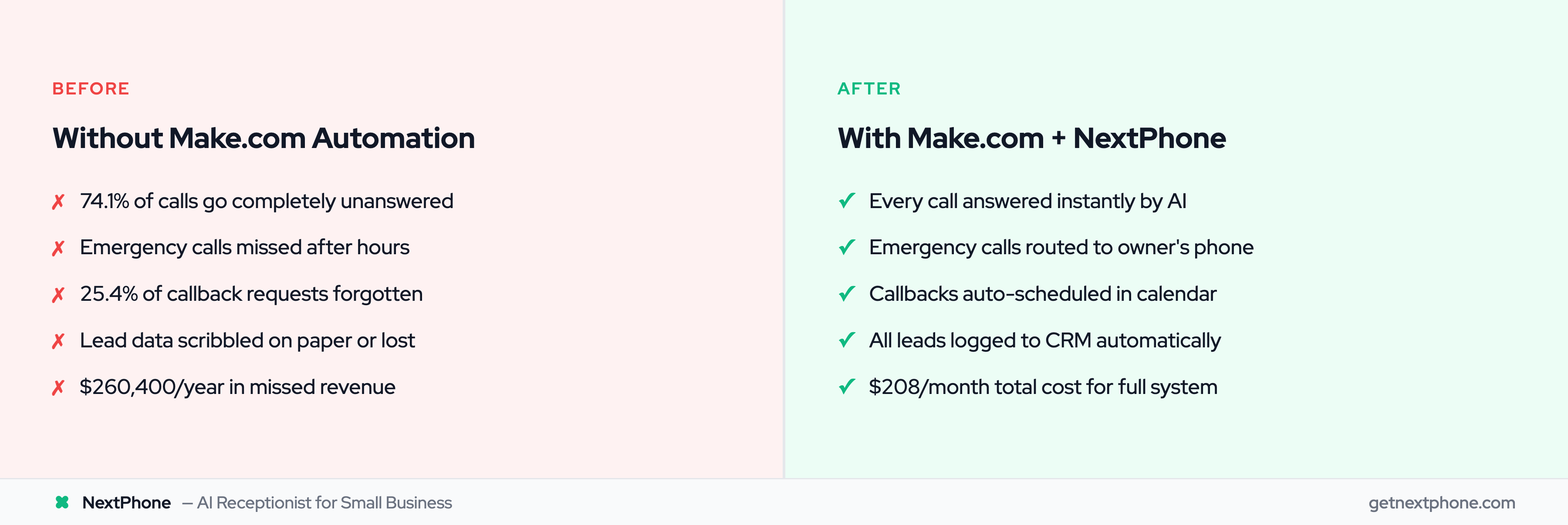
Let's calculate costs for a typical home services contractor:

  • Usage:

  • 42 calls/month (industry average)

  • 150 operations per call (includes AI answer, extract data, router logic, CRM logging, owner notification, callback scheduling)

  • 42 calls — 150 operations = 6,300 operations/month

  • Cost:

  • Make.com Core: $9/month

  • NextPhone pricing: $199/month (unlimited calls)

  • Total: $208/month

  • Return:

  • Lost revenue without automation: 42 calls — 74.1% missed — 20% close rate — $3,500 average job = $21,700/month lost = $260,400/year

  • Recover just 20% of missed calls: 6 jobs/month — $3,500 = $21,000/month revenue

  • Cost: $208/month

  • ROI: 10,000%

Even if you only recover 10% of missed calls (3 jobs/month), that's $10,500/month revenue against $208 cost—a 5,000% ROI.

View complete Make.com pricing plans to see which tier fits your business.

Getting Started with Make.com: Quick Setup Guide

Ready to build your first scenario? Here's how to start.

Sign Up & Choose Your Plan

Sign up for Make.com free—no credit card required. Start with the free plan (1,000 operations/month) to test workflows. You can always upgrade when you outgrow it.

Build Your First Scenario (Template or From Scratch)

Browse 1,000+ templates for common workflows: e-commerce orders, lead generation, AI phone calling integrations.

Or build from scratch:

  1. Click "Create Scenario"
  2. Add your trigger module (webhook from NextPhone, new email, new form submission)
  3. Add action modules (create CRM record, send email, update spreadsheet)
  4. Connect modules visually by clicking connection points
  5. Configure each module (map data fields, set conditions)

Most basic scenarios set up in 15-30 minutes.

Connect Your Apps & Test

Connect apps using OAuth (one-click authorization) or API keys. Make.com handles authentication securely.

Before activating your scenario, test it with real data. Make shows you exactly what data each module receives and sends, making debugging easy.

Activate your scenario, monitor operations usage in the dashboard, and adjust as needed.

Pro tip: Start simple—one trigger, two actions. Get comfortable with the visual builder before adding routers and filters.

How NextPhone Works with Make.com

NextPhone integrates with Make.com through built-in HTTP webhooks—no coding required.

NextPhone's Built-in Webhook Integration

After each call, NextPhone sends structured data to your Make.com scenario via webhook. This triggers your automation immediately: CRM logging, owner notifications, callback scheduling, emergency routing.

NextPhone's webhook integration is point-and-click setup. You generate a webhook URL in Make.com, paste it into NextPhone settings, and you're connected.

What Data NextPhone Sends to Make.com

Every call includes:

  • Caller name and phone number
  • Call summary (AI-generated)
  • Full transcript
  • Recording URL
  • Urgency detected (yes/no)
  • Callback requested (yes/no)
  • Call duration and timestamp

This data powers your automation. Router modules can check for urgency. Filters can catch callback requests. CRM modules can log everything automatically.

Pre-Built Workflow Ideas

  • For contractors:

  • Route emergency calls (pipe burst, power out) to owner's phone immediately

  • Log all calls to HubSpot or Salesforce with complete details

  • Create calendar events for quote requests

  • Send SMS notifications for after-hours calls

  • For any small business:

  • Answer calls 24/7 with AI, capture leads automatically

  • Filter spam calls (7.0% of calls in our data) so you never get robocalls

  • Track callback requests (25.4% of calls) and schedule follow-ups

  • Generate daily/weekly reports on call volume and lead quality

NextPhone handles 45,000+ calls daily across customers, answers in under 5 seconds, and costs $199/month for unlimited calls—93% cheaper than hiring a receptionist at $35,000/year.

Speak with one of our experts

Book a Call

Frequently Asked Questions

Does Make.com have a free plan?

Yes, Make.com offers a permanent free plan with 1,000 operations per month and access to all integrations. You can run 2 active scenarios with no time limit and no credit card required. This is perfect for testing workflows before committing to a paid plan. When you're ready to scale, upgrade to Core ($9/mo) or Pro ($16/mo) for higher operation limits.

Is Make.com better than Zapier?

It depends on your needs. Make.com is better for complex workflows with branching logic (route emergency calls differently than routine calls) and for cost-sensitive users—it's typically 60-70% cheaper for multi-step workflows. Zapier is better for simple linear automations and if you need maximum app integrations (8,000+ vs Make's 2,400+). Make has a steeper learning curve but offers more power and flexibility once you learn the visual builder.

Can Make.com integrate with AI phone systems?

Absolutely. Make.com supports AI phone system integrations including Synthflow, Bland AI, Retell AI, and custom webhooks from platforms like NextPhone. Data flows from your AI receptionist — Make.com webhook trigger — your CRM, calendar, email, SMS, and other business tools. This lets you automate call logging, emergency routing, callback scheduling, and lead notifications without any coding.

What counts as an operation in Make.com pricing?

Each action a module performs = 1 operation. This includes downloading a file, sending an email, creating a database record, or searching for a contact. For example: A workflow with a trigger + 5 action modules = 5 operations per run. Make.com's dashboard shows exact operation usage so you can track consumption and predict costs. Most small businesses with 40-50 calls/month fit easily in the Core plan (10,000 operations/month for $9).

How hard is Make.com to learn?

The visual builder is intuitive, but there's a learning curve—especially for advanced features like routers and filters. Most users build their first basic scenario (trigger + 2-3 actions) in 15-30 minutes. Complex workflows with branching logic take longer to master. Make provides extensive documentation, templates, and video tutorials. It's easier than coding but more complex than Zapier. If you can think through "if this happens, do that," you can build in Make.com.

Can I migrate my Zapier workflows to Make.com?

Yes, but migration isn't automatic—you'll rebuild workflows in Make.com using the visual builder. This is often an opportunity to improve workflows with Make's advanced features (routers, parallel processing, better error handling). Start by listing your current Zaps, identify the most critical ones, and recreate them in Make.com. Run both platforms in parallel during transition to ensure nothing breaks. Many users find their workflows become more efficient in Make.com.

What's the best Make.com plan for a small business?

Start with the free plan (1,000 operations/month) to test workflows and understand your usage. Most small businesses need the Core plan ($9/month, 10,000 operations/month, unlimited scenarios). If you're running 40-50 calls per month through AI phone automation workflows, the Core plan is sufficient. Upgrade to Pro ($16/month) if you need team collaboration features, priority support, or higher operation limits. Check your operation usage after the first month to confirm you're on the right tier.

Stop Missing Calls, Start Automating Workflows

Make.com offers the power and flexibility that simpler platforms can't match for complex workflows. The visual builder makes advanced automation accessible to non-technical small business owners who need more than basic "if this, then that" sequences.

When you connect an AI receptionist to Make.com, you close the loop on missed calls. Every caller gets answered instantly. Every lead gets logged automatically. Emergency calls route to your phone while routine inquiries go to your CRM. Callback requests don't fall through the cracks.

The ROI is undeniable: $208 per month to recover $260,400 per year in lost revenue. Small businesses that automate phone workflows win against bigger competitors because they never miss opportunities.

Start your free 14-day trial of NextPhone today and connect it to Make.com in minutes. Stop missing calls, capture every lead, and automate your entire customer communication workflow.

Related Articles

Yanis Mellata

About NextPhone

NextPhone helps small businesses implement AI-powered phone answering so they never miss another customer call. Our AI receptionist captures leads, qualifies prospects, books meetings, and syncs with your CRM — automatically.