It's 9 PM on a Saturday. A homeowner's AC just died. It's 95 degrees inside, and they have two young kids who can't sleep. They call your number. The home services industry faces mounting pressure: 60% of contractors say labor shortages affect job completion, making every call even more critical. Your phone rings in your pocket while you're at dinner with your family. You glance at it, see it's a work call, and let it go to voicemail. The homeowner waits 30 seconds, then calls the next HVAC contractor. That contractor answers. They book the emergency service call. You just lost $3,500.
This is the norm.
Home services businesses miss around 27% of their inbound calls, with the average loss per missed call estimated at $1,200. Other research suggests the problem is even worse, with 62% of calls going unanswered. But industry research on calls to contractors puts the problem even higher: 74.1% of calls go completely unanswered. That's three out of every four potential customers calling someone else.
If you're using Housecall Pro to manage your field service business, you already have powerful tools for scheduling, dispatching, and invoicing. But when it comes to answering every call (especially after hours and during emergencies), you need more than what comes in the box.
This guide shows you how to integrate NextPhone's AI receptionist with Housecall Pro to capture every lead, book jobs automatically, and stop losing revenue to missed calls.
Housecall Pro's Native Phone Answering Options
Over 200,000 home service professionals use Housecall Pro. Before exploring third-party integrations, let's look at what Housecall Pro offers for phone answering.
HCP Assist (Live Agent Service)
HCP Assist provides 24/7 live agents who are Housecall Pro employees trained specifically for the home services industry. These agents answer your calls, ask qualifying questions, and book jobs directly into your Housecall Pro calendar.
Pros:
- Human touch with real agents
- Industry knowledge and training
- Live booking into your HCP calendar
- Available 24/7, including weekends and holidays
Cons:
- Cost scales with call volume (per-call or per-minute pricing)
- Pricing not publicly listed (contact sales required)
- May have wait times during peak hours
- Estimated cost: $300-600/month for moderate call volume
CSR AI (AI-Powered Receptionist)
CSR AI is Housecall Pro's AI-powered customer service representative that answers calls, books jobs, and schedules appointments 24/7 inside your Housecall Pro account.
Pros:
- AI-powered, so it's always available
- Integrated directly with HCP platform
- More affordable than live agents
- No wait times
Cons:
- Limited to Housecall Pro ecosystem
- Less customizable than third-party AI solutions
- May struggle with complex or unusual questions
- Specific pricing not publicly disclosed
Voice (VoIP Phone System)
Voice is Housecall Pro's business phone system built on Twilio infrastructure. It lets you manage calls, texts, and customer information through the HCP platform.
Pros:
- Integrated with HCP for seamless data flow
- Manage calls and texts in one place
- Built for field service businesses
Cons:
- Doesn't answer calls automatically (you still need to pick up)
- User-reported reliability issues (one reviewer lost $20K in 30 days due to a VoIP bug that took weeks to resolve)
- Add-on cost makes Housecall Pro more expensive
- Basic feature set compared to specialized phone systems
| Feature | HCP Assist | CSR AI | Voice |
|---|
| Availability | 24/7 | 24/7 | Business hours only |
| Cost Structure | Per-call/minute | Add-on or included in plan | Monthly add-on fee |
| Answers Automatically | Yes | Yes | No (you still answer) |
| Integration | Native HCP | Native HCP | Native HCP |
| Best For | Businesses wanting human touch | Small teams needing basic AI | Teams needing phone system only |
All three options have value, but they also have limitations, especially when it comes to cost at scale, reliability, and advanced features like emergency detection.
Why Integrate a Third-Party AI Receptionist

Here's the thing: Housecall Pro is excellent field service management software. Competitors like ServiceM8 manage over $22 billion in jobs worldwide, showing the scale of this industry. But phone answering isn't its core strength.
Limitations of Native Solutions
62% of home service companies say finding clients is their biggest challenge, and 94% are more likely to book if online scheduling is available. This makes phone answering even more critical.
HCP Assist works well if you want human agents, but the per-call pricing model becomes expensive fast. A plumbing business receiving 60 calls per month during peak season could pay $500-800/month just for answering services. That's 3-4X the cost of unlimited AI answering.
CSR AI is more affordable, but it's limited to Housecall Pro's ecosystem. You can't deeply customize call flows, add multi-language support, or integrate with other tools outside HCP. If you want advanced features like sentiment analysis or custom routing logic, you're out of luck.
Voice doesn't solve the core problem: it's just a phone system. You still need to physically answer calls. If you're on a roof installing an AC unit or under a sink fixing a leak, you can't answer, and calls still go to voicemail.
The Reliability Question
Multiple user reviews on Capterra mention integration syncing issues, particularly with QuickBooks and Google Calendar. One reviewer reported losing $20,000 in business over 30 days due to a Voice system bug that Housecall Pro support couldn't fix quickly.
When your revenue depends on answering every call, reliability isn't optional. 72% of homeowners say they'd pay 10% more for a contractor with a better customer service reputation.
Cost at Scale
For businesses taking 50+ calls per month, unlimited pricing makes more sense than per-call fees. During busy seasons (summer for HVAC, winter for heating and plumbing), call volume can double or triple. Per-call pricing means your busiest months (when you're making the most money) are also when your answering service costs spike.
When Third-Party Integration Makes Sense
Industry trends for 2025 show continued growth in home services demand, making efficient call handling essential for capturing market share.
Consider a third-party AI receptionist integrated with Housecall Pro if you:
- Receive more than 50 calls per month
- Need after-hours emergency call routing
- Want advanced AI features like urgency detection and custom workflows
- Need transparent, unlimited pricing regardless of call volume
- Want to stay on a lower Housecall Pro plan (not upgrade to MAX just for API access)
- Need a reliability guarantee with proven uptime
You're not replacing Housecall Pro. You're enhancing it. 77% of home service pros expect to grow in 2025, with 40% expecting 10%+ growth.
How NextPhone Integrates with Housecall Pro
The field service management market is projected to grow from $5.1 billion in 2025 to $9.17 billion by 2030, at a 12.5% CAGR. NextPhone works alongside Housecall Pro by receiving your business calls, qualifying leads with AI, and automatically syncing customer data and job bookings into your HCP account.
Integration Architecture Overview
Here's how it works:
- Customer calls your business number (either forwarded to NextPhone or using a NextPhone number)
- NextPhone AI answers in under 2 seconds
- AI asks qualifying questions: name, phone, email, service needed, urgency level, preferred appointment time
- NextPhone sends structured data to Housecall Pro via webhook or API
- Housecall Pro creates customer profile and books job automatically
- Customer receives SMS confirmation with appointment details and HCP customer portal link
- You get email notification with call summary and transcript
Everything happens automatically. No manual data entry. No missed leads. AI and mobility can increase field service productivity by 30-40%.
Webhook-Based Data Sync
After each call, NextPhone triggers a webhook containing all the information collected during the conversation:
- Caller name, phone number, and email
- Service type requested (AC repair, heater install, pipe leak, drain cleaning, etc.)
- Urgency level (routine, urgent, emergency)
- Preferred appointment time
- Service address
- Call transcript and recording link
- Any notes or special requests
This data flows into Housecall Pro, where it creates a new customer record (if the caller is new) or updates an existing record, then books a job based on availability.
API Endpoints for Job Creation
For Housecall Pro MAX plan users, NextPhone can integrate directly via the Housecall Pro API. This provides the fastest, most seamless integration:
- Customer records are created instantly
- Jobs are booked based on real-time calendar availability
- Call notes and transcripts are attached to the job
- Jobs are tagged with service type and urgency level
- Follow-up tasks can be created automatically
The API integration ensures zero delay between the call ending and the job appearing in your Housecall Pro dashboard.
No MAX Plan Required
Here's the good news: You don't need the expensive MAX plan to integrate NextPhone with Housecall Pro.
While the direct API is only available on MAX plans, you have two other options:
Option 1: Zapier Integration (Works on All Plans)
Zapier connects NextPhone to Housecall Pro without requiring API access. Create a "Zap" that triggers when NextPhone completes a call, then automatically creates a customer and books a job in Housecall Pro.
Setup takes 15-30 minutes and requires no coding. Zapier's free tier supports up to 100 tasks per month, which works for many small businesses. Paid plans start at $20/month for higher volume.
Option 2: Email Forwarding Workflow
For businesses on basic Housecall Pro plans, NextPhone can email call summaries to a designated HCP email address. While not as automated as webhooks or Zapier, this ensures you never lose lead information.
You get every detail from the call in your inbox and can manually add it to Housecall Pro in under 30 seconds. Still faster than calling people back hours later, or never.
Key Features for HVAC & Plumbing Businesses
HVAC employment is projected to grow 8% from 2024-2034, adding 425,200 jobs. NextPhone's integration with Housecall Pro includes features specifically valuable for HVAC contractors and plumbing businesses.
Emergency Call Detection and Routing
84% of consumers contact an HVAC company after searching online, and when they call, they expect immediate answers.
Here's something that matters: in our data, urgent calls with language like "emergency," "urgent," or "ASAP" rank among the top reasons people call. For HVAC and plumbing businesses, these emergency calls are where the money is: they average $4,200 compared to $3,500 for routine work. The home services market is valued at over $657 billion, making every captured lead significant.
NextPhone's AI listens for urgency keywords specific to your trade:
HVAC emergencies: HVAC industry statistics show strong demand for responsive service.
- "No cooling" or "no AC"
- "95 degrees inside"
- "Heater not working" in winter
- "Furnace won't start"
- "No heat"
Plumbing emergencies: The plumbing industry continues to grow, making responsive service essential.
- "Burst pipe"
- "Water everywhere" or "flooding"
- "Sewage backup"
- "No water"
- "Water heater leaking"
When detected, the AI routes the call immediately to your on-call technician's phone. You can configure routing rules by time of day, day of week, and technician availability. The customer gets a live human for their emergency, and you capture a high-value service call instead of losing it to voicemail.
After-Hours Job Booking
Most field service calls happen outside standard 9-5 business hours. Homeowners call when they get home from work, between 6 PM and 9 PM on weekdays and all day on weekends.
NextPhone answers 24/7, including holidays. When someone calls at 8 PM on Sunday needing a water heater quote, the AI:
- Collects all relevant details (current heater age, size, gas vs electric, location)
- Checks your Housecall Pro calendar for availability
- Offers the next available appointment slots
- Books the appointment when the customer confirms
- Sends SMS confirmation with your business info and appointment details
- Creates the job in HCP so it's waiting for you Monday morning
The customer gets instant service instead of waiting hours for a callback. You wake up Monday to a booked calendar. No leads lost to competitors who answered faster.
Service Type Classification
Not all calls are created equal. A homeowner calling about a routine maintenance check is different from someone with a flooding basement.
NextPhone's AI asks qualifying questions to determine service type:
- "What type of service do you need?"
- "Is this a new installation, repair, or maintenance?"
- "What seems to be the problem?"
Based on the answers, jobs are tagged in Housecall Pro with the specific service type: AC repair, heater installation, pipe leak, drain cleaning, water heater replacement, etc.
This helps with dispatching the right technician (send your HVAC specialist to HVAC jobs, your master plumber to complex plumbing work) and ensures accurate pricing estimates are given upfront.
Technician Availability Sync
Nobody wants double-booked jobs or appointments scheduled when your techs are already committed.
NextPhone checks your Housecall Pro calendar in real-time before offering appointment slots to customers. It sees:
- Which technicians are available
- Existing appointments and blocked-off time
- Technician time off and vacations
- Travel time between jobs
- Preferred working hours
When a customer asks for an appointment "as soon as possible," the AI offers the next genuinely available slot, not a time that forces you to reschedule other jobs or work late.
Follow-Up Automation
After every call, NextPhone automatically:
- Sends SMS to the customer with booking confirmation, technician name, arrival window, and a link to the HCP customer portal
- Sends email notification to you with call summary, transcript, and link to recording
- Creates the customer record in Housecall Pro with all collected information
- Books the job with proper service type, urgency level, and notes
- Attaches the call transcript to the job for reference
Customers can reschedule or add notes via the HCP portal link. You can review call quality and verify details before the appointment. Everything is documented and traceable.
Pricing Comparison & ROI
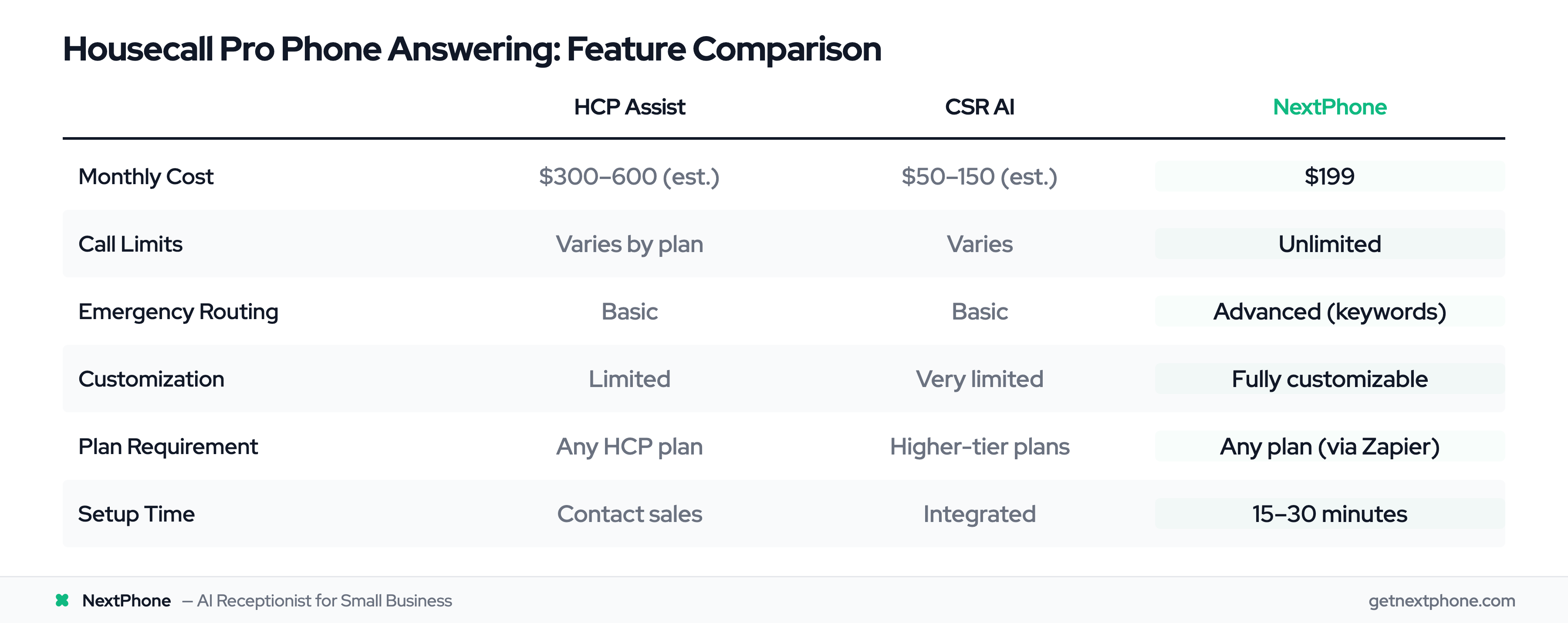
Let's talk numbers.
HCP Assist Pricing
Housecall Pro doesn't list HCP Assist pricing publicly. Based on competitor analysis and typical answering service rates, expect:
- $300-600/month for moderate call volume (40-60 calls)
- Per-call or per-minute pricing structure
- Costs scale with volume (problem during peak seasons)
- Additional charges for after-hours or weekend coverage in some cases
CSR AI Pricing
CSR AI pricing isn't publicly disclosed either. It's likely:
- Included in higher-tier Housecall Pro plans
- Or available as a monthly add-on fee ($50-150/month range estimated)
- More affordable than HCP Assist but less flexible
NextPhone Pricing
NextPhone is transparent:
- $199/month for unlimited calls
- No per-call fees
- No setup fees
- No contracts (cancel anytime)
Includes: AI answering, call transcripts, recordings, webhooks, API access, SMS notifications, email notifications, emergency routing, and integration support.
Works with any Housecall Pro plan via Zapier (all plans) or direct API (MAX plan only).
ROI Calculation: What You're Losing vs What You're Spending
Let's use real data to calculate what missed calls are costing you.
Industry baseline:
- Average contractor receives 42 calls per month
- Miss rate: 74.1% (from industry research)
- Missed calls: 42 × 74.1% = 31 calls per month
- HVAC lead costs range from $25 to $300+, with an average of $105
Revenue loss:
- Conversion rate: 20% (conservative estimate)
- Average job value: $3,500
- Lost jobs per month: 31 × 20% = 6.2 jobs
- Monthly revenue loss: 6.2 × $3,500 = $21,700
- Annual revenue loss: $260,400
NextPhone investment:
- Monthly cost: $199
- Annual cost: $2,388
- Capture just 1.5 extra jobs per month to break even
- You're currently missing 31 calls per month
ROI: Recovering $21,700/month in revenue for a $199 investment = 10,800% ROI. Research shows a 46% lead conversion rate for phone calls in home services, with 37% converting during the call itself.
Emergency Call Economics
Emergency calls are even more valuable. Our data shows:
- Urgent calls rank among the top reasons people call
- For a 42-call/month business: several urgent calls per month
- Emergency job average: $4,200
- Missing 1 emergency call per week = $16,800/month lost
NextPhone's emergency routing pays for itself by capturing just 1 extra emergency call every 2 months. See 40+ home services marketing statistics for more insights on call conversion.
| Feature | HCP Assist | CSR AI | NextPhone |
|---|
| Monthly Cost | $300-600 (est.) | $50-150 (est.) | $199 |
| Call Limits | Varies by plan | Varies | Unlimited |
| Integration Method | Native HCP | Native HCP | Webhook/API/Zapier |
| Emergency Routing | Basic | Basic | Advanced with keywords |
| After-Hours Coverage | 24/7 | 24/7 | 24/7 |
| Customization | Limited | Very limited | Fully customizable |
| Plan Requirement | Any HCP plan | Higher-tier plans | Any plan (via Zapier) |
| Setup Time | Contact sales | Integrated | 15-30 minutes |
Setting Up the Integration
Getting NextPhone connected to Housecall Pro takes under an hour.
For MAX Plan Users (Direct API Integration)
If you're on Housecall Pro MAX, use the direct API for the fastest integration:
- Get your API key: Log into Housecall Pro → Settings → Integrations → API → Generate API key
- Configure NextPhone: In your NextPhone dashboard → Integrations → Housecall Pro
- Enter API credentials: Paste your HCP API key
- Map data fields: Select which fields to sync (name, phone, email, service type, urgency, notes, address)
- Configure webhooks: Enter your HCP webhook endpoint URL (provided by HCP)
- Set routing rules: Configure when calls should route to humans vs be handled by AI
- Test: Make a test call, verify customer record is created in HCP, check that job is booked correctly
Total setup time: 30-45 minutes.
For All Other Plans (Zapier Integration)
If you're on Basic, Essentials, or Professional plans, use Zapier:
- Create Zapier account: Free tier works for basic automation (up to 100 tasks/month)
- Create new Zap: Trigger = NextPhone (new call completed), Action = Housecall Pro (create customer and job)
- Connect NextPhone: Use API key from NextPhone dashboard (Settings → Integrations → Zapier)
- Connect Housecall Pro: OAuth login with your HCP credentials
- Map fields: NextPhone call data → HCP customer/job fields (name → customer name, phone → phone number, service type → job type, etc.)
- Add filters: Only create jobs for calls longer than 60 seconds (excludes spam and wrong numbers)
- Test Zap: Run test with sample data, verify it creates customer and job in HCP
- Turn on Zap: Activate automation
Total setup time: 15-30 minutes.
Configuration Best Practices
In Housecall Pro:
- Create custom fields for: call urgency level, call date/time, transcript link
- Set up job templates for common services (AC repair, heater install, pipe leak, drain cleaning, water heater replacement)
- Configure your calendar availability and technician schedules
In NextPhone:
- Add your services list, pricing information, and service areas to the AI knowledge base
- Configure business hours to match HCP availability
- Set up custom SMS templates that include HCP booking portal link
- Create routing rules for emergencies (who gets called, what hours, fallback numbers)
- Upload FAQs (common questions customers ask)
Testing Your Integration
Before going live:
- Make a test call to your number
- Verify AI answers and asks correct questions
- Check that customer record is created in HCP with correct information
- Confirm job is booked at requested time (or next available)
- Verify SMS/email confirmations are sent with correct details
- Review call transcript in both NextPhone and HCP
- Test emergency routing (use urgency keywords to trigger transfer)
Most integrations work perfectly on the first try. The entire testing process takes 10-15 minutes.
Real-World Use Cases
Here's what this looks like in practice.
Emergency HVAC Call Routing
Scenario: Saturday night, 9 PM. A homeowner's AC fails. It's 95 degrees inside. They have two young children who can't sleep. They're panicking.
They call your number. NextPhone answers in 3 seconds.
AI: "Thank you for calling [Your Business]. How can I help you today?"
Caller: "Our air conditioning just stopped working and it's so hot inside. We have two young kids and it's 95 degrees. This is an emergency."
The AI detects urgency keywords: "emergency," "95 degrees," "stopped working."
AI: "I understand this is urgent. Let me get you help right away. What's your address?"
The AI collects the address, asks about the AC unit (make, model, when it stopped working), then says:
AI: "I'm transferring you to our on-call technician right now. Please hold."
The call transfers to your emergency line. Your on-call tech answers, already seeing the customer details on their phone. They confirm they can be there within 2 hours.
Result: You captured a $4,200 emergency service call instead of losing it to voicemail. The customer is thrilled with the fast response and leaves a 5-star review. Job booked and paid within 24 hours.
After-Hours Plumbing Estimate Request
Scenario: Tuesday, 7 PM. A homeowner needs a water heater replacement quote. You're at home with your family and don't want to answer work calls.
They call your number. NextPhone answers.
AI: "Thank you for calling [Your Business]. How can I help?"
Caller: "Hi, my water heater is 15 years old and starting to leak. I think I need a replacement. Can I get a quote?"
AI: "I can definitely help with that. Let me ask a few questions. Is it a gas or electric water heater?"
The AI collects: gas vs electric, tank size (gallons), current heater age, installation location (garage, basement, closet), timeline (urgent vs routine).
AI: "Perfect. I can schedule an estimate for you. I have availability Thursday at 10 AM or Friday at 2 PM. Which works better?"
Caller: "Thursday at 10 works great."
AI: "Excellent. I'm booking that for you now. You'll receive a text confirmation with our technician's name and details. Is this the best number to reach you?"
The AI confirms phone number and email, books the appointment in Housecall Pro, and sends SMS confirmation with customer portal link.
Result: You review the call summary Wednesday morning. Show up Thursday at 10 AM with pricing info ready. Customer is impressed with the professional process. You close a $2,800 water heater installation. The customer never knew they talked to AI. They just experienced great service.
Summer HVAC Peak Season Volume Handling
Scenario: July. Temperatures hit 100+ degrees. Your phone is ringing off the hook. Normally you get 5 calls per day. Now you're getting 15.
You and your two techs are booked solid on jobs. You physically can't answer 90% of calls.
Without NextPhone: 13 calls per day go to voicemail. You lose $16,000/week in jobs. Competitors capture your overflow.
With NextPhone: AI handles the overflow automatically. Out of 15 calls:
- 8 jobs booked for next available slots (tomorrow and Friday)
- 3 true emergencies routed to on-call tech's phone (captured immediately)
- 2 non-urgent callers sent "We'll call you back" SMS with callback scheduled
- 2 spam/robocalls filtered out (AI hangs up)
Result: You capture $28,000 in jobs that would've gone to competitors. Your calendar is full for the next week. You're working the same number of hours but making 3X the revenue. NextPhone cost: $199. Revenue captured: $28,000. ROI: 14,000%.
Frequently Asked Questions
Do I need the Housecall Pro MAX plan to integrate with NextPhone?
No, you don't need the MAX plan. MAX plan users can use direct API integration (fastest and most seamless), but users on Basic, Essentials, or Professional plans can use Zapier integration, which works on all HCP plans. Zapier connects NextPhone to Housecall Pro automatically and accomplishes the same goal: getting call data into Housecall Pro and booking jobs. Setup takes 15-30 minutes with no coding required. For businesses not wanting to use Zapier, email forwarding is another option where NextPhone sends call summaries to your email for manual entry into HCP.
What happens if the AI doesn't know how to answer a question?
NextPhone AI is trained on your specific business: services offered, pricing, availability, service areas, and common FAQs. For routine questions (hours, pricing, service areas, appointment availability), the AI answers directly with 85-95% accuracy. For complex or unusual questions it hasn't been trained on, the AI says "Let me transfer you to someone who can help better" and routes the call to your phone. You configure the fallback behavior: transfer to human, take a detailed message, or schedule a callback. The hybrid approach works best: AI handles 80-90% of calls autonomously, and humans handle the complex 10-20%.
Can NextPhone detect plumbing or HVAC emergencies automatically?
Yes. The AI listens for urgency keywords specific to your trade. For HVAC: "no cooling," "no heat," "AC out," "furnace not working," "95 degrees inside," "freezing cold." For plumbing: "burst pipe," "flooding," "water everywhere," "sewage backup," "no water," "water heater leaking." When urgency is detected, the AI routes the call immediately to your on-call technician or emergency line. You configure the routing rules: who gets emergency calls, what hours, which phone numbers, fallback options if first number doesn't answer. In our data on calls to home services businesses, urgent calls rank among the top reasons people call, and true emergencies requiring same-day service are a recurring reason too.
How accurate is AI at booking jobs in Housecall Pro?
Modern AI achieves 85-95% accuracy for routine booking tasks when properly trained on your business. NextPhone checks your HCP calendar in real-time before offering appointment slots to customers, ensuring it doesn't double-book or suggest unavailable times. During the call, it collects all required information: customer name, phone, email, service address, service type, and preferred appointment time. It then creates the customer record and books the job in HCP automatically. You can review and adjust bookings in your HCP dashboard before the appointment if needed. All calls are transcribed, so you can verify details if something seems off. The safety net of human review combined with AI efficiency gives you the best of both worlds.
What if I'm already using HCP Assist or CSR AI?
You can use NextPhone alongside Housecall Pro's native solutions. Many businesses set up hybrid systems: NextPhone handles the primary line for routine calls and after-hours coverage, while HCP Assist handles overflow during peak times or specific situations requiring human judgment. Or use NextPhone for high-volume routine calls (saving money on per-call fees) and HCP Assist for complex situations requiring a human touch. It's not either/or. It can be both. Many businesses start with HCP Assist, then add NextPhone for cost savings once call volume exceeds 50 per month. NextPhone's unlimited pricing at $199/month makes it cost-effective for high-volume businesses where per-call fees would add up quickly.
How long does it take to set up the integration?
Zapier integration takes 15-30 minutes with no coding required. Direct API integration (for MAX plan users) takes 30-45 minutes and requires getting your API key from HCP. Most of the setup time is configuring your business information: services offered, pricing, service areas, routing rules, and call handling preferences. Testing the integration takes another 10-15 minutes (making test calls and verifying data flows correctly into Housecall Pro). Total time from start to finish: under 1 hour for most businesses. NextPhone support can help if you get stuck or prefer assisted setup.
Will this work with my existing Housecall Pro workflows and integrations?
Yes. NextPhone adds to your existing setup without replacing anything. Your QuickBooks integration, Google Calendar sync, and other HCP integrations continue working normally. NextPhone simply creates customer records and books jobs in Housecall Pro, just like manual entry or using HCP's native call answering options. Once the data is in HCP, it syncs to QuickBooks, Google Calendar, and other connected tools exactly as it normally would. There are no conflicts with existing workflows. Bonus: NextPhone can also send data directly to QuickBooks or other systems via separate webhooks if you want redundancy or need to bypass HCP for certain data flows.
Stop Losing Revenue to Missed Calls
Housecall Pro is powerful field service software, but phone answering is a gap. The native options (HCP Assist, CSR AI, and Voice) each have limitations in cost, reliability, or customization.
Meanwhile, you're missing calls. According to Housecall Pro's own research, home service businesses miss 27% of inbound calls. Other industry research shows the problem is worse: 74.1% of calls go unanswered. At $1,200 per missed call, the typical contractor loses $260,400 per year.
NextPhone integrates seamlessly with Housecall Pro via webhooks, API, or Zapier, working on any HCP plan, not just MAX. For $199/month with unlimited calls, you get 24/7 AI phone answering, emergency routing, automatic job booking, customer data sync, and follow-up automation.
HVAC and plumbing businesses benefit most. The AI detects emergencies (burst pipes, AC failures, no heat), routes urgent calls to your phone immediately, and books routine jobs automatically while you're working. After-hours calls get answered instead of going to voicemail. Peak season volume gets handled without hiring staff.
Setup takes under an hour. ROI is immediate: Capture just 1-2 extra jobs per month to break even. You're currently missing 31.
Ready to stop losing revenue to missed calls? Integrate NextPhone with Housecall Pro today. Start your free 7-day trial.
