The $177,840 Problem Real Estate Teams Don't See
Picture this: You've got five agents on your team. One's showing a condo in Beverly Hills. Another's at a listing appointment. Two more are driving between open houses. The fifth is finally taking a lunch break after a 12-hour day.
Your business line rings. A buyer wants to see a property this weekend. The call goes to voicemail. They call the next agent. You just lost a potential $12,000 commission.
Here's the brutal reality industry research shows: 74.1% of calls to home services businesses go completely unanswered. That's three out of every four potential customers calling someone else. Real estate lead generation statistics show speed-to-lead is everything: MIT research found that contacting leads within 5 minutes yields 21x better conversion.
For a real estate team with five agents, each receiving about 40 calls per month, the math is devastating. That's 200 calls monthly, with 148 going unanswered. If just 10% of those convert at a $12,000 average commission, you're losing $177,840 per year in revenue that's walking straight to your competitors.
Follow Up Boss is the top real estate CRM in the country: 41 of the top 50 teams use it for lead management and routing. But here's what it doesn't do: answer phone calls automatically. Your sophisticated lead flow rules, your Round Robin assignments, your geographic routing: none of it helps when the phone rings and no human picks up.
This is where AI integration changes everything. NextPhone is an AI virtual receptionist that captures every buyer and seller call, qualifies leads automatically, and routes them through Follow Up Boss's powerful assignment engine, without hiring a full-time receptionist.
Follow Up Boss + NextPhone: Total Cost Comparison
Option 1: Follow Up Boss + Manual Call Handling
- Follow Up Boss Pro plan: $416/month (for up to 10 agents, annual billing)
- Follow Up Boss Dialer add-on: $33/user × 10 agents = $330/month Total: $746/month
What you get: Great CRM and lead routing for web leads. Outbound dialing capability. But no automatic inbound answering; agents still miss 74% of calls.
Option 2: Follow Up Boss + NextPhone
- Follow Up Boss Pro plan: $416/month (same as above)
- NextPhone: $199/month (covers entire team, unlimited calls) Total: $615/month
What you get: Everything from Option 1, PLUS 24/7 AI answering, automatic qualification, instant Follow Up Boss contact creation, and intelligent routing for phone calls.
You Actually Save Money
NextPhone at $199/month costs $131 less per month than the Follow Up Boss Dialer for 10 agents ($330). The Dialer is for outbound calls only. It doesn't answer inbound calls or create contacts automatically when buyers and sellers call you. NextPhone gives you inbound AI answering for less money than the tool that only handles outbound. Total savings: $131/month or $1,572/year while getting better inbound coverage.
What Is Follow Up Boss (And Why Top Teams Use It)
Follow Up Boss is a real estate-specific CRM built for agents, teams, and brokerages who need to manage leads from dozens of sources. Zillow Group acquired it in December 2023, which tells you everything about its market position.
41 of the top 50 real estate teams in the United States use Follow Up Boss. Why? Because it's designed specifically for real estate workflows, not generic sales pipelines. AI-powered CRMs show 67% improvement in lead conversion.
The platform integrates with over 200 lead sources: Zillow, Realtor.com, Homes.com, Ylopo, BoldTrail, kvCORE, and virtually every lead generation tool real estate teams use. When a lead comes in from a Facebook ad, a Zillow inquiry, or a website form, Follow Up Boss captures it, applies your routing rules, and assigns it to the right agent automatically.
Core features include unlimited calls, texts, and emails (no per-message pricing), automated follow-up sequences, team collaboration tools, performance tracking, and mobile apps for iOS and Android. Everything real estate teams need to manage their pipeline.
Follow Up Boss Pricing
Follow Up Boss offers three pricing tiers starting at $58/month per user (Grow), $416/month for up to 10 users (Pro), and $833/month for 30 users (Platform). Add-ons include a Dialer at $33/user/month for outbound calling.
The Lead Routing Engine
Follow Up Boss's lead distribution system supports Automatic Assignment, Round Robin, First to Claim, and Advanced Rules based on tags, price range, geography, and more. It's sophisticated lead management, but there's a massive hole in the system.
Why Real Estate Teams Miss Three Out of Four Calls
Follow Up Boss routes web leads brilliantly. But phone calls? Those still require a human to pick up the phone. And real estate agents are busy people who physically cannot answer every call.
Agents Are Physically Unavailable
When you're showing a $2.5 million home to serious buyers, you can't stop mid-tour to take a call. When you're presenting a listing proposal to a potential seller, answering your phone would be unprofessional. When you're driving between appointments (which is half your day), you shouldn't be on the phone at all.
Real estate agents spend their days:
- Showing properties to buyers (can't interrupt the showing)
- At listing appointments with sellers (can't take calls during pitch)
- Driving between showings (safety and focus)
- Running open houses (talking to attendees)
- At inspections, appraisals, and closings (formal settings where phones stay silent)
You're physically busy doing the work that generates commissions. That's when the phone rings.
After-Hours Is When Buyers Actually Call
A large share of calls to small businesses arrive outside traditional 9-5 hours. AI increases lead conversions by up to 30% precisely because it captures these off-hours opportunities. For real estate, this is even more pronounced.
Buyers browse listings at night after work. They find a property they love at 8 PM and want to ask questions or schedule a showing. Sellers get home from their jobs at 6 PM and start researching agents to list their home. Weekends are when people tour properties and have follow-up questions.
You need personal time. You can't answer calls 24/7. But buyers and sellers don't care about your schedule. They're calling when it's convenient for them.
Multi-Agent Teams Have Coordination Problems
Even with Follow Up Boss's routing rules set up perfectly for web leads, phone calls create chaos. A buyer calls your main business line asking about a property in a specific neighborhood. Who should take it?
- Does Agent A cover that zip code, or Agent B?
- Is this a buyer or seller inquiry (different specialists)?
- Is it new construction or resale (different expertise)?
- Should it go to the agent who listed that property, or the on-call buyer's agent?
Without automatic answering and routing, these calls sit in voicemail while you manually figure out who should follow up. By then, the buyer has already scheduled a showing with a competitor who answered.
The Follow Up Boss Dialer Doesn't Solve This
Follow Up Boss offers a Dialer add-on at $33/user/month. But that's for outbound calling: making calls to leads in your database. It doesn't answer inbound calls for you.
When a buyer calls your number, the Dialer does nothing. The call still goes to a human's phone (or voicemail if they don't answer). And when that call is missed, nothing gets logged in Follow Up Boss. No contact created, no lead flow rules triggered, no automated follow-up sequence started.
The lead is just... gone.
The Revenue Impact Is Staggering
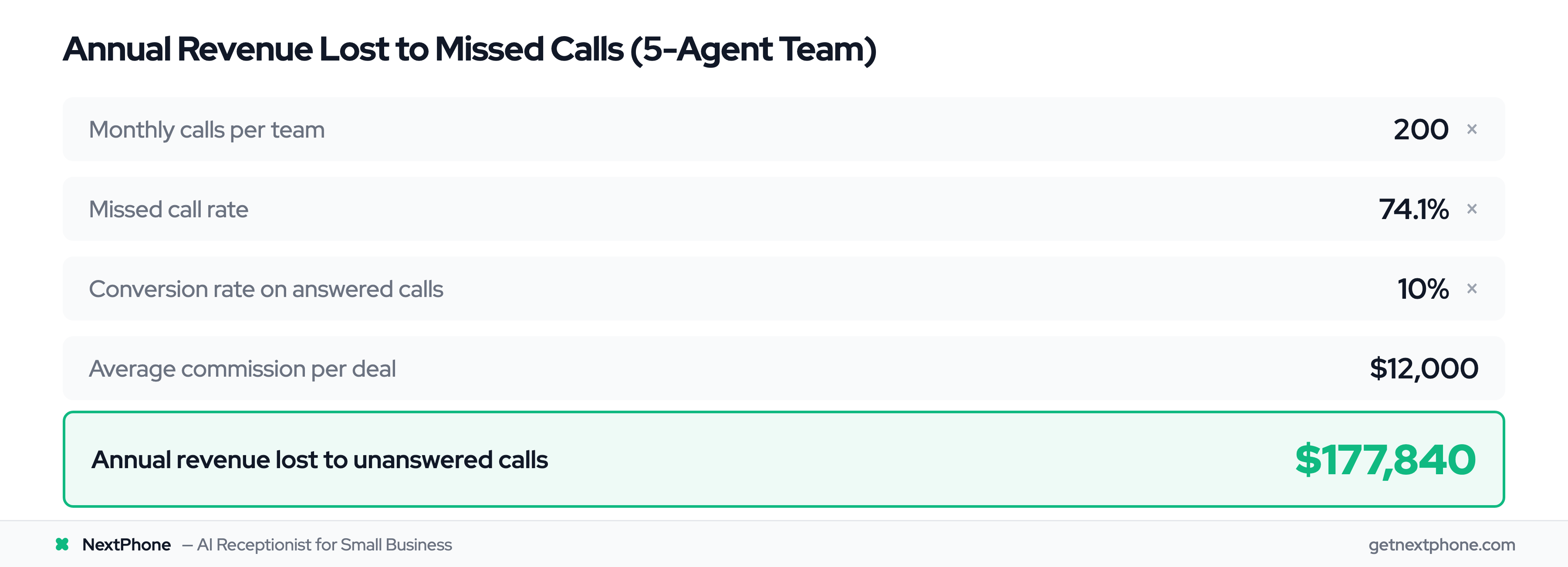
Let's do the math for a 5-agent team where each agent gets about 40 calls per month:
- 200 calls per month total
- 74.1% missed = 148 unanswered calls per month
- 10% conversion rate = 14.8 potential deals lost per year
- Average commission: $12,000 Total lost: $177,840 per year
That's a six-figure revenue leak that most teams don't even know exists because missed calls don't show up in your CRM reports.
A real estate agent we talked to said: "I didn't realize how many buyer calls we were missing while we were out showing properties. I just assumed if someone really wanted to work with us, they'd leave a voicemail. Turns out they just called the next agent."
How the Follow Up Boss + NextPhone Integration Works
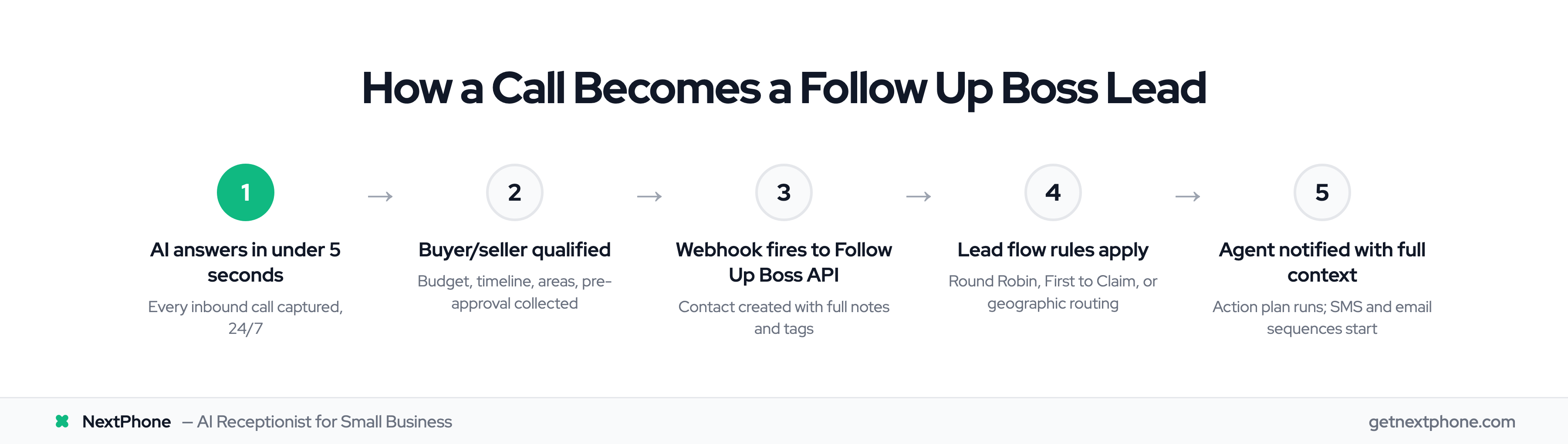
The integration uses Follow Up Boss's API to create contacts automatically when AI answers calls, following the same principles outlined in our CRM phone integration guide. It works with your existing lead flow system, triggering the same routing rules you've already configured for web leads.
The Integration Architecture
NextPhone sends data to Follow Up Boss via HTTP webhook. When the AI answers a call and qualifies the lead, it makes a POST request to the Follow Up Boss API endpoint, creating a new contact with all the information collected during the conversation.
This triggers your Follow Up Boss lead flow rules automatically, just like a web lead from Zillow or Realtor.com would. The contact gets assigned via Round Robin, First to Claim, or Automatic Assignment based on your settings. Action plans run. SMS and email sequences start. Your agents get notified.
The only difference is the lead source shows as "NextPhone AI Call" instead of "Zillow" or "Website."
Real Estate Call Flow: Buyer Inquiry Example
Here's what happens when a buyer calls about a property:
Call comes in at 7:30 PM. All your agents are off-duty. AI answers in under 2 seconds.
AI qualifies the buyer:
- "Are you looking to buy or sell?"
- "What's your budget range?"
- "Which areas are you interested in?"
- "What's your timeline to move?"
- "Are you working with an agent already?"
- "Have you been pre-approved for a mortgage?"
The conversation is natural. The AI doesn't sound like a robot running through a checklist. It adapts to how the buyer responds, asks follow-up questions, and provides helpful information about your team.
Webhook triggers immediately. While still on the call (or right after), NextPhone sends all collected data to the Follow Up Boss API.
Contact created in Follow Up Boss with:
- Name, email, phone number
- Lead source: "NextPhone AI Call"
- Lead type: "Buyer"
- Custom fields: Budget range, preferred areas, timeline, pre-approval status
- Tags: "ai-call", "buyer", urgency level
- Notes: Full conversation summary with qualification details
Your lead flow rules apply. If you have Round Robin set for buyer leads, the next agent in rotation gets assigned. If you route by geography, it goes to whoever covers the zip codes the buyer mentioned. If you use First to Claim, all buyer's agents get a push notification to compete for the lead.
Action plan runs automatically. Your "New Buyer Lead" sequence starts: welcome SMS sent, introduction email delivered, tasks created for the assigned agent.
Agent follows up first thing in the morning with complete context about the buyer's needs, budget, timeline, and areas of interest. The buyer gets a response within 12 hours even though they called at 7:30 PM.
Your competitor who missed the call? The buyer never heard back and already scheduled three showings with your agent.
Showing Coordination Workflow
When a buyer calls about a specific property, the AI handles it differently:
Buyer: "I saw the listing for 123 Oak Street. Is it still available? Can I see it this weekend?"
AI captures:
- Property address (123 Oak Street) or MLS number if mentioned
- Preferred showing time (this weekend)
- Buyer contact info (name, phone, email)
- Any specific questions about the property
Webhook creates Follow Up Boss contact with a "showing-request" tag.
Your routing rules assign it to the listing agent or the agent who covers that territory.
Agent gets notified immediately with all the details needed to confirm the showing.
No more voicemails that say "Hey, I want to see a house on Oak Street, call me back" with no details about which property, what time, or how serious the buyer is.
The Webhook Template
Here's what the actual integration looks like behind the scenes:
POST https://api.followupboss.com/v1/people

Headers:
{
  "X-API-Key": "YOUR_FUB_API_KEY",
  "Content-Type": "application/json"
}

Body:
{
  "firstName": "[first_name]",
  "lastName": "[last_name]",
  "emails": [{"value": "[email]"}],
  "phones": [{"value": "[caller_number]", "type": "Mobile"}],
  "source": "NextPhone AI Call",
  "leadType": "[buyer_or_seller]",
  "notes": "Budget: [budget_range] | Timeline: [timeline] | Areas: [preferred_areas] | Pre-approved: [pre_approved] | Call transcript: [transcript]",
  "tags": ["ai-call", "[buyer_or_seller]", "[urgency_level]"],
  "assignedTo": "[agent_email]"
}
The template variables automatically populate from the AI conversation:
- [first_name], [last_name] - Collected during introduction
- [email] - Asked during qualification
- [caller_number] - Captured automatically from call
- [buyer_or_seller] - Based on what the caller says
- [budget_range], [timeline], [preferred_areas] - From qualification questions
- [urgency_level] - "hot", "warm", or "cold" based on timeline
- [transcript] - Full conversation for context
- [agent_email] - Determined by routing rules or geography
Tags trigger specific workflows. A contact tagged "buyer" + "hot" might get immediate text outreach, while "seller" + "warm" gets added to a nurture sequence.
The assignedTo field can be pre-set (always route to Team Leader) or dynamically determined (route based on zip code mentioned during call).
Everything you need is in Follow Up Boss within seconds of the call ending.