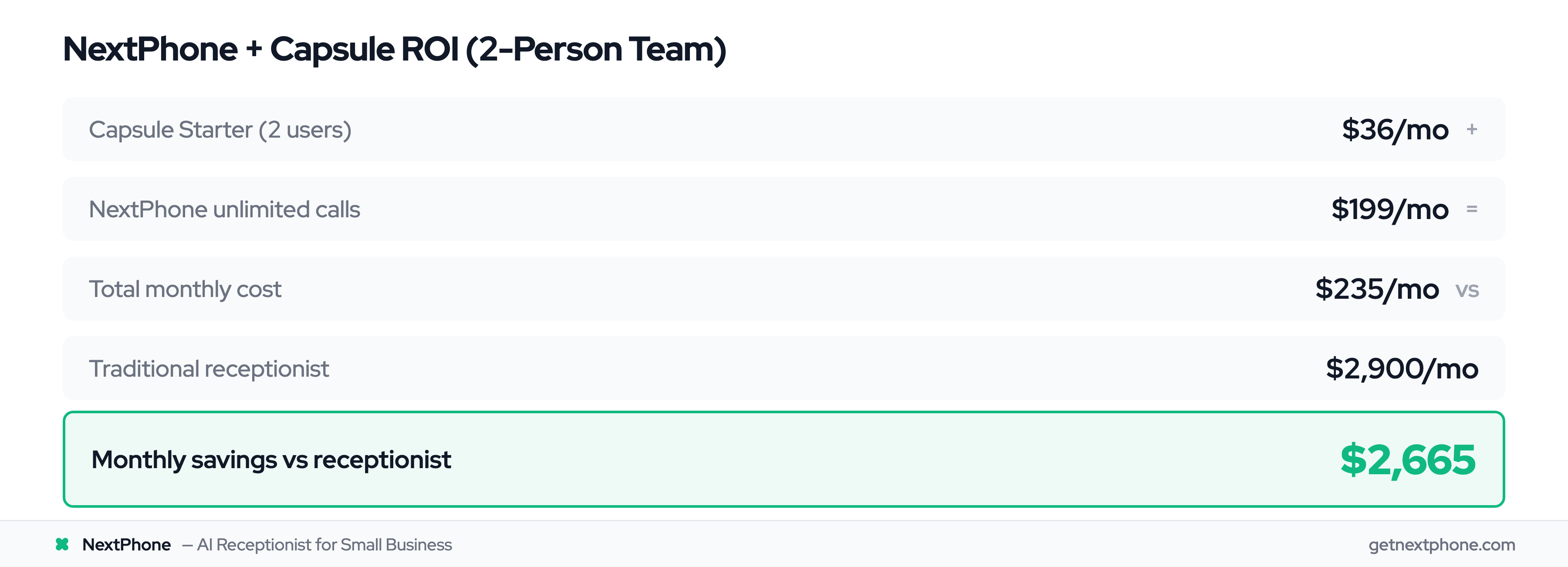
You're installing a new roof. Your phone rings. It's in your truck. The customer needs an estimate. They call the next roofer. You just lost $6,500.
Capsule CRM is the lightweight contact manager built for small teams, and connecting it to your phone system means every lead lands in your pipeline automatically, even when you can't answer.
Industry research shows 74.1% of calls to home services businesses go completely unanswered. For a typical contractor receiving 42 calls per month, those missed calls add up to $260,400 in lost revenue per year. The fix is connecting Capsule CRM to NextPhone, an AI receptionist that captures every lead from every call.
Capsule CRM Phone Integration Options Compared
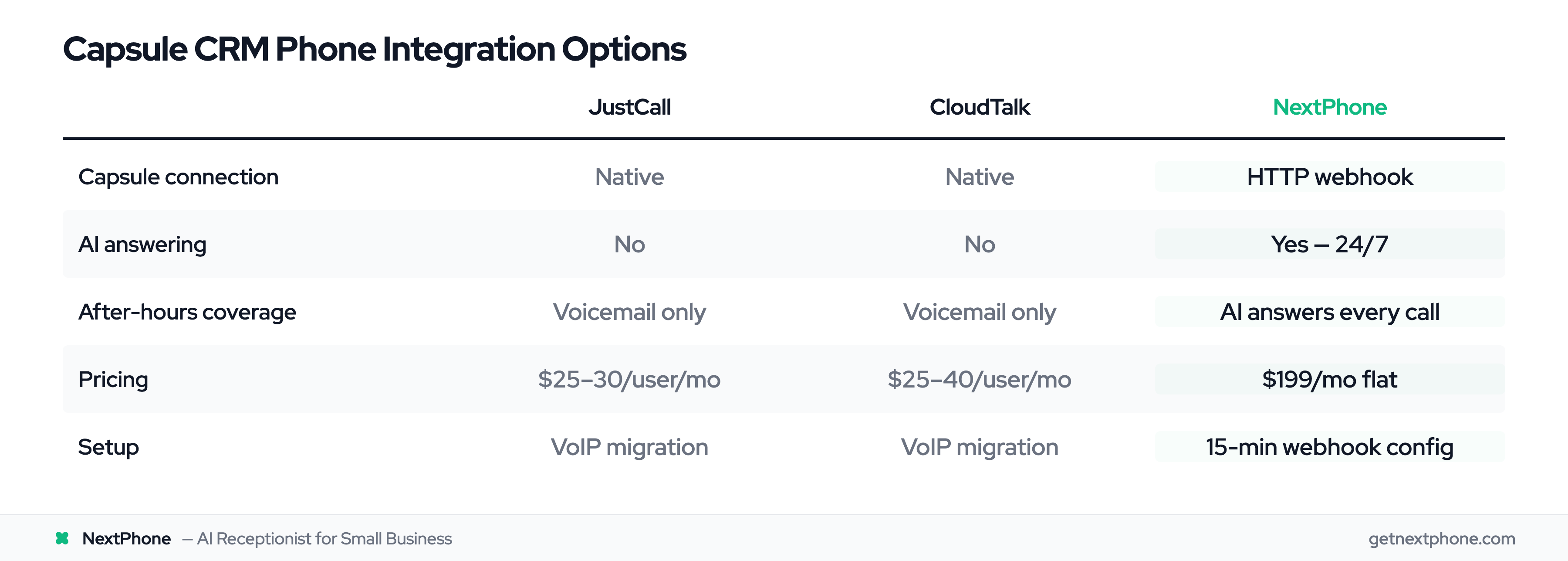
Capsule doesn't have a built-in phone system, but it integrates with several platforms:
| Feature | JustCall | CloudTalk | NextPhone |
|---|---|---|---|
| Capsule connection | Native | Native | HTTP webhook |
| Call logging | Auto | Auto | Auto (AI-extracted) |
| AI answering | No | No | Yes, 24/7 |
| After-hours coverage | Voicemail only | Voicemail only | AI answers every call |
| Pricing | $25-30/user/mo | $25-40/user/mo | From $199/mo, flat monthly |
| Setup | VoIP migration required | VoIP migration required | 15-minute webhook config |
JustCall and CloudTalk are VoIP phone systems with CRM logging, great if you need a full phone system with call routing and IVR menus. NextPhone is an AI answering service with CRM push: it answers calls FOR you and pushes the data to Capsule.
What is Capsule CRM?
Capsule CRM is a cloud-based contact management system designed specifically for small and mid-sized businesses. Unlike enterprise platforms that overwhelm you with features you'll never use, Capsule focuses on the basics: contacts, pipeline tracking, and task management.
Users rate it 4.28 out of 5 stars, consistently praising its clean interface and straightforward functionality. One reviewer describes it perfectly: "Nice and lightweight, really clean interface. You never get lost in it, unlike other platforms."
Lightweight Contact Management for Small Teams
Capsule is built for teams of 1-10 people who need to stay organized without enterprise complexity. You get contact management, deal tracking, task automation, and basic reporting, without the bloat.
The interface is genuinely simple. Adding a contact takes seconds. Tracking a deal means dragging it across your pipeline. No training manuals required.
Who Capsule is For (and Who It's Not For)
Capsule works best for small service businesses, freelancers, marketing agencies, and solo consultants. If you're a 2-person contracting crew or a 5-person marketing agency, this is your CRM.
It's not for enterprise sales teams who need advanced automation, complex workflows, or AI-powered forecasting. Capsule openly acknowledges it lacks some features like two-way email sync, and that's by design.
Why Small Businesses Choose Capsule Over HubSpot or Salesforce
Three reasons: simplicity, transparency, and price.
HubSpot offers a free CRM, but their advanced features come with hefty price tags, and the platform can be overwhelming for small teams. Salesforce is powerful but complex, with customization that requires a dedicated admin.
Capsule starts at £14 per user per month (about $18 USD). That's it. No hidden fees, no surprise charges, no "contact our sales team" pricing games.
For small businesses, lightweight CRM solutions offer the perfect balance of functionality and ease of use, and Capsule sits at the top of that category.
Why Phone Integration Matters for Small Businesses
You already know missing calls is bad. But do you know how bad?
The Real Cost of Missed Calls
Across the 1,446,980 business calls in our analysis, plus industry research, here's what stands out:
- 74.1% of calls go completely unanswered (industry research)
- Approximately one in four callers explicitly asks for a callback
- Urgent calls using words like "emergency," "urgent," or "ASAP" rank among the top reasons people call
Here's the math: A contractor averaging 42 calls per month misses 31 of them. If just 20% of those would have converted at an average project value of $3,500, that's $21,700 per month in lost revenue. Over a year, that's $260,400, which is why reducing missed calls is the single highest-leverage fix.
Why Manual Call Logging Fails
You finish a call. You promise yourself you'll log it in your CRM later. Then you get back to work. By the end of the day, you've forgotten half the details. By next week, you've forgotten the call happened.
This is a human problem. Manual processes fail because they rely on perfect behavior during chaotic workdays.
What Happens When Calls Aren't Tracked
Without CRM integration, leads disappear into voicemail purgatory. Callback requests get lost in text messages. Emergency calls blend into routine inquiries.
You can't prioritize what you can't see. You can't follow up on leads you forgot to log. And you definitely can't analyze patterns when your data exists in your head, your voicemail, and scattered sticky notes.
That's why connecting your phone system to your CRM is the difference between growing your business and wondering why you're not getting more calls. 65% of businesses are already using AI, and phone integration is a key use case.
Using Capsule's API for Custom Integrations
If native integrations don't fit your needs, Capsule offers a REST API for custom connections.
Capsule API Basics
The Capsule API supports OAuth 2 authentication and allows you to create, read, update, and delete contacts, opportunities, tasks, and notes programmatically.
The rate limit is 4,000 requests per hour per user, plenty for most small business use cases.
You can build custom integrations using the API directly, or use platforms like Zapier, Make, or n8n to connect Capsule to hundreds of other tools without writing code.
When Custom Integration Makes Sense
Custom API integration works best when:
- You have developer resources or use no-code platforms
- You need to connect Capsule to a phone system that doesn't have a native integration
- You want complete control over what data gets captured and how it's structured
For most small businesses, though, there's a simpler option than building custom integrations: HTTP webhooks.