When to Wake the Owner at 2 AM
Your phone rings at 2 AM. A customer's basement is flooding: burst pipe, water everywhere. Does your AI transfer immediately to wake you up? Or does it take a message for the morning?
The answer determines whether you capture a $4,200 emergency job or lose it to the next plumber in the customer's Google search.
AI handles 75-90% of basic inquiries without breaking a sweat. Hours, pricing, scheduling, service area questions: all answered instantly. But the remaining 10-25% requires human judgment, empathy, or authority that no AI possesses yet. The difference between a smart business and a struggling one comes down to having clear protocols for when AI transfers to humans.
In our analysis of 1,446,980 inbound business calls, we found that emergencies requiring immediate human response are a recurring reason people call, and urgent calls needing quick evaluation rank among the top reasons overall. Miss those calls and you're walking away from your highest-value opportunities. Transfer too many routine calls and you'll never sleep again. An answering service can help with overflow, but the real solution is smart transfer protocols.
This guide shows you exactly when AI should transfer, how to structure your escalation hierarchy, and how to build after-hours protocols that protect both revenue and sanity.
Why Call Transfer Protocols Matter for AI Systems

The AI Capability Gap
AI receptionists excel at the routine stuff. "What are your hours?" Answered. "Do you service my ZIP code?" Handled. "I need to schedule an appointment for next Tuesday." Done.
But when a customer says "I'm willing to pay double if you can come NOW," that's three things at once: an emergency, a negotiation, and a high-value opportunity. AI can detect the urgency, but it can't authorize premium pricing or promise same-day service without human approval.
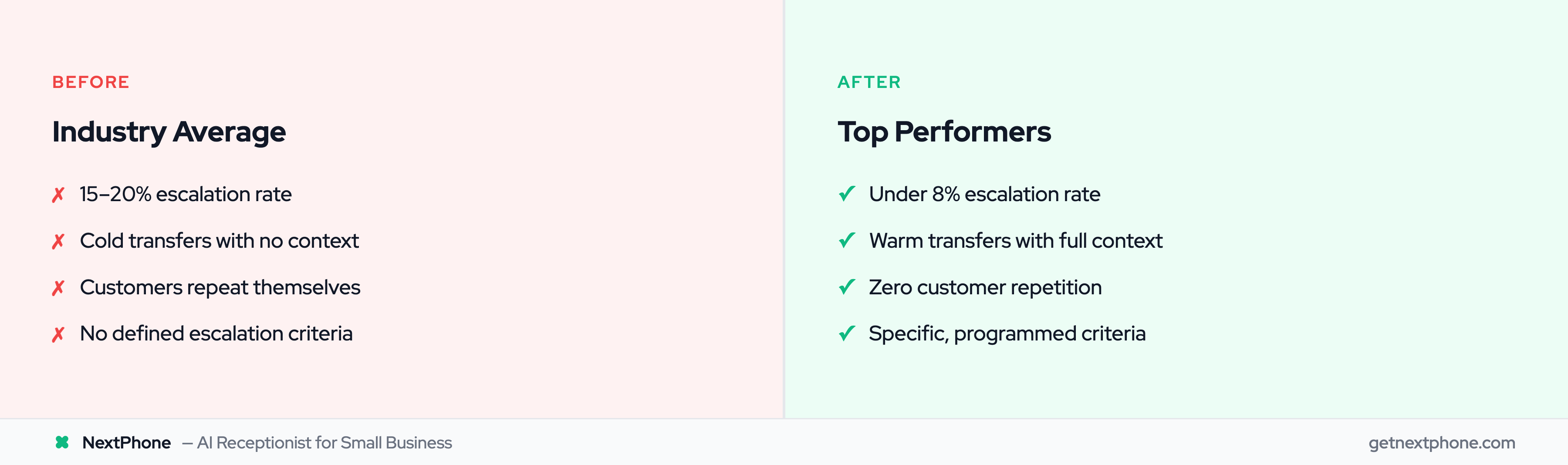
According to industry research, the average business escalates 15-20% of calls to human agents. Top performers? They're under 8%. 51% prefer AI bots for immediate service, but 77% are more willing to use AI if they know how to reach a human. The difference is better protocols for when and how to transfer.
Cost of Wrong Transfer Decisions
Transfer too little and customers get frustrated. They waste five minutes explaining their problem to AI, only to hear "I can't help with that" followed by a disconnected call or endless loop.
Transfer too much and you're right back where you started: answering every call yourself, overwhelmed and unavailable for actual work.
Industry research shows 74.1% of calls to home services contractors go completely unanswered before they implement AI. The contractors who succeeded after adding AI weren't the ones who transferred everything. They were the ones who transferred smart: emergencies immediately, routine questions never, everything else based on clear criteria.
The Balancing Act
Organizations with well-defined escalation policies resolve incidents 40% faster than those winging it. Why? Because everyone knows exactly when to escalate, who handles what, and how to hand off context without making customers repeat themselves.
Your AI can answer routine questions about your HVAC services all day. It knows your hours, your service area, your standard pricing for common jobs. But when the customer's AC died in 95-degree heat and they have a newborn at home? That needs a human to assess urgency, quote emergency pricing, and commit to a timeline.
Smart protocols live in that gap between "AI can definitely handle this" and "AI definitely can't."
Warm Transfer vs Cold Transfer
What Is a Cold Transfer?
A cold transfer (also called a blind transfer) happens when AI immediately passes the call to a human without any briefing. The recipient picks up knowing nothing about who's calling or why.
Customer: "I need to speak with someone about my bill." AI: "One moment please." [transfers] Human: "Hello, how can I help you?" Customer: "Like I just told the AI, I have a question about my bill..."
See the problem? The customer already explained their issue. Now they're repeating themselves, already frustrated before the human even starts helping.
What Is a Warm Transfer?
A warm transfer is when AI stays on the line, introduces the caller to the human recipient, provides context about the conversation so far, and then hands off the call.
Customer: "I need to speak with someone about my bill." AI: "Of course, let me connect you to Lisa, our owner who handles billing. One moment." [puts customer on brief hold] AI to Lisa: "Hi Lisa, I have Michael on the line. He has a question about the December invoice. He mentioned the final price was $500 more than the original quote. He's been a customer for three jobs over the past year." Lisa: "Got it, thanks. Hi Michael, I see the December project here. Let me pull up that quote..."
Michael doesn't repeat himself. Lisa has context before the conversation even starts. Warm transfers prevent customers from having to repeat themselves, which reduces handling time and customer frustration.
When to Use Each Type
Here's the simple rule: Default to warm transfers. Use cold transfers only when the routing is obvious and requires zero context.
Cold transfer makes sense for:
- Simple department routing: "Can I speak to sales?" → Direct transfer, no context needed
- Wrong number scenarios: Caller meant to reach a different business entirely
- Spam calls being routed to voicemail
Warm transfer is required for:
- Emotional or upset callers (AI should warn the human: "Customer is frustrated about delayed service")
- Complex issues (AI explains what troubleshooting steps were already discussed)
- VIP customers (AI provides customer history and value)
- Pricing or negotiation (AI shares what numbers were already discussed)
- Any scenario where context matters
Studies show that 80% of people will only use chatbots if they know a human option exists. But they'll abandon the interaction entirely if transferring to that human means starting the whole conversation over.
When AI Should Transfer to Humans: The 7 Transfer Triggers
1. Customer Explicitly Requests a Human
"I want to talk to a person." "Just connect me to someone." "This isn't working. I need to speak with the owner."
When a customer asks for a human, transfer immediately. Never make them ask twice. Never try to convince them the AI can help. Just hand off.
Leading AI customer service guides are clear on this: the moment someone requests human help, that becomes their right, not a privilege to be earned after the AI exhausts all options.
2. Complex Technical Questions Beyond Knowledge Base
Your AI knows your service area, your hours, your standard pricing for outlet installations. But when a customer asks "Can you install a 200-amp panel in a house that currently has 100-amp service and the main line comes from a pole versus underground?" that's beyond routine.
The two-strike rule works well here: If AI gives an unhelpful or uncertain response twice in a row, escalate on the third attempt. Don't let conversations loop endlessly.
Most AI systems use a confidence threshold, typically around 70%. When the AI's certainty about its answer drops below that threshold, it should proactively offer transfer: "This is a more technical question than I'm equipped to answer accurately. Let me connect you with our lead electrician who can give you a precise answer."
3. Angry or Upset Callers (Sentiment Detection)
"This is ridiculous!" "I'm extremely upset about this." "You guys really screwed this up."
Modern AI can detect negative sentiment with over 90% accuracy. When the system picks up anger, frustration, or strong negative emotion, it should immediately offer smart forwarding to your phone.
Why? Because an upset customer needs empathy and authority, two things AI can simulate but not truly provide. They need to hear "I understand you're frustrated, and you're right to be upset. Let me get you to someone who can make this right" from an actual human who can make decisions.
In our analysis of 1,446,980 business calls, angry customers represented some of the highest-stakes interactions. They're either about to become former customers or they're reachable if someone with authority addresses the issue immediately. Don't let AI handle damage control.
4. High-Value VIP Customers (Automatic Routing)
You have a customer who's spent $87,000 with you over the past two years. They call with any question (even a routine one) and get your AI?
Configure automatic VIP routing. When the system recognizes their phone number, bypass AI triage entirely and route straight to you or your senior team member with a note: "This is David Martinez calling. He's completed 5 projects with you totaling $87,000."
High-value customers expect and deserve white-glove service. Automatic human routing shows them you recognize their value before they have to prove it.
5. Multi-Step Troubleshooting Requiring Back-and-Forth
Customer: "My AC won't start." AI: "Have you checked if the thermostat is set to cool?" Customer: "Yes." AI: "Is the breaker on?" Customer: "I think so... where do I check that?"
This is heading into multi-step diagnostic territory. The customer needs someone who can ask follow-up questions, hear subtle details in their responses, and adapt the troubleshooting path in real-time.
AI can handle single-step Q&A ("What are your hours?") but struggles with the branching logic of real troubleshooting. After two or three diagnostic questions, transfer to someone who can solve it.
6. Pricing Negotiation and Contract Discussions
"Can you do this job for $8,000 instead of $10,000?" "I'm getting quotes from three contractors. What's your best price?" "I need this in writing before I commit."
AI can quote standard pricing. It can share your rate for replacing an outlet or installing a ceiling fan. But the moment pricing becomes negotiable or contracts need discussion, humans take over.
Why? Because negotiation requires authority. The customer knows they're not going to negotiate price with an answering machine. They want to talk terms with someone who can actually make the deal.
7. Specific Person Request ("I Need to Speak with John")
"Is Lisa available?" "I need to talk to the electrician who came to my house last month." "Can I speak with the owner?"
When someone asks for a specific person by name, transfer to that person if they're available. If not, AI should take a detailed message: caller's name, reason for calling, best time to return the call.
Then offer an alternative: "Lisa is with a client right now, but I can have her call you back in about 30 minutes. Or if this is urgent, I can see if our project manager Sarah can help."
Types of Escalation: Hierarchical, Functional, Automatic
Hierarchical Escalation (By Seniority)
Hierarchical escalation means passing the issue up a chain of command based on experience or authority.
For a small business, this typically looks like:
- Level 1: AI handles routine questions
- Level 2: Owner handles customer decisions, pricing, VIP calls
- Level 3: Manager or business partner steps in if owner is unavailable and issue can't wait
For an enterprise call center, you might have five levels (agent → senior agent → team lead → manager → director). But most small businesses operate with just two or three tiers.
The key is knowing when to escalate up. If the customer is still unsatisfied after talking to the owner, does it go to a manager? A more senior technician? Your business partner? Define that path before you need it.
Functional Escalation (By Skill)
Functional escalation routes based on who has the right expertise, not seniority.
Examples:
- Technical question → Goes to licensed electrician, not bookkeeper
- Billing question → Goes to person who handles invoicing
- Scheduling for specific service → Goes to person who manages that service line
A general contractor might have:
- Rough carpentry questions → Lead carpenter
- Electrical questions → Licensed electrician (even if they're newer to the team)
- Plumbing questions → Master plumber
- Billing questions → Office manager
Your AI should route based on what the question is about, not just "escalate to the boss" for everything.
Automatic Escalation (By Rules)
Automatic escalation uses pre-programmed triggers to bypass normal triage entirely.
Common automatic triggers:
- Emergency keywords: "burst pipe," "no power," "gas leak" → Immediate owner transfer
- VIP phone numbers: Recognized high-value customer → Straight to owner
- After-hours emergencies: Nighttime call + urgency keywords → On-call staff
- Specific contract terms: Customer mentions active warranty or contract → Route to person who manages that
Industry research shows that organizations using automatic escalation for VIP customers and emergencies see significantly higher customer satisfaction because response time drops from minutes to seconds.
Building Your Escalation Hierarchy (Small Business Edition)
The Solo Operator Model (AI → Owner)
You're a one-person plumbing business. Your escalation hierarchy is beautifully simple:
- AI handles: Scheduling, FAQs about services and pricing, service area questions, taking messages
- Owner handles: Everything else: emergencies, pricing discussions, angry customers, VIP calls, complex questions, specific person requests
That's it. Two tiers. Your AI answers what it can, transfers what it can't.
The key is defining clear boundaries. Can your AI book appointments? Yes. Can it offer a 10% discount to close a deal? No, that transfers to you. Can it quote standard service pricing? Yes. Can it negotiate custom project pricing? No, transfer.
Give your AI decision-making authority up to your comfort level, then draw a clear line.
The Small Team Model (AI → Owner → Specialist)
You run a small electrical contracting company with three people: you (owner), a lead electrician, and an apprentice.
Your hierarchy:
- AI handles: Routine questions, scheduling, standard pricing
- Owner handles: Business decisions, pricing negotiations, VIP customers, hiring/contracts
- Lead electrician handles: Complex technical questions, job-site emergencies, work-in-progress issues
The AI routes based on question type. Technical question about three-way switch wiring? Lead electrician. Question about payment terms on a $50,000 project? Owner.
Setting Authority Limits
The best way to reduce unnecessary escalations is to expand what AI can do without asking permission.
Examples of authority limits:
- AI can schedule any standard appointment without confirmation
- AI can provide pricing for services under $500
- AI can reschedule appointments up to 48 hours in advance
- AI can offer standard first-time customer discount (10%)
- AI can take messages for anything else
Or stricter limits:
- AI can only answer questions; all appointments get transferred for confirmation
- AI can provide rough pricing ranges but not commit to exact quotes
- AI can only take messages after hours (no appointment booking)
There's no universal right answer. Set limits based on your comfort level, then expand them over time as you see what the AI handles well.
Just don't make your AI powerless. If it can only say "Let me have someone call you back" to every question, customers will stop bothering with it entirely.
After-Hours Escalation Protocol (When to Wake Staff vs Schedule Callback)
The After-Hours Challenge
Most customer calls don't happen during your business hours. They happen when the customer has time to make calls: early morning, evenings, weekends.
Your 2 AM phone call could be:
- A burst pipe flooding a basement (wake up immediately: this is a $4,200 emergency)
- Someone researching contractors for a kitchen remodel (take a message, call back tomorrow)
The question your AI needs to answer: Is this worth waking up the owner right now?
True Emergencies: When to Wake Up Staff
Wake up for:
- Safety issues: Gas leak, electrical sparking, no heat in freezing weather, no AC with vulnerable household members
- Property damage in progress: Burst pipe, roof leak, flooding, fire damage
- Complete service failure: Total power loss, complete HVAC failure in extreme temperatures
- High-value urgent opportunities: Commercial client with emergency needs, VIP customer with urgent issue
In our analysis of 1,446,980 business calls, emergencies are a recurring reason people call. For a home services contractor getting 42 calls per month, that's a handful of genuine emergencies every month. Missing one emergency per week costs roughly $16,800 per month in lost revenue, since emergency jobs typically run around $4,200 against $3,500 for routine work.
From a pure revenue perspective, most emergency calls are worth the wake-up.
Can-Wait Calls: Schedule Callback
Schedule morning or next-business-day callback for:
- Quote requests
- General questions about services
- Appointment scheduling for non-urgent work
- Follow-up on previous projects
- Routine maintenance inquiries
These are legitimate customer inquiries. You want them. But they don't require waking someone at 2 AM.
Your AI should handle these perfectly: "Thanks for calling. Our office hours are Monday through Friday, 8 AM to 5 PM. I can take your information and have Lisa call you first thing tomorrow morning, or I can schedule an appointment time for you right now if you'd like to book ahead."
Then the AI collects: name, phone number, best time to call back, brief description of what they need.
Severity-Based Escalation Rules
According to on-call management best practices, use severity levels to determine response:
Priority 1 (P1) - Emergency: Immediate transfer, wake on-call staff
- Examples: Burst pipe, power outage, gas leak, AC failure with vulnerable people, commercial property emergency
- Response: Wake owner/on-call tech immediately
- After-hours handling: Direct phone transfer with urgency note
Priority 2 (P2) - Urgent: Morning callback, first on the list
- Examples: HVAC not working but weather is mild, non-emergency repair needed soon, VIP customer non-emergency question
- Response: AI takes detailed message, owner calls back within 2 hours during business hours
- After-hours handling: Flagged message, top of morning callback list
Priority 3 (P3) - Routine: Next business day
- Examples: Quote requests, general questions, routine maintenance, appointment scheduling
- Response: Standard callback queue
- After-hours handling: AI answers if possible, otherwise schedules callback
Configure your AI with specific keywords and scenarios for each priority level. "Burst pipe" = P1. "Kitchen remodel quote" = P3.