You're on a ladder replacing an HVAC unit. It's 9 PM on a Tuesday. Your phone rings: it's a customer whose AC died in 95-degree heat. You can't answer. The call goes to voicemail. They call the next contractor. You just lost a $3,500 job.
This scenario plays out thousands of times daily. Industry research on calls to home services contractors is brutal: 74.1% of calls go completely unanswered. That's three out of every four potential customers calling someone else.
Here's the paradox: most of these businesses already had VoIP phone systems like Vonage. They had call forwarding. Voicemail-to-email. Mobile apps. All the features. But features don't answer calls. People do. Or in 2025, AI does.
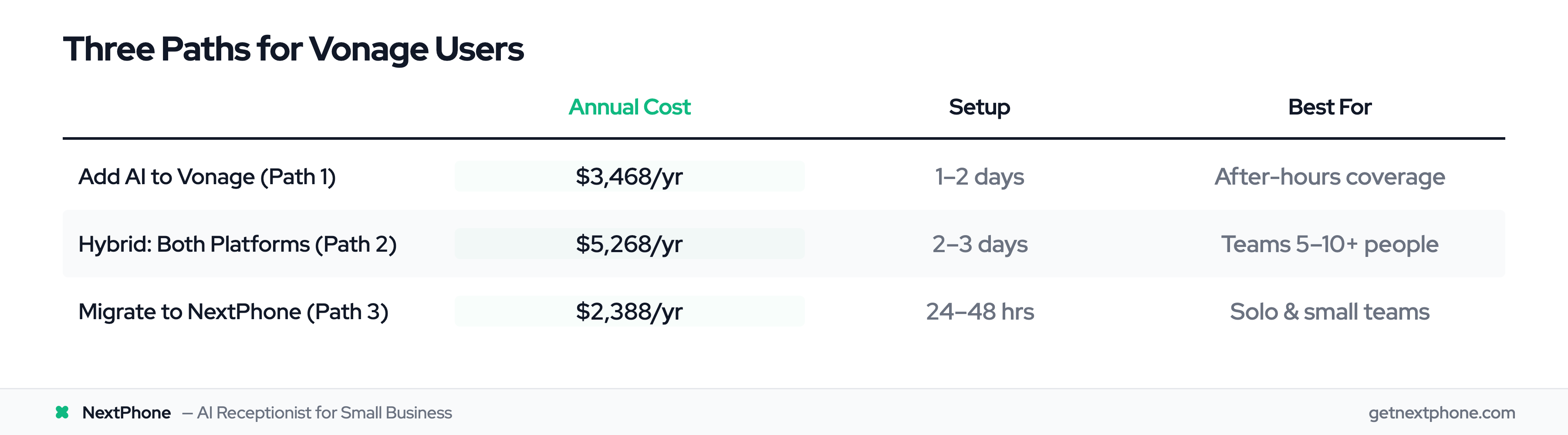
If you're using Vonage Business Communications (or considering it), this guide shows you three actionable paths: add AI to your existing setup, use a hybrid approach, or migrate to an AI-first platform. No vendor bias. Just data-driven guidance for small businesses.
The VoIP Paradox: Why Phone Systems Don't Answer Calls
VoIP Gives You Features, Not Coverage
Vonage Business Communications is a solid unified communications platform. So is RingCentral. And 8x8. They offer call forwarding, simultaneous ring, mobile apps, voicemail transcription, team messaging, video conferencing: the works.
But here's what they don't offer: someone (or something) to actually pick up the phone.
You're a solo contractor installing a roof. Your phone rings. Call forwarding is set to your mobile. You're 30 feet up, hands full of shingles, can't reach your pocket. The call goes to voicemail. Vonage did its job. It forwarded the call perfectly. But nobody answered.
The 74.1% Problem
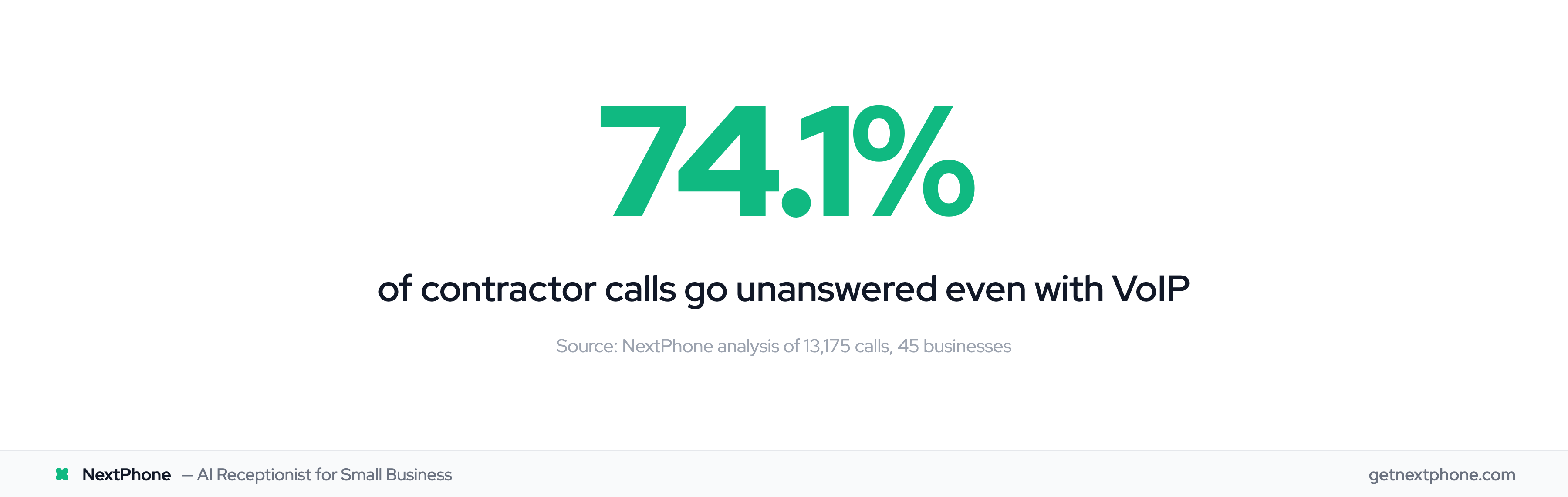
Industry research shows 74.1% of calls to home services contractors go completely unanswered. These aren't spam calls. Spam gets filtered out before it ever rings you. These are real customers looking for estimates, emergency repairs, and appointment bookings.
Breaking down those unanswered calls:
- Approximately one in four callers explicitly asks for a callback
- Urgent calls, using language like "emergency," "urgent," or "ASAP," rank among the top reasons people call
- Emergencies requiring same-day service are a recurring reason people call
For a typical contractor receiving 42 calls per month, missing 74.1% means 31 lost opportunities. If just 20% would have converted at an average $3,500 project value, that's $21,700 per month in lost revenue, or $260,400 per year.
Why Traditional Solutions Fall Short
VoIP features help you manage calls once they're answered. Call queues route calls to available team members. Auto-attendants play menu options. Follow-me routing tries multiple numbers in sequence.
But all of these require the same thing: someone available to pick up. If you're a one-person operation, or a small team where everyone's working on job sites during the day, these features don't solve your core problem.
The missing piece is intelligent, 24/7 call answering that actually picks up.
What is Vonage Business Communications?
Cloud-Based Unified Communications Platform
Vonage Business Communications (VBC) is a cloud-based phone system that combines voice calling, video conferencing, team messaging, and collaboration tools into a single platform. You don't need traditional phone lines or PBX hardware. Everything runs over your internet connection.
The platform includes desktop and mobile apps, so your team can make and receive calls from anywhere. It's built for businesses that need more than just a phone system: teams that want integrated communication tools for remote work and collaboration.
According to Capterra reviews, Vonage earns 4.0 out of 5 stars based on 320 user reviews. Vonage is used by over 120,000 customers, with an API platform reaching 7B+ people across 1,600+ telecom networks.
Users praise the feature set and call quality. Complaints center around customer service responsiveness and billing transparency (more on that shortly).
Core Capabilities
GetVoIP's 2025 review highlights that Vonage offers over 40 calling features including:
- Advanced call management (forwarding, transfer, parking, simultaneous ring)
- Virtual receptionist with customizable call routing for different times of day
- Automatic call distribution to route callers to the right department
- Conference calling supporting up to 30 participants
- Voicemail-to-email and voicemail transcription
- Paperless fax (send/receive faxes digitally)
- Call flip (swap calls between devices mid-conversation)
- Call continuity (auto-reroute to backup numbers during outages)
Vonage advertises 99.999% uptime, which translates to about 5 minutes of downtime per year. For businesses relying on phone communication, that reliability matters.
Who Vonage Works Best For
Vonage is designed for businesses with teams that need:
- Internal team collaboration (chat, video, screen sharing)
- Multi-location operations with centralized phone management
- CRM integration for sales teams
- Professional call handling with auto-attendants and queues
Where Vonage falls short: solo operators and small teams (1-5 people) who primarily need someone to answer customer calls 24/7. You're paying for enterprise collaboration features you might not use, while still missing calls when you're working.
Vonage Features & Integration Ecosystem
Call Management Features
Vonage's call management goes beyond basic forwarding:
Follow Me lets you set a sequence of numbers to ring. Example: desk phone rings for 10 seconds, then mobile rings if no answer, then goes to voicemail. You can customize the timing and sequence.
Simultaneous Ring makes multiple phones ring at once: your desk phone and mobile, or route calls to your entire team so someone answers.
Virtual Receptionist (auto-attendant) provides menu-based call routing: "Press 1 for Sales, 2 for Support, 3 for Billing." You can set different menus for business hours, after hours, holidays, and lunch breaks.
The limitation? These are menu-based systems, not conversational AI. Callers navigate menus by pressing buttons, and someone still needs to be available to answer when the call routes through.
CRM Integrations (Salesforce, HubSpot, Zoho)
Vonage's Integration Suite connects with major CRM platforms through their marketplace. Vonage for HubSpot, for example, provides:
- Click-to-call from contact records
- Automatic call logging in CRM
- Screen pop-ups showing caller information when calls come in
- Post-call notes synced directly to CRM records
Supported integrations include:
- Salesforce
- HubSpot
- Microsoft Dynamics
- Zoho CRM
- SugarCRM
- G Suite / Google Workspace
- Office 365 / Microsoft 365
- Zendesk
- NetSuite
- ConnectWise
Research from the US Chamber of Commerce shows that companies with successful CRM-VoIP integrations report 30-40% improvements in call handling efficiency. Sales teams see caller context immediately, log interactions faster, and follow up more systematically.
The setup process varies by integration but generally requires admin approval and configuration through the Vonage admin portal.
Vonage Integration Suite
The Vonage Integration Suite provides pre-built connectors for 20+ business applications. This is different from custom API integration. You're working with templates that Vonage has already built.
Pros:
- Plug-and-play setup for supported apps
- Officially supported by Vonage
- Usually reliable and maintained
Cons:
- Limited to apps Vonage has built integrations for
- Requires admin approval in some cases
- Limited customization of what data syncs
- Can't easily connect to custom software or niche industry tools
For businesses using mainstream tools like Salesforce or HubSpot, this works fine. For businesses with custom CRMs, proprietary job management software, or specialized industry tools, the limitations become frustrating.
Mobile & Remote Work Features
Vonage's mobile apps (iOS and Android) give you full phone system access from anywhere:
- Make/receive calls using your business number
- Access voicemail and call history
- Join video conferences
- Send team messages
- Call flip to switch devices mid-call
The "work from anywhere" feature means you can take your desk phone home or to a remote location and it works the same as in the office.
For distributed teams and remote workers, these features are valuable. For field service businesses where the owner is physically working on job sites, they don't solve the fundamental problem: you can't answer while your hands are dirty, you're on a ladder, or you're focused on the work in front of you.
Vonage Pricing: What It Really Costs
Advertised Pricing Plans
Vonage offers three main pricing tiers with annual billing (month-to-month costs are higher):
Mobile Plan:
- $13.99/user/month (annual contract)
- $19.99/user/month (month-to-month)
- Includes: Unlimited calling, texting, team messaging, mobile app
Premium Plan:
- $20.99/user/month (annual contract)
- $29.99/user/month (month-to-month)
- Adds: Video collaboration, integrations, desktop app
Advanced Plan:
- $27.99/user/month (annual contract)
- $39.99/user/month (month-to-month)
- Adds: Advanced call management, custom integrations, enhanced admin controls
Vonage currently runs a promotion offering 30% off standard rates for the duration of annual contracts (up to 99 lines), valid through January 31, 2026.
The Hidden Cost Reality
Here's where advertised pricing diverges from reality. Better Business Bureau reports include numerous complaints about misleading pricing practices:
"Advertised prices of $13.99 per line became $26-30 with taxes and fees."
The $13.99 Mobile plan is the base service fee. What's not immediately clear:
- Regulatory fees and taxes (varies by location, often $5-8/user)
- E911 fees ($1.50-2/user)
- Equipment costs if you buy Vonage phones
- Add-on features (call recording, AI assistant, advanced queues)
A more realistic monthly cost is $26-30 per user for the entry-level plan with all fees included.
Additionally, Vonage requires a 12-month contract to get the best pricing. If you cancel early, you'll pay a termination fee equal to the remaining contract value.
Total Cost of Ownership
Let's calculate real annual costs for a 3-person HVAC company:
Vonage Premium Plan (realistic):
- 3 users × $30/month (actual with fees) = $90/month
- Annual cost: $90 × 12 = $1,080/year
What you get: Full-featured phone system with video, CRM integration, mobile/desktop apps, team chat.
What you don't get: Someone to answer calls when your team is on job sites.
At industry miss rates, this business receiving 42 calls per month still misses 74.1% of them (31 calls). At a 20% conversion rate and $3,500 average project value:
31 missed calls × 20% conversion × $3,500 = $21,700/month lost = $260,400/year in lost revenue
Now compare to NextPhone:
NextPhone:
- Flat monthly plans from $199 (no per-user fees)
- Annual cost: $2,388/year
What you get: AI receptionist answers 24/7, qualifies leads, books appointments, routes emergencies, integrates with any CRM via webhooks.
What you don't miss: Those 31 calls. If NextPhone captures even 50% of the previously missed calls and converts at 20%, that's:
- 15.5 new customers × $3,500 = $54,250/month = $651,000/year in recovered revenue
Net benefit: $651,000 captured - $2,388 cost = $648,612 annual gain (272X ROI)
Even if you keep Vonage for internal team use and add NextPhone for customer calls, you're at $1,080 + $2,388 = $3,468/year total, still capturing hundreds of thousands in previously lost revenue.
Adding AI to Your Vonage System
What is SIP Integration?
SIP (Session Initiation Protocol) is the internet-based standard that VoIP systems use to establish and manage calls. Most modern business phone systems, including Vonage, support SIP.
According to this SIP integration guide, SIP integration creates a direct connection between AI platforms and VoIP systems, allowing them to work together seamlessly.
The technical setup involves configuring your AI platform to connect to your Vonage system via SIP credentials (IP address, username, password, port). Once connected, calls can flow between the systems.
How AI + Vonage Works Together
With SIP integration, you can keep your existing Vonage infrastructure while adding an AI answering layer:
Call Flow Example:
- Customer calls your business number
- AI receptionist answers in under 5 seconds
- AI handles routine questions (hours, pricing, availability)
- For complex issues or customer requests, AI transfers to your Vonage extension
- You receive the call with context (caller name, reason for call, urgency level)
Benefits:
- Keep your Vonage investment (no migration needed)
- AI provides 24/7 coverage for routine calls
- Your team only gets calls that need human attention
- Emergencies route immediately to on-call team member
Use Cases:
- Plumbing company: AI handles "What are your rates?" and "Are you open Sunday?" while routing "my basement is flooding" calls directly to the on-call plumber
- HVAC contractor: AI books maintenance appointments while transferring emergency "AC out in 98-degree heat" calls immediately
- Electrician: AI provides service area information and pricing ranges while routing "I smell smoke from my panel" calls to the owner's cell
Setup Process Overview
Adding AI to Vonage via SIP typically involves:
- Choose SIP-compatible AI platform (NextPhone supports this)
- Gather Vonage SIP credentials from your admin portal
- Configure AI platform with Vonage connection details
- Set up call routing rules (what AI handles vs. what transfers)
- Test the integration with test calls
- Go live and monitor performance
Most businesses complete this setup in 1-2 days with support from their AI platform provider.
The limitation: this approach requires maintaining two systems. You're paying for both Vonage and the AI platform. For some businesses, this makes sense: keep the existing investment, add intelligence on top. For others, a complete migration to an AI-first platform is simpler and more cost-effective.
NextPhone vs. Vonage Integration Ecosystem
Vonage Integration Suite: Pre-Built Connectors
Vonage's approach to integrations is curated: they build official connectors for major platforms and make them available through the Vonage Marketplace.
What's included:
- 20+ pre-built integrations (Salesforce, HubSpot, Microsoft Dynamics, Zoho, etc.)
- Official support from Vonage
- Standardized setup process
- Integration configuration through admin portal
How it works: You browse the marketplace, select the integration you need (e.g., HubSpot), request admin approval, and follow the setup wizard. Vonage's connector handles the authentication and data sync between platforms.
Limitations:
- Only works with apps Vonage has built integrations for
- Limited customization (you get what Vonage built)
- Can't easily integrate with custom software, proprietary CRMs, or niche industry tools
- Some integrations require higher-tier plans (Premium or Advanced)
For a marketing agency using standard tools like HubSpot and Slack, this works great. For a specialty contractor using custom job management software built specifically for their trade, you're out of luck.
NextPhone Custom Webhooks: Unlimited Flexibility
NextPhone takes a different approach: instead of pre-built integrations for specific apps, it provides custom HTTP webhooks that can connect to any system with an API.
How webhooks work: During or after calls, the AI can send structured data to any URL you specify. You define:
- What data to collect (name, email, company, project details, budget, urgency, anything)
- Where to send it (your CRM API, Zapier, Make, Google Sheets, custom database)
- When to trigger (during call, after call, on specific conditions)
Example: Custom CRM Integration A general contractor uses proprietary job management software. With webhooks, NextPhone can:
- Collect caller information during the call (name, address, project type, timeline)
- Send POST request to the contractor's CRM API with structured data
- Create new lead record automatically with call transcript and audio recording link
- Trigger follow-up automation (send estimate request email, schedule callback)
Template variables available:
- All AI-collected parameters (fully customizable)
- [caller_number] - Caller's phone
- [receiving_number] - Your business phone
- [owner_name] - Business owner name
- [website] - Your website
- [booking_url] - Auto-extracted from knowledge base
Real-world example: An HVAC company uses NextPhone to:
- Push leads to ServiceTitan (field service software) via API
- Log calls in Google Sheets for reporting
- Send emergency alerts to PagerDuty when urgency keywords detected
- Trigger SMS via Twilio to send appointment confirmations
- Update inventory management system when parts inquiries come in
All of this happens automatically during or after calls, with zero manual data entry.
Which Approach Works Better?
Choose Vonage Integration Suite if:
- You only use mainstream tools (Salesforce, HubSpot, Microsoft 365)
- You want plug-and-play setup with minimal configuration
- You have IT staff to manage integrations
- You're already invested in the Vonage ecosystem
Choose NextPhone Webhooks if:
- You use custom software or niche industry tools
- You need to integrate with multiple systems simultaneously
- You want full control over what data syncs where
- You use automation platforms like Zapier or Make
- You're a small business without IT staff (webhooks are actually simpler once set up)
The flexibility difference is significant. Vonage gives you 20 integration options. NextPhone gives you unlimited: if it has an API, you can connect to it.
Try NextPhone free for 7 days
AI answering service that answers, qualifies, and books, 24/7.