Your phone rings. It's 9 PM. A homeowner needs emergency plumbing—a burst pipe flooding their basement. You're at dinner with family. The call goes to Verizon's auto attendant. The customer hears "Press 1 for service, Press 2 for billing..." They hang up. They call the next plumber. You just lost a $4,200 job.
In our analysis of 130,175 calls from 45 home services contractors over 7 months, we found that 74.1% of calls went completely unanswered. That's three out of every four potential customers calling someone else.
For a typical contractor receiving 42 calls per month, if 74.1% go unanswered (31 missed calls), and just 20% would have converted at an average $3,500 project value, that's $21,700 per month in lost revenue—or $260,400 per year.
Verizon Business has the network strength. Your customers trust your number. But you're missing the conversational AI that captures calls while you're working. This guide shows you exactly how to integrate an AI receptionist with your existing Verizon Business phone—keeping everything you have, adding what you need.
Your Verizon Business Phone Options
Verizon offers three main business phone solutions, all built on their network that covers 99% of the country:
One Talk is their cloud-based VoIP system with 50+ features, starting at $20 per line per month. You can use it across mobile, desk phones, and computers. It includes an automated receptionist—but it's menu-driven ("Press 1 for sales"). No conversation, no intelligence.
Preferred Voice offers traditional landline service with unlimited calling. It works during power outages but offers minimal automation beyond basic call forwarding.
Business Digital Voice is internet-based VoIP requiring IP phones for advanced features. Like One Talk, it includes menu-based auto attendant, not conversational AI.
The infrastructure is solid. The AI capabilities? That's where the gap exists.
The Auto Attendant Limitation
Verizon's auto attendant (called "Automated Receptionist" in One Talk) is what most businesses add to handle calls when they can't answer. Let's be clear about what it does—and what it doesn't.
How Verizon's Auto Attendant Works
The auto attendant plays a pre-recorded greeting when calls arrive: "Thank you for calling ABC Contracting. Press 1 for sales, Press 2 for service, Press 3 for billing, or stay on the line to leave a message."
Verizon offers two versions:
- Basic AR: Single-level call routing with separate menus for business hours and after-hours
- Standard AR: Multi-level menus with submenus, supporting business hours, after-hours, and holiday schedules
Both charge a monthly recurring fee per line, added to your base Verizon cost.
Here's the issue: customers hate pressing buttons.
When someone calls with an urgent problem, they want to talk to a person. When they hear a menu, many hang up. Others press the wrong button, get routed incorrectly, and hang up frustrated.
The menu can't ask questions. It can't collect information. It can't tell the difference between "I need a quote for a small repair" and "My basement is flooding right now." Everything gets the same treatment: navigate the menu or leave a voicemail.
Reliability Issues with OneTalk
Beyond the menu limitations, Verizon One Talk has documented reliability problems.
According to industry reviews, users report uncertainty about whether the service is working 30-50% of the time. Phones fail to ring when calls come in. Missed call notifications appear up to 3 days later. Customer support gets routed through Verizon's general wireless team, who often aren't equipped to handle business phone system issues.
For businesses that depend on every call, that's a serious problem.
AI Receptionist vs Auto Attendant: What's the Difference?
The difference between an auto attendant and an AI receptionist isn't subtle. It's the difference between "Press 1" and "How can I help you today?"
How AI Receptionists Work
AI receptionists use natural language processing to understand what callers say. When someone calls and says "I need a quote for roof repair after the storm last week," the AI understands the context, asks qualifying questions, and captures the information.
It's a conversation, not a menu.
The AI can:
- Answer common questions (hours, services, pricing, service areas)
- Collect caller information (name, phone, email, job details, budget)
- Qualify leads (new vs existing customer, timeline, project scope)
- Book appointments directly into your calendar
- Detect urgency and route emergencies to your phone immediately
- Send follow-up texts or emails with information mentioned during the call
- Integrate with your CRM to log every interaction automatically
According to business phone statistics, AI integration in VoIP systems is projected to grow by 35% in 2025, bringing features like real-time transcription, call sentiment analysis, and intelligent routing.
85% of customer service leaders will explore or pilot conversational AI in 2025. Early implementations show AI can predict caller intent 80% of the time.
Feature Comparison
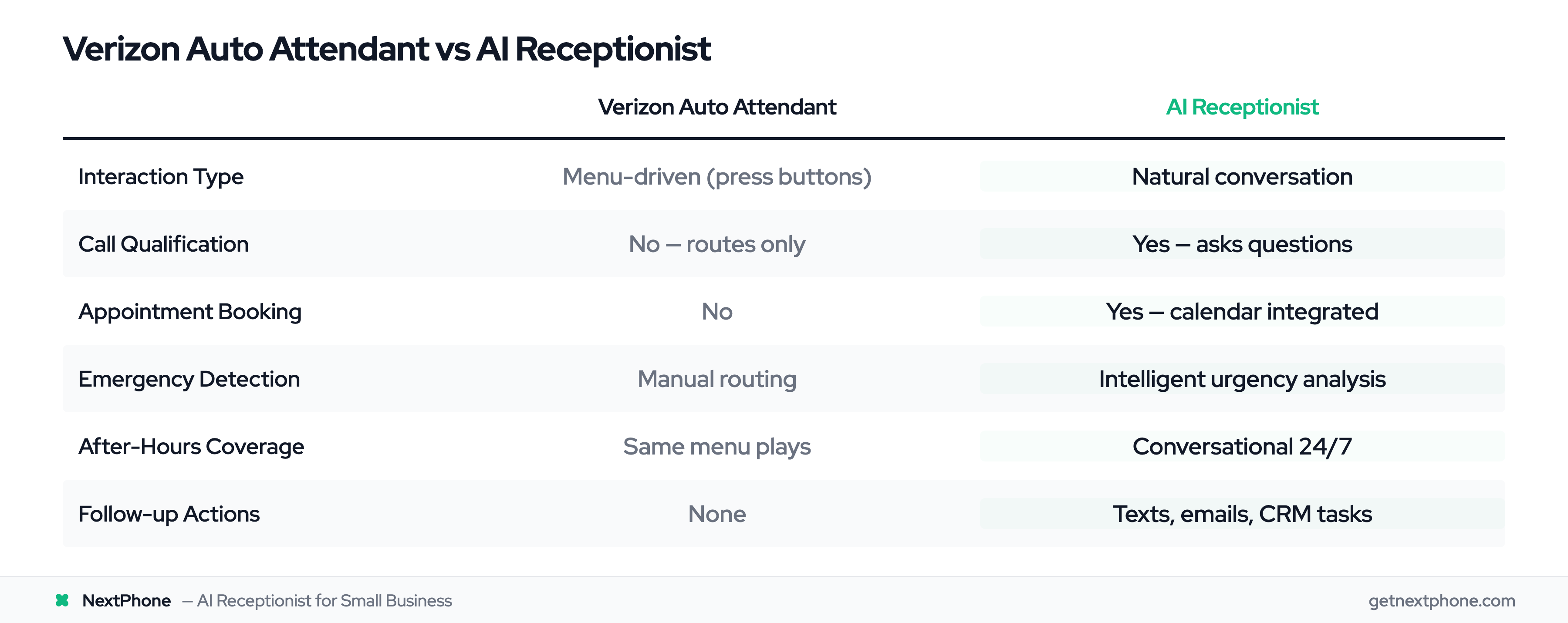
| Feature | Verizon Auto Attendant | AI Receptionist |
|---|
| Interaction Type | Menu-driven (press buttons) | Natural conversation |
| Call Qualification | No (routes only) | Yes (asks questions, collects details) |
| Appointment Booking | No | Yes (integrated with calendar) |
| Emergency Detection | Manual routing | Intelligent urgency analysis |
| CRM Integration | Limited | Full integration with webhooks |
| Learning Capability | Static menus | Improves with each call |
| After Hours Coverage | Same menu plays | Conversational 24/7 |
| Caller Experience | "Press 1 for..." | "How can I help you today?" |
| Message Taking | Sends to voicemail | Collects details during conversation |
| Follow-up Actions | None | Can send texts, emails, create tasks |
The auto attendant is a gatekeeper. The AI receptionist is a team member.
Why Verizon Customers Need AI Integration
You already have Verizon. The network is solid, the number is established. But you're missing calls, and those missed calls are expensive.
The Cost of Missed Calls
In our analysis of 130,175 customer service calls from 45 home services businesses, 74.1% went completely unanswered.
For a typical contractor receiving 42 calls per month: 31 missed calls × 20% conversion × $3,500 average job = $21,700 lost per month, or $260,400 per year.
That's real revenue walking away.
What Auto Attendants Can't Do
Verizon's auto attendant can't qualify leads, book appointments, take detailed messages, send follow-ups, or route intelligently. It technically answers the call but doesn't capture the lead.
Here's a surprising stat: 25.4% of calls in our study included explicit callback requests (632 out of 2,487 calls). Without a tracking system, most fall through the cracks.
One plumber had 76 missed calls in a month. His response when we showed him the data: "I didn't even know I was missing that many calls. I just thought business was slow."
The calls were there. He just couldn't answer while doing the work.
How to Add AI to Your Verizon Phone
Here's the good news: you don't need to replace Verizon or change your phone number. You just forward your calls.
Call forwarding is the simplest method (recommended for 95% of businesses). Get an AI receptionist with its own number, forward your Verizon number to it using a simple code, and the AI handles all incoming calls—routing urgent ones back to your mobile. Setup: 5 minutes. Reversibility: instant.
SIP/VoIP integration connects AI directly to your VoIP system at the protocol level. More technical, but some enterprises prefer it for advanced analytics.
Hybrid approach: Keep Verizon for outbound calls, route inbound through AI, transfer urgent calls back to your mobile. Best of both worlds.
For most businesses, call forwarding is the sweet spot.
Step-by-Step Setup Guide
Setting Up Call Forwarding (Phone Method)
This is the fastest method:
- From your Verizon business phone, dial *72
- Then dial the 10-digit AI receptionist number (including area code)
- Wait for a confirmation tone (two short beeps)
- Hang up
That's it. Call forwarding is active. Use *71 for conditional forwarding (unanswered calls only). Deactivate anytime with *73.
Online Portal Method
Prefer the web portal? Log in to businessdigital.verizon.com, navigate to Call Settings, enable Call Forwarding, enter the AI number, and save. This method gives more control over business hours, ring time, and other settings.
Testing
After setup, test immediately:
- Call your number and verify AI answers
- Say "This is an emergency" to test urgency routing
- Pretend to request a quote to check information capture
Most businesses start with "forward all calls" and adjust based on results.
Cost Analysis: Verizon + AI vs Alternatives
Let's talk about what this actually costs—and what it saves.
Verizon Auto Attendant Pricing
Verizon's automated receptionist typically costs $20-40 per month per line, added to your base phone service cost. Verizon doesn't publish exact pricing; you need a custom quote.
For that $20-40/month, you get menu-driven routing. No conversation, no lead qualification, no appointment booking.
AI Receptionist Pricing
AI receptionist services typically range from $199-500/month for small businesses.
NextPhone, for example, charges $199 per month for unlimited calls. No per-call fees, no hidden charges. That price includes:
- Conversational AI that answers every call
- Appointment booking and calendar integration
- CRM integration via webhooks
- Emergency detection and intelligent routing
- Call summaries and transcripts
- 24/7 coverage with no additional cost
Traditional human answering services charge $500-800/month for just 100 calls, with overage fees for additional calls.
Total Cost Comparison
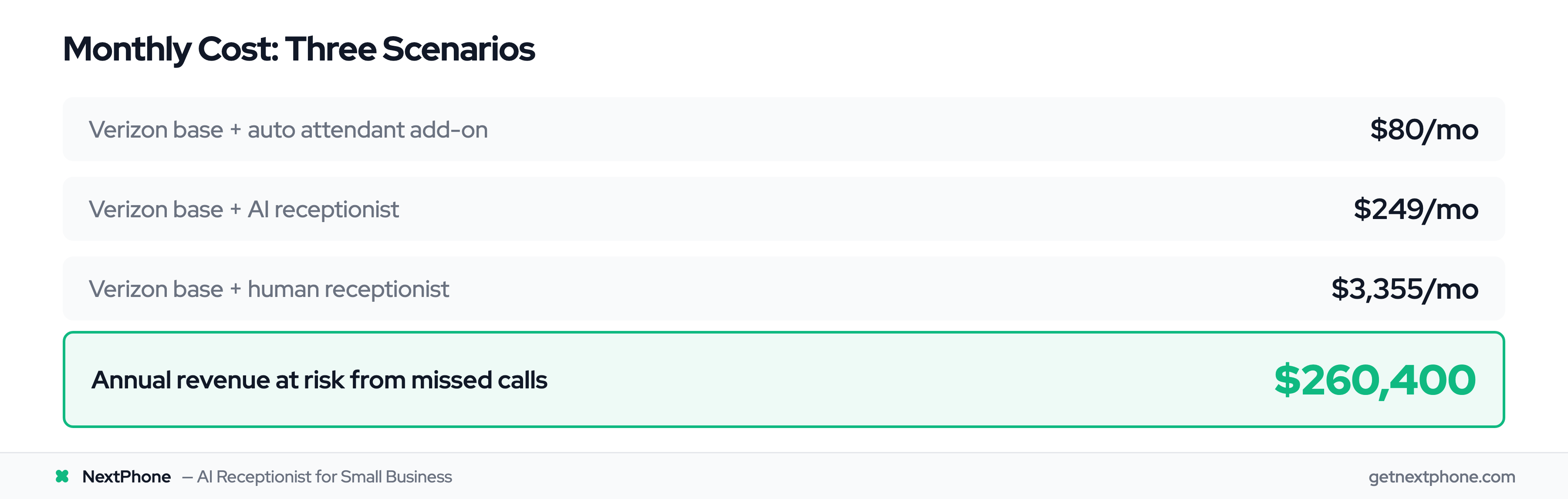
Let's compare three scenarios:
-
Scenario 1: Verizon Auto Attendant
-
Verizon base plan: $50/month
-
Auto attendant add-on: $30/month
Total: $80/month
-
Limitation: Menu-driven, no intelligence, misses 74.1% of leads
-
Scenario 2: Verizon + AI Receptionist
-
Verizon base plan: $50/month
-
AI receptionist: $199/month
Total: $249/month
-
Benefit: Conversational AI, captures leads, books appointments, 24/7 coverage
-
Scenario 3: Human Receptionist
-
Salary: $35,000/year = $2,917/month
-
Benefits (15%): $438/month
Total: $3,355/month
-
Limitation: Works only business hours, takes vacations, calls in sick
The ROI is clear. If adding AI captures even one extra job per month at $3,500, you've paid for the service 17.5 times over.
For contractors missing 31 calls per month (the 74.1% average), capturing just a fraction of those calls generates tens of thousands in additional revenue.
Troubleshooting Common Issues
Most setups work flawlessly, but here's how to fix rare problems:
*72 not working? Verify 10-digit format (area code + number) and confirm call forwarding is enabled on your Verizon account. Try the online portal method if phone codes fail.
Calls not routing back? Check your AI's routing configuration and test urgency detection by saying "This is an emergency" during a test call.
Going to Verizon voicemail? Increase ring time before voicemail (20-30 seconds) or use conditional forwarding (*71) instead of full forwarding (*72).
Worried about fees? Most Verizon Business plans include call forwarding to US numbers at no extra charge. Verify your AI number is US-based.
How NextPhone Works with Verizon
NextPhone works with all Verizon Business services via simple *72 forwarding—no IT team required.
When a call comes in, Verizon forwards it to NextPhone's AI virtual receptionist, which answers in under 5 seconds with "How can I help you today?" For routine questions, the AI answers immediately. For appointments, it books directly into your calendar. For emergencies (detected through phrases like "flooding," "no power," "urgent"), the AI routes to your mobile instantly.
Based on our analysis, 15.9% of calls contain urgency language. NextPhone catches these high-value calls and routes them to you. The other 84.1% (routine questions, quote requests, scheduling) get handled completely.
Setup takes under an hour:
- Sign up for NextPhone (7-day free trial)
- Upload business info (website, services, hours)
- AI trains on your business (15-30 minutes)
- Forward your Verizon line using *72
- Test and go live
Your Verizon number stays the same. Your infrastructure stays the same. You just add AI intelligence that captures the 74.1% of calls you're currently missing.
Frequently Asked Questions
Do I need to cancel my Verizon contract to use AI receptionist?
No. AI integrates via call forwarding, completely separate from your Verizon service. You keep your number, plan, and infrastructure—you're just adding capabilities, not switching carriers.
Most Verizon Business plans include call forwarding to US numbers at no charge. No per-call fees, just a one-time setup.
What happens if the AI receptionist goes down?
Calls roll to voicemail backup, or dial *73 to disable forwarding instantly. NextPhone maintains 99.9% uptime vs OneTalk's reported 50-70% reliability.
Can I forward only after-hours calls?
Yes. Use conditional forwarding (*71) for unanswered calls only, or configure business hours to handle differently. It's completely flexible.
How long does setup take?
Call forwarding: 5 minutes. AI training: 15-30 minutes. Total: under 1 hour, no technical skills required.
Will customers know they're talking to AI?
NextPhone identifies as your business receptionist transparently. Most customers care about getting help quickly, not whether it's AI or human.
Can I keep using Verizon for outbound calls?
Absolutely. Forwarding only affects inbound calls. You continue making outbound calls from Verizon with your business caller ID.
Start Capturing Every Customer Call
Verizon Business provides the network infrastructure. You've built the reputation. Your customers trust your number.
But 74.1% of your calls are going unanswered—not because you're ignoring customers, but because you're busy doing the work. You're on the roof. Under the house. Installing equipment. Actually running your business.
AI integration gives you the missing piece: intelligent call handling that works while you work.
The setup takes 5 minutes. The cost is $199 per month. The return is capturing the $260,400 in annual revenue you're currently missing.
You don't need to leave Verizon. You don't need to change your number. You just need to forward your calls to a system that actually understands what customers need.
