The $31,000 Problem
You're on a call with a hot prospect. Your phone rings - another inbound lead. You let it go to voicemail thinking "I'll call them back after this."
You forget.
They call the next company.
You just lost $5,000.
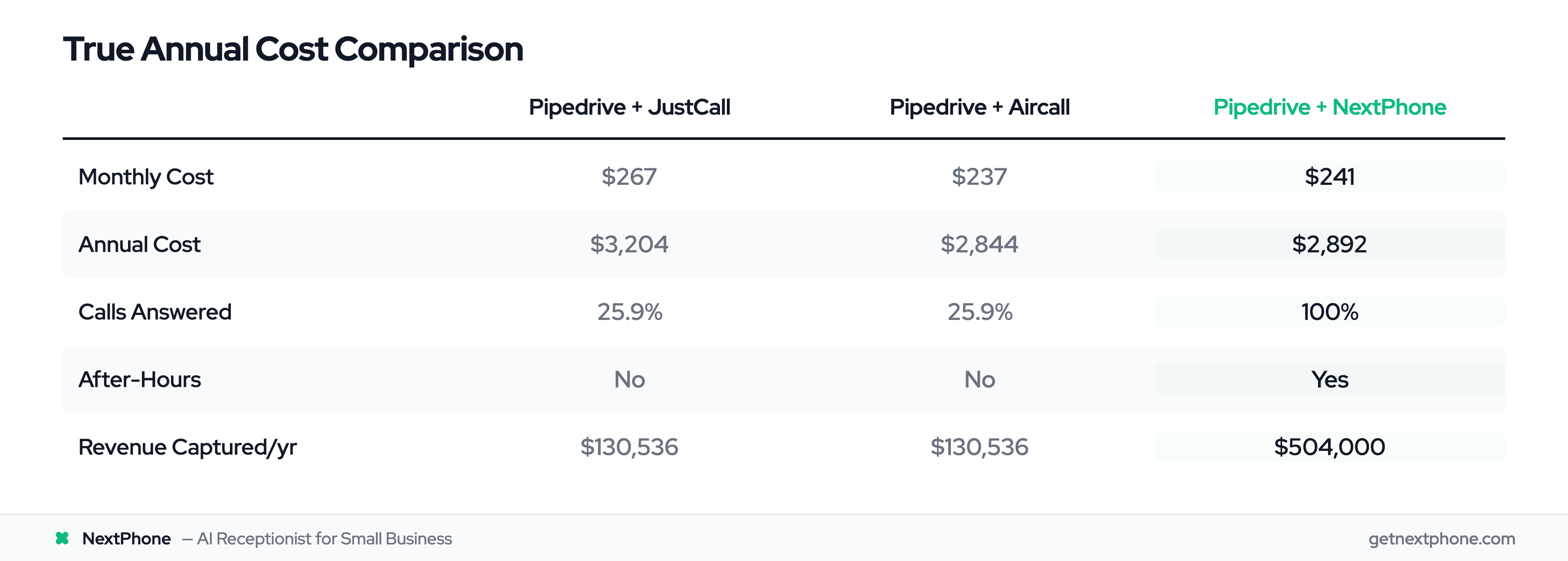
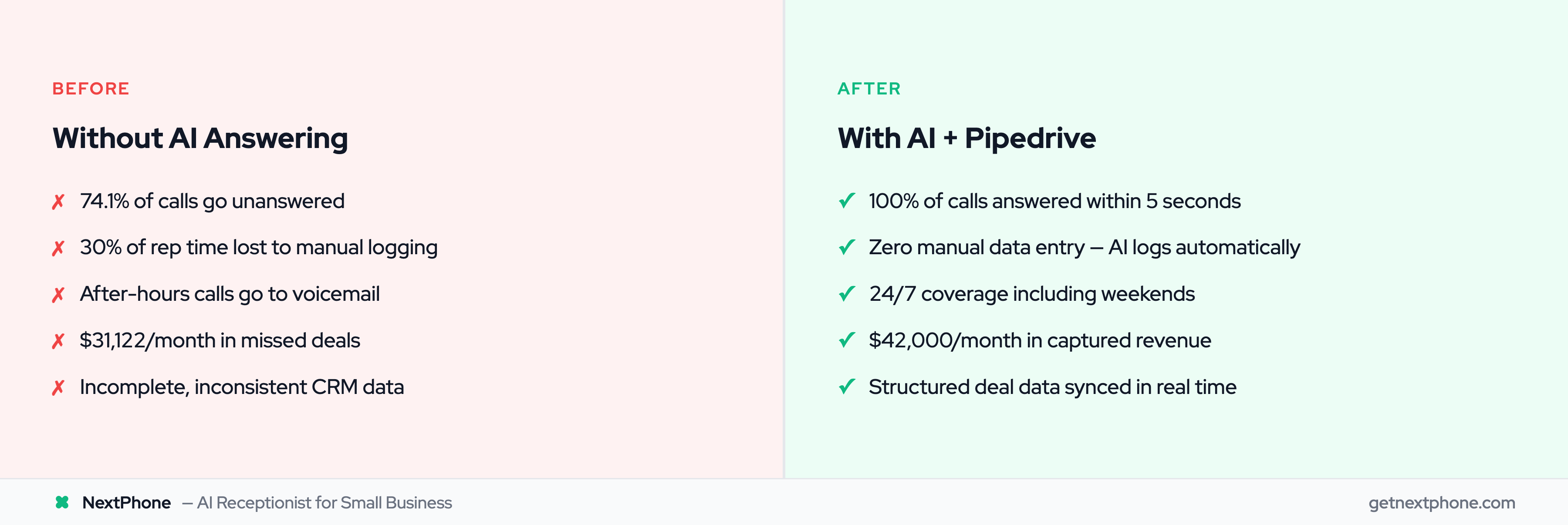
This happens more than you think. We analyzed 130,175 customer service calls from 45 small businesses over 7 months. The data is brutal: 74.1% of sales calls went completely unanswered. That's three out of every four potential customers calling someone else.
For a typical small sales team receiving 42 calls per month, that's 31 missed calls. If just 20% would have closed at an average deal size of $5,000, you're losing $31,122 per month. Every month. $373,464 per year walking away because you couldn't answer the phone.
But the revenue leak isn't the only problem. The calls you do answer create another hidden cost: manual call logging.
Sales reps spend up to 30% of their time on administrative tasks, such as logging calls and updating CRM records. For a sales rep earning $70,000/year, that's $21,000 per year spent on data entry instead of selling.
This guide shows you how to eliminate both problems: capture every inbound call automatically and eliminate manual logging entirely with Pipedrive integration.
The $31K Problem: Why Sales Teams Lose Deals to Manual Call Logging
The Hidden Cost of Missed Calls
Most sales leaders don't realize how many calls they're missing. Without call tracking, you only know about the calls you answered. The silent killer is the 74.1% that never make it through.
We've found that sales teams average 42 calls per month. Here's the math on what you're actually losing:
- 42 calls per month
- — 74.1% unanswered (31 missed calls)
- — 20% close rate (if they'd been answered)
- — $5,000 average deal value
- = $31,122 per month lost revenue
That's $373,464 per year. For small sales teams, that's often more than the entire annual revenue.
One sales manager we worked with had no idea. "I didn't even know I was missing that many calls until I saw the data," he told us. "I just thought business was slow."
The Manual Logging Trap
The calls you do answer create their own problem. Every call requires manual data entry:
- Update contact record
- Log call as activity
- Create deal (if new lead)
- Add notes about conversation
- Set follow-up reminders
- Update deal stage
A rep earning $70,000/year spends 30% of their time on this admin work. That's 2.4 hours every day updating Pipedrive instead of talking to prospects. The annual cost? $21,000 per rep in wasted productivity.
Scale that across a 3-person sales team and you're burning $63,000/year on manual data entry.
iOS Limitations Make It Worse
Pipedrive's mobile app has serious limitations on iOS. Due to Apple's system restrictions, only outgoing calls made directly from the Pipedrive mobile app can be logged as activities. Incoming calls and outgoing calls made outside the app won't trigger a logging prompt.
This means if a prospect calls your mobile number directly, there's no automatic log. You have to remember to manually add it later - which means most don't get logged at all.
Pipedrive community forums are full of complaints: "Calls not logging in the Deal field properly" and "insights widgets not updating with new calls from the app."
As call volume grows, manual updates leave gaps in your pipeline. You're flying blind without accurate call data.
What is Pipedrive Call Integration?
Pipedrive call integration is the process of connecting your phone system with your CRM so calls are automatically logged and customer data syncs in real time.
How Call Integration Works with CRMs
When a prospect calls, the integration captures:
- Caller's phone number
- Call duration and timestamp
- Conversation details (if recorded)
- Qualification data (budget, timeline, needs)
This data flows directly into Pipedrive, creating or updating contact records, logging activities, and optionally creating deals - all without manual input.
What Pipedrive Call Integration Can Do
With proper call integration, your sales team can:
- Make and receive calls directly inside Pipedrive
- Automatically log all call details in contact records
- Create deals automatically from qualifying calls
- Access call recordings and transcripts
- Track call metrics and rep performance
- Sync data in real-time (not end-of-day batches)
Here's what most people don't realize: Pipedrive lacks a built-in phone dialer. You must use a third-party integration. This isn't a limitation - it's actually an advantage because you can choose the phone solution that fits your specific needs.
Two Approaches: Manual Click-to-Call vs AI Answering
This is where things get interesting. There are two fundamentally different types of Pipedrive phone integrations:
1. Click-to-Call Tools (JustCall, Aircall, CloudTalk)
These tools add a dialer inside Pipedrive. Your sales rep sees a phone number, clicks it, and the software dials. The call gets logged automatically.
Sounds good, right? But there's a critical limitation: these tools don't answer inbound calls automatically. When a prospect calls your business number, it still goes to a human (or voicemail if they're busy). You still miss the 74.1% of calls that come in when reps are on other calls, in meetings, or after-hours.
2. AI Answering Service (NextPhone)
An AI answering service actually picks up the phone. When a prospect calls, the AI virtual receptionist answers in under 5 seconds, qualifies the lead, collects information, and pushes everything to Pipedrive automatically.
The difference? Click-to-call tools help you make outbound calls. AI answering services handle inbound calls automatically - the ones you're currently missing.
AI Answering vs Click-to-Call: Why It Matters for Sales Teams
Let's be clear about what you're actually getting with each approach.
The Click-to-Call Limitation
JustCall, Aircall, and CloudTalk are excellent tools for outbound calling. They let your reps dial faster, track call time, record calls, and automatically log them in Pipedrive.
But they all require one thing: a human sales rep to be available and initiate or answer the call.
When an inbound lead calls your number:
- If your rep is available and answers — Great, the call gets logged
- If your rep is on another call — Voicemail
- If your rep is in a meeting — Voicemail
- If it's 7 PM — Voicemail
- If it's Saturday — Voicemail
You're still missing 74.1% of calls.
Why AI Answering Captures More Deals
An AI answering service works differently. It's always on, always available, always picking up.
When a prospect calls:
- AI answers in under 5 seconds
- AI asks qualifying questions: "What service are you interested in?" "What's your budget range?" "What's your timeline?"
- AI collects: name, company, phone number, email, specific needs
- AI determines urgency: "Do you need this immediately?"
- After the call, AI pushes all data to Pipedrive via webhook
The prospect gets an immediate response. You get a qualified lead in your CRM. No voicemail. No forgotten callback. No manual data entry.
Real-World Impact: 73% of Calls Happen After-Hours
Here's the stat that changes everything: 73% of calls to small businesses happen outside standard 9-5 hours.
Think about when you research and call businesses. It's usually evenings or weekends when you have time.
Your prospects are the same. They're calling you at 7 PM from their couch. At 10 AM Saturday while drinking coffee. At lunch on Tuesday.
Click-to-call tools can't help with this. Your reps aren't working at 7 PM Saturday.
But AI is.
In our analysis of 130,175 calls, we found that 25.4% of callers explicitly requested callbacks: "Have him call me back when he gets a chance." Without a system to log these requests, research shows that 80% of callbacks never happen. The rep forgets, the note gets lost, or the callback request was left on voicemail that nobody checks.
AI logs every callback request as a scheduled activity in Pipedrive. Your rep sees it Monday morning, makes the call, and closes the deal.
We also found that 15.9% of calls contain urgency language - "emergency," "urgent," "ASAP," "need this today." These are high-value opportunities. AI can immediately route urgent calls to an on-call rep's mobile phone while still logging everything in Pipedrive.
How NextPhone + Pipedrive Integration Works (HTTP Webhooks)
The technical magic behind NextPhone's Pipedrive integration is surprisingly simple: HTTP webhooks.
The Webhook Connection
Most integrations require installing apps from a marketplace. NextPhone uses something more flexible: direct API connections via webhooks.
Here's how it works:
- AI answers an inbound call
- AI asks questions and collects information
- When the call ends, AI sends an HTTP POST request to Pipedrive's API
- Pipedrive receives the data and creates/updates records automatically
No app installation. No middleware. No monthly connector fees. Just a direct connection between NextPhone and your Pipedrive account.
What Data Gets Collected
During the call, the AI can collect any information you specify:
- [caller_number] - Phone number (automatic from caller ID)
- [first_name] - "What's your name?"
- [last_name] - Extracted from full name
- [company_name] - "What company are you with?"
- [email] - "What's the best email to reach you?"
- [message] - The overall reason for calling
- [estimated_value] - "What's your budget for this project?"
- [timeline] - "When are you looking to move forward?"
- [call_summary] - AI-generated summary of conversation
You can configure exactly which questions the AI asks based on your qualification criteria. SaaS company? Ask about company size and current solution. Service business? Ask about service type and urgency.
The AI adapts the conversation naturally. This isn't a rigid phone tree - it's a real conversation that extracts structured data.
How Deals Get Created Automatically
Here's a real example of the webhook template:
POST https://api.pipedrive.com/v1/deals?api_token=YOUR_TOKEN

{
  "title": "[company_name] - [first_name] [last_name]",
  "person_name": "[first_name] [last_name]",
  "phone": "[caller_number]",
  "email": "[email]",
  "value": "[estimated_value]",
  "currency": "USD",
  "status": "open",
  "stage_id": 1,
  "custom_field_timeline": "[timeline]",
  "custom_field_source": "Inbound Call",
  "notes": "Call Summary: [call_summary]\n\nDetailed Notes: [message]"
}
When a prospect calls and says:
"Hi, I'm Sarah Johnson from Acme Corp. We're looking for your Enterprise plan for about 25 users. Budget is around $50K, and we need to implement by Q2."
The AI extracts:
- first_name: Sarah
- last_name: Johnson
- company_name: Acme Corp
- message: Enterprise plan for 25 users
- estimated_value: 50000
- timeline: Q2 2025
The webhook fires, and a new deal appears in your Pipedrive with all fields populated. Your sales rep sees it instantly and can follow up while the prospect is still hot.
The integration is fail-safe - even if Pipedrive's API is temporarily down, the call still completes normally and the data is retried until it successfully syncs.
Automatic Deal Creation Workflow: Real Examples
Let's walk through three common scenarios to show how this works in practice.
Inbound Lead Qualification — New Deal
Scenario: A prospect finds your website and calls your sales number.
What happens:
- AI answers: "Thanks for calling Acme Software. How can I help you today?"
- Prospect: "I'm interested in your Enterprise plan for about 50 users."
- AI: "Great! What's your name?"
- Prospect: "John Smith from TechCorp."
- AI: "Thanks, John. What's your budget range for this?"
- Prospect: "Around $50,000."
- AI: "And when are you looking to make a decision?"
- Prospect: "Probably next quarter."
- AI: "Perfect. A sales rep will reach out within an hour. Can I get your email?"
- Prospect provides email, call ends
Result in Pipedrive:
- New deal created: "TechCorp - John Smith"
- Deal value: $50,000
- Stage: "Qualification" (stage ID 1)
- Custom fields populated: Timeline (Q1 2025), Product Interest (Enterprise), User Count (50)
- Activity logged: "Inbound call on [date/time], 3min 47sec"
- Notes include: Full call summary and transcript snippet
- Assigned to: Round-robin to next available rep
Your sales rep gets an email notification, sees the deal in their pipeline, and calls John back within 30 minutes while he's still researching solutions.
Callback Request — Scheduled Activity
Scenario: Existing client calls outside business hours with a question.
What happens:
- Client calls at 7:15 PM (after hours)
- AI answers: "Thanks for calling. Our team is currently unavailable, but I can help or take a message."
- Client: "I need to talk to my account manager about adding more licenses."
- AI: "I can schedule a callback for you. What's the best time?"
- Client: "Tomorrow morning around 10 AM would be great."
- AI: "Perfect, I'll have your account manager call you at 10 AM tomorrow. Can I confirm your phone number?"
Result in Pipedrive:
- Existing contact located (via phone number lookup)
- New activity created: "Callback scheduled - License expansion inquiry"
- Activity due date: Tomorrow at 10:00 AM
- Assigned to: Client's account manager
- Notes: "Client interested in adding licenses. Call at 10 AM."
- Deal: Existing account deal moved to "Expansion Opportunity" stage
The account manager arrives at the office, sees the scheduled callback at the top of their to-do list, and calls at exactly 10 AM. The client is impressed by the responsiveness.
This solves the 25.4% callback problem. In our analysis, one-quarter of callers requested callbacks. Without a system, 80% never happen. With AI + Pipedrive integration, 100% get scheduled and tracked.
Existing Customer Call — Activity Log + Deal Update
Scenario: A customer from an existing deal calls with an upsell question.
What happens:
- Customer calls main line
- AI checks phone number against Pipedrive contacts
- AI finds existing contact and pulls recent deal history
- AI: "Hi Jane! I see you're working with Tom on the Pro plan upgrade. How can I help?"
- Customer: "Yes! We want to add the Premium features actually."
- AI: "Great! I'll let Tom know. He'll call you back today to discuss Premium pricing."
Result in Pipedrive:
- Existing deal updated: "Pro Plan Upgrade" — "Premium Plan Upgrade"
- Deal value increased: $10K — $25K (based on AI's knowledge of pricing)
- New activity logged: "Customer called requesting Premium upgrade"
- Assigned to: Tom (existing deal owner)
- Deal stage moved: "Negotiation" — "Final Proposal"
Tom gets a notification, sees the updated deal value and notes, and calls Jane back within an hour with Premium pricing. He closes the upsell that afternoon.