Your Nextiva system handles team communication well. As the #1 cloud VoIP serving 100,000+ businesses with 99.999% uptime, the reliability is excellent. VoIP statistics and trends show cloud VoIP saves companies up to 60% on communications. The collaboration features work. Your business numbers are established.
But your call tree frustrates customers. "Press 1 for sales, press 2 for service..." They just want to schedule an appointment, not navigate a menu.
Here's what most Nextiva users don't realize: you can layer AI answering on top of your existing system. Keep your numbers, keep your Nextiva features, and add intelligent call handling that goes beyond what IVR menus can do.
This guide shows you how to integrate AI receptionist with your Nextiva setup: no migration, no number changes, no disruption to what already works.
Where Nextiva IVR Falls Short
Nextiva's Advanced IVR does what traditional call routing systems do: guide callers through button menus to reach the right department.
The limitations are inherent to the technology:
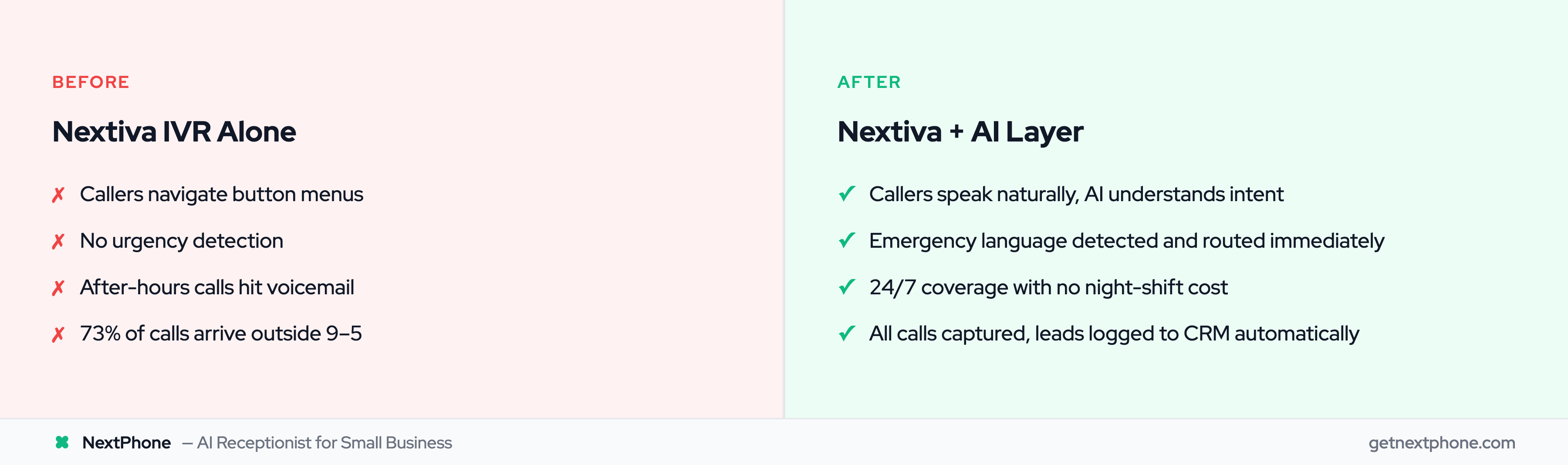
Menu fatigue. "For sales press 1, for service press 2, for billing press 3, for parts press 4, for hours and directions press 5..." Callers zone out. Many hang up.
No natural language. A customer calling to say "My AC broke and it's 95 degrees" can't communicate urgency through a number pad. They press a button and hope.
Complex configuration. Building call flows in Nextiva's admin portal requires planning, testing, and ongoing maintenance. Add a department? Rebuild the tree.
After-hours gaps. When the office closes, calls hit voicemail. A large share of calls to contractors come outside business hours, straight to voicemail for most.
No urgency detection. The IVR treats "I have a question about pricing" the same as "My basement is flooding." Both get the same menu.
These are IVR problems, common to every phone system. AI solves them by understanding language instead of button presses.
The Integration Partner Approach
Instead of replacing Nextiva, add AI as a layer:
Nextiva continues handling:
- Your VoIP phone service
- Team messaging and collaboration
- Video conferencing
- Internal extension dialing
- Call recording and analytics
AI handles:
- Answering external calls conversationally
- Routine inquiries (hours, pricing, scheduling)
- Emergency detection and immediate routing
- After-hours coverage
- CRM integration for lead logging
Your team keeps using Nextiva exactly as they do now. The only difference: external callers get intelligent AI instead of menu trees.
This approach protects your investment while adding capabilities Nextiva's native IVR can't match.
How Call Forwarding Integration Works
The integration uses Nextiva's standard call forwarding, a feature already included in your plan.
Nextiva Forwarding Options
Nextiva supports several forwarding modes:
- Call Forward Always: Every call routes to AI immediately
- Call Forward Busy: Forwards when all lines are in use
- Call Forward No Answer: Forwards after configured rings (typically 3-4)
- Call Forward Not Reachable: Forwards when system can't be reached
Most businesses start with "Call Forward No Answer": your team gets first chance to answer; AI catches what they miss.
The Integration Flow
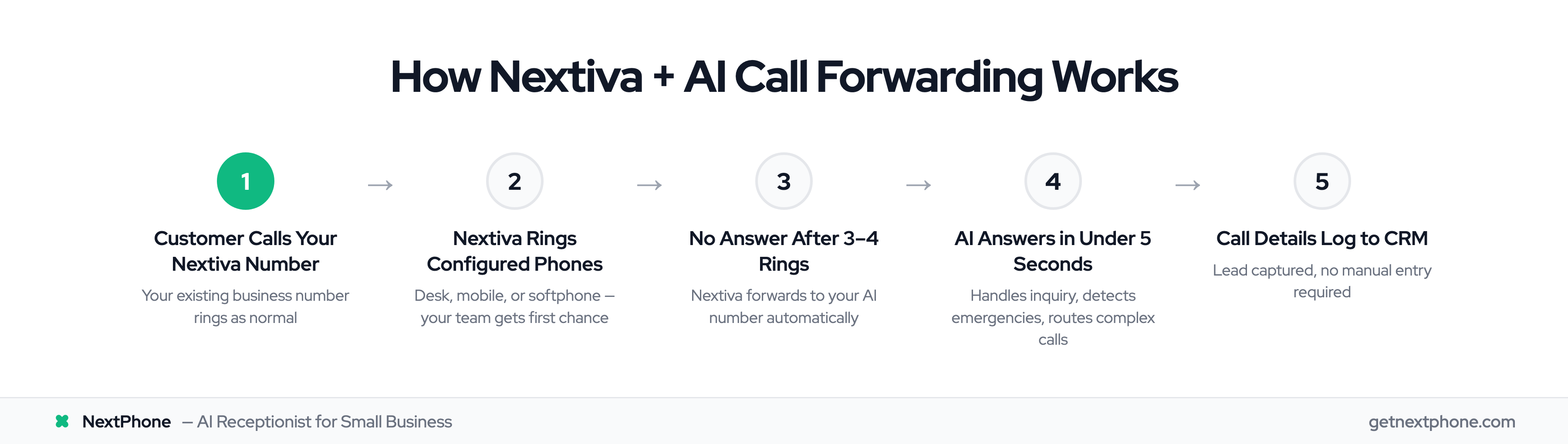
- Customer calls your Nextiva business number
- Nextiva rings your configured phones (desk, mobile, softphone)
- If unanswered after 3-4 rings, Nextiva forwards to your AI number
- AI answers in under 5 seconds
- AI handles the inquiry or transfers to team members
- Call details log to your CRM automatically
Callers dial one number and get help. They don't know whether a human or AI answered, nor do they care.
No Additional Nextiva Costs
Call forwarding to external numbers is a standard Nextiva feature. Configuring forwarding to an AI service doesn't add to your Nextiva bill. You pay only for the AI service itself.
Use Cases: Where Nextiva + AI Works Best
Branch Office Coverage
Headquarters has reception staff. Your satellite location has three technicians who can't answer phones while working.
Forward that branch's Nextiva lines to AI. HQ keeps human reception; the branch gets AI. Same customer experience either way.
After-Hours Answering
Your team works 8-5. Calls after hours go to voicemail. But your customers discover problems after work: the AC fails when they get home, the leak appears on Saturday morning.
Set Nextiva to forward after-hours to AI. Routine questions get answered ("We open at 8 AM tomorrow"). Emergencies route to on-call staff immediately.
Overflow During Peak Periods
Your three-person office normally handles call volume fine. Then storm season hits and calls triple. Every ring that goes unanswered is a customer calling competitors.
Configure "Forward When Busy" to send overflow to AI. When all lines are occupied, AI picks up additional calls. No hold music; no voicemail.
Department-Specific AI
Your main customer line needs more than press-button menus. But internal extensions work fine through Nextiva.
Forward only the main customer number to AI. Internal dialing continues through Nextiva. Customers get conversational help; your team keeps familiar extension dialing.