The $109,000 Problem Hiding in Your Phone System
A customer in Dallas calls your franchise's main number at 2 PM on a Tuesday. They need emergency HVAC repair—their AC died in 95-degree heat. Your phone system routes the call to your Miami office, 2,000 miles away, because it doesn't understand geography. The Miami receptionist tries to transfer, but Dallas doesn't answer. The customer hangs up, frustrated, and calls your competitor.
You just lost a $3,500 job. And you don't even know it happened.
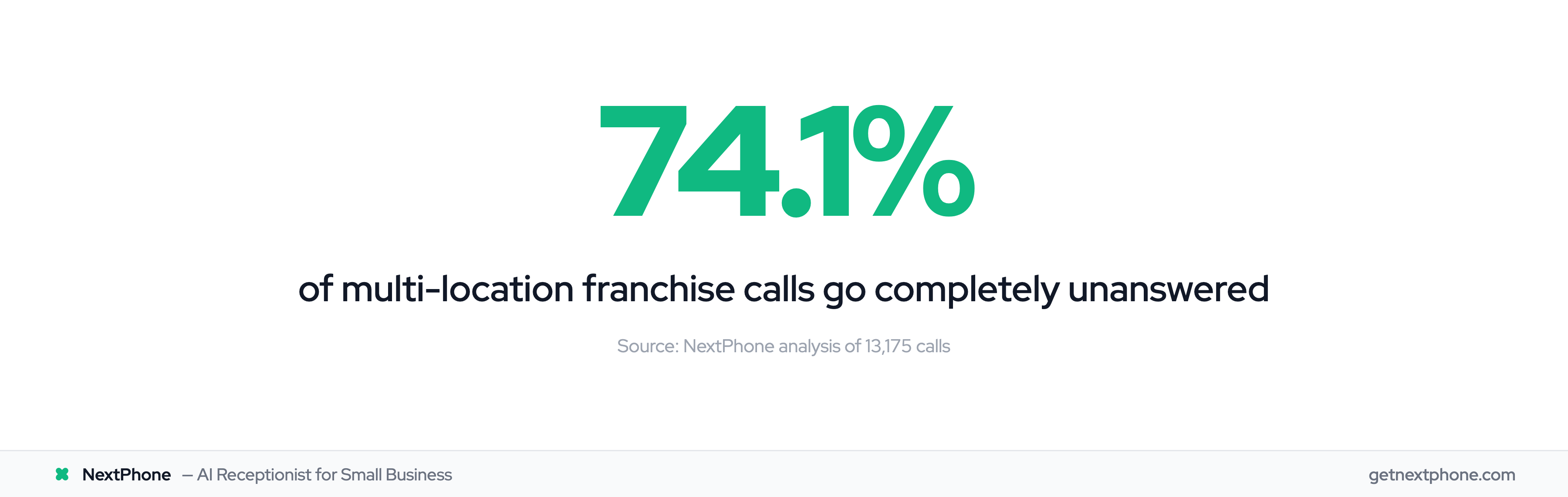
According to industry research, 62% of calls to home service businesses go unanswered, with missed calls costing significant revenue. In our analysis of 130,175 calls from 45 home services contractors over 7 months, we found that 74.1% of calls went completely unanswered. That's three out of every four potential customers calling someone else.
For multi-location businesses, this problem multiplies. A franchise with 5 locations receiving 42 calls per month each handles 210 total calls. At a 74.1% miss rate, that's 156 missed calls every month. If just 20% would have converted at $3,500 average job value, you're losing $109,200 per month—over $1.3 million per year.
85% of customer service leaders will pilot conversational GenAI in 2025. This playbook shows you how to fix it with intelligent call routing, overflow strategies, and centralized management that actually works.
The Multi-Location Call Routing Problem
Calls Go to the Wrong Location
The most common complaint we hear: "We have 5 locations and calls are a mess. Some go to the wrong place, some never get answered."
Without geographic routing, your phone system has no idea where callers are located. A customer in Seattle gets routed to your Boston office. A tenant calling about a maintenance issue at Property A ends up talking to Property B's manager. A legal client in Houston gets connected to your Chicago office, adding confusion and frustration.
The caller experience is terrible. 82% of customers expect an immediate response, and routing them to the wrong location creates frustration. The location experience is worse—fielding calls for territories they don't serve while missing calls from their actual customers.
No Backup When Primary Location Is Busy
Your Dallas HVAC location is fully booked. Every technician is out on jobs. The phone rings. And rings. And rings.
Without overflow routing, that call either goes to voicemail or rings endlessly until the customer hangs up. According to our data, 25.4% of callers explicitly request callbacks. Without a system to capture these requests and route them to an available backup location, most of these callbacks never happen.
Storm season makes this exponentially worse. Your Florida roofing locations get hammered with 5X normal call volume after a hurricane. Calls ring unanswered while your Tampa and Orlando backup teams sit idle, unaware of the overflow need.
Location-Specific Hours Not Respected
Your beach location closes early during the winter off-season—10 AM to 5 PM instead of the summer 7 AM to 10 PM schedule. But your phone system doesn't know this. At 6 PM in January, calls keep routing there, going straight to a closed office.
Similarly, your Phoenix HVAC location extends hours during brutal summer months (5 AM to 11 PM) to handle AC emergencies in extreme heat. Your Seattle location keeps standard hours. Without location-specific hour management, your system routes calls to closed locations or rejects calls to open ones.
Corporate Can't See What's Happening
Your corporate office has no visibility into which locations are answering calls versus missing them. You can't identify performance issues, staffing gaps, or overflow needs until customers start complaining—or worse, until revenue drops.
One location might be crushing it with a 95% answer rate while another misses 60% of calls. Without centralized monitoring, you're flying blind.
Each of these problems multiplies across locations. Five locations with poor routing don't just lose 5X the calls—they create a chaotic customer experience that damages your brand.
What Is Multi-Location Call Routing?
Multi-location call routing automatically directs incoming calls to the correct location based on the caller's geography, the time they're calling, or manual selection. Instead of one receptionist juggling calls for five locations, the system intelligently routes each call to the right place.
The technology uses several detection methods:
Geographic detection identifies where the caller is located using their area code or ZIP code. A caller from area code 214 (Dallas) automatically routes to your Dallas location. A caller from ZIP code 33139 (Miami Beach) routes to your Miami office.
42% of SMBs lose $500+ per month to missed calls, making proper routing essential. The VoIP market is projected to reach $102.5B by 2026, driven by businesses adopting cloud-based phone systems with intelligent routing. Time-based routing respects each location's hours, including seasonal variations and timezone differences. A call at 9 AM automatically routes to the location that's currently open in the caller's timezone, not the corporate headquarters' timezone.
Overflow rules send calls to backup locations when the primary location is busy or unavailable. Dallas fully booked routes to Houston. Miami closed for a holiday routes to Fort Lauderdale.
Location-Specific Greetings
Instead of a generic "Thank you for calling ABC Company," callers hear "Thank you for calling ABC Company Dallas" when routed to your Dallas office. This small detail creates a localized experience that builds trust.
Regional law firms use this to great effect. When a Houston caller reaches your Houston office automatically, hearing "Thank you for calling Smith & Associates Houston" immediately confirms they're in the right place. No confusion, no transfers, no explaining which office they need.
Centralized vs Distributed Management
Modern multi-location routing balances two competing needs: corporate oversight and location autonomy.
Centralized management means corporate can oversee all locations from one dashboard. You see total call volume, answer rates by location, peak calling times, and which locations need overflow support. You set brand standards—hold music, core greetings, emergency protocols—ensuring consistency.
Distributed autonomy means each location controls their own hours, staffing schedules, local promotions, and territory-specific settings within corporate guidelines. The Dallas manager sets Dallas hours. The Miami manager adjusts Miami's seasonal schedule. No corporate micromanagement required.
According to CallRail, "A franchise with multiple locations can share a single telephone number, then using geo-routing, calls are automatically directed to different franchise locations based on area code, state or country." This unified approach gives customers one number to remember while ensuring they reach the right location.
Geographic Routing Methods
Area Code-Based Routing
Area code routing uses ANI (automatic number identification) to detect the caller's area code and route them to the nearest location serving that territory.
A caller from 214 (Dallas) routes to Dallas. A caller from 713 (Houston) routes to Houston. A caller from 305 (Miami) routes to Miami. No input required from the caller—the system handles it automatically.
Pros: Simple, automatic, requires no caller input, works with basic caller ID
Cons: Less precise (area codes cover large regions, sometimes 50+ miles), doesn't work well in dense metro areas with multiple locations per area code
Best for: Regional franchises with one location per area code (5-10 locations spread across states)
ZIP Code-Based Routing
ZIP code routing uses enhanced caller ID technology to identify the caller's specific ZIP code, then routes to the location serving that territory.
A caller from ZIP 75201 (downtown Dallas) routes to your downtown Dallas location. A caller from ZIP 75240 (North Dallas) routes to your North Dallas location—even though both share the same 214 area code.
Pros: Highly precise, perfect for metro areas with multiple locations, handles urban density well
Cons: Only works for U.S. and Canadian numbers, requires enhanced caller ID (not all carriers provide ZIP data), falls back to area code if ZIP unavailable
Best for: Urban franchises with multiple locations in the same city (12+ locations in Dallas/Fort Worth, 8+ in Miami metro, etc.)
Manual Selection (IVR Menu)
Manual selection asks the caller to choose their location either by pressing a number ("Press 1 for Dallas, 2 for Houston, 3 for Miami") or by entering their ZIP code on the keypad.
Pros: 100% accurate (caller chooses), works for any geography, handles specialty routing (route by service type, not just location)
Cons: Extra step for callers, some hang up rather than navigate menus, requires good menu design to avoid confusion
Best for: National franchises with 50+ locations where area code overlap is unavoidable, or businesses that need to route by service type before location
When to Use Each Method
The decision depends on your geography and location density:
- 2-5 locations in same metro area — ZIP code routing + location overflow
- 5-10 locations spread across region — Area code routing + manual fallback
- 10-50 locations across multiple states — Area code primary, IVR for overlaps, centralized dashboard
- 50+ locations nationwide — IVR for location selection, area code for validation, full ACD with corporate analytics
Many businesses use a hybrid approach. A multi-location HVAC company with 12 locations across Texas uses ZIP code routing for Dallas and Houston (where they have multiple locations per city) and area code routing for rural West Texas (one location per region).
Overflow Routing Strategies
Overflow routing automatically sends calls to a backup location or team when the primary location is busy, closed, or unavailable.
Location-to-Location Overflow
Your Dallas HVAC location is fully booked. Every technician is out on jobs. The next customer call doesn't go to voicemail—it routes to your Houston location 240 miles away.
The Houston team can either:
- Book the Dallas customer for a future Dallas appointment slot
- Dispatch a Houston tech to Dallas for emergency jobs (if distance allows)
- Capture the lead information and have Dallas call back later
- Provide phone support (troubleshooting, scheduling, pricing questions)
This is infinitely better than a missed call. In our analysis, 25.4% of callers explicitly requested callbacks. Without overflow routing, these callback requests go to voicemail and often never get returned. With overflow, a live person captures the request immediately.
Time-Based Overflow Triggers
You can configure overflow based on wait time:
- Call rings Dallas for 15 seconds — No answer
- Call rings Houston for 15 seconds — No answer
- Call routes to answering service or AI receptionist — Captures lead information
This tiered approach ensures someone answers, even during peak volume times.
During a Florida hurricane, one roofing franchise's Miami location received 200 calls in one day—5X normal volume. Their overflow routing automatically sent excess calls to Tampa and Orlando backup teams. Result: 87% of calls answered within 30 seconds instead of going to voicemail.
Emergency vs Routine Overflow Rules
Our data shows that 15.9% of calls contain urgency keywords like "emergency," "urgent," or "ASAP." These calls deserve special treatment.
Emergency overflow rules can:
- Bypass the queue entirely, routing directly to an on-call manager
- Try multiple overflow locations simultaneously instead of sequentially
- Send alerts to corporate that high-urgency overflow is occurring
- Connect to 24/7 answering services trained on emergency protocols
A regional law firm uses this approach. Routine client calls follow standard overflow (Dallas — Houston — Answering service). But calls where the caller says "I've been arrested" or "car accident" trigger emergency overflow directly to the intake specialist's cell phone, 24/7.
According to Diabolocom, "ACD systems distribute incoming calls based on agent availability, skills, and call priority, preventing bottlenecks and keeping workloads balanced." Modern overflow routing brings enterprise-grade ACD capabilities to small and mid-size franchises without enterprise pricing.
Location-Specific Hours & Seasonal Management
Timezone Management for Coast-to-Coast Franchises
Your New York office opens at 9 AM Eastern. Your Los Angeles office opens at 9 AM Pacific. Without timezone-aware routing, your system would route calls to NY at 6 AM Pacific (before LA is even open) or reject LA calls at 9 AM Pacific (because it's noon Eastern and you think everyone should be open).
Smart routing respects each location's local timezone. A caller at 9:15 AM Pacific reaches the LA office. A caller at 9:15 AM Eastern reaches the NY office. Both get live support, no confusion.
For businesses operating across multiple timezones, this creates natural extended hours. You're technically open 9 AM - 5 PM local time everywhere, which means you're answering calls from 9 AM Eastern to 8 PM Eastern (5 PM Pacific)—11 hours of coverage from just 8-hour schedules.
Research shows that companies with distributed teams spend up to 30% more time on scheduling coordination without appropriate timezone tools. Location-aware call routing eliminates this overhead entirely.
Seasonal Hours (Beach vs Mountain Locations)
Your Miami Beach property management company has dramatically different demand patterns:
Summer hours (May-September): 7 AM - 10 PM (peak rental season, extended support) Winter hours (October-April): 10 AM - 5 PM (slower season, reduced hours)
Your phone system needs to know this. A call at 6 PM in July should route to the Miami Beach office (still open). A call at 6 PM in January should overflow to your Fort Lauderdale year-round office (Miami Beach closed).
Similarly, your Phoenix HVAC location extends hours during brutal summer heat (5 AM - 11 PM from June-August) to handle AC emergencies. Your Seattle location keeps standard hours (8 AM - 6 PM). The system routes after-hours Phoenix calls during summer extended hours, not to overflow.
Holiday and Special Event Routing
Different locations close for different holidays. Your Texas locations close for Texas Independence Day. Your Massachusetts locations close for Patriots' Day. Your Louisiana locations close for Mardi Gras.
Individual location control means Dallas can set Texas-specific holidays without affecting Boston's schedule. When Dallas is closed for a local holiday, calls automatically overflow to Houston—not to a closed Boston office.
Regional Promotion Handling
You're running a "Florida Summer Special" air conditioning tune-up promotion. The promotion only applies to Florida locations. When a Florida caller mentions the special, they route to a Florida location automatically. When a Texas caller asks about it, the system routes to Texas locations that can explain it's Florida-only and offer an alternative.
This prevents the nightmare scenario: running a regional promotion, routing everyone nationally, and having 80% of calls go to locations that can't honor the offer.
Centralized Management Dashboard
The centralized dashboard is your command center for managing all locations from one interface.
Corporate Oversight Capabilities
According to Invoca, businesses can "monitor answer rates across locations and reduce missed calls by using data to inform staffing."
Your corporate dashboard shows:
- Call volume by location: Which locations are getting the most calls, which are slow
- Answer rates: Dallas answering 94%, Miami answering 67% (staffing issue?)
- Missed calls: Exactly which calls went unanswered, at what time, from what area codes
- Overflow patterns: How often overflow routing is triggered, which backup locations are taking overflow
- Peak hours: When each location gets the most calls (for staffing planning)
This visibility lets you spot problems immediately. When you see Miami's answer rate drop from 88% to 67% in one week, you investigate. You find they're short-staffed due to vacation season. You add overflow support from Fort Lauderdale until the team is back to full strength.
Location Autonomy Settings
While corporate sees everything, each location controls their own:
- Hours: Including seasonal variations and holiday closures
- Staff scheduling: Who's answering calls when
- Local greetings: Within corporate brand guidelines
- Overflow preferences: Which backup location they prefer
- Promotion routing: Local offers specific to their territory
This balance prevents corporate micromanagement while maintaining brand consistency. Dallas doesn't need approval from headquarters to adjust their hours for a local event. But corporate ensures the greeting, hold music, and core customer experience remain consistent across all locations.
Real-Time Monitoring and Adjustments
You see Miami is getting slammed—queue time is 3 minutes and climbing. You click one button to activate emergency overflow to Fort Lauderdale and Tampa. Calls immediately start routing to backup teams. Crisis averted.
Without centralized monitoring, Miami's manager would have to call corporate, explain the situation, get approval, wait for IT to make changes—all while customers wait or hang up.
Performance Comparison and Best Practices
The dashboard reveals which locations are performing best. Dallas answers 96% of calls with an average 8-second pickup time. Miami answers 78% with 32-second average. What's Dallas doing differently?
You investigate and find Dallas uses a ring group strategy where backup staff can pick up overflow. You roll this best practice out to Miami. Their answer rate jumps to 91% in two weeks.
According to FranConnect, "Franchise systems utilizing AI-powered platform are growing at twice the industry average, achieving 5.5% growth, compared to the IFA's predicted 2.6% industry-wide growth." Centralized management that shares best practices across locations drives this outperformance.
Decision Tree: Choosing Your Routing Strategy
Not every franchise needs the same routing approach. Use this framework to decide:
Start with geography:
— Single metro area (all locations within 50 miles): Use ZIP code routing. Callers get directed to their nearest location precisely. Add overflow between nearby locations for capacity balancing.
— Regional spread (5-10 locations across 1-3 states): Use area code routing as primary. Add manual IVR selection for overlapping area codes (Dallas and Fort Worth both have 214, so ask caller to confirm location). Implement location-to-location overflow.
— National franchise (10-50 locations across multiple states): Use area code routing for initial screening, IVR menu for locations with overlapping area codes. Add centralized dashboard for corporate monitoring. Implement tiered overflow (primary — regional backup — national answering service).
— Large franchise (50+ locations nationwide): Use IVR for location selection ("Enter your ZIP code or say your city"). Validate with area code. Deploy full ACD system with intelligent routing based on wait times, location capacity, and staff availability. Corporate analytics dashboard monitors all locations in real-time.
Then consider call volume:
- Low volume (under 50 calls/month per location): Simple area code routing is sufficient
- Medium volume (50-200 calls/month): Add overflow routing and basic monitoring
- High volume (200+ calls/month): Full ACD with multiple overflow tiers and real-time analytics
Finally, factor in industry needs:
- Service businesses (HVAC, plumbing, electrical: Need emergency overflow, 24/7 routing capability, seasonal hour management
- Sales/retail: Need business hours routing, manual selection for specialty services
- Professional services (legal, medical): Need practice area routing, strict after-hours protocols, intake specialist overflow
- Property management: Need property-specific routing (manual entry of property code), 24/7 emergency routing, tenant vs prospect call handling