
Your phone rings. A customer needs to schedule a roof inspection. But you're on a ladder installing shingles. The call goes to voicemail. They call the next roofer. You just lost a $2,800 job.
Across the 1,446,980 business calls in our analysis, booking or rescheduling an appointment is the single most common reason people call home services contractors. With industry research showing 74.1% of calls go completely unanswered, that's an average of 3-4 lost appointment bookings every single month.
Here's what most businesses don't know: you don't have to choose between booking appointments over the phone or sending customers a link to book themselves. AI can do both in the same conversation.
Why Small Businesses Lose Appointments Every Day
The math is brutal. A typical contractor receives about 42 calls per month. If 74.1% go unanswered, that's 31 missed calls. When booking an appointment is the single most common reason people call, you're losing real revenue to competitors who simply picked up the phone.
Missed Calls = Missed Bookings
Most small business owners don't realize how many appointment requests they're missing. You're working - installing HVAC units, fixing electrical panels, repairing plumbing under a house. Your hands are dirty, you're focused on the job, and your phone rings.
The customer on the other line wants to book service. They're ready to schedule. But you can't answer right now. They leave a voicemail, or more likely, they don't. They just call the next business on Google.
We answer calls like these every day. The pattern is clear: industry research shows 74.1% of calls to home services businesses go completely unanswered. That's three out of every four potential customers calling someone else.
Manual Scheduling Wastes Time
Even when you do answer, manual scheduling eats up your day. According to appointment scheduling research, it takes an average of 8.1 minutes to book an appointment over the phone. That includes the back-and-forth to find available times, writing it down, transferring the information to your calendar, and confirming details.
Compare that to online booking, which takes less than one minute.
The problem gets worse when you factor in mistakes. Manual calendar entry leads to double-bookings. You think you wrote down "Tuesday 2 PM" but your calendar says "Thursday 2 PM." Now you have two customers showing up at different times, or worse - both at the same time.
In a bustling small business, back-and-forth phone calls, missed messages, and crumpled sticky notes often define scheduling routines. This manual approach is inefficient, and today's customers expect the ease of online appointment booking.
The Real Cost of Lost Appointments
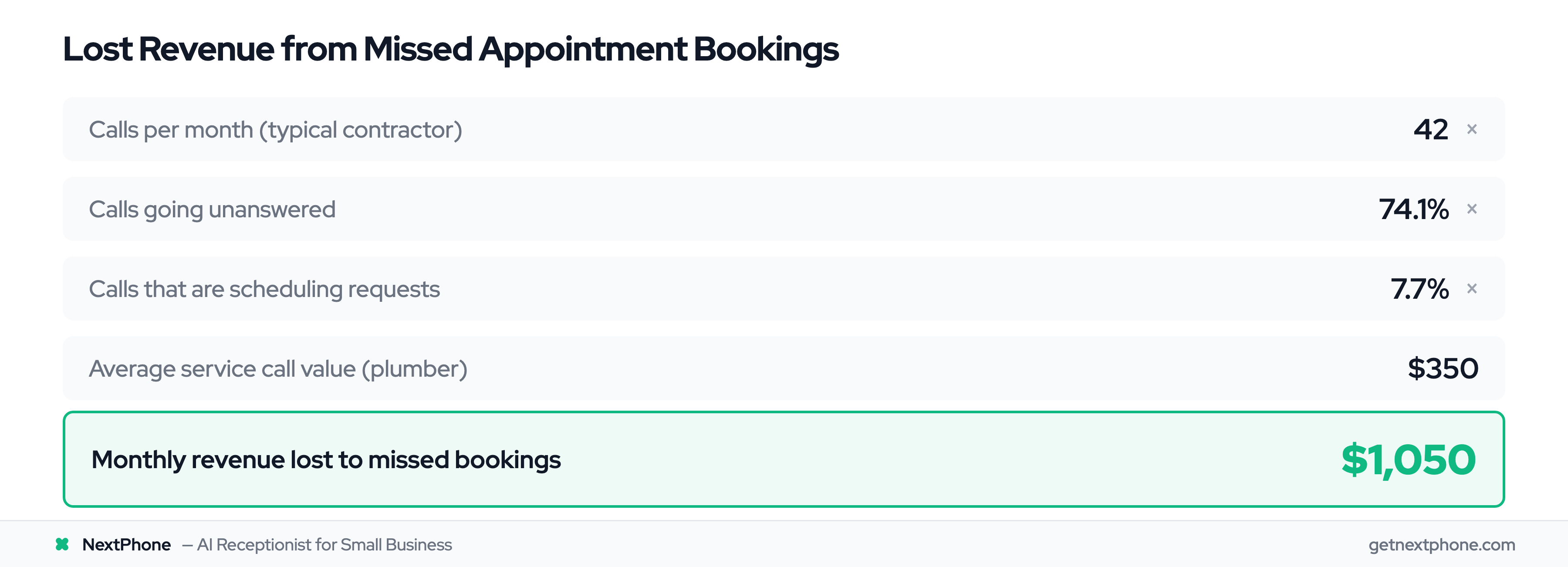
Let's run the numbers for a typical plumber:
- Receives 42 calls per month
- 31 go unanswered (74.1%)
- Scheduling requests are the most common reason people call
- That's approximately 3 missed appointment bookings monthly
- Average service call: $350
- Lost revenue: $1,050 per month
- Annual loss: $12,600
For an HVAC contractor during summer peak season with higher call volume and larger job values:
- 50 calls per month
- 37 unanswered
- Scheduling requests, the most common call reason = ~4 missed appointments
- Average HVAC installation/repair: $4,200
- Lost revenue: $16,800 per month
- Annual loss: $201,600
Industry research shows the estimated yearly loss from missed medical appointments alone is $150 billion. Additional appointment scheduling statistics for 2025 confirm similar patterns across industries. While healthcare is a different vertical, the principle is the same: missed appointments mean lost revenue.
Two Ways to Book Appointments During Phone Calls
Live booking during calls means scheduling happens in real-time during the conversation - not hours later when you listen to voicemail, not after playing phone tag for days. The appointment gets booked while you're talking to the customer.
But here's what makes this powerful: there are two methods, and customers get to choose which one they prefer.
Method 1: Book Directly Over the Phone
The AI checks your calendar availability in real-time while talking to the customer. It knows your schedule, business hours, and existing appointments.
Customer calls: "I need a roof inspection."
AI: "I can schedule that for you. I have Tuesday at 2 PM or Thursday at 10 AM available. Which works better for you?"
Customer: "Thursday works."
AI: "Perfect. I've booked your roof inspection for Thursday, March 14th at 10 AM. You'll receive a confirmation text with all the details."
Done. Appointment booked in 30 seconds. Customer gets instant confirmation. You get a real booking in your calendar without lifting a finger. Research shows 66.7% of qualified forms successfully book meetings when live booking options are available, more than double the 30% industry average.
Method 2: Send Booking Link via Text
Sometimes customers don't want to commit to a time right then. Maybe they're driving. Maybe they need to check their own calendar first. Maybe they just prefer to see all available times and pick the one that works best.
That's where the text-to-book workflow comes in.
Customer calls: "I'd like to schedule a maintenance check, but I'm on the road right now."
AI: "No problem. I'll text you a booking link right now. You can pick whichever time slot works best for your schedule."
Within seconds, the customer receives a text message:
"Hi John, here's your booking link for HVAC maintenance: [calendly.com/yourcompany]. Book at your convenience! - ABC Heating & Cooling"
The customer clicks the link, sees all your available times, picks Thursday at 3 PM, and books themselves. You get a confirmation. They get a confirmation. The appointment is in your calendar.
According to SMS effectiveness data, approximately 98% of text messages get opened, compared to just 20% of emails. When you text a booking link, customers actually see it and use it.
When to Use Each Method
Both methods work. The question is: when should you use which approach?
| Scenario | Best Method | Why |
|---|---|---|
| Customer calls during work hours, ready to schedule | Book over phone | Instant confirmation, done in one conversation |
| Customer calls while driving or busy | Send SMS link | Lets them book when they're ready |
| Customer wants to see all available times | Send SMS link | Visual calendar picker is easier than verbal back-and-forth |
| Simple appointment (one slot, one service) | Book over phone | Faster than clicking through a booking form |
| Customer mentions "I need to check my calendar" | Send SMS link | They can book when they have their schedule in front of them |
| Emergency or urgent service | Book over phone | Speed matters - get them scheduled immediately |
| Customer prefers to book themselves | Send SMS link | Respects their preference for self-service |
| Multiple family members need to coordinate | Send SMS link | They can share the link with whoever makes scheduling decisions |
The beauty of live booking during calls is that the AI adapts to the customer's preference. Some people love the convenience of booking immediately over the phone. Others prefer the control of picking their own time from a visual calendar.
You don't have to guess which one your customer wants - you can offer both options in the same conversation.
How AI Handles Appointment Booking in Real-Time
The technology behind live booking during calls combines calendar integration, SMS automation, and conversational AI. A voice AI receptionist handles the entire booking flow naturally. Here's how it actually works.
Calendar Integration (How AI Checks Availability)
The AI connects directly to your existing calendar system - Google Calendar, Outlook, Calendly, or whatever you already use. Google Calendar's "Find a Time" feature saves 2M+ hours daily, with 88% user retention after one year. This isn't a separate scheduling system you have to manage. It's integrated with the calendar you're already maintaining.
When a customer calls wanting to schedule, the AI queries your calendar in real-time. It knows:
- Your business hours (Monday-Friday 8 AM - 5 PM, or whatever you set)
- Existing appointments (busy blocks are unavailable)
- Buffer times (if you need 30 minutes between jobs)
- Appointment types and durations (roof inspection = 2 hours, consultation = 30 minutes)
According to AI scheduling technology research, modern AI uses function calling to query calendar APIs during conversations, checking availability or booking appointments in real-time as callers make requests.
This prevents double-bookings automatically. The AI can't schedule two people at the same time because it sees your calendar exactly as you see it.
The SMS Workflow (Texting Booking Links)
When the AI sends a booking link via text, it's using a template with variables that auto-fill based on the conversation.
During the call, the AI collects:
- Customer's name
- Phone number (already captured from caller ID)
- Email address (if needed for calendar confirmation)
- Preferred service type
- General time preference (morning/afternoon, this week/next week)
Then it triggers an SMS using a template like this:
"Hi [caller_name], here's your booking link for [service_type]: [booking_url]. Pick whichever time works best! - [business_name]"
The variables automatically fill in:
"Hi Sarah, here's your booking link for plumbing inspection: calendly.com/smithplumbing/inspection. Pick whichever time works best! - Smith Plumbing"
The customer receives the text within seconds - while they're still on the call or immediately after hanging up. They click the link, see your available time slots, pick one, and book.
Calendly workflows act as your personal meeting communications assistant, automatically sending text reminders and booking links to keep scheduling simple.
Collecting Customer Information
The AI has a natural conversation while gathering the information needed to complete the booking.
Customer: "Yeah, I need someone to look at my AC unit. It's making a weird noise."
AI: "I can help you schedule that. What's the best way to reach you if we need to follow up?"
Customer: "You can call me at this number, or email me at john@email.com."
AI: "Perfect. And what's your name?"
Customer: "John Martinez."
AI: "Thanks, John. When would you like us to come out? We have availability this week or next."
The conversation flows naturally. The AI collects name, phone, email, and time preference without making it feel like filling out a form.
Preventing Double-Bookings
One of the biggest fears with automated booking is: "What if two people book the same time slot at the exact same moment?"
Real-time calendar syncing prevents this. When the AI books an appointment or when a customer books via the link, the time slot is immediately marked as busy in your calendar. The next person who calls or clicks the booking link sees that slot as unavailable.
If you manually add an appointment to your calendar (like a friend or family commitment), the AI sees that block as busy and won't offer it to customers.
Everything stays in sync because there's only one source of truth: your calendar.
Why Live Booking During Calls Beats Manual Scheduling
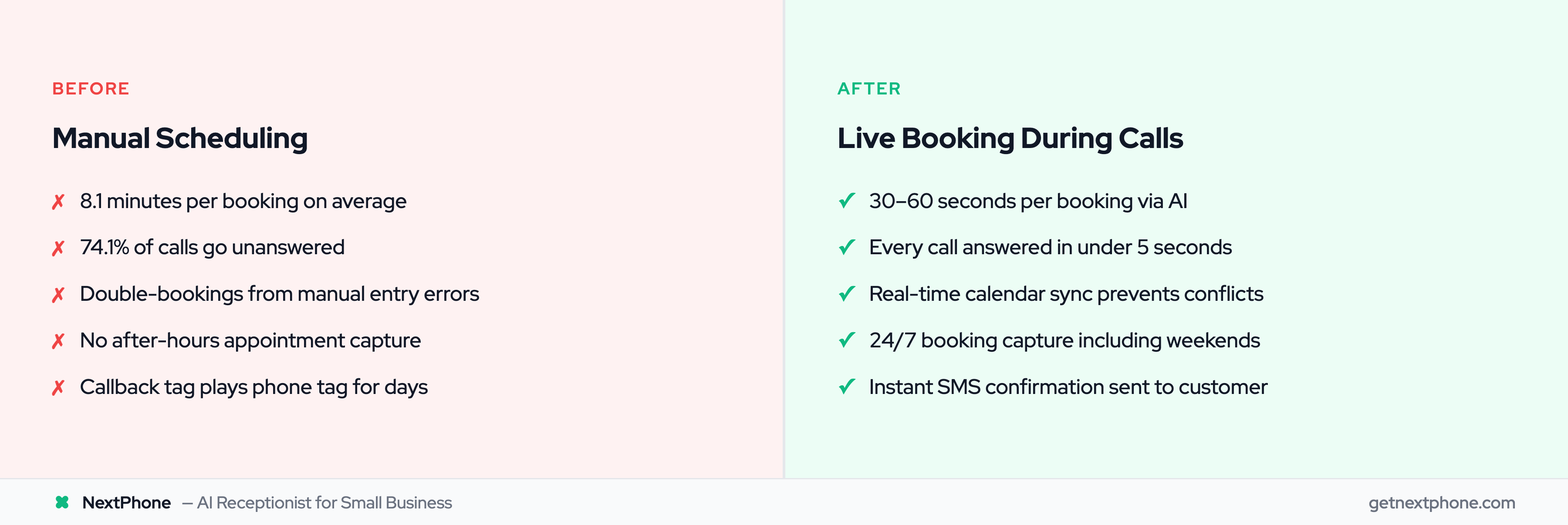
The benefits go way beyond just "saving time." This changes how your business operates and how customers experience booking with you.
Capture Every Booking Opportunity (24/7 Availability)
You're working on a job site. Your phone is in the truck. A customer calls at 7 PM wanting to schedule service. With traditional phone-based scheduling, they get voicemail. Maybe they leave a message. Maybe you call back tomorrow. Maybe they've already booked someone else.
With live booking during calls, the AI answers in under 5 seconds. The customer books an appointment at 7 PM on a Tuesday, or receives a text link they can click at 9 PM after the kids are in bed.
A large share of calls to home services businesses arrive outside standard 9-5 hours. Home services industry research reveals 62% of companies say finding clients is their biggest challenge, and 94% of customers are more likely to book if online scheduling is available. If you're only available to book appointments during business hours, you're missing a large chunk of potential customers.
24/7 availability means you capture bookings while you're sleeping, working, or spending time with family.
Save 8+ Minutes Per Call
Remember that stat about phone booking taking 8.1 minutes on average? That's per appointment.
If you manually schedule just 20 appointments per month, you're spending 162 minutes - almost 3 hours - on scheduling alone. That's 3 hours you could spend on actual billable work.
With live booking, the AI handles the entire scheduling conversation in 30-60 seconds. You spend zero time on it. The appointment just appears in your calendar with all the details already filled in.
For a plumber charging $150/hour, those recovered 3 hours are worth $450 per month in additional work you can complete.
Reduce No-Shows by 90%
According to automated reminder research, timely automated reminders have been shown to cut down missed appointments by up to 90% in certain cases. Healthcare studies confirm that online scheduling significantly reduces no-show rates.
When appointments are booked via AI, confirmations and reminders happen automatically:
- Immediate confirmation (via text and email right after booking)
- Reminder 24 hours before appointment
- Reminder 2 hours before appointment (optional)
- Customer can confirm, reschedule, or cancel directly from the text message
No-shows cost you money. An empty slot in your schedule is time you could have filled with a paying customer. Automated reminders keep your calendar full and customers showing up.
Give Customers Control
Some customers love talking to someone (even an AI) to get their questions answered and book immediately. Others prefer self-service - they want to see all available times and pick the one that fits their schedule best. Patient self-scheduling adoption has surged 30% year-over-year, and MGMA research confirms patients increasingly prefer scheduling power in their own hands.
The dual approach respects both preferences. Customers who want immediate booking get it. Customers who want to think about it and book later can do that too.
You're not forcing customers into your preferred method - you're adapting to theirs. That's better customer experience.
Never Double-Book Again
Manual scheduling errors are common. You think you wrote down Tuesday but you meant Thursday. You forgot about that family commitment on Wednesday afternoon. You accidentally scheduled two people at 2 PM.
Real-time calendar integration eliminates these errors. The system knows what's available and what's not. It physically cannot book two people at the same time because the first booking makes that slot unavailable for the second.
Your calendar stays organized, accurate, and conflict-free.
ROI Example - Plumber:
- Currently losing 3 appointment bookings per month to missed calls
- 3 appointments × $350 per service call = $1,050/month
- Annual lost revenue: $12,600
- NextPhone cost: $199/month = $2,388/year
- Net gain: $10,212 per year
- ROI: 428%
That's from capturing just 3 extra appointments per month - appointments you're already losing to voicemail.