IVR Integration with AI Receptionist: After-Hours Call Handling Setup

23 min read
Yanis Mellata
AI Technology

The Phone Tree That Cost You a Customer

"Press 1 for sales. Press 2 for service. Press 3 for billing. Press 4 for—"

Your customer hangs up. They call the next contractor.

This happens more than you think. Phone trees with more than 3 menu levels see 43% higher abandonment rates than simpler systems. And only 23% of callers actually complete IVR interactions with 4 or more levels before giving up or mashing zero to reach a human.

The bigger problem? In our analysis of 13,175 customer service calls from 45 home services contractors over 7 months, 74.1% of calls went completely unanswered. That's three out of every four potential customers calling someone else.

IVR integration with AI offers a better path forward—one that routes calls intelligently without frustrating customers or forcing you to answer your phone at 2 AM for every spam call. Here's exactly how to set up after-hours call handling that captures routine inquiries but routes true emergencies straight to your phone.

The Phone Tree Problem

Why Customers Hate Phone Menus

Your customers press 0 the moment they hear "Press 1 for..." They're not trying to be difficult. They just know from experience that navigating a 6-level phone tree takes three minutes and usually dead-ends in voicemail anyway.

Industry data confirms what you already suspect: phone trees with more than 3 levels lose 43% of callers before they reach their destination. Multi-level menus waste time, test patience, and cause hang-ups.

The Abandonment Problem

Only 23% of callers complete IVR interactions when you've got 4 or more menu levels. The rest abandon, press zero frantically hoping to reach a human, or—most likely—call your competitor who answers in two rings.

Here's what one plumber discovered when he finally looked at his call data: "I didn't even know I was missing that many calls until I saw the numbers. I just thought business was slow." He had 76 missed calls in one month. Most happened after hours.

After-Hours Calls = Highest Value Opportunities
The calls you're missing at 9 PM or on weekends? Those are often your most valuable opportunities. We found that 15.9% of calls contain urgency keywords like "emergency," "urgent," or "ASAP." Another 6.2% are true emergencies—pipe bursts, power outages, AC failures in 95-degree heat.

Emergency jobs average $4,200 compared to $3,500 for routine work. When that HVAC contractor is on a ladder installing a unit and can't answer, the customer with no cooling in summer heat calls the next company. Missing one emergency call per week costs you $16,800 per month in lost revenue.

Traditional phone trees make customers navigate menus even during emergencies. A plumber gets a 2 AM call about a burst pipe flooding a basement—and the caller has to press 1 for emergency service, then 2 for plumbing, then 3 for residential before reaching an emergency line that... goes to voicemail because nobody's there.

The customer calls someone else.

What is IVR Integration with AI?

Traditional IVR Explained

IVR (Interactive Voice Response) is that automated menu system you know well: "Press 1 for sales, press 2 for service, press 3 for billing." It's been around since the 1980s and works through button-press navigation or basic voice recognition ("Say sales or press 1").

Traditional IVR follows rigid decision trees. Every caller path must be pre-programmed. If a customer's question doesn't fit your menu structure, they're stuck.

AI Receptionist Capabilities

An AI receptionist understands natural speech and responds intelligently to open-ended questions. Instead of "Press 1 for hours," you get "Hi! How can I help you today?" followed by the AI understanding "What time do you close?" or "I need an emergency repair" or "How much do you charge for installations?"

The AI has been trained on your specific business—your services, pricing, hours, service area. It answers accurately because it knows your business context, not just generic scripts.

How Integration Works

IVR integration with AI combines the best of both approaches:

  • IVR handles basic routing: Simple 1-2 level menu for department selection or language choice
  • AI handles conversation: Natural language interaction for questions, booking, information gathering
  • Humans handle complex/emergency: Live transfer for situations requiring expertise or immediate response

According to Gartner's research, 67% of customers prefer self-service options for simple inquiries, but 82% still want the option to reach a human for complex issues. A hybrid IVR-AI system gives both groups what they need.

Conversational IVR vs Button-Press Menus

Modern systems offer conversational IVR: "Say or press 1 for sales." The caller can speak naturally ("I need sales") or press buttons if they prefer. Some businesses skip the menu entirely and go straight to conversational AI: "Hi! What brings you in today?"

Research from MIT Sloan shows conversational AI systems achieve 4.2x faster resolution times than multi-level IVR menus. Customers get answers in 30 seconds instead of navigating three minutes of button-pressing.

IVR vs AI vs Hybrid - Which Do You Need?

Pure IVR Approach (When It Works)

A pure IVR system works if you have very simple routing needs: main line forwards to 2-3 departments, low call volume, tight budget constraints, and callers who don't need complex conversations.

Example: A law firm with three practice areas might use "Press 1 for family law, 2 for estate planning, 3 for business law" and route directly to those teams during business hours.

Pure AI Approach (When It's Better)

Skip the menu entirely if you have high call volume, complex questions that don't fit rigid categories, need 24/7 coverage, or prioritize customer experience. AI answers immediately and routes based on conversation content, not button presses.

Example: A real estate agent gets 20 calls per week with unpredictable questions—property availability, neighborhood info, showing schedules, market conditions. A menu can't capture all that. Conversational AI handles it naturally.

Hybrid Approach (Best for Most SMBs)

The hybrid approach works for most small businesses: simple IVR menu for basic routing, then AI conversation, then human fallback for emergencies.

Example: HVAC company setup—

  • Level 1 (IVR): "Press 1 for emergency service, or stay on the line to speak with our assistant"
  • Level 2 (AI): Conversational handling—"What's going on with your system?"
  • Level 3 (Human): If AI detects emergency keywords or can't answer, immediate transfer to on-call tech

This gives customers choice (press buttons if they want, or just talk) while ensuring emergencies reach humans immediately and routine calls get handled without waking you at midnight.

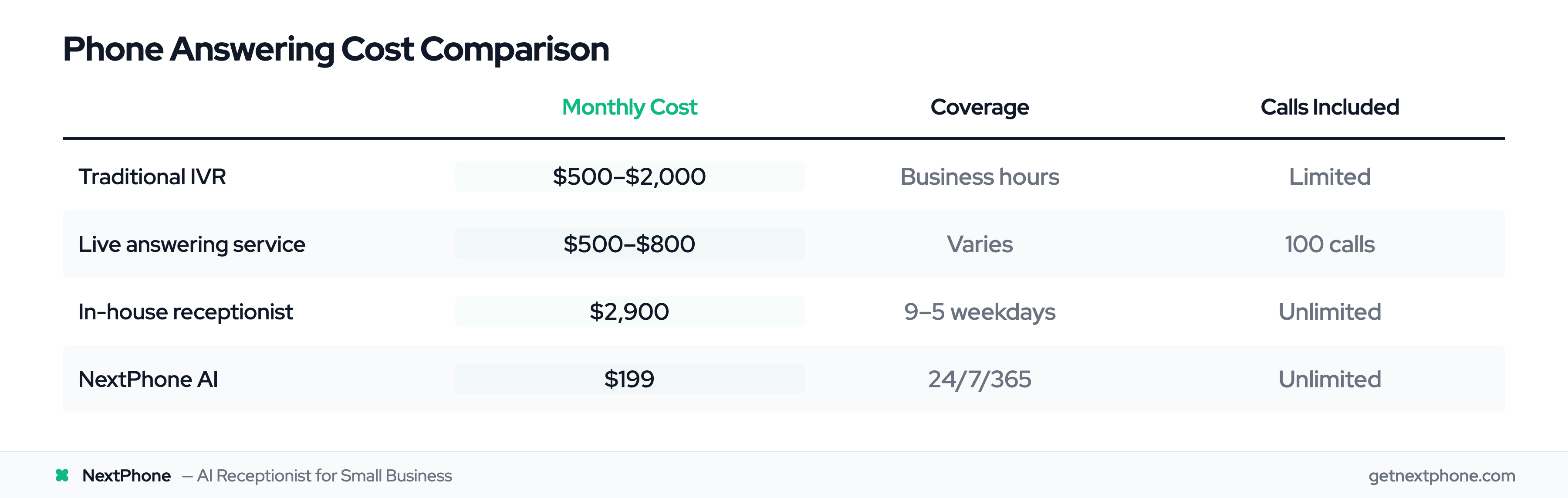
  • Cost comparison:

  • Traditional IVR system: $500-2,000/month for small businesses with advanced routing

  • Live answering service: $500-800/month for 100 calls (then overage fees)

  • In-house receptionist: $2,900/month ($35,000 annual salary)

  • AI receptionist (NextPhone): $199/month unlimited calls

Multi-Level Routing Strategy

Level 1: IVR Menu (Basic Routing)

Keep your IVR menu simple—one or two levels maximum. Use it for basic routing that customers understand immediately:

  • Language selection ("Para espa—ol, oprima dos")
  • Department routing (sales vs service vs billing)
  • Emergency vs routine ("Press 1 for emergency, or stay on the line")

The key is not using IVR for information gathering or complex questions. That's where AI takes over.

Level 2: AI Conversation (Handles Most Calls)

After basic IVR routing, AI handles the actual conversation. It can:

  • Answer common questions (hours, location, pricing, services)
  • Book appointments and collect contact information
  • Qualify leads (budget, timeline, project scope)
  • Take detailed messages for callbacks
  • Detect urgency and escalate when needed

Our data shows 25.4% of callers explicitly request callbacks. AI can capture these automatically—name, phone, reason for call, preferred callback time—then send the information to your email and CRM.

Level 3: Human Fallback (Emergencies and Complex)

Certain situations require human judgment:

  • True emergencies: Keywords like "burst," "flooding," "no power," "can't breathe"
  • Complex technical questions: Unusual situations AI hasn't been trained on
  • High-value negotiations: $50K commercial project discussions
  • Upset customers: Complaints requiring empathy and authority

The AI recognizes these situations and transfers immediately. Research on emergency services shows that intelligent routing systems answer 89% of emergency calls within 15 seconds, compared to just 34% with traditional multi-level menus.

Setting Up Triggers for Each Level

Configure specific triggers that escalate calls:

  • Keyword detection: "emergency," "urgent," "ASAP," "flooding," "fire," "broken," "leak"
  • Caller request: "I need to speak to a person" triggers immediate transfer
  • AI uncertainty: If AI confidence drops below threshold, it offers human transfer
  • High-value indicators: Caller mentions large project budget or commercial work
  • Repeat callers: System recognizes phone number of existing customer, offers priority routing

The advantage of this multi-level system is it never dead-ends. If AI can't help, it transfers to human or takes a detailed message. Customers always have a path forward.

After-Hours Call Handling Setup

Business Hours vs After-Hours Routing Logic

Your phone system should behave differently at 2 PM versus 2 AM:

  • During business hours (9-5):

  • IVR menu available if you want department routing

  • AI answers calls while you're helping customers in person

  • Human backup available for transfers

  • Calls can go to receptionist desk during peak times

  • After hours (5 PM - 9 AM):

  • AI answers every call (no human available)

  • Emergency calls route to owner's cell phone

  • Routine calls handled with message + callback scheduling

  • Spam filtered automatically (no 2 AM robocalls)

According to Forbes, 73% of small business calls occur outside standard 9-5 hours. Traditional businesses miss nearly three-quarters of potential customers by not having after-hours coverage.

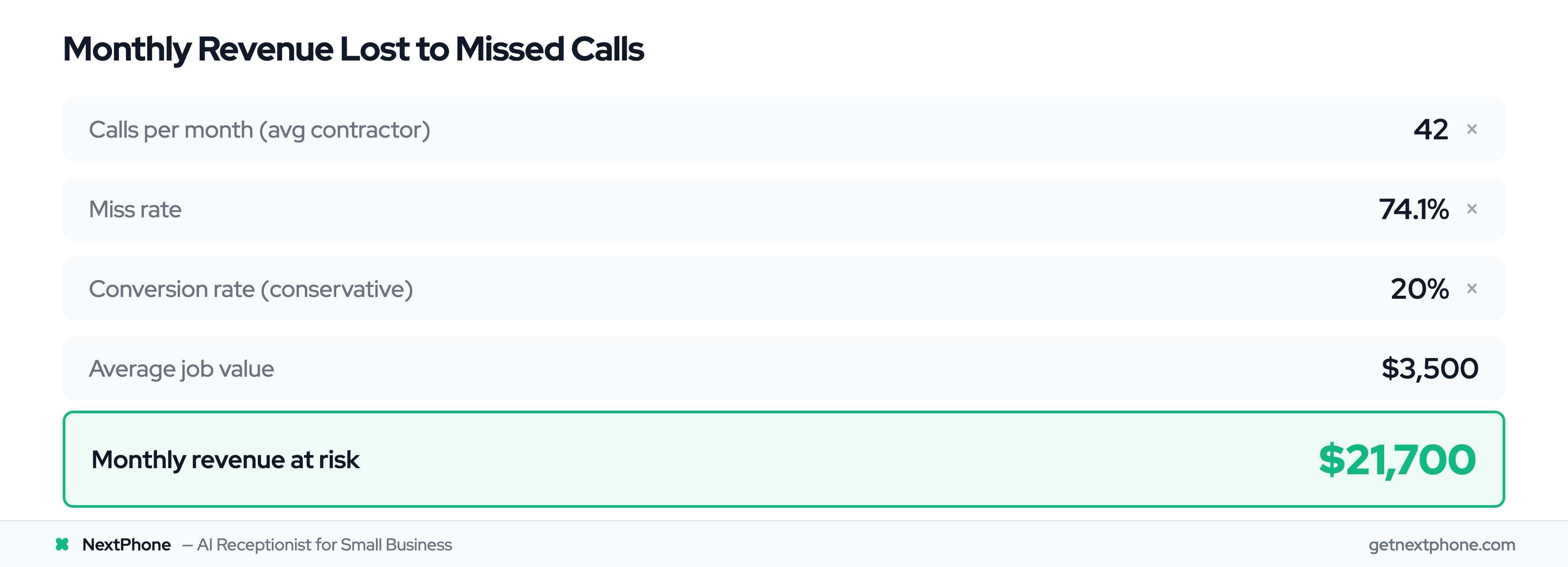
For a typical contractor receiving 42 calls per month, if 74.1% go unanswered (31 missed calls), and just 20% would convert at an average $3,500 project value, that's $21,700 per month in lost revenue—or $260,400 per year.

Emergency Call Detection and Routing

The magic of modern IVR AI integration is smart emergency detection. The AI listens for specific keywords and patterns:

  • Emergency triggers:

  • "Burst pipe" or "flooding"

  • "No power" or "electrical fire"

  • "No heat" (in winter) or "no AC" (in summer over 90—)

  • "Carbon monoxide"

  • "Can't access building"

  • Any variation of "emergency" + your service type

When detected, the AI immediately transfers to your configured emergency contact—usually the owner's cell phone or an on-call rotation.

Example scenario - 2 AM Emergency:

Call comes in at 2:04 AM

AI: "Hi! You've reached ABC Plumbing. How can I help?"

Caller: "My pipe just burst and there's water everywhere!"

AI: [Detects "burst" and "water everywhere"] "I'm connecting you to our emergency line right now. Please hold."

[Immediate transfer to owner's cell phone]

Owner answers: "This is ABC Plumbing, I can be there in 20 minutes. What's the address?"

The customer gets immediate human help. The owner only gets woken up for real emergencies, not spam or routine quote requests.

Routine Call Handling (Quotes, Questions, Scheduling)

Not every after-hours call is an emergency. Most are quote requests, questions about services, or appointment scheduling.

Example scenario - 7 PM Quote Request:

Call comes in at 7:14 PM

AI: "Hi! You've reached ABC Plumbing. How can I help?"

Caller: "Yeah, I'd like to get a quote for remodeling my bathroom."

AI: "I'd be happy to help with that! Let me get some details so our team can give you an accurate quote. First, can I get your name?"

Caller: "Sure, it's Mike Johnson."

AI: "Thanks Mike. What's the best number to reach you?"

[Continues collecting: phone, email, project scope, timeline, budget range]

AI: "Perfect! I've sent all this information to our team. They'll call you tomorrow morning between 9 and 10 AM. You'll also receive a confirmation text with the appointment details. Is there anything else I can help with tonight?"

The AI captured the lead completely—no missed opportunity, no lost revenue. Mike gets confirmation he'll hear back tomorrow. The business owner wakes up to a detailed email with the lead information already in their CRM.

Our analysis found 25.4% of callers explicitly request callbacks. Without automated tracking, most of these callback requests fall through the cracks. AI never forgets.

Weekend and Holiday Configuration

Configure separate routing for weekends and holidays:

  • Weekends: Often same as after-hours (AI handles routine, emergencies go to on-call)
  • Holidays: Special greeting ("We're closed for Thanksgiving, but if this is an emergency...")
  • On-call rotation: Different emergency contact depending on day/time
  • Seasonal adjustments: HVAC companies might route differently during peak summer cooling season

Spam Filtering for After-Hours Calls

Here's the scenario every business owner dreads: It's midnight. Your phone rings. You're on-call for emergencies. You answer groggily.

"We've been trying to reach you about your car's extended warranty..."

Our data shows 7.0% of all calls are spam or robocalls. Without AI filtering, these wake you up regularly. With AI screening, spam gets blocked before it reaches your phone.

The AI detects:

  • Robocall patterns (long initial pause, background call center noise)
  • Known spam numbers
  • Automated voices (not human callers)
  • Suspicious scripts ("You've won a free vacation...")

Legitimate emergency calls from real customers always get through. Spam gets sent to digital trash.
Decision Framework - When to Route to AI vs Human

Route to AI (Routine, Repeatable)

AI handles these call types exceptionally well:

  • Hours and location questions: "What time do you close?" "Do you service my area?"
  • Standard pricing: "How much for a basic HVAC tune-up?" (if you have set prices)
  • Appointment scheduling: "I'd like to book a consultation for next week"
  • FAQ answers: "Do you offer emergency service?" "What brands do you work with?"
  • Quote request intake: Collecting details for callbacks
  • Callback scheduling: Customer can't talk now, wants to set up later call

Gartner's research confirms that 67% of customers prefer self-service for simple inquiries. These interactions don't require human judgment—AI answers faster and more consistently.

Route to Human (Complex, Emergency, High-Value)

Humans handle situations requiring empathy, expertise, or immediate action:

  • True emergencies: "My basement is flooding RIGHT NOW"
  • Complex technical questions: Unusual equipment, rare situations, multi-part projects
  • Price negotiations: Commercial projects, custom quotes, bulk discounts
  • Upset customers: Complaints, service quality issues, refund requests
  • High-value sales: $50K+ projects that need experienced sales discussion
  • Nuanced situations: Anything requiring judgment calls or exceptions to standard policy

According to the same Gartner research, 82% of customers want the option to reach a human for complex issues. The key word is "option"—they don't want to wait on hold for three minutes to ask your business hours, but they do want human help for difficult problems.

Route to Voicemail/Callback (Non-Urgent, Off-Hours)

Some calls don't need immediate response but shouldn't be ignored:

  • Detailed project discussions: Customer wants to explain a complex remodeling vision (AI takes detailed notes for callback)
  • Non-urgent during busy times: Front desk is helping in-person customers, AI captures message
  • After-hours non-emergencies: Quote requests at 8 PM can be scheduled for callback next morning
  • Follow-up conversations: Customer called back about previous quote, needs to speak with specific person

The AI collects comprehensive information—name, contact details, reason for call, preferred callback time, any specific questions—then schedules the callback and sends confirmation. This captures 25.4% of callers who request callbacks anyway.

Phone Tree Modernization Playbook

Diagnose Your Current Phone Tree

Start by understanding what you have now:

  • Count menu levels: How many button presses before reaching a human or voicemail?
  • Measure abandonment: What percentage of callers hang up mid-menu? (Check your phone system analytics)
  • Identify most common paths: Which menu options do 80% of callers select?
  • Find dead ends: Where do callers get stuck or confused?

If you have 4+ menu levels, you're losing 43% of callers to abandonment. If callers constantly press 0 to bypass your menu, the menu isn't helping—it's hurting.

Simplify Menu Structure

Cut ruthlessly:

  • Reduce 6-8 levels to 2 maximum: Most businesses only need "Emergency? Press 1" or language selection
  • Remove rarely-used options: If fewer than 5% of callers select an option, eliminate it
  • Combine similar categories: "New customers" and "existing customers" can often be handled by the same AI conversation

Before (8-level nightmare):

"Thank you for calling. For sales, press 1. For service, press 2. For billing, press 3..."

[Caller presses 2]

"For residential service, press 1. For commercial service, press 2..."

[Caller presses 1]

"For new customers, press 1. For existing customers, press 2..."

[Caller hangs up in frustration]

After (2 levels + AI):

"Thanks for calling ABC HVAC. For emergencies, press 1 now. Otherwise, stay on the line to speak with our assistant."

[2 second pause]

AI: "Hi! How can I help you today?"

[Caller explains their need in natural language, AI routes appropriately]

Add Conversational AI Layer

You don't have to rip out your existing phone system. Add an AI layer on top:

  • Keep simple IVR for emergency routing (safety net)
  • Replace deep menus with conversational AI
  • Let AI ask clarifying questions instead of forcing menu navigation
  • Maintain human transfer option for customers who prefer it

The MIT study showed conversational AI resolves inquiries 4.2x faster than multi-level menus. Your customers get help in 30 seconds instead of 3 minutes.

Test and Optimize

Don't just flip a switch—test your new setup:

  • Call your own business: Does the routing work as expected?
  • Try emergency keywords: Does "flooding" trigger immediate transfer?
  • Test during off-hours: Does after-hours routing work correctly?
  • Review call logs: Listen to first 50 calls, identify any issues
  • Adjust triggers: Refine which keywords route to human vs AI
  • A/B test (if possible): Compare old menu completion rates vs new AI completion rates

You can refine over time. The AI learns from your feedback and improves.

Implementation and Cost

Setup Steps (How to Implement)

Modern IVR AI integration doesn't require a computer science degree:

  • Step 1: Define routing logic

  • Business hours vs after-hours paths

  • Emergency trigger keywords

  • Which calls need human transfer

  • Spam filtering rules

  • Step 2: Configure AI knowledge base

  • Train AI on your services, pricing, hours

  • Add FAQ answers

  • Provide service area information

  • Include any policies (warranty, payment terms, etc.)

  • Step 3: Set up emergency contacts

  • Owner cell phone for after-hours emergencies

  • On-call rotation if applicable

  • Backup contacts if primary doesn't answer

  • Step 4: Create greeting messages

  • Different greetings for business hours vs after-hours

  • Special holiday messages

  • Professional voice recordings or text-to-speech

  • Step 5: Test with sample calls

  • Call and try emergency keywords

  • Test routine questions

  • Verify transfers work

  • Confirm spam filtering

  • Step 6: Go live and monitor

  • Review call logs daily for first week

  • Adjust triggers as needed

  • Collect customer feedback

  • Refine AI responses over time

Time to implement: 10-30 minutes for basic setup, ongoing refinement as you learn what works.

Cost Comparison (All Options)

Let's compare what you'd actually pay:

Traditional IVR system: $500-2,000/month

  • Hardware costs or cloud subscription
  • Per-user fees
  • Advanced routing features extra
  • Setup fees ($500-1,500)
  • Maintenance and support

Live answering service: $500-800/month for 100 calls

  • Per-call or per-minute pricing
  • Overage fees add up fast during busy seasons
  • Limited to script-based responses
  • Can't integrate with your CRM or tools
  • Business hours coverage only (or 24/7 costs much more)

In-house receptionist: $2,900/month ($35,000/year salary)

  • Plus benefits (healthcare, vacation, sick days)
  • Only covers 9-5 Monday-Friday
  • Need backup coverage for breaks, lunch, PTO
  • Sick days leave you uncovered
  • Can't scale during peak seasons

NextPhone AI receptionist: $199/month unlimited calls

  • No per-call fees, no overage charges
  • 24/7 coverage including holidays
  • Integrates with CRM, calendar, email, SMS
  • Learns and improves over time
  • No setup fees, cancel anytime

ROI Calculation

The math is straightforward:

  • Revenue opportunity:

  • 42 calls/month (average small business)

  • 74.1% missed = 31 missed calls

  • 20% would convert = 6.2 jobs lost/month

  • $3,500 average project = $21,700/month in lost revenue

  • Annual loss: $260,400

  • Solution cost:

  • NextPhone: $199/month = $2,388/year

ROI: Capture just one additional job per month ($3,500) and you've covered the cost with $3,301 left over. That's a 1,765% return on investment.

Or put another way: the system pays for itself if it captures just 5.7% of the calls you're currently missing.

How NextPhone Solves This

NextPhone combines IVR flexibility, conversational AI, and intelligent routing in one platform designed for small businesses.

  • Key features for after-hours handling:

  • Optional IVR menu: Set up simple 1-2 level routing if you want it, or skip straight to AI

  • Conversational AI: Natural language understanding—no button-pressing required unless customer prefers it

  • Emergency keyword detection: Configure trigger words for your industry ("burst," "flooding," "no power," "no heat")

  • Automatic call transfer: AI connects emergency calls to your cell phone in seconds

  • After-hours configuration: Different routing for 9-5 vs evenings/weekends vs holidays

  • Spam filtering: AI screens robocalls before they wake you at 2 AM (blocks the 7% that are spam)

  • SMS follow-up: Sends confirmation texts after calls ("Your quote request has been sent to our team")

  • Email notifications: Immediate alerts for emergency calls, summary emails for routine messages

  • Call recording and transcripts: Review exactly what AI said and how it handled each situation

Setup: 10-minute web-based configuration. No technical skills required, no phone equipment to buy.

Pricing: $199/month for unlimited calls. No setup fees, no per-call charges, no hidden costs.

How it works with our data: NextPhone's features are informed by our analysis of 13,175 calls. We know 15.9% contain urgency keywords, 25.4% request callbacks, and 7% are spam—so we built the system to handle exactly those scenarios.

Example: An HVAC contractor uses NextPhone for after-hours coverage. During business hours, calls ring his front desk. After 5 PM, AI answers every call. Quote requests get captured with full details and scheduled for next-morning callback. Emergency calls ("My AC is broken and it's 97 degrees in here") transfer immediately to his cell. Spam calls get blocked. He sleeps through the night but never misses a $4,200 emergency job.

Ready to set up intelligent call routing for your business? [Start your free trial —]

Frequently Asked Questions

Can AI really detect emergencies accurately?

Modern AI detects emergency keywords ("burst," "flooding," "no power," "fire," "emergency") with high accuracy. You configure custom trigger words specific to your industry—plumbers add "leak" and "water damage," electricians add "sparks" and "burning smell," HVAC adds "no heat" (winter) and "no cooling" (summer).

False positives are rare, and the AI errs on the side of caution. If it's borderline, it routes to human. You can review call logs and refine triggers over time—add new keywords if you discover the AI missed something, or remove triggers that fire too often.

What if customers want to speak to a human immediately?

The AI always offers transfer options. A customer can say "I want to talk to a person" at any point and get transferred. You can also configure your IVR menu with "Press 0 for immediate operator" if you want that safety valve.

The hybrid approach gives customers choice: talk to AI for fast answers, or wait for human if they prefer. According to Gartner, 67% prefer self-service for simple questions anyway—most customers are happy talking to AI if it answers their question quickly.

How much does IVR integration cost?

Traditional IVR systems run $500-2,000 per month for small businesses with advanced routing features, plus setup fees of $500-1,500. Live answering services charge $500-800 per month for just 100 calls, with overage fees that add up during busy seasons.

NextPhone offers IVR integration with AI for $199 per month with unlimited calls. No setup fees, no per-call charges, no hidden costs. Cancel anytime.

Is setup complicated or do I need IT help?

No technical skills required. Most businesses complete basic setup in 10-30 minutes through a web dashboard. The platform provides templates for common industries (contractors, medical offices, real estate, legal) so you're not starting from scratch.

If you get stuck, support is available. But the interface is designed for business owners, not IT professionals.

Will customers get frustrated talking to AI instead of human?

Customer frustration comes from multi-level button menus that waste time, not from conversational AI that answers questions quickly. The MIT study found conversational AI resolves issues 4.2x faster than phone trees.

The key is always offering a human option for complex situations. Gartner's research shows 67% of customers prefer self-service for simple questions, but 82% want human access for complex issues. Give both options and customers are happy.

How do I handle spam calls with after-hours routing?

AI screens all calls before routing to your cell phone. It detects robocall patterns (long initial pauses, background call center noise, known spam numbers, automated voices) and blocks them automatically.

Our data shows 7% of calls are spam. Without AI filtering, these wake you up at midnight. With screening, only legitimate customer emergencies ring your phone. Spam gets blocked or sent to voicemail.

Can I use this with my existing phone number?

Yes. Either forward your existing number to NextPhone (takes 5 minutes) or port your number completely (takes 1-3 business days). You can keep your main business line, cell phone, and office numbers exactly as they are.

There's no disruption to customers—they call the same number they always have. On the backend, calls route through NextPhone's IVR AI system, then transfer to you when needed.

Stop Losing Calls to Complicated Phone Trees

Phone trees frustrate customers. Pure AI solves some problems. But hybrid IVR integration with AI solves most—giving customers simple routing options, conversational help for routine questions, and immediate human connection for emergencies.

After-hours call handling is where this setup really shines. You can sleep through spam and routine quote requests, but your phone rings immediately when someone says "flooding" or "no power." You capture every lead without hiring 24/7 staff.

Modern systems are affordable ($199/month vs $500-2,000/month for traditional IVR or answering services), simple to set up (10-30 minutes with no technical skills), and effective (our data shows 74.1% of calls are currently going unanswered—you can capture those).

The businesses winning in 2025 aren't the ones with the biggest marketing budgets or the fanciest websites. They're the ones that answer every call—at 2 PM and 2 AM.

Stop losing calls to phone trees and missed after-hours emergencies. NextPhone's IVR integration with AI gives you intelligent routing in under 10 minutes, starting at $199/month with unlimited calls. [Set up your free trial today —]

Related Articles

Yanis Mellata

About NextPhone

NextPhone helps small businesses implement AI-powered phone answering so they never miss another customer call. Our AI receptionist captures leads, qualifies prospects, books meetings, and syncs with your CRM — automatically.