
It's 2 AM when the call comes in. A homeowner's water heater just burst, flooding their basement. They dial the first plumber they can find, and an AI voice answers: "Thank you for calling. How can I help you today?"
The response? "I need a REAL person, not a robot!" Click.
They hang up and call your competitor.
This scenario plays out thousands of times daily across home services businesses. The irony? That AI could have connected them to an emergency technician in under 30 seconds, scheduled a same-day appointment, or transferred them immediately to a human agent with full context. But because the escalation logic wasn't configured properly, the business lost both the call and the customer.
Here's what the data shows: 82% of customers prefer human support even when wait times are equal. And 60% fear that AI will make it harder to reach a real person. These concerns are valid—but they're not arguments against AI phone systems. They're arguments for smarter escalation protocols.
This guide provides the scripts, frameworks, and configuration strategies you need to handle callers who demand live agents—without losing them in the process.
NextPhone's AI virtual receptionist includes configurable escalation triggers and seamless human handoff—learn how it works.
Why Callers Demand Human Agents (And Why That's Okay)
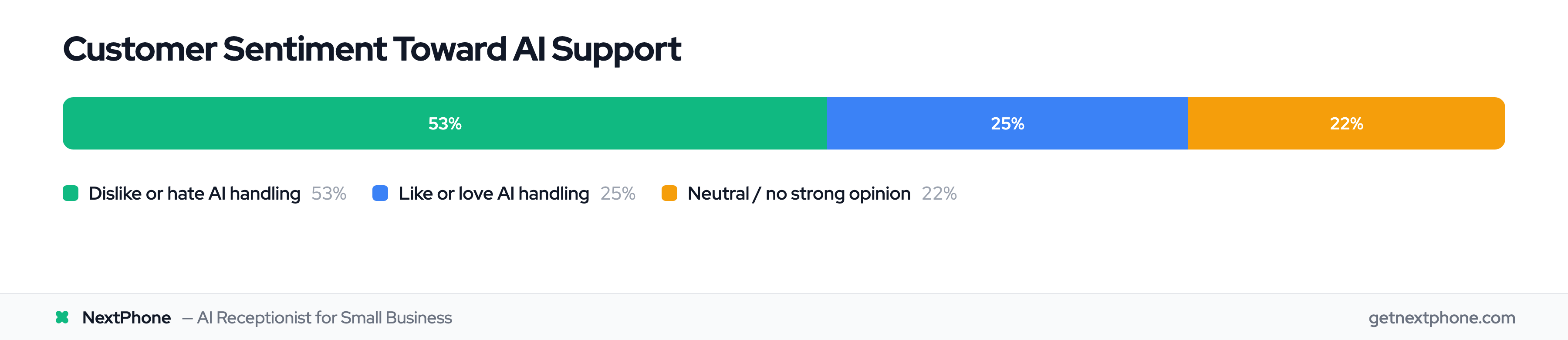
The statistics paint a clear picture of customer sentiment toward AI in customer service.
Only 25% of consumers actually like or love AI handling their service interactions. Meanwhile, 53% actively dislike or hate it. Gartner research found that 88% of customers have "major concerns" about AI, and 64% would prefer companies not use it for customer service at all.
The number one fear? That AI will make it harder to reach a human agent. Research shows 67% hang up on IVR due to frustration, 65% report problems with IVR having too many or too few options, and 54% are frustrated by the inability to reach human agents.
But here's the thing: these concerns are legitimate. Humans matter most in specific situations—complex problems requiring judgment, emotional circumstances needing empathy, and high-stakes decisions like expensive repairs or true emergencies. Research from Harvard Business School reveals that eliminating human contact in stressful situations makes customers less satisfied, even when their issues are resolved correctly.
VIP customers also expect premium service. Making your highest-value accounts navigate AI menus risks relationships that took years to build.
The solution isn't choosing between AI and humans—it's building a hybrid approach that leverages both. Notably, 51% of customers prefer AI bots when seeking immediate service, and 77% are more willing to use AI if they know how to reach a human.
From our analysis of 130,175 calls across 45 home services businesses over seven months, we found that 74.1% of calls would go unanswered without AI. Yet 86% of customer issues escalate to a human at least once, according to Gartner. The data proves what customer experience professionals have known for years: AI excels at routine tasks, while humans handle nuance.
As Michelle Shell, a professor at Boston University's Questrom School of Business, explains: "Even having a button to talk to a real agent puts people at ease. Reintroducing notions of human contact by giving them these options to connect with the company, even if they don't actually use it, can restore trust."
The key is designing escalation logic that gets callers to the right resource at the right time.
The Three-Tier Escalation Framework
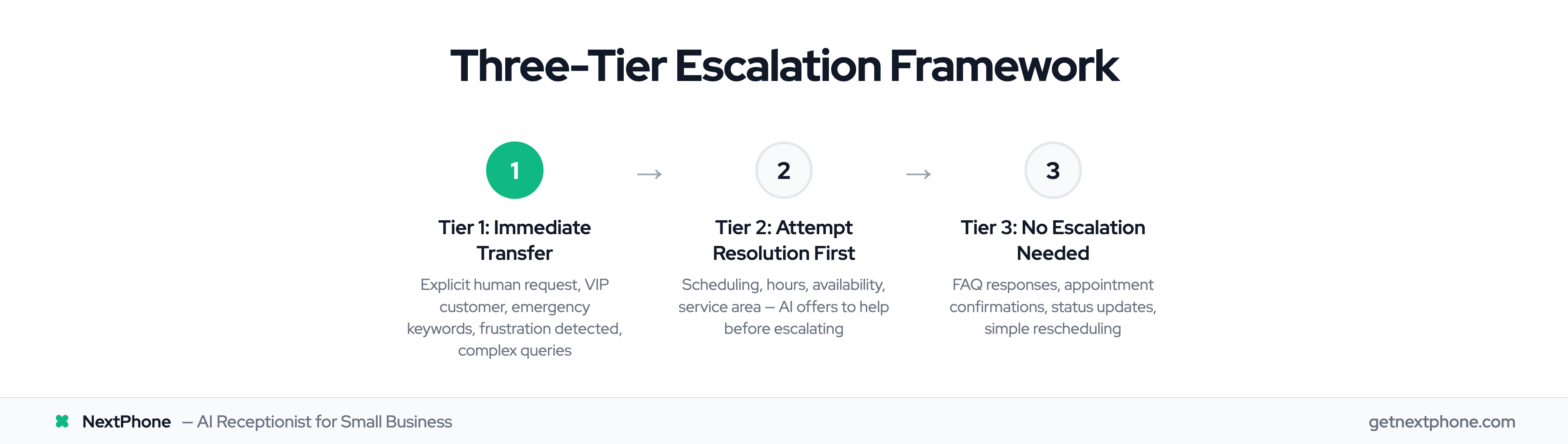
Not all calls require the same escalation approach. Your AI should categorize requests into three tiers—immediate transfer, attempt resolution first, or no escalation needed.
Tier 1: Immediate Transfer
Some situations demand instant human contact. Configure your system to transfer immediately when:
The caller explicitly requests it. If someone says "I want to talk to someone" or asks for a "real person," don't argue. Transfer them.
VIP or high-value customers are detected. Phone number lookups can identify your best accounts within seconds. These customers deserve fast-track service.
Emergency situations arise. Keywords like "burst pipe," "no heat," "gas smell," or "flooding" should trigger immediate routing to emergency dispatch.
Frustration is detected. Phrases like "This is ridiculous," "I've called three times," or repeated questions indicate a caller who needs human assistance now.
Complex queries come in. Estimates, refund disputes, insurance questions, or technical troubleshooting typically exceed AI capabilities.
Why does this matter? Because seven in ten people will switch brands after just one poor AI support interaction, according to Agility PR Solutions research. You can't afford to force high-stakes calls through automated menus.
Tier 2: Attempt Resolution First
For routine requests, your AI should offer to help before escalating. This includes:
- Appointment scheduling and rescheduling
- Business hours and location questions
- Service area qualification
- Availability checks
- General information requests
The key is positioning AI as a helpful option, not a barrier. When a caller asks to schedule an appointment, the AI should respond: "I can schedule that for you right now—what day works best?"
If the caller still prefers speaking to a human, transfer immediately with full context. No friction, no argument.
Tier 3: No Escalation Needed
Some calls rarely require human intervention:
- FAQ responses (hours, service areas, general pricing)
- Appointment confirmations
- Status updates on scheduled services
- Simple rescheduling
For these interactions, clear AI self-disclosure sets expectations: "I'm an AI assistant who can schedule your appointment, answer questions about our services, and get you to the right person if you need more help." Importantly, 61% feel IVR creates poor customer experience, and 52% are frustrated by automation-only systems—AI with clear human access options solves this.
Transparency eliminates anxiety. Customers who understand what AI can do are more likely to let it help.
Scripts for Handling "I Want a Real Person" Requests
Having the right words ready makes all the difference. Here are ten scripts for common escalation scenarios.
When to Transfer Immediately
Script 1 — Direct request: "Absolutely, I'll connect you with someone from our team right away. Please hold for just a moment."
Script 2 — VIP customer: "I see you're one of our valued customers—let me get you directly to Sarah. She'll have all of our conversation details. One moment please."
Script 3 — Frustration detected: "I understand, and I want to make sure you get exactly the help you need. Let me transfer you to our team right now. They'll have everything we've discussed so far."
Script 4 — Emergency: "This sounds urgent. I'm connecting you to our emergency dispatch team immediately. Stay on the line."
When to Offer to Help First
Script 5 — Routine request: "I can definitely help you with that. I'm an AI assistant who can schedule appointments, answer questions about our services, and provide availability. What did you need today?"
Script 6 — If they still want human: "No problem at all. Let me get some information first so our team has everything they need when you're connected. What's your name and callback number?"
Script 7 — Explain capabilities: "I'm an AI assistant, and I can handle scheduling your service appointment right now. Would you like me to do that, or would you prefer to speak with someone from the team? Either way is fine."
Script 8 — Build confidence: "I can help you with that. I have access to our full schedule and can book your appointment in under a minute. If you'd rather speak to our office, I can transfer you—your choice."
After-Hours Scenarios
Script 9 — No humans available: "Our office is open Monday through Friday, 8am to 6pm. I'm available 24/7 to schedule your appointment, answer questions, or take your information for a callback first thing tomorrow. What works best for you?"
Script 10 — Emergency after hours: "I understand this is urgent. Our emergency on-call technician is available. Let me gather your information and connect you with them now, or I can have them call you back within 15 minutes. Which would you prefer?"
Notice how all these scripts maintain a natural, conversational tone. No robotic phrasing, no defensive positioning—just helpful assistance that respects the caller's preferences.
Configuring Escalation Triggers That Work
Behind every smooth escalation experience is a well-configured system. Here are the triggers you should set up.
Technical Triggers to Configure
Time-based: Transfer if a call exceeds three minutes without resolution. Long calls usually indicate complexity beyond AI capabilities.
Attempt-based: After three failed attempts to resolve a question, transfer to a human. The caller shouldn't have to keep rephrasing.
Menu-based: Always provide a "press 0 to speak with our team" option. The availability alone reduces anxiety.
Silence-based: If a customer is silent for more than 10 seconds, they're probably confused. Offer to transfer them.
Language-Based Triggers
Configure your AI to recognize these phrases and patterns:
Explicit requests: "human," "real person," "someone," "manager," "supervisor," "actual person"
Frustration phrases: "ridiculous," "doesn't work," "third time calling," "don't understand," "not helping"
Negative sentiment: Tone analysis can detect anger, confusion, or distress in the caller's voice.
Repeated questions: When a customer asks the same question twice, they're not getting what they need. Transfer them.
Customer Segment Triggers
Different customers deserve different handling:
VIP customers: Immediate transfer based on phone number or account lookup in your CRM.
High-value jobs: Route estimate requests over certain dollar thresholds to senior staff.
Emergency keywords: "Burst," "leak," "smoke," "no heat," "electrical hazard," "flooding"—all should bypass normal routing.
Repeat customers: Flag loyalty accounts for special handling or dedicated representatives.
Commercial accounts: B2B customers often have different service agreements and dedicated contacts.
From our analysis of 130,175 calls across 45 home services businesses, configurable triggers are what separate frustrating experiences from seamless ones. Each business has different customer expectations—your escalation logic should reflect that.