Common Call Routing Failure Scenarios
Research shows 62% of business calls go unanswered, and call routing failures make this worse. Before you can fix routing problems, you need to recognize what you're dealing with. Here are the five most common scenarios we see.
Calls Not Reaching the Correct Department
Your sales calls keep going to support. Your tech support calls land in billing. Customers get frustrated repeating themselves to the wrong team.
This usually happens when multiple routing rules can match the same incoming call. Your system evaluates rules in priority order (typically top to bottom) and executes the first match. If your general "all inbound calls" rule sits above your specific "VIP customer" rule, guess which one wins?
The fix is reordering your rules so specific conditions come before general ones. But first, you need to identify which rules are actually firing.
Time-Based Routing Not Triggering
After-hours calls should go to your on-call technician or voicemail. Instead, they're still ringing office phones that nobody's answering.
The culprit is usually a time zone mismatch. If you're running an after-hours answering service, this is especially damaging. Your phone system thinks it's operating in UTC (Universal Time), while your business hours are configured for Eastern Time. That's a 5-hour difference, which means your "after hours" coverage never activates when it should.
We've also seen daylight saving time changes break routing. Your schedules don't account for the spring-forward or fall-back hour, so routing triggers at the wrong time for weeks before someone notices.
82% of consumers expect an immediate response. When emergencies are a recurring reason people call, after-hours routing failures are dangerous. For plumbers and HVAC companies handling burst pipes and heating failures, a misconfigured route can mean a lost customer and a safety issue. Proper emergency call routing can be the difference between a resolved crisis and a lost customer.
CRM Lookup Failures and Timeouts
Your VIP customers are supposed to get priority routing based on CRM data. Instead, they're waiting in the general queue like everyone else.
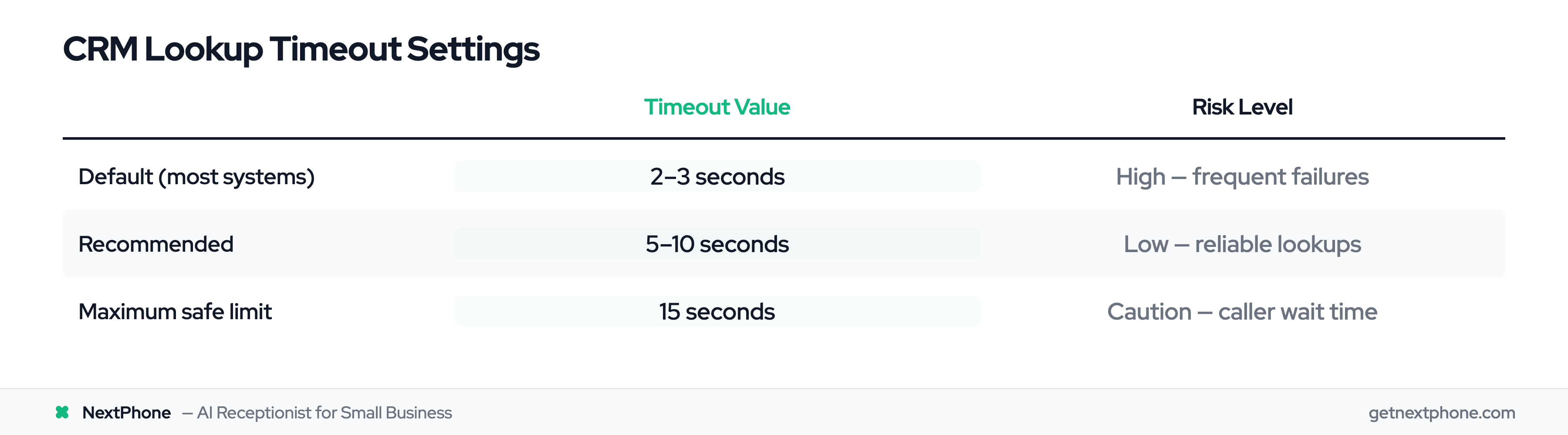
Here's what's happening: Your phone system makes an API call to your CRM to look up customer information. That lookup takes 4 seconds to complete. But your phone system is configured with a 3-second timeout. The system gives up before the CRM responds, and the call proceeds with generic routing.
Default timeout settings in most phone systems are 2-3 seconds. That's not long enough for many CRM integrations, especially during high-traffic periods. The integration works, just slower than your timeout allows.
Fallback Logic Not Activating
Your primary agent is offline. Calls should roll over to your backup agent or queue. Instead, they just drop.
This happens when your fallback route references a resource that doesn't exist anymore: maybe you deleted that backup queue or reassigned that phone number. Your primary route fails, your system attempts the fallback, the fallback fails, and there's no catch-all to save it.
Every routing path must end somewhere valid. If it doesn't, calls disappear into the void.
Call Loops and Circular Routing
A customer calls your sales line. The IVR transfers them to sales. Sales determines it's actually a support issue and transfers to support. Support thinks it's a sales question and transfers back to sales. The customer hangs up in disgust.
Circular routing happens when transfer logic doesn't account for where the call came from. Department A's rule says "if it's a product question, send to department B." Department B's rule says "if they want to buy, send to department A." Neither rule checks whether the call has already been transferred.
The fix requires breaking the loop with proper termination logic, usually by limiting transfer counts or adding explicit routing rules for already-transferred calls. Implementing intelligent call routing with clear decision trees prevents these loops from forming in the first place.
The Call Routing Debugging Methodology
Random troubleshooting wastes time. A systematic debugging method finds routing issues faster than trial and error, because each step rules out one cause before you move to the next. Here's the exact methodology to follow.
Step 1: Visualize Your Call Flow Diagram
You can't debug what you can't see. Before touching any settings, map out your entire routing logic visually.
Start with the call entry point: your main phone number. Then document each routing decision point: Does the call check the time of day? Does it look up the caller in your CRM? Does it present an IVR menu?
Map all possible paths, not just the happy path. Include fallback routes for when the primary agent is busy. Note conditional logic like "if caller is VIP, route to priority queue."
You don't need fancy flowchart software. A whiteboard, paper, or even a simple text outline works fine. What matters is getting the logic out of your head and onto something you can examine.
As you map it out, you'll often spot gaps immediately. "Wait, what happens if the CRM lookup fails? I never configured that." Finding those gaps on paper is way better than discovering them when a customer calls.
Step 2: Check Call Logs for Routing Decisions
Your call logs (technically called Call Detail Records or CDRs) contain the record of what your system actually did.
Pull the CDRs for 3-5 calls that exhibited the routing problem. Look for these key fields:
- Call timestamp and duration
- Routing decision points (where the system made choices)
- Transfer chains (if the call was handed off between agents or departments)
- Final destination versus intended destination
Compare the actual routing path in your logs to the flow diagram you created in Step 1. Where do they diverge? That's your problem area.
Look for patterns. Do failures only happen at certain times of day? Only for specific caller ID patterns? Only when call volume is high? Patterns reveal root causes.
Step 3: Identify the Bottleneck
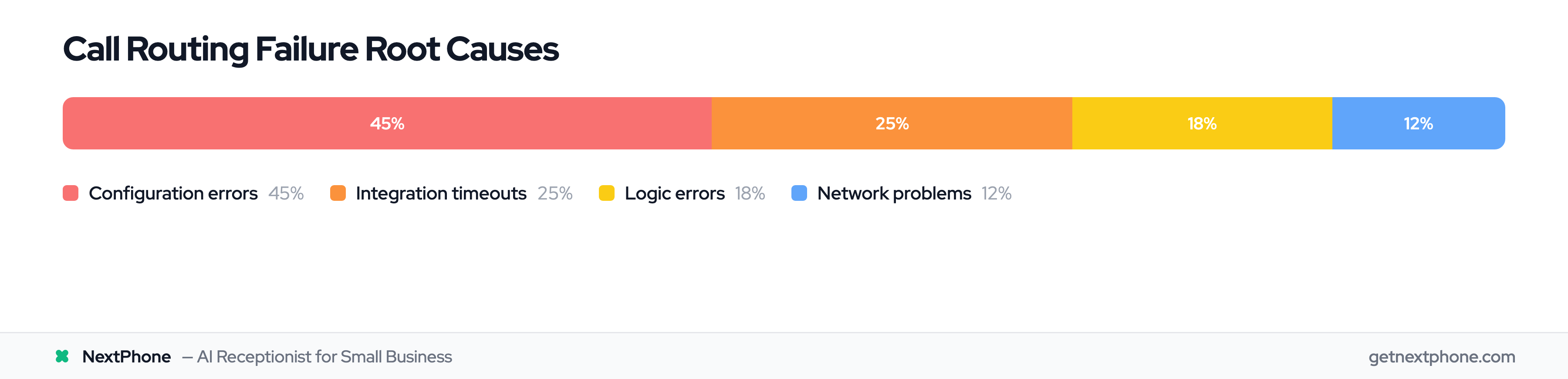
Now that you know where the routing path breaks, you need to identify why. Call routing failures typically fall into four categories:
Configuration issues account for 40-50% of routing failures. These are wrong settings: DID format mismatches, incorrect time zones, rule priority conflicts.
Integration failures cause 20-30% of issues. Your CRM lookup times out, your webhook endpoint is unreachable, or you've hit API rate limits.
Logic errors represent 15-20% of failures. Your routing rules contain gaps, missing conditions, or circular references.
Network problems make up the remaining 10-15%. SIP trunk connectivity issues, firewalls blocking SIP messages, or poor network quality. With the VoIP market projected to reach $102.5B by 2026, businesses increasingly rely on cloud-based phone systems where network stability directly impacts call routing success.
Use your call logs to pinpoint which category applies to your situation. If logs show a 3-second delay before routing with a "lookup timeout" message, you're looking at an integration failure. If logs show the call immediately routing to the wrong destination with no delay, it's likely configuration or logic.
Step 4: Test Routing Logic with Sample Calls
Never deploy routing changes without testing them first. Create controlled test scenarios that mirror real-world conditions.
Make test calls that exercise each routing path individually. If you have time-based routing, test at different hours (you can usually simulate time zones in your system settings without waiting for actual business hours to change).
Test fallback scenarios by intentionally making the primary route unavailable. Put your primary agent in Do Not Disturb mode and verify the call rolls to your backup.
Document every test and its result. "Test: VIP customer calls at 3 PM. Expected: Route to priority queue. Actual: Routed to priority queue. Status: Pass."
This documentation becomes valuable when routing mysteriously breaks again in three months. You'll know exactly what working routing looks like.
How to Analyze Call Logs for Routing Issues
Call logs are your most powerful debugging tool, but only if you know how to read them. Here's what to look for.
What Call Detail Records Tell You
Every call generates a CDR containing:
- Call origin: Caller ID and source number
- Call destination: Where it actually went
- Routing decisions: Each hop in the journey
- Timestamps: When each decision was made
- Duration and outcome: Answered, sent to voicemail, or abandoned
CDRs show what actually happened, which is often different from what you configured or expected. That difference is where you'll find your bugs.
Most modern phone systems let you export CDRs to CSV format. Pull at least 10-20 calls exhibiting the problem you're debugging. The more data points you have, the easier it is to spot patterns.
Reading Routing Decision Timestamps
Pay close attention to the timestamps between routing decisions. Here's what time gaps reveal:
A 3-second gap between call arrival and routing decision? That's likely a CRM lookup timeout. Your system waited the full timeout period before giving up and proceeding with default routing.
A 0.1-second gap means the routing decision was instant, probably rule-based logic that doesn't require external lookups. If you expected a CRM lookup but see instant routing, your integration isn't firing at all.
Multiple timestamps clustered within milliseconds suggest an IVR menu tree or multi-condition logic evaluation. That's normal and expected.
What you're looking for are unexpected delays or immediate routing when you expected processing time. Those anomalies point to integration failures or skipped logic.
Tracing Transfer Chains and Handoffs
Call transfers create a chain in your logs. A healthy transfer chain looks like:
- Call arrives at main number (timestamp: 10:00:00)
- Routes to sales queue (timestamp: 10:00:01)
- Agent answers (timestamp: 10:00:15)
- Agent initiates transfer (timestamp: 10:02:30)
- Transfer completes to support agent (timestamp: 10:02:33)
An unhealthy transfer chain has missing links:
- Call arrives at main number (timestamp: 10:00:00)
- Routes to sales queue (timestamp: 10:00:01)
- Transfer initiated (timestamp: 10:02:30)
- Call ends (timestamp: 10:02:31)
That transfer was initiated but never completed. The call dropped. That's your routing failure.
Look for loop patterns too. If you see A→B→A→B, you've got circular routing. If you see more than 2-3 transfer hops total, your routing logic is too complex or poorly organized.
Identifying Where the Routing Path Breaks
Now compare your flow diagram from Step 1 to the actual paths in your call logs. Create a side-by-side comparison:
Expected path: Main number → Time check → After-hours route → On-call phone Actual path: Main number → Time check → Business hours route → Voicemail
The divergence is at the time check. Your system evaluated the time and decided it's business hours when it should be after-hours. Now you know exactly what to investigate: your time zone configuration and schedule settings.
Every routing failure has a divergence point. Find it in your logs, and you've found your bug.
Debugging Configuration Issues
Configuration errors cause 40-50% of all routing failures. The frustrating part? Your settings might look correct but contain subtle mismatches that break everything. Here's what to check.
DID Format Mismatches
Your phone provider sends incoming calls with caller ID formatted as +15551234567 (E.164 format). But your routing rules are configured to match 5551234567 (10-digit format).
The formats don't match, so your specific routing rules never trigger. All calls fall through to your default route.
Here's how to check: Pull a call log and look at how incoming caller IDs appear. Common formats include:
- E.164: +15551234567 (plus sign, country code, number)
- 10-digit: 5551234567 (just the phone number)
- 11-digit: 15551234567 (country code but no plus sign)
Now check your configured DIDs and routing rules. They must match the incoming format exactly, character for character.
Quick test: If removing the "+" from your DID configuration suddenly makes routing work, you've got a format mismatch.
Time Zone and Schedule Configuration Errors
Your phone system is running in UTC (Universal Time). Your business hours are configured for 9 AM to 5 PM Eastern Time. But you never told the system which time zone your business hours reference.
So when it's 9 AM in New York, it's 2 PM UTC. Your system thinks it's still business hours when it's actually after-hours on the East Coast.
Here's how to verify:
- Check your system's time zone setting (often buried in admin settings)
- Check your business hours configuration
- Confirm what time zone those business hours reference
- Make sure they align
Always use 24-hour format for business hours to avoid AM/PM confusion. Configure 09:00 to 17:00, not 9:00 to 5:00.
Test at boundary times. Make test calls at exactly 9:00 AM and 5:00 PM and verify routing switches correctly. Boundary conditions reveal configuration errors that might work 99% of the time.
Rule Priority and Conflict Resolution
Multiple routing rules can match the same incoming call. When that happens, which one executes?
Most phone systems evaluate rules in priority order, usually top to bottom in your configuration interface. The first rule that matches wins. All remaining rules are ignored.
This means if your generic "all customers" rule sits above your specific "VIP customers" rule, VIPs never get special treatment. The generic rule matches first and executes, and the VIP rule never even gets evaluated.
Here's how to fix it:
- Review all routing rules that could potentially match your problem scenario
- Identify which rules are more specific (have more conditions) versus more general
- Reorder so specific rules come before general rules
- Example ordering:
- Rule 1: If caller is VIP customer → Priority queue (most specific)
- Rule 2: If calling during business hours → Sales queue (less specific)
- Rule 3: All other calls → General voicemail (least specific, catch-all)
Test with different caller scenarios to validate your priority ordering actually works as intended.