
Your phone rings at 7 PM. A customer needs an estimate for a kitchen remodel: a potential $12,000 job. But you're finishing another project, hands covered in paint. The call goes to voicemail. They don't leave a message. They call the next contractor.
This happens more than you think. Industry research shows 74.1% of calls to home services contractors go completely unanswered. That's three out of every four potential customers you never talk to.
Even worse, approximately one in four callers who do reach someone explicitly requests a callback. Without a systematic way to track these requests, most fall through the cracks.
The solution? Combine Cal.com's open-source scheduling platform with an AI receptionist like NextPhone. You get 24/7 phone coverage plus automatic appointment booking, no receptionist salary required. This guide shows you exactly how to set it up, what it costs, and the ROI you can expect.
What is Cal.com? The Open-Source Calendly Alternative
Cal.com is an open-source scheduling platform that lets customers book appointments with you automatically. Think Calendly, but with full code access and the ability to self-host on your own servers.
You can use the free hosted version at cal.com (just sign up and go), or download the code and run it yourself. Either way, you get robust API access, webhook automation, and embeddable calendar widgets called "Cal Atoms."
Key Integration Capabilities
Cal.com was built for integrations. That's what makes it perfect for pairing with an AI receptionist. The appointment scheduling software market is projected to reach $1.5B by 2032, reflecting massive demand for automated booking solutions.
You get:
- API for programmatic booking - Your AI can create appointments via code during live phone calls
- Webhooks for real-time notifications - Get instant alerts when appointments are created, rescheduled, or cancelled
- Embeddable widgets - Add booking calendars directly to your website
- Direct integrations - Connects to Google Calendar, Outlook, Zoom, Stripe, HubSpot, Salesforce
- Automation platform support - Works with Zapier (8,000+ apps), Make, Pipedream (3,000+ apps)
The API is the key. It lets your AI receptionist check your real-time availability and book appointments while talking to customers.
How AI Receptionist + Cal.com Integration Works
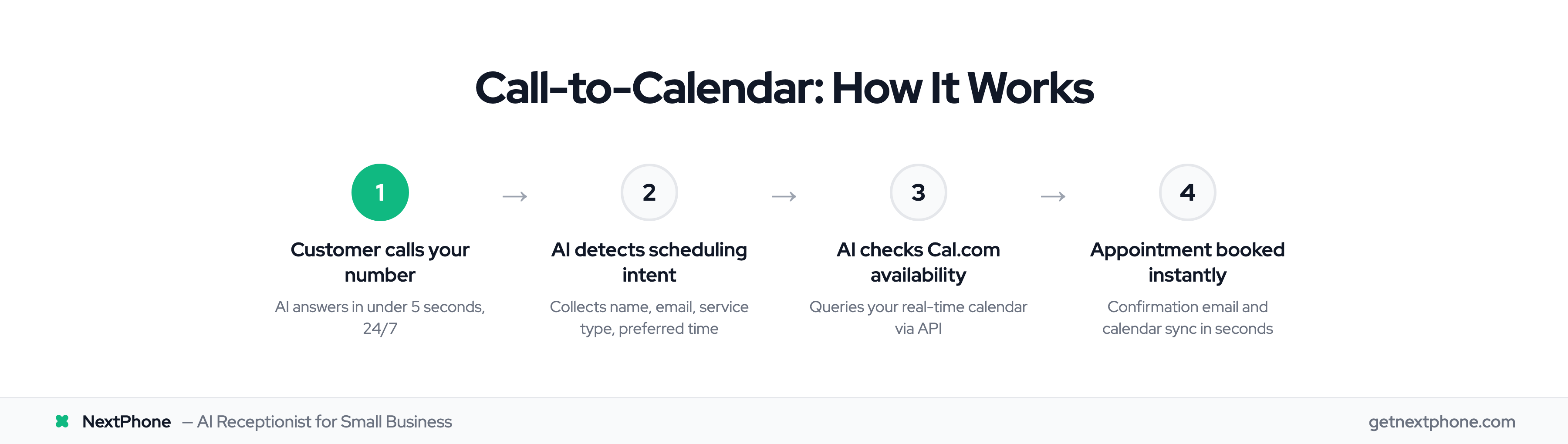
Here's the complete workflow, from phone ring to confirmed appointment.
The Complete Call-to-Calendar Workflow
- Customer calls your business number
- AI receptionist answers in under 2 seconds (compared to the 74.1% of calls that go unanswered)
- AI engages in conversation: "Thanks for calling, how can I help you today?"
- Caller says: "I'd like to schedule an estimate for next Tuesday"
- AI collects required information: name, phone number, email, service type, preferred date and time
- AI queries Cal.com's booking API for your real-time availability
- AI confirms available slots: "I have 2 PM or 4 PM available on Tuesday. Which works better for you?"
- Caller chooses their preferred time
- AI books the appointment instantly through the Cal.com API
- Cal.com automatically sends a confirmation email with calendar invite
- AI optionally sends a follow-up SMS with booking details
- The event syncs to your Google Calendar or Outlook immediately
The entire process takes 60-90 seconds. No phone tag. No missed callbacks. No manual calendar updates.
What the AI Receptionist Does During the Call
The AI handles natural conversation, not rigid scripts. It understands when someone says "I need someone to come look at my AC" or "Can you fit me in this week?" and knows that's a scheduling request.
The AI collects structured data: name, email, phone number, the service they need, and their preferred timing. It asks clarifying questions when needed: "Is this for a residential or commercial property?"
Here's where it gets smart: The AI can detect urgency. Calls containing urgency language like "emergency," "urgent," or "ASAP" rank among the top reasons people call. When the AI hears this, it can either book the next available emergency slot or transfer the call to your cell phone immediately.
The AI confirms all details before finalizing the booking. And because it checks your calendar in real-time, it never double-books you.
How Cal.com Handles the Booking
On the Cal.com side, here's what happens:
The platform receives the booking request via its API. It checks availability against your synced Google Calendar or Outlook. If the requested time is open, it creates a calendar event with all the details: customer name, phone, email, and any notes about the service needed.
Cal.com then triggers webhook notifications (the BOOKING_CREATED event fires). If you've set up webhook integrations, this can automatically update your CRM, notify your team in Slack, or trigger any other workflow you need.
The customer gets a confirmation email immediately with a calendar invite they can add to their phone. You see the appointment in your calendar instantly.
Example workflow: Sarah calls Joe's Plumbing at 8 PM on a Wednesday. The AI answers: "Thanks for calling Joe's Plumbing, this is your AI assistant. How can I help you?"
Sarah: "I need a quote for replacing my kitchen sink."
AI: "I'd be happy to schedule that for you. What's your name and the best number to reach you?"
After collecting Sarah's information, the AI checks Joe's Cal.com calendar and offers available times. Sarah picks Tuesday at 10 AM. She gets a confirmation email in seconds. Joe sees "Kitchen sink replacement estimate - Sarah" appear in his Google Calendar.
The whole thing takes 90 seconds. No voicemail. No callback request. Just a booked appointment.
Three Ways to Integrate Cal.com with Your AI Receptionist
You have three paths for connecting Cal.com to your AI phone system, depending on your technical comfort level and budget.
Option 1: No-Code Integration (Zapier, Make)
Use automation platforms like Zapier or Make to connect your AI receptionist with Cal.com. No coding required.
The workflow: When your AI collects an appointment request, it triggers a Zap. That Zap creates a Cal.com booking using the information the AI gathered.
Pros: Easy setup, visual workflow builder, no technical skills needed
Cons: Monthly cost for the automation platform ($20-50/month typical), slight delays (not truly real-time), requires AI platform that can trigger Zapier
Best for: Small businesses with simple scheduling needs and non-technical owners
You could set up a Zap like: "When NextPhone AI collects appointment request" → "Create Cal.com booking" → "Send Slack notification to team"
Option 2: Native Platform Integration (NextPhone)
Some AI receptionist platforms offer pre-built Cal.com integration. NextPhone has native Cal.com support built in.
You connect your Cal.com account via OAuth (one click), and the AI gets direct API access during calls. When someone requests an appointment, the AI checks your calendar availability in real-time and books it, all in the same phone conversation.
Pros: Seamless experience, truly real-time availability checks, no middleware needed, no extra monthly fees
Cons: Requires using an AI platform that supports Cal.com natively
Best for: Businesses wanting a turnkey solution without technical work or extra tools
Setup takes about 2 minutes: Settings → Integrations → Cal.com → Authorize → Done. Then test with a phone call.
Option 3: Custom API/Webhook Integration (For Developers)
If you have development resources or very specific requirements, you can build a custom integration using Cal.com's API and webhooks.
Cal.com webhooks notify your system in real-time when events occur: BOOKING_CREATED, BOOKING_RESCHEDULED, BOOKING_CANCELLED, MEETING_ENDED. You can build custom workflows triggered by these events.
Pros: Fully customizable, complete control, can build complex business logic
Cons: Requires developer, ongoing maintenance burden, higher upfront cost
Best for: Businesses with development teams or unique integration requirements
According to Cal.com's documentation, "Webhooks offer a great way to automate the flow with other apps when invitees schedule, cancel or reschedule events."
| Integration Method | Setup Time | Monthly Cost | Technical Skill Required | Best For |
|---|---|---|---|---|
| No-Code (Zapier) | 1-2 hours | $20-50 | None | Simple setups, non-technical users |
| Native (NextPhone) | 2 minutes | $0 extra | None | Most small businesses |
| Custom API | 1-2 weeks | Developer time | High | Unique requirements, dev teams |
Cost & ROI: What You'll Actually Pay (And Save)
Let's talk real numbers.
Cal.com Pricing Breakdown
Cal.com Free tier: $0/month - Unlimited events, calendar sync, webhooks, API access, basic integrations
Cal.com Starter: $12/seat/month - Teams, custom branding, advanced workflows
Cal.com Professional: $29/seat/month - Salesforce/HubSpot integrations, admin controls
Most small businesses use the free tier. It has everything you need.
Compare this to Calendly, which requires $10-16 per user per month for similar features. If you have 3 people, that's $30-48/month just for scheduling software.
AI Receptionist Costs
NextPhone: $199/month for unlimited calls
Traditional receptionist: $35,000/year ($2,917/month) plus benefits
Traditional answering service: $500-800/month for just 100 calls
The math is clear: You save 93% compared to hiring a receptionist and 75% compared to traditional answering services.
ROI Calculation: What You Recover
Here's what you're actually losing to missed calls and what you gain back.
Scenario 1: Service Contractor (42 calls/month)
Your current situation:
- You receive 42 calls per month (typical for a small contractor)
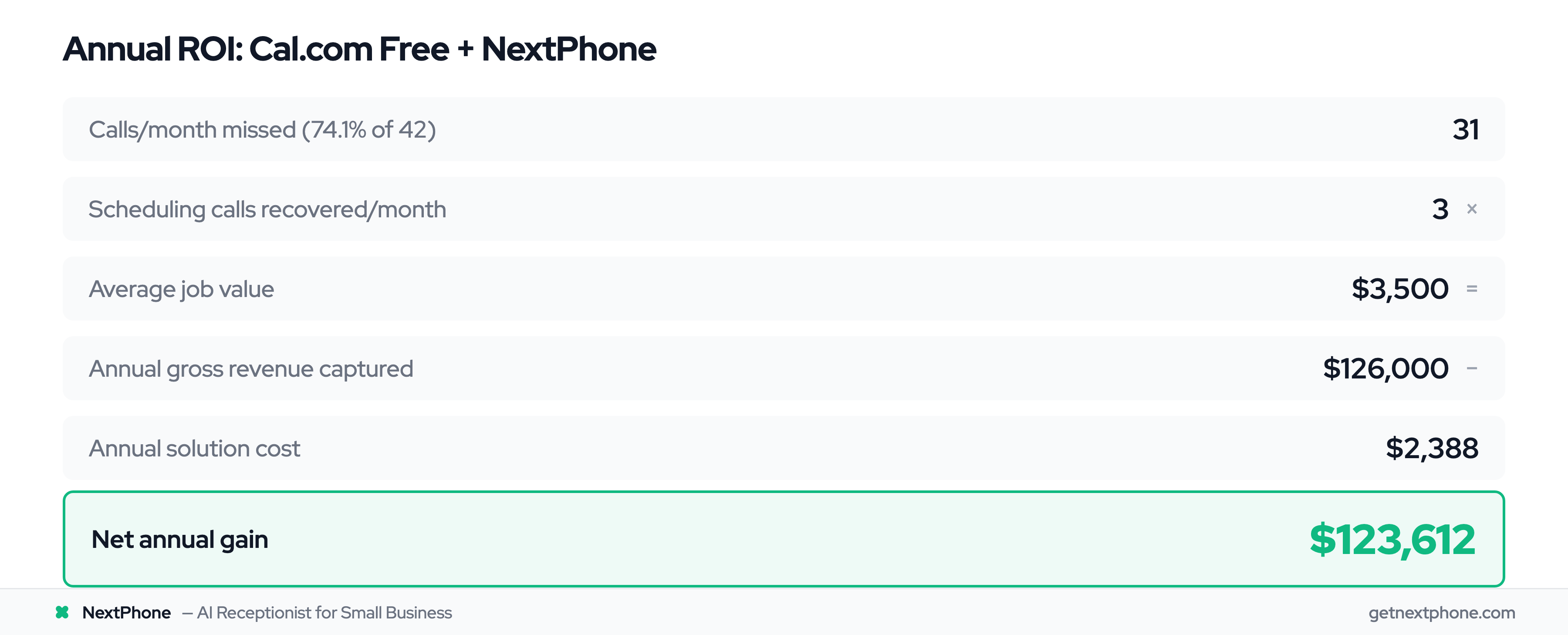
- 74.1% go unanswered = 31 missed calls every month
- Booking is the most common reason people call = about 3 booking calls/month
- If 74.1% of those are missed, you lose 2.2 appointments per month
- Average job value: $3,500
- Lost revenue: 2.2 appointments × $3,500 = $7,700/month = $92,400/year
With Cal.com + NextPhone:
- Solution cost: Cal.com Free ($0) + NextPhone ($199/month) = $2,388/year
- Appointments you capture: All 3 booking calls/month × 12 months = 36 appointments/year
- Revenue from captured appointments: 36 × $3,500 = $126,000
- Net gain: $126,000 - $2,388 = $123,612/year
- ROI: 5,079%
Scenario 2: Callback Request Recovery
Remember that roughly one in four callers requests a callback? Here's what that costs you:
- 42 calls/month × about 1 in 4 = 11 callback requests every month
- Without a system to track these, 80% fall through = 9 lost leads/month
- With automated booking instead of callback requests = 0 lost
- Recovered leads: 9/month × 30% conversion rate × $3,500 average job = $9,450/month
- Annual recovered revenue: $113,400/year
- Solution cost: $2,388/year
- ROI: 4,649%
The reality? Your business isn't slow. You're just not answering the phone.
Ready to stop losing $92,000+ per year to missed calls? Try NextPhone with Cal.com integration.