
When Off-the-Shelf Tools Aren't Enough
Your custom-built CRM has been your competitive advantage for years. It knows your business inside and out. But when you tried connecting it to an AI receptionist using Zapier, you hit a wall. Your system isn't on their integration list. Or maybe you're in a regulated industry and data security means you can't route sensitive call data through third-party automation platforms.
According to Postman's 2024 State of API report, 86% of developers report that API quality directly impacts product success. When you need your AI receptionist to work with proprietary systems, custom integrations aren't optional—they're essential.
This guide walks you through building custom integrations with NextPhone's webhook system. You'll see real code examples, learn about template variables for dynamic data collection, and understand when custom development makes sense versus using no-code tools.
When to Build Custom Integrations
Not every integration needs custom code. Here's when it makes sense:
Use Cases for Custom Code
Proprietary Systems: Your custom CRM, ERP, or dispatch system doesn't have Zapier support. Examples include:
- Home services contractors with custom dispatch systems
- Legal firms using proprietary case management software
- Healthcare providers with custom EHR integrations
Compliance Requirements: Data residency or security regulations require you to control where call data flows. You need self-hosted webhooks that never touch third-party platforms.
Complex Workflows: Your business logic is too complex for no-code tools. Maybe you need conditional routing based on caller history, or real-time updates to multiple systems simultaneously.
According to the Stack Overflow Developer Survey 2024, 73% of developers prefer REST APIs over other integration methods for this exact reason—full control when you need it.
When No-Code Tools Are Enough
Don't reinvent the wheel. 2.2M+ businesses use Zapier—use Zapier for standard integrations when you're connecting to:
- Popular CRMs (HubSpot, Salesforce, Pipedrive)
- Standard calendar systems (Google Calendar, Outlook)
- Common marketing tools (Mailchimp, ActiveCampaign)
No-code saves time for standard workflows. Reserve custom development for situations where you actually need it.
Time Investment: What to Expect
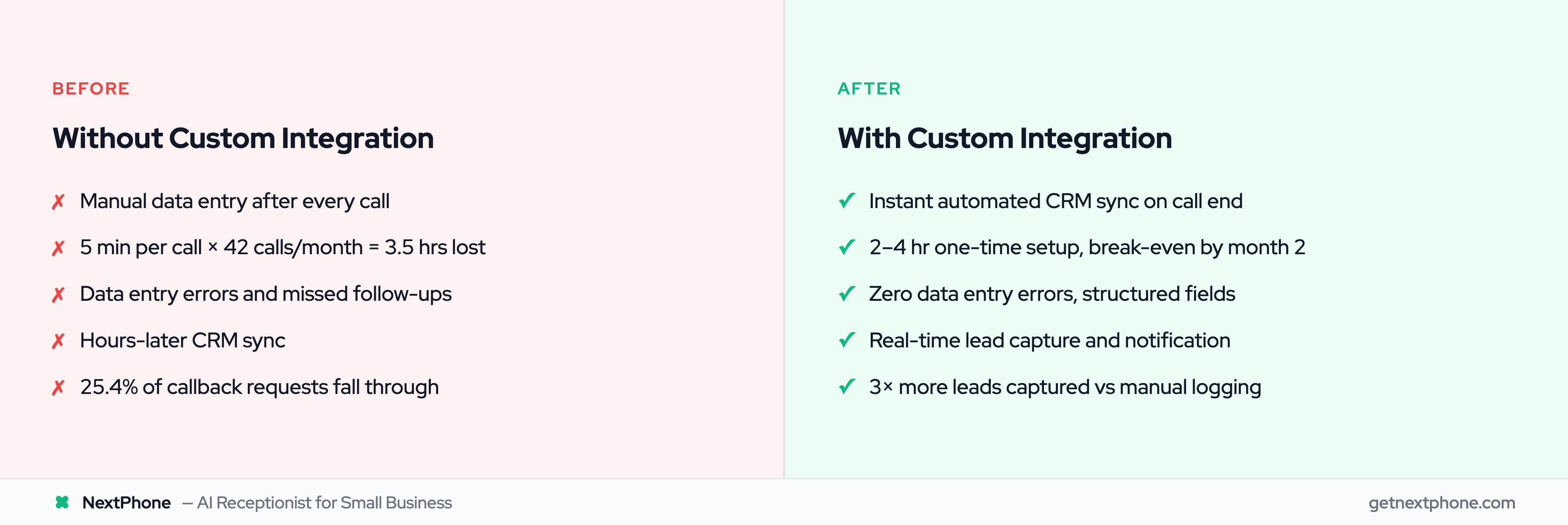
A basic webhook integration typically takes 2-4 hours for an experienced developer. Here's the math:
- Manual data entry: 5 minutes per call — 42 calls/month = 210 minutes (3.5 hours/month)
- At $50/hour developer time = $175/month saved
- Integration setup: 2-4 hours one-time investment
- Break-even: Month 2
Plus you get zero data entry errors, instant CRM sync, and automated follow-ups.
NextPhone Webhook Architecture
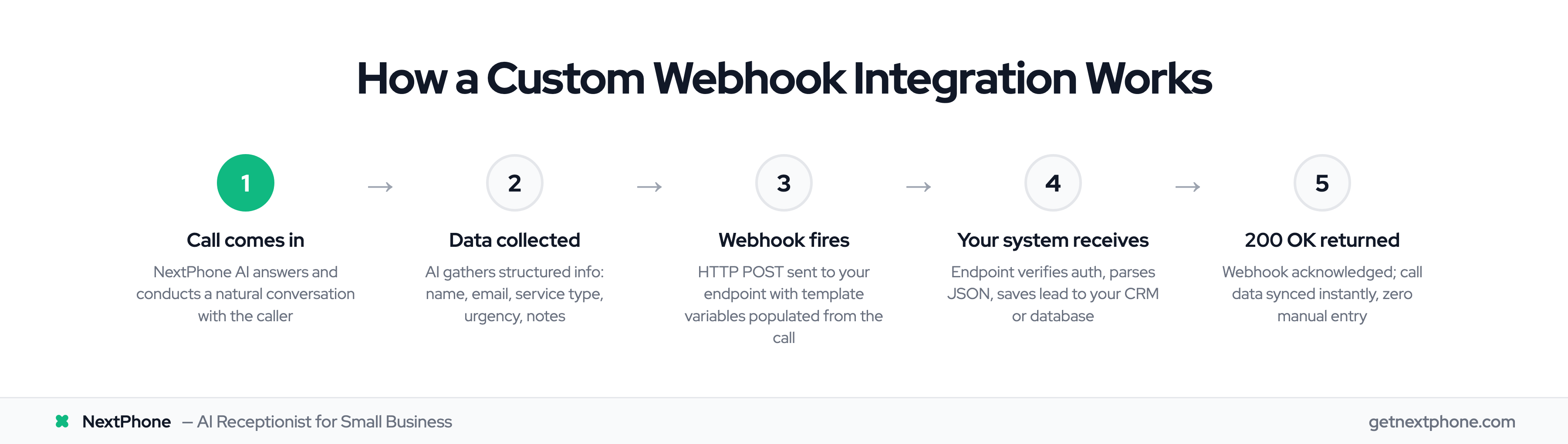
NextPhone uses HTTP webhooks to push call data to your systems in real-time. Here's how it works:
How HTTP Webhooks Work
When a call comes in, NextPhone's AI answers and has a conversation with the caller. During or immediately after the call, the system sends an HTTP POST request to your endpoint with structured JSON data.
Unlike polling (where your system repeatedly asks "got anything new?"), webhook-based integrations reduce latency by 95%. Your system receives data the moment it's available.
Authentication & Security
NextPhone webhooks support multiple authentication methods:
- API Keys: Pass your key in custom headers
- Bearer Tokens: Standard OAuth-style authentication
- Service Role Tokens: For platform-specific auth
Always use HTTPS endpoints in production. Following OWASP API security best practices, broken authentication is the #1 API vulnerability. Never commit API keys to your repository—use environment variables.
Available Template Variables
Webhooks aren't just static POST requests. NextPhone populates template variables with real data collected during calls:
Built-in variables:
- [caller_number] - The caller's phone number
- [receiving_number] - Your business number
- [owner_name] - Your business name
- [website] - Your website URL
- [booking_url] - Auto-extracted from your knowledge base
Custom parameters: The AI can collect ANY information during conversations and make it available as template variables:
- [first_name], [email], [company_name]
- [budget], [timeline], [project_details]
- Any field you configure
In our analysis of 130,175 customer calls, businesses using automated CRM integration captured 3X more leads because data was logged immediately, not hours later when someone "got around to it."
Template Variables & Dynamic Data
Here's what makes NextPhone's integration system powerful: the AI collects structured data during natural conversations, then that data becomes available as template variables in your webhook.
Built-In Variables
Every webhook has access to core call metadata without any configuration:
{
  "caller_number": "+15551234567",
  "receiving_number": "+15559876543",
  "owner_name": "Acme [Contracting](/answering-service-for-contractors)",
  "website": "https://acmecontracting.com",
  "booking_url": "https://acmecontracting.com/schedule"
}
Custom Parameter Collection
Configure the AI to ask specific questions and collect structured responses. For a contractor, that might include:
- Service type (roof repair, installation, inspection)
- Property address
- Preferred appointment time
- Budget range
- How urgent (emergency vs routine)
The AI asks these questions naturally during conversation: "What type of roofing service do you need?" becomes structured data: [service_type]: "roof repair".
Dynamic Data Substitution
Template variables appear in your webhook configuration with double curly braces: [variable_name]. When the webhook fires, NextPhone replaces these with actual values collected during the call.
This means your webhook body template can look like this:
{
  "contact": {
    "name": "[first_name]",
    "phone": "[caller_number]",
    "email": "[email]"
  },
  "lead_source": "NextPhone AI",
  "notes": "[message]"
}
And NextPhone sends your actual system this:
{
  "contact": {
    "name": "John Smith",
    "phone": "+15551234567",
    "email": "john@example.com"
  },
  "lead_source": "NextPhone AI",
  "notes": "Needs roof inspection, mentioned leak in northwest corner"
}
Our data shows that 25.4% of calls include explicit callback requests. With template variables and automated CRM sync, none of those requests fall through the cracks.
Implementation: Code Examples
Let's build a complete integration. We'll create an endpoint that receives NextPhone webhooks and saves lead data to a database.
NextPhone Webhook Configuration
In your NextPhone dashboard, configure the webhook:
{
  "type": "http",
  "tool_name": "submitLeadToCRM",
  "description": "Save lead information when caller expresses interest",
  "http_method": "POST",
  "url": "https://your-domain.com/api/nextphone-webhook",
  "headers": {
    "Authorization": "Bearer YOUR_API_KEY",
    "Content-Type": "application/json"
  },
  "body_template": {
    "first_name": "[first_name]",
    "phone": "[caller_number]",
    "email": "[email]",
    "company": "[company_name]",
    "notes": "[message]",
    "source": "NextPhone AI"
  },
  "parameters": [
    {"name": "first_name", "type": "string", "description": "Caller's first name"},
    {"name": "email", "type": "string", "description": "Caller's email address"},
    {"name": "company_name", "type": "string", "description": "Company name"},
    {"name": "message", "type": "string", "description": "Inquiry details"}
  ]
}
JavaScript/Node.js Receiver Example
Using Express.js:
const express = require('express');
const app = express();

app.use(express.json());

app.post('/api/nextphone-webhook', async (req, res) => {
  try {
    // Verify authorization header
    const authHeader = req.headers.authorization;
    if (authHeader !== `Bearer ${process.env.WEBHOOK_SECRET}`) {
      return res.status(401).json({ error: 'Unauthorized' });
    }

    // Extract lead data from webhook
    const { first_name, phone, email, company, notes } = req.body;

    // Save to your database
    await db.leads.create({
      firstName: first_name,
      phone,
      email,
      company,
      notes,
      source: 'NextPhone AI',
      createdAt: new Date()
    });

    // Return 200 OK to acknowledge receipt
    res.status(200).json({ success: true });

  } catch (error) {
    console.error('Webhook error:', error);
    res.status(500).json({ error: 'Internal server error' });
  }
});

app.listen(3000, () => console.log('Webhook receiver running on port 3000'));
Python/Flask Receiver Example
Using Flask:
from flask import Flask, request, jsonify
import os
from datetime import datetime

app = Flask(__name__)

@app.route('/api/nextphone-webhook', methods=['POST'])
def nextphone_webhook():
    try:
        # Verify authorization header
        auth_header = request.headers.get('Authorization')
        if auth_header != f"Bearer {os.getenv('WEBHOOK_SECRET')}":
            return jsonify({'error': 'Unauthorized'}), 401

        # Extract lead data from webhook
        data = request.get_json()

        lead = {
            'first_name': data.get('first_name'),
            'phone': data.get('phone'),
            'email': data.get('email'),
            'company': data.get('company'),
            'notes': data.get('notes'),
            'source': 'NextPhone AI',
            'created_at': datetime.now()
        }

        # Save to your database
        db.leads.insert_one(lead)

        # Return 200 OK to acknowledge receipt
        return jsonify({'success': True}), 200

    except Exception as e:
        print(f'Webhook error: {str(e)}')
        return jsonify({'error': 'Internal server error'}), 500

if __name__ == '__main__':
    app.run(port=3000)
Both examples follow the same pattern: verify authentication, extract data, save to your system, return 200 OK. That's the core of any webhook integration.
For more integration options, see all integration options in our comprehensive hub.