
Your phone rings. A homeowner needs an estimate for a deck addition—$5,200 project. But you're on a ladder installing gutters, hands full, can't answer. The call goes to voicemail.
The homeowner doesn't leave a message. They call the next contractor. Your competitor answers, books the estimate appointment, wins the job.
The worst part? That call never made it to your Asana project board. No task created. No follow-up reminder. No record it even happened.
This scenario plays out dozens of times per month for project-based businesses. What if every call automatically became an Asana task—complete with caller details, project scope, and smart team assignment?
The Hidden Cost of Missed Calls for Project Managers
Every incoming call to your business contains potential project data. A client calling about an emergency repair. A prospect requesting an estimate. A customer asking for a callback to discuss project details.
Without an automated system connecting calls to your Asana workflow, most of this information disappears.
Every Call Is a Potential Project Task

We analyzed 130,175 calls from 45 home services contractors over 7 months. Here's what we found:
- 25.4% of calls explicitly requested callbacks (632 out of 2,487 calls analyzed)
- 6.9% were quote or estimate requests (171 calls)
- 15.9% contained urgency language like "emergency," "urgent," or "ASAP" (395 calls)
- 7.7% were scheduling requests (191 calls)
For a typical contractor receiving 42 calls per month, that means:
- 11 callback requests
- 3 estimate requests
- 7 urgent calls
- 3 scheduling requests
Every single one should become an Asana task. Most don't.
The Math on What You're Losing
Here's the revenue impact for a business averaging 42 calls per month:
Missed estimate requests: 3 estimate calls — 74.1% missed call rate = 2.2 missed estimates — $3,500 average project value = $7,700/month in lost projects that never made it to your Asana pipeline.
Failed callbacks: 11 callback requests — 80% failure rate without systematic tracking = 9 lost callbacks — 30% conversion rate — $3,500 = $9,450/month lost because the callback task was never created.
Total monthly impact: $17,150 in revenue walking away because calls didn't become tasks.
That's $205,800 per year.
The Manual Entry Problem
Even when you do answer calls, there's the manual work problem. Creating an Asana task for each call takes about 5 minutes—opening your phone or computer, navigating to the right project, filling in the details, assigning to a team member.
For 31 answered calls per month, that's 155 minutes (2.5 hours) of manual data entry. Time you could spend on actual project work.
And here's the reality: When you're busy running a business, manual task creation doesn't happen consistently. You tell yourself you'll add it to Asana later. You forget. The callback never happens. The estimate is never sent.
One plumber told us: "I didn't even know I was missing that many calls until I saw the data. I just thought business was slow."
What Is Asana Phone Integration?
Asana phone integration connects your business phone system to your Asana workspace, automatically creating tasks from incoming calls.
Unlike other integrations you might use—Slack for messages, Google Drive for files—phone integration has to capture unstructured conversations and turn them into structured project data.
The Basic Concept
When a customer calls, the integration captures key information: caller name, phone number, call timestamp, call duration, and (with AI-powered systems) the actual content and intent of the conversation.
After the call, that information flows into Asana as a new task, automatically placed in the right project, with all relevant details filled in.
Why Project-Based Businesses Need It
82% of companies now use project management software to track work—and for good reason. The project management software market is projected to grow from $9.76 billion to $23.09 billion as more businesses digitize their workflows.
If you run a contracting business, consulting agency, law firm, or any service where client calls drive your project pipeline, every call contains data you need:
- Who called (lead or existing client?)
- What they want (emergency, estimate, callback, scheduling?)
- Project scope and budget
- Timeline and urgency level
- Which team member should handle it
According to research on Asana integrations, 70% of Asana users integrate with at least three other tools. With over 200 app integrations available, the platform is built for workflow automation. Asana generates $716-722 million in annual revenue, making it one of the leading project management platforms.
But phone integration is different from connecting your email or calendar. Phone calls are unstructured conversations. The integration needs to extract meaning from what people say, not just log that a call happened.
What Makes Phone Integration Different
Most Asana integrations move data between structured systems. Email integration creates tasks from messages that already have subject lines and content. Calendar integration syncs events that already have titles and times.
Phone integration has to listen to a conversation, understand the intent, and create structured task data from unstructured speech.
That's where AI-powered solutions have a major advantage over basic call logging systems.
How Phone-to-Asana Integration Works
The technical process behind phone-to-Asana integration involves APIs, webhooks, and data transformation.
The Technology Behind It (APIs and Webhooks)
Asana's API is a RESTful interface providing programmatic access to workspace data. Any system can use the API to create tasks, update projects, assign team members, and manage custom fields.
Phone systems connect to Asana through webhooks—automated notifications sent when specific events happen (like a call ending).
Here's the technical flow:
- Customer calls your business number
- Phone system answers and handles the call
- When call ends, phone system triggers a webhook
- Webhook sends call data to integration platform
- Integration platform uses Asana API to create a task
- Task appears in your Asana project with call details
The entire process takes 1-2 seconds after the call ends.
Real-Time vs Post-Call Task Creation
There are two approaches to timing:
Post-call creation is most common. The task is created after the call ends, using the call summary, duration, and any notes logged by the person who answered.
Real-time creation happens during the call. AI-powered systems can analyze the conversation in real-time and create the task while still talking to the caller. This ensures the task exists immediately, even if the call gets disconnected.
What Data Gets Captured
Basic integrations capture:
- Caller name
- Phone number
- Call timestamp
- Call duration
- Whether call was answered or missed
Advanced integrations (especially AI-powered) can extract:
- Call intent (emergency, estimate, callback, question, complaint)
- Urgency level (routine vs urgent vs emergency)
- Project scope details mentioned during call
- Budget or pricing discussed
- Timeline expectations
- Specific team member requested
The more intelligent the system, the richer the Asana task data—and the more actionable the task becomes.
Integration Methods: Zapier vs API vs AI-Powered Solutions
There are three main ways to connect phone systems to Asana. Each has different tradeoffs for ease of use, intelligence, cost, and customization.
Zapier Integrations (Easiest, Limited Intelligence)
Zapier's Asana integrations connect Asana to 8,000+ apps, including several phone systems like Dialpad, CallRail, and JustCall.
How it works: You create a "Zap" that triggers when a call ends and creates an Asana task with basic call data.
Pros:
- No coding required (point-and-click setup)
- Works with many popular phone systems
- Quick to set up (under an hour)
- Affordable for low call volume
Cons:
- Limited to basic data (caller name, number, timestamp)
- Can't analyze call content or intent
- Requires a Zapier subscription ($20-50/month)
- Each phone system requires a separate Zap configuration
Best for: Small businesses with simple needs who already use Zapier for other automations.
Direct API Integration (Flexible, Requires Dev Work)
Building a custom integration using Asana's API gives you complete control over the workflow and data fields.
How it works: A developer writes code that connects your phone system to Asana's API, customizing exactly what data gets sent and how tasks are structured.
Pros:
- Total customization (any field, any project, any logic)
- No monthly subscription fees after initial build
- Can integrate with any phone system that has an API
- Advanced conditional logic (route different call types to different projects)
Cons:
- Requires developer expertise ($75-150/hour)
- One-time build cost ($2,000-5,000 depending on complexity)
- Ongoing maintenance if APIs change
- Longer setup time (2-4 weeks)
Best for: Larger businesses with specific workflow requirements and technical resources.
AI-Powered Platforms (Intelligent, No-Code)
AI-powered phone platforms like NextPhone include Asana integration built-in, with intelligence that understands call content.
How it works: AI answers calls 24/7, has conversations with callers, extracts key information, and automatically creates detailed Asana tasks with full context and smart team assignment.
Pros:
- No setup complexity (connect in minutes)
- Understands call intent and urgency
- Captures conversation details automatically
- Assigns tasks to appropriate team members based on call content
- Includes call answering, not just logging
- All-in-one pricing (no separate phone system + integration tool)
Cons:
- Higher monthly cost ($199/month)
- Less customization than API (but more than Zapier)
Best for: Project-based businesses that want intelligent automation without technical complexity.
Which Method Is Right for Your Business?
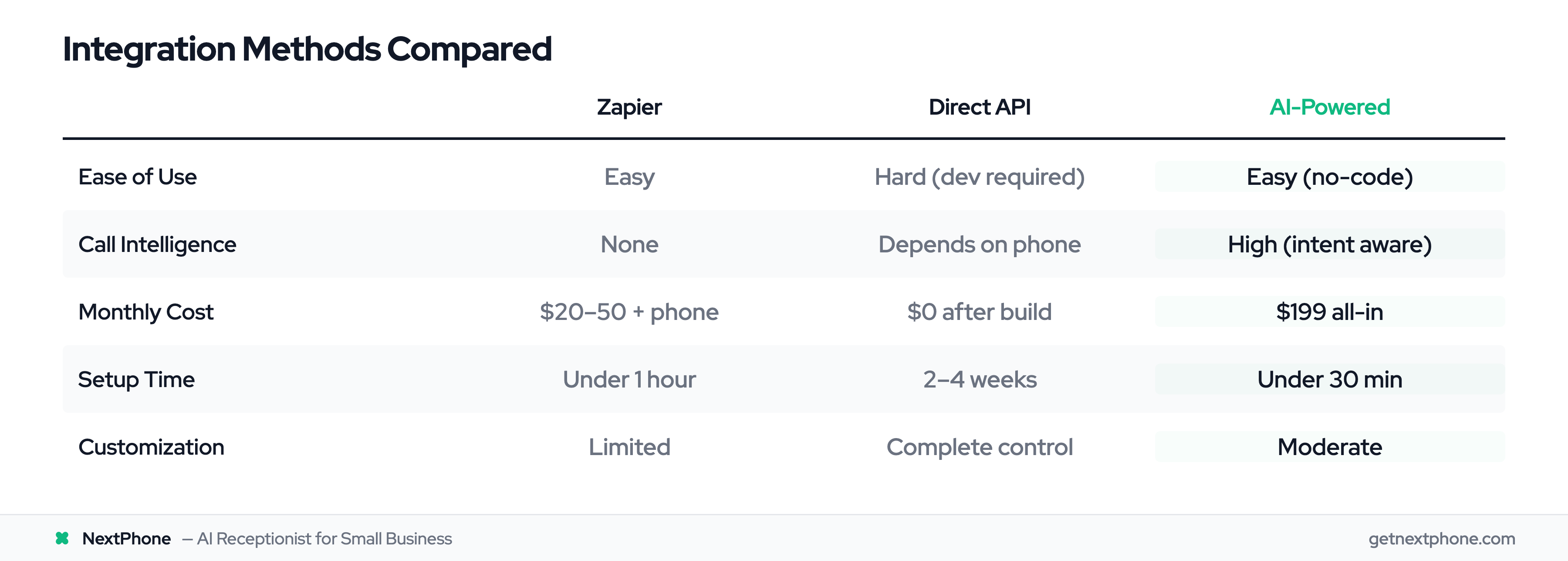
| Feature | Zapier | Direct API | AI-Powered |
|---|---|---|---|
| Ease of Use | Easy (point-and-click) | Hard (requires developer) | Easy (no-code setup) |
| Call Intelligence | None (basic data only) | Depends on phone system | High (understands intent) |
| Monthly Cost | $20-50 (+ phone system) | $0 (after build cost) | $199 all-inclusive |
| Setup Time | Under 1 hour | 2-4 weeks | Under 30 minutes |
| Customization | Limited | Complete control | Moderate |
| Best For | Simple logging needs | Complex custom workflows | Intelligent automation |
Most small to mid-size project-based businesses get the best results from AI-powered solutions—you get intelligence without complexity.
Call Types — Task Types: Building Your Workflow
Different types of calls should create different types of Asana tasks. Here's how to structure your workflow for maximum efficiency.
Emergency Calls — Priority Tasks
In our analysis, 15.9% of calls contained urgency language like "emergency," "urgent," or "ASAP." For home services businesses, these are often the highest-value calls—a burst pipe, power outage, or HVAC failure in extreme weather.
What the task should include:
- High priority flag
- "URGENT" in task title
- Caller name and callback number (tap-to-call)
- Specific emergency details (what broke, safety concerns)
- Address if provided
- Immediate assignment to on-call team member
Example task: "URGENT: Burst pipe flooding basement - [Client Name] - [Address] - Call immediately: [phone]"
Emergency calls can't wait for someone to check their Asana board tomorrow. The integration should send a push notification or text to the assigned team member.
Estimate Requests — Project Proposal Tasks
We found 6.9% of calls were quote or estimate requests. For a contractor receiving 42 calls per month, that's nearly 3 potential projects.
What the task should include:
- Project type (deck, kitchen remodel, roof replacement, etc.)
- Property address
- Approximate scope mentioned by caller
- Budget range if discussed
- Timeline expectations
- Assignment to estimator or sales team
Example task: "Estimate Request: Deck Addition - [Client Name] - 300 sq ft composite deck - Budget: $8K-10K - Wants quote by Friday"
These tasks should go into your "Sales Pipeline" or "Estimates" project in Asana, with a due date for following up.
Callback Requests — Follow-Up Reminders
This is the big one. In our data, 25.4% of calls (632 out of 2,487) explicitly requested callbacks. Without a system to track these, 80% never happen.
What the task should include:
- Callback deadline (when they asked to be called back)
- Caller's preferred time window
- Reason for callback
- Any questions they want answered
- Assignment to whoever handles that type of request
Example task: "Callback: [Client Name] - Wants pricing for bathroom remodel - Call back Thursday 2-5 PM - [phone]"
Set the due date in Asana to the requested callback time. This ensures the callback actually happens instead of getting lost in the chaos of running a business.
Scheduling Calls — Calendar Tasks
Another 7.7% of calls were scheduling-related—booking appointments, confirming service times, or requesting specific visit windows.
What the task should include:
- Appointment type (service call, consultation, follow-up)
- Requested date and time
- Service needed
- Address
- Assignment to service team member
- Sync to calendar if possible
Example task: "Schedule: Annual HVAC Maintenance - [Client Name] - [Address] - Prefers Tuesday or Wednesday mornings"
These tasks should trigger both an Asana task and a calendar event to block the time.
Team Assignment Based on Call Content
One of the biggest advantages of AI-powered integration is smart team assignment.
Instead of all call tasks going to one person (usually the business owner) who then has to manually reassign them, the system routes tasks to the right person automatically:
- Plumbing emergency — Lead plumber
- Electrical estimate — Electrical team lead
- General questions — Office manager
- Billing inquiry — Bookkeeper
- New project quote — Sales/estimator
This saves time and ensures faster response. The right person sees the task immediately instead of waiting for manual reassignment.