The Hidden Cost of Missed Appointment Confirmations
Your receptionist is with a patient. The phone rings—someone calling to confirm tomorrow's 2 PM appointment. The call goes to voicemail. They don't leave a message.
The next day, they don't show up. You just lost $200 and 30 minutes you could have filled with another patient.
This happens more often than you think. In our analysis of 130,175 calls from 45 home services businesses over 7 months, we found that 74.1% of calls went completely unanswered. That's three out of every four calls going to voicemail. Even more telling: 25.4% of those callers explicitly requested callbacks—many of them trying to confirm or reschedule appointments.
When you can't confirm appointments, customers assume you're disorganized or don't care. They book elsewhere. US missed appointments result in $150B per year in losses. No-shows cost the U.S. healthcare system $150 billion annually, but the problem isn't limited to medical offices. Salons, contractors, consultants—any business that relies on scheduled appointments—loses thousands to tens of thousands of dollars every year.
Automated reminders reduce no-shows 30-40%, with some achieving up to 90% reduction. 88% of healthcare leaders use automated reminders. The good news? Automated appointment confirmation workflows can reduce no-shows by 30-50%. This article shows you exactly how to build those workflows.
The True Cost of Appointment No-Shows

Before we dive into solutions, you need to understand what no-shows are actually costing you.
Healthcare: $150 Billion Lost Annually
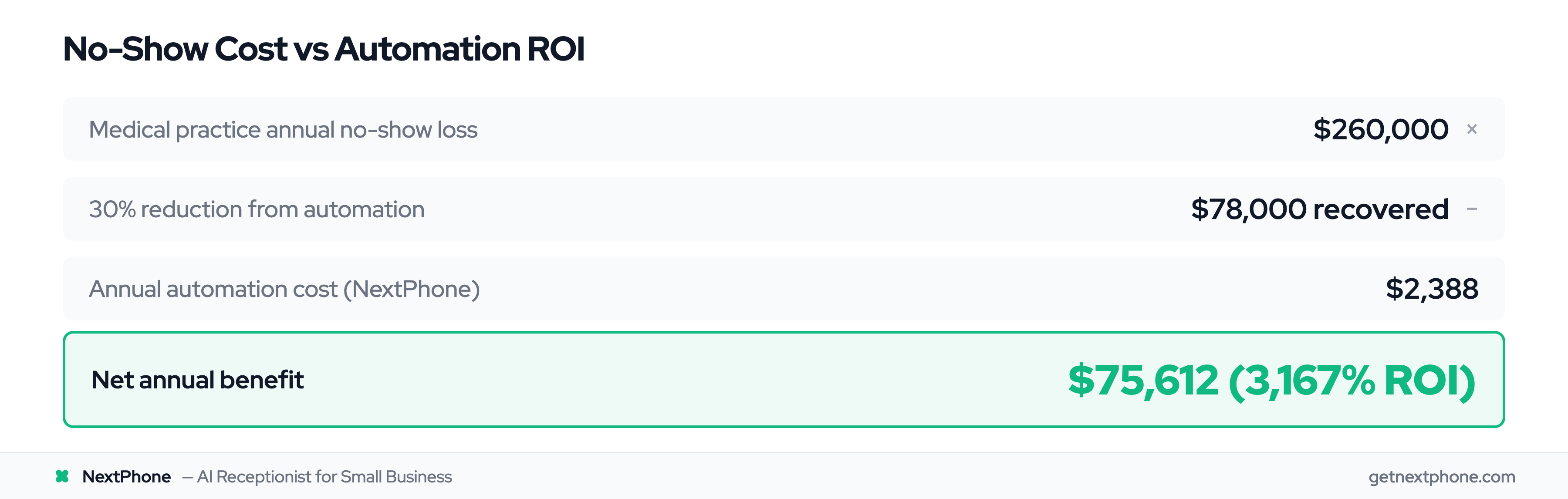
The numbers are staggering. Average patient no-show rates range from 23% to 33% across outpatient medical settings. For a solo physician practice, this translates to roughly $150,000 in lost revenue each year.
Missed phone calls are dental offices' largest revenue loss. On a daily basis, patient no-shows contribute to an average 14% loss in daily revenue for medical groups. That means for every $10,000 you should be earning, you're only collecting $8,600.
AI can predict no-shows and reduce hospital costs. A systematic literature review on appointment no-shows confirms these patterns across healthcare settings. Consider this scenario: Your clinic is scheduled to see 22 patients at an average of $265 per appointment. With an 18% no-show rate, four patients don't show. That's $1,060 lost in a single day—$5,300 per week, or $275,600 per year.
The problem extends beyond immediate revenue loss. According to a 2019 Athenahealth study, patients with a single no-show have an attrition rate of nearly 70%, compared to just 19% for patients who never miss appointments. When someone no-shows once, you're likely losing their entire lifetime value as a patient.
Salons and Beauty Services: 30% No-Show Rates
The beauty industry faces even higher no-show rates. Data shows that 30% of salon appointments are missed or canceled every year, costing the average salon around $67,000 in lost revenue annually.
For many salons, this is even more damaging than the raw numbers suggest. Stylists are often self-employed, working on commission or renting chairs. When a client no-shows, the stylist doesn't just lose revenue—they lose an entire time slot they could have filled with another customer.
Online scheduling reduces no-show rates in healthcare settings. Client no-shows and cancellations cost the hairdressing industry around $1.2 million every year. For every 10 appointments booked, 3 clients simply don't show up—leaving chairs empty and stylists unpaid.
Home Services Contractors: Weather and Scheduling Challenges
Contractors face a different challenge. While their no-show rates tend to be lower (around 15-20%), the per-appointment value is often much higher. An HVAC contractor who drives 45 minutes to a $350 service call only to find nobody home loses not just the service revenue, but also the drive time and fuel costs.
Weather adds another layer of complexity. Extreme weather can wreak havoc on strategically planned schedules-contractors-bottom-lines), with teams scrambling to reschedule maintenance calls in favor of emergency repairs. Cancellations spike during these periods, and without an automated system to handle rescheduling, chaos ensues.
The good news? Automated reminder systems have reduced customer cancellations by 34% for contractors who implement them.
The Complete Appointment Confirmation Workflow
Here's where most businesses get it wrong: they think "appointment reminders" means sending a single text the day before.
A truly effective appointment no-show prevention system is a multi-touch workflow that starts the moment an appointment is booked and continues through no-show recovery. Here's what that looks like:
Step 1: Immediate Booking Confirmation (Within 5 Minutes)
The moment someone books an appointment—whether online, by phone, or in person—they should receive an instant confirmation via SMS and email.
This serves two purposes. First, it confirms they booked the right date and time (catching errors immediately). Second, it sets the tone that your business is organized and professional.
The message should include:
- Appointment date and time
- Location/address
- What to bring or how to prepare
- Cancellation policy link
- Easy way to add to their calendar
Step 2: Three-Day Advance Reminder
Text reminders reduce no-shows by 38%. Three days before the appointment, send the first reminder. This is early enough that if they need to reschedule, you have time to fill the slot with someone else.
Keep this reminder simple and friendly. The goal is just to keep the appointment top-of-mind, not to overwhelm them with details.
Step 3: One-Day Advance Confirmation Call or SMS
This is the most critical window. Practices using hybrid approaches that combine SMS and phone confirmations achieve 85-90% show rates, compared to 75-80% for single-channel systems. A NIH systematic review found 97% of studies show appointment reminders improve attendance rates.
At this stage, you're not just reminding—you're asking for explicit confirmation. This is where two-way communication becomes essential.
For SMS, make it dead simple to respond:
"Hi Sarah, this is Elite Dental. Your cleaning is tomorrow (Wed) at 2 PM. Reply C to confirm or R to reschedule."
If you're using confirmation calls, keep them brief and friendly. We'll cover call scripts in detail in the next section.
Step 4: Two-Hour Final Reminder
Two hours before the appointment, send a final SMS reminder. At this point, you're catching the "I forgot" no-shows—people who fully intended to come but got busy and lost track of time.
This reminder should include specific details:
- Exact appointment time
- Parking information
- Provider name
- Office suite number
- Contact number if they're running late
Step 5: No-Show Follow-Up Automation
If someone doesn't show up, don't just write off the appointment. Thirty minutes after the missed appointment, your system should automatically send a reschedule message:
"We missed you today at 2 PM. Life gets busy—we understand. Click here to reschedule at a time that works better: [link]"
This accomplishes two things: it recovers some patients who had legitimate emergencies, and it educates chronic no-shows about your policy.
SMS and Email Reminder Sequences That Work
Let's talk about the channels themselves—when to use SMS versus email, and how to make each one effective.
SMS Reminders: 90%+ Open Rates
35+ patient appointment reminder statistics show text reminders achieve 98% open rate with response in 90 seconds. Text messages are the MVP of appointment reminders. They have a 90%+ open rate compared to 20-30% for email, and most people read them within minutes of receiving them.
Best practices for SMS appointment reminders include:
Keep it short. You're working with 160 characters. Include only essential information: name, date, time, location, and action.
Make it personal. Use the customer's name and your business name. "Hi Sarah, this is Elite Dental" feels infinitely better than "Appointment reminder."
Add reply options. The magic of SMS is two-way communication. Studies show that asking customers to confirm by replying can cut no-show rates by 80%.
Time it right. Send messages between 8 AM and 8 PM only. Best engagement happens mid-morning (8-10 AM), during lunch (12-1 PM), or after work (5-8 PM). Never send before 8 AM or after 8 PM—it feels intrusive and may violate local regulations.
Here's a good SMS template:
"Hi [Name], this is [Business]. Your [service] is [day] at [time]. Reply C to confirm, R to reschedule, or call [number] with questions."
Email Reminders: Detail and Documentation
Email can't compete with SMS for immediacy, but it's perfect for including detailed information that doesn't fit in a text message.
Use email for:
- Appointment confirmation with calendar file attachment
- Pre-appointment forms and paperwork
- Detailed preparation instructions
- Maps and parking information
- Links to patient portals or intake systems
The subject line should be clear and urgent: "Your appointment tomorrow at 2 PM" works better than "Appointment reminder."
Two-Way Communication: Make It Easy to Respond
The easier you make it for customers to confirm, cancel, or reschedule, the fewer no-shows you'll have.
Simple response options like "Reply C to confirm or R to reschedule" remove all friction. Customers don't have to call your office, navigate a phone tree, or wait on hold. They just type one letter.
For businesses using automated appointment confirmation software, this is even more powerful. When a customer replies "R," the system can automatically send them a link to view available times and book a new slot—no staff involvement required.
Optimal Timing: When to Send Each Reminder
The data is clear on timing. Studies show that practices sending three reminder touches—7 days out, 24 hours before, and 2 hours before—see optimal results.
But here's the important part: don't overdo it. Sending more than three to four reminders can backfire. Customers start to feel nagged, and your messages lose impact.
The sweet spot for most businesses:
- Day of booking: Immediate confirmation
- 3 days before: First reminder
- 1 day before: Confirmation request
- 2 hours before: Final reminder with details
Confirmation Calls: Personal Touch for High-Value Appointments
Not every appointment needs a phone call, but for high-value appointments or customers with a history of no-shows, the personal touch of a confirmation call can make the difference.
When to Use Confirmation Calls (vs Automated SMS)
Reserve phone calls for:
- High-value appointments ($500+): A $2,000 dental implant procedure warrants a personal call
- New patients or clients: First-time customers who don't know your business yet
- Clients with no-show history: If someone has missed appointments before, a personal call shows you're paying attention
- Complex appointments: Procedures requiring preparation or special instructions
For routine appointments with established customers, automated SMS is usually sufficient.
Optimal Timing: 24-48 Hours Before
Call 24 to 48 hours in advance. This gives the customer enough time to reschedule if needed, while still being close enough that the appointment is on their radar.
If you call too early (a week out), they might forget again by the appointment date. Too late (same day), and they can't help you fill the slot if they need to cancel.
What to Say: Effective Call Scripts
Keep confirmation calls brief and friendly. You're not selling anything—just confirming they're still coming.
Here's a simple script:
"Hi [Name], this is [Your Name] from [Business]. I'm calling to confirm your appointment tomorrow at 2 PM. Can you still make it?"
If yes: "Great! Do you have any questions before your visit? ... Perfect. We'll see you tomorrow at 2 PM."
If no: "No problem. Let me check what else we have available. Does [alternate time] work for you?"
The entire call should take 30-60 seconds.
How AI Handles This Automatically
Here's where AI receptionists like NextPhone come in. Our analysis of 130,175 calls showed that 25.4% of customers explicitly request callbacks—but without a systematic way to track and complete those callbacks, most never happen.
An AI receptionist can make confirmation calls 24/7 without tying up staff time. If the customer confirms, it's logged automatically. If they need to reschedule, the AI can handle that too, updating your calendar in real time.
For businesses handling dozens or hundreds of appointments per week, this kind of automation is the difference between a manageable process and complete chaos.
Industry-Specific Automation Examples
The basic workflow we've outlined works for any business, but different industries have unique needs. Here's how to adapt appointment confirmation automation for specific business types.
Medical Offices: Insurance Verification + Confirmation
Medical practices have an extra layer of complexity: insurance verification. Nothing's worse than having a patient show up only to discover their insurance isn't valid or doesn't cover the procedure.
The Workflow:
- Day of booking: Immediate confirmation SMS + email with intake forms
- 3 days before: Automated insurance verification (check coverage, copay amount)
- 2 days before: SMS with verified copay: "Your copay for Friday's appointment is $35. Reply C to confirm."
- 1 day before: Confirmation call for new patients, SMS for established patients
- Morning of: Final SMS with "Remember to bring your insurance card and ID"
This workflow catches insurance issues early, gives patients time to resolve them, and ensures everyone knows what to expect financially.
Medical practices implementing these systems report reducing no-show rates from 23-33% down to 5-7%—the ideal benchmark.
Salons and Spas: Service Reminders + Upsell Opportunities
Salons have two opportunities in the confirmation process: reducing no-shows AND increasing revenue through strategic upsells.
The Workflow:
- Day of booking: Immediate confirmation with deposit charge (refunded at check-in)
- 3 days before: Service reminder with prep instructions: "Your balayage appointment is Thursday at 2 PM. Please arrive with clean, dry hair."
- 2 days before: Upsell opportunity via SMS: "Add a deep conditioning treatment for $25? Reply Y to add it to your appointment."
- 4 hours before: Final reminder with parking and check-in instructions
The upsell approach is surprisingly effective. One salon reported that 40% of clients add services when offered via text message, adding an average of $18 per appointment.
The deposit requirement also dramatically reduces no-shows. When clients have financial skin in the game, they're much more likely to show up or call to cancel. Since implementing card-on-file deposits, many salons have seen no-show rates drop from 30% to 8%.
Home Services Contractors: Weather-Dependent Reschedule Logic
Contractors face a unique challenge: weather. You can't install a roof in the rain or do outdoor HVAC work in a snowstorm.
Smart automation can check weather forecasts and proactively reach out to customers:
The Workflow:
- Day of booking: Immediate confirmation with service window (e.g., "between 2-4 PM")
- 2 days before: Weather check—if rain/snow forecasted, automated call: "Weather forecast shows rain Thursday. Can we reschedule for Friday?"
- 1 day before: If weather clear, confirmation SMS with technician details: "Your appointment is tomorrow 2-4 PM. Your technician John will call 30 minutes before arrival."
- 30 minutes before: Technician dispatch notification with photo and truck number
- Day of: Real-time updates if technician is running late
This proactive approach reduces the frustration of last-minute weather cancellations. Instead of the customer calling to cancel the morning of the appointment, you've already worked together to find an alternative date.
For emergency calls—burst pipes, no power, broken AC in summer—the system can bypass the entire reminder sequence and route directly to dispatch.