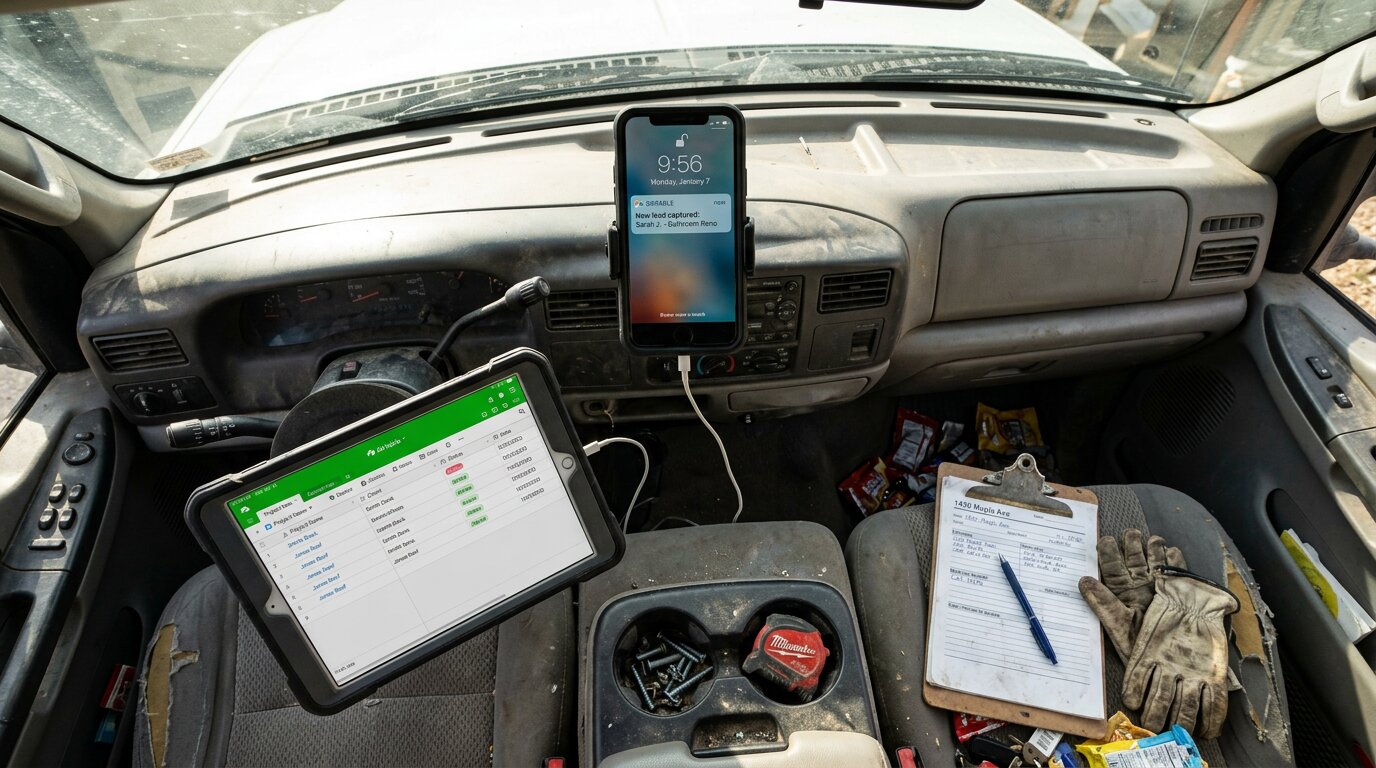
You're on the roof installing shingles. Your phone rings. A potential customer needs an estimate for a $4,500 job. But you can't answer: you're 20 feet up, hands full, safety first. The call goes to voicemail. They need someone today. They call the next contractor. Job gone.
This happens more than you think. The data on home services contractors is brutal: industry research shows 74.1% of their calls go completely unanswered. That's three out of every four potential customers calling someone else.
For the average contractor receiving 42 calls per month, those 31 missed calls translate to $260,400 in lost revenue per year. This post shows you how to build a custom lead tracking database with Airtable that captures every call detail automatically, no coding required. Combined with an AI virtual receptionist, you'll never miss another opportunity.
The Hidden Cost of Missed Calls
Your Phone Rings More Than You Think
Most contractors underestimate their call volume. Ask a business owner how many calls they get in a month and you'll usually hear 15-20. For a typical small contractor, the real number is closer to 42.
The gap between perception and reality costs money. Approximately one in four callers explicitly asks for a callback. Without a systematic tracking system, most of these callback requests fall through the cracks, leaving frustrated customers and lost revenue.
Manual Call Tracking Doesn't Work
You've tried the manual approach. Sticky notes. Spreadsheets you promise to update "later." Text messages to yourself. It doesn't work.
Why? Because without an automated tracking system, most of those callbacks never happen. You get busy with the job in front of you. The sticky note gets lost. The customer moves on.
The Revenue Math
Let's calculate what you're actually losing.
Average contractor: 42 calls per month. At 74.1% missed, that's 31 calls going to voicemail. Even if only 20% would have converted (conservative estimate), that's 6 jobs per month. At an average project value of $3,500, you're losing $21,700 per month, $260,400 per year.
Emergency calls hit even harder. Urgent calls rank among the top reasons people call, using language like "emergency," "urgent," or "ASAP." These emergency jobs average $4,200 in revenue, significantly higher than routine work. Missing just one emergency call per week costs $16,800 per month in lost revenue.
You need a system that captures every call, tracks every detail, and ensures nothing falls through the cracks. For most small businesses, that system is Airtable.
What is Airtable? (No-Code Database Explained)
Spreadsheet Meets Database
Airtable looks like a spreadsheet, but it's actually a powerful database. Think of it as Google Sheets on steroids, with relationships, custom views, and automation built in.
You organize data in tables (like spreadsheet tabs), but unlike spreadsheets, you can link records between tables. For example, your Leads table connects to your Calls table, which connects to your Projects table. Click on any customer and see their entire history (every call, every quote, every job) in one place.
The interface is visual and intuitive. Drag and drop to create fields. Click to change field types. No SQL queries, no developer required.
Built for Non-Technical Users
Airtable was designed for people who aren't developers. Over 450,000 organizations and 15 million monthly active users rely on Airtable. The entire platform is point-and-click. Creating a new field takes seconds:
- Click the + button
- Choose your field type (text, number, dropdown, date, etc.)
- Name it
- Done
Pre-built, customizable templates let you import data and get started in minutes. There are templates for CRM, project management, inventory tracking, event planning, and hundreds of other use cases. You can start with a template and modify it to fit your exact workflow.
When to Upgrade from Google Sheets
Google Sheets works fine for simple lists. But it breaks down when you need:
- More than 500 rows (gets slow and unwieldy)
- Relationships between data (customers linked to projects, calls linked to leads)
- Multiple people editing simultaneously without version chaos
- Different views of the same data (grid view for you, calendar view for your scheduler, Kanban board for your project manager)
- Automation triggered by data changes
When you hit any of these walls, it's time for Airtable.
Why Use Airtable for Lead Tracking (vs Traditional CRMs)
Flexibility: Build Exactly What You Need
Traditional CRMs lock you into their structure. Salesforce gives you "Account," "Contact," "Opportunity," and "Lead," whether those terms make sense for your business or not.
Airtable lets you build exactly what you need. Name your tables whatever you want. Add fields on the fly as your business evolves. Create views that match your actual workflow, not some consultant's idea of "best practices."
A general contractor might track:
- Leads table (new inquiries)
- Customers table (people you've worked with)
- Calls table (every phone interaction)
- Projects table (active jobs)
- Invoices table (billing)
All linked together. One central source of truth.
Cost: 10X Cheaper Than Traditional CRMs
Let's talk money.
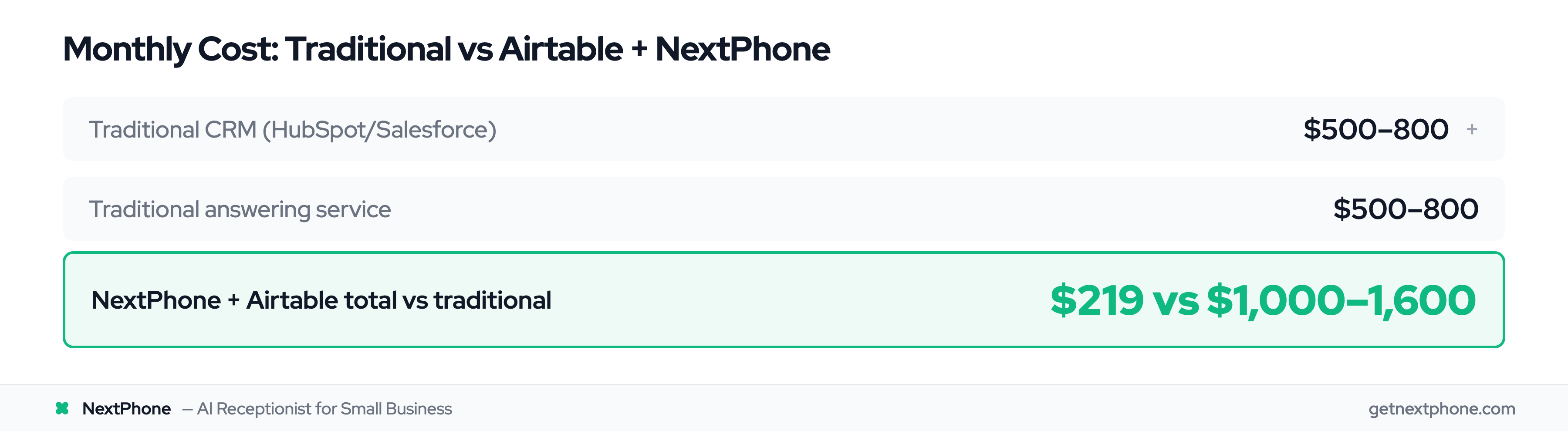
- Airtable Team plan: $20 per user per month
- HubSpot CRM: $500+ per month for meaningful features
- Salesforce: $1,000+ per month with required add-ons
- Traditional answering service: $500-800 per month for 100 calls
For a cost-effective alternative to traditional CRM systems, Airtable delivers the core functionality small businesses actually use, without the enterprise bloat. Airtable generated $478M in revenue in 2025, up from $305M in 2024.
Simplicity: No 6-Month Implementation
Salesforce implementations take months. You need consultants, training sessions, change management processes. It's a whole thing.
Airtable setup takes hours. Import your contacts from a CSV. Configure your fields. Start using it. Learn as you go. No consultant invoice required. Half of Fortune 1000 companies use Airtable, validating its enterprise readiness.
Limitations: What Airtable Can't Do
Airtable isn't perfect. Here's what it doesn't do natively:
- Make phone calls or send SMS (you need an integration)
- Send email campaigns (no built-in mail merge or drip sequences)
- Provide deep analytics dashboards (you can export to BI tools)
- Offer sales automation playbooks (no automatic follow-up sequences)
Airtable is flexible but doesn't offer core CRM functionalities such as email & calendar integration, mail merge & campaigns, or analytics on emails.
The solution? Hybrid approach. Use Airtable for flexible data storage and custom workflows. Integrate specialized tools for calling, emailing, and other functions. NextPhone handles the calls, Airtable handles the data, and you get a complete system at a fraction of the cost.
How Airtable Integrations Work (3 Main Methods)
Method 1: No-Code Tools (Zapier, Make)
Zapier connects 6,000+ apps to Airtable without code. You build "Zaps" that trigger when something happens. Example: when you miss a call on your phone system, create an Airtable record automatically.
Make (formerly Integromat) offers similar functionality with a visual workflow builder. Both platforms work well for basic automations.
Pros:
- Easy setup (click and configure)
- No coding required
- Lots of pre-built templates
Cons:
- Monthly cost ($20-50/month for basic plans)
- Delay (1-15 minutes between trigger and action)
- Limited customization
- Can get expensive with high volume
Method 2: Airtable API (Direct Integration)
The Airtable API allows direct HTTP requests to read and write data. Developers can build custom integrations that do exactly what you need.
Airtable offers both no-code integrations that allow for quick configuration with no coding experience required, and low-code integrations that enable highly customizable connections with some technical setup.
You send a POST request with your data, and Airtable creates a record. Full control, no middleman, no delays.
This method requires technical knowledge (understanding HTTP requests, JSON formatting, authentication) but gives you complete flexibility.
Method 3: Webhooks (Real-Time Sync)
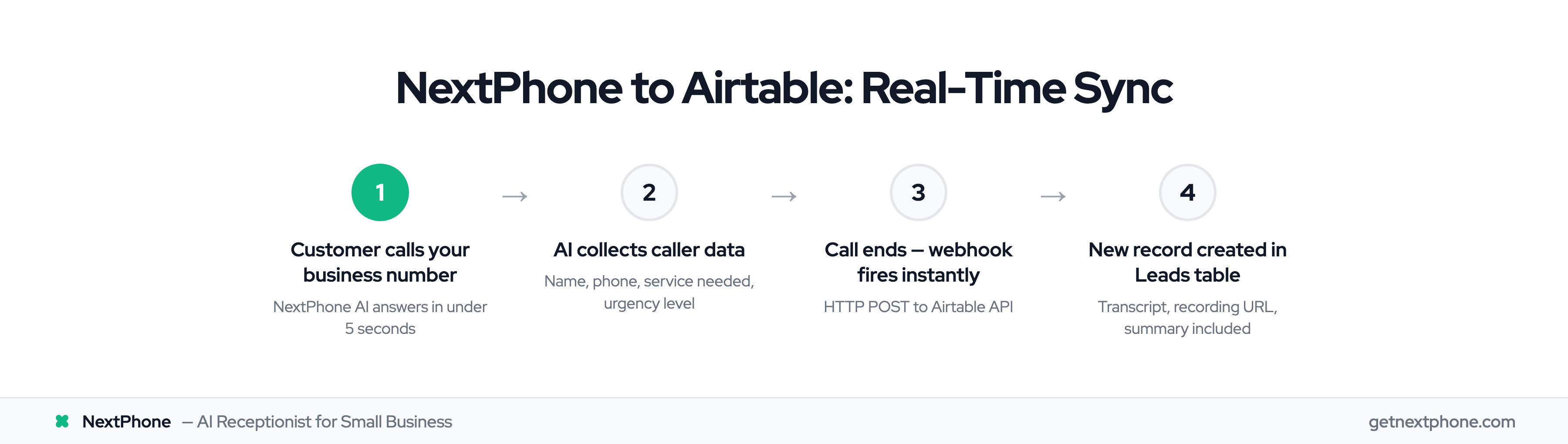
Webhooks are the fastest integration method. When an event happens (like receiving a call), the phone system immediately sends data to Airtable via HTTP request.
The Airtable Webhooks API allows real-time notifications of changes, from newly created records to a field being updated in an existing record.
How it works:
- Call comes in to your business number
- AI receptionist answers and collects caller information
- During the call, data is collected (name, phone, service needed, urgency)
- Webhook fires immediately
- HTTP POST request sent to Airtable API
- New record created in your Leads table
- You get a notification with all call details
Comparison: Zapier might take 5-15 minutes to create the record. Webhooks create it instantly, often while you're still on the call.
For time-sensitive leads (emergencies, urgent requests), real-time sync makes a huge difference.
Setting Up Custom Fields for Call Data
Essential Call Data Fields
Every business should track these basic call details:
- Caller Name (Single line text) - Who called
- Phone Number (Phone number type) - Click to call back directly from Airtable
- Call Date/Time (Date with time) - When they reached out
- Call Duration (Number) - How long the conversation lasted
- Call Recording URL (URL type) - Link to recording for quality review
- Call Summary (Long text) - AI-generated summary of conversation
- Follow-up Status (Single select: New, Contacted, Quoted, Won, Lost) - Track progress
Custom Fields for Home Services
Contractors have specific information they need to track. Here's what to add for trades businesses:
- Service Needed (Single select: Plumbing, Electrical, HVAC, Roofing, General Repair)
- Job Type (Single select: Emergency, Estimate Request, Question, Scheduling)
- Service Area (Single line text or linked to Locations table)
- Budget Range (Single select: Under $500, $500-$2K, $2K-$5K, $5K-$10K, $10K+)
- Urgency Level (Single select: Emergency, Urgent This Week, Normal, Low Priority)
- Lead Source (Single select: Google, Referral, Repeat Customer, Website, Facebook)
Example populated record: "John Smith called at 9:15 PM, AC not working (95° outside), Emergency urgency, Budget $3K-5K, Status: Contacted, Quoted $3,200"
Field Types to Use
Choosing the right field type matters:
Use "Single select" for dropdown options - This standardizes your data. Instead of people typing "emergency," "Emergency!!" and "URGENT," you get consistent "Emergency" tags you can filter and report on.
Use "Phone number" type for contact numbers - Airtable formats them properly and makes them click-to-call on mobile.
Use "Linked record" to connect to other tables - Link your Calls table to your Customers table so you can see a customer's entire call history.
Use "Checkbox" for Yes/No fields - Called Back? Quoted? Job Won? Simple checkboxes are faster than dropdowns.