The Enterprise Phone System Paradox
You invested in 8x8's unified communications platform, an enterprise-grade phone system with all the features: VoIP, video conferencing, team messaging, CRM integration. Your team has the tools they need.
But you're still missing most of your calls.
Industry research on calls to small businesses found that 74.1% go completely unanswered. That's three out of every four potential customers reaching voicemail and calling your competitor instead.
Here's the problem: UCaaS platforms like 8x8 are powerful tools, but they still require humans to answer the phone. And humans can't be available 24/7.
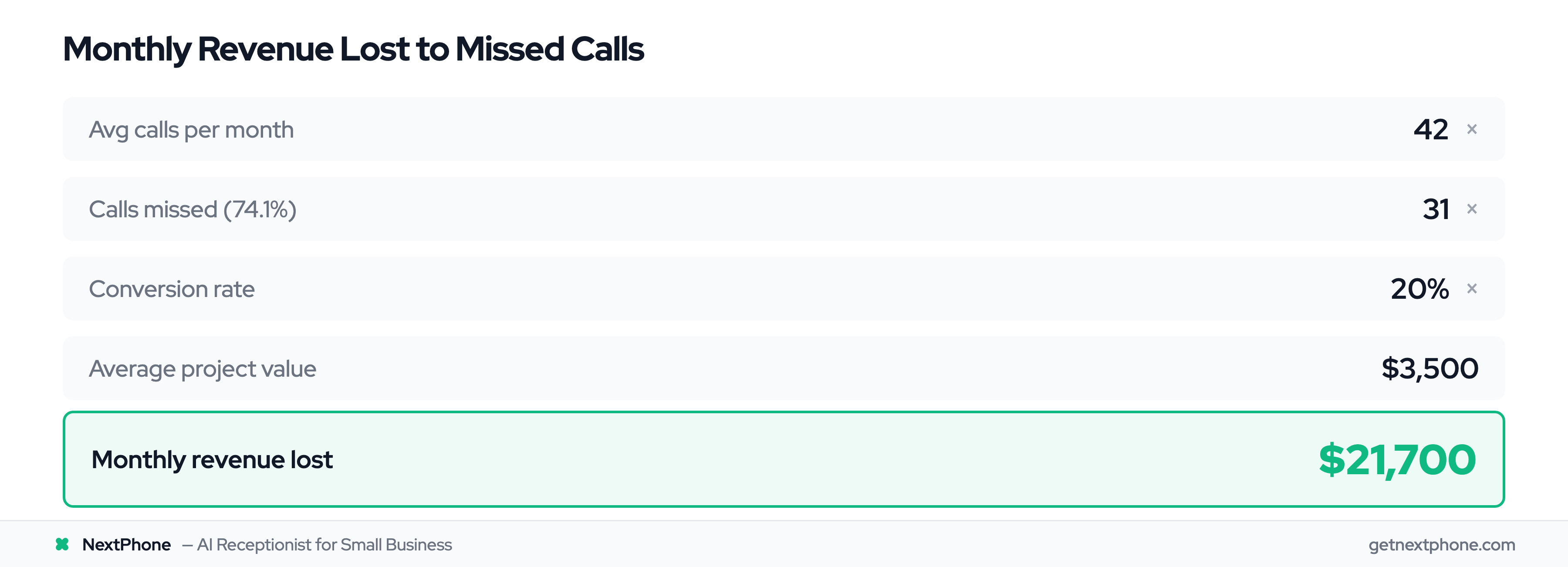
For a typical contractor receiving 42 calls per month, if 74.1% go unanswered and just 20% would have converted at an average $3,500 project value, that's $21,700 per month in lost revenue, or $260,400 per year.
This is where AI phone answering changes everything. 85% of customer service leaders will explore or pilot conversational GenAI in 2025. The smart ones are using it to augment their existing phone systems.
What is 8x8?
Enterprise UCaaS Platform
8x8 is a unified communications as a service (UCaaS) platform that combines voice, video, messaging, and contact center capabilities into one cloud-based system. The VoIP market is growing from $132B to $326B, and UCaaS platforms like 8x8 are leading this shift. It serves approximately 2.5 million users globally, primarily targeting mid-sized to enterprise businesses.
Key Features & Capabilities
8x8 offers four major product lines:
- 8x8 Work: Full UCaaS solution with VoIP, team messaging, SMS, video conferencing, and collaboration tools
- 8x8 Contact Center: Cloud contact center with omnichannel support, AI-powered features, and workforce management
- 8x8 Engage: Customer engagement platform combining communications with business intelligence
- Communications APIs: Developer tools for building custom communication solutions
The platform includes approximately 70 integrations with popular business tools, including CRM platforms like Salesforce and Microsoft Dynamics 365, project management tools, and productivity apps.
Who Uses 8x8
8x8 typically serves businesses with 10+ employees looking to modernize legacy phone systems or consolidate multiple communication platforms. 8x8 is ranked as a "Visionary" in the 2025 Gartner Magic Quadrant for UCaaS. 8x8 Work plans range from $15 to $35 per user monthly, making it a significant investment for small teams.
For a 5-person team, that's $75 to $175 per month just for the phone system, before you even consider the cost of staff time answering calls.
The Missed Call Problem (Even with Enterprise Systems)
UCaaS Requires Human Answering
Here's what most businesses don't realize when they invest in platforms like 8x8: you're buying the infrastructure, not the solution. VoIP statistics and trends show that while adoption is high, the fundamental staffing challenge remains.
8x8 gives you the phone lines, the call routing, the voicemail transcription. But someone still has to answer the phone when it rings. And when your team is in meetings, on job sites, helping in-store customers, or simply off the clock, those calls go straight to voicemail.
The Real Cost of Missed Calls
Across the 1,446,980 calls in our analysis, approximately one in four callers explicitly asks for a callback. Without a systematic tracking system, most of these callback requests fall through the cracks, leaving frustrated customers and lost revenue.
The picture is even more striking for urgent calls. We found that urgent calls with language like "emergency," "urgent," or "ASAP" rank among the top reasons people call. And emergency work bills higher than routine work: a typical emergency job runs something like $4,200 against $3,500 for a scheduled project.
Missing one emergency call per week costs $16,800 per month in lost revenue.
Why This Happens
Even with a sophisticated phone system like 8x8, small teams face the same staffing challenges:
- Everyone's in a team meeting from 2-4 PM. Six calls come in. All go to voicemail.
- Your technician is on a ladder installing HVAC equipment. Can't answer. Three calls missed.
- It's 9 PM. A customer's AC died in 95-degree heat. Emergency call goes to voicemail. They call the next contractor.
- Weekend calls pile up in voicemail. By Monday, those customers have already booked with competitors.
The phone system works perfectly. But you need humans to use it, and humans can't be available 24/7. 90% of organizations now use UCaaS as their primary communications platform, yet the missed call problem persists. The UCaaS market is growing from $56B to $176B by 2030, but platform growth alone doesn't solve the availability gap.
How AI Answering Complements 8x8
The AI Front-Line Layer
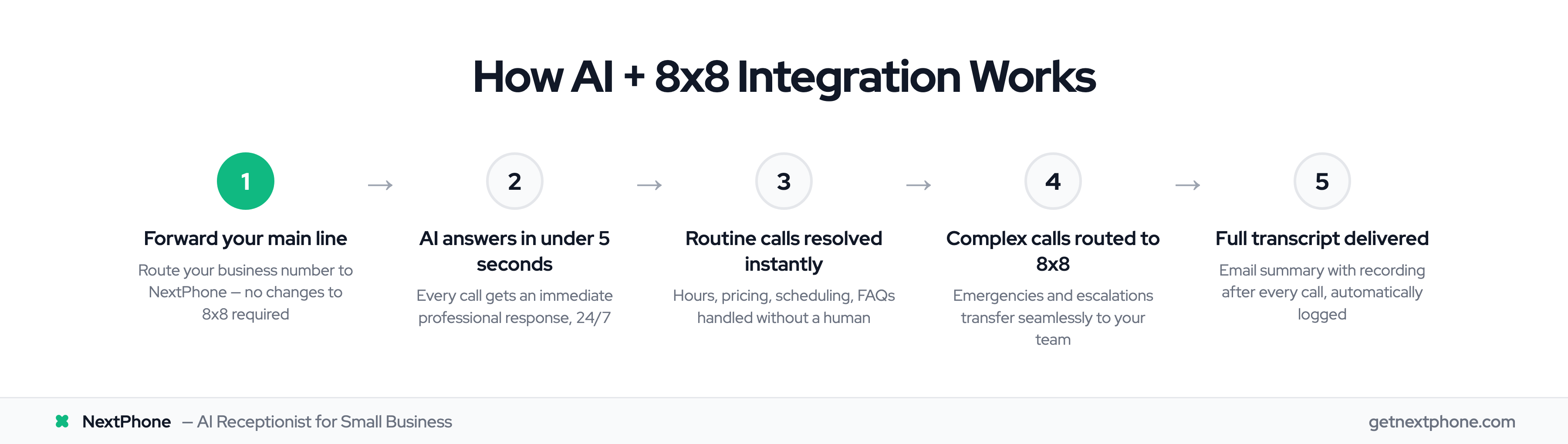
NextPhone solves this by adding an AI layer in front of your 8x8 system. Instead of calls going directly to your team or voicemail, they're answered by AI in under 2 seconds, every time, 24/7.
The AI handles routine inquiries that make up the majority of customer calls:
- Business hours and location
- Pricing and service offerings
- Scheduling appointments
- Frequently asked questions
- Lead qualification
For these common questions, customers get instant answers without waiting for a callback. No more "I'll have someone get back to you tomorrow."
Intelligent Call Routing
Here's where the integration with 8x8 becomes powerful. The AI doesn't try to handle everything. It recognizes when a call needs human attention.
Emergency calls, complex technical questions, VIP customers, or anything outside its knowledge base gets immediately transferred to your 8x8 phone numbers. AI phone systems integrate directly with SIP-based providers, making this handoff seamless.
From the caller's perspective, it's one smooth conversation. They don't know (or care) that they started with AI and got transferred to a human. They just know they got help fast.
Best of Both Worlds
This hybrid approach gives you:
- 24/7 availability without hiring night shift staff
- Instant response to routine questions (under 2 seconds vs. hours for callback)
- Human expertise when it matters (complex questions, emergencies)
- Complete call capture (never miss another call)
- Cost efficiency (AI handles volume, humans handle value)
An HVAC contractor using this setup described it perfectly: "The AI handles 'Do you service my area?' and 'What's your hourly rate?' instantly. When someone calls saying 'My AC died in 95-degree heat,' it transfers to my phone immediately. I get the emergencies, the AI handles everything else."
Integration Methods
Call Forwarding Setup
The simplest integration method is call forwarding. You forward your business number to NextPhone. The AI answers, handles what it can, and transfers calls back to your 8x8 numbers when needed.
Setup takes about five minutes:
- Forward your main business line to your NextPhone number
- Configure the AI with your business information (hours, services, pricing)
- Set routing rules for when calls should transfer to your 8x8 system
- Done
Your customers call the same number they always have. They don't need to know anything changed.
Webhook Integration
For more advanced integration, NextPhone's custom HTTP webhooks can push call data directly to 8x8's external CRM integration or other systems in real-time.
This means:
- Call information appears in your 8x8 Contact Center dashboard automatically
- Lead data flows to your CRM without manual entry
- Your team sees caller history before they even pick up
- All systems stay synchronized without duplicate data entry
The webhooks support custom parameters, authentication headers, and dynamic template resolution, giving you complete control over what data goes where.
CRM Sync
Both NextPhone and 8x8 support integration with major CRM platforms. This means you can configure both systems to write to the same CRM, giving you complete call history across both AI-handled calls and human conversations.
Supported CRMs include Salesforce, HubSpot, Pipedrive, Zoho, and hundreds of others. See our CRM integration setup guide for specific configuration steps.