WordPress runs 43.4% of all websites on the internet. WordPress also confirmed this 43.4% market share in their 2025 report. That's over 850 million sites, more than Shopify, Wix, and Squarespace combined.
With over 59,000 plugins and 13,000+ themes available, WordPress users can add almost any feature imaginable. WordPress sites see 20B+ page views monthly with 70M posts published each month. SEO optimization? There's Yoast. Ecommerce? WooCommerce. Security? Wordfence. Contact forms? Gravity Forms.
But here's what's missing: actual phone answering.
Sure, you can add click-to-call buttons. You can embed chatbots for text conversations. But when a potential customer picks up their phone and calls your WordPress site, who answers?
Industry research shows 74.1% of calls to home services contractors go completely unanswered. That's three out of every four potential customers calling someone else.
This guide shows you how to add true AI phone answering to your WordPress site: no coding required, integrates like any other plugin, and costs a fraction of hiring a receptionist.
Why WordPress Is the Largest Integration Opportunity
WordPress Powers 43% of the Internet
Let's put that 43.4% number in context.
According to the 2025 WordPress market share report, WordPress's dominance has grown steadily from 27.3% in 2017 to 43.6% in January 2025. Recent data shows 62.8% CMS market share with 587M websites. Among websites with a known content management system, WordPress holds 61.3% of the market.
This is the internet's infrastructure.
Your potential customers are building their businesses on WordPress. Marketing agencies, consultants, contractors, law firms, medical practices, real estate agents, local service businesses. They're all on WordPress.
The WordPress Plugin Ecosystem
WordPress users think in plugins. According to WordPress plugin statistics, 80% of WordPress websites use at least one plugin. The top 10 plugins account for 27.6% of all plugin installations.
What does this mean for phone integration?
WordPress users expect a familiar workflow: find plugin, install, activate, configure, done. They don't want to learn new platforms or leave their WordPress dashboard to manage features.
They've added plugins for email marketing (Mailchimp), appointment booking (Calendly), live chat (Intercom), and customer relationship management (HubSpot). Phone answering should work the same way. For context, Webflow (a competitor) has 493K active websites with 1.2% CMS market share, showing how dominant WordPress remains.
Why WordPress Sites Need Phone Integration
Who's using WordPress? Here's the reality:
Marketing agencies spend 4-6 hours daily on Zoom client calls. When a potential client calls, it goes to voicemail.
Consultants are in back-to-back meetings. Their beautiful WordPress portfolio site lists their phone number, but they can't actually answer it.
Contractors are on job sites with hands covered in drywall mud or up on ladders installing HVAC units. Their WordPress site generates leads, but they miss the calls.
Local service businesses close at 5 PM. Emergency calls come in at 9 PM (burst pipe, no AC, broken lock). They lose the high-value urgent work to competitors who answer.
Every one of these businesses has a WordPress site. None of them can actually answer their phone consistently.
The Current State of WordPress Phone Integration
Click-to-Call Buttons: The Status Quo
The most popular WordPress phone solution is the click-to-call button. Call Now Button alone has over 200,000 active installations.
Here's what these plugins do: they create a clickable phone number that triggers a phone dial on mobile devices. Tap the button, your phone dials the business.
Simple. Effective for what it is. But limited.
What Click-to-Call Actually Does
Click-to-call plugins make it easier for customers to initiate a call. That's where their job ends.
The call still goes to your regular business phone. If you're available, you answer. If you're busy, in a meeting, on another call, or after-hours, the call goes to voicemail.
The plugin didn't answer the call. It just made dialing easier.
The Problem: Forwarding ` Answering
Let me show you what this looks like in practice.
You're a marketing agency owner presenting a website redesign to a client on Zoom. A potential customer finds your WordPress site, loves your portfolio, and clicks "Call Now" at 2 PM.
Your phone rings. You're mid-presentation. You ignore it.
The caller hears ringing, then voicemail. They hang up. They Google "marketing agency [your city]" again. They call the next one. That agency answers (or their AI receptionist does). You just lost a $15,000 website project.
Our data tells this story at scale. Across the 1,446,980 business calls in our analysis:
- Approximately one in four callers explicitly asks for a callback
- Urgent calls rank among the top reasons people call, using language like "emergency," "urgent," or "ASAP"
- Emergencies are a recurring reason people call, and they need an immediate response
Click-to-call buttons don't capture callback requests. They don't recognize urgency. They don't qualify leads or book appointments. They just forward.
That worked fine in 2015. But we can do better now.
What Is an AI Receptionist for WordPress?
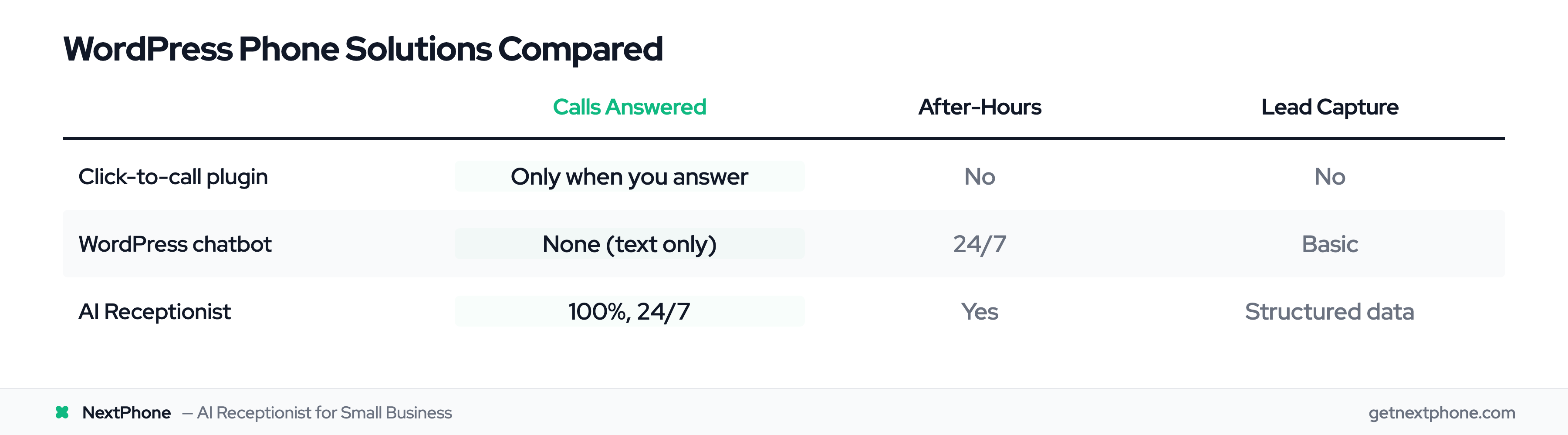
AI Receptionist vs Chatbot vs Click-to-Call
Let's clarify what we're talking about, because there's confusion around these terms.
Click-to-call button: Makes your phone number clickable. Forwards incoming calls to your phone. Works great when you're available. Useless when you're not.
Chatbot: Handles text conversations on your website. Answers FAQs via typing. Can't handle phone calls at all: different technology, different use case.
AI receptionist: Actually answers voice phone calls 24/7. Has conversations with callers. Qualifies leads, books appointments, routes emergencies, captures callback requests.
Think of it this way: click-to-call was step 1 (making calls easier). AI receptionist is step 2 (actually answering those calls).
How AI Receptionist Technology Works
Modern AI receptionists use natural language processing to understand what callers are saying and respond conversationally.
You train the AI with your business information: what services you offer, your pricing, your hours, common questions you get. The AI learns this context.
When someone calls, the AI:
- Answers in under 5 seconds
- Greets the caller with your business name
- Asks how it can help
- Understands the caller's request (even if phrased differently than expected)
- Provides accurate answers based on your training
- Collects information (name, phone, email, project details)
- Books appointments if you've connected a calendar
- Routes urgent calls to your mobile phone if it detects emergency language
- Sends you a summary via email with call recording and transcript
This happens whether you're in a meeting, on a job site, asleep, or on vacation.
The Evolution: From Forwarding to Answering
Here's the comparison in plain terms:
Click-to-Call Button:
- Handles: Phone calls
- When it works: During business hours (if you answer)
- What it does: Forwards call to your phone
- Cost: Free to $50/year
- Calls answered: Only when you're available
WordPress Chatbot:
- Handles: Text conversations
- When it works: 24/7
- What it does: Responds to typed questions
- Cost: $0-200/month
- Calls answered: None (different technology)
AI Receptionist:
- Handles: Voice phone calls
- When it works: 24/7, 365 days
- What it does: Answers, qualifies, books, routes
- Cost: $50-500/month
- Calls answered: 100%
The best WordPress sites use all three: click-to-call for visibility, chatbot for web visitors who prefer typing, AI receptionist for phone calls.
Why WordPress Sites Need Phone Answering (The Data)
The Missed Call Crisis
Look at home services contractors: real businesses with professional WordPress sites, contact forms, and click-to-call buttons.
The data is brutal: industry research shows 74.1% of their calls go completely unanswered.
Not "went to voicemail and got a callback later." Completely unanswered. The customer called, got voicemail or endless ringing, hung up, called a competitor.
Why does this happen?
You're busy running your business. You're in client meetings. On job sites. Handling current customers. In the field. On Zoom calls. Driving. At lunch. After hours.
Your WordPress site works 24/7 generating leads. Your phone answering capability works maybe 6 hours a day if you're disciplined.
What Happens to Unanswered Calls
Let's look at what those missed calls actually contained.
Approximately one in four callers explicitly asks for a callback. Those are the people saying things like:
- "Give me a call back when you get a chance"
- "Have someone call me to schedule an estimate"
- "Call me at this number"
Without a system to capture and track these requests, most never get called back. The business owner listens to voicemail at the end of the day, means to call everyone back, gets distracted with current work, and forgets.
The customer moves on.
Even worse: urgent calls rank among the top reasons people call. "Emergency," "urgent," "ASAP," "right now," "immediately."
Emergency calls average $4,200 in revenue, significantly higher than routine work. Missing one emergency call per week costs $16,800 per month in lost revenue.
WordPress Site Owner Scenarios
Let me show you what this looks like for real WordPress users.
Scenario 1: Marketing Agency
You run a 3-person agency. Beautiful WordPress portfolio site, great SEO, strong local presence. You get 35 calls per month from your website.
You're in client meetings 4-6 hours daily. Those 35 calls come in randomly. You answer maybe 12 of them (the ones that happen to call when you're at your desk).
The other 23 go to voicemail. Some leave messages. Most don't. They call the next agency on Google.
23 missed calls × 30% close rate × $12,000 average project = $82,800 per month in lost revenue.
For a $0 click-to-call button that doesn't actually answer calls.
Scenario 2: HVAC Contractor
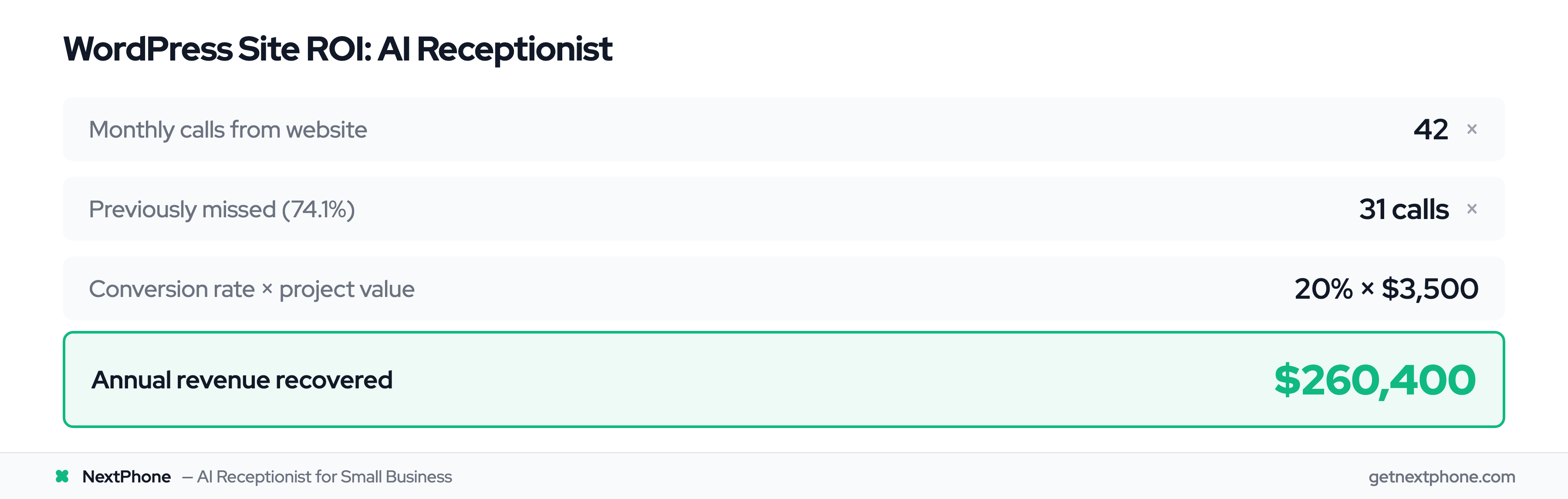
You installed Call Now Button on your WordPress site. Works great: you get 42 calls per month.
But you're on ladders installing AC units 6-8 hours daily. Your phone's in your pocket. You can't answer when you're carrying a compressor or working with refrigerant.
At 9 PM, a customer's AC dies. It's 95 degrees. They're panicking. They call every HVAC company on Google. The one that answers (or whose AI answers) gets a $3,500 emergency job.
Your call goes to voicemail. You check it at 10 PM. You call back. They already booked someone else.
42 calls/month × 74.1% missed = 31 missed calls. If just 20% would have converted at $3,500 average:
31 missed × 20% × $3,500 = $21,700 per month lost. That's $260,400 per year.
Scenario 3: Business Consultant
You have an impressive WordPress site showcasing your expertise. You charge $10,000 for 90-day consulting engagements.
You're on Zoom calls with current clients 4-6 hours daily. That's your delivery model. You can't exactly pause a strategic planning session to answer your phone.
You get 15 calls per month from your WordPress site. You miss 11 of them because you're in meetings.
11 missed × 25% close rate × $10,000 = $27,500 per month lost.
How AI Receptionist Integration Works for WordPress
Three Integration Methods
Adding an AI receptionist to WordPress is simpler than you'd think. There are three methods, all no-code:
Method 1: Custom HTML Block (Easiest for Modern WordPress)
If you're using the Gutenberg block editor (WordPress 5.0+), this is your best option. You add a Custom HTML block and paste the embed code. Done.
Works exactly like embedding a Google Map or YouTube video.
Method 2: Widget Areas (Traditional WordPress)
Add the code to your sidebar, footer, or header widget areas. This is the classic WordPress approach: go to Appearance → Widgets, add a Custom HTML widget, paste code.
Method 3: Shortcode
Some AI receptionist services (including NextPhone) provide a shortcode you can paste anywhere in your content. Want it on your contact page? Paste the shortcode. Homepage? Paste it there.
All three methods take less than 5 minutes.
The Embed Code Approach (Easiest)
Here's the step-by-step for modern WordPress:
- Get your embed code from your AI receptionist dashboard (we'll cover this in the setup section)
- In WordPress, go to the page where you want the widget (usually Contact page or Homepage)
- Click the '+' icon to add a block
- Search for "Custom HTML"
- Paste your embed code
- Click Publish
The widget appears on your site. Customers can see your phone number. When they call, the AI answers.
This works exactly like adding a Calendly scheduler or Mailchimp signup form to WordPress. If you've done either of those, you already know how to add an AI receptionist.
WordPress Widget Areas
Prefer the traditional widget approach? Here's how:
- Go to Appearance → Widgets in your WordPress dashboard
- Choose your widget area (sidebar, footer, header; depends on your theme)
- Add a Custom HTML widget
- Paste your embed code
- Save
The advantage of widget areas: the phone widget appears on every page automatically. Customer can call from anywhere on your site.
Performance note: The widget loads asynchronously, meaning it doesn't slow down your page load time. It loads after your main content, just like Google Analytics or Facebook Pixel.
We've tested this on sites with GTmetrix and Google PageSpeed Insights. Typical impact: less than 0.1 seconds (imperceptible to users).
Compatibility: Works with any WordPress theme: Divi, Elementor, Astra, GeneratePress, OceanWP, Avada, all of them. If your theme supports Custom HTML blocks or widgets (they all do), it works.
Benefits of AI Receptionist for WordPress Sites
24/7 Availability (Never Miss a Call)
Your WordPress site works around the clock. Your AI receptionist should too.
A large share of calls to home services businesses arrive outside standard 9-5 hours. People research service providers in the evening after work. Emergencies happen at midnight. Weekend projects generate Monday calls.
A traditional receptionist costs $35,000 per year, works 40 hours per week, and takes holidays, sick days, and vacations.
An AI receptionist works 168 hours per week, every week, for $199-500 per month depending on the service.
When someone calls your WordPress site at 2 AM because their pipe burst, the AI answers. When a prospect researches agencies at 10 PM on Sunday, the AI books a consultation for Monday morning.
You wake up to qualified leads in your inbox.
Lead Qualification and Capture
Here's what makes AI receptionists different from dumb call forwarding.
The AI asks qualifying questions:
- "What type of project are you working on?"
- "What's your budget range?"
- "What's your timeline?"
- "How did you hear about us?"
It collects structured information:
- Full name
- Phone number
- Email address
- Company name (for B2B)
- Project details
- Preferred contact time
This data flows into your WordPress ecosystem. If you're using WooCommerce, it can create a customer record. If you have a CRM plugin, it can push the lead there. If you use Gravity Forms or WPForms, it integrates via webhook.
Callback Request Tracking
Remember that approximately one in four callers requests a callback?
Click-to-call buttons don't capture this. The customer leaves a voicemail saying "call me back" with their phone number spoken quickly. You miss a digit when transcribing. You call the wrong number. They don't answer. You both play phone tag for three days.
The lead goes cold.
AI receptionists capture callback requests systematically:
- "What's the best number to reach you?"
- "What time works best for a call back?"
- "Can I get your email in case we need to reschedule?"
You get a notification: "John Smith requested callback, (555) 123-4567, best time: tomorrow 2-4 PM, interested in kitchen remodel, budget $30-50K."
You call once, at the right time, with context. Close rate goes up.
Emergency Call Routing
Not all calls are equal. Some need a human immediately.
AI receptionists detect urgency keywords:
- "Emergency"
- "Urgent"
- "ASAP"
- "Right now"
- "Immediately"
- "No heat" (HVAC)
- "Burst pipe" (plumbing
- "No power" (electrical
When detected, the AI can transfer the call to your mobile phone mid-conversation. The customer talks to the AI, explains the emergency, AI says "Let me connect you with our emergency technician right away," and rings your phone.
You answer already knowing: emergency, what kind, customer's name and number, location.
These emergency calls average $4,200 in revenue. You don't want to miss them.
ROI for WordPress Site Owners
Let's do the math for a typical contractor with a WordPress site.
Current state:
- 42 calls per month from website
- 74.1% missed (31 calls)
- 20% would have converted (conservative estimate)
- $3,500 average project value
- 31 × 20% × $3,500 = $21,700/month lost
- Annual: $260,400 lost
With AI receptionist:
- Same 42 calls per month
- 100% answered
- 20% conversion (same rate, now applied to all calls)
- 42 × 20% × $3,500 = $29,400/month revenue
- AI receptionist cost: $199/month
- Net gain: $29,400 - $199 = $29,201/month
- Annual net: $350,412
The AI receptionist costs $2,388 per year and generates $350,412 in captured revenue.
That's a 14,600% ROI.
Even if only 10% of missed calls would have converted (half our estimate), you're still capturing $130,200 per year for a $2,388 investment.