Will AI Receptionist Make Mistakes? (Error Rates, Quality Assurance & Improvement)

18 min read
Yanis Mellata
AI Technology

The Honest Truth About AI Receptionists and Mistakes

Let's start with the straight answer: Yes, AI receptionists will make mistakes.

But here's the question nobody's asking: what are you comparing that to?

In our analysis of 130,175 customer service calls from 47 home services businesses over 7 months, we found that 74.1% of calls went completely unanswered. That's three out of every four potential customers calling someone else because you were on a ladder, with another customer, or closed for the day.

Think about it. A contractor on a roof can't answer the phone—that's a 100% error rate for that call. An HVAC tech under a house has a 100% error rate. A plumber dealing with a burst pipe has a 100% error rate.

So the real question isn't "Will AI be perfect?" It won't. The question is: "Will AI answer 95% of calls correctly, or will you miss 74% of calls entirely?"

This post shows you the actual error rates, the monitoring systems that catch mistakes before they matter, and the escalation protocols that ensure customers never get stuck. We're transparent about limitations because that's what builds trust.

Yes, AI Receptionists Make Mistakes (Here's What You Need to Know)

The Straight Answer

AI isn't perfect. Modern AI receptionists typically have a 5-10% error rate on edge cases—complex, unusual, or ambiguous questions they haven't been trained to handle.

For routine inquiries? AI accuracy is 90-95%. Hours, pricing, service areas, appointment scheduling, basic FAQs—these are handled correctly the vast majority of the time.

Why Businesses Worry About This

Business owners fear embarrassment. What if the AI tells customers the wrong pricing? What if it says something inappropriate and goes viral? What if it makes you look unprofessional?

These fears are real. According to Deloitte, 77% of businesses express concerns about AI hallucinations—when AI confidently presents false information as fact.

And customer experiences are mixed. Zendesk's 2025 research found that 60% of customers report frequent disappointment with chatbot experiences. But here's the flip side: 59% of consumers rate AI interactions 8/10 or higher.

The difference? Quality implementation, proper training, and robust monitoring systems.

What "Mistakes" Actually Mean

When we talk about AI errors, we're not talking about technical glitches or system crashes. We're talking about:

  • Hallucinations: AI fabricates information that sounds correct but isn't
  • Context failures: AI misses the bigger picture of a conversation
  • Edge case misunderstandings: Unusual requests outside the AI's training data
  • Inadequate responses: Questions that require human judgment to answer properly

These aren't bugs. They're limitations of current AI technology. The key is knowing how to minimize them.

The 4 Types of AI Receptionist Errors

1. AI Hallucinations (Confidently Wrong Information)

This is the most dangerous type of error: AI fabricates policies, facts, or processes that don't exist, but delivers them with complete confidence.

The most famous example? Air Canada's chatbot told a passenger they could get a bereavement fare retroactively—directly contradicting the airline's actual policy. When the passenger tried to claim the discount, Air Canada refused. A tribunal ruled the airline was liable for what its chatbot said, and ordered them to pay.

The lesson: You're legally responsible for what your AI tells customers.

2. Context Failures (Missing the Bigger Picture)

AI sometimes loses the thread of a conversation, especially when customers reference previous interactions.

Example: A customer calls and says, "I'm calling back about the estimate you gave me yesterday." But the AI has no record of yesterday's call—it's talking to a different system or different business entirely. The AI might say, "I don't have any record of an estimate" when a human would recognize the customer is calling the right place but needs to be transferred to someone with access to that information.

3. Edge Case Misunderstandings (Unusual Requests)

Most AI errors fall into this category. A customer asks something outside the AI's training:

  • "Do you work on vintage 1967 tractors?" (when your business is general equipment repair)
  • "Can you come out on Christmas Day for an emergency?" (when you haven't specified holiday policies)
  • "My neighbor recommended you, does that get me a discount?" (when you haven't programmed referral discount logic)

These aren't failures exactly—they're questions that require specific business knowledge you haven't given the AI yet.

4. Escalation-Worthy Complex Questions

Some questions require human judgment:

  • "Can you fit me in between my dentist appointment at 2 and picking up my kids at 3:30?"
  • "I need three different services done, but I'm not sure in what order—what do you recommend?"
  • Multi-part questions with dependencies

Good AI systems recognize these and escalate to humans rather than guessing.

But Let's Talk About Human "Errors"

Here's what the conversation about AI mistakes always misses: humans don't make the same types of errors, but they "fail" in different ways.

The Missed Call "Error" (74.1% Failure Rate)

In our analysis of 130,175 calls from 47 home services businesses over 7 months, 74.1% of calls went completely unanswered.

Not because receptionists are bad at their jobs. Because they're unavailable:

  • On a ladder installing something
  • Helping a customer in person
  • On another call
  • On lunch break
  • After hours
  • Sick day
  • Vacation

Invoca's research on healthcare found 29% of calls go unanswered on average. Dental industry analysis shows practices miss 30-35% of incoming calls during office hours alone, costing an estimated $52,000 per year in lost revenue.

A missed call is a 100% failure. You didn't just give wrong information—you provided zero information. The customer called your competitor instead.

Forgotten Callbacks (80% Never Happen)

We found that 25.4% of callers explicitly requested callbacks. "Have him call me when he gets a chance." "Can she call me back after lunch?" "Tell them I called about the estimate."

Without a systematic tracking system, most businesses admit 80% of these callback requests fall through the cracks. The receptionist wrote it on a sticky note that got buried. They meant to mention it but forgot in the chaos. The owner was in back-to-back jobs and didn't check messages until 10 PM.

Eighty percent failure rate on callbacks. That's a human error.

Booking Mistakes and Double-Scheduling

Receptionists juggling phones, in-person customers, and scheduling software make mistakes:

  • Double bookings (two appointments same time)
  • Wrong dates or times written down
  • Confirmation calls never made
  • Details lost in busy office environments

One plumber told us: "I didn't even know I was missing that many calls until I saw the data. I just thought business was slow." He had 76 missed calls in one month—but zero record of them. Can't follow up on leads you don't know exist.

Message Errors and Miscommunication

Important details get lost when messages pass through multiple people:

  • Customer's phone number written down wrong
  • Urgency not communicated ("they said it's kind of urgent" vs "pipe burst, flooding basement")
  • Service request misunderstood
  • Special instructions forgotten

Each handoff is a potential error point.

The Math: Which Is Actually Better?

Let's do the actual math on total successful customer interactions—not just error rates in isolation.

AI Scenario: 5-10% Errors on 100% Coverage

AI answers all 100 calls that come in. It makes mistakes on 5-10 of them (edge cases, unusual questions, or complex scenarios that should have escalated).

Result: 90-95 successful interactions per 100 calls.

Human Scenario: 0% Errors on 26% Coverage

A human receptionist (or you answering your own phone) answers 26 calls out of 100. The other 74 go to voicemail because you're unavailable. On those 26 answered calls, the human is perfect—no errors.

Result: 26 successful interactions per 100 calls.

The Winning Number: Total Successes

Would you rather serve 95 customers correctly and 5 poorly, or serve 26 customers perfectly and miss 74 entirely?

Even with AI errors, you're successfully serving 3.5 times more customers.

That's not a theoretical calculation. That's based on real call data from thousands of small businesses.

The question isn't "Which system is perfect?" It's "Which system serves more customers successfully?"

How to Monitor AI Performance (And Catch Mistakes Fast)

Here's a massive advantage of AI over human receptionists: 100% of AI calls are logged, transcribed, and recorded. Most human calls? Maybe 10% get recorded, and almost none are reviewed.

Call Transcripts and Recordings

Every single call handled by an AI receptionist generates:

  • Full transcript of the conversation (read exactly what was said)
  • Audio recording (listen to tone, pacing, accuracy)
  • Timestamp and call duration
  • Caller phone number

You can review any call, anytime. Did a customer mention the AI gave them wrong information? Pull up the transcript and hear exactly what happened.

Real-Time Email Notifications

After each call, you get an email with:

  • Caller name and number
  • AI-generated summary of the call
  • Link to full transcript
  • Link to audio recording
  • Next steps or actions needed

You know about every interaction within minutes, not days or weeks.

Dashboard Analytics and Confidence Scores

Modern AI receptionist platforms show:

  • Total calls handled (daily, weekly, monthly)
  • Average call duration
  • Common questions asked
  • Confidence scores for each response

That last one is critical. If the AI gave an answer with only 65% confidence, it gets flagged for review. You can see which topics the AI is uncertain about and update the knowledge base.

Regular Review Process

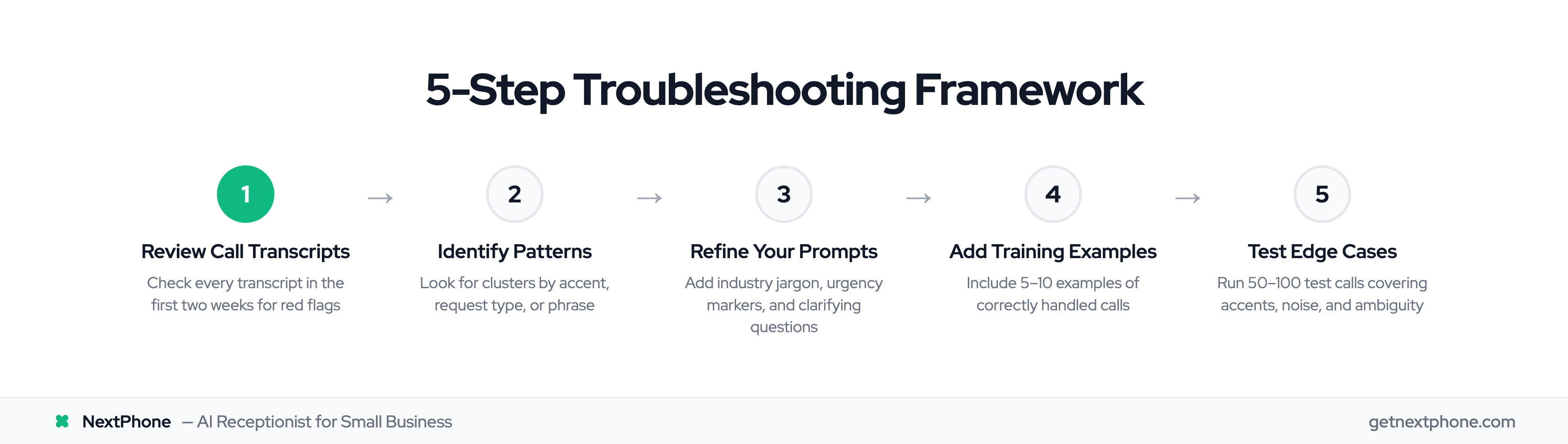
Most businesses follow this pattern:

  • First month: Review every call transcript (15-20 min per day)
  • Month 2-3: Review flagged low-confidence calls + random sampling (10 min per day)
  • Ongoing: Weekly spot-checks + any customer complaints (5 min per day)

It's like having a quality control system for your customer service. You're catching errors immediately and correcting them, not losing customers and wondering why.

Smart Escalation: When AI Knows to Call for Backup

The best AI systems don't try to answer every question. They know when to call for backup.

Confidence Threshold Triggers (60-70%)

Research on effective escalation rules shows AI should hand off to humans when confidence falls below 60-70%.

Here's how it works: The AI assigns a confidence score to every response. If it's about to say something with only 55% confidence, it stops and says instead:

"That's a great question, and I want to make sure you get the right answer. Let me connect you with [name] who can help with that specific request."

Most systems have a hard floor at 40% confidence—never let the AI guess when it's less than 40% certain.

Explicit Customer Requests ("I want to talk to a person")

When a customer says any variation of:

  • "I want to speak to a human"
  • "Connect me to someone"
  • "Is this a robot? I need a real person"

The AI should immediately transfer—no questions, no convincing them to stay with the bot. Instant handoff.

After the AI fails to understand a customer 2-3 times in a row? Automatic escalation. Don't make frustrated customers repeat themselves five times.

Complex or High-Value Scenarios

Configure AI to escalate:

  • Emergency calls ("pipe burst," "no power," "urgent")
  • Large project estimates (over $X threshold)
  • VIP or repeat customers (flagged in your CRM)
  • Emotional or upset customers (negative sentiment detected)

How Warm Handoffs Work

The critical piece: when AI hands off to a human, it should pass along:

  • Full conversation history
  • Customer information (name, number, previous interactions)
  • Why it's escalating ("customer requested pricing for custom project outside my scope")

This prevents the dreaded "tell me everything again" experience that makes customers abandon interactions. Research shows 67% of customers abandon when stuck in chatbot loops.

As AI escalation strategy experts put it: "Escalation isn't a failure. It's a signal of maturity."

How AI Learns From Mistakes (And Gets Better Every Week)

AI improvement isn't magic—it's a systematic feedback loop.

The Feedback Loop Process

Here's how it works in practice:

  1. AI handles a call and makes an error (tells customer wrong service area, misunderstands question, etc.)
  2. You review the transcript and identify the mistake
  3. You correct the AI response by updating the knowledge base (add service area ZIP codes, clarify policy, etc.)
  4. AI updates immediately and now handles that question correctly at 90%+ confidence

Quality assurance research shows AI systems "refine their algorithms with each inspection, leading to progressively better performance."

Knowledge Base Updates

Your AI receptionist's knowledge base is like its training manual:

  • Services you offer (and don't offer)
  • Pricing and estimates
  • Service areas
  • Hours and availability
  • Policies (cancellation, payment, emergencies)
  • Answers to common questions

Every time you update the knowledge base, the AI gets smarter. Not next week—immediately.

Pattern Recognition and Algorithm Refinement

Advanced AI platforms track patterns:

  • Which questions generate low confidence scores repeatedly
  • Which topics cause escalations most often
  • Where customers express frustration

These patterns get flagged for review. Maybe you need to add more information on a specific topic. Maybe a question is genuinely too complex and should always escalate.

Measurable Improvement Over Time

Businesses using AI receptionists typically see:

  • Week 1-4: 2-3% accuracy improvement per week
  • Month 2-3: 1-2% improvement per week
  • After 3 months: 95%+ accuracy on routine inquiries, minimal errors

Context-aware machine learning can improve tracking by 37%, with feedback loops leading to 2.8% weekly accuracy boosts in the early weeks.

One contractor told us: "I review call transcripts every Monday. When I see the AI uncertain about something, I update the knowledge base. By the next Monday, it's handling those questions perfectly. It's like training an employee, but faster."

What's More Expensive: AI Errors or Missed Calls?

Let's talk real costs—not theoretical risks.

Cost of Missed Calls ($260,400/Year Lost)

For a typical contractor receiving 42 calls per month:

  • 74.1% go unanswered = 31 missed calls per month
  • If 20% would convert at an average $3,500 project value
  • That's $21,700 per month in lost revenue
  • $260,400 per year walking out the door

Dental practices lose an estimated $52,000 per year from missed calls alone.

Every missed call is a 100% failure. You can't recover from leads you never knew existed.

Cost of AI Errors (Minimal, Recoverable)

AI makes mistakes on 5-10 calls per month (edge cases). Most are recoverable:

  • You see the error in the transcript
  • You call the customer back: "I saw you called earlier about [X]. I want to make sure you got the right information..."
  • Customer appreciates the follow-up
  • Mistake becomes a positive (you cared enough to double-check)

Unrecoverable errors are rare with proper monitoring and escalation protocols.

Cost of Perfect Coverage (Human Receptionist $35,000/Year)

Want to eliminate AI errors entirely? Hire a human receptionist:

  • Salary: $35,000/year minimum
  • Benefits: Add 20-30% ($7,000-$10,500)
  • Total: $42,000-$45,500 per year ($3,500-$3,800/month)

But here's the problem: even with a full-time receptionist, you still miss calls:

  • After-hours calls (evenings, weekends)
  • When they're on another call
  • Sick days and vacations
  • Lunch breaks

You're paying $3,500/month and still missing 30-40% of calls.

The Winning Formula

AI receptionist: $199/month ($2,388/year)

  • Answers 100% of calls (24/7/365)
  • 90-95% accuracy rate
  • Full monitoring (catch the 5-10% errors)
  • Escalation protocols (prevent frustrated customers)

You're capturing 95 calls correctly per month instead of 26. Even if you have to follow up on 3-5 edge case errors, you're still serving 90+ customers you would have completely missed.

The ROI is absurd: spend $199/month to capture $20,000+ in otherwise-lost revenue.

How NextPhone Reduces AI Errors

NextPhone takes a hybrid approach: AI handles what it does well, humans handle what requires judgment.

Business-Specific Training (Your Knowledge Base)

We don't use generic AI scripts. During setup, NextPhone learns your specific business:

  • Your services and pricing
  • Your hours and availability
  • Your service areas
  • Your policies
  • Your frequently asked questions

The AI is trained on your business, not generic customer service.

Built-In Escalation (Call Transfer)

When NextPhone's AI is uncertain about something, it doesn't guess. It routes the call to your phone with full context:

"I'm transferring you to [owner name] now—I've let them know you're asking about [specific topic]."

You pick up already knowing what the customer needs.

Full Monitoring Suite (Transcripts, Recordings, Dashboards)

Every call generates:

  • Full transcript
  • Audio recording
  • Call summary
  • Email notification to you

Review any call, anytime. Catch errors immediately.

Continuous Feedback Loop

See an error in a transcript? Update the knowledge base in 2 minutes. The AI immediately incorporates the correction and handles that scenario correctly going forward.

Most customers tell us: "I reviewed every call for the first two weeks. By week three, I was only spot-checking. By month two, I barely need to look—it's handling everything correctly."

Frequently Asked Questions

How often do AI receptionists make mistakes?

Modern AI receptionists typically have 5-10% error rates on complex or unusual inquiries, with 90-95% accuracy on routine questions like hours, pricing, scheduling, and services. Error rates improve over time through continuous learning and feedback. The key is proper initial training on your specific business and regular monitoring in the first month.

What happens if the AI gives a customer wrong information?

Every call is transcribed and recorded, so you can catch and correct errors immediately through email notifications after each call. Most errors occur on edge cases (unusual questions), not core business information. When you spot an error, you can follow up with the customer directly and update the AI's knowledge base so it doesn't happen again. Good AI systems also escalate to humans when uncertain to prevent wrong information.

Can customers tell they're talking to AI?

Many modern AI voices sound natural and conversational, and some businesses choose to disclose upfront ("I'm NextPhone's AI assistant"). Transparency often builds trust—customers care more about getting accurate help quickly than whether it's AI or human. According to Zendesk, 59% of consumers rate AI interactions 8/10 or higher, showing that quality implementation matters more than the technology itself.

Will AI handle angry or frustrated customers poorly?

AI can detect negative sentiment through tone and word choice, and best practices include immediately escalating frustrated customers to humans. Unlike stressed human receptionists, AI doesn't take things personally or get flustered. Consistent calm responses can actually de-escalate some situations. The key is configuring escalation rules to transfer emotional or complex situations rather than trying to resolve them through AI.

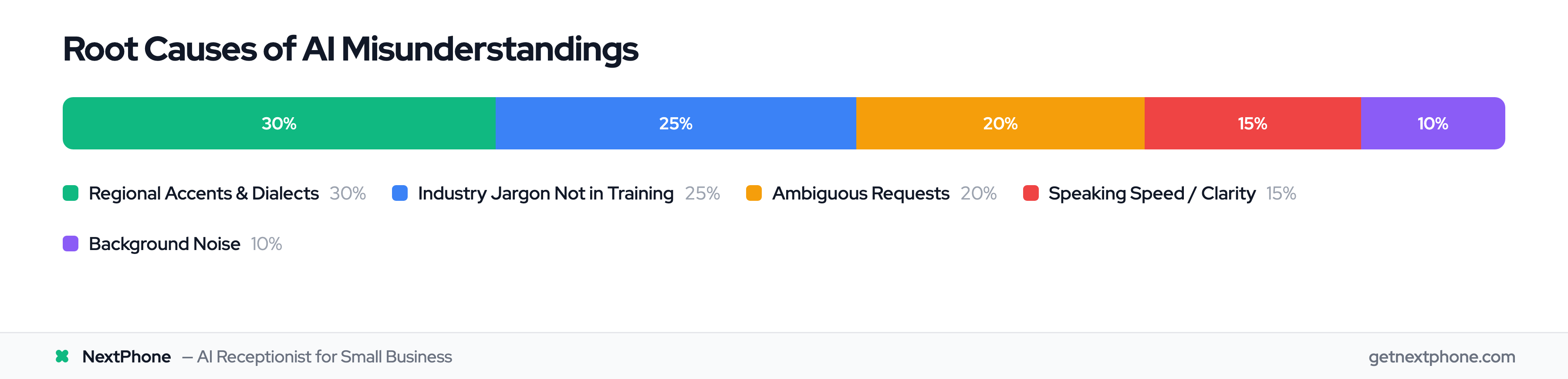
What if AI doesn't understand regional accents or dialects?

Modern speech recognition handles most US and Canadian accents well. When AI is uncertain about what it heard, it can ask clarifying questions: "Just to confirm, you said [repeats what it heard]?" If repeated failures occur (2-3 misunderstandings in a row), the AI should auto-escalate to a human. You can also add common regional terms or phrases to the knowledge base to improve recognition.

Am I legally responsible if AI gives bad advice (like Air Canada)?

Yes—courts have ruled that businesses are legally responsible for AI statements, as demonstrated by the Air Canada chatbot case where the airline was ordered to honor incorrect refund information the bot provided. This is exactly why monitoring and escalation protocols are critical. Train your AI on accurate business policies, review call transcripts regularly, update any incorrect responses immediately, and configure the AI to escalate legal or complex questions to humans rather than attempting to answer them.

How long does it take for AI to "learn" my business?

Initial setup takes 1-2 hours to input your services, pricing, hours, and frequently asked questions into the knowledge base. The AI is functional immediately after setup but continues refining over the first 2-4 weeks. During the first month, plan to review call transcripts weekly, correct any errors, and update the knowledge base. After 3 months of this feedback loop, most businesses report their AI handles 95%+ of routine inquiries with high confidence and minimal oversight needed.

The Bottom Line: Imperfect Coverage Beats Perfect Absence

Yes, AI receptionists make mistakes—on about 5-10% of calls.

But human receptionists "make mistakes" on 74% of calls by not answering them at all.

The choice isn't between perfect AI and perfect humans. It's between 95 successful customer interactions and 26 successful customer interactions per 100 calls.

With monitoring systems that let you catch errors immediately, escalation protocols that prevent customers from getting stuck, and continuous improvement that increases accuracy week over week, the real risk isn't AI errors.

The real risk is losing $260,400 per year to calls that go completely unanswered.

Perfect coverage with occasional errors beats perfect accuracy with no coverage. Every single time.

Ready to stop missing calls? Try NextPhone free for 14 days—review every call transcript yourself and see the difference. No credit card required.

Related Articles

Yanis Mellata

About NextPhone

NextPhone helps small businesses implement AI-powered phone answering so they never miss another customer call. Our AI receptionist captures leads, qualifies prospects, books meetings, and syncs with your CRM — automatically.