
Your phone rings. A potential customer wants a quote for a kitchen remodel: $15,000 job. Your AI receptionist answers, asks the right questions, captures their name, email, project details, and budget. Then what?
If you're manually logging this information into your CRM hours later (or worse, days later), you're losing leads. For contractors and other service businesses, automated CRM integration means customer information flows into the system within seconds of the call ending, not when someone "gets around to it," so fewer leads go cold while they wait to be entered by hand.
This guide shows you exactly how to connect your AI receptionist to any platform using webhooks, with complete code examples, platform-specific integrations for HubSpot and Salesforce, and honest guidance on when custom webhooks are worth it versus using Zapier.
When Custom Integrations Make Sense
Before you write a single line of code, let's answer the real question: Do you even need custom webhooks?
Most businesses start with no-code tools like Zapier or Make. That's perfectly fine, and often the right choice. Zapier can connect NextPhone to 6,000+ apps without writing code, set up in 15 minutes, and handle straightforward workflows like "new call → create CRM contact."
But custom webhooks are worth the extra effort when you have:
The Integration Decision Framework
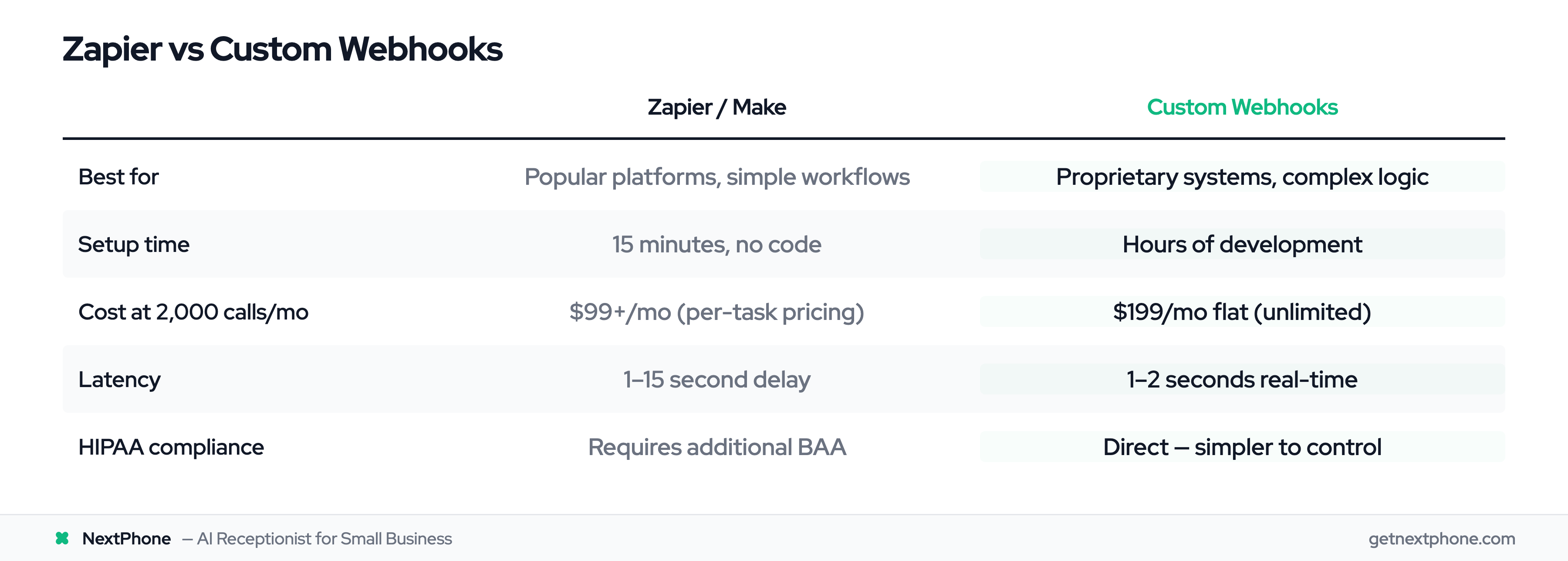
Choose Zapier/Make when:
- You're connecting to popular platforms (HubSpot, Salesforce, Slack, Google Sheets)
- Your workflow is straightforward (1-3 steps)
- You don't have technical resources
- Call volume is moderate (under 1,000/month)
Choose custom webhooks when:
- You have proprietary or custom-built systems
- You need complex data transformation before storing
- You're in a regulated industry requiring SOC 2 compliance
- Call volume is high (Zapier charges per task, webhooks are unlimited)
- You need sub-second response times (Zapier adds 1-15 second delay)
When Zapier Is Better (Be Honest)
If you're a solo contractor using standard tools, Zapier is faster. A plumber with Google Calendar and Gmail doesn't need custom webhooks. Zapier connects both in minutes without code.
Research shows SMBs use an average of 253 SaaS applications, and 2.2M+ businesses use Zapier with access to 8,000+ integrations. Most of those apps already have Zapier integrations. Use what works.
When Custom Webhooks Are Worth It
Custom webhooks shine for specialized scenarios:
Proprietary Systems: A general contractor built custom dispatch software in 2015. No Zapier integration exists. They need incoming leads to flow directly into their proprietary database with specific field mappings. Custom webhook solution: 3 hours of development, unlimited calls for $199/month.
Complex Workflows: A law firm needs caller information to: (1) Check if caller is existing client in proprietary case management system, (2) Route to appropriate attorney based on practice area mentioned in call, (3) Create intake form with custom questions, (4) Trigger conflict check. This multi-step, conditional logic requires custom code.
Data Security: A medical clinic can't send patient data through third-party platforms like Zapier without additional compliance verification. Direct webhook integration to their secure EHR system is simpler and more secure.
Cost at Scale: Zapier charges per task. At $29.99/month, you get 750 tasks. If you're processing 2,000 calls/month with 2 actions per call (create contact + send notification), that's 4,000 tasks = $99/month in Zapier fees alone. Custom webhooks are unlimited at $199/month total.
Team Notifications: For businesses using Slack (which has 2,400+ app integrations and helps reduce emails by 32%), webhook notifications provide instant alerts when calls come in.
In our data, approximately one in four callers explicitly asks for a callback. If your business processes 100 calls/month, that's roughly 25 callback requests you can't afford to lose. Whether you use Zapier or custom webhooks, automating this flow is critical.
Understanding Webhooks (The Basics)
If you're new to webhooks, here's what you need to know.
What Are Webhooks?
A webhook is an automated HTTP callback that fires when a specific event occurs. Instead of your application constantly checking "did anything happen yet?" (polling), the sending system notifies you the instant something happens (push).
Think of it like this: APIs are like checking your mailbox every hour to see if mail arrived. Webhooks are like getting a notification on your phone the moment mail is delivered.
Webhooks vs APIs: Push vs Pull
Traditional API (Pull): Your system: "Any new leads?" CRM: "No." (5 minutes pass) Your system: "Any new leads?" CRM: "No." (5 minutes pass) Your system: "Any new leads?" CRM: "Yes, here's one from 7 minutes ago."
Webhook (Push): (New lead arrives) CRM → instantly sends data to your system
The difference? Webhooks deliver data in real-time with zero wasted requests. According to Enterprise Integration Patterns, webhook-based integrations can reduce latency by up to 95% compared to polling-based approaches.
Why Webhooks Matter for Real-Time Communication
When a customer calls your AI receptionist asking about emergency HVAC repair at 9 PM, you don't want that lead sitting in a queue for 5 minutes until your next API poll. You want it in your CRM immediately, notification sent to your on-call technician within seconds.
Webhooks make this possible. The AI answers the call, determines it's an emergency (urgent calls using language like "emergency," "urgent," or "ASAP" rank among the top reasons people call, according to our data), collects caller details, and fires a webhook to your system before the call even ends.
That's the power of event-driven architecture, and why 73% of developers prefer REST APIs with webhook callbacks for modern integrations, according to the Stack Overflow Developer Survey 2024.
How NextPhone Webhooks Work
Now let's get specific about NextPhone's webhook implementation.
The AI Data Collection Process
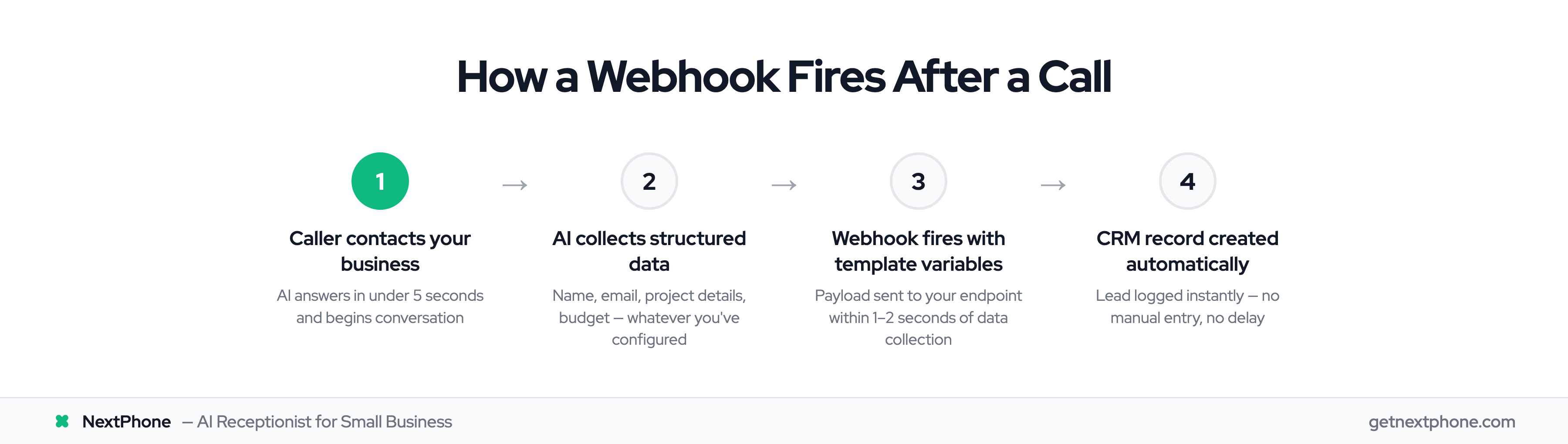
Here's what happens during a call:
- Caller contacts your business via your NextPhone number
- AI answers in under 2 seconds and starts the conversation
- AI asks custom questions you've configured: "Can I get your name?" "What service are you interested in?" "What's your email address?" "When would you like us to call you back?"
- AI collects structured data from the caller's responses (name, email, company, project details, budget, timeline: whatever you've defined)
- AI triggers webhooks either during the call (for real-time routing) or after the call ends (for data logging)
The key difference from generic webhook systems: NextPhone's AI understands context. If you ask for an email and the caller says "john at example dot com," the AI correctly formats it as john@example.com. If you ask for a phone number and they say "five five five twelve thirty-four," it's stored as 555-1234.
Webhook Trigger Points (During Call vs After Call)
You can configure webhooks to fire:
During the call:
- Emergency detection triggers immediate SMS to owner
- Appointment booking triggers calendar availability check
- VIP caller detected, route call to owner's cell
After the call:
- Send full conversation summary to CRM
- Create support ticket with caller details
- Log callback request with timestamp
Fail-safe design: If a webhook fails (your endpoint is down, network issue), the call experience is never interrupted. The webhook failure is logged, retried automatically, and you're alerted, but the caller never knows anything went wrong.
HTTP Configuration Options
NextPhone webhooks support full HTTP customization:
- Methods: POST, GET, PUT, PATCH, DELETE
- Authentication: API keys, Bearer tokens, custom headers, OAuth, service role tokens
- Content-Type: JSON, XML, form-data, custom
- Retry Logic: Automatic exponential backoff on failures
- Timeout: Configurable (default 30 seconds)
According to Postman's State of APIs 2024 report, 86% of developers report that API quality directly impacts product success. NextPhone's webhook system is built to that standard: reliable, flexible, and production-ready.
Template Variables: Dynamic Data Substitution
This is where webhooks get powerful.
Built-in Template Variables
NextPhone provides several built-in variables you can use in webhook payloads:
- caller_number - The caller's phone number (e.g.,
+15551234567) - [receiving_number] - Your business phone number
- [owner_name] - Your business name/owner name
- [website] - Your business website URL
- [booking_url] - Auto-extracted from your knowledge base (Calendly link, booking page, etc.)
These variables are automatically populated for every call.
Custom Parameters from AI Conversations
This is the real magic: Any data the AI collects becomes a custom parameter.
Example conversation: AI: "Thanks for calling ABC Plumbing. Can I get your name?" Caller: "Yeah, it's Mike Johnson." AI: "Great, Mike. What can I help you with today?" Caller: "I have a leaky pipe in my kitchen." AI: "Got it. Can I get your email so we can send you a quote?" Caller: "Sure, mjohnson@email.com." AI: "Perfect. And what's your address?" Caller: "123 Main Street."
Resulting parameters:
{
  "first_name": "Mike",
  "last_name": "Johnson",
  "email": "mjohnson@email.com",
  "issue": "leaky pipe in kitchen",
  "address": "123 Main Street",
  "caller_number": "+15559876543",
  "receiving_number": "+15551234567"
}
Every parameter becomes available as a template variable: [first_name], [email], [issue], [address], etc.
Putting It Together: Example Payload
Before variable substitution (template):
{
  "properties": [
    { "property": "firstname", "value": "[first_name]" },
    { "property": "phone", "value": "caller_number" },
    { "property": "email", "value": "[email]" },
    { "property": "notes", "value": "[issue]" }
  ]
}
After substitution (actual payload sent):
{
  "properties": [
    { "property": "firstname", "value": "Mike" },
    { "property": "phone", "value": "+15559876543" },
    { "property": "email", "value": "mjohnson@email.com" },
    { "property": "notes", "value": "leaky pipe in kitchen" }
  ]
}
This dynamic substitution happens automatically every time the webhook fires. You define the template once, and NextPhone fills in the real data for each call.
Remember: approximately one in four callers explicitly asks for a callback, according to our data. With template variables, you can automatically log these callback requests with full caller context (name, number, reason for call, preferred callback time), so you never lose track.
Complete Code Examples: Building Webhook Receivers
Now let's build the receiving end. These are complete, working examples you can deploy.
NextPhone Webhook Configuration (JSON)
First, configure the webhook in NextPhone. Here's a complete example for a CRM lead submission:
{
  "type": "http",
  "tool_name": "submitLeadToCRM",
  "description": "Save lead information to CRM when caller expresses interest",
  "http_method": "POST",
  "url": "https://yourdomain.com/api/webhooks/nextphone",
  "headers": {
    "Authorization": "Bearer YOUR_API_KEY",
    "Content-Type": "application/json",
    "X-Webhook-Source": "NextPhone"
  },
  "body_template": {
    "lead": {
      "name": "[first_name] [last_name]",
      "phone": "caller_number",
      "email": "[email]",
      "company": "[company_name]",
      "notes": "[message]",
      "source": "AI Receptionist",
      "created_at": "[timestamp]"
    }
  },
  "parameters": [
    { "name": "first_name", "type": "string", "description": "Caller's first name" },
    { "name": "last_name", "type": "string", "description": "Caller's last name" },
    { "name": "email", "type": "string", "description": "Caller's email address" },
    { "name": "company_name", "type": "string", "description": "Company name if provided" },
    { "name": "message", "type": "string", "description": "Details about inquiry or issue" }
  ]
}
This configuration tells NextPhone: "When the AI collects these parameters, send an HTTP POST to my endpoint with this exact structure."
JavaScript/Node.js Receiver (Express.js)
Here's a complete Express.js server that receives NextPhone webhooks:
const express = require('express');
const crypto = require('crypto');
const app = express();

// Middleware to parse JSON bodies
app.use(express.json());

// Your webhook secret (for signature verification)
const WEBHOOK_SECRET = process.env.NEXTPHONE_WEBHOOK_SECRET;

// Verify webhook signature (security best practice)
function verifySignature(payload, signature) {
  const hash = crypto
    .createHmac('sha256', WEBHOOK_SECRET)
    .update(JSON.stringify(payload))
    .digest('hex');
  return hash === signature;
}

// Webhook endpoint
app.post('/api/webhooks/nextphone', async (req, res) => {
  try {
    // 1. Verify signature (if using signed webhooks)
    const signature = req.headers['x-nextphone-signature'];
    if (signature && !verifySignature(req.body, signature)) {
      console.error('Invalid webhook signature');
      return res.status(403).json({ error: 'Invalid signature' });
    }

    // 2. Extract lead data from payload
    const leadData = req.body.lead;

    console.log('Received lead:', leadData);

    // 3. Validate required fields
    if (!leadData.phone) {
      return res.status(400).json({ error: 'Phone number required' });
    }

    // 4. Process the lead (save to database, send to CRM, etc.)
    await saveLeadToCRM(leadData);

    // 5. Send success response (important: NextPhone expects 2xx status)
    res.status(200).json({
      success: true,
      message: 'Lead processed successfully'
    });

  } catch (error) {
    console.error('Webhook processing error:', error);
    // Return 500 so NextPhone retries
    res.status(500).json({ error: 'Internal server error' });
  }
});

// Example CRM save function
async function saveLeadToCRM(leadData) {
  // Your CRM integration logic here
  // Could be: Database insert, API call to HubSpot/Salesforce, etc.
  console.log('Saving lead to CRM:', leadData);

  // Example: Insert into PostgreSQL
  // await db.query(
  //   'INSERT INTO leads (name, phone, email, notes) VALUES ($1, $2, $3, $4)',
  //   [leadData.name, leadData.phone, leadData.email, leadData.notes]
  // );
}

// Start server
const PORT = process.env.PORT || 3000;
app.listen(PORT, () => {
  console.log(`Webhook receiver listening on port ${PORT}`);
});
Key points:
- Always return 200 OK for successful processing (triggers NextPhone retry logic on 5xx errors)
- Verify signatures to ensure webhooks are from NextPhone (security)
- Handle errors gracefully (log, alert, but don't crash)
- Process asynchronously if possible (don't block the webhook response)
Python Receiver (Flask)
Same functionality in Python with Flask:
from flask import Flask, request, jsonify
import hmac
import hashlib
import json
import os

app = Flask(__name__)

# Your webhook secret
WEBHOOK_SECRET = os.environ.get('NEXTPHONE_WEBHOOK_SECRET')

def verify_signature(payload, signature):
    """Verify webhook signature for security"""
    hash_object = hmac.new(
        WEBHOOK_SECRET.encode('utf-8'),
        json.dumps(payload).encode('utf-8'),
        hashlib.sha256
    )
    expected_signature = hash_object.hexdigest()
    return hmac.compare_digest(expected_signature, signature)

@app.route('/api/webhooks/nextphone', methods=['POST'])
def nextphone_webhook():
    try:
        # 1. Verify signature
        signature = request.headers.get('X-Nextphone-Signature')
        if signature and not verify_signature(request.json, signature):
            return jsonify({'error': 'Invalid signature'}), 403

        # 2. Extract lead data
        lead_data = request.json.get('lead')

        print(f'Received lead: {lead_data}')

        # 3. Validate required fields
        if not lead_data.get('phone'):
            return jsonify({'error': 'Phone number required'}), 400

        # 4. Process the lead
        save_lead_to_crm(lead_data)

        # 5. Return success
        return jsonify({
            'success': True,
            'message': 'Lead processed successfully'
        }), 200

    except Exception as e:
        print(f'Webhook processing error: {e}')
        return jsonify({'error': 'Internal server error'}), 500

def save_lead_to_crm(lead_data):
    """Save lead to your CRM or database"""
    print(f'Saving lead to CRM: {lead_data}')

    # Your integration logic here
    # Example: Insert into database, call CRM API, etc.
    pass

if __name__ == '__main__':
    app.run(port=3000, debug=False)
Error Handling and Validation
Both examples include critical error handling:
Signature Verification: Prevents malicious requests pretending to be from NextPhone Input Validation: Ensures required fields are present before processing Try/Catch Blocks: Gracefully handle unexpected errors Proper HTTP Status Codes: 200 = success (don't retry), 4xx = client error (don't retry), 5xx = server error (retry)
These patterns align with OWASP API Security best practices, which identify broken authentication as the #1 API vulnerability.