
Introduction
You need someone answering your phones. Customers are calling, you're missing opportunities, and you know it's costing you money. The logical solution seems obvious: hire a receptionist.
Then you look at the numbers.
A full-time receptionist costs $50,000 per year minimum—before benefits, taxes, training, and the desk they'll sit at. You'll spend 6-8 weeks hiring them. They'll cover 40 hours per week, which sounds reasonable until you realize that's only 24% of the hours in a week. Nights, weekends, holidays, emergencies? Voicemail.
Meanwhile, virtual receptionist pricing starts at $199 per month. That's $2,388 per year vs $50,000+. And they answer 24/7/365. Gartner predicts 50% of organizations will abandon plans to reduce customer service workforce due to AI—but for small businesses, virtual receptionists (a type of answering service) aren't about replacement; they're about affordable coverage.
The math doesn't seem real. This guide breaks down exactly what each option actually costs—not just salary, but the true total cost including everything employers rarely account for. You'll see real numbers, real comparisons, and a clear framework for deciding which makes sense for your business.
No sales pitch. Just math.
Quick Pricing Comparison
| Option | Monthly Cost | Annual Cost | Coverage |
|---|---|---|---|
| Full-time receptionist | $4,300-$5,000 | $52,000-$61,000 | 40 hrs/week (24%) |
| Live answering service | $400-$800 | $4,800-$9,600 | Business hours only |
| AI virtual receptionist | $199 flat | $2,388 | 24/7/365 |
Try NextPhone AI answering service
AI answering service that answers, qualifies, and books — 24/7.
Get Started FreeThe True Cost of Hiring a Receptionist
When employers budget for a new hire, they typically think about salary. Maybe benefits. But the true cost of a full-time receptionist goes far beyond the hourly rate you see on Indeed.
Base Salary Is Just the Beginning
According to the Bureau of Labor Statistics, the median hourly wage for receptionists was $17.90 in May 2024. Multiple salary sources confirm the range falls between $17.52 and $17.82 per hour for most markets.
At 40 hours per week, 52 weeks per year, that's:
$17.90 × 2,080 hours = $37,232 annual salary
That number is your starting point. It's also the only number most people consider when deciding whether to hire. But it represents roughly 70% of what you'll actually pay.
The Hidden 40%: Taxes, Benefits, and Overhead
Here's what the salary number doesn't include:
Employer Payroll Taxes (FICA)
As an employer, you're required to match your employee's Social Security and Medicare contributions. That's 7.65% of their wages—6.2% for Social Security (up to $176,100 in 2024) and 1.45% for Medicare with no cap.
On a $37,232 salary: $2,848 in FICA taxes
Federal and State Unemployment (FUTA/SUTA)
Federal Unemployment Tax is 6% on the first $7,000 of wages, typically reduced to 0.6% after state credits. State rates vary wildly—from 0.1% to as high as 12% depending on your state and your company's claims history.
Estimate conservatively: $745-$1,500 per year
Health Insurance and Benefits
If you offer health benefits (and you'll struggle to hire without them), expect to contribute $6,000-$12,000 per year toward an employee's health insurance premium. The Bureau of Labor Statistics reports that benefits average 31% of total compensation for civilian workers.
Add paid time off, sick days, and holidays—typically 10-15 days for a receptionist role—and you're paying for days worked plus days not worked.
PTO cost at $17.90/hour for 10 days: $1,432
Workers' Compensation Insurance
Rates vary by state and classification, but office workers typically run 1-3% of payroll.
Estimate: $745-$1,117
Training and Onboarding
The 2024 Training Industry Report found organizations spend an average of $774 per learner annually, with employees receiving about 47 hours of training. For a new receptionist learning your systems, customers, and protocols, expect higher first-year costs.
Year-one training investment: $1,000-$1,500
Equipment and Space
Your receptionist needs somewhere to sit:
- Desk and chair: $500-$1,500
- Computer and phone system: $1,000-$2,000
- Office supplies and software: $200-$500
- Allocated office space: $200-$500/month depending on your rent
One-time equipment: $1,700-$4,000 Ongoing space: $2,400-$6,000/year
Year One: The Real Number
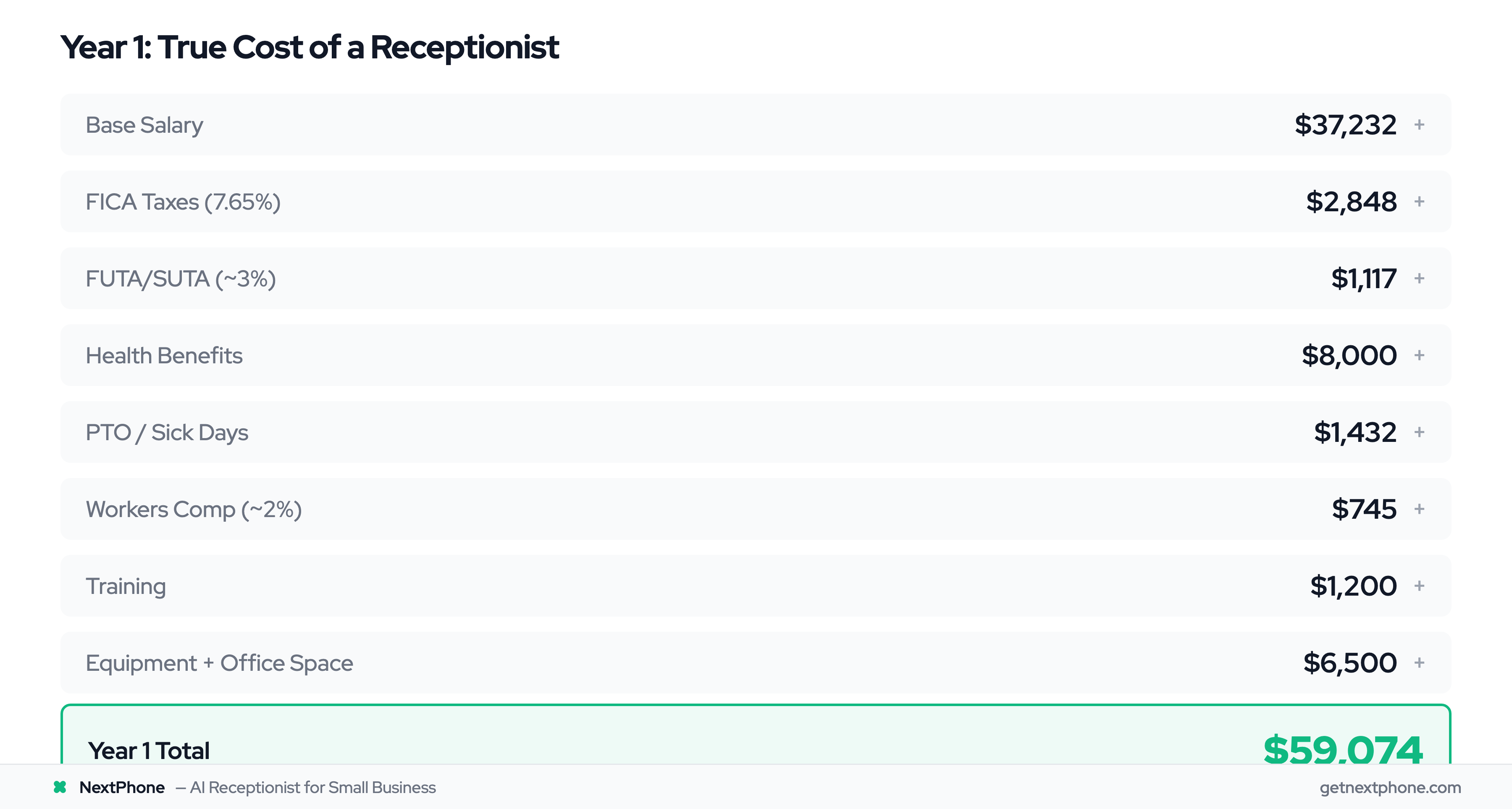
Let's add it all up for a full-time receptionist's first year:
| Cost Category | Amount |
|---|---|
| Base Salary | $37,232 |
| FICA Taxes (7.65%) | $2,848 |
| FUTA/SUTA (~3%) | $1,117 |
| Health Benefits | $8,000 |
| PTO/Sick Days | $1,432 |
| Workers Comp (~2%) | $745 |
| Training | $1,200 |
| Equipment (one-time) | $2,500 |
| Office Space | $4,000 |
| Year 1 Total | $59,074 |
Monthly equivalent: $4,923
Ongoing years (after equipment purchase) still run $52,000-$55,000 annually.
Compare that to a virtual receptionist at $199/month: $2,388 per year.
The Turnover Time Bomb
There's one more cost most employers don't calculate until it happens: what if they leave?
The Society for Human Resource Management reports the average cost to hire a new employee is $4,683. But that's just the direct hiring costs—posting jobs, screening resumes, interviewing.
The full cost of turnover runs 50% to 200% of the employee's annual salary according to multiple employment studies. For a $37,000 receptionist, that's $18,500 to $74,000 in total replacement costs when you factor in:
- Lost productivity during the vacant position
- Management time spent hiring and interviewing
- Training the replacement
- Reduced productivity during the learning curve
- Potential impact on customer experience
The average time to hire is 41 days. That's 41 days with no receptionist, or 41 days of you answering phones yourself.
And here's the sobering statistic: 34% of new hires quit within the first 90 days, often due to culture or expectation mismatches. You might go through this entire process twice before landing someone who stays.
Virtual receptionist turnover risk: Zero.
The 24/7 Problem: What One Hire Can't Solve
Even if you're comfortable spending $50,000+ per year on a receptionist, there's a coverage problem that no single hire can fix.
The Math: 40 Hours vs 168 Hours Per Week
A full-time receptionist works 40 hours per week. Standard schedule: Monday through Friday, 9 AM to 5 PM.
There are 168 hours in a week.
Your receptionist covers 40 of them. That means 128 hours per week—76% of the time—go completely uncovered.
No evenings. No weekends. No holidays. No coverage before 9 AM or after 5 PM.
Your business might operate 9-5, but your customers' emergencies don't follow a schedule.
When Your Best Calls Actually Happen
Industry data on contractor calls reveals that 6.2% of calls are true emergencies—burst pipes, no heat in winter, electrical sparking, AC failures in summer. These calls carry premium pricing ($1,200 average vs $750 for routine service) because customers need help NOW. The BLS projects HVAC employment to grow 8% from 2024-2034, reaching 425,200 jobs-and-installers.htm)—demand is rising, and so is the need for reliable phone coverage.
Emergencies don't wait for business hours. A pipe bursts at midnight. The AC dies on Sunday afternoon during a heatwave. Power goes out during a weekend storm.
Another 15.9% of calls contain urgency language—"ASAP," "urgent," "today," "emergency." These callers aren't leaving polite voicemails and waiting patiently until Monday.
When someone calls five contractors about an emergency and yours goes to voicemail at 8 PM, they're hiring whoever answers first. You won't even know you lost that $1,200 job.
The Sick Day and Vacation Reality
Even during those 40 scheduled hours, coverage isn't guaranteed.
- Sick days: 5-10 per year (unexpected, often at the worst times)
- Vacation: 10-15 days (you probably promised this when hiring)
- Appointments, emergencies, life: Unpredictable
During these absences, you're back to answering phones yourself—or missing calls.
Realistic availability of a single receptionist: 85-90% of their scheduled hours. For a 40-hour week, that's 34-36 hours of actual coverage.
What 24/7 Human Coverage Actually Costs
If you truly need someone answering phones around the clock, you need shift coverage:
- First shift (8 AM - 4 PM): 1 full-time employee
- Second shift (4 PM - Midnight): 1 full-time employee
- Third shift (Midnight - 8 AM): 1 full-time employee
- Weekend coverage: Additional part-time or overtime
Minimum for 24/7 coverage: 3 full-time employees
At $50,000 per employee (loaded cost), that's $150,000 per year minimum.
Plus you still need a fourth person for sick days and vacation coverage. Plus management overhead for scheduling three shifts. Plus the complexity of overnight and weekend staff retention (notoriously difficult roles to fill).
Realistic 24/7 human coverage: $175,000-$200,000+ per year
Virtual receptionist providing true 24/7 coverage: $199 per month ($2,388/year)
The math is overwhelming.
Virtual Receptionist Pricing Breakdown
Now let's look at what virtual receptionist services actually cost—and what drives the virtual receptionist pricing differences between providers.
Three Pricing Models Explained
Virtual receptionists use three main pricing structures. Understanding these is critical because choosing the wrong model can blow your budget.
Per-Minute Pricing
Some services charge for every minute the receptionist is engaged with a caller. Rates typically range from $1.50 to $6.00 per minute.
This sounds affordable until you do the math. Average call duration for scheduling and service inquiries runs 3-5 minutes. At $3.00 per minute:
- 50 calls × 4 minutes = 200 minutes
- 200 minutes × $3.00 = $600/month
Many per-minute plans also round up to 2-minute or 5-minute increments. A 30-second call gets billed as 2 minutes. This adds 20-40% to your actual cost.
Best for: Very low, predictable call volume (under 30 calls/month) Risk: Overages make costs unpredictable
Per-Call Pricing
Other services charge a flat rate per call, regardless of duration. Rates range from $3 to $11 per call.
Smith.ai, for example, charges $292.50 for 30 calls, with additional calls at $9.75 each. At 50 calls per month:
- First 30 calls: $292.50
- Next 20 calls: 20 × $9.75 = $195.00 Total: $487.50/month
Best for: Moderate, consistent volume with variable call lengths Risk: Gets expensive quickly as volume grows
Monthly Flat Rate
Flat-rate plans charge one price for unlimited (or very high volume) calls. Prices range from $199 to $500+ monthly.
NextPhone charges $199/month for unlimited calls with no per-minute or per-call fees. Whether you get 30 calls or 300 calls, the price stays the same.
Best for: Unpredictable volume, seasonal businesses, growing companies Benefit: Complete cost predictability
Real Provider Pricing Comparison
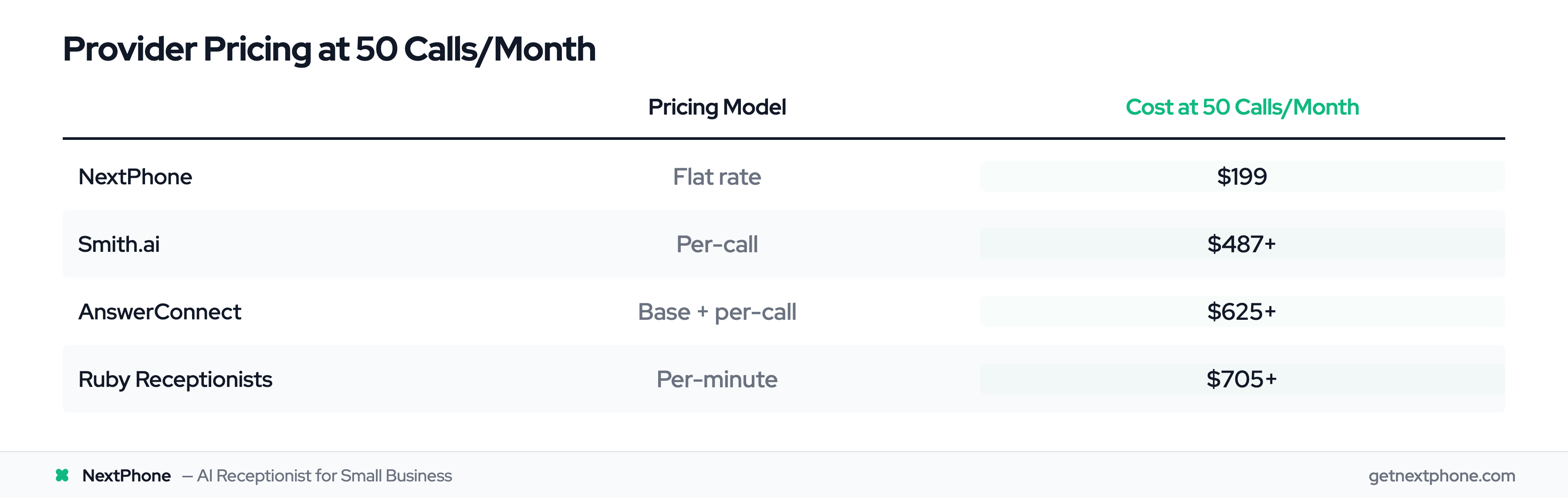
What does 50 calls per month actually cost with major providers?
| Provider | Pricing Model | Cost at 50 Calls/Month |
|---|---|---|
| NextPhone | Flat rate | $199 |
| Smith.ai | Per-call | $487+ |
| AnswerConnect | Base + per-call | $625+ |
| Ruby Receptionists | Per-minute | $705+ |
The range is dramatic—from $199 to over $700 for the same call volume. Studies show businesses save 40-60% when switching to cloud-based phone systems—virtual receptionists extend these savings further.
Hidden Fees to Watch For
The advertised price isn't always what you pay. Watch for these common add-ons:
- Setup fees: $50-$500 to configure your account (NextPhone: $0)
- Integration fees: $50-$200 to connect your calendar or CRM
- Overage charges: $0.50-$11 per call or minute beyond your plan
- Weekend/holiday surcharges: Up to 50% premium for off-hours coverage
- Annual contract penalties: $100-$500 for early cancellation
- Feature add-ons: Voicemail transcription, call recording, analytics often cost extra
A "$99/month" plan can easily become $180-$250/month once you add the features you actually need.
Virtual Receptionist Pricing by Industry
Cost drivers vary by industry. Here's what to expect:
Home Services (HVAC, Plumbing, Electrical, Roofing: After-hours emergency calls carry premium pricing ($1,200+ average) — you need 24/7 coverage to capture them. Per-minute plans get expensive fast because emergency calls run long. Flat-rate pricing at $199/month is the standard for trades businesses handling 30-100+ calls/month.
Legal (Law Firms, Attorneys): Intake calls require confidentiality and structured data collection. Live answering services charge $500-$1,200/month for legal intake. AI receptionists handle routine intake at $199/month, but complex case screening may still need human backup.
Medical/Dental (Dentists, Medical Offices): Regulatory compliance is non-negotiable, and some providers charge $50-$150/month extra for it. Appointment scheduling volume is high. Look for services with built-in calendar integration to avoid per-call charges on routine booking calls.
Real Estate: Call volume spikes unpredictably around open houses and new listings. Per-call pricing punishes these surges. Flat-rate plans absorb volume spikes without budget surprises.
What $199/Month Gets You with NextPhone
For context, here's what's included in NextPhone's flat $199/month:
- True 24/7/365 coverage (AI-powered, never sleeps)
- Unlimited call volume (no overages, no per-call fees)
- Emergency detection and routing
- Appointment scheduling with calendar integration
- CRM integration for lead capture
- Voicemail transcription included
- Call recording included
- Spam filtering (blocks 7%+ of junk calls)
- No setup fees
- No contracts (month-to-month)
That's $199 total. Not "$199 base plus..."
The Complete Cost Comparison: Virtual Receptionist vs Hiring Staff
Let's put both options side by side with real numbers.
Annual Cost Comparison
| Factor | In-House Receptionist | Virtual Receptionist |
|---|---|---|
| Annual Cost | $52,000-$61,000 | $2,388 ($199/mo) |
| Monthly Cost | $4,333-$5,083 | $199 |
| Coverage Hours/Week | 40 (24% of time) | 168 (100%, 24/7) |
| Setup/Hiring Time | 6-8 weeks | 2-5 days |
| Turnover Risk Cost | $18,500-$74,000 | $0 |
| Benefits Required | Yes (31%+ of salary) | No |
| Annual Training | $774-$1,280 | Included |
| Sick Day Coverage | Gaps or your time | Automatic |
| Vacation Coverage | Gaps or your time | Automatic |
| Scalability | Hire more staff | Same price |
Annual savings: $49,612-$58,612 Percentage savings: 95.4%
5-Year Cost Projection
91% of customer service leaders report executive pressure to implement AI, with 80% expecting reduced agent headcount within 18 months. The gap compounds over time:
In-House Receptionist (5 years):
| Year | Cost |
|---|---|
| Year 1 (with hiring/equipment) | $59,000 |
| Year 2 | $52,000 |
| Year 3 | $53,000 |
| Year 4 | $54,000 |
| Year 5 | $55,000 |
| One turnover event | $30,000 |
| 5-Year Total | $303,000 |
Virtual Receptionist (5 years):
| Year | Cost |
|---|---|
| Year 1-5 ($199/mo × 60 months) | $11,940 |
| Feature upgrades | $0 (included) |
| 5-Year Total | $11,940 |
5-Year Savings: $291,060
That's $291,000 you could invest in marketing, equipment, hiring revenue-generating roles, or simply keeping as profit. Gartner forecasts $80 billion in contact center labor cost reduction by 2026 as automation accelerates.
What You Lose vs What You Gain
Let's be honest about the trade-offs.
What you lose with virtual receptionist:
- In-person greeting for office visitors (if you have walk-ins)
- A human who can handle truly complex, nuanced conversations
- Someone who can perform other office tasks (filing, mail, admin work)
- Physical presence and "culture" of a dedicated team member
- Deep relationship building with repeat callers over time
What you gain with virtual receptionist:
- 95% cost reduction ($50K+ → $2,388/year)
- True 24/7 coverage (not just business hours)
- Zero turnover risk (no hiring, no training, no replacement costs)
- Instant scalability (50 calls or 500 calls, same price)
- No management overhead (no schedules, no HR, no reviews)
- No benefits administration
- Predictable monthly cost (no surprises)
- 62% reduction in manual tasks possible with automation
- Captures after-hours emergency revenue
- 2-5 day setup vs 6-8 week hiring process
For businesses without walk-in traffic and with limited budgets, the trade-offs heavily favor virtual.
Calculating Your Virtual Receptionist ROI
Abstract percentages are helpful, but let's calculate actual return on investment for your situation.
The Missed Call Revenue Formula
Here's the basic formula for calculating what missed calls cost you:
Missed calls per month × % that are revenue opportunities × Average job value × Close rate = Lost monthly revenue
Industry data provides the inputs:
- Contractors miss 60-80% of calls (74% average)
- 6.9% of calls are quote/estimate requests
- 6.2% are emergencies (higher close rate, premium pricing)
- Average job value varies by trade ($800 plumber to $15,000 roofer)
- Close rate: 20-30% for quotes, 30%+ for emergencies
Sample ROI Calculations by Business Type
HVAC Contractor (Mike Rodriguez, Phoenix AZ): Mike was answering calls between AC installs during Arizona summers — missing 60%+ of inbound leads. After switching to an AI virtual receptionist, his team captured 12 additional jobs in the first quarter, averaging $2,800 each. That's $33,600 in revenue from a $597 investment (3 months × $199).
- Monthly calls: 55
- Previous miss rate: ~65%
- Captured jobs per month (post-switch): ~4 additional
- Average job value: $2,800
- Monthly gained revenue: $11,200
Virtual receptionist cost: $199/month ROI: 5,530%
Plumber:
- Monthly calls: 50
- Current miss rate: 66%
- Missed calls: 33/month
- Quote requests + emergencies: 4.3/month
- Average job value: $800 (service) / $1,200 (emergency)
- Monthly lost revenue: $1,100
Virtual receptionist cost: $199/month Net monthly gain: $901 Annual ROI: 453%
Roofer:
- Monthly calls: 87
- Current miss rate: 76%
- Missed calls: 66/month
- Quote requests (10.6%—highest of any trade): 7/month
- Average job value: $15,000
- Close rate: 20%
- Monthly lost revenue: 7 × $15,000 × 20% = $21,000
Virtual receptionist cost: $199/month Net monthly gain: $20,801 Annual ROI: 10,453%
For roofers, capturing even one additional roof every quarter pays for the virtual receptionist for three years.
Break-Even Analysis
How many additional jobs do you need to capture for this investment to pay off?
At $199/month and varying job values:
| Average Job Value | Jobs Needed to Break Even |
|---|---|
| $500 | 0.4 jobs/month (5/year) |
| $1,000 | 0.2 jobs/month (2.4/year) |
| $2,000 | 0.1 jobs/month (1.2/year) |
| $3,500 | 0.06 jobs/month (0.7/year) |
| $15,000 | 0.013 jobs/month (0.16/year) |
At $3,500 average job value, you need to capture one additional job every 17.6 months for the virtual receptionist to pay for itself.
The question becomes: will answering 100% of calls instead of 26% result in at least one additional job over the next 17 months?
For any business missing the majority of their calls, the answer is almost certainly yes.
The Hidden ROI: Your Time
There's another calculation most people miss: the value of your time.
If you're currently answering calls yourself between jobs, consider:
- Average time spent on phone management: 1-2 hours/day
- Your effective hourly rate: $75-$200/hour (what you could bill)
- Weekly opportunity cost: $375-$2,000
Even at the low end, reclaiming 1 hour per day at $75/hour = $1,500/month in productivity gains.
That's on top of the captured revenue from calls you used to miss.
Decision Framework: Which Option Is Right for You?
The math favors virtual receptionists for most small businesses. But not every business. Here's how to decide.
Choose In-House Receptionist If:
You have a physical office with walk-in visitors. If customers walk through your door expecting a greeting, virtual can't replace in-person presence.
Your budget comfortably supports $60,000+/year for reception. If you're already profitable enough that $60K is a reasonable overhead expense, and you want the control of a dedicated employee, hiring makes sense.
You need multi-tasking beyond phones. Receptionists can handle mail, filing, light admin work, office management. Virtual receptionists only handle calls.
Call volume exceeds 500+ calls/month AND you want human touch on every call. Very high volume with complex conversations may warrant dedicated human staff.
Your industry requires deep specialized knowledge. If every call requires expertise (technical products, medical, legal), thorough training of a dedicated person may be necessary.
Choose Virtual Receptionist If:
Cost is a primary concern. If you're comparing $2,388/year vs $52,000/year, and budget matters, virtual wins.
You need 24/7 coverage. Emergency calls, after-hours inquiries, weekend availability—one hire can't provide this; virtual does automatically.
You work in the field. Contractors, service technicians, anyone who can't answer phones while working needs someone (or something) else handling calls.
Call volume fluctuates seasonally. HVAC contractors see 3x summer volume. Roofers get slammed after storms. Virtual scales instantly at the same price.
You're a solo operator or small team (under 10 employees). The $52K+ for a receptionist represents a huge overhead percentage. Virtual keeps that overhead minimal.
You want predictable monthly costs. No surprises, no turnover costs, no benefit increases, no raises—just $199/month.
Turnover risk concerns you. If you've been burned by employees leaving, virtual eliminates that risk entirely.
The Hybrid Approach
Some businesses combine both options:
- In-house receptionist: Business hours, complex calls, walk-in visitors
- Virtual receptionist: After-hours, overflow during busy periods, emergencies
This hybrid model can look like:
- Part-time receptionist (20 hrs/week): ~$23,000/year
- Virtual for remaining 148 hours: $2,388/year Total: $25,388/year
You get human presence when it matters most, plus 24/7 coverage, for half the cost of a full-time hire.
Quick Decision Flowchart
-
Do you have a physical office with walk-in visitors?
- YES: Consider hybrid or in-house
- NO: Virtual handles everything you need
-
Is your total reception budget under $25,000/year?
- YES: Virtual is your only viable option
- NO: Both options are on the table
-
Do you need 24/7 emergency coverage?
- YES: Virtual (or budget $150K+ for 3 FTEs)
- NO: Single hire could work
-
Are you missing calls while on job sites or with customers?
- YES: Virtual solves this immediately
- NO: You might be handling calls fine already
-
Can you justify $50K+/year given your current revenue?
- YES: Consider in-house if other factors align
- NO: Start with virtual, upgrade later if needed
For most small businesses—especially service-based, field-based, or budget-conscious operations—virtual receptionist is the clear winner.
Getting Started with Virtual Receptionist
If the math makes sense for your business, switching to virtual receptionist is significantly faster than hiring.
The Setup Process
Hiring a receptionist:
- Write job description (1-2 days)
- Post job, screen resumes (1-2 weeks)
- Interview candidates (1-2 weeks)
- Background check, offer, acceptance (1 week)
- Onboarding and training (2-4 weeks)
- Full productivity (1-3 months)
Total time to full operation: 8-16 weeks
Setting up virtual receptionist:
- Sign up online (5 minutes)
- Forward your business number (30 minutes with carrier)
- Customize greeting, hours, FAQs (1-2 hours)
- Configure emergency routing and scheduling (1 hour)
- Test calls (30 minutes)
- Go live
Total time to full operation: 2-5 days
What Information You'll Need
To set up a virtual receptionist effectively, prepare:
- Business hours: When are you available for callbacks?
- Services offered: What do you do? What don't you do?
- Common FAQs: Hours, service area, pricing basics
- Emergency protocols: What constitutes an emergency? Who gets notified?
- Calendar access: For appointment scheduling
- Preferred notification method: Text, email, app notification?
The more information you provide upfront, the better the AI handles calls from day one.
NextPhone: Built for Small Business
NextPhone was built specifically for small businesses and contractors who can't afford to miss calls but also can't afford a $50,000+ receptionist.
What you get for $199/month:
- True 24/7/365 coverage
- Unlimited call volume
- Emergency detection and instant routing
- Appointment scheduling with calendar sync
- CRM integration
- Spam filtering
- Voicemail transcription
- Call recording
What you don't pay:
- Setup fees ($0)
- Per-call or per-minute charges ($0)
- Long-term contract ($0—month-to-month)
- Early cancellation penalties ($0)
Trial offer: 7 days free to test with your real calls before any commitment.
Frequently Asked Questions
How much does a virtual receptionist cost per month?
Virtual receptionist pricing ranges from $199 to $800+ per month depending on the provider and pricing model. Flat-rate AI services like NextPhone charge $199/month for unlimited calls. Live answering services using per-call pricing (Smith.ai, Ruby) typically cost $400-$700/month at 50 calls. Per-minute plans can exceed $600/month for moderate volume.
What's included in virtual receptionist pricing plans?
It varies significantly. Budget plans ($99-$150) often include only basic message-taking with limited minutes. Mid-range plans ($200-$400) add call routing, voicemail transcription, and CRM integration. Premium plans ($500+) include live human receptionists, bilingual support, and dedicated account managers. NextPhone includes 24/7 AI answering, unlimited calls, emergency routing, appointment scheduling, CRM push, call recording, and spam filtering — all for $199/month with no add-on fees.
Are there hidden fees with virtual receptionist services?
Common hidden fees include setup charges ($50-$500), per-minute overages ($1.50-$6.00), weekend/holiday surcharges (up to 50% premium), integration fees ($50-$200 for CRM or calendar), and early cancellation penalties. Always ask for the total cost at your expected call volume, not just the base price. A "$99/month" plan often becomes $200-$300 after add-ons.
How does AI virtual receptionist pricing compare to live answering services?
AI virtual receptionists cost 50-75% less than live human answering services at equivalent call volumes. At 50 calls/month: AI flat-rate runs $199, while live services like Ruby ($705+) or AnswerConnect ($625+) charge 3-4x more. The trade-off is that AI handles routine calls (scheduling, FAQs, message-taking) extremely well but may not match humans on deeply nuanced conversations.
Is flat-rate or per-minute pricing better for small businesses?
Flat-rate is better for most small businesses because it eliminates budget surprises. Per-minute pricing only makes sense if you receive fewer than 20-25 calls per month with very short call durations. Once you hit 30+ calls/month, flat-rate at $199 almost always costs less than per-minute ($450+) or per-call ($390+) alternatives. Seasonal businesses especially benefit from flat-rate since volume spikes don't increase costs.
How much does a full-time receptionist really cost?
The true cost goes far beyond salary. A $37,000 base salary becomes $52,000-$61,000 annually when you add employer taxes (7.65% FICA), benefits (averaging 31% of compensation), workers' comp, training, equipment, and office space. That's $4,300-$5,000 per month before you account for turnover costs, which can run 50-200% of annual salary.
Can a virtual receptionist handle emergencies after hours?
Yes. AI-powered virtual receptionists provide true 24/7/365 coverage. They can detect emergency keywords, route urgent calls immediately to on-call technicians, and send instant notifications. This captures the 6.2% of calls that are emergencies—often premium-priced jobs that happen outside business hours when a single in-house receptionist would be unavailable.
What's the difference between per-minute, per-call, and flat-rate pricing?
Per-minute services charge $1.50-$6.00 for every minute on a call—a 4-minute call at $3/minute costs $12. Per-call services charge $3-$11 per call regardless of length. Flat-rate plans charge one monthly fee for unlimited calls. At 50 calls per month, per-minute plans can cost $600+, per-call plans $400+, while flat-rate plans stay at $199.
Is it worth hiring a receptionist if I have walk-in customers?
If you have a physical office with regular walk-in visitors, you may need in-person presence. Consider a hybrid approach: a part-time receptionist for business hours and walk-ins ($23,000/year) plus a virtual receptionist for after-hours and overflow ($2,400/year). This gives you both human presence and 24/7 coverage for under half the cost of a full-time hire.
How quickly can I switch to a virtual receptionist?
Setup takes 2-5 days compared to 8-16 weeks for hiring. You sign up online, forward your business number, customize your greeting and FAQs, configure emergency routing, test a few calls, and go live. Most businesses are fully operational within a week.