Understanding Busy Season Call Volume Patterns
Before you can make a smart staffing decision, you need to understand exactly what you're dealing with. How predictable is your busy season? How dramatic is the volume spike?
Industry-Specific Busy Seasons
Different home services businesses face wildly different seasonal patterns. HVAC contractors see the most extreme swings. We're talking 500-600% volume increases between slow and peak months. Summer brings AC failures when heat waves hit. Winter brings furnace emergencies when temperatures plummet.
Plumbing businesses get hit twice: summer strain from high water usage (+36% call volume) and winter disasters from frozen pipes (+609% for emergency pipe repair searches). Roofing companies see more moderate but still significant fluctuations, with September bringing a 24% peak as homeowners prepare for winter and handle storm damage repairs.
These patterns come from real data, not guesses. Across the 1,446,980 business calls in our analysis, seasonal spikes weren't just noticeable. They were business-defining events.
The Cost of Missed Calls
Here's the uncomfortable truth: industry research shows 74.1% of calls to home services businesses go unanswered, and peak periods make it worse. Nearly three out of four potential customers get voicemail instead of help.
Each missed call represents lost revenue. But it's worse than that. When a homeowner's AC dies in 95-degree heat or their pipe bursts at midnight, they're calling the next contractor on their list. Your competitor who answers wins the job. Research shows 62% of calls to home services businesses go unanswered, with significant revenue implications.
Overflow doesn't just mean missed revenue. It creates compounding problems. Frustrated customers leave negative reviews. Your reputation takes hits. And your stressed staff makes mistakes trying to handle impossible call volumes.
Your busy season pattern determines what staffing strategy makes sense. Predictable annual surges require different solutions than unpredictable storm-driven emergencies.
Three Staffing Models for Temporary Virtual Receptionist Busy Season Coverage
Let's define the options clearly before we get into how to choose between them.
AI-Only Virtual Receptionist
An AI virtual receptionist is an automated system that answers all your calls 24/7, handles routine questions, schedules appointments, and routes urgent calls appropriately. Modern AI sounds natural and responds in under 5 seconds.
85% of customer service leaders will explore or pilot conversational GenAI in 2025, recognizing its potential. This model works best for businesses with predictable patterns and mostly routine calls: appointment requests, service area questions, pricing inquiries. Deployment is instant (5-minute setup). Cost is flat monthly regardless of call volume (NextPhone runs $199/month for unlimited calls). And capacity is truly unlimited: the AI handles multiple concurrent calls without any busy signals.
Example: An HVAC company knows July and August bring AC surge. Most calls are "my AC broke, I need service today." The AI captures information, checks availability, and schedules appointments while technicians stay focused on actual repairs.
Temporary Human Receptionist
This is traditional short-term human staffing, either through an agency or direct hire. A real person answers calls, asks questions, and makes judgment calls based on the conversation.
Temp human receptionists make sense for complex intake requirements, high-touch customer service needs, or situations requiring nuanced human judgment. But deployment takes 2-4 weeks minimum (recruiting, training, onboarding). Cost runs $15-25/hour plus training investment and management overhead. And capacity is limited to however many people you hire.
Example: A medical practice with complex patient screening requirements, insurance verification, and strict compliance requirements might need human judgment that AI can't provide.
AI with Smart Forwarding
AI answers every call and resolves 90-95% autonomously: scheduling, answering questions, capturing leads. For the 5-10% of calls requiring your personal judgment (complex emergencies, high-value decisions), smart forwarding routes the call to your phone or team with full context.
This model gives you complete coverage without hiring anyone. AI deploys instantly and handles unlimited calls. Smart forwarding ensures you're only interrupted when it actually matters. No paid strangers making decisions for your business.
Example: A plumbing company uses AI for scheduling and lead capture. When a panicked homeowner calls about a major leak at 2 AM, the AI captures critical information and forwards to the on-call plumber immediately with full context.
Decision Framework: How AI Handles Your Busy Season
Most business owners overthink this decision. Here's a practical framework based on your actual situation.
Choose AI-Only When You Have:
-
Predictable busy season patterns: Same months every year, foreseeable volume increases
-
High volume of routine questions: "Do you service my area?", "What are your hours?", "Can you come today?"
-
Straightforward appointment scheduling: Available slots, capture customer info, confirm booking
-
Budget constraints: Need 93% cost savings vs traditional receptionist staffing
-
Immediate deployment requirement: Can't wait 2-4 weeks for human hiring and training
-
24/7 coverage needs: Including nights, weekends, and holidays when human coverage is expensive
-
Multiple simultaneous calls: AI never gives busy signals, no matter how many calls hit at once
Example scenario: An HVAC contractor knows exactly when busy season hits: July through August, every single year. When heat waves strike, call volume triples. Most customers need the same thing: emergency AC repair, preferably today. The AI handles appointment scheduling, checks technician availability, captures property details, and confirms bookings. It never gets overwhelmed, never takes breaks, and its flat monthly plans start at $199, about what a temp receptionist costs for a single day.
When Smart Forwarding Activates:
-
Complex decisions requiring your judgment: High-value jobs, detailed problem diagnosis, custom quotes
-
Emergency situations: Storm damage, safety concerns that need immediate owner attention
-
High-stress callers needing reassurance: Your voice and expertise matter more than speed
-
Detailed technical conversations: Back-and-forth requiring your specific knowledge
-
Regulatory requirements: Compliance situations where your direct involvement is needed
-
VIP customers: Key accounts you want to handle personally
Example scenario: A roofing company during storm season gets flooded with calls. AI handles 90%+ autonomously: scheduling inspections, answering insurance questions, capturing lead details. For the homeowner with complex damage needing expert assessment advice, smart forwarding routes to the owner with full context. You provide the expertise. No strangers making judgment calls for your business.
Why Smart Forwarding Beats Hiring:
You get AI efficiency for 90-95% of calls plus your own judgment for the exceptions. No training strangers. No agency fees. No management overhead. Just your AI handling the volume and your phone ringing when it actually matters.
Key insight: Most home services businesses discover AI resolves far more calls than they expected. Smart forwarding exists as a safety net, not a crutch. You stay in control without being chained to the phone.
True Cost Comparison: AI vs Temporary Human Receptionist
Let's do transparent math with real numbers. No vague "cost-effective" claims: actual dollars.
AI Virtual Receptionist Total Cost
Monthly investment:
- Base service: $199/month (NextPhone unlimited calls)
- Setup/onboarding: $0 (instant deployment)
- Training time: 0 hours (pre-configured for your business)
- Management overhead: Minimal (dashboard monitoring, maybe 30 minutes/week)
- Scaling cost: $0 (handles unlimited concurrent calls automatically)
Three-month busy season total: ~$600
Temporary Human Receptionist Total Cost
Monthly investment:
- Hourly rate: $15-25/hr (let's use $20 average; BLS median is $17.90/hr or $37,230/year)
- Full-time (160 hours/month): $3,200/month
- Part-time (80 hours/month): $1,600/month
- Onboarding and training: 2-4 weeks at partial productivity (add $800-1,200)
- Your recruiting time: 5-10 hours finding, interviewing, selecting
- Management overhead: 3-5 hours/week for scheduling, supervision, performance management
- Staffing agency markup: 30-50% if you use placement service
Three-month busy season total (part-time): $5,400-$6,000
And here's the hidden cost nobody talks about: that 2-4 week lead time means you might completely miss the early surge of your busy season while you're still training staff.
AI with Smart Forwarding Cost
- AI receptionist: $199/month (unlimited calls, includes smart forwarding)
- Your time on forwarded calls: ~2-5 calls/day during peak (5-10% of volume) Total: $199/month (no extra fees; smart forwarding is included)
Cost Comparison Table
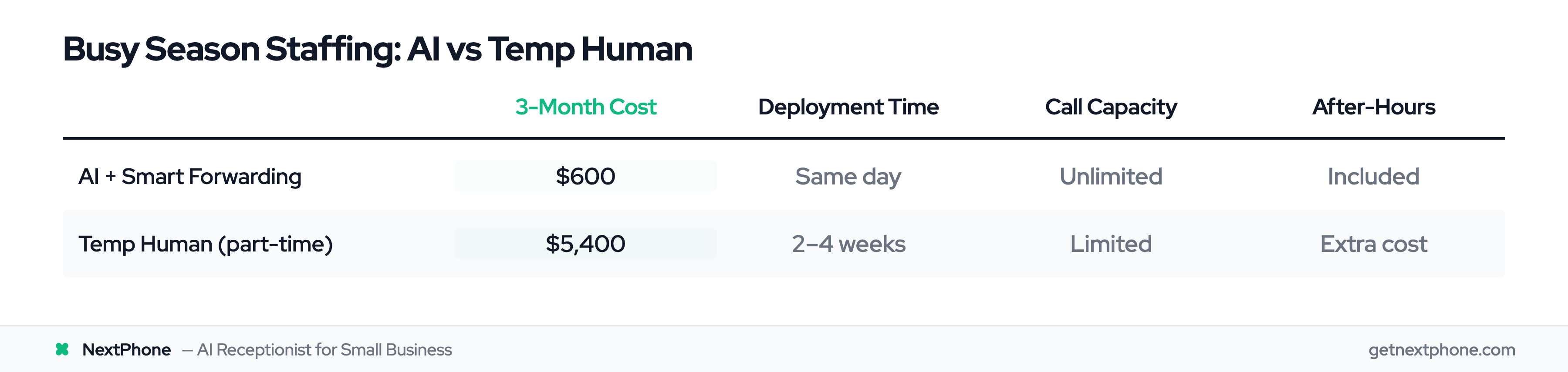
| Model | 3-Month Cost | Deployment Time | Call Capacity | After-Hours Coverage |
|---|---|---|---|---|
| AI + Smart Forwarding | $600 | Same day | Unlimited | Included |
| Temp Human (PT) | $5,400 | 2-4 weeks | Limited | Extra cost |
AI costs 89% less than a part-time temp receptionist for a three-month busy season. It deploys immediately instead of in a month. And it scales to handle unlimited concurrent calls instead of creating busy signals when volume spikes.
According to 2026 industry research, these cost differences hold true across virtual receptionist providers: AI consistently delivers 80-95% cost savings compared to human-staffed alternatives.
Onboarding Timeline Comparison: Why Speed Matters
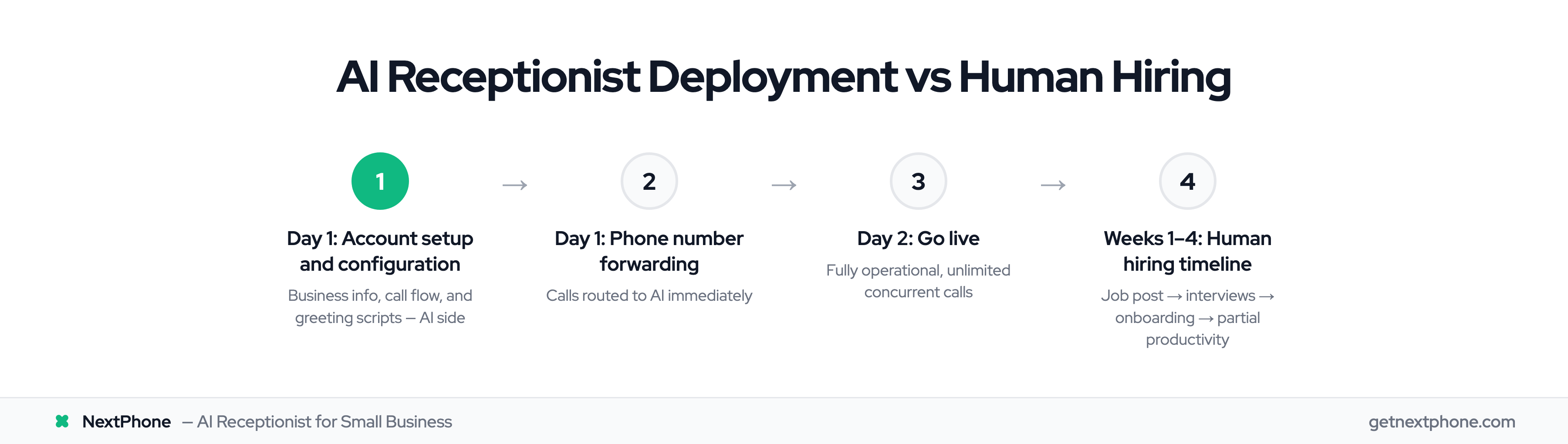
Deployment speed decides whether you're ready when busy season actually hits.
AI Virtual Receptionist Timeline
- Day 1: Account setup, business information input, call flow configuration, greeting scripts
- Day 1: Phone number forwarding setup
- Day 2: Testing, refinement, quality checks
- Go-live: 5 minutes, fully operational
Real impact: An HVAC company sees a heat wave forecasted for next week. They deploy AI on Monday. By Wednesday, they're handling unlimited concurrent calls with under 5-second answer times. The heat wave hits Thursday. Every call gets answered.
Temporary Human Receptionist Timeline
- Week 1: Create job posting, screen candidates, initial phone interviews
- Week 2: In-person or video interviews, selection process, extend offer
- Week 3: Onboarding paperwork, system training, call script practice, software access setup
- Week 4: Supervised call handling, quality reviews, feedback and corrections
- Go-live: 3-4 weeks at partial productivity
- Full productivity: 4-6 weeks
Real impact: A plumbing company anticipates winter freeze season starting in November. They begin hiring in early October. First candidate is fully trained and productive by mid-November, potentially missing the first freeze events of the season when early cold snaps catch homeowners off-guard.
If your busy season starts in 2-3 weeks, AI is your only viable option. Temporary human receptionists need 4-6 weeks minimum to reach full productivity. You can't compress that timeline without sacrificing quality.