Your phone rings. A customer's AC died in 95-degree heat. They need help now. But you're in an attic running electrical wire, can't reach your phone. The call goes to voicemail.
They call the next contractor. Someone answers. They get the $3,500 emergency job. You get nothing.
This happens more than you think. We analyzed 130,175 calls from 45 home services businesses over 7 months. The data is brutal: 74.1% of calls went completely unanswered. That's three out of every four potential customers calling someone else.
Slack notifications can change this. When a call comes in and you can't answer, your entire team sees it instantly. Someone responds. You win the job. 79% of businesses now use digital communication tools for exactly this reason.
The Real Cost of Missed Calls: $260,000 Per Year

Let's talk numbers. Most contractors don't realize how much money walks away when calls go unanswered.
How Much Revenue Are You Actually Losing?
The average home services contractor receives about 42 calls per month. Sounds manageable, right? But here's what happens to those calls:
- 74.1% go unanswered = 31 missed calls every month
- If just 20% of those would convert at an average $3,500 project value
- You're losing $21,700 per month
- That's $260,400 per year in revenue that never hits your bank account
And that's being conservative. Many contractors close at higher rates with faster response times.
Emergency Calls Are Worth Even More
Our analysis found that 15.9% of calls contain urgency language—words like "emergency," "urgent," "ASAP," or "right now." These aren't quote requests for next month. These are problems happening now.
Emergency jobs average $4,200 in revenue. That's 20% higher than routine work, because customers need help immediately and price becomes less important than speed.
Missing one emergency call per week costs you $16,800 per month. Over a year, that's $201,600 in high-value work going to competitors who answered faster.
Why Your Team Can't Answer
You're not ignoring calls on purpose. You physically can't answer because:
- You're on a ladder installing HVAC equipment
- You're in an attic running electrical (safety regulations prevent phone use)
- You're under a sink fixing a pipe burst (hands covered in water)
- You're on a roof replacing shingles (can't hear the phone)
- You're at a job site with equipment noise drowning out the ring
One plumber told us: "I didn't even know I was missing that many calls until I saw the data. I just thought business was slow."
Business wasn't slow. He had 76 missed calls that month. He just couldn't answer while working.
Why Use Slack for Call Notifications?
When you can't answer, your team needs to know a call came in. Email gets buried. Text messages get lost. Phone trees are complicated. Some teams use Discord, which has 200 million monthly active users—38% of workers now use it for workplace communication.
But for most businesses, Slack is different.
Your Team Already Lives in Slack
Over 2,600 apps integrate with Slack because that's where teams coordinate work. With 47 million daily active users across 77% of Fortune 100 companies, Slack has become the default workspace for business communication.
Organizations using Slack see 338% ROI, with 18% of the business communications market. Your crew is already checking Slack for:
- Job site updates
- Material orders
- Schedule changes
- Customer information
Adding call notifications puts them where your team already looks. Slack reduces emails by 32% and meetings by 27%, making it the ideal hub for team communication.
Instant Alerts to Multiple People
Here's the advantage: When a call notification hits Slack, everyone in that channel sees it simultaneously.
Say a sales inquiry comes in at 2 PM. You're on a job site and can't answer. But your office manager is at her desk. She sees the Slack notification in #sales, calls the customer back in 3 minutes, and books the estimate.
You didn't miss the call. Your team caught it.
The same thing works for emergencies. A homeowner calls about a burst pipe at 9 PM. The notification goes to your #urgent channel. Three team members see it at once. The first available person responds. The panicked homeowner gets help. You get a $4,200 emergency job.
Context and Collaboration in One Place
Our data shows that 25.4% of callers explicitly request callbacks—they say "please call me back" or "can someone return my call?"
Without a system, these requests get forgotten. The callback never happens. The customer moves on. 86% of employees say poor communication causes work problems—missed callbacks are a prime example.
With Slack notifications, the request is logged in a channel. Your team can see:
- Who called and when
- What they needed
- Whether anyone has followed up yet
Someone can comment "I'll call them back at 5 PM" right in the thread. The whole team knows it's handled. Nothing falls through the cracks.
How Slack Webhooks Work (Without the Tech Jargon)
You don't need to be a developer to set up Slack notifications. You need to understand one concept: webhooks.
What Is a Webhook?
Think of a webhook like a direct phone line from your phone system to your Slack channel.
When something happens—a customer calls, leaves a voicemail, requests a callback—your phone system automatically sends that information to a special URL. That URL belongs to Slack. Slack receives the information and posts it as a message in whichever channel you chose.
You don't manually do anything. The webhook handles it automatically.
Setting Up an Incoming Webhook in Slack
Slack's incoming webhooks let any system send messages to your channels. Here's the basic setup:
- Create a Slack App - Go to api.slack.com and create an app for your workspace
- Enable Incoming Webhooks - Toggle the setting to "on"
- Choose a channel - Pick which channel gets the notifications (#calls, #urgent, #sales, etc.)
- Copy the webhook URL - Slack gives you a unique URL that looks like:
https://hooks.slack.com/services/YOUR/WEBHOOK/URL - Configure your phone system - Tell it to send call data to that URL
When a call comes in, your phone system sends the caller's information to that webhook URL. Slack receives it and posts it in your chosen channel.
What Data Can You Send?
This is where it gets powerful. You can include:
- Caller's name and phone number
- Time the call came in
- Message they left or reason they called
- Call duration
- Whether it's a new customer or existing one
- Urgency level
- Link to call recording or transcript
The more context you provide, the better your team can prioritize who responds and how quickly.
What Call Information Should You Send to Slack?
Not all calls are equal. Your Slack notifications should reflect that.
Missed Call Alerts
The basics: who called, when, and their phone number. Format it for quick action:
=— Missed Call
John Smith
(555) 123-4567 [tap to call]
2:34 PM - Tuesday
Your team can tap the number on mobile and call back immediately. No searching for contact info.
Voicemail Notifications
If the caller left a voicemail, include a transcription. Reading takes 10 seconds. Listening to a voicemail takes 60 seconds.
<— New Voicemail
Sarah Johnson
(555) 987-6543
3:15 PM - Tuesday
Message: "Hi, I need someone to look at my water heater.
It's making weird noises and leaking a little.
Can you call me back today? Thanks."
Now your team knows exactly what the customer needs before calling back. They can prepare the right information, quote an estimate range, or schedule the right technician.
Call Summaries and Transcripts
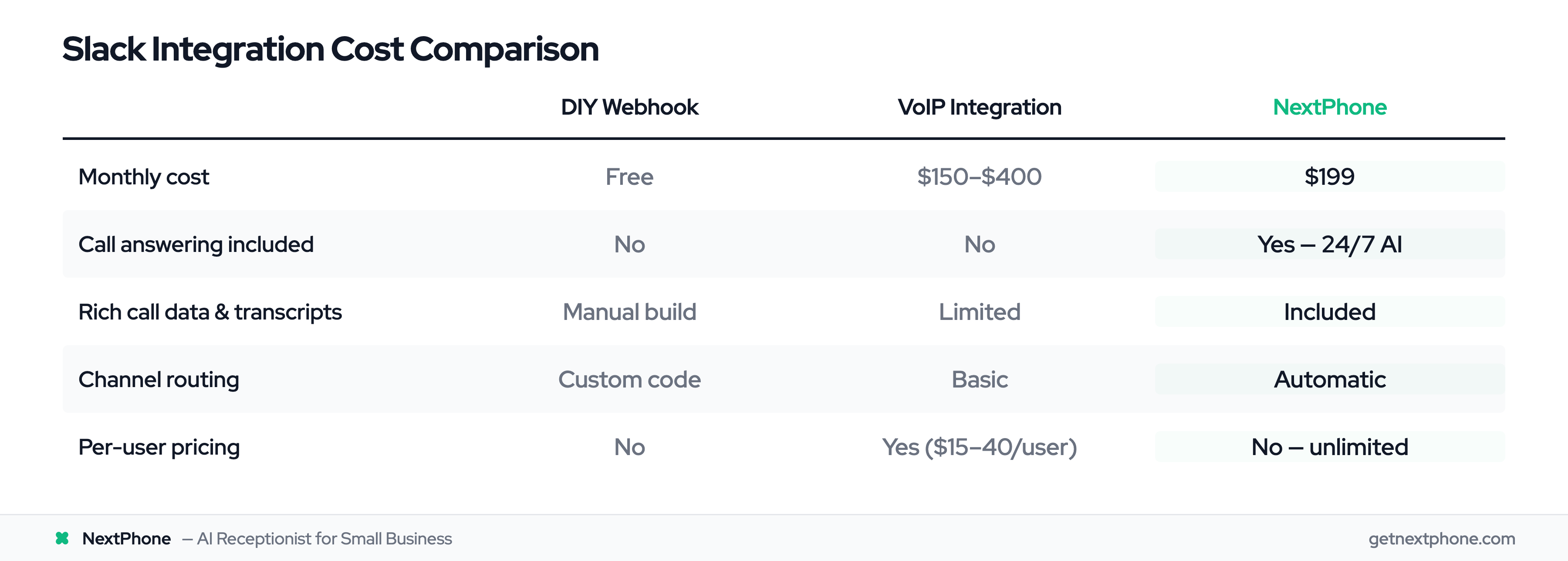
If you're using an AI receptionist (like NextPhone), the AI can generate a summary of what the caller wanted:
=— Call Summary
Mike Chen - (555) 246-8135
4:02 PM - Tuesday
New customer, needs roof inspection after storm damage
Timeline: ASAP, noticed missing shingles this morning
Budget: Not discussed, focused on getting estimate
Scheduled: Estimate appointment Thurs 2 PM
This level of detail means whoever calls back doesn't start from scratch. They already know the context.
Callback Requests
In our analysis of 130,175 calls, we found that 25.4% of callers explicitly request callbacks. They say "please have someone call me back" or "when can I expect a return call?"
These are high-intent customers. They're not browsing—they need your service. Track them separately:
=— Callback Requested
Lisa Martinez - (555) 369-2580
5:47 PM - Tuesday
Wants estimate for bathroom remodel
Preferred callback time: Tomorrow morning before 10 AM
Send these to a dedicated #callbacks channel. Make it someone's job to clear this channel every morning. Every callback request gets a response.
Smart Channel Routing: Get Calls to the Right Team
Here's where Slack integration becomes powerful: Don't send everything to one channel.
If your #calls channel gets 31 notifications per month (the average number of missed calls), and half are spam or wrong numbers, your team starts ignoring the channel. Signal gets lost in noise. Slack GPT powers 20M+ AI workflows monthly, showing how teams are using smart automation to filter and prioritize.
Instead, route intelligently.
Route by Call Type
Different calls need different people:
- Sales inquiries — #sales channel (sales team, estimators)
- Support questions — #support channel (customer service, schedulers)
- General calls — #calls channel (whoever is available)
Your sales team doesn't need to see appointment reschedule requests. Your support team doesn't need to jump on every new lead inquiry. Targeted routing keeps everyone focused.
Route by Urgency Level
Our data shows that 15.9% of calls contain urgency keywords like "emergency," "urgent," "ASAP," or "right now." Another 6.2% are true emergencies—pipe burst, no power, AC out in a heat wave.
These calls can't wait in a general queue. Route them to an #urgent channel with @channel notifications enabled:
=— @channel URGENT CALL
Emergency: Pipe burst, water flooding basement
Tom Wilson - (555) 789-4561
Called: 9:47 PM
Needs immediate response
Everyone in that channel gets a push notification. The first available person responds. Response time drops from hours to minutes. You win high-value emergency work.
Meanwhile, routine calls go to #calls without alerting everyone. Your team can respond when they finish their current task.
Route by Team Function
Some businesses route by who handles what:
- #new-leads - First-time callers, quote requests
- #existing-customers - Current clients with questions or service needs
- #follow-ups - Callback requests and scheduled follow-ups
- #urgent - True emergencies only
Your new lead specialist focuses on #new-leads. Your customer success person monitors #existing-customers. Your on-call technician watches #urgent.
Everyone knows their lane. Nothing gets duplicated or ignored.