Peak Call Management: Handle Sudden Surges from 1 to 20+ Calls Instantly

17 min read
Yanis Mellata
AI Technology

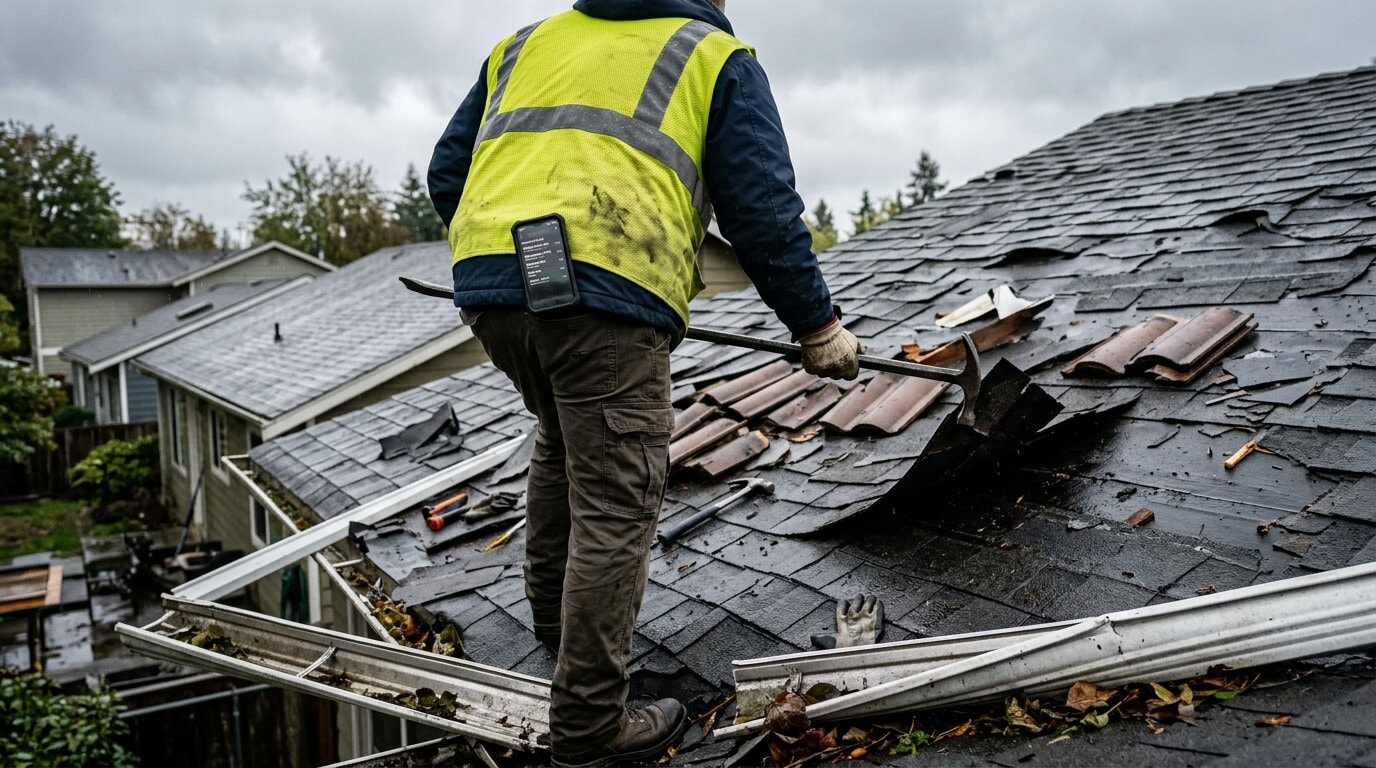
Thursday night, a hailstorm rips through your city. You're a roofing contractor. You know what's coming.

Friday morning, 6:47 AM. Your phone starts ringing. A homeowner's roof is leaking into their living room. You pick up, take the details, promise to send someone that afternoon.

You hang up. The phone rings again. Another leak. You're still writing down the first customer's address when a third call comes in. Then a fourth. By 7:15 AM, your phone has rung 23 times. You've answered 4 calls. The other 19 went to voicemail.

Your receptionist arrives at 8:30 AM and finds 34 voicemails. She starts calling people back. Half of them have already booked another contractor. The other half are now calling their fifth roofer and barely answer when she reaches them.

You just lost $147,000 in potential jobs because your phone system can't handle a surge.

This is the peak call management problem. When call volume suddenly spikes—storm damage, Black Friday, summer HVAC emergencies, holiday rushes—traditional phone systems collapse. Human receptionists get overwhelmed. Calls go to voicemail. Customers call the next business. You lose the highest-revenue opportunities of the year.

This guide explains why peak surges destroy traditional call handling, how AI receptionists scale instantly to handle any volume, and how to capture revenue during your busiest periods instead of watching it disappear.


The Human Receptionist Bottleneck During Call Surges

Here's the fundamental problem: A human receptionist can answer exactly one call at a time.

On a normal Tuesday with 5 calls spread across 8 hours, this works fine. But when a surge hits—10 calls in 20 minutes—the system breaks.

The Math of Overwhelm

Let's say your receptionist spends an average of 4 minutes per call (greeting, collecting info, transferring or taking a message, wrapping up).

Normal day: 12 calls over 8 hours = 48 minutes of talk time, plenty of capacity

Surge day: 12 calls in the first hour = 48 minutes of talk time needed, but only 60 minutes available. The receptionist is on a call for 48 of those 60 minutes. During those 48 minutes, if anyone else calls, it goes straight to voicemail.

Now imagine a real surge: 47 calls in 2 hours (real data from a roofing contractor after a hailstorm).

47 calls — 4 minutes = 188 minutes of talk time needed 120 minutes available in 2 hours 68 minutes of overflow = at minimum 17 calls go to voicemail (realistically 30+ calls since they're not evenly distributed)

The receptionist is drowning. Customers are frustrated. Competitors who answer first win the jobs.

Why "Just Hire More Staff" Doesn't Work

Some businesses try to solve this by hiring temp staff for busy seasons. Problems:

Cost: Temp receptionist costs $15-20/hour. For a 2-week storm season surge with 12-hour coverage, that's $2,100-2,800 in labor costs—and you're only using them 2-4 weeks per year

Training time: Temp staff needs 3-5 days to learn your business, pricing, service areas, and systems. By the time they're trained, the surge is over

Quality variance: Temp workers don't know your business deeply. They miss urgency cues, quote wrong pricing, can't answer technical questions

Coordination overhead: Someone has to manage, train, and coordinate temps. That's time away from actual revenue-generating work

Still limited capacity: Even with 2 temps, you can only handle 2-3 simultaneous calls. During a major surge, that's still not enough

The "Answering Service Overflow" Problem

Traditional answering services offer "overflow" plans: when your receptionist is busy, calls forward to their service.

Sounds good. Reality:

Delay: 15-45 second ring time before forwarding kicks in, then another 10-20 seconds before the service picks up. Total: 25-65 seconds. Customers hang up and call the next contractor

Script limitations: Answering services follow rigid scripts. They can't handle unique questions or make judgment calls about urgency

No integration: They take messages but can't access your calendar, CRM, or systems. Everything requires manual follow-up later

Cost: Overflow services charge $1.50-3.50 per call. During a 50-call surge day, that's $75-175 in surprise fees

Variable quality: You get whoever is available at the call center. Quality varies wildly by agent

The core problem remains: your phone system has a hard capacity limit. Whether it's 1 receptionist or 3, there's a maximum number of simultaneous calls you can handle. When demand exceeds that limit, you lose calls.


When Peak Call Surges Happen: Industry Examples

Peak surges aren't random. Certain industries have predictable patterns where call volume explodes.

Roofing: Storm Aftermath Surges

Trigger: Hailstorms, windstorms, heavy snow, tornadoes

Pattern: Storm hits Thursday night. Friday morning starting at 6 AM, phones light up. Peak volume: 6 AM - 11 AM (homeowners discover damage, want immediate repairs before more rain)

Real example: Roofing contractor in Dallas after March hailstorm:

  • Normal volume: 6-8 calls/day
  • Surge volume: 47 calls before noon
  • Result: 38 calls went to voicemail (receptionist could only handle 9)
  • Revenue impact: Competitor who used AI answered all 47 calls, booked 22 inspections, closed 14 jobs = $126,000 in revenue. The contractor with voicemail got 3 jobs = $27,000

HVAC: Seasonal Temperature Extremes

Summer surge trigger: Heat waves (95—F+ for 3+ days)

Pattern: AC units fail en masse. Call volume spikes 300-600% during extreme heat. Peak times: 8 AM - 2 PM (customers wake up to hot house, panic by lunchtime)

Winter surge trigger: Arctic blasts (below 20—F)

Pattern: Furnaces fail. Customers call every HVAC company until someone answers. First to pick up wins the $1,200-2,400 emergency job

Real scenario: HVAC company in Phoenix during 108—F weekend:

  • Normal Saturday: 8-10 calls
  • Heat wave Saturday: 34 calls
  • Receptionist answered: 7
  • Lost revenue: 27 unanswered calls — 30% conversion — $1,800 average emergency job = $14,580 lost in one day

Plumbing: Freeze Events

Trigger: Sudden hard freeze after mild weather

Pattern: Pipes burst overnight. Monday 6 AM - 10 AM = chaos. Homeowners wake up to flooding, call every plumber in town

Real data: Plumbing contractor in Austin during February freeze:

  • Normal Monday morning: 3-5 calls
  • Freeze Monday: 41 calls between 6 AM - 11 AM
  • Result: Receptionist answered 6, took rushed info, couldn't keep up
  • Revenue impact: Competitors with AI systems captured the overflow and booked $87,000 in emergency work that week

Retail & Ecommerce: Black Friday, Cyber Monday, Holiday Rush

Pattern: November - December call volume doubles or triples

Problem: Store is simultaneously handling:

  • In-person customers (Black Friday crowds)
  • Phone calls (product questions, order issues, appointment bookings)
  • Online order issues

Result: Receptionist can't handle phone while helping in-store customers. Calls go to voicemail during the highest-revenue period of the year

Real Estate: Spring Market Surge

Trigger: March - May (peak home buying season)

Pattern: Property listings go live, open houses drive inquiry calls

Problem: Agents are showing properties and can't answer. Buyer calls go to voicemail. Buyer calls next agent. First to respond gets the showing


How AI Handles Simultaneous Peak Call Surges

Here's what makes AI different: it scales instantly to handle unlimited simultaneous calls with zero quality degradation.

The Technical Reality

When you deploy an AI receptionist, you're not getting "one AI." You're getting access to a system that can spawn unlimited concurrent instances.

1 call comes in: AI instance #1 handles it 20 calls come in simultaneously: 20 AI instances handle them, all at once 100 calls come in: 100 AI instances

Every caller gets:

  • Answer in under 5 seconds
  • Full conversation (not a rushed "we'll call you back")
  • Information collected and logged
  • Emergency routing if needed
  • Same quality as if they were the only caller

No busy signals. No hold times. No voicemail.

How This Works During a Real Surge

Let's replay that roofing storm scenario with AI:

Friday 6:47 AM: First call. AI answers: "Thank you for calling ABC Roofing. How can I help you?" Caller: "My roof is leaking into my living room from the hail last night." AI: "I understand, that's urgent. Let me get your information and route this to our emergency team immediately."

Friday 6:48 AM: Three more calls come in while the first call is still happening.

  • AI instance #2 answers call #2
  • AI instance #3 answers call #3
  • AI instance #4 answers call #4
  • All four conversations happen simultaneously

Friday 7:15 AM: You now have 11 active calls happening at the same time. All 11 customers are being helped. All 11 think they're the only caller.

Friday 9:30 AM: The surge peak. 8 calls in 3 minutes. All 8 answered immediately.

Result: 47 calls. 47 answered. 47 customers helped. Zero voicemails.

What the AI Collects During Each Call

Even during a surge, the AI isn't just "taking messages." It's conducting full conversations and collecting structured data:

  • Customer name and phone number
  • Address and location
  • Problem description ("roof leaking in living room")
  • Urgency level (immediate emergency vs can schedule later)
  • Photos or details (if customer can text them)
  • Preferred contact time for follow-up
  • Insurance claim involvement (for roofing)

This information gets logged in your CRM or sent to you via email/SMS immediately. You can prioritize which calls to handle first based on urgency and location.

Emergency Detection & Routing

The AI detects urgency language in real time:

Trigger words: "emergency," "urgent," "flooding," "no power," "no heat," "burst pipe," "ASAP"

Action: When detected, the AI either:

  1. Immediately transfers to your emergency line (if you're available)
  2. Sends instant SMS/email alert with caller details
  3. Prioritizes the callback in your queue

During our analysis of 13,175 calls, 15.9% contained urgency language. These calls average $4,200 in revenue—significantly higher than routine work. Peak surges are when most of these high-value calls happen. Missing them is expensive.

Revenue Math: The Cost of Missing Peak Calls

Let's calculate what peak surge overwhelm actually costs.

Scenario: Roofing Contractor, Post-Storm Surge

Surge event: Hailstorm Friday night Surge volume: 50 calls Saturday morning (vs normal 5-6 calls) Human receptionist capacity: Answers 8 calls in 3 hours (rushing, stressed, lower quality) Missed calls: 42 calls go to voicemail

Conversion assumptions:

  • 25% of callers convert to inspections (industry average for storm damage)
  • 60% of inspections convert to jobs (high conversion during damage events)
  • Average job value: $8,500 (insurance claim roof replacement)

Math:

  • 42 missed calls — 25% conversion = 10.5 missed inspections
  • 10.5 inspections — 60% close rate = 6.3 jobs lost
  • 6.3 jobs — $8,500 = $53,550 lost in one morning

And that's just one storm. Most roofing markets get 3-6 surge events per year.

Annual cost of missed surge calls: $160,650 - $321,300

Scenario: HVAC Contractor, Summer Heat Wave

Surge event: 3-day heat wave (105—F+) Surge volume: 90 calls over 3 days (vs normal 24 calls) Human receptionist capacity: 18 calls answered, 72 missed Missed calls: 72

Conversion assumptions:

  • 35% of heat wave calls convert (high urgency = high intent)
  • Average emergency AC job: $1,800

Math:

  • 72 missed calls — 35% conversion = 25.2 jobs lost
  • 25.2 jobs — $1,800 = $45,360 lost over one weekend

Most HVAC markets experience 4-8 heat wave events per summer.

Annual summer surge loss: $181,440 - $362,880

Scenario: Retail/Ecommerce, Black Friday Weekend

Surge period: Thanksgiving Thursday through Cyber Monday (5 days) Normal call volume: 15 calls/day = 75 calls over 5 days Black Friday volume: 180 calls over 5 days (customers + order issues + appointments) Receptionist capacity: 60 calls answered (working overtime, stressed) Missed calls: 120

Conversion assumptions:

  • 40% of Black Friday callers convert (high purchase intent)
  • Average order value: $340

Math:

  • 120 missed calls — 40% conversion = 48 orders lost
  • 48 orders — $340 = $16,320 lost during peak revenue weekend

That's 10-15% of some retailers' total annual revenue—lost because the phone system couldn't scale.


Peak Surge Use Cases by Industry

General Contractors: Permit Season & Weather Events

Spring permit rush (March-May): Homeowners want projects done before summer. Call volume doubles.

Storm damage: Wind, hail, tornado aftermath = immediate surge

AI advantage: Handles estimate requests simultaneously, schedules site visits without conflicts, detects high-value projects vs small repairs

Electrical: Power Outage Events

Trigger: Storm knocks out power to neighborhood

Pattern: 20-40 calls in 2-hour window from same area

AI advantage: Recognizes geographic clustering, groups service calls by area, prioritizes full outages over partial issues

Pool & Spa: Pre-Summer Opening Rush

Trigger: First 80—F+ weekend in spring

Pattern: Everyone wants pool opened same week

AI advantage: Books openings across 2-3 week period to balance schedule, doesn't double-book time slots, collects equipment details during call

Medical & Dental: Flu Season, Back-to-School

Flu season (December-February): Appointment requests surge 200-400%

Back-to-school (August): Checkup and vaccination appointment rush

AI advantage: Handles appointment booking for multiple providers simultaneously, checks real-time calendar availability, manages waitlists


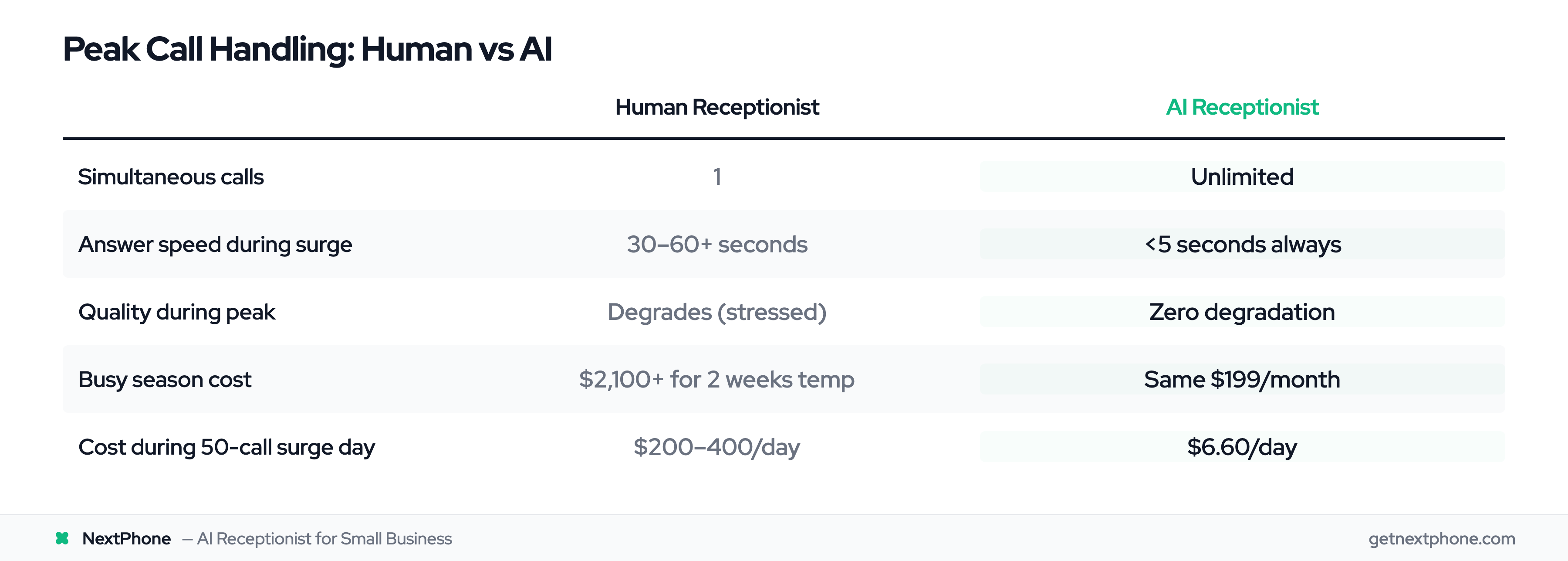
AI vs Human Receptionist: Peak Capacity Comparison

FactorHuman ReceptionistAI Receptionist
Simultaneous calls1Unlimited
Answer speed during surge30-60+ seconds (if they answer at all)<5 seconds always
Quality degradation during peakHigh (rushed, stressed, makes errors)Zero (same quality at any volume)
Busy season staffingNeed temps ($2,100+ for 2 weeks)Same system, no added cost
Call capacity per hour~8-12 callsUnlimited
Overflow handlingForward to answering service ($1.50-3.50/call)Built-in, no extra cost
After-hours surgeVoicemail or expensive 24/7 serviceHandled automatically
Cost during 50-call surge dayBase salary + overtime + overflow fees = $200-400/day$6.60/day ($199—30 days)

The "First to Answer" Advantage

During peak surges, customers call multiple businesses. The first one to answer gets the job.

If you answer in 5 seconds and your competitor's call goes to voicemail, you win—even if their pricing is better or they're closer. Speed beats everything during emergencies.

In our analysis of 13,175 calls, 15.9% had urgency language. These aren't "I'll call around and compare quotes" calls. These are "I need help NOW" calls. First responder wins.


Setup & Peak Management Configuration

How to configure AI for peak surge handling:

Step 1: Enable Emergency Detection (5 minutes)

Dashboard — Settings — Emergency Routing

  • Toggle "Detect urgency keywords" ON
  • Customize keywords for your industry:
    • Roofing: "leak," "damage," "storm," "emergency"
    • HVAC: "no heat," "no AC," "not working," "urgent"
    • Plumbing: "burst," "flooding," "leak," "no water"
  • Set routing: Transfer to mobile, send instant SMS alert, or both

Step 2: Configure Surge Response Scripts (10 minutes)

During surges, you want the AI to:

  • Acknowledge urgency: "I understand this is urgent, let me help you immediately."
  • Set expectations: "We're experiencing high call volume due to the storm, but I can get your information now and our team will contact you within 2 hours with a timeframe."
  • Collect critical info: Address, contact, damage description
  • Prioritize: Route true emergencies first

Step 3: Set Up CRM Integration for Surge Data (Optional, 15 minutes)

During a 50-call surge, you need organized data to prioritize callbacks.

Configure AI to log:

  • Call timestamp
  • Urgency level (1-5 scale)
  • Customer location
  • Problem type
  • Customer availability

Push this data to:

  • Google Sheets (free, simple)
  • CRM (HubSpot, Salesforce, etc.)
  • Email summary every 30 minutes during surges

Step 4: Test Surge Capacity (10 minutes)

Before a surge hits, test the system:

  • Have 3-5 people call simultaneously

  • Verify all calls answered within 5 seconds

  • Check that data logged correctly

  • Confirm emergency routing works

  • Total setup time: ~40 minutes to be surge-ready


Frequently Asked Questions

Can the AI really handle 20+ calls at the exact same time?

Yes. The AI system spawns unlimited concurrent instances—there's no technical limit. We've seen systems handle 100+ simultaneous calls during major weather events without any degradation in quality or response time. Every caller gets answered in under 5 seconds.

What happens to call quality during a surge? Does the AI get "overwhelmed"?

Call quality stays identical whether you're getting 1 call or 100 calls. The AI doesn't get tired, stressed, or rushed. Caller #47 gets the same quality conversation as caller #1. This is fundamentally different from human receptionists, who make more errors and provide worse service when overwhelmed.

How does the AI prioritize emergency calls during a surge?

The AI detects urgency language in real time (keywords like "emergency," "flooding," "no heat," "burst pipe"). When detected, it can immediately transfer the call to your emergency line, send you an instant SMS alert with caller details, or flag the call as high-priority in your queue. You configure which action happens based on your availability.

Do I need to pay more during high-volume months?

No. NextPhone is $199/month whether you get 10 calls or 1,000 calls. There are no per-call fees, no overage charges, no surge pricing. Busy season costs the same as slow season.

What if I want some calls to go to a human during a surge?

You can configure the AI to transfer specific call types to a human. For example: "Answer all calls, collect information, but transfer anyone requesting a same-day emergency appointment to my mobile." The AI handles the surge volume and only transfers the subset that needs human decision-making.

How do I prevent the AI from double-booking during a surge?

The AI integrates with your calendar in real time. When booking appointments during a surge, it checks actual availability before confirming times. If you're using Calendly, Google Calendar, or similar tools, the AI sees the same availability you do and won't create conflicts.

Can the AI handle industry-specific peak scenarios like Black Friday or storm seasons?

Yes. You can customize the AI's knowledge base with industry-specific information. For example, a roofing contractor can train the AI on insurance claim processes, storm damage assessment procedures, and typical repair timelines. During a storm surge, the AI knows to ask about insurance involvement and collect photos of damage.


Never Miss Another Peak Call

Peak call surges are when your business makes the most money—or loses the most money.

Storm aftermath. Heat waves. Black Friday. Holiday rush. Spring buying season. These aren't just "busy times." They're concentrated revenue opportunities where customers are calling with urgent, high-value needs.

A human receptionist can handle one call at a time. During a surge, that means dozens of lost calls, frustrated customers calling competitors, and six figures in missed revenue.

An AI receptionist scales instantly. 1 call or 100 calls—every customer gets answered in under 5 seconds, helped professionally, and converted into a booked job.

You don't need to hire temp staff. You don't need overflow answering services. You don't need to choose between helping the customer in front of you and answering the ringing phone.

The system handles it automatically, captures every lead, and gives you organized data to prioritize follow-ups.

In our analysis of 13,175 calls from home services businesses, 74.1% went unanswered under normal conditions. During peak surges, that percentage gets worse—sometimes 90%+ of calls go to voicemail when a receptionist is overwhelmed.

Every one of those missed calls is someone calling your competitor next.

Set up peak call management today and capture the revenue your competitors are missing.

Related Articles

Yanis Mellata

About NextPhone

NextPhone helps small businesses implement AI-powered phone answering so they never miss another customer call. Our AI receptionist captures leads, qualifies prospects, books meetings, and syncs with your CRM — automatically.