Your phone rings. You're under a kitchen sink, water shut off, hands covered in plumber's putty. The customer on the other end wants to schedule a bathroom remodel estimate. The call goes to voicemail. They call the next plumber. They book there instead. You just lost a $6,500 job.
This happens more than you think. In our analysis of 13,175 customer service calls from 47 home services businesses over 7 months, we found that 7.7% of calls were explicit scheduling requests—customers calling specifically to book appointments. That's 191 out of 2,487 calls where someone wanted to give you money and a time to show up.
Here's the problem: 74.1% of all calls to service businesses go completely unanswered. Three out of every four potential customers calling someone else.
For contractors already using Microsoft 365, Outlook calendar integration with AI automation solves this. Your calendar fills itself while you're on the roof, under the house, or in the attic doing actual billable work.
The Hidden Cost of Missed Scheduling Calls
How Many Scheduling Calls Are You Missing?
Let's do the math for a typical contractor. If you're getting 42 calls per month (average from our data), 7.7% of those are people calling specifically to book an appointment. That's 3.2 scheduling calls monthly.
At a 74.1% miss rate, you're losing 2.4 appointment bookings every single month just from calls that went unanswered.
That doesn't include customers who called with a question and would've booked if someone answered. We're only counting the ones who said "I want to schedule" in their voicemail.
The Revenue Math
Here's what those missed scheduling calls cost you.
If your average job is $3,500 and you're missing 2.4 appointment bookings per month, you're losing $8,400 monthly. That's $100,800 per year in revenue that called you first, got voicemail, and booked with someone else.
For many contractors, the average ticket is higher. HVAC emergency calls average $4,200. Electrical panel upgrades run $5,000-8,000. Bathroom remodels start at $6,500. Kitchen remodels can be $15,000-30,000.
One plumber we work with had 76 missed calls in a single month. He told us: "I didn't even know I was missing that many calls until I saw the data. I just thought business was slow."
Business wasn't slow. His phone was ringing. He just couldn't answer it.
Why Service Businesses Miss Appointment Requests
You know exactly why you can't answer every call.
You're on a ladder installing ductwork. You're in an attic running electrical wire in 110-degree heat. You're under a house with a burst pipe spraying water. You're on a roof nailing shingles.
Safety regulations prevent you from answering in some situations. Physics prevents you in others—you literally can't reach your phone.
Even when you can answer, your hands are dirty, you're sweaty, you're in the middle of something that can't stop. By the time you get to a place where you can check your phone, the customer has already called two other contractors.
And here's what makes it worse: many customers call outside business hours. They get home from work at 6 PM, notice their AC isn't working, and start calling. You're having dinner. By the time you see the voicemail at 8 PM and call back, they've already booked with someone who answered.
What Is Outlook Calendar Integration?
The Basics: Calendar Sync Explained
Outlook calendar integration means your appointment booking system and your Outlook calendar talk to each other automatically. When someone books an appointment, it appears in Outlook instantly. When you block time in Outlook, your booking system knows that slot is unavailable.
It's two-way sync. Changes flow both directions, keeping everything current without manual entry.
This works with both Microsoft 365 (cloud-based) and Exchange Server (on-premise installations). The technology is mature, reliable, and built into the Microsoft ecosystem you're likely already using.
Microsoft 365 vs Standalone Outlook
If you're using Microsoft 365 Business (Basic, Standard, or Premium), you get instant syncing across all your devices. Book an appointment through your AI system at 7 PM? It shows up on your phone, your tablet, and your desktop Outlook immediately.
Standalone Outlook (the desktop app without Microsoft 365) can still integrate through OAuth authentication, but syncing happens when Outlook connects to the server rather than in real-time.
Most contractors we work with use Microsoft 365 because they need email on their phones anyway. Business Basic starts at $6 per user per month. You're probably already paying for it.
Why Microsoft 365 Makes Sense for Contractors
You're already in the Microsoft ecosystem. You use Outlook for email. Maybe you use Teams for communicating with your crew. Possibly Excel for estimates or Word for contracts.
Microsoft 365 gives small contractors enterprise-level tools at small business prices. Rather than buying a separate booking system, CRM, calendar app, and email provider, you leverage what you already have.
The learning curve is zero. You already know how Outlook works. Your crew knows how to check their Outlook calendar on their phones. There's no new platform to learn.
How AI Automates Appointment Booking with Outlook
The Traditional Way (Manual Calendar Management)
Here's how appointment booking works without automation:
Customer calls. You miss it because you're working. They leave voicemail. You check voicemail later. You call them back. They don't answer—now they're at work. They call you back. You miss it again. Three days of phone tag later, you finally connect. You agree on a time. You hang up. You open Outlook. You manually type in the appointment details. Done.
Or, if you're unlucky: Customer calls. You miss it. They call the next contractor. That contractor answers. They book. You never hear from the customer again.
The AI-Powered Way (Complete Automation)
Here's how it works with AI + Outlook calendar integration:
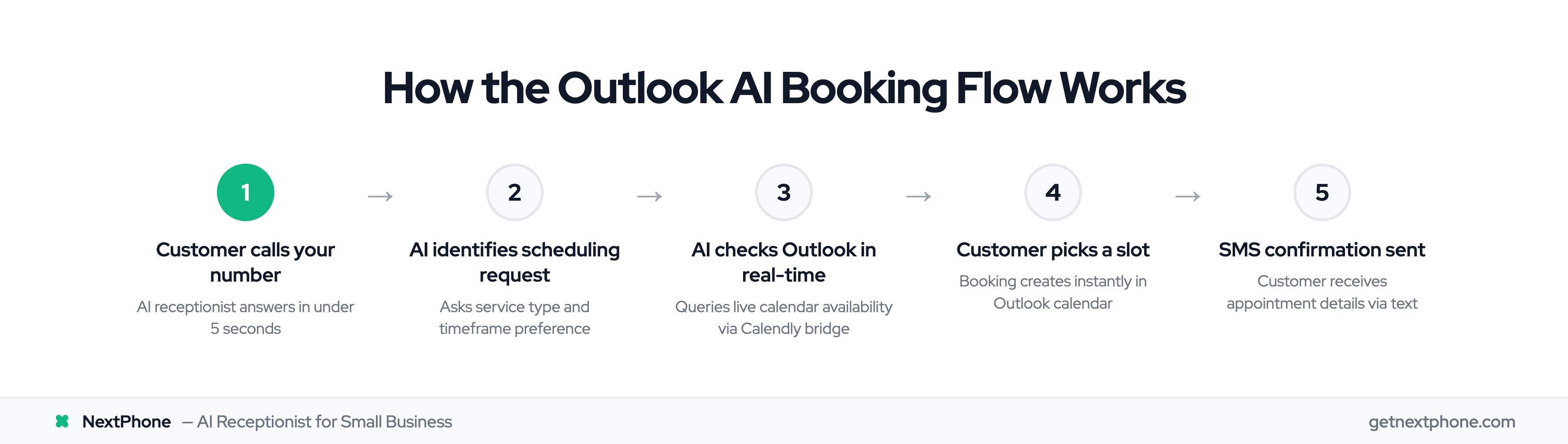
Customer calls. AI answers in under 5 seconds. AI asks what they need. Customer explains they want to schedule service. AI asks when they're available. Customer says "Thursday afternoon." AI checks your Outlook calendar in real-time, sees Thursday at 2 PM is open, confirms with customer. Customer agrees. AI books the appointment, syncs it to Outlook, sends the customer an SMS confirmation with date/time/your business name, and emails you the details.
All of this happens during the phone call. The customer hangs up with a confirmed appointment. You're still under the house fixing the pipe. Your calendar is updated. The customer got a confirmation text.
No voicemail. No phone tag. No manual calendar entry. Just a booked appointment.
Real-Time Availability Checking
The AI doesn't just randomly pick times. It actually checks your Outlook calendar before suggesting slots.
If you've already got an appointment Thursday at 2 PM (either booked manually or by the AI earlier that day), the system knows that slot is taken. It offers Thursday at 3 PM or Friday at 10 AM instead.
This works because the integration is live. Every time the AI suggests a time, it's checking against current availability. If you manually block time in Outlook for a personal appointment, the AI respects that and doesn't book over it.
Preventing Double Bookings
Double bookings happen when two booking sources don't know about each other. Your office manager books an appointment in Outlook at 2 PM. A customer books online at the same time through your website. Now you have two customers expecting you at 2 PM.
With Outlook calendar integration, this can't happen. All booking sources—AI phone system, website booking, manual Outlook entries—write to the same calendar. The second attempt to book 2 PM sees the slot is taken and offers a different time.
You can also configure buffer time. If you need 15 minutes between appointments to drive from one job to the next, the system automatically blocks those buffers. Book 2 PM? The system marks 1:45-2:15 as unavailable, giving you travel time.
The system works 24/7. Customer calls at 11 PM because their AC died in a heatwave? AI answers, books them for first available slot tomorrow morning, syncs to Outlook, sends confirmation. You wake up tomorrow and see the appointment already on your calendar.
Benefits for Service Businesses
24/7 Appointment Booking (Even While You Sleep)
Most customers don't call during business hours. They call when they notice a problem—after work, evenings, weekends.
Our call data suggests that a significant portion of calls to home services businesses happen outside standard 9-5 hours. That's when homeowners are home, notice issues, and start making calls.
Without 24/7 coverage, every after-hours call is a missed opportunity. With AI + Outlook integration, those calls get answered and appointments get booked while you sleep.
You wake up to a full calendar instead of a voicemail box full of people who already called someone else.
Mobile-First: Field Workers Get Updates Instantly
You're not sitting at a desk. You're in a truck driving to the next job, on a ladder, in a crawl space. Your calendar needs to live on your phone.
With Microsoft 365 and Outlook calendar integration, updates sync instantly to your mobile device. An appointment gets booked at 3 PM? By 3:01 PM, it's on your phone.
Your crew can check their Outlook calendars on their phones to see the day's schedule. Updates happen in real-time. No more calling the office to ask "What's next?" or "Did that 2 PM confirm?"
If you use Outlook on a tablet in your truck, same thing. All devices stay current automatically.
Professional Customer Experience
Every call gets answered in under 5 seconds. Every customer hears a friendly, professional voice (even if it's AI). Every scheduling request gets handled completely during the call.
Customers don't know they're talking to AI unless you tell them. The conversation is natural: "Thanks for calling [Your Business]. How can I help you today?"
Compare this to what most small contractors offer: voicemail after 6 rings, or a rushed, harried human trying to talk while operating a power tool.
The AI is never rushed, never distracted, never having a bad day. Just consistent, professional service every single time.
Time Savings and Reduced Administrative Work
How much time do you spend managing your calendar every week?
Checking voicemails, calling people back, playing phone tag, manually entering appointments into Outlook, sending confirmation texts, updating the schedule when someone cancels, rebooking that slot.
For most contractors, it's 30-60 minutes per day. That's 2.5-5 hours per week. That's 10-20 hours per month. That's billable time you're spending on administrative work.
With complete automation, those hours go back to revenue-generating work. The AI handles the calls, books the appointments, updates Outlook, sends confirmations. You just show up where your calendar tells you to be.
Never Miss an Appointment Request Again
Remember those 2.4 missed scheduling calls per month? The $8,400 in monthly revenue calling someone else?
With AI answering every call and Outlook calendar integration handling the booking, you capture every single one.
Three scheduling calls per month — $3,500 average job = $10,500 in monthly revenue you weren't capturing before. That's $126,000 annually.
The math is simple. Every scheduling call that previously went to voicemail now becomes a booked appointment.
Real-World Use Cases for Contractors
HVAC Contractors
You're on a roof installing a condenser unit. It's July. It's 95 degrees. You physically cannot safely use your phone while you're up there.
A customer calls. Their AC just died. It's 6 PM, you're done for the day, but they need service. AI answers, captures their information, explains you handle emergency AC repairs, checks tomorrow's calendar, books them for 8 AM, syncs to Outlook, sends confirmation.
You check your phone at 6:30 PM when you're packing up. You see tomorrow's first appointment is already scheduled. The customer got immediate service instead of waiting for you to call back tomorrow.
During peak summer season, call volume explodes. Instead of missing half of them because you're slammed, the AI handles all of them while you're running between jobs.
Seasonal maintenance bookings work the same way. Customer calls in April wanting to schedule AC tune-up before summer. AI books it for a May slot when you're less busy. Syncs to Outlook. Done.
Plumbers
You're under a house. A slab leak is flooding the crawlspace. Your phone is in your truck because there's no way you're bringing it under here.
A customer calls about a bathroom remodel. Wants an estimate. AI answers, collects details about the project, asks about their timeline, checks your calendar for estimate appointments, books them for Thursday at 3 PM, syncs to Outlook, sends confirmation.
You finish the emergency repair two hours later. You check your phone. You have an estimate booked for Thursday. The customer has a confirmation text with your business name and the appointment time.
Or here's another common scenario: You just fixed an emergency. Customer is standing there. Their toilet works now, but they mention they want to remodel the whole bathroom. You could stop what you're doing, pull out your phone, check your calendar, book them... or the AI already running can handle it.
Customer calls your business line from their cell. AI answers, books the follow-up estimate, syncs to Outlook. You see it show up on your phone while you're still cleaning up. No back-and-forth, no manual calendar work.
Electricians
You're in an attic running wire. It's 110 degrees. You're focused on not stepping through the drywall. Your phone is in your truck.
A customer calls about a panel upgrade. AI answers, asks about their electrical service details, explains you handle panel upgrades, checks your Outlook calendar, books an inspection appointment for next Tuesday, syncs to Outlook, sends confirmation.
You finish the job. You check your phone. Tuesday at 10 AM: panel upgrade inspection. The address, customer name, and phone number are all there in the Outlook appointment.
Safety regulations in some electrical work prevent you from being distracted by a phone. The AI handles calls while you stay focused on the work that could literally kill you if you mess it up.
General Contractors
You're on a job site with a client, walking through finish selections. Your phone rings. You silence it—you're not going to take a call in the middle of a client meeting.
The call is another potential client wanting an estimate for a kitchen remodel. AI answers, asks about the scope, confirms your service area covers their location, checks Outlook for estimate appointments, books them for Thursday afternoon, syncs to Outlook, sends confirmation.
Your meeting ends at 3 PM. You check your phone. You have an estimate appointment booked for Thursday at 2 PM. The customer got immediate service, you didn't interrupt your existing client, and your calendar is updated.
Estimate appointments are the lifeblood of contracting businesses. Each one is a potential $10K-50K project. Missing estimate requests because you're physically on a job site is leaving serious money on the table.
Implementation and Setup
What You Need to Get Started
You need two things: a Microsoft 365 account (or Outlook) and a phone number to forward calls to.
That's it. You probably already have both.
If you don't have Microsoft 365 yet, Business Basic starts at $6 per user per month and includes Outlook, email, and calendar. Business Standard is $12.50 per user per month and adds desktop Office apps. Most contractors use Business Basic.
The Setup Process
Setting up AI + Outlook calendar integration takes a few hours, not weeks.
First, you connect your Outlook calendar. This uses OAuth authentication—the same secure method every Microsoft app uses. You click "Allow," grant permission, done. The AI system can now read your calendar availability and write appointments to it.
Next, you configure your availability rules. What days do you work? What hours? How much buffer time between appointments? Do you want to block lunch? This defines when the AI can book appointments.
Then you set up the conversation flow. What information do you want the AI to collect? Name, phone number, address, service needed, preferred date/time. You can customize this based on your business.
Finally, you test it. Call your number, go through the booking process, make sure it syncs to Outlook correctly. Adjust anything that needs tweaking.
Most contractors are live the same day they start setup.
Security and Data Protection
Microsoft 365 meets enterprise security standards. Your calendar data is encrypted in transit and at rest. OAuth authentication means the AI system never sees your Microsoft password—it uses temporary access tokens instead.
The integration follows the same security protocols that Microsoft's own apps use. If you trust Outlook on your phone (which you probably already use), you can trust this integration.
Customer data—names, phone numbers, addresses—is handled according to standard business data protection practices. No different than if you were writing it in a paper appointment book, except it's encrypted digital storage instead of paper.
Complete Appointment Automation with NextPhone + Outlook
Most Outlook calendar integrations just sync the calendar. You still have to answer calls, collect information, and manually book appointments. The calendar sync is the easy part.
NextPhone combines AI call handling with Outlook calendar integration to automate the entire workflow.
Here's what happens when a customer calls: The AI answers in under 5 seconds. It asks how it can help. The customer says they need service or want to book an appointment. The AI asks qualifying questions—what service they need, where they're located, when they're available.
While still on the phone with the customer, the AI checks your Outlook calendar for available slots. It offers times based on real availability. The customer picks one. The AI confirms the booking, syncs it to Outlook instantly, and tells the customer "You're all set for Thursday at 2 PM. I'm sending you a confirmation text now."
The customer gets an SMS confirmation with the date, time, and your business name. You get an email notification about the new booking. Your Outlook calendar shows the appointment with all the details. Your phone syncs the update.
All of that happens during a single phone call. No voicemail, no callbacks, no manual calendar work, no confirmation texts you have to send yourself. The customer hangs up with a confirmed appointment. You were on a roof the whole time.
It works 24/7. Nights, weekends, holidays. Customers can book appointments when it's convenient for them, not just during your business hours.
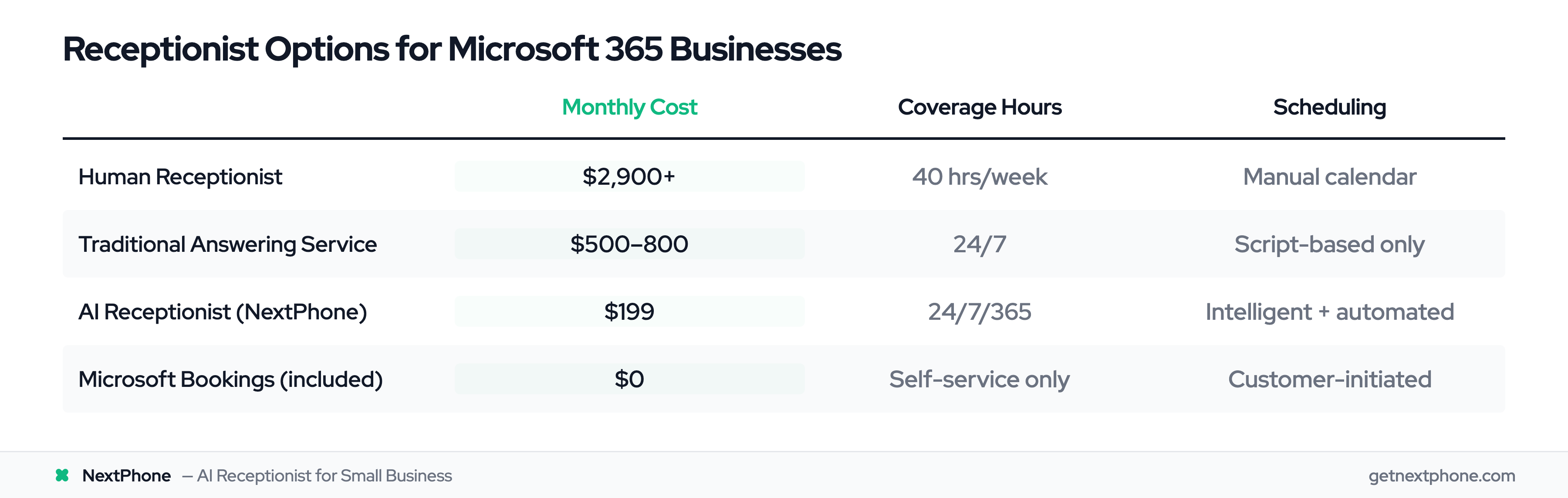
The ROI is substantial. At $199 per month, NextPhone costs less than one day of a receptionist's salary. The typical contractor captures $10,500 per month in previously-missed scheduling calls. That's a 5,300% monthly return.
Compare the alternatives: A full-time receptionist costs $35,000 per year ($2,900 per month) and only works 9-5. You're still missing after-hours calls. Or you keep missing calls entirely and lose $100,000+ annually in revenue that called you first.
For contractors already using Microsoft 365, this leverages your existing investment. You're not replacing Outlook—you're making it dramatically more useful.
Frequently Asked Questions
Will this work with my existing Microsoft 365 account?
Yes. The integration works with all Microsoft 365 Business plans (Basic, Standard, Premium). It also works with Exchange Server on-premise installations and standalone Outlook through OAuth authentication.
You don't need additional Microsoft licenses. If you have Outlook, you can use this. The connection uses Microsoft's Graph API—the same technology Microsoft's own apps use to access your calendar.
Can AI actually book appointments without making mistakes?
Modern AI achieves over 90% accuracy for routine appointment booking when it's trained on your specific business. The AI learns your services, your pricing, your availability rules, and your scheduling preferences.
For appointment booking specifically, the accuracy is even higher because the AI checks your Outlook calendar in real-time before confirming any slot. It can't double-book because it sees what's already scheduled.
For complex or unusual requests, the AI collects the information and flags it for your manual review rather than guessing. You stay in control of non-routine situations.
You configure the availability rules. The AI operates within the parameters you set. If you don't work Sundays, the AI won't book Sunday appointments. If you need 30-minute buffers between jobs, it enforces that automatically.
How do I prevent double bookings?
The AI checks your Outlook calendar in real-time before confirming any appointment. If a slot is already taken—whether booked by the AI, by you manually, by your office manager, or through your website—the system sees it and offers a different time.
Two-way sync ensures all booking sources write to the same calendar. Every system that can create appointments is looking at the same availability data.
You can also configure buffer time. If you set 15-minute buffers, the system automatically blocks 15 minutes after each appointment. Book 2 PM? The system marks 2:00-2:15 as unavailable.
If you manually block time in Outlook for personal appointments, the AI respects those blocks. It only books into slots marked as available.
What happens to after-hours calls?
The AI answers 24/7, including nights, weekends, and holidays. When a customer calls at 9 PM because they just got home and noticed their AC isn't working, the AI answers immediately.
It can book appointments for your next available slot based on the availability rules you configured. If you start work at 8 AM tomorrow, it can book them for 8 AM, 9 AM, or whenever you have openings.
You receive an email and SMS notification about the new booking. The customer receives a confirmation text immediately. When you wake up tomorrow, you check your Outlook calendar and see the appointment already scheduled.
The customer got immediate service instead of voicemail. You get a booked appointment instead of a missed opportunity.
Is my customer data secure?
Yes. The integration uses Microsoft's enterprise-grade security standards. OAuth 2.0 authentication means the AI system never sees your Microsoft password—it uses temporary access tokens with limited permissions.
Data is encrypted in transit (while traveling between systems) and at rest (while stored). The same encryption standards Microsoft uses for all their business products.
NextPhone doesn't store your Microsoft credentials. The OAuth token only allows calendar read/write access, not access to email or other data. If you revoke the token, the integration stops immediately.
This meets the same security requirements as any other Microsoft 365 business application. If you're comfortable using Outlook on your phone or Teams for business communication, the security level is identical.
How much does this cost and what's the ROI?
NextPhone costs $199 per month for unlimited calls and Outlook calendar integration. No per-call charges, no overage fees, no setup costs.
The typical ROI: You're currently missing 2-3 scheduling calls per month at 74.1% miss rate. Capturing those generates $8,400 per month in bookings ($3,500 average job — 2.4 appointments).
ROI calculation: $8,400 in monthly revenue — $199 monthly cost = 4,221% return.
That's conservative math using average job values. If you do higher-ticket work (HVAC replacements, kitchen remodels, whole-house electrical), the ROI is even higher.
Compare to alternatives: A traditional receptionist costs $35,000 per year and only works business hours, still missing after-hours calls. NextPhone costs $2,388 per year and works 24/7. That's 93% cost savings with better coverage.
Free trials are available so you can test it with your business before committing.
Do I need technical skills to set this up?
No. Setup is done through a user interface, not code. If you can click buttons and fill out forms, you can set this up.
Connecting Outlook requires one OAuth permission—the same type of permission you grant when connecting any Microsoft app. Click "Allow," done.
Configuration means answering questions: What days do you work? What hours? What information do you want collected from callers? All point-and-click.
NextPhone support walks you through setup if you need help. Typical setup time is 2-3 hours from start to taking live calls.
No developer required, no IT team needed, no technical expertise necessary.
Start Capturing Every Appointment Request
You're missing 7.7% of your calls that are customers specifically wanting to book appointments. For a typical contractor, that's $100,000+ per year in revenue that called you first, got voicemail, and booked with someone else.
You already use Microsoft 365 for email. Your calendar is already in Outlook. You're already paying for the tools. You just need to connect them to an AI that can actually use them while you're working.
AI + Outlook calendar integration gives you 24/7 appointment booking without hiring staff. Customers call, AI answers, appointments get booked, your Outlook calendar syncs across all your devices. You show up where the calendar tells you to be. That's it.
The ROI is massive. $199 per month captures thousands in monthly revenue from calls you're currently missing. Every scheduling request that goes to voicemail today becomes a confirmed appointment tomorrow.