Your phone system is in a server room closet. The hardware is 12 years old. Last summer, the AC unit servicing that closet died. Your phones went down for 2 days.
Your Avaya vendor quoted $8,000 for parts that are increasingly hard to find. Your IT person spent 15 hours last quarter dealing with phone system issues instead of actual work.
This is what on-premise PBX becomes: a maintenance burden that grows more expensive and less reliable every year.
Cloud-based phone systems with AI eliminate this entirely. No server room. No hardware failures. No emergency maintenance calls. And as a bonus: intelligent answering that captures more calls.
Why On-Premise PBX Becomes a Problem
On-premise systems made sense when cloud wasn't reliable enough. Twenty years ago, keeping your phone system on-site meant control and uptime.
Today, it means headaches. The cloud PBX market has grown to $17.4B and is projected to hit $48.6B by 2034. 90% of organizations now use UCaaS as their primary communications platform. The shift is happening—the question is whether you're ahead of it or behind.
Hardware Ages Out
PBX hardware has a lifespan. After 10-15 years, components fail more frequently. Replacement parts become scarce. Manufacturers discontinue support.
Common scenarios:
- Avaya end-of-support: Older IP Office systems no longer receive updates
- Cisco parts scarcity: Older CallManager hardware increasingly unavailable
- Mitel maintenance: Legacy systems require expensive specialized support. Mitel holds 12.62% of the business phone systems market—and Mitel + Unify combined serve 75M+ users as the 2nd largest UC provider, meaning many businesses face this issue
When the manufacturer says "we don't support that anymore," you're on your own.
Expertise Becomes Rare
The technicians who installed your PBX in 2012 have retired, moved on, or cost premium rates as specialists in aging technology. Finding someone who knows your specific system gets harder every year.
Remote Work Doesn't Work
On-premise PBX assumes everyone is in the office, using desk phones. Modern work requires mobility. Your technicians are in the field. Your office staff may work from home.
Retrofitting on-premise systems for remote access adds complexity and cost. Cloud is remote by design.
Failures Cascade
When cloud servers fail, providers have redundancy. When your single PBX fails, your business has no phones until it's fixed.
The server room AC story isn't hypothetical—we've heard it from multiple business owners. Environmental control fails, equipment overheats, phones go down. On-premise creates single points of failure.
The Hidden Costs of On-Premise
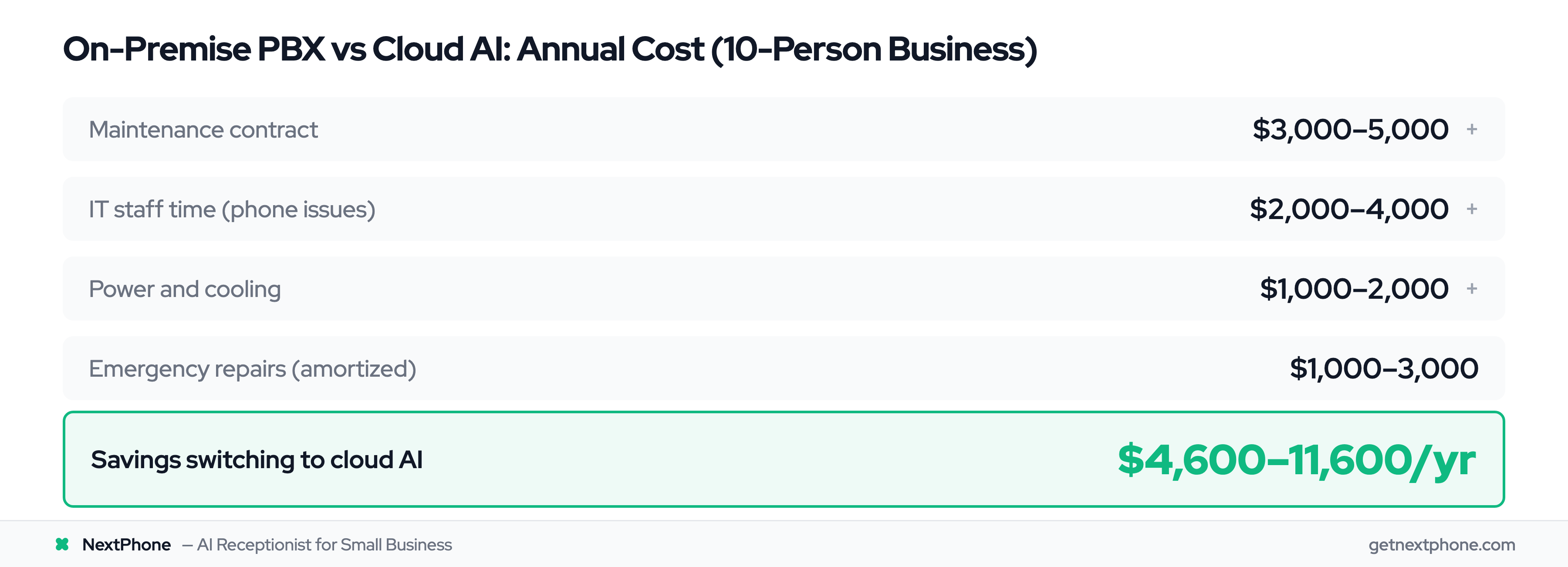
The purchase price of PBX equipment is just the beginning.
Server Room Space
That closet or room hosting your PBX isn't free. It's square footage you could use for something else, or rent you're paying regardless.
Power and Cooling
PBX hardware runs 24/7, generating heat that needs cooling. Both the equipment and the AC running to cool it appear on your utility bills.
IT Staff Time
Every hour your IT person spends on phone system issues is an hour not spent on core business technology. Even if you outsource IT, those support calls cost money.
Maintenance Contracts
Annual maintenance contracts for on-premise PBX typically run $2,000-10,000 depending on system size. These don't cover parts or emergency service—just standard support.
Emergency Repairs
When something breaks, you pay for emergency technician visits, replacement parts, and downtime. An unplanned failure can cost $2,000-5,000 in a single incident.
Opportunity Cost
Outdated systems can't do modern things. AI answering, CRM integration, mobile apps, advanced routing—these require systems designed for them.
What Cloud + AI Delivers
Migrating to cloud-based phone with AI answering changes the equation.
No Hardware
The "phone system" exists in data centers you never see. No server room, no equipment to maintain, no parts to replace.
No Maintenance
Updates happen automatically. Security patches apply in the background. You never schedule a maintenance window.
24/7 AI Answering
Cloud AI answers calls around the clock. In our data, 74.1% of contractor calls went unanswered—often because staff was busy and no one else was available. AI answers every call.
Emergency Detection
AI recognizes "emergency," "urgent," "flooding"—routing critical calls immediately. For plumbers and electricians, this urgency detection is the difference between capturing a $500 emergency job and losing it to voicemail. Your 12-year-old PBX can't detect caller intent.
Work From Anywhere
Cloud systems work on any device: desk phones, mobile phones, laptops. Your team answers business calls from the field, home, or office—a major advantage if you're comparing modern VoIP options.
Predictable Cost
Monthly subscription replaces unpredictable maintenance bills. You know exactly what phones cost each month.
Migration Planning
Over 62% of enterprises have already migrated from legacy PBX to cloud, with those who've made the switch reporting 28% cost savings and 32% productivity improvements. Yet only 40% have fully migrated to UCaaS, and 44% have no plans within 3 years—meaning many businesses are still waiting to act.
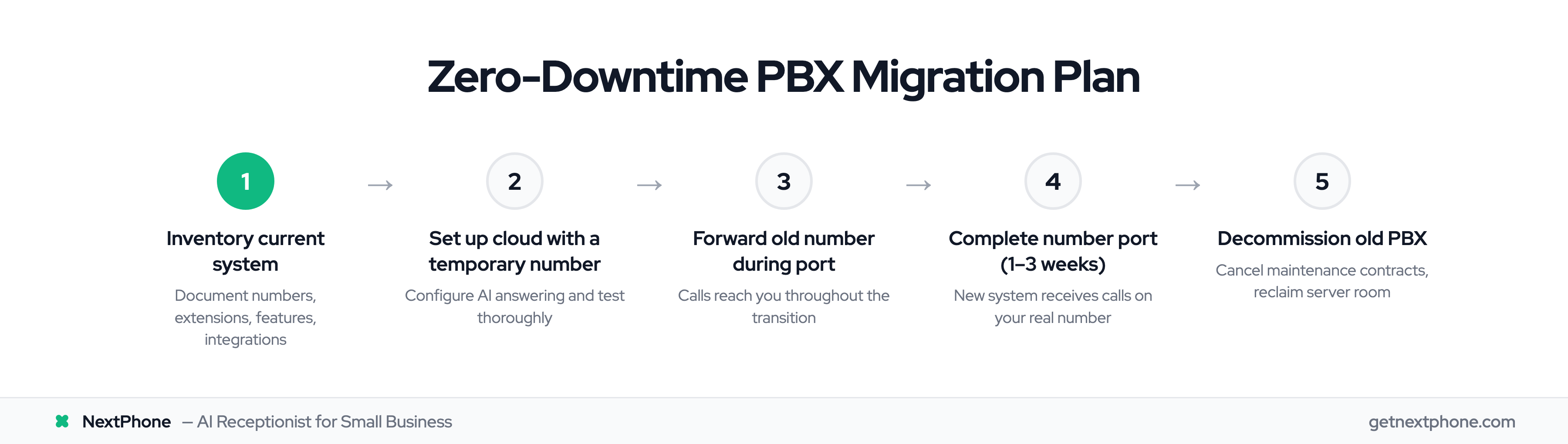
Moving from on-premise to cloud doesn't have to be disruptive.
Step 1: Inventory Your Current System
Document everything:
- How many phone numbers?
- How many extensions?
- What features do you use?
- What integrations exist?
This informs your cloud requirements.
Step 2: Choose Cloud Provider
Evaluate based on:
- AI answering capability
- Pricing structure (flat vs. per-user vs. per-minute)
- Number porting support
- Feature match to your needs
Step 3: Plan the Transition
Decide on cutover approach:
- Big bang: Port all numbers at once, switch completely
- Parallel: Run both systems temporarily, migrate in phases
- Gradual: Port one number, test, port the next
For small businesses, big bang typically works—it's simpler and faster.
Step 4: Prepare for Porting
Gather documentation:
- Current carrier account information
- Authorization signatures
- Phone numbers to port
- Any existing contracts (check termination terms)
Step 5: Execute Migration
Work with your new provider on:
- Number porting timeline (typically 1-3 weeks)
- Configuration of AI and routing
- Testing before go-live
- Training for staff
Step 6: Decommission Old System
Once cloud is verified working:
- Cancel old maintenance contracts
- Dispose of hardware responsibly
- Reclaim server room space