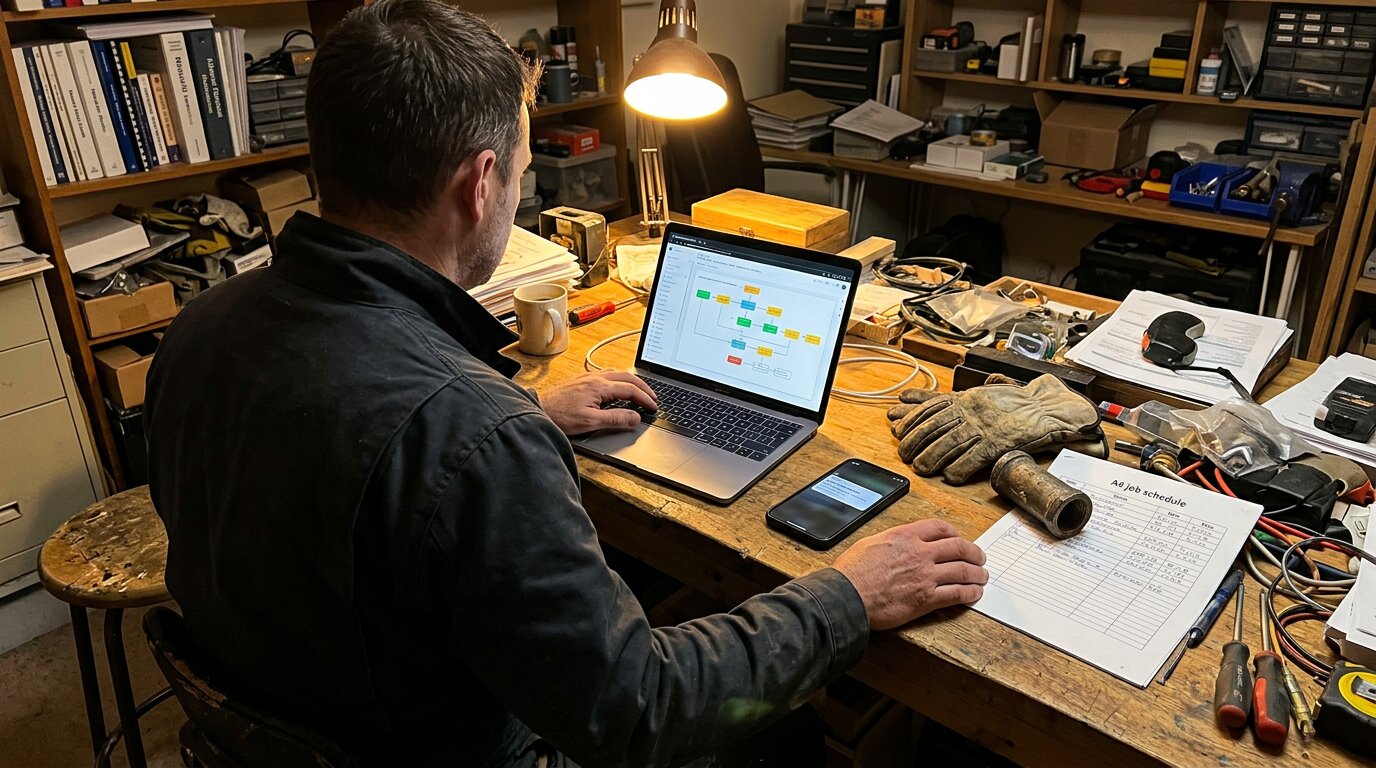
Your phone rings at 2 PM. A customer needs a quote for a bathroom remodel. You're on another job site, hands full. The call goes to voicemail. They call the next contractor. You just lost a $8,500 project.
Industry research shows 74.1% of calls to home services contractors go completely unanswered. For a business receiving 42 calls per month, that's 31 missed opportunities, translating to $21,700 in lost revenue monthly.
A cheaper fix than a $35,000/year receptionist is connecting your AI phone system to your business tools automatically. That's where n8n workflow automation comes in.
What is n8n Workflow Automation?
n8n (short for "node everywhere node") is a workflow automation platform that connects your business apps without requiring code. Think of it as the connective tissue between your tools: when something happens in one system, n8n automatically triggers actions in another.
Unlike cloud-only platforms like Zapier, n8n is open-source on GitHub with over 164,400 stars and 100 million Docker pulls. You can self-host it on your own infrastructure or use their cloud service.
Here's how it works: You build workflows using a visual, drag-and-drop interface. Each workflow consists of connected "nodes" that represent different apps and actions. When a trigger fires (like a webhook from your AI phone system), n8n executes the connected actions automatically: updating your CRM, sending notifications, logging data, whatever you configure.
With 400+ pre-built integrations plus custom HTTP webhooks for any API, n8n can connect virtually any business tool you use. Similar to how Make.com supports 2,000+ apps with 30,000+ actions, n8n provides extensive automation capabilities for business workflows.
Why n8n for Business Call Automation?
Privacy & Data Control
When you're handling customer calls, you're collecting sensitive information: names, phone numbers, addresses, sometimes payment details. With cloud-only automation tools, that data passes through third-party servers.
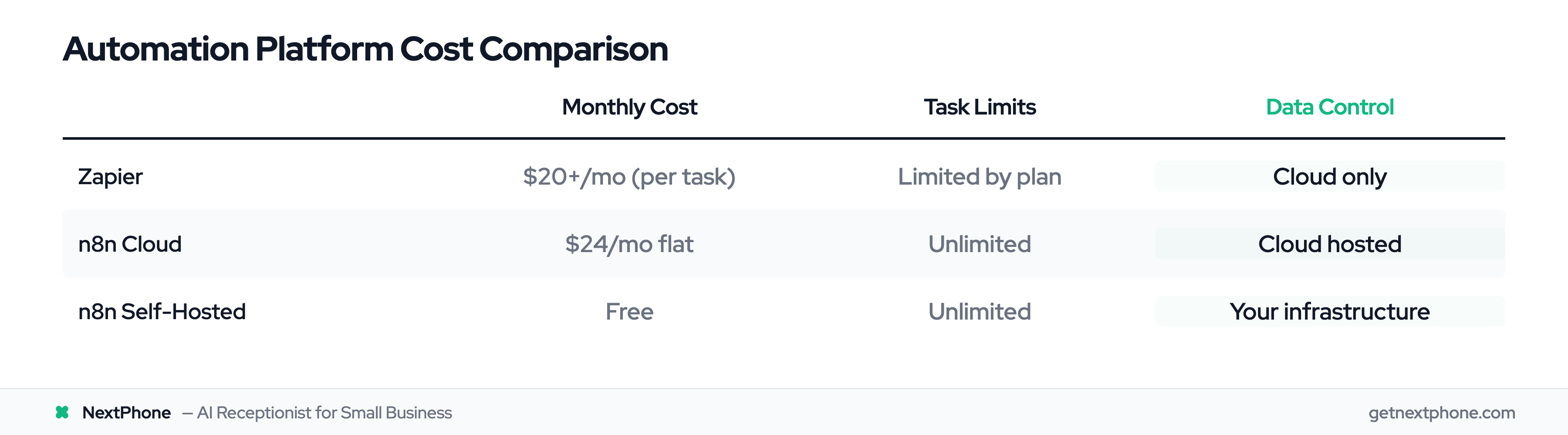
Self-hosted n8n keeps everything on your infrastructure. Customer call data never leaves your servers. This is critical for GDPR compliance. You can even disable telemetry completely.
According to n8n's privacy documentation, the platform is SOC 2 aligned and designed for businesses requiring complete data sovereignty. For a plumbing company handling 100+ calls monthly with customer addresses and service details, self-hosting means you control where that data lives.
Cost-Effective Scaling
Zapier starts at $20/month, but costs explode as your call volume grows. Each action counts as a "task," and you pay per task. A high-volume contractor could hit $100+/month quickly.
n8n cloud hosting is $24/month for the Starter plan. Self-hosted? Free. No task limits. Unlimited workflows. Unlimited executions.
Companies like Delivery Hero and StepStone use n8n to run hundreds of mission-critical workflows. Delivery Hero saved over 200 hours monthly with a single n8n automation. StepStone reports integrating new data sources 25 times faster than before.
Unlimited Flexibility
n8n's 400+ built-in integrations cover the tools most businesses use: HubSpot, Salesforce, Google Sheets, Slack, Twilio, and more. But the real power is the HTTP node.
If a service has an API (and most do), n8n can integrate with it, whether there's a pre-built node or not. You're not limited to what's in the app marketplace. This is perfect for custom integrations like connecting NextPhone's webhooks to your specific business workflow.
NextPhone + n8n Integration: Automated Call Workflows
Here's where it gets practical. Let's walk through exactly how NextPhone integrates with n8n to automate your call management.
How NextPhone Webhooks Work with n8n
NextPhone's AI virtual receptionist answers every call in under 2 seconds, 24/7. During the conversation, the AI collects caller information: name, phone number, reason for calling, urgency level, and any custom fields you configure.
When the call ends, NextPhone fires a webhook containing all the structured data. That webhook hits your n8n workflow, which processes the information and triggers your configured actions: updating your CRM, sending SMS confirmations, creating tasks, whatever you need.
It's real-time. No delays. No manual logging.
Example Workflow: Call to CRM in 3 Steps
Here's a concrete example for an HVAC contractor:
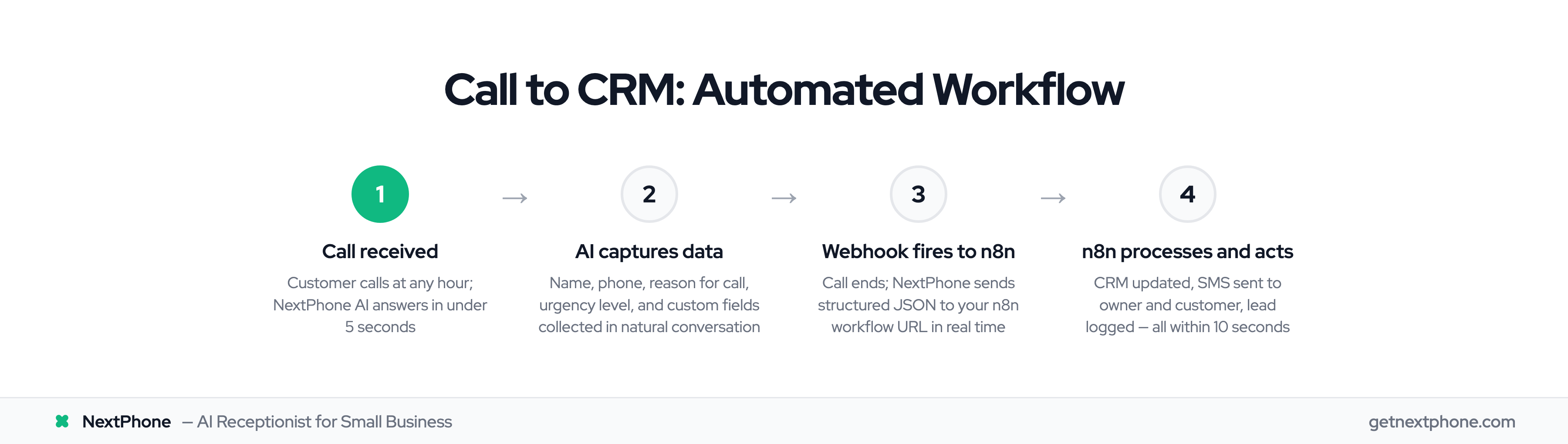
Step 1: Call Received Customer calls your business number at 9 PM. Your phone is on silent. You're having dinner.
Step 2: AI Captures Data NextPhone's AI answers: "Thanks for calling ABC HVAC. How can I help you?" The customer explains their AC stopped working. It's 95 degrees inside. The AI asks for their name, phone number, address, and confirms it's an emergency. The AI collects all this information during the natural conversation.
Step 3: Webhook Triggers n8n Call ends. NextPhone immediately sends a webhook to your n8n workflow URL with structured JSON data containing everything the AI collected.
Step 4: n8n Processes the Data Your n8n webhook node receives the data. The workflow checks the urgency field. Because it's marked "emergency," n8n:
- Creates a high-priority lead in your CRM (HubSpot, Pipedrive, whatever you use)
- Sends an SMS to your phone with customer details and "EMERGENCY AC REPAIR" tag
- Logs the interaction in Google Sheets for record-keeping
- Sends a confirmation SMS to the customer: "We received your emergency request. Our technician will call you within 15 minutes."
Total time from call end to all actions complete: Under 10 seconds.
You call the customer back within 15 minutes. Job won. The alternative? Voicemail. Customer calls competitor. You never knew they called.
What Data Gets Captured
Our analysis of the 1,446,980 calls in our corpus shows approximately one in four callers asks for a callback, and urgent calls with keywords like "emergency" or "ASAP" rank among the top reasons people call. Without automation, most callback requests fall through the cracks.
With NextPhone + n8n, every data point is captured:
- Caller name and phone number
- Call timestamp and duration
- Reason for call (quote, emergency, billing question)
- Urgency level (routine vs emergency)
- Custom fields you configure (service type, budget, preferred appointment time)
Everything is structured and ready for automation. According to n8n's webhook documentation, webhooks can handle payloads up to 16MB, more than enough for detailed call transcripts if needed.