Email notifications after calls are automatic alerts sent to your inbox whenever a phone call ends, whether you answered it, missed it, or an AI receptionist handled it. They range from simple "missed call" alerts to full AI-generated summaries with transcripts, action items, and urgency levels.
Below we cover how to set them up on any system, then show how AI-powered call summaries take notifications further for businesses losing revenue to forgotten follow-ups.
How to Set Up Email Notifications After Calls
Phone Carrier Voicemail-to-Email
Most major carriers offer voicemail-to-email as a basic notification option:
Verizon: Enable Visual Voicemail in the My Verizon app → Settings → Voicemail → turn on email delivery. Sends voicemail recordings and transcriptions to your email.
AT&T: AT&T Visual Voicemail settings → Notifications → enable email forwarding. Available on most postpaid plans.
T-Mobile: T-Mobile Visual Voicemail → Settings → Email a copy. Attaches the voicemail audio file to the email.
These are basic: you get the voicemail recording and a rough transcription. No call summaries, no caller intent, no action items.
VoIP and Business Phone Systems
Most business phone systems include email notifications in their settings:
- Google Voice: Settings → Voicemail → Enable email notifications. Sends transcribed voicemails to your Gmail.
- RingCentral: Admin Portal → Phone System → Notifications → configure missed call and voicemail email alerts.
- Grasshopper: Settings → Extensions → Notifications → enable email delivery for calls and voicemails.
- OpenPhone: Workspace Settings → Notifications → configure email alerts per team member.
These give you missed call alerts and voicemail transcriptions, but still require you to manually piece together what the caller needed.
AI-Powered Call Summary Emails
AI receptionist platforms like NextPhone send a different kind of notification: a complete summary of the entire conversation (whether you answered or the AI handled it) with the caller's name, what they needed, urgency level, and specific next steps. This is what the rest of this guide covers.
The Hidden Cost of Forgotten Follow-Ups
You promise a customer you'll call them back with a quote. Then three more calls come in. By the end of the day, you've forgotten who needed the callback.
In our analysis of 1,446,980 inbound business calls for home services contractors and others, approximately one in four callers asks for a callback. That's roughly 11 callback requests per month for a typical contractor receiving 42 calls monthly.
Without a systematic way to track these requests, most of those callbacks never happen. Customers move on to the next contractor. You lose the job without even knowing you were in the running.
86% of workers say poor communication causes workplace problems.
Why Callbacks Fall Through the Cracks
You're under a sink fixing a leak when your phone rings. The customer asks about a bathroom remodel and wants a detailed quote. You say "I'll call you back this afternoon." Then you finish the job, drive to the next appointment, handle two emergency calls, and head home.
The callback? Completely forgotten.
This is a systems problem. When you're working with your hands, you can't write down callback requests. When you're juggling five jobs in a day, mental notes don't cut it. Without a tracking system, there's no accountability.
The Math on Lost Revenue
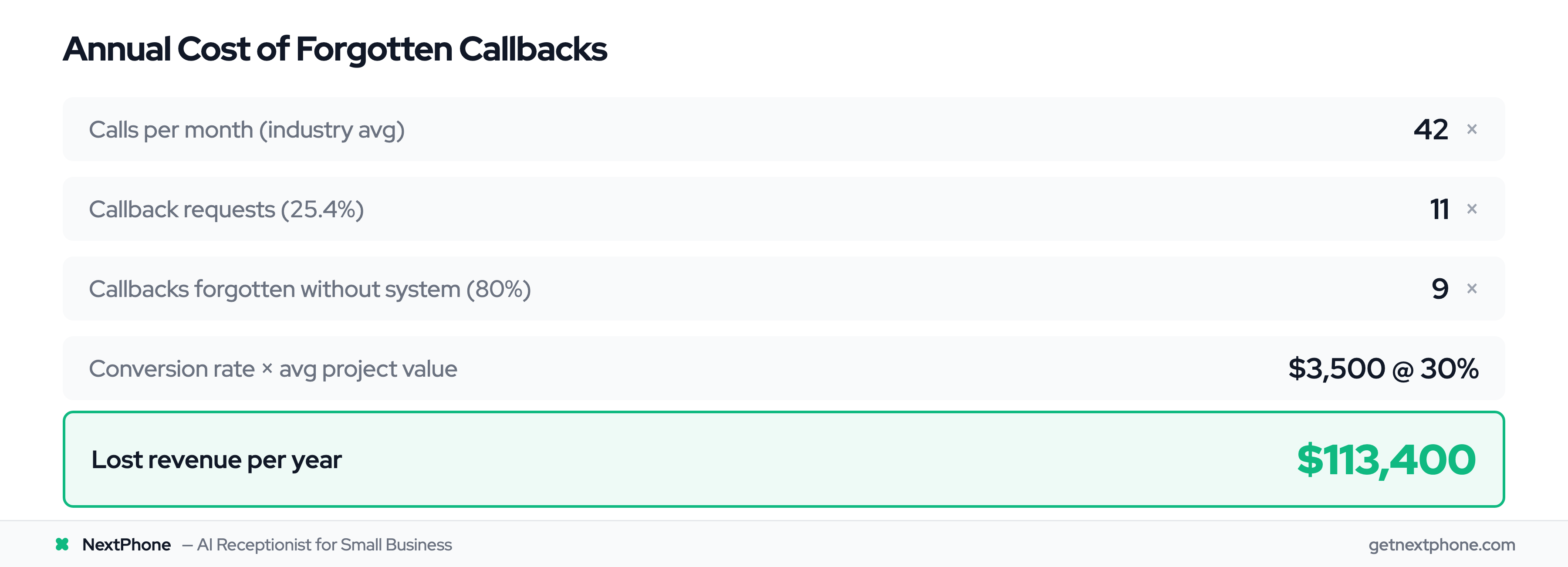
Let's run the numbers for a typical home services contractor:
- 42 calls per month (industry average)
- Roughly one in four includes a callback request = 11 callbacks needed per month
- Without tracking, 80% are forgotten = 9 lost callbacks per month
- At a 30% conversion rate and $3,500 average project value
- Lost revenue: $9,450 per month = $113,400 per year
That's more than enough to hire a full-time employee. But you're not trying to hire someone. You're just trying to remember to call people back.
Common Scenarios from Home Services
An electrician finishes a service call in an attic. While up there, the customer mentions wanting a panel upgrade and asks for a quote. The electrician says "I'll email you an estimate tomorrow." Three more service calls happen that day. The estimate never gets sent.
A plumber gets a call at 10 AM about a kitchen renovation. She's in the middle of replacing a water heater. She tells the customer she'll call back after 2 PM with pricing. By 2 PM, she's on another job. The callback doesn't happen.
Email notifications after calls prevent this entirely. After every conversation (whether you answered it or your voice AI receptionist handled it), you get an email with the caller's information and what they needed. No more relying on memory. No more lost revenue.
What Are Email Notifications After Calls?
Automated Email Delivery After Every Call
Email notifications after calls are exactly what they sound like: automatic emails sent to you (and your team) immediately after a phone call ends. They're comprehensive summaries of every conversation, whether you answered the call or not.
The system works like this: Call ends → AI processes the conversation → Email generated with summary and details → Sent to designated team members → You take appropriate action.
No manual steps. No logging into a dashboard. The information arrives in your inbox within seconds of the call ending.
Real-Time vs Scheduled Notifications
Most modern systems send emails in real-time, typically within 10-15 seconds of the call ending. This is critical for emergency situations. When a customer calls about a burst pipe at 11 PM, you need to know immediately, not when you check your daily digest the next morning.
Some systems also offer digest modes: a single email summarizing all calls from the day. This works well for office managers who want an overview without inbox overload. You can typically configure both: real-time for emergencies, daily digest for routine calls.
Who Receives the Emails
One of the most powerful features is routing different notifications to different people based on call type:
- Owner receives emergency calls only
- Office manager gets all calls
- Sales team gets new lead inquiries
- Service manager gets scheduling requests
- Billing department gets payment questions
This prevents inbox overload while ensuring the right person sees every call. 77% of Fortune 100 companies use Slack, achieving 338% ROI through better communication. As CloudTalk notes, "Automated notifications are real-time alerts that let you know when important events happen, like an incoming call, a missed call, a voicemail, or a new message."
What's Included in Call Notification Emails
Caller Information and Context
At minimum, every email notification includes:
- Caller's name (if provided or identified)
- Phone number (tap-to-call enabled on mobile)
- Date and time of call
- Call duration
- Whether the call was answered or went to voicemail
But modern systems include much more.
AI-Generated Call Summaries
This is where email notifications get powerful. Instead of just getting a transcript (a wall of text to read through), you get an AI-generated summary that extracts the key information:
Example email summary: "John Smith called at 2:34 PM requesting emergency AC repair. His system stopped working this morning. He needs same-day service and mentioned a budget of $500-800. Marked as URGENT. Action: Call back within 30 minutes."
According to Dialpad's research, their system "automatically sends all the attendees a recap email that contains the recording and searchable transcript, action items, and more."
The AI identifies:
- What the caller wanted (intent)
- Level of urgency (routine, urgent, emergency)
- Specific details (budget, timeline, location)
- Clear next steps (action items)
Transcripts and Recordings
Beyond the summary, you get access to the complete conversation:
- Full transcript: Searchable text of the entire call, broken down by speaker
- Audio recording: Link to listen to the actual conversation
- Timestamps: Jump to specific parts of the call
This is valuable for training new team members, resolving disputes ("I never said that"), and quality assurance.
Action Items and Next Steps
The best systems extract specific action items from the conversation:
- "Send estimate for bathroom remodel by Friday"
- "Schedule follow-up call for next Tuesday at 10 AM"
- "Email product specs mentioned during call"
- "Add to CRM as hot lead - ready to buy"
These become your to-do list without any manual effort.
Key Benefits of Email Notifications
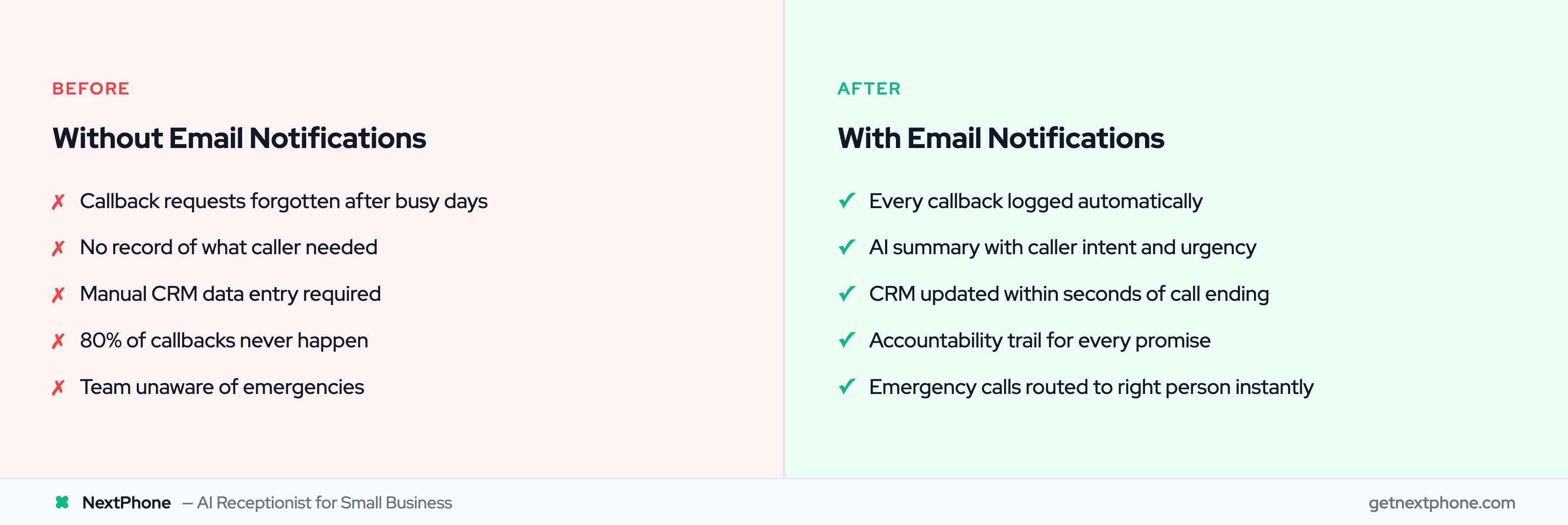
Never Miss a Callback Request Again
We've already covered the revenue impact: $113,400 per year recovered by simply following up on callback requests. But the benefit goes beyond money.
Customer experience improves dramatically. When you call someone back as promised, you build trust. When you forget, you look unprofessional. Email notifications eliminate the "I forgot" excuse entirely.
The email serves as both reminder and reference. You know exactly what you promised, when you promised it, and what details the customer provided.
Team Coordination Without Meetings
In a typical three-person HVAC company, the owner handles installations, the office manager schedules jobs, and a tech handles warranty work. Email notifications let each person stay informed without constant check-ins:
- Owner gets notifications for emergency calls and new installation leads
- Office manager receives all calls for scheduling and coordination
- Tech lead sees warranty and technical support inquiries
Everyone knows what's happening without meetings, group texts, or "Did anyone talk to the customer about X?" conversations.
According to NUACOM, "Email notifications eliminate the risk of missed communication by providing immediate awareness of missed calls, helping you follow up promptly and avoid lost sales opportunities."
Accountability and Follow-Up Tracking
When every call generates an email, there's a paper trail. You can search your inbox for "John Smith" and find every conversation you've had with that customer. No more "I think we talked about this three months ago but I'm not sure what we decided."
Managers can review their team's call handling without listening to dozens of recordings. A quick scan of email summaries shows who followed up promptly and who let leads go cold.
Training and Quality Assurance
New employees learn faster by reading email summaries from experienced team members. "This is how Sarah handles pricing questions." "This is how Mike deals with difficult customers."
You can forward particularly good (or bad) call summaries to your team as teaching moments. This is far easier than saying "listen to recording #247 from last Tuesday."
As Woodpecker points out, "A follow-up email provides a written record of the conversation which can be referred back to for clarification and accountability." According to email marketing benchmarks, open rates now average 38%+, up from 20-25% previously.