
Introduction
Your Gmail is integrated. Your Google Calendar syncs perfectly. Copper CRM logs every email conversation. You've built the perfect Google Workspace stack.
But your phone keeps ringing. And you can't answer.
Industry research shows 74.1% of calls to home services contractors go completely unanswered. That's three out of every four potential customers calling someone else.
Copper CRM is Google's recommended CRM for Workspace users. It handles email and calendar brilliantly. But it doesn't answer your phone. Here's how to complete the stack with AI phone integration.
Why Copper CRM Users Chose Google Workspace
Google Workspace Native CRM
Copper is the only CRM solution that's a Recommended for Google Workspace app, a Chrome Enterprise Partner, and a Google-backed company. It's built specifically for teams that live in Gmail, Calendar, and Drive.
The integration is native, not bolted on. Add contacts directly from Gmail. View customer history without leaving your inbox. Schedule follow-ups that sync with Google Calendar instantly. Access files from Drive right inside customer records.
According to Matthew Izaat, Google Cloud Product Manager, "customers value a best-in-class CRM solution with deep, native integration to critical Workspace apps such as Gmail, Drive and Calendar."
Who Uses Copper
Small teams that chose Google Workspace over Microsoft or other ecosystems. Agencies, consulting firms, contractors, real estate agents. Typically 5-50 people. Teams that want powerful CRM features without leaving the Google tools they already use.
Copper CRM pricing starts at $25/user per month for the Basic plan. The Professional plan at $59/user per month includes third-party integrations, which brings us to the phone problem.
The Phone Call Gap
The Missed Call Problem
Copper CRM doesn't answer phone calls. It logs emails, tracks calendar events, and manages contacts. But when a potential customer calls? You're on your own.
That's a problem if you're:
- On a job site and can't reach your phone
- In a client meeting
- Focused on actual work
- Running a small team without a receptionist
- Getting calls after business hours
We've answered 2,000,000+ business calls for contractors like you. The industry data is brutal: 74.1% of calls go completely unanswered.
Revenue Impact for Small Businesses

Here's the math. A typical small contractor receives about 42 calls per month. If 74.1% go unanswered, that's 31 missed calls. If just 20% of those would have converted at an average project value of $3,500:
31 missed calls × 20% conversion × $3,500 = $21,700 per month lost
That's $260,400 per year in revenue walking away because you couldn't answer the phone.
The call logging market is growing from $2.3 billion in 2021 to a projected $4.1 billion by 2026. Businesses know they're losing money. They're looking for solutions.
Current Copper Phone Integration Options
Manual Calling Integrations (CloudTalk, JustCall, RingCentral)
Copper integrates with several phone systems: CloudTalk, JustCall, RingCentral, and Kixie.
These are solid tools. They let you click-to-dial contacts directly from Copper. They automatically log call duration, notes, and recordings. According to CloudTalk's research, companies that integrate their CRM with calling platforms report 30% faster customer response times and a 40% drop in manual data entry.
What They Do Well
You get automatic call logging. Click a contact in Copper, the phone system dials. The call gets logged automatically with duration and notes. You can see call history right in the CRM.
For outbound sales teams, this is efficient. No more typing in phone numbers. No more forgetting to log calls.
The Limitation: You Still Have to Answer
Here's what these integrations don't solve: missed calls.
CloudTalk, JustCall, and RingCentral are calling tools for when you're available to answer. They help you make calls and log them. But if you can't answer (because you're on a ladder, in a meeting, or asleep at 9 PM), the call still goes to voicemail.
The lead is still lost.
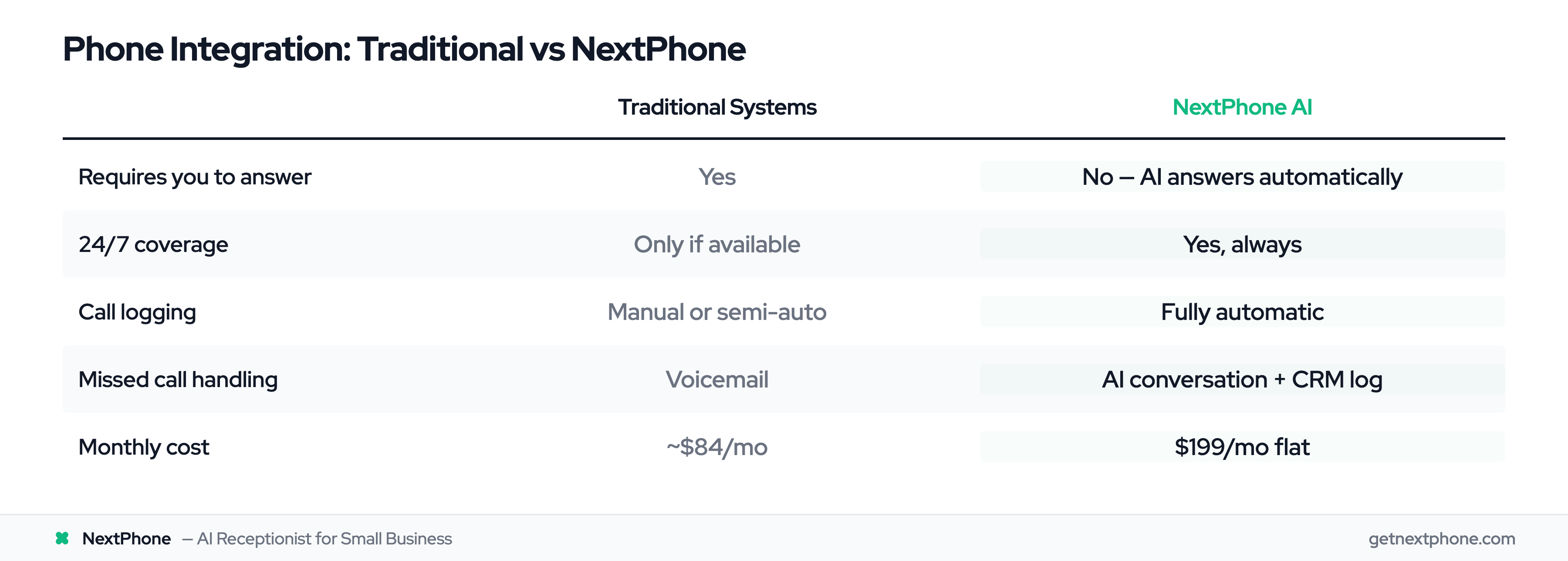
| Feature | Traditional Phone Systems | NextPhone AI Integration |
|---|---|---|
| Requires you to answer | Yes | No - AI answers automatically |
| 24/7 coverage | Only if you're available | Yes |
| Call logging | Manual or semi-automatic | Fully automatic |
| Data collection | You ask questions | AI asks and logs |
| Missed call handling | Voicemail | AI conversation + CRM logging |
How NextPhone Integrates with Copper CRM
AI Answers First, Then Logs to Copper
NextPhone takes a different approach. Instead of helping you make calls, it answers calls for you.
The AI virtual receptionist picks up in under 2 seconds. Every time. Even at 2 AM on Sunday.
"Thanks for calling [Your Business]. How can I help you today?"
The caller explains what they need. The AI asks clarifying questions. It collects the information you care about: caller name, phone number, email, company name, reason for call, project details, budget, timeline.
All while having a natural conversation.
What Data Gets Captured
You configure what information the AI should collect. Standard fields:
- Caller name and phone number
- Email address
- Company name
- Reason for calling
- Service interest
- Budget range
- Preferred contact time
Custom fields based on your business:
- Property address (for contractors)
- Square footage (for cleaning services)
- Current provider (for service businesses)
- Urgency level
Whatever you need to qualify a lead or route a call properly.
Real-Time CRM Sync
Here's where the Copper integration happens. As the AI collects information during the call, it pushes data to Copper's API via HTTP webhook.
Not after the call. During the call.
The lead appears in Copper CRM within seconds. By the time the call ends, you have a complete record: caller details, conversation summary, next steps.
If it's urgent (and urgent calls rank among the top reasons people call, using keywords like "emergency," "urgent," or "ASAP"), the AI can transfer the call to your cell phone immediately while still logging everything to Copper.
You get how NextPhone's AI receptionist works without leaving the Google Workspace ecosystem you chose Copper for.