
You're in the middle of a deposition. Your phone vibrates. A potential client needs immediate help with an emergency custody matter. You can't answer. The call goes to voicemail.
They don't leave a message. They call the next firm on Google. That attorney picks up. You just lost a $15,000 case.
According to research, 35% of law firm calls go unanswered, costing the industry an estimated $109 billion annually. Law firms miss around 36% of incoming calls, and 34% of those callers never try to reach out again. That's not just a missed call - that's $649 in wasted marketing spend per lead, and potentially thousands in lost case value.
Clio powers 150,000+ legal professionals in over 130 countries as the world's leading legal practice management software. When you integrate an AI receptionist like NextPhone with Clio, you transform your practice from missing one-third of calls to capturing every client, automating intake, and creating matters without lifting a finger.
This post explains exactly how AI receptionist integration with Clio works - from the initial call to automatic matter creation, with real workflows, cost comparisons, and technical details.
The Cost of Missed Calls for Law Firms

Legal Industry Has Second-Highest Missed Call Rate
If you think you're the only attorney missing calls, you're not. CallRail's industry benchmarks show that law firms have the second-highest missed call rate of any industry, with 28% of calls going unanswered. The ABA reports that law firm answer rates have dropped to 40%, down from 56% in 2019, with 86% failing to collect email and 45% failing to collect phone on intake.
Here's what makes it worse: of the firms that missed a call, only 20% returned it. That means nearly half of all law firms (48%) are effectively unreachable by phone.
Our own call data from small businesses across different industries confirms a similar pattern, and industry research puts 74.1% of calls completely unanswered. When you're in court, meeting with a client, or reviewing case files, your phone becomes a missed opportunity machine.
The $649 Per Lead Waste
The average law firm spends $649 to generate a single lead through PPC, SEO, referrals, and other marketing channels. When that lead calls and gets voicemail, you're not just missing a phone call - you're flushing $649 down the drain.
Let's do the math for a solo attorney receiving 30 calls per month:
- 36% missed (legal industry average) = 11 missed calls/month
- 11 missed calls — $649 cost per lead = $7,139/month in wasted marketing spend
- If 20% of those would have converted at an average $5,000 case value = $11,000/month in lost revenue Total monthly loss: $18,139
- Annual loss: $217,668
For a small firm receiving 50 calls per month, the numbers get even more brutal:
- 36% missed = 18 missed calls/month
- $649 — 18 = $11,682 wasted on marketing
- 20% conversion — $5,000 = $18,000 lost revenue Total monthly loss: $29,682
- Annual loss: $356,184
Client Behavior: Why Speed Matters
67% of legal clients choose the first attorney who answers their call. Not the best attorney. Not the most experienced. The one who picks up the phone.
Legal clients are dealing with stressful situations - divorce, criminal charges, estate planning, business disputes. They want immediate help. When you don't answer, they assume you're too busy for their case.
Research shows that law firms responding within the first five minutes experience a 400% higher conversion rate compared to those who respond later. Every minute you wait, your chances of winning that client drop dramatically.
The legal profession has a communication problem. Poor communication has become the most significant single source of complaints against lawyers. It's not malpractice that destroys reputations - it's simply failing to return calls promptly.
What Is Clio?
Clio is cloud-based legal practice management software used by over 150,000 legal professionals in 130+ countries, handling matter management, time tracking, billing, calendars, and document storage. It offers two main products -- Clio Manage (core practice management) and Clio Grow (client intake and CRM) -- with over 250 integrations in its app directory. According to the Clio 2024 Legal Trends Report, 79% of legal professionals now use AI daily (up from just 19% in 2023), while only 40% of law firms answer phone calls (down from 56% in 2019). When an AI receptionist integrates with Clio, data flows automatically -- a potential client calls at 9 PM on Saturday, the AI captures their information, and by Monday morning there's a new lead in Clio Grow with complete intake details waiting for your review.
Clio + AI Receptionist Options Compared
| Feature | Traditional Answering Service | Smith.ai | NextPhone AI |
|---|---|---|---|
| Monthly cost | $500-800 (limited calls) | $300+ (30 calls) | $199 (unlimited calls) |
| Availability | Business hours or limited 24/7 | 24/7 (higher tiers) | 24/7/365 |
| Clio integration | Manual entry or basic sync | Native connector | API/webhook (fully customizable) |
| Auto matter creation | No | Limited | Yes, via Clio API |
| Call capacity | 1 at a time | Multiple | Unlimited simultaneous |
| Legal intake customization | Script-based | Template-based | Fully configurable per practice area |
| Overage fees | Yes | $9.50/call over plan | None |
How AI Receptionists Work for Law Firms
24/7 Availability (No After-Hours Voicemail)
Traditional receptionists work 9-5. Your potential clients call 24/7. The disconnect costs you cases.
An AI receptionist for law firms answers every call in under 5 seconds, regardless of time, day, or how many other calls are coming in simultaneously. Saturday night emergency? Answered. Sunday afternoon consultation request? Handled. Tuesday at 2 AM after someone's been arrested? The AI picks up.
You don't pay overtime. You don't worry about sick days or vacation coverage. The AI never gets frustrated, never puts someone on hold for 10 minutes, and never forgets to log critical details.
Legal-Specific Call Handling
Generic AI chatbots weren't built for legal intake. Legal-focused AI receptionists are trained on scenarios specific to law practice:
- Case type inquiries (personal injury, family law, criminal defense, estate planning)
- Initial consultation requests and availability questions
- Conflict of interest screening (collecting party names)
- Urgency assessment (statute of limitations deadlines, court date proximity, emergency situations)
- Fee structure questions and payment options
The AI can pull from your knowledge base to answer common questions: your practice areas, geographic coverage, fee structures, typical timeline for case types, and your firm's approach to specific legal matters.
Urgency Detection and Call Routing
Not all legal calls are created equal. A question about updating a will can wait. A call about a protective order needed before Monday cannot.
AI receptionists analyze call content in real-time to detect urgency signals. In our call data, urgent calls with language like "emergency," "urgent," "ASAP," or "deadline" rank among the top reasons people call. For law firms, these might include:
- "I was just arrested"
- "My court date is tomorrow"
- "The statute of limitations is about to expire"
- "I need an emergency custody order"
- "I was just served papers"
When the AI detects high urgency, it can immediately transfer the call to your mobile phone. For routine inquiries, it collects complete intake information and schedules a consultation. You handle only the calls that truly need your immediate attention.
Human Handoff When Needed
AI receptionists excel at structured intake - names, contact information, case details, scheduling. For complex legal strategy questions or highly emotional situations, the best approach is a hybrid model.
The AI can recognize when a question is beyond its scope: "That's a complex question about estate tax implications. I'd like to connect you with Attorney Smith who specializes in estate planning. May I transfer you now, or would you prefer to schedule a consultation?"
If you're unavailable, the AI still captures all the caller's information, logs it in Clio, and sends you a detailed summary with transcript and recording. You return the call with full context instead of playing phone tag based on a vague voicemail.
Clio Integration: The Complete Workflow
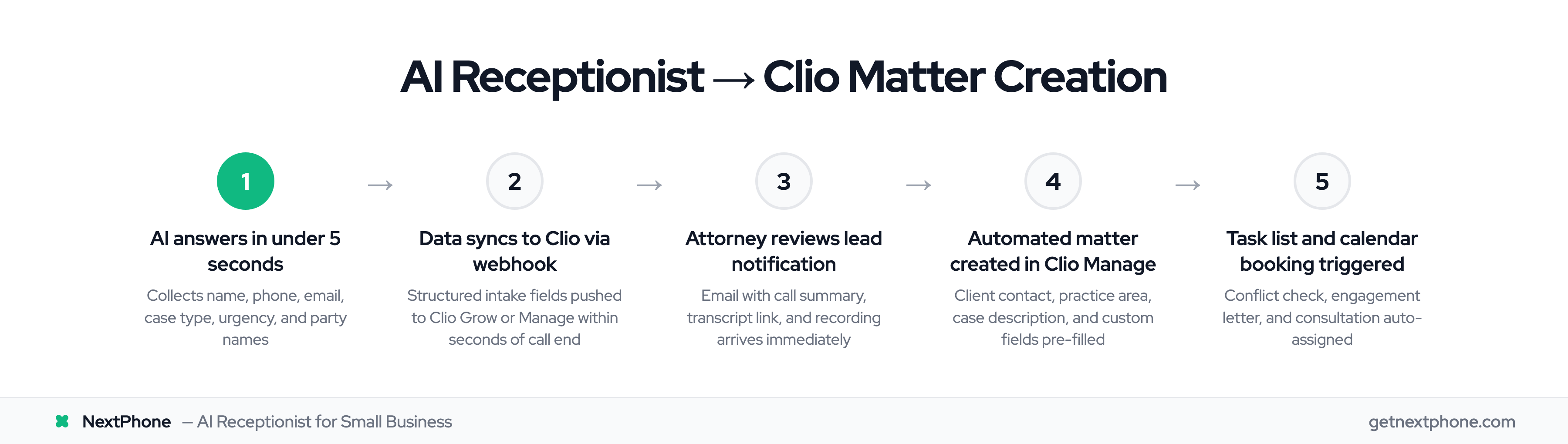
Step 1: AI Answers and Collects Client Data
When a potential client calls, the AI engages them conversationally - not with robotic menus or "press 1 for billing" frustration.
The conversation might sound like this:
AI: "Thank you for calling Smith & Associates. How can I help you today?"
Caller: "I was in a car accident last week and need to talk to someone about a personal injury case."
AI: "I'm sorry to hear about your accident. I can help get you connected with our personal injury team. First, may I get your name and best contact number?"
Caller: "Sure, it's Jennifer Martinez, 555-0123."
AI: "Thanks Jennifer. Can you briefly tell me what happened in the accident and if you've seen a doctor for your injuries?"
The AI systematically collects structured data:
- Caller name, phone number, email address
- Case type (personal injury, family law, criminal, etc.)
- Brief case details (accident description, parties involved, timeline)
- Urgency level (immediate need vs consultation request)
- Preferred contact method and consultation timing
- Whether they've spoken with other attorneys (conflict check consideration)
All of this happens in a natural conversation, not a form-filling interrogation.
Step 2: Data Syncs to Clio (Grow or Manage)
Once the call ends, the AI doesn't just save a recording to a folder somewhere. It pushes structured data directly to your Clio account.
There are two main integration approaches:
-
Native Integrations - Services like Smith.ai offer pre-built Clio Grow connectors, but charge per call ($9.50/call over plan limits) and provide limited customization of intake flows.
-
API/Webhook Integrations - NextPhone uses HTTP webhooks to connect with Clio's public API. This approach is more flexible -- you customize exactly which data goes where, map custom fields, and connect to Clio Manage or Clio Grow based on your workflow. Unlimited calls at a flat $199/month means no overage surprises after a marketing push.
Either way, the client data flows into Clio within seconds of the call ending. For firms using Clio Grow, the caller becomes a new lead. For firms managing intake directly in Clio Manage, a new contact and matter record are created.
Field mapping looks something like this:
- [caller_name] — Clio contact: first_name + last_name
- [phone] — Clio contact: phone_number
- [email] — Clio contact: email
- [case_type] — Clio matter: practice_area
- [case_details] — Clio matter: description
- [urgency_level] — Clio custom field: priority
Step 3: Automated Matter Creation
Here's where the real automation happens. Firms using Clio Grow's automated workflows can set up triggers that automatically convert approved leads into matters in Clio Manage.
The workflow might look like this:
- AI call creates new lead in Clio Grow
- Attorney receives email notification with call summary and recording
- Attorney reviews lead details and marks as "approved" in Clio Grow
- Automated workflow triggers: creates new matter in Clio Manage
- Matter is pre-filled with all intake data (client name, contact info, case type, description)
- Matter is assigned to the appropriate attorney based on practice area
- Automated task list is created: run conflict check, send engagement letter, schedule initial consultation
According to Clio, firms using Clio Operate (their enterprise solution) have accelerated matter creation by 80% through automation like this.
For more conservative workflows, the AI creates the lead, and the attorney manually converts it to a matter after reviewing. Either way, you eliminate the manual data entry that wastes 10-15 minutes per call.
Step 4: Activity Timeline Logging
Every call is logged in Clio's activity timeline with a timestamp. The entry includes:
- Call date, time, and duration
- Caller identification and contact information
- AI-generated summary of the call (what the caller needed, case details, urgency)
- Link to full transcript (searchable text of the entire conversation)
- Link to call recording (audio file for review)
Six months later, when you need to recall what the client said during their initial inquiry, it's all there. Searchable, accessible, and documented.
This creates an audit trail that protects you and provides context for everyone on your team. No more "I think they mentioned something about a deadline" vagueness.
Key Features for Legal Client Intake Automation
Custom Data Collection for Legal Intake
Generic intake forms don't work for legal. A personal injury case needs completely different information than a family law matter or criminal defense case.
AI receptionists can ask practice-area-specific questions:
Personal Injury:
- Date and location of accident
- Type of injuries sustained
- Medical treatment received
- Insurance information (yours and other party's)
- Police report filed?
Family Law:
- Names of parties involved
- Children (names, ages)
- Current custody arrangement
- Reason for seeking legal help (divorce, modification, enforcement)
Criminal Defense:
- Charges filed
- Court date (urgency assessment)
- Currently represented?
- Out on bond or in custody?
Estate Planning:
- Assets to be included
- Beneficiaries
- Existing documents (will, trust, power of attorney)
- Immediate need or planning ahead?
All responses are captured in structured format and synced to Clio custom fields. Your intake is comprehensive and consistent, not dependent on whether your receptionist remembered to ask the right questions.
Calendar Sync and Consultation Booking
Clio offers bi-directional calendar synchronization with Google Calendar and Microsoft Office 365. When your Clio calendar is synced with your personal calendar, the AI receptionist can check your real-time availability during the call.
The conversation becomes:
AI: "I can schedule an initial consultation for you with Attorney Johnson. I see she's available Tuesday at 2 PM or Wednesday at 10 AM. Which works better?"
Caller: "Tuesday at 2 works great."
AI: "Perfect, I've booked you for Tuesday, March 15th at 2 PM. You'll receive a confirmation email and text message with the details and a calendar invite."
The appointment is created in Clio, syncs to the attorney's Google Calendar, and the client receives automated confirmation. No back-and-forth emails, no double-booking, no missed appointments because someone forgot to send a reminder.
Conflict Check Integration
One of an attorney's most fundamental ethical obligations is running conflict checks before taking on a new client. Missing a conflict can result in disqualification from a case, malpractice claims, and disciplinary action.
AI intake helps by systematically capturing the names of all parties involved:
- Opposing parties in litigation
- Other beneficiaries in estate planning
- Co-defendants in criminal cases
- Spouses in family law matters
This data syncs to Clio, where you can run conflict checks across both Clio Grow and Clio Manage databases. Clio searches your entire matter history and flags potential conflicts before you agree to representation.
The AI doesn't run the conflict check itself (that's your professional responsibility), but it ensures you have all the names you need to run a thorough check.
Email and SMS Follow-Up
Speed matters in client acquisition, but so does persistence. In our analysis of customer service calls, approximately one in four callers explicitly asks for a callback. Without a tracking system, most of these requests fall through the cracks.
AI receptionist integration with Clio enables automated follow-up:
- Client confirmation: Immediately after the call, the potential client receives an email confirming their consultation appointment with calendar invite and intake forms if needed
- Attorney notification: You receive an email with call summary, transcript, and recording link
- SMS reminders: Automated text reminders sent 24 hours before the consultation ("Reminder: You have a consultation with Smith & Associates tomorrow at 2 PM. Reply CONFIRM or call 555-0100.")
- Follow-up sequences: If the client doesn't book a consultation during the call, automated emails can nurture the lead
All of this happens without manual effort, and all communication is logged in Clio's activity timeline.
Call Recording and Transcription
Every call is automatically recorded and transcribed. This serves multiple purposes:
- Accuracy: Verify what the client said instead of relying on notes
- Training: Review how the AI handles different scenarios and refine responses
- Compliance: Document attorney-client communications (note: pre-representation calls have different privilege considerations)
- Context: New team members can review the initial call to understand the client's situation
The full transcript is searchable, so if you remember the client mentioned something about a specific date or person but can't recall details, you can find it in seconds.
Recordings are stored securely with encryption, accessible only to authorized firm members, maintaining the same security standards as other sensitive client data in Clio.