
It's 9 PM. A customer calls—their AC just died in 95-degree heat. They need emergency repair NOW. You're finishing up a different job, can't get to your phone. The AI receptionist answers.
What happens next makes the difference between winning a $4,200 emergency job and losing it to a competitor.
If the AI fumbles the handoff—transfers the call poorly, makes the customer repeat everything, or can't detect the urgency—the customer hangs up frustrated and calls someone else. A well-configured voice AI receptionist handles these transitions seamlessly.
If the AI transfers intelligently with full context, you pick up knowing exactly who's calling and why. You win the job.
In our analysis of 130,175 calls from 45 home services contractors over 7 months, 15.9% contained urgency language like "emergency," "urgent," or "ASAP." And 6.2% were true emergencies requiring immediate human response.
These emergency calls average $4,200 in revenue—significantly higher than routine work. Missing even one per week costs you $16,800 per month.
This post explains warm transfer protocols, escalation triggers, context preservation, and the hybrid AI+human model that prevents fumbled handoffs and lost revenue.
Warm vs Cold Transfer—What's the Difference?
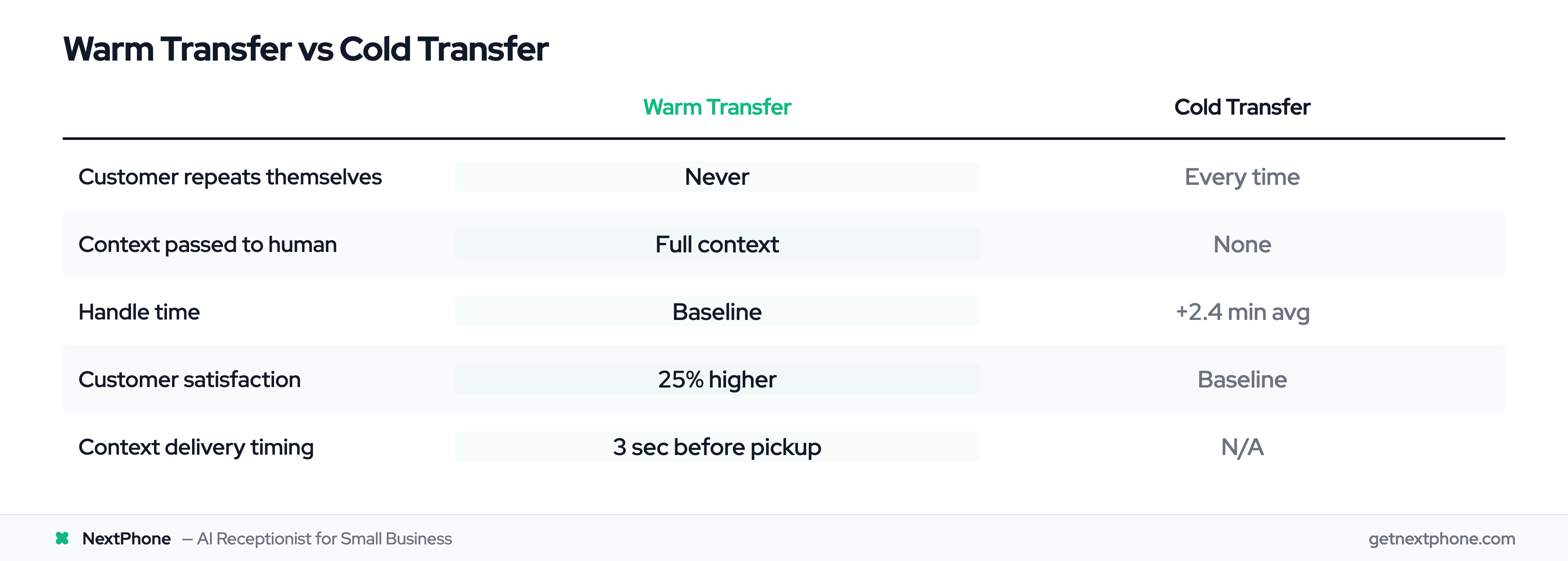
Not all call transfers are created equal. The difference between warm and cold transfer determines whether your customer feels heard or frustrated.
Cold Transfer: Drop and Hope
A cold transfer forwards the call to another number with zero context. The customer gets dropped into a conversation with someone who has no idea why they're calling.
It's like being handed mid-sentence to a stranger. The customer has to repeat their name, phone number, and entire problem from scratch.
Research shows calls involving cold transfers take an average of 2.4 minutes longer to resolve. That's wasted time for both the customer and your staff.
Warm Transfer: Context-Aware Handoff
A warm transfer happens when the AI briefs the human agent first, passes all the context, then completes the handoff.
The human agent picks up knowing who's calling, what they need, and how urgent it is. No repeating. No frustration.
Think of it as a proper introduction instead of being tossed into a conversation blind.
Why the Difference Matters for Small Businesses
Customer service research found that 73% of customers cite having to repeat information as a major frustration point.
And here's the kicker: Customers are 25% more likely to report a positive experience when they don't have to repeat themselves.
For small businesses, every fumbled handoff is a potential lost job. A plumber's customer calls about a burst pipe. The AI cold transfers. The plumber picks up with no context. Customer repeats the problem. Plumber asks for address. Customer gets frustrated, hangs up, calls the next company.
That's a $3,500 job lost in 30 seconds.
Now contrast that with a warm transfer: The plumber's phone rings, screen shows "John Smith (555-1234) - Emergency: Burst pipe in basement, water damage urgent." The plumber picks up and immediately says, "Hi John, I understand you have a burst pipe in the basement and it's urgent. I'm 15 minutes away."
The job is won before the conversation even starts.
Why Call Transferring Matters for Small Businesses
You're on job sites. You're on ladders. You're under houses with your hands dirty. You can't answer every call—but you can't afford to miss them either.
The Cost of Fumbled Handoffs
Traditional options are lose-lose: let calls ring unanswered (lose the job) or answer unprepared and fumble the conversation (look unprofessional).
The fumbled handoff scenario plays out constantly: Customer gets transferred, waits on hold, finally connects, has to repeat everything they already told the AI, gets frustrated, hangs up. You just lost a $3,500+ job.
Small business owners tell us this happens more than they realize. Research from Invoca shows 62% of calls to home services businesses go unanswered. One plumber we analyzed had 76 missed calls in a month. His reaction? "I didn't even know I was missing that many calls until I saw the data. I just thought business was slow."
Emergency Calls Are Your Highest-Value Jobs
In our data from 130,175 calls, 6.2% were true emergencies. These aren't just urgent—they're immediate problems requiring same-day or next-day response.
Emergency calls average $4,200 in revenue versus $3,500 for routine work. Customers with emergencies are less price-sensitive. They need it fixed NOW.
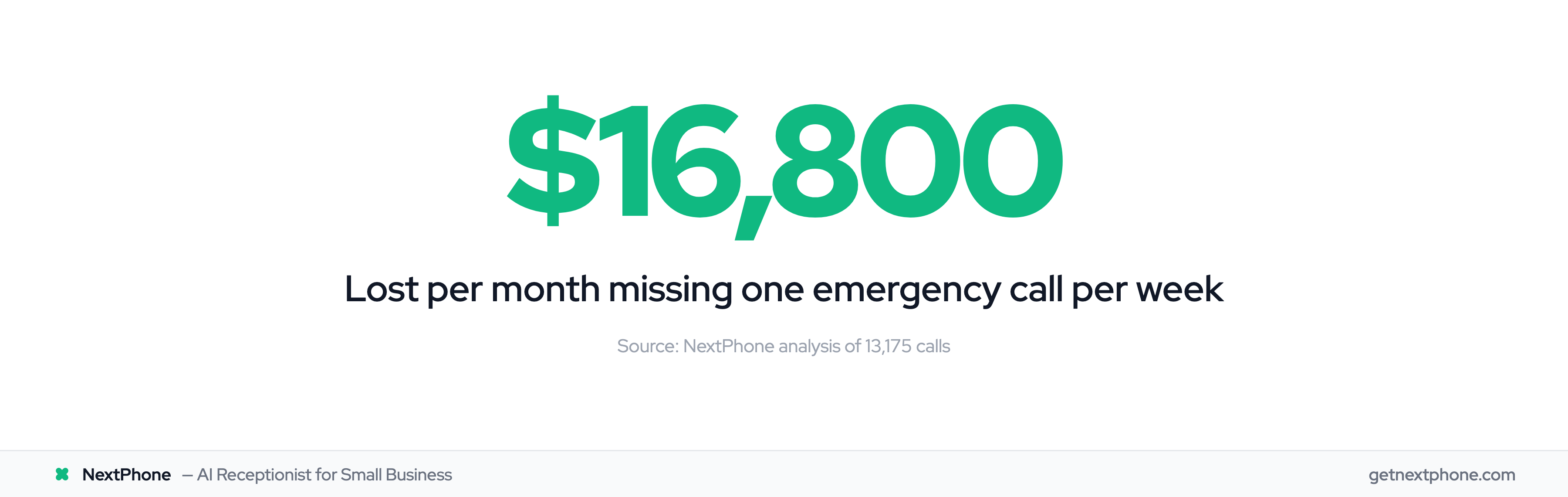
Missing even one emergency call per week costs you $16,800 per month in lost revenue. That's $201,600 per year.
You Can't Answer Every Call—But You Need To
An electrician gets a call at 8 PM while working in an attic. A homeowner's power is out. He can't get to his phone. By the time he climbs down and calls back, the customer has already booked someone else. That's a $3,800 job gone.
The gap is clear: You need something that screens routine calls (hours, pricing, directions) but routes emergencies to you instantly with full context.
That's exactly what intelligent call transferring does.
How AI Call Transfer Actually Works
The technical flow is simpler than you'd think. Here's what happens behind the scenes when an AI receptionist transfers a call.
The Decision Point: Transfer or Handle
A call comes in. Your AI receptionist answers in under 5 seconds.
The AI engages with the caller. "Thanks for calling. How can I help you today?"
As the conversation progresses, the AI collects information: caller name, phone number, and what they need.
Then the AI makes a decision: Can I handle this call myself, or should I transfer it to a human?
This decision happens in real-time based on multiple factors: confidence level, complexity, explicit customer request, and urgency signals.
The Handoff Process (Under 10 Seconds)
If the AI decides to transfer, here's what happens:
The AI says something like, "Let me connect you with [name or team]. One moment please." Brief hold music.
While the customer is on hold, the AI is working behind the scenes. It sends a context package to the human agent: caller name, phone number, conversation summary, and urgency flag.
Modern AI phone systems deliver this context 3 seconds before the call arrives. The human agent's phone rings, showing all the details on screen.
Total time from transfer decision to human pickup: under 10 seconds with zero customer hold time beyond the initial "one moment."
What Happens Behind the Scenes
From the human agent's perspective, here's the experience:
Your phone rings. The screen shows: "Sarah Johnson (555-0123) - Quote request for kitchen remodel, 400 sq ft, budget $15K-20K, timeline 3 months."
You pick up already knowing who's calling and what they want. "Hi Sarah, I understand you're looking for a quote on a kitchen remodel. I'd love to help with that."
Sarah doesn't have to repeat a single thing. The conversation picks up right where it left off with the AI.
That's the difference between a fumbled handoff and a seamless one.
Escalation Triggers—When AI Transfers to Humans
Not every call should be transferred. AI receptionists need to know when to handle calls themselves and when to hand off. Here are the specific triggers that should prompt a transfer.
Confidence Threshold Triggers
AI systems monitor their own confidence levels in real-time. Think of it as the AI asking itself, "How sure am I that I'm giving the right answer?"
AI confidence monitoring research shows that effective handoff protocols should activate when AI confidence falls below 60-70%, with hard floors at 40% confidence.
If the AI's confidence drops—maybe the question is too technical, too specific, or completely out of its knowledge base—it triggers a transfer.
The AI should also track failed attempts. Customer experience best practices recommend limiting failed responses to 2-3 attempts before escalating. If the AI can't help after three tries, it's time to bring in a human.
Urgency and Emergency Detection
This is where call transferring becomes revenue-critical for small businesses.
AI analyzes language for urgency signals: "emergency," "urgent," "ASAP," "right now," "immediately."
But urgency language alone isn't enough. In our analysis of 130,175 calls, 15.9% contained urgency language—but only 6.2% were true emergencies.
True emergency keywords include: "burst pipe," "no power," "won't start," "broken down," "AC out," "heat not working," "flooding," "sparking," "smoke," "leak."
The AI can distinguish between routine urgency and true emergency:
Routine urgency: "I need a quote ASAP for a bathroom remodel." The AI handles this, collects details, and books an appointment for tomorrow.
True emergency: "My basement is flooding, the pipe burst!" The AI transfers immediately with an urgency flag.
Sentiment Analysis
Modern AI can detect anger, frustration, or confusion in a caller's tone. If sentiment analysis picks up that the customer is getting upset, the AI should proactively offer to connect them with a human.
Example: A customer has called three times about the same issue. The AI detects rising frustration in their voice. Instead of trying to help again, it says, "I can tell this has been frustrating. Let me connect you with someone who can resolve this right away."
Explicit Customer Requests
This one's simple: If a customer says "I want to talk to a person" or "Transfer me to someone," the AI should honor that request immediately.
Never trap customers with an AI that won't let them reach a human. That's a surefire way to lose business and damage your reputation.
Custom Business Rules
You can configure AI receptionists with custom transfer triggers based on your business needs:
- VIP customers get automatically transferred
- High-value inquiries (projects over $10K) go straight to the owner
- After-hours emergencies transfer to your mobile
- Specific keywords trigger transfers (permit questions, insurance claims, warranty issues)
One HVAC contractor we work with has this rule: Any call after 9 PM mentioning "AC," "heat," "furnace," or "no power" auto-transfers to his mobile. He doesn't want to miss emergency calls during peak season.
The key is flexibility. Your AI should adapt to how you want to run your business, not force you into a one-size-fits-all approach.
Context Preservation—No Customer Repeats Themselves
The single biggest complaint about traditional call transfers is customers having to repeat themselves. Context preservation solves this completely.
What Information Gets Transferred
When an AI hands off a call, it sends a complete information package to the human agent:
- Caller name
- Phone number
- Full conversation history (transcript)
- 2-3 sentence issue summary
- Urgency level (routine, urgent, emergency)
- Customer mood/sentiment
- Any details collected (location, preferred callback time, budget, timeline, etc.)
All of this arrives before the call does.
How Context Appears for the Human Agent
Here's what you see when your phone rings after a transfer:
Screen display: "John Martinez (555-9876) - Emergency: Water heater leaking, garage flooding, needs immediate shutoff help."
You pick up informed: "Hi John, I see your water heater is leaking in the garage. First, let me help you shut off the water supply. Do you know where your main water shutoff valve is?"
John doesn't repeat a word. You're immediately solving his problem.
Customer service research backs this up: 73% of customers cite having to repeat information as a major frustration point. Context preservation eliminates this entirely.
And the payoff is real: Customers are 25% more likely to report a positive experience when they don't have to repeat themselves.
The Customer Experience
From the customer's perspective, the handoff is seamless. They explain their problem once to the AI. When they're transferred, the human already knows everything.
It feels like talking to one person who brought in a specialist—not like being bounced around between people who don't communicate.
That perception matters. 82% of customers expect an immediate response when contacting businesses. It's the difference between "this company has their act together" and "I'm being passed around and nobody knows what's going on."
The best part? Context is delivered 3 seconds before the call arrives, so the human agent is ready the instant they pick up. No scrambling, no "Hold on, let me read the notes."