Introduction
You're on a roof installing shingles. Your phone rings—a potential customer wants to schedule an estimate. You can't answer. The call goes to voicemail. They call the next roofer. Job lost.
This happens more than you think. In our analysis of 130,175 customer service calls from 45 home services businesses over 7 months, we found that 7.7% were appointment scheduling requests. That's 191 calls where customers explicitly wanted to book time with a contractor.
For a typical business receiving 42 calls per month, that's 3 scheduling opportunities. Research from Chili Piper shows 66.7% of qualified form leads book meetings, and live call options achieve 69.2% form-to-meeting conversion—but only if someone answers. And here's the problem: 85% of callers say they won't try again if they hit voicemail. They're calling your competitor instead.
The solution? AI voice assistants integrated with Calendly can handle the entire booking process during the call—checking your availability, selecting the right meeting type, and confirming the appointment—all in under 90 seconds. There's been an industry-wide surge in self-scheduling adoption, with 30% year-over-year increases. No texting links. No website visits. No follow-up needed.
The Scheduling Call Problem
How Many Scheduling Calls You're Missing
In our analysis of 130,175 calls from 45 home services businesses, 7.7% were scheduling requests and another 25.4% explicitly requested callbacks. Combined, that's one-third of all customer calls asking for some form of appointment or follow-up.
But the brutal reality? 74.1% of those calls went completely unanswered. That's three out of every four potential customers calling someone else.
For scheduling calls specifically, these are high-intent customers. They've already decided they need your service. They're not price shopping or asking general questions—they're ready to book. Missing these calls means losing jobs to competitors who simply answered their phone.
The Revenue Impact
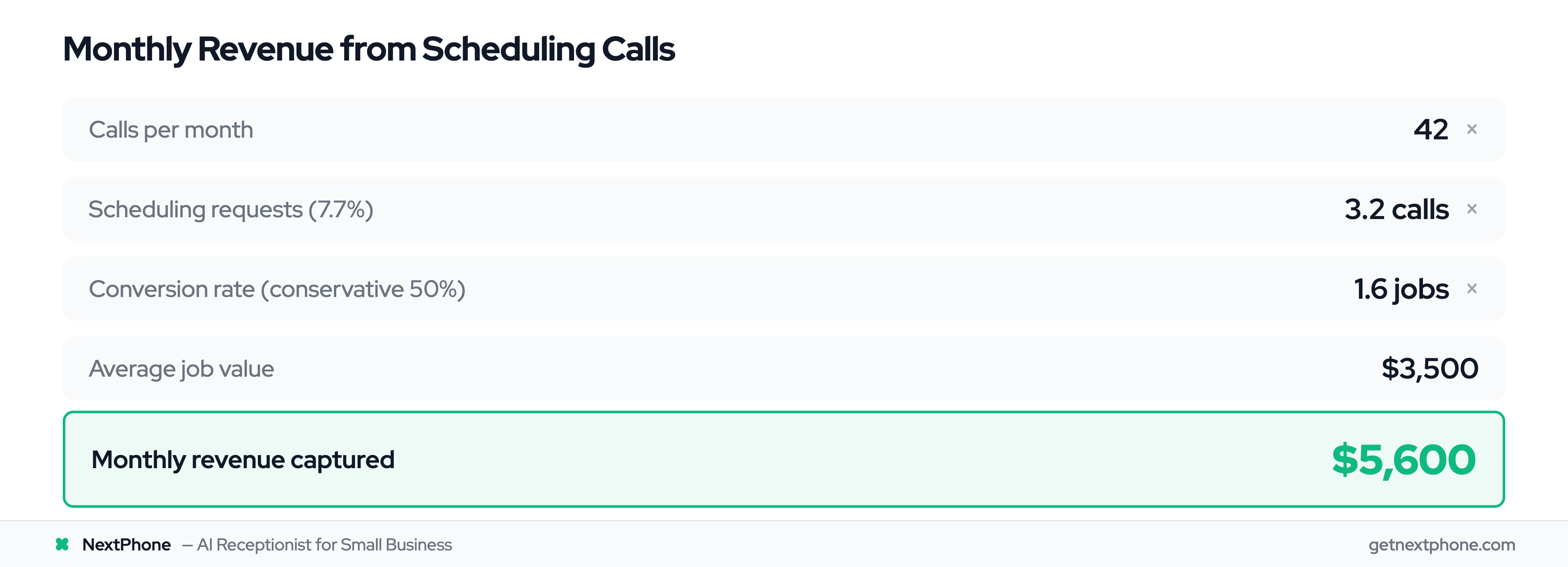
Let's do the math. If your business gets 42 calls per month (the average we observed), 7.7% means roughly 3 scheduling calls monthly. If you miss them all and they go to voicemail, here's what you're losing:
- 3 scheduling calls per month
- 50% would have converted if you'd answered and booked them
- $3,500 average job value for home services contractors
- $5,250 per month in lost revenue = $63,000 per year
And that's just from the explicit scheduling requests. Add in the callback requests (25.4% of calls) and the number gets much larger.
Why Manual Callbacks Don't Work
You might be thinking: "I call people back when I see a missed call." The problem is consistency. Without a systematic tracking system, 80% of callback requests fall through the cracks.
You finish the job you're on, see three missed calls, remember to call back two of them, forget the third. Or you call back but they don't answer, and you never try again. Or the callback request was in a voicemail you didn't listen to until two days later—by which point they've already hired someone else.
As one plumber told us: "I didn't even know I was missing that many calls until I saw the data. I just thought business was slow."
What Is Calendly Integration for Voice AI?
Traditional Calendly vs Voice AI Integration
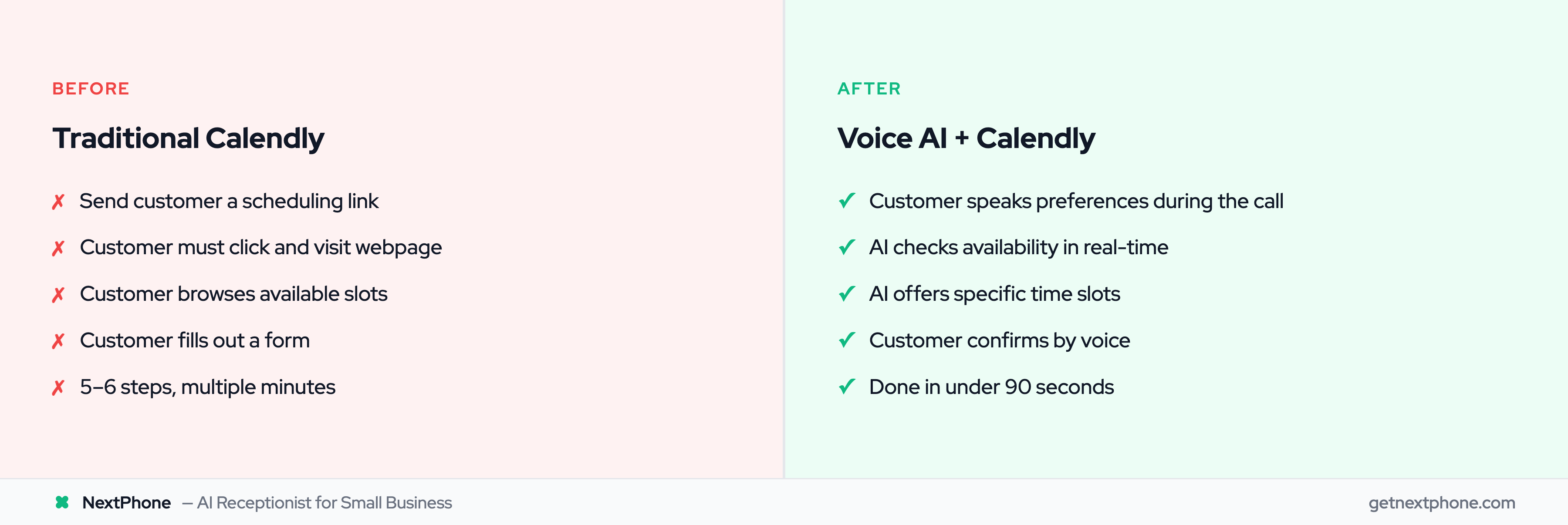
Traditional Calendly works like this: You send the customer a link (via email or text). They click it. They visit a webpage. They browse your available time slots. They pick one. They fill out a form. Then they book.
That's 5-6 steps requiring the customer to stop what they're doing, find the link, and interact with a website.
Voice AI integration with Calendly flips this completely. The customer speaks their scheduling preferences during the phone call. The AI checks your calendar in real-time via Calendly's Scheduling API. The AI offers specific available times. The customer confirms. Done.
One conversation. Under 90 seconds. Zero clicks required.
How the Scheduling API Works
Calendly launched its Scheduling API in 2024 specifically to enable this kind of integration. The API allows AI voice agents, chatbots, and automated systems to access your calendar availability and book appointments on behalf of customers—without the customer ever visiting a Calendly webpage.
When integrated with an AI phone system, it works seamlessly. The AI has real-time access to check which time slots are available and can instantly book confirmed appointments. Everything syncs to your Google Calendar, Outlook, or whatever calendar system you use.
According to a Thoughtly customer case study, their AI voice agent books meetings in under 90 seconds into a phone call. That's faster than most humans can type out a text message with a scheduling link.
What Happens During the Call
Here's the flow from the customer's perspective:
- They call your business number
- AI answers: "Hi, you've reached ABC Roofing. How can I help?"
- Customer: "I need someone to look at my roof. I think I have some damage from the storm."
- AI: "I can help with that. Would you like to schedule a roof inspection?"
- Customer: "Yes, sometime this week if possible."
- AI checks Calendly availability in real-time
- AI: "I have availability on Thursday at 10 AM or Friday at 2 PM. Which works better for you?"
- Customer: "Thursday at 10 works."
- AI: "Perfect. I've scheduled you for Thursday, March 16th at 10 AM for a roof inspection. Can I get your email to send a confirmation?"
- Customer: "Sure, it's john@email.com"
- AI: "Got it. I've sent a confirmation to john@email.com with the appointment details and our address. See you Thursday!"
Total time: 75 seconds. Job booked. Customer happy. You never touched your phone.
Voice-to-Calendar Booking in Detail
The Conversation Flow
The magic is in how natural it feels. The AI doesn't sound like it's reading from a script or forcing the customer into rigid options. It identifies scheduling intent from context, asks clarifying questions, and handles the booking conversationally.
The AI is trained to recognize scheduling language:
- "I need to schedule..."
- "Can I book an appointment?"
- "When are you available?"
- "I'd like to set up a time..."
Once it detects intent, it smoothly transitions into the booking flow without making the customer repeat themselves or navigate a phone tree.
Real-Time Availability Checking
This is where the Calendly API integration shines. Instead of saying "Let me check the schedule and call you back" (which leads to callback failures), the AI checks availability instantly during the call.
It queries your Calendly account, sees which time slots are open, and offers specific options. If the customer's preferred time isn't available, the AI immediately suggests alternatives.
The system prevents double-booking automatically. Calendly maintains your calendar sync with Google or Outlook, so if you manually book something or another call comes in simultaneously, the AI always works from your current real-time availability.
ElevenLabs' Calendly integration describes this as "schedule, modify, and manage appointments in real-time during voice calls"—and that's exactly what happens.
Booking Confirmation & Calendar Sync
Once the customer confirms a time, several things happen automatically:
- Appointment is created in your Calendly account
- Calendar event is added to your Google/Outlook calendar
- Confirmation email is sent to the customer with appointment details
- Confirmation SMS is sent (if you've enabled text notifications)
- Customer data is collected (name, phone, email, service needed)
- CRM is updated (if you have webhook integrations set up)
All of this happens in 2-3 seconds while the AI is still talking to the customer. By the time the call ends, everything is logged, synced, and confirmed.
What Information AI Collects
During the booking conversation, the AI captures:
- Customer name - "Can I get your name for the appointment?"
- Phone number - Automatically from caller ID
- Email address - "What email should I send the confirmation to?"
- Service needed - From the conversation context
- Preferred date/time - Selected from available options
- Any special notes - "Anything specific you'd like me to note about the roof damage?"
This information flows into your Calendly event and can be pushed to your CRM via webhooks, so you have full context before you show up for the appointment.
Meeting Type Selection & Intelligent Routing
Offering Multiple Meeting Types
Not all appointments are the same. You might offer:
- 30-minute quick estimates
- 60-minute detailed consultations
- 90-minute on-site assessments
- Emergency same-day service calls
The AI can ask qualifying questions to determine which Calendly event type to book:
AI: "Are you looking for a free estimate or a detailed consultation?" Customer: "Just an estimate for now." AI: "Perfect. I can schedule a 30-minute estimate. I have availability on..."
Each event type can have different durations, different availability windows, and even different team members assigned. The AI selects the right one based on the conversation.
Emergency vs Routine Call Routing
Here's a critical distinction: Not every call should go to your calendar.
In our analysis of 130,175 calls, 15.9% contained urgency language like "emergency," "urgent," or "ASAP." And 6.2% were true emergencies—pipe bursts, no power, AC out in 95-degree heat.
Emergency calls need immediate human response, not calendar booking for next week. Smart AI systems differentiate:
Emergency detected — "This sounds urgent. Let me connect you with our on-call technician right now." (Transfers to your phone immediately)
Routine request — "I can schedule that for you. I have availability on Thursday at..."
The AI uses keyword detection and context clues. If someone says "my basement is flooding right now," that's not a calendar booking situation. But "I need my gutters cleaned before winter" is perfect for scheduling.
Custom Questions for Qualification
You can configure the AI to ask business-specific questions before booking:
- "Is this for a new installation or a repair?"
- "What type of property—residential or commercial?"
- "How soon do you need this completed?"
The answers can determine which meeting type to offer or whether to route to a human for custom quoting. Research shows real estate achieves 93.84% qualified lead rates and 73.78% booking rates with proper demo-to-meeting flows. This level of qualification means you show up to appointments with the right context and the right time blocked.
The Complete Automation Loop
Beyond Initial Booking
Calendly integration isn't just about getting the appointment on the calendar. It's about managing the entire lifecycle automatically.
Smith.ai reported a 26% increase in bookings after implementing Calendly routing and automation. MGMA research confirms the power of putting scheduling into customers' hands. Why? Because the system handles everything that typically falls through the cracks.
Automated Reminders via Calendly Workflows
Once an appointment is booked, Calendly Workflows kick in. These are automated sequences that run without any manual effort:
- 24 hours before: Send email reminder with appointment details
- 24 hours before: Send SMS reminder (text messages have higher open rates)
- 1 hour before: Send final reminder with directions or preparation info
These reminders are customizable. You can adjust timing, messaging, and which channels to use. The key is they happen automatically for every booked appointment.
Reschedule Requests Handled by AI
Customer calls back: "Hi, I need to move my Thursday appointment. Something came up."
The AI doesn't just take a message. It handles the reschedule:
AI: "No problem. Let me check availability. I can move you to Friday at 11 AM or next Monday at 2 PM. Which works better?"
Customer: "Friday at 11."
AI: "Done. I've updated your appointment to Friday, March 17th at 11 AM and sent a new confirmation to your email."
The original appointment is canceled in Calendly, the new one is created, the calendar is updated, and a confirmation is sent. All during one phone call. No back-and-forth emails. No playing phone tag.
Cancellation Management
If a customer needs to cancel, the AI processes it immediately. The calendar slot is freed up, making it available for other customers. You can even configure a cancellation workflow that automatically reaches out to your waitlist or offers the slot to other customers.
CRM Integration & Data Sync
Via Calendly's webhook capabilities, every booking event (new appointment, reschedule, cancellation) can trigger data to flow into your CRM:
- HubSpot gets updated with the new contact and appointment
- Salesforce logs the interaction and scheduled meeting
- Your custom system receives the booking details via HTTP webhook
This means your team sees appointments in their normal workflow tools. No separate Calendly login required. Everything lives where you already work.