
Your phone rings. A homeowner with a burst pipe calls your plumbing business. "I've got a burst pipe in the basement!" But your AI receptionist hears "first hype in the basement" and responds with your service area information. Confused and frustrated, the caller hangs up. They call the next plumber. You just lost a $3,500 emergency job.
This scenario plays out more often than you'd think. According to a Consumer Technology Association study, 68% of regular voice AI users cite misrecognition as their top complaint. Across the 2,000,000+ business calls we've answered, we've seen how critical accuracy is. When your AI receptionist misunderstands callers, you don't just lose revenue. You lose customer trust.
The good news? Most AI misunderstandings are fixable with systematic troubleshooting. With 85% of customer service leaders planning to pilot conversational GenAI in 2025, getting accuracy right is essential. This guide shows you exactly how to diagnose what's going wrong and implement solutions that work.
The 5 Root Causes of AI Misunderstandings
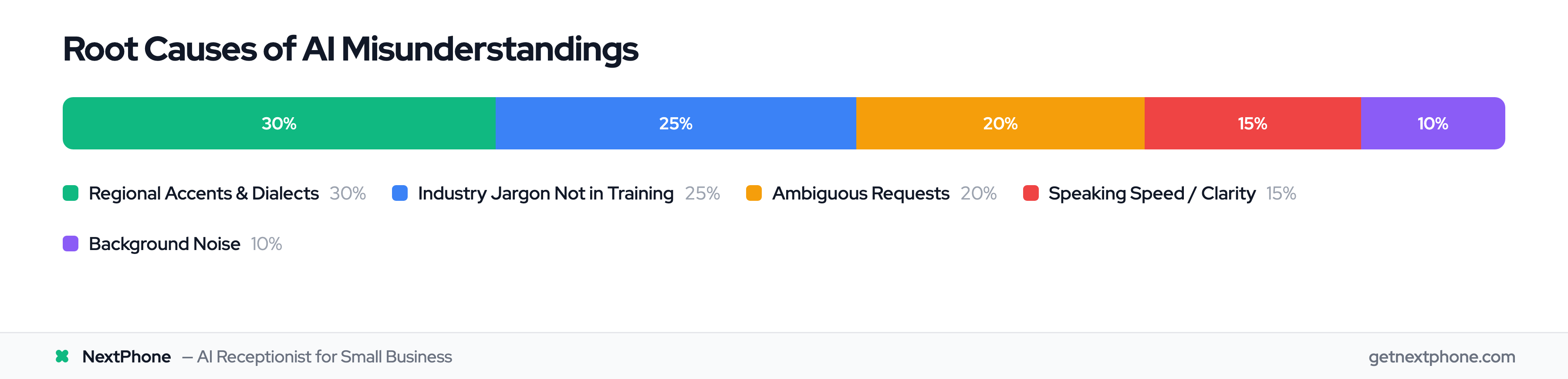
Before you can fix accuracy issues, you need to understand what's causing them. AI receptionist misunderstandings typically fall into five categories:
1. Regional Accents and Dialects
Voice AI systems struggle with accents they weren't trained on. The voice recognition market has grown to $26.79B, but over 70% of publicly available speech recognition training data comes from American and British English speakers, heavily skewing toward General American pronunciation and younger adults aged 18-34.
The result? A Life Science Centre Newcastle survey found that 79% of respondents report having to suppress their regional accents to use voice assistants. Your Southern customer saying "I need a quote" might be heard as "I need a coat." Your Boston caller asking about "parking lot paving" could be misinterpreted entirely.
2. Industry-Specific Jargon Not in Training Data
Your AI wasn't trained on plumbing terminology, HVAC technical terms, or electrical jargon. When a plumber calls asking about "PEX replacement" or "slab leak repair," the AI might not recognize these as legitimate service requests. This is especially problematic for emergency calls.
Urgency language like "emergency," "urgent," or "ASAP" ranks among the top reasons people call. 82% of customers expect an immediate response. Missing these signals because the AI doesn't understand "AC out in 95-degree heat" or "burst pipe" costs you high-value work. Emergency jobs average $4,200 compared to routine service calls.
3. Ambiguous Requests Without Context
"I need help" tells the AI almost nothing. Help with what? Sales? Support? Emergency service? Scheduling? Without context, even the most advanced AI has to guess.
The same goes for "I have a question about pricing" (pricing for which service?), "Something's broken" (what specifically?), or "Can you come out today?" (for what type of work?).
4. Speaking Too Fast or Unclear
A fast-talking New Yorker speaks differently than someone from rural Georgia. Speaking speed, pronunciation clarity, and vocal patterns all affect recognition accuracy. Add in poor phone connections, and misunderstandings multiply.
5. Background Noise Interference
Your contractor customers call from job sites with power tools running. Homeowners call while cooking dinner with exhaust fans roaring. Background noise interferes with speech recognition, making it harder for the AI to accurately capture what callers are saying.
While modern AI-powered noise cancellation technology helps, it's not perfect, especially when the caller is in an extremely loud environment.
The 5-Step Troubleshooting Framework
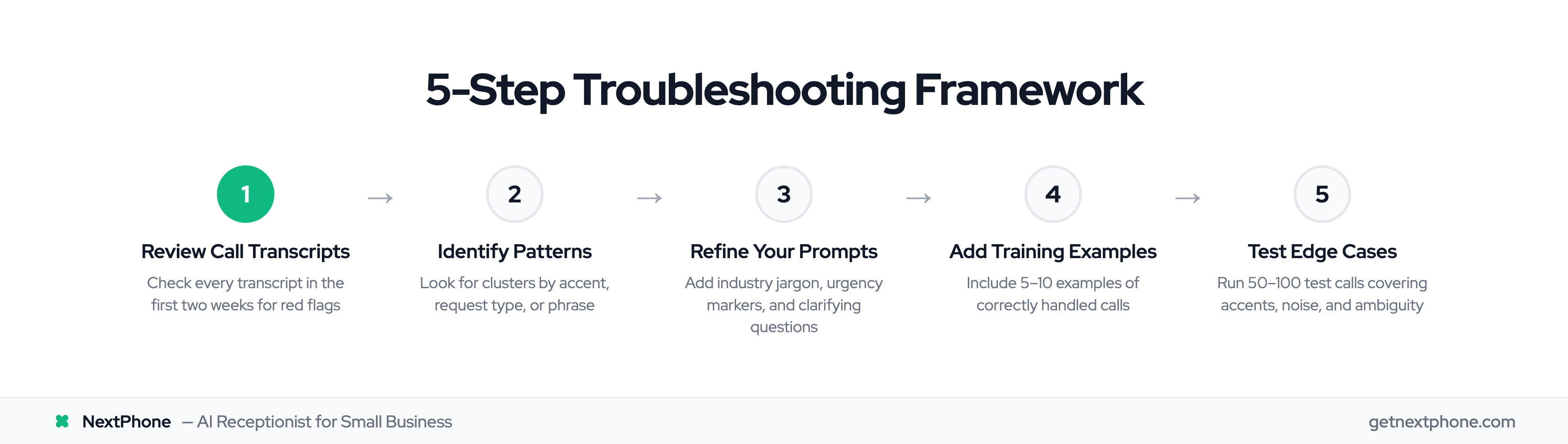
Don't just react to individual mistakes. Follow this systematic process to diagnose patterns and fix root causes:
Step 1: Review Call Transcripts
Check every call transcript for the first two weeks after deploying your AI receptionist. Look for specific red flags:
- Where does the AI ask callers to repeat themselves?
- Where does it provide incorrect information?
- Which calls escalated to human handoff unnecessarily?
- What words or phrases consistently cause confusion?
Most AI receptionist platforms provide transcripts automatically. NextPhone sends an email summary with a full transcript link after every call, making this review process straightforward.
Step 2: Identify Patterns
Misunderstandings are rarely random. Look for clusters:
- Same caller demographics: Are all misunderstandings happening with callers from a specific region?
- Same request type: Do emergency calls get misrouted more often than quote requests?
- Same time of day: More background noise during rush hours?
- Same phrases: Does "slab leak" consistently confuse the system?
If you find patterns, you've found your troubleshooting target.
Step 3: Refine Your Prompts
Once you've identified patterns, update your AI's system prompts and knowledge base:
Add industry-specific terminology with definitions. For a plumbing business: "When caller mentions 'burst pipe,' 'slab leak,' 'water hammer,' or 'PEX replacement,' these are plumbing service requests."
Provide context examples for ambiguous phrases. Example: "If caller says 'I need help,' ask: 'I'd be happy to help. Are you calling about scheduling service, getting a price quote, or reporting an emergency?'"
Clarify urgency markers. "If caller mentions 'emergency,' 'urgent,' 'ASAP,' 'burst,' 'leak,' 'out,' 'not working,' or 'broken' combined with critical systems (AC, heat, power, water), classify as emergency and escalate immediately."
Step 4: Add Examples to Training
Include 5-10 examples of correctly handled calls in your prompt. Show the AI what good responses look like:
- Example of handling ambiguous request
- Example of recognizing industry jargon
- Example of detecting emergency language
- Example of asking clarifying questions
These examples help the AI understand expected behavior patterns.
Step 5: Test with Edge Cases
According to industry best practices, you should run 50-100 test calls to refine your AI receptionist setup and eliminate misunderstandings.
Test specific scenarios:
- Have team members with different accents call in
- Simulate calls from noisy environments
- Try ambiguous requests ("I have a question")
- Test fast-talking vs slow-talking callers
- Verify emergency keywords trigger correct routing
Document what works and what doesn't, then refine again.
How to Fix Each Root Cause
Now let's get specific. Here's exactly how to address each type of misunderstanding:
Fixing Accent and Dialect Issues
Start with conservative confidence thresholds. According to AI receptionist prompting guides, you should set initial thresholds to auto-respond above 85% confidence, request clarification between 70-85%, and escalate below 70%.
Add regional vocabulary to your knowledge base. If you serve the Boston area, include "pahking" as a variation of "parking." If you work in the South, account for different vowel pronunciations.
Test with diverse callers before deployment. Have friends, family, or team members with different accents call your system. If the AI struggles with certain pronunciations, adjust your prompts or lower the auto-response threshold for those scenarios.
Handling Industry-Specific Jargon
Create a comprehensive list of every term your customers might use. For HVAC contractors:
- "AC out," "no cooling," "unit not running," "compressor issue"
- "Furnace down," "no heat," "pilot light out"
- "Thermostat problems," "won't turn on"
Add each term to your knowledge base with context: "When caller mentions 'AC out in 95-degree heat' or 'no cooling,' this is an emergency requiring same-day service. Transfer immediately to [owner phone number]."
Before our refinement, one HVAC contractor's AI missed emergency signals. After adding urgency keywords and temperature-related phrases, 100% of true emergency calls routed correctly.
Clarifying Ambiguous Requests
Train your AI to ask clarifying questions rather than guess. Create decision trees for common ambiguous phrases:
Caller says: "I need help" AI responds: "I'd be happy to help. Are you looking to schedule service, get a price quote, or report an urgent issue?"
Caller says: "I have a question" AI responds: "What can I help you with today? I can help with scheduling, pricing information, or answer questions about our services."
Include fallback prompts for when the AI doesn't understand: "I didn't quite catch that. Are you calling about [service A], [service B], or something else?"
Dealing with Fast or Unclear Speech
Set your AI to use confirmation loops, especially for critical information:
"Just to make sure I have this right, you need emergency plumbing service at [address]. Is that correct?"
"Let me confirm your phone number: [number]. Did I get that right?"
This accomplishes two things: it gives the AI processing time and catches errors before they become problems.
Reducing Background Noise Impact
Modern AI systems include noise reduction, but you can still optimize:
For persistent noise issues, train your AI to acknowledge and request a quieter environment: "I'm having a bit of trouble hearing you clearly. If possible, could you move to a quieter location? I want to make sure I capture all your information correctly."
For critical data like phone numbers and addresses, always have the AI repeat back for confirmation. This catches transcription errors caused by noise interference.
NextPhone's email summaries let you catch any missed details after the call, giving you a safety net even when background noise affects accuracy.