You posted a receptionist job listing on Monday morning.
By Wednesday afternoon, you're drowning in 47 resumes, scheduling phone screens, and wondering how you'll find time for interviews. Meanwhile, your phone keeps ringing and going to voicemail.
Here's what really stings: Your competitor set up an AI receptionist Monday at 10am. By Wednesday afternoon, their AI has already answered 127 calls, booked 18 appointments, and captured 31 leads. Your 127 calls? 74.1% went straight to voicemail.
This isn't a hypothetical. We've answered more than 2,000,000 business calls, and industry research shows nearly three-quarters of calls to home services businesses go completely unanswered. Every week you spend hiring is another week of missed opportunities.
The good news? You don't need to choose between "hire fast" and "hire right" anymore. While SMBs average a 90-day pilot-to-implementation timeline with most enterprise software, modern voice AI receptionists can be set up in less than 15 minutes. NextPhone gets you answering calls 5 minutes after you sign up.
Here's exactly how long AI receptionist setup actually takes, broken down hour by hour.
The Reality of Traditional Receptionist Hiring
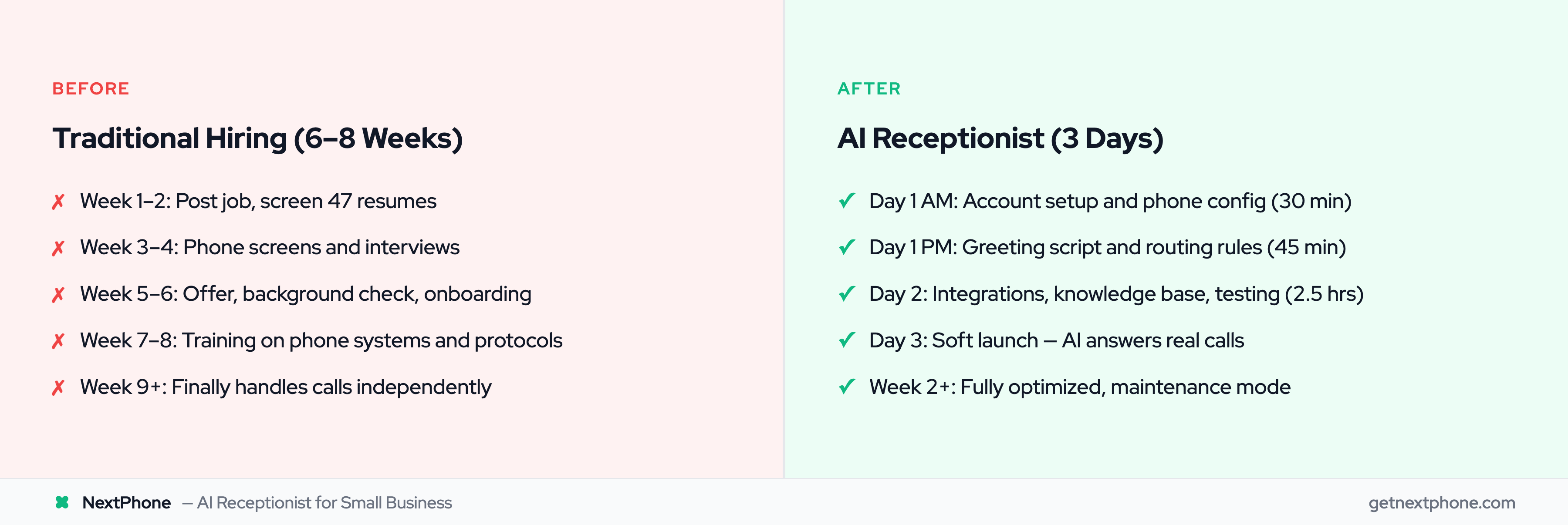
Let's be honest about what you're comparing AI setup against. The traditional hiring timeline isn't quick.
Week 1-2: Job Posting and Candidate Sourcing
You write the job description, post it to Indeed and LinkedIn, and wait. Applications trickle in over several days. You dedicate 5-10 hours across these two weeks screening resumes, ruling out underqualified candidates, and scheduling initial conversations.
Your phone's still ringing during this time. Those aren't just missed calls. Approximately one in four callers asks for a callback. That's a growing pile of follow-up work with nobody to handle it.
Week 3-4: Interview Process
First round phone screens take 30 minutes each. If you're thorough, you're talking to 5-10 candidates. Second round video or in-person interviews take an hour each for 3-5 finalists. Add reference checks, internal discussions, making the offer, and negotiating terms.
This phase eats another 8-12 hours of your time. More concerning: urgent calls rank among the top reasons people call. Time-sensitive opportunities are evaporating while you're interviewing.
Week 5-6: Onboarding and Training
Background check processing, paperwork, system access setup. Then the real work begins: training on your phone system, transferring your company knowledge, teaching scripts and protocols. Most receptionists need 2-4 weeks to get fully up to speed.
You're investing 40+ hours of training time (a full work week) before your new hire can confidently handle calls solo.
The Hidden Costs of This Timeline
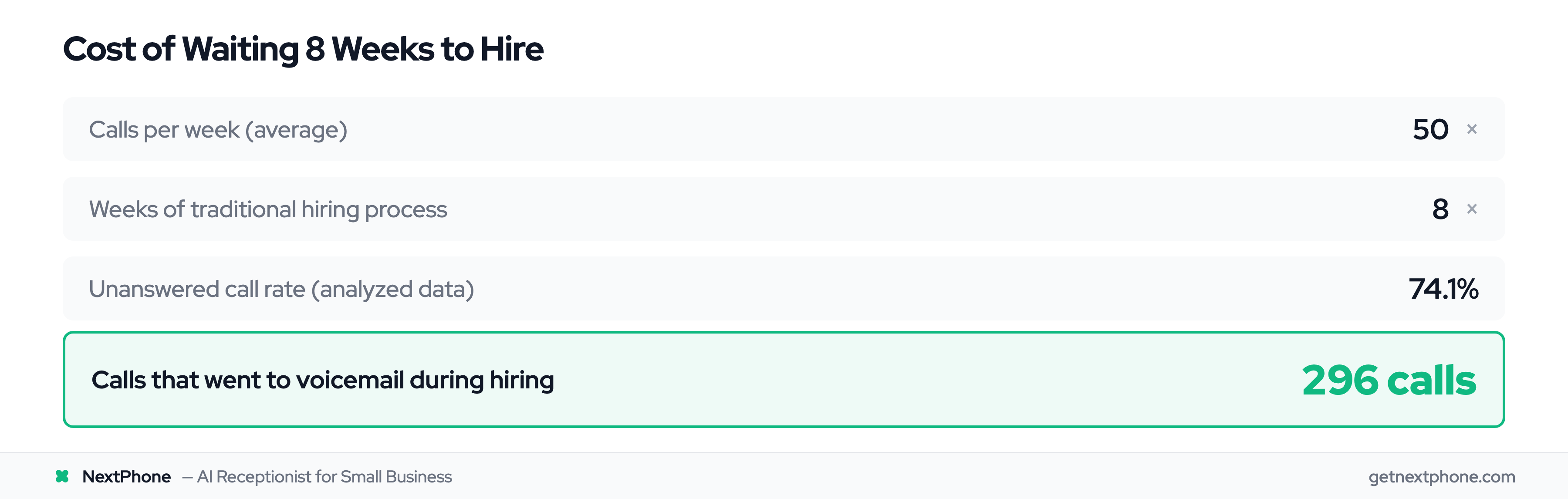
Six to eight weeks at 74.1% unanswered calls adds up fast. If you're getting 50 calls per week (pretty typical), that's 400 total calls during the hiring period. At a 74.1% miss rate, that's 296 calls going to voicemail.
The financial cost is painful too. You're looking at $35,000-$45,000 in annual salary plus benefits, taxes, and workspace costs. And that's after investing 8+ weeks to get there.
There's got to be a better way.
AI Receptionist Setup Timeline Overview
Here's the alternative: a live AI receptionist 5 minutes after signup, then about 4 hours of hands-on refinement spread over 3 days.
You don't need IT staff, developers, or technical expertise. If you can use Google Calendar or schedule an appointment online, you have the skills to set up an AI receptionist.
The timeline breaks into three phases:
-
Day 1: Core Setup (75 minutes hands-on) - Account creation, phone configuration, greeting script, and basic routing rules. You're answering calls within the first 5 minutes; the rest of Day 1 shapes how.
-
Day 2: Intelligence and Testing (2.5 hours hands-on) - Calendar integration, CRM connections, knowledge base upload, and testing scenarios to make sure everything works.
-
Day 3: Soft Launch (monitoring, minimal hands-on) - Your AI starts handling real calls while you monitor performance and make quick adjustments.
What makes this timeline possible? Modern AI receptionist platforms like NextPhone use website analyzers that automatically extract your business information, pre-built templates for common industries, and one-click integrations with major platforms. Research shows 75% of users see value in 30 days, and 81% stay because of ease of use. You're customizing a proven system, not building from scratch.
Here's a reality check: While you're completing Day 1 setup in 75 minutes, traditional hiring candidates are still waiting for your job posting to get approved. By the time you finish Day 3, traditional hiring hasn't even reached the interview stage.
Once deployed, your AI answers calls in under 2 seconds. Every single time.
Day 1 - Core Setup (Hour-by-Hour Breakdown)
Let's get specific about what happens in your first day.
First 30 Minutes: Account and Phone Configuration
Create your account (2 minutes). Choose whether you want to port your existing phone number or get a new one (5 minutes). Note: if you're porting an existing number, carrier processing takes 1-2 weeks. That's industry standard for any phone system. But you can use a temporary number immediately while porting happens in the background.
The website analyzer scans your business website (3 minutes, automated). It extracts your business name, services, hours, and key information. You verify the details it found (5 minutes) and set basic preferences like timezone and language (2 minutes). Your number is live and answering calls about 5 minutes in.
Make a test call to verify your phone connection works (3 minutes). Set up voicemail fallback if you want it (5 minutes). We're building in 5 minutes of buffer time because tech occasionally misbehaves.
What you need for this phase: your business website URL, a decision on phone number strategy, and basic business information.
Next 45 Minutes: Greeting and Call Routing Rules
Now you customize your greeting script. You can start with a template and add your brand's personality (10 minutes). Most businesses start with a template and refine it later. You can update scripts anytime without taking your system offline.
Set up call routing rules for business hours versus after hours, different departments or services, and emergency protocols (15 minutes). Configure what happens when someone's on hold (5 minutes). Define when calls should transfer to a human and who they should transfer to (10 minutes).
Test your greeting with a practice call (5 minutes). How does it sound? Is the routing working correctly?
Pro tip: Don't obsess over perfect scripts on Day 1. Get something good enough live, then refine based on real call recordings. Perfection is the enemy of progress here.
End of Day 1 Status
After 75 minutes total, your phone is answering calls with a professional greeting and routing them correctly. Some businesses stop here.
Or you can continue to Day 2 for integrations and advanced intelligence. That's the recommended path, but you have options.
Here's the comparison point: At the end of your Day 1, you have a working phone receptionist. Traditional hiring Day 1? You posted the job listing and you're waiting.
Day 1-2 - Integrations and Intelligence
Now we add the power features. None of this is required to answer calls, but it makes your AI receptionist significantly smarter.
Calendar Integration Setup (15-20 minutes)
Modern AI receptionists integrate with Google Calendar, Outlook/Microsoft 365, Apple Calendar, and scheduling platforms like Calendly.
The process is straightforward: select your calendar platform (1 minute), authorize access through a standard OAuth flow (2 minutes), choose which calendars to sync (2 minutes), and set booking rules like buffer time between appointments and advance notice requirements (5 minutes).
Test appointment booking with a practice call (5 minutes) and configure what confirmation messages get sent (5 minutes).
Once connected, your AI checks your real-time availability during calls, books appointments directly into your calendar, sends confirmations, and handles rescheduling requests. No more phone tag.
CRM Integration (20-30 minutes)
If you use HubSpot, Salesforce, JobNimbus, ServiceTitan, or other major CRM platforms, you can connect them just as easily.
Select your CRM (1 minute), click the one-click integration button for popular platforms (3 minutes), map which call data goes into which CRM fields (10 minutes), test the data flow with a practice call (10 minutes), and optionally set up automation rules (10 minutes).
This enables automatic contact creation, call logging, lead capture, and follow-up automation. Every conversation gets documented without manual data entry.
Optional Integrations (Add Time As Needed)
Want payment processing through Stripe or Square? Add 15 minutes. SMS notifications? 10 minutes. Slack alerts when important calls come in? 5 minutes. Email forwarding? 5 minutes.
Here's an important decision point: You can skip integrations entirely for your Day 1 launch and add them later. They're not required to start answering calls. If you're in a hurry, get the basic system live first, then layer in integrations over the following week.
Total time investment for this phase: 1-2 hours depending on which integrations you choose.
Day 2 - Knowledge Base and AI Training
Let's demystify "AI training." You're not coding anything or running complex machine learning models. You're uploading documents.
Upload Business Knowledge (30-45 minutes)
Your AI receptionist needs to know what you know: service descriptions and pricing, frequently asked questions, policies on cancellation and payment, staff directory showing who handles what, and common customer scenarios.
The system accepts PDFs, Word documents, text files, web page URLs, and spreadsheets. Gather your existing documents. You probably already have most of these. Pull your FAQ page from your website, your service menu, the training docs you'd give a human receptionist.
Upload them to the knowledge base (5 minutes). The AI processes and indexes everything automatically (10 minutes, no action required from you). Review the extracted information to make sure it understood correctly (10 minutes).
Pro tip: Start with 3-5 core documents. Don't try to upload your entire company wiki on Day 1. You can always add more later, and the AI gets smarter over time as you feed it more information.
Configure Response Parameters (15 minutes)
Tell the AI how you want it to sound. Should it be professional and formal, or friendly and casual? Do you want concise answers or detailed explanations? At what confidence threshold should it transfer to a human instead of guessing? What topics should it never discuss? Any industry-specific compliance requirements?
These settings shape your AI's personality and behavior. You can always adjust them after hearing how it sounds on real calls.
Total time investment: 45-60 minutes.
What you get: An AI that can answer questions about your services, handle pricing inquiries, knows your policies, and escalates appropriately when it's unsure.
Day 2 - Testing Phase
Before you route live customer calls to your AI, you test it. This is how you build confidence.
Internal Testing Scenarios (20 minutes)
Run through test cases: basic greeting and routing, appointment booking, common questions about pricing, hours, and services, transferring to a human, after-hours handling, and voicemail capture.
Call from your mobile phone. Have team members call and try to stump the AI. Test edge cases and weird scenarios. See how it handles confusion.
The goal is catching obvious problems before customers encounter them.
Soft Launch Strategy (10 minutes setup)
You have options for de-risking your launch:
-
Option 1: Parallel Running - Keep your current system (human receptionist or your personal phone handling) and route some calls to AI. Compare performance. Gradually increase the percentage of calls the AI handles.
-
Option 2: Off-Hours First - Let the AI handle after-hours and weekends only. Monitor how it performs when the stakes are lower. Expand to business hours once you're confident.
-
Option 3: Overflow Only - AI takes calls when your human receptionist is busy or on another line. It reduces workload on your staff without going all-in immediately.
Set up monitoring: enable call recording so you can review conversations later, configure daily email summaries, create alerts for transfers or issues, and bookmark your real-time dashboard.
What to Look For
Listen for greeting clarity: does it sound natural? Check routing accuracy: are calls going to the right place? Verify information correctness: is the AI giving accurate answers? Assess transfer appropriateness: is it escalating at the right times?
Based on testing, you'll probably tweak scripts, add a few knowledge base documents, or adjust routing rules. This is normal and takes 10-30 minutes of refinement.
Total time investment: 30 minutes of structured testing plus adjustments as needed.