The $3,500 Job That Got Away
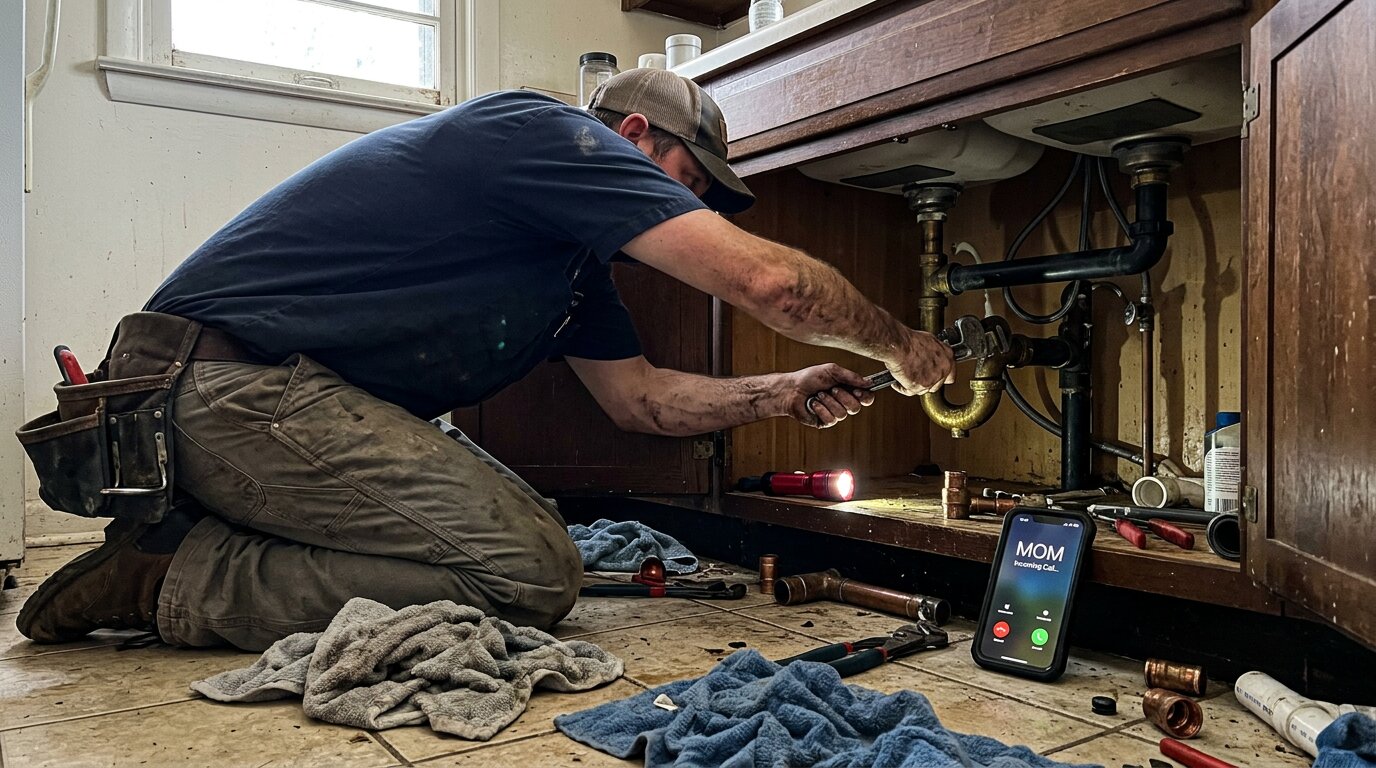
You're under a kitchen sink, hands covered in grime, wrench in one hand, flashlight in the other. Your phone rings. A customer needs emergency service: a burst pipe flooding their basement. You can't reach the phone. It goes to voicemail.
They call the next plumber. Job booked. $3,500 gone in 30 seconds.
This scenario is the norm for home services contractors.
We've answered more than 2,000,000 business calls. The data is brutal: industry research shows 74.1% of calls to home services businesses go unanswered. That's three out of every four potential customers calling someone else. For a contractor receiving 42 calls per month, that's 31 missed opportunities every single month.
This post shows you the exact cost of missed calls, why customers don't give you a second chance, and how AI receptionists provide 24/7 coverage that solves this problem without hiring staff.
The 62% Problem: How Many Calls You're Actually Missing

Industry research suggests that 62% of small businesses regularly miss calls. SMBs answer only 37.8% of inbound calls, with 37.8% going to voicemail and 24.3% receiving no response. That's already alarming.
Industry research on home services contractors shows the reality is worse: 74.1% of calls go unanswered.
Industry Benchmarks vs Reality
Small businesses lose an average of $126,360 each year due to missed calls, according to industry analysis. Research on home services specifically found that 27% of calls to these businesses are not answered.
For contractors working in the field, the picture is grimmer still.
What That Looks Like Month to Month
For a typical contractor receiving 42 calls per month:
- 31 calls go unanswered (74.1%)
- 11 calls get answered (25.9%)
- 0 calls should go unanswered (the goal)
The reasons are obvious when you think about a contractor's day. You're on a ladder installing a roof. In an attic running electrical wire. Under a house fixing pipes. In a crawl space with your hands full. During these moments, answering the phone is impossible.
Trade-Specific Missed Call Rates
The problem varies slightly by trade, but it's consistent across the board:
In law firms, only 40% of calls get answered, down from 56% in 2019, with 86% failing to collect email and 45% failing to collect phone during intake.
- General contractors: Can't answer while on job sites, measuring, or meeting with clients
- Roofers: On ladders or roofs where reaching for a phone creates safety hazards
- Electricians: In attics, crawl spaces, or working on live panels where regulations prevent phone use
- Plumbers: Under houses, hands covered in water and grime, fixing urgent issues
- HVAC technicians: On ladders installing units or diagnosing systems in tight spaces
Why Customers Don't Call Back
Here's where the missed call problem becomes a revenue crisis: customers don't give you a second chance.
The Voicemail Black Hole
85% of callers won't call back if their call isn't answered. Even worse, 80% of calls going to voicemail don't result in a message. People just hang up.
Why? Because your competitors are answering their phones. Or at least one of them is.
Think about the customer's perspective. They have a problem that needs solving. They search Google, find three contractors, and start calling. The first call goes to voicemail. The second contractor answers. Job booked. You never even knew they called.
Customer Callback Expectations
90% of customers consider an immediate response "important" or "very important" when they have a service question, according to Harvard Business Review research. Modern consumers have zero patience for waiting.
Most customers only call twice before they take their business elsewhere, and about 20% won't even make a second call if you don't answer their first one.
For emergency calls (burst pipes, no power, AC out in 95-degree heat), speed matters even more. The first contractor to answer gets a premium-priced emergency job. The second, third, and fourth contractors don't even know the opportunity existed. In real estate, the average agent takes 917 minutes (over 15 hours) to respond to leads.
The Callback Request Failure
Across the calls we answer, approximately one in four callers explicitly asks for a callback. They leave their name, number, and ask you to call them back.
But here's the problem: without a systematic tracking system, 80% of these callback requests fall through the cracks. You're busy on a job, you see a voicemail notification, you think "I'll call them back after this," and then three more calls come in, you finish the job, drive to the next site, and the callback never happens.
For a contractor getting 42 calls per month, that's 11 callback requests. If 80% don't get returned, that's 9 potential customers you never followed up with. They hired someone else.
The Real Cost: Revenue Lost to Missed Calls
Let's do the math with real numbers.
Monthly Revenue Impact (The Math)
Start with a contractor receiving 42 calls per month. Apply the 74.1% industry missed call rate:
- 42 calls/month (baseline call volume)
- × 74.1% (missed call rate)
- = 31 missed calls per month
Now, not every call is a qualified lead. But if we use a conservative 20% conversion rate (meaning 20% of answered calls turn into booked jobs):
- 31 missed calls/month
- × 20% (conversion rate)
- = 6.2 jobs lost per month
At an average project value of $3,500:
- 6.2 lost jobs/month
- × $3,500 (average project value)
- = $21,700 lost per month
Annual impact: $260,400 in lost revenue.
That's not hypothetical. That's the math of what happens when three out of four customer calls go to voicemail.
Emergency Call Economics
Emergency calls are worth even more. Across the calls we answer, urgency language like "emergency," "urgent," or "ASAP" ranks among the top reasons people call. And these aren't just impatient customers: true emergencies (burst pipe, no power, AC failure in extreme heat) are a recurring reason people call.
Emergency jobs average $4,200 compared to $3,500 for routine work. Customers expect to pay more for immediate service, and they're willing to do it, if you answer the phone.
For a contractor receiving 42 calls per month, several of those every month are urgent or emergency jobs.
If you miss just one emergency call per week (four per month):
- 4 missed emergencies/month
- × $4,200 (emergency job value)
- = $16,800 lost per month
- Annual impact: $201,600
These are the calls you absolutely cannot afford to miss. And they're the ones most likely to happen after hours or during your busiest periods.
The Callback Request Failure Cost
Approximately one in four callers asks for a callback. For our 42-call-per-month contractor:
- 42 calls/month
- × ~1 in 4 (callback request rate)
- = 11 callback requests per month
Without a tracking system, 80% of these never get called back. That's 9 lost leads per month. At a 30% conversion rate (callback requesters are warmer leads):
- 9 lost callback leads/month
- × 30% (conversion rate)
- = 2.7 jobs lost
- × $3,500 (average value)
- = $9,450 lost per month
- Annual impact: $113,400
Add it all up: $260,400 in general missed calls, $201,600 in missed emergencies, $113,400 in unfulfilled callbacks. You're looking at over half a million dollars in annual revenue loss from the simple act of not answering your phone.
How AI Receptionists Eliminate Missed Calls
An AI virtual receptionist is exactly what it sounds like: an AI-powered phone system that answers every call like a human receptionist would, but it never takes a break, never calls in sick, and answers every call in under 5 seconds.
What Is an AI Receptionist?
Think of it as a virtual employee who handles your phones 24/7. When a customer calls, the AI:
- Greets them professionally with your business name
- Asks what they need (estimate, emergency service, question about pricing)
- Answers routine questions using information about your business
- Books appointments directly in your calendar
- Takes detailed messages with caller name, number, and specific needs
- Routes urgent calls to your cell phone immediately
- Sends you real-time notifications about every call
The AI is trained on your specific business: your services, pricing, service area, hours, and common questions. It's not a generic system; it knows your business inside and out.
How It Answers Calls 24/7
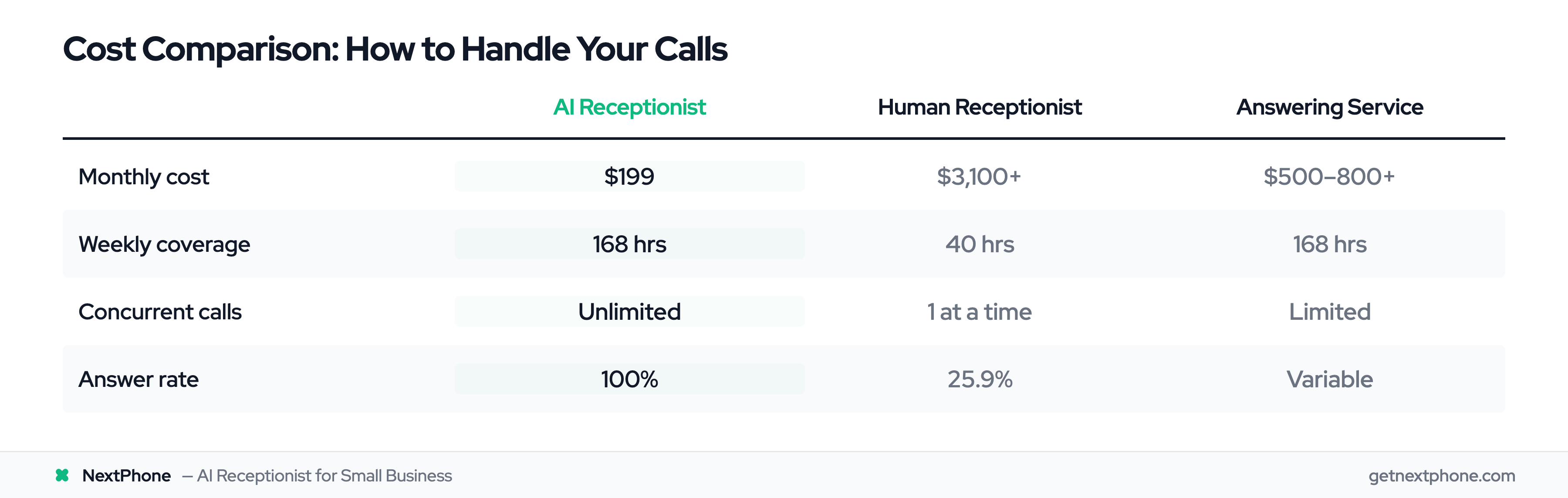
Human receptionists work 40 hours per week. That's 40 out of 168 hours in a week, only 24% coverage. The remaining 76% of the week, your calls go to voicemail.
AI receptionists work all 168 hours:
- Before business hours - Customer calls at 7 AM before you're open? AI answers.
- During lunch - You're eating and don't want to take calls? AI handles it.
- After hours - Emergency call at 9 PM? AI can answer and route to you or take a message.
- Weekends - Calls on Saturday? AI is working.
- Holidays - Business closed but customers calling? AI captures every lead.
The coverage difference is dramatic. You go from answering 25.9% of calls (the industry average) to answering 100%.
Intelligent Call Routing
Not all calls need the same handling. AI receptionists use smart routing:
- Routine questions (hours, pricing, service area) → AI answers immediately
- Appointment requests → AI checks your calendar availability and books it
- Callback requests → AI logs the request, sends you notification, tracks follow-up
- Emergency calls → AI detects urgency keywords and transfers directly to your cell phone
- Complex questions → AI takes detailed message or transfers to human
This means customers get instant help for simple questions, and you only get interrupted for calls that truly need your attention.
Integration with Business Systems
Modern AI receptionists answer calls and complete workflows:
- CRM integration - Caller info automatically logged in your CRM within seconds
- Calendar sync - Appointments booked directly in your scheduling system
- SMS follow-up - AI sends confirmation texts to customers after the call
- Email notifications - You get real-time alerts with call transcripts and recordings
- Callback tracking - Every callback request logged and tracked until completed
This solves the callback failure problem. Instead of relying on memory or scattered voicemails, you have a systematic way to ensure every customer gets followed up with.
The 4 Critical Advantages of 24/7 AI Coverage
AI receptionists solve four specific problems that cause missed calls:
1. No Lunch Breaks, Sick Days, or Vacations
A human receptionist works 9-5 with:
- 1-hour lunch break daily
- 5-10 sick days per year
- 2-3 weeks vacation
- Personal appointments and emergencies
Every one of those gaps is a missed call. AI never goes offline. It doesn't get sick, doesn't need lunch, doesn't take vacations. When a customer calls at 12:30 PM while your receptionist is eating, the AI answers.
2. Unlimited Surge Capacity
Here's a scenario every contractor knows: storm season hits, and 50 calls come in during one afternoon. A human receptionist can handle one call at a time. The rest get busy signals or go to voicemail.
AI handles unlimited concurrent calls. All 50 callers get answered simultaneously. No busy signals. No queue. No "please hold."
This matters during:
- Storm season (roofers getting 100+ calls in 48 hours)
- Heat waves (HVAC companies slammed with AC emergencies)
- Cold snaps (plumbers and heating techs overwhelmed)
- Marketing campaigns (when your ad brings in a surge of inquiries)
A human receptionist hits capacity at one call. AI has no capacity limit.
3. After-Hours Coverage
In our call data, a significant portion of calls happen outside standard 9-5 business hours: evenings, early mornings, weekends. For some trades, after-hours calls are often the most valuable:
- Plumbing emergencies - Burst pipes at 2 AM
- HVAC failures - AC dies at 8 PM in summer heat
- Electrical issues - Power outages in the evening
- Security concerns - Lockouts and break-ins happen anytime
These calls command premium pricing because of the urgency and after-hours service. Missing them means losing your highest-margin work to competitors who answer 24/7. AI after-hours answering ensures you capture every one of these calls.
4. Automatic Callback Tracking
Remember the roughly one in four callers who request callbacks? AI receptionists systematically track every single one:
- Logs the request with timestamp, caller info, and specific need
- Sends you immediate notification
- Adds to your task list or CRM
- Can send automated follow-up SMS to the customer ("Thanks for calling! We'll call you back within 2 hours.")
- Tracks whether callback was completed
This ensures zero callback requests fall through the cracks. Every customer who asks to be called back gets called back. Missed phone calls are dental offices' largest revenue loss/blog-articles/2025/Why_missed_phone_calls_are_dental_offices_largest_revenue_loss). The same principle applies across service industries.