You've configured your voice AI receptionist. Settings are saved. Phone number is connected. Greeting sounds good.
But is it actually ready?
It's easy to miss something—a routing rule that doesn't work, a knowledge base gap, an integration that didn't connect properly. SMBs typically average a 90-day pilot-to-implementation timeline—but with the right checklist, you can compress that dramatically. Launch with gaps and your callers notice.
This checklist ensures you're fully ready before your first real call. Use it as a go/no-go framework: if everything's checked, you're ready. If not, you know exactly what needs attention.
Pre-Launch: Is Your AI Ready?
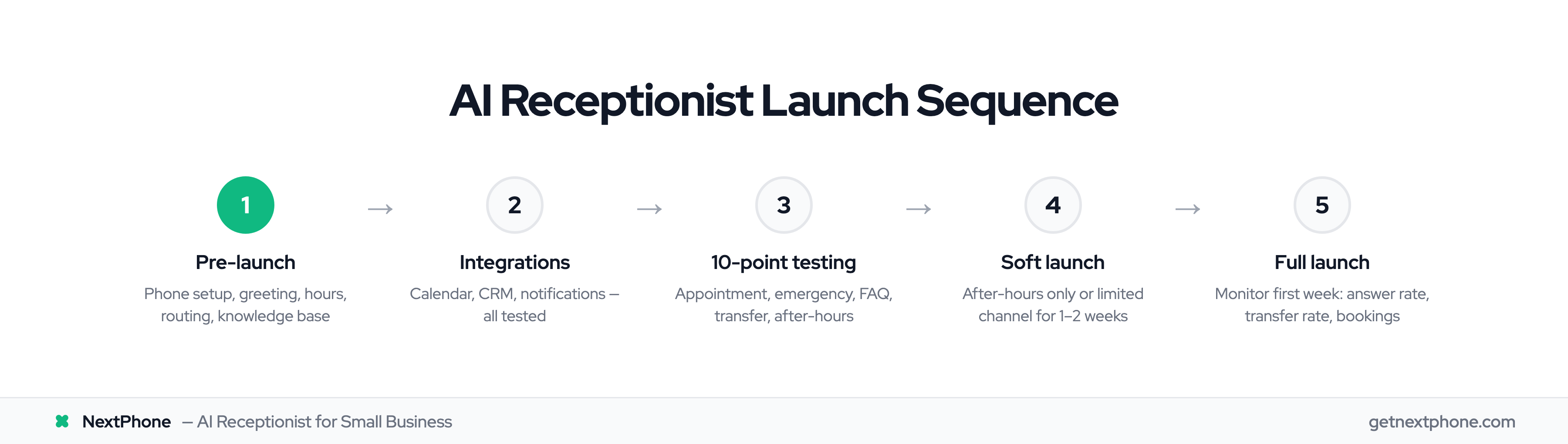
Before any real calls, verify these configurations are complete.
Phone Setup
- Phone number active and assigned
- Call forwarding configured (if using existing number)
- Forwarding tested—called your business number, AI answered
- Carrier forwarding codes confirmed working
- Backup number configured (if applicable)
Greeting Script
- Greeting script finalized and recorded
- Greeting length under 20 seconds
- Business name clearly stated in greeting
- Tone matches your brand (professional, friendly, etc.)
- No confusing menu options or jargon
- Call-to-action clear ("How can I help you?")
Business Hours
- Hours set correctly for each day of the week
- After-hours behavior configured (voicemail, emergency transfer, callback scheduling)
- After-hours greeting differs from business-hours greeting (if desired)
- Holiday schedule configured (if applicable)
- Time zone correct
Call Routing
- Transfer triggers defined (when AI should hand off to human)
- Emergency routing configured with on-call numbers
- Escalation tree complete (primary — backup — fallback)
- Transfer message configured ("Connecting you now...")
- Fallback behavior set if all transfer numbers fail
Knowledge Base
- Services described with enough detail for accurate responses
- Pricing information included (ranges are fine)
- Minimum 10 FAQs populated
- Business contact info accurate
- Location/service area defined
- Website URL and booking link included
Integration: Are Your Tools Connected?
If you're using integrations, verify they're working before launch.
Calendar Integration
- Calendar platform connected (Calendly, Acuity, etc.)
- Availability displaying correctly
- Test booking completed successfully
- Confirmation email sent to test caller
- Calendar event created properly
CRM Integration
- CRM connected (HubSpot, Salesforce, Pipedrive, etc.)
- Fields mapped correctly (name, phone, email, notes)
- Test lead created successfully in CRM
- Call notes syncing properly
- No duplicate contacts created
Notifications
- Email notifications configured
- Correct email addresses receiving notifications
- Mobile push notifications enabled
- Test notification received on phone
- Notification content includes useful info (caller name, reason, phone number)
Testing: 10 Scenarios Before Go-Live
Never launch without testing. Run through all 10 scenarios:
The 10-Point Test
1. Simple Greeting Call Call your AI. Verify it answers, greets properly, and audio is clear.
- Passed
2. Appointment Request Say "I'd like to schedule an appointment." Verify booking flow works.
- Passed
3. Quote/Pricing Question Ask "How much does [your service] cost?" Verify accurate info given.
- Passed
4. Emergency Scenario Describe an emergency situation. Verify transfer to on-call works.
- Passed
5. After-Hours Call Call outside business hours. Verify after-hours behavior is correct.
- Passed
6. FAQ Question Ask a question from your knowledge base. Verify accurate answer.
- Passed
7. Transfer Request Say "I'd like to speak with a real person." Verify transfer works.
- Passed
8. Wrong Number Say "Is this Joe's Pizza?" Verify graceful handling.
- Passed
9. Extended Silence Call and say nothing for 10 seconds. Verify appropriate response.
- Passed
10. Language Test (If Bilingual) Call and speak in Spanish. Verify Spanish response.
- Passed
For Each Test, Also Verify:
- Audio quality clear on both ends
- Response content accurate
- Routing works as expected
- Notification received
- CRM/calendar updated correctly
Team Prep: Communicating the Change
Your team needs to know what's happening before you flip the switch.
Internal Communication Checklist
- Announced AI receptionist to all staff
- Explained what AI handles (appointments, FAQs, basic info)
- Clarified what staff still handles (complex issues, transfers)
- Trained team on transfer process (what to expect, context given)
- Shared monitoring plan (who reviews calls, how to report issues)
- Set launch date and communicated it
What to Tell Your Team
Keep it simple and clear:
What's changing: "Starting [date], an AI system will answer our phones."
What AI handles: "Routine calls—scheduling appointments, answering common questions about services and pricing, taking messages."
What you handle: "Complex issues, angry customers, and anyone who asks for a real person. The AI will transfer these to you."
How transfers work: "When AI transfers, you'll see the caller's name and reason for calling. Pick up and continue the conversation—the AI hands off smoothly."
How to give feedback: "If you notice issues—wrong information given, awkward responses—tell me immediately. We can adjust."
Template Announcement
"Team, starting [date], we're implementing an AI receptionist to handle routine calls—appointments, basic questions, and after-hours messages.
This means every call gets answered, even when we're all busy. You'll receive transfers for complex issues or whenever callers want a person. The AI provides context before each transfer so you're not starting blind.
All calls are recorded and transcribed. We'll review these to ensure quality and make improvements.
Questions? Let's discuss before launch."
Soft Launch: Test with Real Calls First
A soft launch lets you catch issues with real callers before full rollout—lower stakes, easier to fix.
Option A: Time-Based Soft Launch
This approach works well for contractors, medical offices, and other businesses that already have daytime coverage but need after-hours help.
Week 1: AI handles after-hours calls only. Your team handles business hours normally. Week 2: AI handles overflow (when you're busy or on another call). Week 3: AI handles all incoming calls.
This gradual approach reveals issues in contained scenarios before full exposure.
Option B: Source-Based Soft Launch
Route calls from one marketing channel (Google Ads, for example) to the AI number. Keep your main business number on the existing system.
Monitor AI performance on this subset. If it performs well, switch your main number.
Option C: Select Customer Soft Launch
Invite 10-20 trusted customers to call your new AI number. Ask for honest feedback.
Adjust based on their input before broad rollout.
Soft Launch Checklist
- Soft launch approach selected
- Duration defined (1-2 weeks recommended)
- Feedback collection method ready (survey, direct ask, transcript review)
- Go/no-go criteria established (what determines you're ready for full launch)
- Full launch date tentatively set
- Team knows this is soft launch phase
Go/No-Go Criteria
Ready for full launch if:
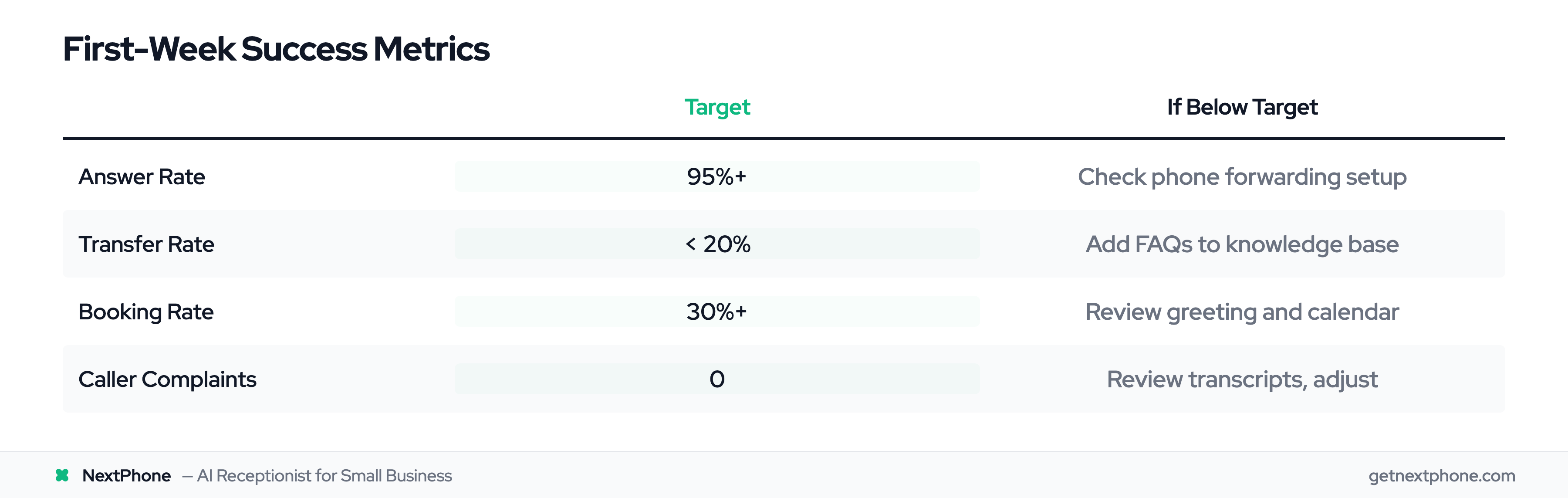
- Answer rate above 90%
- No major caller complaints
- Transfers working correctly
- Bookings successful and accurate
- Knowledge base handling common questions
Not ready if:
- Frequent caller confusion
- High transfer rate (over 30%)
- Integration issues unresolved
- Team concerns unaddressed