Quick answer: The best AI receptionist software for most small businesses is NextPhone — $199/month flat rate, unlimited calls, picks up in under 5 seconds, and uses smart forwarding to route anything that needs your attention directly to your phone. It answers 24/7, books directly into your calendar, and doesn't charge per call when your busy season hits.
Your phone rings at 6 PM. A homeowner needs emergency plumbing—their pipe just burst. You're finishing another job, covered in grease, can't answer. The call goes to voicemail. They call the next plumber. You just lost a $1,200 emergency job.
The performance gap between AI and human receptionists has flipped. Across 1,446,980 real business calls, top AI platforms resolve 90-95% of calls without escalation, answer in under 5 seconds, and maintain 99% positive caller sentiment. Human services answer in 30-90 seconds and charge per minute on top of that.
This guide breaks down the top AI receptionist software platforms, showing you exactly what they do, how much they cost, and how to choose the right one.
Hear it: a production AI receptionist answering a live small-business call
0:00
0:00
What the software actually sounds like end-to-end — greeting, intake, capture. This is the bar to evaluate every platform in this guide against.
What Is AI Receptionist Software?
Think of an AI virtual receptionist as a virtual employee that never sleeps, never takes a sick day, and can handle five phone calls at once. It's software that uses conversational AI to answer your phone calls, understand what the caller needs, and either provide information, book an appointment, or route the call to you—all automatically.
The Basics: Virtual Employee That Never Sleeps
AI receptionist software picks up when you can't. You're on a ladder replacing shingles, your hands are full of paint, you're with a customer—the phone rings, and the AI answers in 3-5 seconds with a professional greeting.
It's not a chatbot that types responses on your website. It's not a remote human working from home. It's artificial intelligence that sounds remarkably human, understands natural language, and handles calls 24/7.
The game-changer? If 10 people call at once, the AI talks to all 10 simultaneously. No busy signals. No "please hold." Every caller gets immediate attention.
How AI Receptionist Technology Works
Here's what happens when a call comes in:
Call arrives → Your unanswered call forwards to the AI system
AI answers → Professional greeting in 2-5 seconds
Natural language processing → AI understands what the caller is asking ("Can I schedule for tomorrow?" or "How much for emergency service?")
AI responds → Either answers from your business info, books the appointment directly, or routes to your phone
The AI learns your business: your hours, services, pricing ranges, common questions. When someone asks "Do you service [zip code]?" the AI knows your service area and answers accurately.
Hear it: AI receptionist software qualifying an inbound lead end-to-end
0:00
0:00
The intake flow described above, running on a real production call — contact, urgency, scope. This is the software replacing the 20.8% of inbound calls that would otherwise end as a captured message.
What the AI actually sounds like
Voice quality is not a detail. Voice quality is the single largest controllable variable in whether a caller stays on the line at all. Two production voices from our library, so this isn't an abstract claim:
Voice sample: Emma — warm-professional female
0:00
0:00
Default pick for client-facing service businesses. Friendly, organized, trustworthy.
Voice sample: Chris — direct-confident male
0:00
0:00
Default male pick for business lines. Unfussy, credible, good across trades and B2B.
When you evaluate receptionist software, ask the vendor to send you raw samples — not a curated demo reel. The voice you hear in the demo is the voice your customers will hear on their first impression of your business.
AI Receptionist vs Virtual Receptionist vs Answering Service
Let's clear up the confusion:
AI Receptionist → Software using artificial intelligence, no human involved, available 24/7, handles unlimited calls simultaneously
Virtual Receptionist → Real human working remotely, handles calls during business hours, one call at a time
Traditional Answering Service → Call center with humans, takes messages, limited availability, charges per call
Why Small Businesses Need AI Receptionist Software
Every contractor knows this frustration: you're up on a roof, in a crawl space, elbow-deep in a repair—and your phone rings. You can't answer safely. The call goes to voicemail. You check it three hours later. They already hired someone else.
The Hidden Cost of Missed Calls
Industry research shows home services contractors miss 60-80% of incoming calls. Let's break down what that actually costs you.
For the average contractor getting 42 calls per month, missing 74% means 31 unanswered calls. Here's where it gets painful:
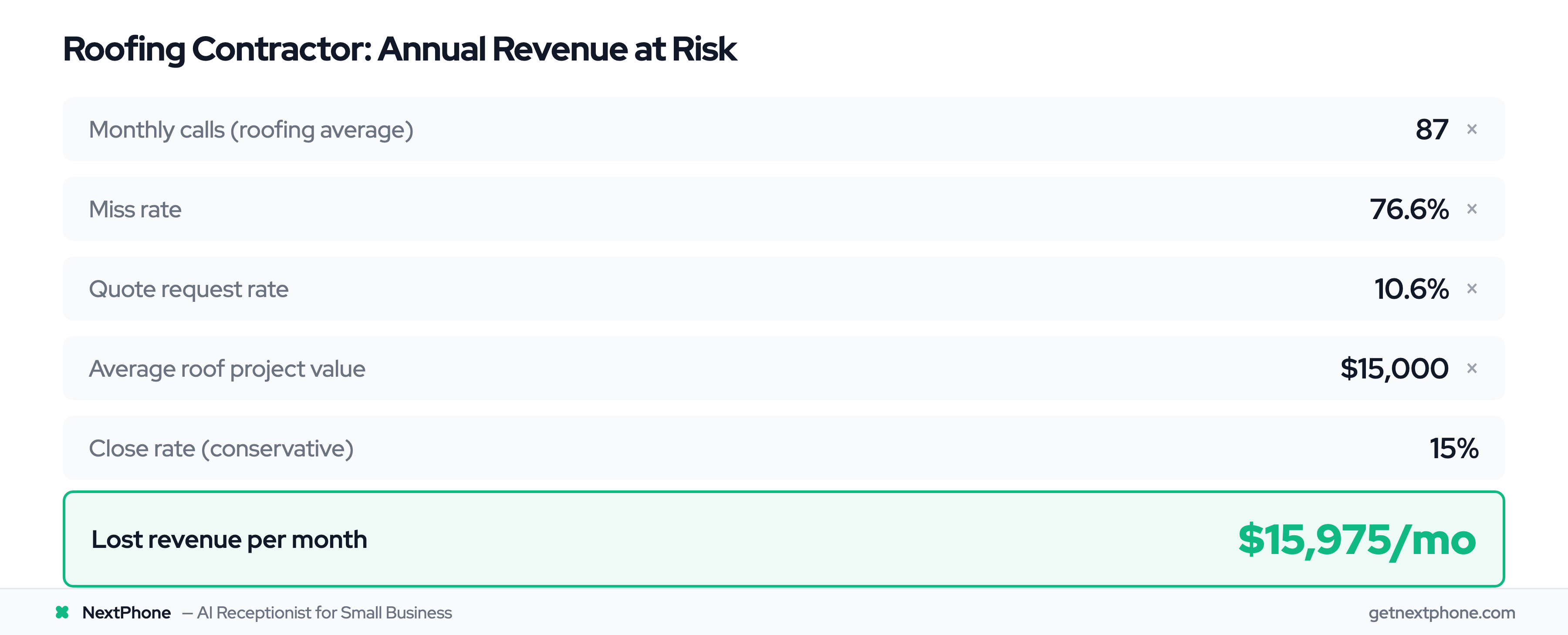
One roofing contractor tracked 87 calls in a single month during busy season. With a 76.6% miss rate, that's 67 missed calls—including 7-8 quote requests for $15,000 roofing projects.
What Happens to Unanswered Calls
When customers can't reach you, they don't wait. They call the next contractor on Google. For emergency calls—pipe bursts, no AC in 95-degree heat, electrical issues—they're calling five contractors. The first one to answer gets the job.
Real voicemail from industry data: "Urgent: AC repair needed, no cooling in 95 degree weather."
That caller isn't leaving voicemails for five contractors. They're moving down the list until someone picks up.
7% of all incoming calls are spam or robocalls. That's 3-4 wasted interruptions per month where you stop what you're doing, dig your phone out, and answer a junk call. AI filters these automatically.
Why Traditional Solutions Fall Short
Most small businesses try one of three approaches, and all fall short:
Hire a receptionist. The Bureau of Labor Statistics reports median receptionist pay at $33,960/year. Add benefits, and you're spending $40,000+ annually. They work 9-5. What about the calls that come at 7 AM, 6 PM, or Saturday mornings? Those still go to voicemail.
Use a traditional answering service. Live answering services charge $400-600/month for 100 calls. During busy season when you're getting 150+ calls? That bill jumps to $1,000+. They take messages—they don't book appointments or answer specific questions about your business.
Just let it ring. This is what most small businesses do. It's free, but it's also costing you five figures in lost revenue annually.
None of these solutions work for businesses with unpredictable call volume, tight margins, or after-hours emergencies. That's the gap AI receptionist software fills.
Key Benefits of AI Receptionist Software
24/7 Availability (Never Miss Another Call)
Your AI receptionist answers at midnight on Christmas. During your kid's soccer game. While you're on another call. During busy season when you're getting 15 calls a day.
This matters for home services contractors because emergencies don't happen 9-5. Pipes burst at 2 AM. AC fails on Saturday afternoon. Electrical issues happen Sunday morning. These are high-margin jobs ($800-1,500+) that go to whoever answers first.
Traditional answering service: $400-600/month for limited calls, often $1,000+ during peak
AI receptionist: $199-500/month, unlimited calls
The savings are $3,000-3,300/month compared to hiring someone. Even compared to answering services, you're saving $200-400/month while getting better functionality.
Instant Response and Scalability
AI answers in 2-5 seconds. Traditional answering services? 30-90 seconds of hold time before a human picks up.
Here's where it gets better: if one person calls, the AI handles it. If 15 people call simultaneously during a storm when everyone's pipes are freezing, the AI handles all 15 at once. No busy signals. No "please hold for the next available representative." Every caller gets immediate attention.
7% of incoming calls are spam or robocalls. For a contractor getting 60 calls per month, that's 4 interruptions where you stop work, dig out your phone, and waste 30 seconds on "We've been trying to reach you about your car's extended warranty."
AI identifies spam and blocks it automatically. You never see these calls. That's hours per month of saved interruptions.
Smart Call Routing and Emergency Detection
This is where AI gets intelligent. The system analyzes what the caller says and routes appropriately:
Routine questions → AI answers from your knowledge base
Appointment requests → AI books directly into your Google Calendar
Emergency situations → AI detects urgency keywords ("emergency," "urgent," "ASAP," "burst pipe") and immediately routes to your cell phone
Complex questions → AI recognizes it's out of its depth and routes to you or takes a detailed message
Real voicemail from the data: "Wants to schedule service for a leaky toilet, asking about your availability for tomorrow." AI books this appointment automatically. You wake up to a confirmed job.
NextPhone was built specifically for contractors who spend their days on job sites, in crawl spaces, on roofs—anywhere but at a desk. It understands the reality of home services: you can't answer the phone when you're balancing on a ladder or your hands are covered in drywall mud.
24/7 AI call answering trained on home services industry terminology
Emergency call detection that routes urgent calls directly to your phone—when someone says "pipe burst" or "no AC in 95-degree heat," the AI knows that can't wait
Appointment scheduling with Google Calendar integration
Automatic spam filtering that blocks the 7% of junk calls wasting your time
Detailed call summaries showing caller intent, contact info, and whether it's a quote request, emergency, or callback
Hybrid approach: AI handles the routine, routes complex situations to you
9 languages supported, including English and Spanish
Cons:
Focused on home services means not ideal for medical offices needing healthcare compliance or legal firms with different needs
Newer player in the market with less brand recognition than decade-old competitors
Bottom Line:
If you're a home services contractor tired of missing $15,000 quote requests while installing water heaters, NextPhone solves this exact problem. The flat $199/month rate means you never worry about costs during peak season.
Try NextPhone free for 7 days
AI answering service that answers, qualifies, and books — 24/7.
Best For: Businesses that need human backup for complex calls, professional services (legal, consulting), high-touch customer service
Pricing: Starting at $240/month for 30 calls, then $8/call after
Smith.ai takes a different approach: AI handles the simple stuff, but live human receptionists are standing by 24/7 for anything complex. You get efficiency of AI with the safety net of human judgment and empathy.
Key Features:
Hybrid model where AI handles routine calls and humans step in for nuanced conversations
24/7 live backup receptionists available when AI escalates
Bilingual support (English and Spanish)
5,000+ integrations—more than any competitor—connecting to Salesforce, HubSpot, Clio, and virtually any business tool
Lead qualification and detailed intake
Appointment scheduling synced to your calendar
Payment collection capability (can take payments over phone)
Call recording and full transcripts
Dedicated account manager for setup and optimization
Pros:
Human fallback ensures complex calls get handled with empathy and judgment
Excellent for professional services where relationship and nuance matter
Massive integration ecosystem connects to virtually any CRM or business tool
High-touch customer service with dedicated account managers
More expensive ($240+ vs $199 for AI-only platforms)
Per-call pricing means costs can spike with high volume
May be overkill if you just need routine call handling and appointment booking
Bottom Line:
Smith.ai suits businesses where live backup is non-negotiable — professional services, law firms, high-touch industries. Per-call pricing after the 30-call base means costs grow fast at volume; budget carefully.
Abby Connect - Best for Human Backup
Best For: Businesses prioritizing personal touch and human escalation
Pricing: Starting at $99/month
Abby Connect offers AI receptionist with seamless escalation to live receptionists. You get a dedicated team of 5-7 live agents who learn your business, providing consistency that rotating call centers can't match.
Key Features:
AI receptionist with seamless escalation to live receptionists
Team of 5-7 dedicated live agents as backup
Bilingual support (English/Spanish)
Appointment scheduling
Custom intake forms for lead capture
CRM integration
Pros:
Excellent human backup (team of 5-7 live receptionists know your business)
Seamless AI-to-human escalation
Professional setup and training
Good for businesses wanting "best of both worlds"
Cons:
Per-call pricing can add up with high volume
Higher cost than pure AI solutions
May be more expensive during busy season
Bottom Line:
Abby Connect is ideal for businesses that want AI efficiency but worry about losing the personal touch. Great for professional services, medical offices, and businesses where customer experience is paramount.
RingCentral AI Receptionist - Best for Existing RingCentral Users
Best For: Businesses already using RingCentral's phone system, enterprises needing advanced analytics
Pricing: Integrated with RingCentral plans (starting around $30/user/month for phone system + AI features)
If you're already a RingCentral customer, their AI receptionist integrates seamlessly with your existing phone system. For everyone else, the bundled phone system requirement makes it pricier than standalone AI options.
Key Features:
Seamless integration with RingCentral's cloud phone system
Natural language call routing
Appointment scheduling with SMS confirmations
Brand voice customization
Advanced analytics and reporting dashboards
Multilingual support (English, Spanish, French)
Auto-attendant capabilities
Team messaging integration
Video conferencing integration
Pros:
Perfect integration if you're already using RingCentral's phone system
Enterprise-grade analytics and reporting
Part of unified communications platform (calls + messages + video)
Strong brand customization options
Multilingual capabilities covering major business languages
Scales well as your business grows
Cons:
Requires RingCentral phone system (can't use standalone)
More expensive when bundling the full phone system
May be overkill for very small businesses
Setup more complex than standalone AI receptionist options
Bottom Line:
If you're already a RingCentral customer, their AI receptionist adds powerful call handling without switching platforms. For others, the bundled phone system requirement makes it pricier than standalone options like NextPhone.
Now that you've seen detailed reviews of the top 5 platforms, let's compare them side-by-side to see how they stack up.
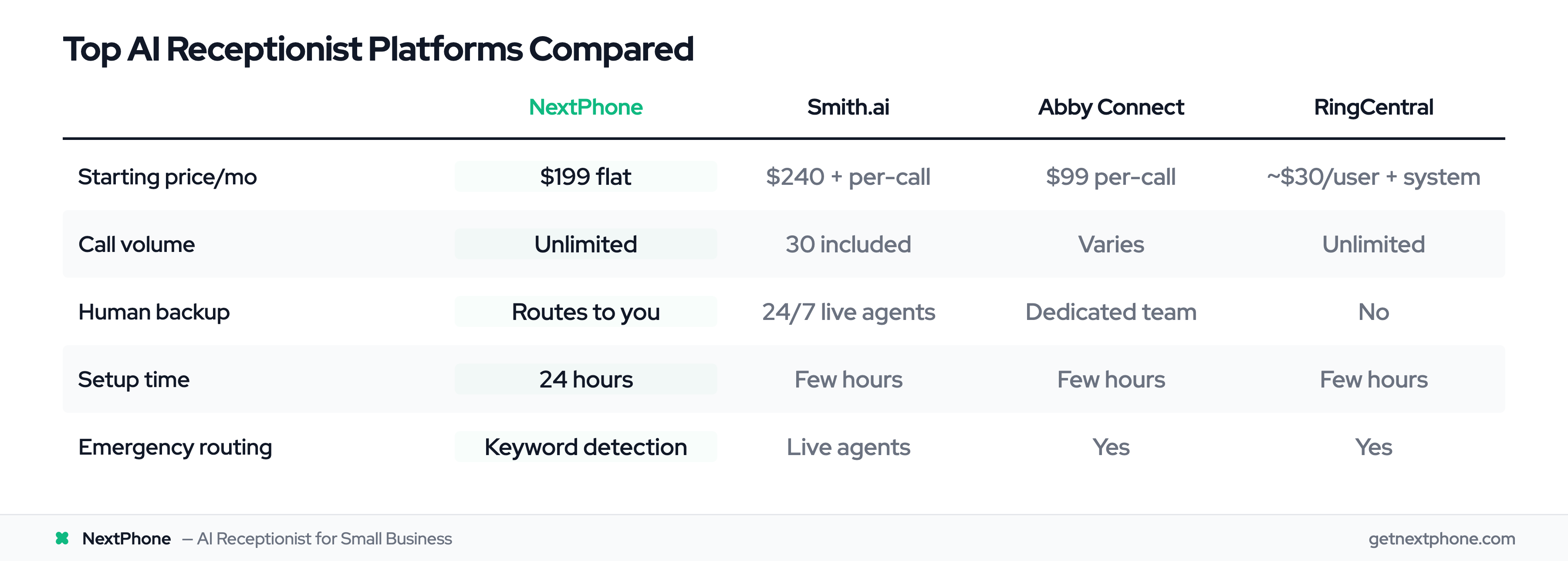
Here's how the top platforms compare across key features and pricing:
Feature
NextPhone
Smith.ai
Abby Connect
RingCentral
Best For
Home services
Hybrid human/AI
Human backup
RingCentral users
Pricing Model
Flat rate
Per-call + base
Per-call
Bundled with phone
Starting Price
$199/mo
$240/mo
$99/mo
~$30/user/mo + system
Call Volume
Unlimited
30 included
Varies
Unlimited
Setup Time
24 hours
Few hours
Few hours
Few hours
Human Backup
Routes to you
24/7 live agents
Yes (dedicated team)
No
Appointment Booking
Google Calendar
Multi-platform
Yes
Advanced
CRM Integration
Standard
5,000+ tools
Standard
RingCentral ecosystem
Multilingual
9 languages
English/Spanish
English/Spanish
English/Spanish/French
Spam Filtering
Automatic
Yes
Yes
Yes
Emergency Routing
Keyword detection
Live agents
Yes
Yes
Free Trial
7 days
No (demos available)
Yes
No
NextPhone offers flat-rate pricing that protects you during high-volume periods. Smith.ai uses per-call models that can add up if you're getting 100+ calls per month. RingCentral bundles AI with their phone system, making it great for existing customers but pricier for new ones.
How to Choose the Right AI Receptionist for Your Business
Not all AI receptionists are created equal. The best platform for a busy roofing contractor is different from the best option for a boutique law firm. Here's how to match your needs to the right solution.
Assess Your Call Volume and Patterns
Any volume (20+ calls/month): NextPhone's $199 flat rate provides excellent value with unlimited calls. No surprises during busy season.
Medium volume (30-100 calls/month): Flat-rate or hybrid models work well. NextPhone's $199 unlimited or Smith.ai's base plan are solid choices.
High volume (100+ calls/month): Flat-rate is essential. Per-minute pricing will destroy your budget. Do the math: 100 calls × 3 minutes average × $0.12/min = $360/month just in per-minute charges. NextPhone's $199 flat rate saves you money.
Seasonal businesses: If you get 40 calls in January and 150 calls in July, you need flat-rate pricing. Per-call models punish you during your busy season when you can least afford it.
Identify Your Must-Have Features
24/7 answering: This is table stakes. Every platform offers it.
Appointment booking: Critical for service businesses. Make sure it integrates with your calendar (Google Calendar or Outlook).
Emergency routing: If you get urgent calls (plumbers, electricians, HVAC, medical), you need AI that detects keywords like "emergency" and routes to your phone immediately. NextPhone and Smith.ai excel here.
Smart forwarding: For professional services where complex conversations are common, configure smart forwarding to route those calls straight to you. AI handles the volume, you handle the judgment calls.
Spam filtering: Nice-to-have that saves hours of interruptions. 7% of calls are junk—automatic filtering means you never see them.
Multilingual: Only matters if you serve non-English customers. Several platforms offer multi-language support if this is critical.
Consider Your Industry Requirements
Home services (plumbers, electricians, roofers, HVAC): You need emergency routing, quote capture, and spam filtering. NextPhone is purpose-built for this. You're on job sites, can't answer safely, and emergencies can't wait.
Professional services (lawyers, consultants, therapists): Smart forwarding matters most here — the AI handles intake and scheduling, then routes anything requiring judgment straight to your phone. Answering services for law firms covers intake specifics.
Medical/Healthcare: You need healthcare compliance. Check each platform's certifications. Not all AI receptionists meet healthcare compliance standards.
General retail/service businesses: Standard features work fine. NextPhone provides solid basics with flat-rate pricing.
Evaluate Integration Needs
Check if your current tools integrate:
CRM: Salesforce, HubSpot, Zoho, Pipedrive—make sure your CRM is supported. Smith.ai has the most integrations (5,000+).
Calendar: Google Calendar and Outlook are standard. Verify the AI can book directly.
Phone system: Most work with any system via call forwarding. RingCentral requires their phone system.
Zapier: If direct integration doesn't exist, Zapier can bridge to 1,000+ apps. Many platforms offer this integration.
Determine Your Budget and ROI Tolerance
Calculate what missed calls currently cost you (see next section for examples). If you're losing $20,000/year to missed quote requests, spending $2,388/year ($199/mo) for AI is a no-brainer.
Factor in hidden costs: setup fees, overage charges, per-minute rates. Some platforms charge extra for call transfers or appointment booking.
Consider ROI: If AI captures even 2-3 extra jobs per month you'd otherwise miss, what's that worth? For most contractors, that's $5,000-15,000 in additional revenue annually.
Understanding what AI receptionists actually cost—and more importantly, what missed calls are costing you—is the difference between seeing this as an expense and recognizing it as one of your best investments.
This is the predictable option. You pay the same whether you get 20 calls or 200 calls. Pros: No surprises, great for high volume. Cons: May overpay if you get very few calls.
Per-call pricing: $5-15/call (Smith.ai at $8/call after base 30)
You pay for each call the AI handles. Pros: Pay only for what you use. Cons: Adds up fast. At 100 calls/month × $8 = $800/month just in per-call charges beyond the $240 base.
Per-minute pricing: $0.10-0.30/minute
Charged based on call duration. Pros: Fine-grained cost control. Cons: Hard to budget. A chatty customer asking detailed questions could run 8-10 minutes = $3/call at $0.30/min.
Bundled with phone system: Part of larger plan (RingCentral)
AI features integrated into phone system pricing. Pros: Unified platform. Cons: Higher total cost, locked into phone provider.
Net benefit: $16,332/year from emergency calls aloneROI: 684%
Even if AI only captures 1-2 additional high-value jobs per month that you would've missed, it pays for itself 5-10X over. The math is overwhelming.
Limitations and Considerations
Let's be honest: AI receptionist software isn't perfect. Before you commit, here's what you need to know about limitations and when you might still need humans.
When AI Struggles (and When You Need Humans)
AI excels at routine but struggles with nuance:
AI is perfect for:
"What are your hours?"
"Do you service [zip code]?"
"Can I book an appointment for Thursday morning?"
"How much does [standard service] cost?"
AI struggles with:
"I'm unhappy with the work you did last week and want to discuss a refund"
Complex sales conversations requiring persuasion
Highly emotional situations or customer complaints
Professional services where relationship and trust matter deeply
AI lacks emotional intelligence and empathy. It can't read the frustration in someone's voice and adjust its tone. It can't handle judgment calls. When a caller says "I need to speak to someone NOW about a problem," that's not the time for AI—that needs a human.
Recognition accuracy ranges from 76% initially to 94%+ after refinement, according to industry data. But even 94% means 6 out of 100 calls get misunderstood. For most routine calls, that's fine. For sensitive conversations, that's problematic.
Customer Sentiment About AI
Here's the uncomfortable truth: Gartner's 2024 customer survey found that 64% of customers would prefer companies didn't use AI in customer service.
People value authenticity and empathy. Younger demographics are more accepting. Older customers tend to prefer humans. Context matters: customers generally accept AI for "What are your hours?" but not for "I have a complaint."
The reality? Customers hate voicemail even more than AI. The choice isn't "AI vs human"—it's "AI vs voicemail" for most of the calls you're currently missing. When framed that way, AI wins.
Smart Forwarding: AI Resolves the Volume, You Handle the Exceptions
The question isn't "AI or humans" — it's "AI or voicemail." Without AI, missed calls go unanswered. With AI and smart forwarding, every call gets handled:
AI resolves 90-95% of calls:
Hours and availability
Pricing for standard services
Appointment scheduling
Service area questions
Basic information
Smart forwarding routes the rest to your phone:
Customer complaints
Unusual situations
Sales conversations requiring your judgment
Emotional or sensitive topics
Anything complex
The AI answers instantly, 24/7, no busy signals. Anything beyond its scope routes straight to your phone with a summary of the caller's issue — so you're already up to speed when you pick up.
NextPhone: AI Receptionist Built for Home Services
For home services contractors dealing with the exact challenges we've discussed—being on roofs, in crawl spaces, or at job sites when critical calls come in—NextPhone was purpose-built to solve this problem.
Here's how it works: You're replacing an HVAC unit. Your phone rings. You can't answer safely. NextPhone's AI picks up in 3 seconds with a professional greeting. The caller says "I need an estimate for a new AC unit." The AI asks for their address and availability, books them into your Google Calendar for tomorrow at 2 PM, and sends you a text summary: "New AC estimate scheduled - [name], [address], [phone number]."
What makes NextPhone different is the home services focus. The AI understands industry terminology. When someone says "pipe burst," "no heat," or "electrical panel sparking," it recognizes these as emergencies and routes immediately to your cell phone instead of taking a message.
The flat $199/month pricing means you never worry about costs during peak season. You could get 50 calls in December and 200 calls in June—same price. Compare that to per-minute pricing that would cost you $600-1,000+ during busy months.
Spam filtering blocks the 7% of junk calls wasting your time. Quote request detection flags the 6.9% of high-value estimate requests so you prioritize them.
One HVAC contractor put it simply: "I can't answer my phone when I'm on a roof. NextPhone handles it and my schedule stays full. It's like having a receptionist for $200/month."
Modern AI receptionists achieve 85-95% accuracy for routine inquiries like hours, pricing, and scheduling. Accuracy depends heavily on how well the AI is trained on your specific business—your services, pricing, common questions.
Recognition rates can range from 76% initially to 94%+ after weeks of refinement and training. AI struggles with complex accents, highly technical questions outside its training, or nuanced conversations requiring context.
The best systems recognize when they're out of their depth and use smart forwarding instead of guessing — routing the call to you with context rather than stumbling through an answer.
Can AI receptionist integrate with my existing CRM?
Most platforms integrate with major CRMs: Salesforce, HubSpot, Zoho, and Pipedrive. Smith.ai has the most comprehensive integration ecosystem with 5,000+ tools.
If your CRM isn't directly supported, Zapier can bridge to 1,000+ apps. Many platforms offer Zapier integration.
Integration typically logs call details, contact info, and caller intent automatically into your CRM. No manual data entry required. Check NextPhone's integration options for compatibility with your specific tools.
What happens if the AI doesn't understand a caller?
Quality platforms have fallback protocols. The AI might ask the caller to rephrase their question, attempt to clarify what they need, or recognize it's out of its depth and route to a human.
NextPhone routes complex calls directly to your phone with a full summary, or takes a comprehensive message with contact details so you can call back when you're free.
Smart forwarding fills this gap — the AI resolves 90-95% of calls, then routes the rest to you rather than leaving callers in a dead end.
Is AI receptionist secure and private?
Reputable platforms use encryption for call data and comply with privacy regulations. However, requirements vary by industry:
Medical offices: Look for compliant options. Not all AI receptionists meet healthcare compliance requirements.
Legal firms: Ensure client confidentiality features and attorney-client privilege protections.
Most platforms don't record calls without explicit consent. Check each provider's security documentation, data storage location (US-based vs international), and retention policies.
Ask about: encryption standards, data storage location, compliance certifications, and who has access to call recordings.
How long does it take to set up an AI receptionist?
Setup time varies by platform:
Fast: Most platforms can be set up in 30 minutes to 2 hours
Full optimization: 2-4 weeks for training the AI on your specific terminology and refining based on real calls
You'll need to provide:
Business hours
Services offered
Common questions and answers
Calendar access for appointment booking
Still dramatically faster than hiring and training a human receptionist, which takes weeks to months.
Will my customers hate talking to AI instead of a human?
It depends on the situation. Gartner found 64% of customers prefer not to interact with AI for customer service. However, context matters significantly.
Customers generally accept AI for:
Routine questions (hours, location, pricing)
Appointment booking
Basic information requests
Customers prefer humans for:
Complaints or problems
Complex questions
Sales conversations
Emotional or sensitive topics
Remember: the alternative isn't "AI vs human"—it's "AI vs voicemail" for the 60-80% of calls you're currently missing. When framed that way, customers vastly prefer AI that answers immediately over voicemail that might get checked in 3 hours.
Smart forwarding provides the best customer experience: AI handles routine calls immediately, and anything complex routes to you — better than voicemail either way.
Can I use AI receptionist if I already have a phone system?
Yes. Most AI receptionists work with any phone system via call forwarding. You set up a forwarding rule: if you don't answer within 3-4 rings, the call forwards to the AI's number.
RingCentral requires their phone system (bundled solution), but platforms like NextPhone, Smith.ai, and Abby Connect work with any VoIP or landline provider.
Some platforms offer porting your existing number to their system. Setup usually involves simple call forwarding rules—no hardware changes needed.
Start Capturing Every Customer Call
That widening doesn't happen by accident. NextPhone's flat-rate model eliminates per-minute billing surprises, ships with 9 languages and emergency detection, and treats after-hours as the default rather than a paid upgrade. Even capturing 2-3 additional jobs per month that you'd otherwise miss pays for the system many times over.
Try NextPhone AI answering service
AI answering service that answers, qualifies, and books — 24/7.